

A newly disclosed Linux kernel vulnerability in the AMD display driver — tracked as CVE-2024-56775 — can allow a local attacker to trigger memory corruption or resource exhaustion by upsetting the driver’s plane reference counting during a backup-and-restore operation, and a patch has been merged into the kernel to correct the behavior (fixes appear in and after kernel 6.12.4).
The Linux DRM (Direct Rendering Manager) subsystem is the kernel interface that mediates access to graphics hardware. Within DRM, the AMD driver (amdgpu) manages planes — hardware entities that hold framebuffers and can be composed and scanned out to displays. The driver tracks reference counts (refcounts) for these plane resources to manage lifetime: every user of a plane increments the refcount, and the refcount must be decremented when that user no longer needs the resource. Correct refcount accounting is critical: mistakes lead to memory leaks (if refs are never released) or double-free / use-after-free conditions (if refs are released too many times).
CVE-2024-56775 arises from a bug in the mechanism that backs up and later restores plane state. The backup/restore flow did not preserve or correctly re-apply the current refcount, so if the refcount changed between the backup and restore steps the driver could end up with an incorrect count. That mismatch can produce memory leaks, invalid memory accesses, or double frees — all of which can crash the kernel or leave it unstable. The fix applied in the upstream kernel caches the current refcount and re-applies it when restoring plane states to ensure refcount consistency.
This is not a remote network service vulnerability: exploitation requires local access to the system. However, the consequences are significant: memory corruption and double-free bugs in a kernel driver can cause total loss of availability (system crash, kernel panic), and in some cases memory corruption may be escalated to privilege-impacting outcomes. The vulnerability is scored high (CVSS v3.x 7.8) in common vulnerability listings and is considered important for systems that expose GPU devices to untrusted local users or to processes running inside containers.
Source: MSRC Security Update Guide - Microsoft Security Response Center
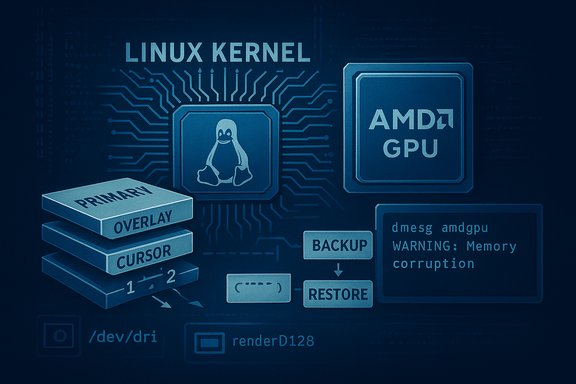 Background
The Linux DRM (Direct Rendering Manager) subsystem is the kernel interface that mediates access to graphics hardware. Within DRM, the AMD driver (amdgpu) manages planes — hardware entities that hold framebuffers and can be composed and scanned out to displays. The driver tracks reference counts (refcounts) for these plane resources to manage lifetime: every user of a plane increments the refcount, and the refcount must be decremented when that user no longer needs the resource. Correct refcount accounting is critical: mistakes lead to memory leaks (if refs are never released) or double-free / use-after-free conditions (if refs are released too many times).CVE-2024-56775 arises from a bug in the mechanism that backs up and later restores plane state. The backup/restore flow did not preserve or correctly re-apply the current refcount, so if the refcount changed between the backup and restore steps the driver could end up with an incorrect count. That mismatch can produce memory leaks, invalid memory accesses, or double frees — all of which can crash the kernel or leave it unstable. The fix applied in the upstream kernel caches the current refcount and re-applies it when restoring plane states to ensure refcount consistency.
This is not a remote network service vulnerability: exploitation requires local access to the system. However, the consequences are significant: memory corruption and double-free bugs in a kernel driver can cause total loss of availability (system crash, kernel panic), and in some cases memory corruption may be escalated to privilege-impacting outcomes. The vulnerability is scored high (CVSS v3.x 7.8) in common vulnerability listings and is considered important for systems that expose GPU devices to untrusted local users or to processes running inside containers.
What exactly is wrong: the mechanics explained
Planes, backups and refcounts — a short primer
- A plane is a hardware construct used to present pixel data to a display (primary plane, overlay plane, cursor plane).
- The driver uses plane states to represent the plane’s configuration (framebuffer pointer, blending, position, etc..
- For complex atomic operations and mode switches, the driver can snapshot or backup plane states and later restore them — e.g., to roll back a failed atomic update.
- The driver also uses reference counting to ensure that framebuffers and related memory are freed only when no one is using them.
Where the bug happens
- During a backup/restore roundtrip, the code that saves and later reinstates plane state did not reliably preserve the plane’s refcount.
- If another thread or operation changed the refcount between the backup and the restore, the restore could inadvertently leave the plane with a refcount that is too high (leading to leaks) or too low (leading to double free / use-after-free).
- The upstream fix captures (caches) the current refcount at the right time and reapplies that exact count when restoring state, preventing the mismatch.
Consequences of mismatched refcounts
- Memory leak: If the restore keeps a refcount artificially high, objects that should have been freed remain allocated, increasing kernel memory pressure — repeated exploitation can lead to exhaustion and denial of service.
- Double free / invalid memory access: If the refcount is mistakenly lowered too much and a resource is freed while still referenced, subsequent accesses can read or write freed memory and cause kernel panics or unpredictable behavior.
- Potential for further exploitation: Kernel memory corruption can sometimes be weaponized into privilege escalation, though exploiting a double-free in modern kernels typically requires further conditions and is non-trivial. At minimum, the vulnerability reliably threatens system stability (availability).
Scope and affected systems
- The defect was introduced in the AMD DRM/display code paths and affects systems that run the amdgpu driver and use plane backup/restore logic.
- Upstream kernel releases containing the fix begin with 6.12.4 and later; systems running kernel versions earlier than 6.12.4 should be considered vulnerable unless the distributor backported the fix into their vendor kernel packages.
- The vulnerability is relevant to:
- Desktop and laptop Linux installations using AMD GPUs.
- Multi-user systems where unprivileged accounts have access to GPU devices.
- Virtualized or cloud hosts that expose GPU devices to guest VMs (device passthrough) or share GPUs among tenants.
- Container workloads that rely on the host GPU (containers share the host kernel, so an unpatched host kernel means all containers are exposed).
How exploitable is CVE-2024-56775?
- Attack vector: Local. An attacker needs the ability to interact with the graphics device from the compromised account or process context.
- Privileges required: Low — a local user in an account that has access to GPU device nodes (commonly members of the
videoorrendergroups) may be able to trigger the bug. - Complexity: Low — triggering the backup/restore path with refcount changes is not a highly complex condition in many environments.
- User interaction: None required (non-interactive local action is enough).
- Public proof-of-concept: As of the most recent checks there is no widely published, weaponized exploit or public PoC that reliably escalates to arbitrary code execution in the wild, but multiple vendor and CVE trackers rate the impact as high because memory corruption in kernel display drivers can cause system crashes and could potentially be escalated in targeted attacks. This means defenders should assume risk and prioritize patching even in the absence of a public exploit.
Real-world attack scenarios
- Shared workstation or lab PC: an untrusted user with an account on a multi-user desktop or workstation that is a member of the
videogroup or otherwise has access to/dev/dri/*can repeatedly trigger the bug to crash the system or exhaust kernel memory. - GPU-accelerated cloud instances: machines that provide GPU passthrough to tenants or attach remote GPUs may expose the vulnerable code path to malicious guest activity.
- Containerized GPU workloads: containers that mount
/dev/drifrom the host or use GPU device plugins can trigger the issue against the host kernel; containers do not isolate kernel bugs. - Developer laptops: a hostile local process (malicious package, compromised developer environment) could abuse GPU device access to cause instability or crash the system.
Mitigation and remediation — prioritized checklist
- Patch the kernel (highest priority)
- Update to a kernel that includes the fix (6.12.4 or later), or install your distribution’s security update that backports the fix.
- Reboot after kernel installation to place the patched kernel into production.
- For enterprise systems that use vendor-supported kernels (RHEL, SUSE, Ubuntu LTS, Oracle, etc., prefer the vendor-provided security update to ensure compatibility and backport coverage.
- If immediate patching is impossible, restrict local access to GPU devices
- Remove untrusted accounts from the
videoorrendergroups. - Use a udev rule to restrict ownership/permissions for
/dev/dri/*to a controlled group or user set. - Example udev rule to set group to a tightly controlled group:
- Create /etc/udev/rules.d/99-restrict-dri.rules with:
- SUBSYSTEM=="drm", KERNEL=="card*", GROUP="trusted_gpus"
- SUBSYSTEM=="drm", KERNEL=="renderD*", GROUP="trusted_gpus"
- Then trigger: udevadm trigger -s drm --action=add
- Note: restricting access will disable hardware acceleration for accounts that lose access; weigh usability impact.
- Consider blacklisting the amdgpu module (temporary emergency measure)
- Echoing a module blacklist will stop the driver from loading, but this disables the GPU and may degrade or disable graphical sessions. Only use as last resort for high-risk or single-purpose headless systems.
- Deploy kernel livepatch or hotpatch where supported
- Vendors that offer livepatch (e.g., Ubuntu Livepatch, kpatch) may provide hotfixes without immediate reboot. Check vendor advisories to see if backported livepatch packages are available.
- Harden container and multi-tenant environments
- Avoid exposing
/dev/drito untrusted containers; use strict runtime device permissions. - Ensure cloud providers and hypervisors apply vendor patches for host kernels and GPU drivers.
- Monitor and test
- After patching, monitor for GPU errors, kernel oops messages, and application instability; test graphics workflows and GPU-accelerated workloads to confirm no regressions.
Commands and practical checks for system administrators
- Check current kernel version
- uname -r
- If the output is older than 6.12.4, check whether your distribution has a patched backport.
- Check whether amdgpu is loaded
- lsmod | grep -i amdgpu
- Check for GPU device nodes
- ls -l /dev/dri/
- Typical nodes: card0, renderD128
- Note group ownership (video, render); this determines which users can access the device.
- Find members of video/render groups
- getent group video
- getent group render
- Check kernel logs for GPU driver errors (dmesg and journalctl)
- sudo dmesg | grep -i amdgpu
- sudo journalctl -k | grep -i drm
- Update kernel on common distributions (examples)
- Ubuntu/Debian:
- sudo apt update && sudo apt upgrade
- Reboot if a new kernel is installed.
- RHEL/CentOS/Oracle Linux:
- sudo yum update kernel
- Reboot.
- SUSE:
- sudo zypper refresh && sudo zypper update
- Reboot.
- Arch:
- sudo pacman -Syu
- Reboot.
- WSL2:
- wsl --update
- Restart WSL instances (wsl --shutdown); confirm kernel version inside WSL.
Detection: what to watch for in logs and telemetry
- Kernel oops/panic messages referencing amdgpu, drm, or double-free/invalid free traces.
- Repeated GPU errors or warnings in dmesg/journalctl that coincide with crashes or hung graphical sessions.
- Unexpected application crashes for GPU-accelerated programs (compositors, games, transcoders).
- Sudden increase in memory consumption at the kernel or graphics allocator level (indicating leaks).
- For containerized environments: host kernel instability or crashes after GPU-heavy workloads are launched from containers.
- sudo journalctl -k --since "24 hours ago" | egrep -i 'amdgpu|drm|oops|BUG|double free|use-after-free'
- Check crash reports in /var/crash and systemd journal for repeated reboots or abnormal reboots.
Operational considerations and trade-offs
- Patching kernel on production systems requires planning: kernel updates are invasive (require reboot) and can affect application compatibility. Prioritize patch deployment for systems where untrusted local access is possible (multi-user machines, shared GPU servers) and for hosts that expose GPUs to containers or guest VMs.
- For desktops and developer machines, the user-impact of restricting access to
/dev/drimust be weighed: removing a developer from thevideogroup may disable GPU acceleration and negatively affect workflows. - Vendors may backport fixes into older kernel trees. Do not rely solely on kernel-version numbers; verify vendor changelogs and security update notes to confirm whether a patch for CVE-2024-56775 is included.
- Livepatch solutions can reduce downtime but are vendor-specific; check availability and whether the exact fix has been packaged for livepatch.
Risk assessment — how to prioritize CVE-2024-56775 in your environment
- High-priority: systems where untrusted users or third-party workloads can access GPU devices (e.g., university labs, shared developer workstations, GPU-accelerated cloud instances) — patch or mitigate immediately.
- Medium-priority: single-user desktops where only trusted users run processes and local access is controlled, but still consider updating to avoid accidental crashes or future exploit development.
- Low-priority: air-gapped systems with no local user accounts and no GPU hardware in use — minimal risk but maintain the standard patch cadence.
Final analysis: strengths of the fix and lingering risks
- The upstream fix addresses the root cause by capturing and re-applying the current refcount during restore, which is the straightforward, correct approach for preserving resource lifetime semantics. This is semantically safe and reduces the attack surface for refcount mismatches.
- The fact that the fix is merged into stable kernels (6.12.4+) and distributors have issued advisories means vendor remediation is available.
- Remaining risks:
- Many production environments run vendor kernels that lag upstream numbering; administrators must confirm backport status rather than assume safety from the version string alone.
- Containers and cloud hosts are still at risk until host kernels are patched; container images alone are not protective.
- Restricting GPU access can be an effective temporary mitigation but may disrupt normal workloads (particularly GUI sessions and hardware-accelerated applications).
- The absence of a public, reliable exploit today does not eliminate the risk of weaponization tomorrow; kernel memory corruption vulnerabilities are commonly targeted for privilege escalation research.
Conclusion
CVE-2024-56775 is a high-impact Linux kernel vulnerability in the AMD DRM display code that stems from improper handling of plane refcounts during backup-and-restore operations. The practical impact is clear: unpatched systems where untrusted local users or containerized workloads can reach GPU devices are at real risk of crashes, denial of service, and potentially worse if memory corruption can be chained. The remedial action is straightforward and urgent — install the vendor security update or upgrade to a kernel that contains the fix (6.12.4 or a vendor-backported equivalent), restrict access to/dev/dri devices if immediate patching is not possible, and monitor kernel logs for amdgpu-related errors. For environment owners and administrators, the highest priority is to ensure the host kernel is patched — containers share the kernel, and an unpatched host exposes all workloads.Source: MSRC Security Update Guide - Microsoft Security Response Center
