

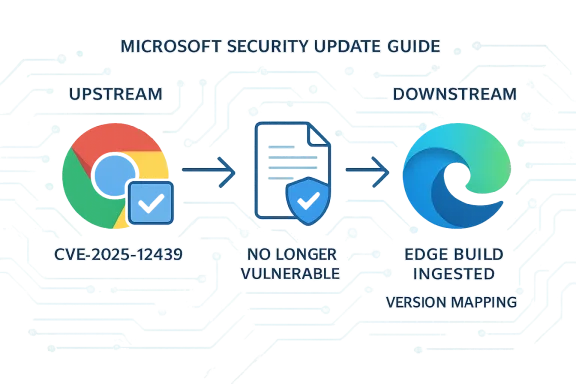
Microsoft lists CVE‑2025‑12439 because the bug lives in the Chromium open‑source engine that Microsoft Edge (Chromium‑based) consumes; the Security Update Guide (SUG) entry is Microsoft’s downstream signal that an Edge build has ingested the upstream Chromium fix and is therefore no longer vulnerable.
Chromium is the upstream, open‑source browser project that supplies the engine (Blink, V8, Mojo, ANGLE, etc. used by Google Chrome and by other vendors including Microsoft Edge (Chromium‑based). When a security defect is discovered and assigned a CVE in Chromium, the remediation happens upstream in Chromium/Chrome. Downstream vendors — Microsoft among them — then ingest those upstream commits, run vendor validation and testing, and ship new product builds. Microsoft’s Security Update Guide records those Chromium CVEs and, crucially, the SUG entry is used to announce whether a particular Microsoft Edge release contains the Chromium fix and is no longer vulnerable. This is why a Chromium CVE such as CVE‑2025‑12439 appears in the SUG: it communicates downstream status for Edge customers rather than indicating Microsoft introduced the bug.
Put plainly:
Because vendors commonly withhold low‑level exploit details until patches reach a wide audience, public summaries stop short of precise exploit mechanics. Treat the high‑level impact as credible and prioritize remediation accordingly.
Strengths of this model:
Below are platform‑specific, step‑by‑step instructions.
Source: MSRC Security Update Guide - Microsoft Security Response Center
 Background / Overview
Chromium is the upstream, open‑source browser project that supplies the engine (Blink, V8, Mojo, ANGLE, etc. used by Google Chrome and by other vendors including Microsoft Edge (Chromium‑based). When a security defect is discovered and assigned a CVE in Chromium, the remediation happens upstream in Chromium/Chrome. Downstream vendors — Microsoft among them — then ingest those upstream commits, run vendor validation and testing, and ship new product builds. Microsoft’s Security Update Guide records those Chromium CVEs and, crucially, the SUG entry is used to announce whether a particular Microsoft Edge release contains the Chromium fix and is no longer vulnerable. This is why a Chromium CVE such as CVE‑2025‑12439 appears in the SUG: it communicates downstream status for Edge customers rather than indicating Microsoft introduced the bug.Put plainly:
- Upstream: Chromium/Crome receives the bug report, fixes it, and ships a Chrome stable release that includes the patch.
- Downstream: Microsoft ingests that Chromium fix, integrates and tests it in Edge, then ships an Edge build. The SUG documents that downstream ingestion and remediation status.
What “Inappropriate implementation in App‑Bound Encryption” means (high level)
Chromium CVE descriptions that use the phrase “inappropriate implementation” usually point to logic, validation or integration errors rather than a raw memory‑safety bug. In the context of App‑Bound Encryption, such an issue could mean incorrect handling of keys, improper validation of messaging boundaries, or enforcement gaps that allow untrusted content or processes to access encrypted artifacts they shouldn’t. While these are not necessarily buffer‑overflows or use‑after‑free style bugs, they can still be serious because they may permit bypasses of intended controls, leading to data leakage, cross‑origin exposure or other escalations depending on context.Because vendors commonly withhold low‑level exploit details until patches reach a wide audience, public summaries stop short of precise exploit mechanics. Treat the high‑level impact as credible and prioritize remediation accordingly.
Why Microsoft includes Chromium CVEs in the Security Update Guide — operational nuance
Microsoft’s SUG entry for a Chromium CVE serves two practical purposes:- It notifies Microsoft customers that the upstream issue exists in Chromium OSS and therefore could affect Edge.
- It declares which Microsoft Edge build(s) contain the ingestion of the Chromium fix so administrators can confirm whether the Edge build in their environment is protected.
Strengths of this model:
- Clarity for enterprises: SUG provides a vendor‑specific remediation marker for compliance and change control.
- Single operational source: Teams can rely on Microsoft’s statement to trigger patch windows and reporting.
- Ingestion lag: There’s a non‑zero delay between Chrome shipping a fix and Edge shipping an ingest build. That window is operational exposure.
- Fragmented ecosystem: Many products embed Chromium (Electron apps, kiosks, WebView2, third‑party browsers) and do not automatically receive the desktop browser update. Those can remain vulnerable even after Edge and Chrome update.
How to see the version of your browser — quick summary
The fastest, most reliable way to verify whether your browser includes the fix for a Chromium CVE is to read the browser’s About / Version information and compare it to the fixed build referenced in either the Chrome release notes (upstream) or Microsoft’s SUG / Edge release notes (downstream). The About page typically triggers an update check and displays the installed product version and, on Chromium builds, the underlying Chromium backend version as well.Below are platform‑specific, step‑by‑step instructions.
Microsoft Edge (desktop — Windows / macOS / Linux)
- Open Microsoft Edge.
- Menu → Help and feedback → About Microsoft Edge.
Or type edge://settings/help in the address bar and press Enter. - The About page shows the Edge version and automatically checks for updates. Use edge://version to see the full build string and the underlying Chromium version (the “Chromium” line).
Google Chrome (desktop)
- Open Chrome.
- Menu → Help → About Google Chrome.
Or type chrome://settings/help or chrome://version. - Chrome will display the full version and check for updates automatically. If Chrome’s version is equal to or newer than the upstream patched build, Chrome is protected upstream. Remember Edge may lag behind.
Mobile (Android / iOS)
- Open the app (Edge or Chrome) → Settings → About (or look at the app store page for the version).
- Mobile app versions don’t always display the underlying Chromium revision; use the app version and cross‑reference vendor advisories if needed.
Advanced checks and system‑level commands (desktop)
For power users and administrators who prefer command‑line or need to inventory versions across machines, use these platform and shell techniques.Windows — single machine
PowerShell to read the executable file version:- Microsoft Edge:
(Get-Item "C:\Program Files (x86)\Microsoft\Edge\Application\msedge.exe").VersionInfo.ProductVersion - Google Chrome:
(Get-Item "C:\Program Files\Google\Chrome\Application\chrome.exe").VersionInfo.ProductVersion
Windows — fleet inventory (example approaches)
- Use Intune / SCCM (ConfigMgr) / WSUS to report installed application versions and file versions across devices. These endpoint management tools can generate reports of Edge/Chrome versions and drive remediation.
- Or remote PowerShell: run the above Get‑Item command remotely and collect results into a CSV for comparison against the patched threshold.
Linux
- Chrome: google-chrome --version OR chromium --version
- Edge (if installed): microsoft-edge --version OR msedge --version
macOS
- Terminal:
- Chrome: /Applications/Google\ Chrome.app/Contents/MacOS/Google\ Chrome --version
- Edge: /Applications/Microsoft\ Edge.app/Contents/MacOS/Microsoft\ Edge --version
- Or use the app About menu to view the version.
How to interpret the version string and map it to the CVE fix
Chromium/Chrome and Edge version strings follow the pattern major.minor.build.patch. When Chrome publishes a fixed build number for a CVE, the SUG or Edge release notes will indicate which Edge build ingests that fix. To confirm protection:- Get your local Edge/Chrome version (edge://version or chrome://version).
- Look up the patched Chrome/Chromium build (from Chrome release notes) and the Edge build that ingested it (from Microsoft’s SUG or Edge release notes).
- If your installed Edge build number is the same or newer than the Edge build that ingested the Chromium fix, your Edge is no longer vulnerable per Microsoft’s downstream statement. If only the Chrome upstream fix is known but Edge ingestion is not yet documented, do not assume Edge is protected.
Practical remediation and mitigation guidance
Immediate actions for home and power users:- Open your browser’s About page (Edge: edge://settings/help; Chrome: chrome://settings/help) and update to the latest version. Relaunch when prompted. This is the primary defense.
- Keep automatic updates enabled so future critical patches apply promptly.
- Inventory every Chromium runtime — not just desktop browsers:
- Microsoft Edge, Google Chrome, Brave, Opera, Vivaldi.
- Embedded Chromium instances: Electron apps, kiosks, WebView2 hosts, packaged runtimes. These are often overlooked and may remain vulnerable if pinned to an older Chromium.
- Use Intune / SCCM / Jamf / endpoint management to report versions and push updates.
- Prioritize high‑risk endpoints (privileged users, remote admins, internet‑facing stations) for immediate patching and relaunch.
- If immediate update is infeasible, apply compensating controls:
- Enforce web allowlists for privileged machines.
- Apply URL filtering or proxy rules to block untrusted content.
- Isolate or remove vulnerable hosts from sensitive networks until updated.
- Monitor for spikes in renderer or browser crashes — exploitation attempts sometimes manifest as unusual crashes.
- Tune EDR to flag unexpected child process creation from browser processes and suspicious post‑exploit behaviors.
Cross‑checks, verification, and auditability
For compliance or audit purposes, capture:- The exact version string from edge://version or chrome://version before and after updating.
- The SUG entry or Edge release notes line showing the ingestion of the Chromium fix (document the SUG entry title and the Edge version it cites).
- Patch deployment records from Intune/SCCM showing device counts and success/failure rates.
Critical analysis — strengths, gaps, and residual risks
Strengths- Authoritative downstream signal: Microsoft’s Security Update Guide provides a clear, vendor‑specific statement about Edge’s exposure status for upstream Chromium CVEs, which is valuable for enterprise patch governance.
- Machine‑readable version info in browser: edge://version and chrome://version surface both the product version and the underlying Chromium backend version, making verification straightforward.
- Downstream ingestion lag: Edge is secure only after Microsoft ingests and ships the Chromium fix. The delay between Chrome’s fix and Edge’s ingest build is a real exposure window that threat actors can exploit. Enterprises must treat the SUG entry as the trigger for downstream remediation, not the Chrome release date.
- Embedded Chromium binaries: Electron apps, kiosks, and custom packaged runtimes frequently embed a pinned Chromium version and do not auto‑update with the system browser; these require separate attention and can remain vulnerable even after desktop browsers are patched.
- Limited public exploit details: Vendor practice of withholding technical exploit details until patches have rolled out reduces immediate technical indicators for defenders; absence of public PoC does not mean absence of private exploits. Treat high‑impact CVEs conservatively.
- If upstream or downstream advisories do not publish the exact Edge build number that ingests a Chromium fix, any specific Edge build claim outside the official SUG or Edge release notes must be treated as unverified. Use the browser’s About page as the single‑device truth and SUG / Edge release notes as the authoritative enterprise statement.
Quick reference — checklist you can use now
- Open Edge → edge://settings/help and update. Confirm the version shown.
- If you manage devices, run an inventory and report all Edge / Chrome versions via Intune/SCCM/Jamf.
- Cross‑reference your installed Edge version with Microsoft’s SUG entry for CVE‑2025‑12439 or with Edge release notes to confirm ingestion. If SUG lists Edge as “no longer vulnerable,” you can consider Edge remediated.
- Don’t forget embedded Chromium: inventory Electron/WebView2 instances and coordinate updates with app vendors.
Conclusion
CVE‑2025‑12439 appears in Microsoft’s Security Update Guide because Microsoft Edge is built on Chromium — the SUG is Microsoft’s downstream confirmation channel that documents whether Edge builds have ingested the upstream Chromium fix and are therefore no longer vulnerable. The single fastest way to confirm your protection is to check the browser’s About or Version page (edge://settings/help / edge://version or chrome://settings/help / chrome://version) and compare the installed build to the ingestion information Microsoft publishes in the SUG or Edge release notes. For enterprises, inventorying all Chromium runtimes (including embedded engines) and using centralized reporting (Intune, SCCM, Jamf) are essential steps to fully close exposure windows. Because ingestion lags and some products embed pinned Chromium binaries, the SUG entry plus a device‑level version check are both required to be confident a given Edge installation is no longer vulnerable.Source: MSRC Security Update Guide - Microsoft Security Response Center
