

Google Chrome before 149.0.7827.53 contains CVE-2026-11077, a medium-severity Chromium flaw in Dawn that was published by the Chrome CVE program on June 4, 2026, and described as enabling sandboxed code execution through a crafted HTML page. The entry looks mundane beside the larger Chrome 149 security haul, but it is exactly the kind of graphics-stack bug that should make Windows administrators stop treating browser updates as background noise. Dawn is not an optional curiosity; it is part of Chromium’s path toward modern GPU-backed web applications. When a browser’s rendering, JavaScript, and graphics layers all become programmable attack surfaces, the old distinction between “just visiting a webpage” and “running code” gets thinner.
The headline mismatch is the first thing to notice. Chromium tags CVE-2026-11077 as medium severity, while CISA’s ADP enrichment gives it a CVSS 3.1 score of 8.8, squarely in high territory. That gap is not necessarily a contradiction; it is a reminder that vendor severity and infrastructure risk scoring answer different questions.
Google’s description says a bad cast in Dawn allowed a remote attacker to execute arbitrary code inside a sandbox via a crafted HTML page. That phrasing matters. It does not say the bug breaks out of Chrome’s sandbox, steals Windows credentials by itself, or installs malware with system privileges. It says the attacker gets code execution in the sandboxed browser context, which is still a serious foothold in a modern exploit chain.
For home users, that may sound like a distinction without practical value. For defenders, it is the difference between a single vulnerability and a stage in an exploit sequence. Chrome’s sandbox is built precisely because the browser assumes memory-safety failures will happen; attackers often need a renderer compromise first, then a separate sandbox escape or privilege escalation to complete the job.
That is why “medium” should not be read as “safe to defer.” In a browser, a crafted page is a delivery mechanism that requires little more than user interaction. If a vulnerability can be triggered by content the browser is designed to process automatically, the operational question is not whether it sounds dramatic. The question is how quickly the vulnerable build disappears from the fleet.
The web has moved far beyond static pages and form submissions. Video conferencing, browser games, CAD viewers, AI demos, mapping tools, image editors, and visualization dashboards all expect the browser to behave more like a native runtime. WebGPU pushes that direction further by giving web apps a more modern way to use graphics hardware than older abstractions such as WebGL.
That evolution is not a mistake. Users want high-performance web apps, developers want portable APIs, and operating systems increasingly treat the browser as the universal application shell. But every new layer that turns untrusted web content into GPU work also creates new assumptions that can fail. A bad cast is one of those failures: the software believes an object is one thing, treats it that way, and memory reality disagrees.
CVE-2026-11077 is listed under CWE-125, out-of-bounds read, while the Chrome description emphasizes a bad cast. Those descriptions can coexist. Type confusion and bad casts often become memory access problems because the program reads or interprets data outside the structure it actually has. The important point for defenders is not the taxonomy debate; it is that the flaw lives in a path reachable by web content and patched in a stable Chrome release.
A CPE is supposed to help scanners identify affected software. In practice, browser vulnerabilities often expose the limits of clean asset modeling. Chrome is an application, but it is also bundled, rebranded, embedded, forked, policy-managed, and sometimes shadow-installed in ways that do not line up neatly with a single inventory record. On Windows especially, Chrome may be present as a machine-level install, a per-user install, an enterprise-managed channel, or a Chromium-derived browser with a different update cadence.
The user-facing question — “Are we missing a CPE here?” — is therefore reasonable. If the entry only models Google Chrome and generic desktop operating systems, it may not express the broader Chromium ecosystem that defenders actually care about. Microsoft Edge, Brave, Vivaldi, Opera, Electron apps, and other Chromium consumers are not automatically covered by a Chrome CPE, even when they inherit related upstream code paths.
That does not mean every Chromium-based product is confirmed vulnerable to this exact CVE on the same schedule. It means administrators should not let a single CPE match become the whole investigation. The better operational move is to map the vulnerable upstream component, check vendor advisories for each Chromium-based browser in the environment, and validate installed versions rather than assuming “Chrome patched” equals “Chromium risk closed.”
The relevant fixed version for this CVE is Chrome 149.0.7827.53 or later, with Windows and macOS receiving the 149.0.7827.53/54 line and Linux receiving 149.0.7827.53 in the initial stable-channel context. By June 9, Google had also moved to newer 149.0.7827.10x builds to address additional Chrome vulnerabilities, including a separately reported V8 issue. That rapid cadence is normal for Chrome, but it complicates compliance reporting because “patched for CVE-2026-11077” and “fully current today” may not be the same statement.
This is where browser patching differs from many traditional Windows application updates. A monthly compliance scan can tell you whether a machine was current at one moment, but Chrome’s risk window moves faster than that. The difference between 149.0.7827.53 and a later 149.0.7827.103 build may matter only days later.
For individual users, the prescription is simple: let Chrome update, restart it, and verify the version. For administrators, the prescription is more demanding: measure whether Chrome actually relaunches after update staging. A browser that has downloaded the fixed build but has not restarted is still running vulnerable code.
When a CVE says arbitrary code execution occurs “inside a sandbox,” it is not saying the bug is harmless. It is saying the first crash barrier held — assuming no additional exploit exists. Attackers value renderer or content-process execution because it gives them a controlled position inside a trusted, highly privileged application boundary. From there, they can attempt sandbox escapes, target browser data, abuse exposed interfaces, or combine the bug with another vulnerability.
The difference is especially important in enterprise environments where browsers are heavily integrated with identity providers, password managers, device trust checks, and SaaS control planes. Even a contained browser compromise can have practical consequences if it enables theft of session material, manipulation of web content, or a stepping stone to another bug. The sandbox reduces blast radius; it does not erase the event.
That is why defenders should resist the psychological comfort of the word “sandbox.” It is a mitigation layer, not a patch. The correct response to a sandboxed code-execution bug is not panic, but it is absolutely patch urgency.
The older browser mental model treated web content as documents. The newer model treats the browser as a runtime with graphics acceleration, file-system mediation, hardware access, authentication state, extension APIs, and enterprise policy hooks. The attack surface is correspondingly broader. A bug in Dawn is not merely a bug in a graphics library; it is a bug in a pathway that lets remote content ask the local machine to do complex GPU-related work.
Windows users are particularly exposed to this architectural reality because Chrome, Edge, and many desktop apps all pull from the Chromium universe. A user may think they “use the web” in one browser, but the same rendering lineage may appear in Teams-like shells, embedded webviews, developer tools, and commercial apps built with Electron. Not all of those are affected by CVE-2026-11077 as reported, but the broader pattern is unmistakable.
The web platform’s ambition is to make powerful apps universal. Security teams must therefore treat browser engines and their graphics stacks as high-value infrastructure, not disposable client software. The days when GPU bugs were niche concerns for gamers and driver developers are over.
That is why administrators should track version state and process age together. A machine that reports the fixed version after a restart is meaningfully different from a machine that has the update staged but is still running the older executable in memory. Chrome’s relaunch notification helps, but it is not a fleet management strategy.
Enterprise controls can enforce update deadlines, relaunch windows, and notifications. Those policies are often treated as user-experience details, but they are actually security controls. The longer a browser can remain open after a high-volume security release, the longer the organization’s real exposure persists.
This is particularly relevant for users who live in browser tabs all day: help desks, finance teams, sales operations, administrators, and developers. The very users most likely to keep Chrome open indefinitely are often the same users with valuable web sessions and privileged SaaS access. A browser patch policy that avoids inconvenience at all costs can quietly create the conditions for avoidable compromise.
The CPE modeling question is a good example. If a scanner maps only
That tension is not unique to Chrome. It is the normal state of modern software supply chains. Components flow downstream, vendors patch on different schedules, and vulnerability records often lag the operational reality. Asset owners need to know not just what CVE exists, but where the vulnerable code actually runs.
For WindowsForum readers, the practical approach is to treat the NVD entry as a starting signal. Confirm Chrome versions directly, check Edge and other Chromium browsers separately, review software inventory for embedded Chromium runtimes, and do not assume that one vendor advisory automatically covers every product with a Chromium ancestry.
This is where many Windows environments get tripped up. Chrome may be managed through Google’s enterprise policies or third-party patching, while Edge is managed through Microsoft update channels, Intune, Configuration Manager, Windows Update for Business, or enterprise browser policies. The two browsers may share upstream ancestry but live in different operational lanes.
The risk is not that Edge is automatically vulnerable to CVE-2026-11077 because Chrome is. The risk is that administrators forget to ask the downstream question at all. If a vulnerability sits in Chromium code that Edge also consumes, Microsoft’s update cadence and advisory language become the relevant source of truth for Edge deployments.
This same logic applies to Brave, Vivaldi, Opera, and Chromium-based specialty browsers. The browser monoculture is not absolute, but the engine monoculture is real enough that Chrome CVEs should trigger a wider inventory check.
A crafted page can arrive through phishing, malvertising, compromised legitimate sites, redirect chains, webmail, messaging apps, documentation portals, ticketing systems, or developer resources. The user interaction requirement in the CVSS vector does not necessarily mean a victim must approve a scary prompt. It may mean the victim must visit or be directed to content the browser then processes.
Security training helps, but it cannot be the main defense against memory-corruption bugs in a browser engine. Users cannot visually inspect a page and determine whether Dawn will mishandle a cast. The defense must be layered: rapid patching, exploit mitigations, site isolation, least privilege, endpoint detection, DNS and web filtering, and sane extension governance.
That last item is worth emphasizing. Browser extensions often sit close to sensitive data and can complicate incident response. A patched browser with a chaotic extension environment is still a messy endpoint. CVE-2026-11077 is a browser-engine flaw, not an extension flaw, but a browser compromise becomes more consequential when the browser is already overloaded with privileged add-ons.
That creates cultural friction in organizations used to treating desktop software as slow-moving. Chrome does not wait for Patch Tuesday. Attackers do not wait for maintenance weekends. Browser vendors ship fixes when they are ready, and security teams must decide whether their endpoint management model can keep up.
There is also a communication problem. Telling users to “update Chrome” is often insufficient because Chrome may already claim it is updated while waiting for a relaunch. Telling administrators “149.0.7827.53 or later” is better, but even that can become stale within days when newer security updates land. The better message is process-oriented: the browser must be on the latest stable build approved for the organization, and stale running processes must be forced closed within a defined deadline.
For unmanaged users, the check is straightforward: open Chrome’s About page and let it apply updates, then relaunch. For managed users, the check belongs in endpoint reporting. If a fleet dashboard cannot answer which machines are running pre-149.0.7827.53 Chrome today, it is not giving the team enough visibility.
Chrome vulnerabilities often sit behind restricted bug tracker entries at first, which slows casual analysis. But patch diffing and exploit development are established disciplines. A medium-rated bug may not attract the same attention as a critical zero-day, yet it can still become valuable if it chains well with another flaw or applies to a target population slow to update.
The absence of known exploitation should influence triage, not justify delay. If there were confirmed active exploitation, the response would escalate to emergency patching and hunting. Without it, the correct response is still rapid deployment, especially because browser updates are usually low-friction compared with operating-system upgrades.
This is one of the quiet advantages of Chrome’s update model. The cost of patching is comparatively low, so the threshold for action should be low as well. Organizations that spend more time debating a browser update than deploying it have inverted the risk equation.
That shift changes who owns the problem. Desktop engineering teams must manage update channels. Security teams must interpret browser CVEs. Help desks must push relaunches. Application owners must test browser-dependent workflows quickly. Identity teams must assume browser compromise is part of the threat model for session security.
The old “application patching” category is too small for this work. Chrome is not just an app; it is a runtime for business operations. When a flaw in Dawn can be reached through a webpage, and when the fix arrives as part of a broader Chrome stable release, the organization’s ability to update browsers becomes part of its core security posture.
This is especially true in hybrid and SaaS-heavy environments. A compromised browser session may be more valuable than a compromised local file share. The endpoint is still the battleground, but the browser is often the front gate.
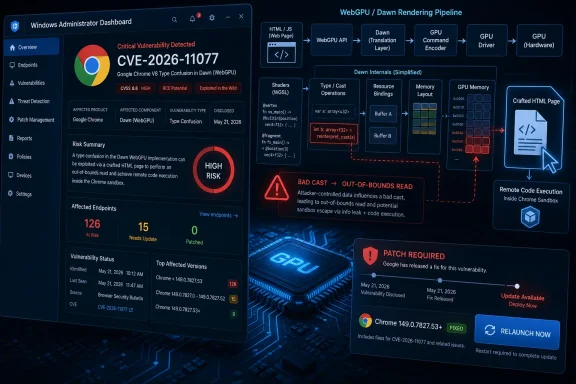 Chrome’s Medium Bug Has High-Severity Consequences
The headline mismatch is the first thing to notice. Chromium tags CVE-2026-11077 as medium severity, while CISA’s ADP enrichment gives it a CVSS 3.1 score of 8.8, squarely in high territory. That gap is not necessarily a contradiction; it is a reminder that vendor severity and infrastructure risk scoring answer different questions.Google’s description says a bad cast in Dawn allowed a remote attacker to execute arbitrary code inside a sandbox via a crafted HTML page. That phrasing matters. It does not say the bug breaks out of Chrome’s sandbox, steals Windows credentials by itself, or installs malware with system privileges. It says the attacker gets code execution in the sandboxed browser context, which is still a serious foothold in a modern exploit chain.
For home users, that may sound like a distinction without practical value. For defenders, it is the difference between a single vulnerability and a stage in an exploit sequence. Chrome’s sandbox is built precisely because the browser assumes memory-safety failures will happen; attackers often need a renderer compromise first, then a separate sandbox escape or privilege escalation to complete the job.
That is why “medium” should not be read as “safe to defer.” In a browser, a crafted page is a delivery mechanism that requires little more than user interaction. If a vulnerability can be triggered by content the browser is designed to process automatically, the operational question is not whether it sounds dramatic. The question is how quickly the vulnerable build disappears from the fleet.
Dawn Is Where Web Graphics Meets Browser Risk
Dawn is Chromium’s implementation layer for WebGPU, the newer web graphics and compute API designed to expose modern GPU capabilities to web applications. It sits in the neighborhood where browser security has historically been uncomfortable: complex parsing, driver interaction, shader compilation, memory management, and hardware-accelerated execution. That is powerful territory for legitimate software and attractive territory for attackers.The web has moved far beyond static pages and form submissions. Video conferencing, browser games, CAD viewers, AI demos, mapping tools, image editors, and visualization dashboards all expect the browser to behave more like a native runtime. WebGPU pushes that direction further by giving web apps a more modern way to use graphics hardware than older abstractions such as WebGL.
That evolution is not a mistake. Users want high-performance web apps, developers want portable APIs, and operating systems increasingly treat the browser as the universal application shell. But every new layer that turns untrusted web content into GPU work also creates new assumptions that can fail. A bad cast is one of those failures: the software believes an object is one thing, treats it that way, and memory reality disagrees.
CVE-2026-11077 is listed under CWE-125, out-of-bounds read, while the Chrome description emphasizes a bad cast. Those descriptions can coexist. Type confusion and bad casts often become memory access problems because the program reads or interprets data outside the structure it actually has. The important point for defenders is not the taxonomy debate; it is that the flaw lives in a path reachable by web content and patched in a stable Chrome release.
The CPE Entry Tells a Familiar Windows Story
The NVD configuration for CVE-2026-11077 is notable because it represents Chrome as the vulnerable application and then enumerates Windows, Linux, and macOS operating environments. That is broadly understandable: Chrome is the affected product, and the desktop builds ship across those platforms. But it also illustrates why vulnerability data can be deceptively awkward inside enterprise tooling.A CPE is supposed to help scanners identify affected software. In practice, browser vulnerabilities often expose the limits of clean asset modeling. Chrome is an application, but it is also bundled, rebranded, embedded, forked, policy-managed, and sometimes shadow-installed in ways that do not line up neatly with a single inventory record. On Windows especially, Chrome may be present as a machine-level install, a per-user install, an enterprise-managed channel, or a Chromium-derived browser with a different update cadence.
The user-facing question — “Are we missing a CPE here?” — is therefore reasonable. If the entry only models Google Chrome and generic desktop operating systems, it may not express the broader Chromium ecosystem that defenders actually care about. Microsoft Edge, Brave, Vivaldi, Opera, Electron apps, and other Chromium consumers are not automatically covered by a Chrome CPE, even when they inherit related upstream code paths.
That does not mean every Chromium-based product is confirmed vulnerable to this exact CVE on the same schedule. It means administrators should not let a single CPE match become the whole investigation. The better operational move is to map the vulnerable upstream component, check vendor advisories for each Chromium-based browser in the environment, and validate installed versions rather than assuming “Chrome patched” equals “Chromium risk closed.”
Chrome 149 Was Not a Normal Patch Tuesday Moment
Chrome 149’s stable-channel release was unusually large from a security perspective, with reporting around the release noting hundreds of security fixes and a cluster of critical vulnerabilities. CVE-2026-11077 is not the biggest bug in that batch, but it benefits from the same conclusion: this was not a cosmetic browser update. It was a security release that deserved fast deployment.The relevant fixed version for this CVE is Chrome 149.0.7827.53 or later, with Windows and macOS receiving the 149.0.7827.53/54 line and Linux receiving 149.0.7827.53 in the initial stable-channel context. By June 9, Google had also moved to newer 149.0.7827.10x builds to address additional Chrome vulnerabilities, including a separately reported V8 issue. That rapid cadence is normal for Chrome, but it complicates compliance reporting because “patched for CVE-2026-11077” and “fully current today” may not be the same statement.
This is where browser patching differs from many traditional Windows application updates. A monthly compliance scan can tell you whether a machine was current at one moment, but Chrome’s risk window moves faster than that. The difference between 149.0.7827.53 and a later 149.0.7827.103 build may matter only days later.
For individual users, the prescription is simple: let Chrome update, restart it, and verify the version. For administrators, the prescription is more demanding: measure whether Chrome actually relaunches after update staging. A browser that has downloaded the fixed build but has not restarted is still running vulnerable code.
The Sandbox Is a Seatbelt, Not a Force Field
Chrome’s sandbox is one of the reasons browser exploitation is harder than it used to be. It isolates renderer processes, limits what compromised code can do, and forces attackers to chain bugs together for a full system compromise. That architecture is a major security achievement, and it is also frequently misunderstood.When a CVE says arbitrary code execution occurs “inside a sandbox,” it is not saying the bug is harmless. It is saying the first crash barrier held — assuming no additional exploit exists. Attackers value renderer or content-process execution because it gives them a controlled position inside a trusted, highly privileged application boundary. From there, they can attempt sandbox escapes, target browser data, abuse exposed interfaces, or combine the bug with another vulnerability.
The difference is especially important in enterprise environments where browsers are heavily integrated with identity providers, password managers, device trust checks, and SaaS control planes. Even a contained browser compromise can have practical consequences if it enables theft of session material, manipulation of web content, or a stepping stone to another bug. The sandbox reduces blast radius; it does not erase the event.
That is why defenders should resist the psychological comfort of the word “sandbox.” It is a mitigation layer, not a patch. The correct response to a sandboxed code-execution bug is not panic, but it is absolutely patch urgency.
WebGPU Makes the Browser More Capable and More Exposed
WebGPU is part of a long-running shift in which browsers absorb workloads that once belonged to desktop applications. That shift is good for deployment, portability, and user experience. It is also one reason browser security has become operating-system security by another name.The older browser mental model treated web content as documents. The newer model treats the browser as a runtime with graphics acceleration, file-system mediation, hardware access, authentication state, extension APIs, and enterprise policy hooks. The attack surface is correspondingly broader. A bug in Dawn is not merely a bug in a graphics library; it is a bug in a pathway that lets remote content ask the local machine to do complex GPU-related work.
Windows users are particularly exposed to this architectural reality because Chrome, Edge, and many desktop apps all pull from the Chromium universe. A user may think they “use the web” in one browser, but the same rendering lineage may appear in Teams-like shells, embedded webviews, developer tools, and commercial apps built with Electron. Not all of those are affected by CVE-2026-11077 as reported, but the broader pattern is unmistakable.
The web platform’s ambition is to make powerful apps universal. Security teams must therefore treat browser engines and their graphics stacks as high-value infrastructure, not disposable client software. The days when GPU bugs were niche concerns for gamers and driver developers are over.
The Real Patch Metric Is Relaunch, Not Download
Chrome’s auto-update model is one of the best things about the modern desktop security baseline. It is also one of the easiest things to overestimate. In managed Windows environments, updates may download silently while users keep browser sessions open for days or weeks. The patched files are present, but the vulnerable process remains alive.That is why administrators should track version state and process age together. A machine that reports the fixed version after a restart is meaningfully different from a machine that has the update staged but is still running the older executable in memory. Chrome’s relaunch notification helps, but it is not a fleet management strategy.
Enterprise controls can enforce update deadlines, relaunch windows, and notifications. Those policies are often treated as user-experience details, but they are actually security controls. The longer a browser can remain open after a high-volume security release, the longer the organization’s real exposure persists.
This is particularly relevant for users who live in browser tabs all day: help desks, finance teams, sales operations, administrators, and developers. The very users most likely to keep Chrome open indefinitely are often the same users with valuable web sessions and privileged SaaS access. A browser patch policy that avoids inconvenience at all costs can quietly create the conditions for avoidable compromise.
Vulnerability Scanners Need More Than the NVD Row
NVD entries are useful, but they are not the same as a complete defensive picture. CVE-2026-11077’s record gives security teams a name, affected version threshold, weakness category, references, and enrichment data. That is enough to begin triage. It is not enough to end it.The CPE modeling question is a good example. If a scanner maps only
google:chrome on Windows, Linux, and macOS, it may correctly identify Chrome installations while missing other Chromium-based software that needs separate review. Conversely, a scanner that naïvely flags every Chromium-derived product may generate noise if downstream vendors have not enabled the affected component, have patched independently, or are on a different branch.That tension is not unique to Chrome. It is the normal state of modern software supply chains. Components flow downstream, vendors patch on different schedules, and vulnerability records often lag the operational reality. Asset owners need to know not just what CVE exists, but where the vulnerable code actually runs.
For WindowsForum readers, the practical approach is to treat the NVD entry as a starting signal. Confirm Chrome versions directly, check Edge and other Chromium browsers separately, review software inventory for embedded Chromium runtimes, and do not assume that one vendor advisory automatically covers every product with a Chromium ancestry.
Microsoft Edge Belongs in the Same Conversation
Because this is a Windows audience, Edge deserves specific mention even when the CVE record names Google Chrome. Microsoft Edge is based on Chromium, but it is patched and shipped by Microsoft on its own schedule. That means administrators should check Microsoft’s Edge release notes and installed Edge versions rather than applying Chrome version numbers mechanically.This is where many Windows environments get tripped up. Chrome may be managed through Google’s enterprise policies or third-party patching, while Edge is managed through Microsoft update channels, Intune, Configuration Manager, Windows Update for Business, or enterprise browser policies. The two browsers may share upstream ancestry but live in different operational lanes.
The risk is not that Edge is automatically vulnerable to CVE-2026-11077 because Chrome is. The risk is that administrators forget to ask the downstream question at all. If a vulnerability sits in Chromium code that Edge also consumes, Microsoft’s update cadence and advisory language become the relevant source of truth for Edge deployments.
This same logic applies to Brave, Vivaldi, Opera, and Chromium-based specialty browsers. The browser monoculture is not absolute, but the engine monoculture is real enough that Chrome CVEs should trigger a wider inventory check.
The “Crafted HTML Page” Is the Oldest Trick Still Working
The attack vector described here is familiar: a remote attacker uses a crafted HTML page. That language can sound almost quaint, as if the threat model belongs to the pop-up era. It does not. The browser remains one of the most efficient delivery systems for exploit attempts because users constantly feed it untrusted content.A crafted page can arrive through phishing, malvertising, compromised legitimate sites, redirect chains, webmail, messaging apps, documentation portals, ticketing systems, or developer resources. The user interaction requirement in the CVSS vector does not necessarily mean a victim must approve a scary prompt. It may mean the victim must visit or be directed to content the browser then processes.
Security training helps, but it cannot be the main defense against memory-corruption bugs in a browser engine. Users cannot visually inspect a page and determine whether Dawn will mishandle a cast. The defense must be layered: rapid patching, exploit mitigations, site isolation, least privilege, endpoint detection, DNS and web filtering, and sane extension governance.
That last item is worth emphasizing. Browser extensions often sit close to sensitive data and can complicate incident response. A patched browser with a chaotic extension environment is still a messy endpoint. CVE-2026-11077 is a browser-engine flaw, not an extension flaw, but a browser compromise becomes more consequential when the browser is already overloaded with privileged add-ons.
Version Numbers Are the New Security Boundary
The concrete line for this CVE is clear: Chrome versions before 149.0.7827.53 are affected. But the security lesson is broader. Version numbers have become a primary boundary between normal operations and exposure, especially for applications that update outside the classic Windows monthly rhythm.That creates cultural friction in organizations used to treating desktop software as slow-moving. Chrome does not wait for Patch Tuesday. Attackers do not wait for maintenance weekends. Browser vendors ship fixes when they are ready, and security teams must decide whether their endpoint management model can keep up.
There is also a communication problem. Telling users to “update Chrome” is often insufficient because Chrome may already claim it is updated while waiting for a relaunch. Telling administrators “149.0.7827.53 or later” is better, but even that can become stale within days when newer security updates land. The better message is process-oriented: the browser must be on the latest stable build approved for the organization, and stale running processes must be forced closed within a defined deadline.
For unmanaged users, the check is straightforward: open Chrome’s About page and let it apply updates, then relaunch. For managed users, the check belongs in endpoint reporting. If a fleet dashboard cannot answer which machines are running pre-149.0.7827.53 Chrome today, it is not giving the team enough visibility.
The Record Says No Known Exploitation, But That Is Not a Promise
The CISA ADP enrichment associated with this CVE indicates no known exploitation at the time of its scoring. That is useful information, but it should not be mistaken for reassurance that exploitation is unlikely forever. Public CVE publication changes attacker economics. Once the patch exists and the bug is named, researchers and adversaries can compare builds, study commits where available, and look for ways to reproduce the issue.Chrome vulnerabilities often sit behind restricted bug tracker entries at first, which slows casual analysis. But patch diffing and exploit development are established disciplines. A medium-rated bug may not attract the same attention as a critical zero-day, yet it can still become valuable if it chains well with another flaw or applies to a target population slow to update.
The absence of known exploitation should influence triage, not justify delay. If there were confirmed active exploitation, the response would escalate to emergency patching and hunting. Without it, the correct response is still rapid deployment, especially because browser updates are usually low-friction compared with operating-system upgrades.
This is one of the quiet advantages of Chrome’s update model. The cost of patching is comparatively low, so the threshold for action should be low as well. Organizations that spend more time debating a browser update than deploying it have inverted the risk equation.
The Patch Burden Is Moving Up the Stack
Windows security has long focused on the operating system: kernel fixes, privilege escalation bugs, remote desktop exposure, SMB hardening, and Defender telemetry. Those still matter. But the browser and its component ecosystem increasingly carry the day-to-day exposure burden.That shift changes who owns the problem. Desktop engineering teams must manage update channels. Security teams must interpret browser CVEs. Help desks must push relaunches. Application owners must test browser-dependent workflows quickly. Identity teams must assume browser compromise is part of the threat model for session security.
The old “application patching” category is too small for this work. Chrome is not just an app; it is a runtime for business operations. When a flaw in Dawn can be reached through a webpage, and when the fix arrives as part of a broader Chrome stable release, the organization’s ability to update browsers becomes part of its core security posture.
This is especially true in hybrid and SaaS-heavy environments. A compromised browser session may be more valuable than a compromised local file share. The endpoint is still the battleground, but the browser is often the front gate.
The Chrome 149 Lesson Fits in Five Operational Moves
CVE-2026-11077 should not cause panic, but it should cause motion. The important thing is to translate the CVE record into actions that close real exposure rather than merely satisfy a scanner. Chrome’s version threshold gives defenders a clean starting point, and the Dawn component gives them a reason to look beyond surface severity.- Update Google Chrome to 149.0.7827.53 or later, and prefer the newest stable build available rather than stopping at the first fixed version.
- Confirm that Chrome has actually relaunched after updating, because staged updates do not protect users still running old browser processes.
- Check Microsoft Edge and other Chromium-based browsers through their own vendor release channels instead of assuming the Chrome CPE tells the whole story.
- Review software inventory for embedded Chromium runtimes and Electron-based applications where browser-engine exposure may not appear as a normal Chrome install.
- Treat “medium” Chromium severity as a triage input, not a reason to defer, when the bug is remotely reachable through crafted web content.
- Use this event to validate browser update deadlines, relaunch enforcement, and reporting accuracy across Windows endpoints.
References
- Primary source: NVD / Chromium
Published: 2026-06-09T07:00:42-07:00
NVD - CVE-2026-11077
 nvd.nist.gov
- Security advisory: MSRC
Published: 2026-06-09T07:00:42-07:00
Original feed URL
Security Update Guide - Microsoft Security Response Center
 msrc.microsoft.com
- Related coverage: govcert.gov.hk
GovCERT.HK - Security Alert (A26-06-08): Multiple Vulnerabilities in Google Chrome
Security Alert (A26-06-08): Multiple Vulnerabilities in Google Chromewww.govcert.gov.hk
