

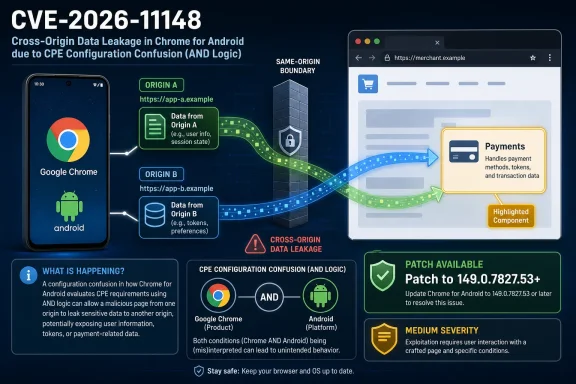
CVE-2026-11148 is a medium-severity Chrome for Android payments vulnerability, published June 4, 2026 and modified by NVD on June 8, affecting Google Chrome versions before 149.0.7827.53 on Android and allowing cross-origin data leakage through a crafted HTML page. The awkward part is not the severity score or the Payments component. It is the CPE story: NVD’s current configuration appears to model the flaw as Chrome plus Android, rather than cleanly as Chrome for Android, and that distinction matters for scanners, asset owners, and anyone trying to decide whether a Windows fleet is actually exposed.
That makes this CVE a small but useful case study in a much larger problem. Browser vulnerabilities are now shipped, scored, enriched, indexed, mirrored, and consumed by machines faster than the ecosystem can always describe them cleanly. When a Chrome-on-Android bug shows up with a desktop release advisory and a generic Chrome CPE, the patch signal is still real — but the asset-matching signal becomes noisy.
The vulnerability description is unusually specific by Chrome standards: “Inappropriate implementation in Payments in Google Chrome on Android prior to 149.0.7827.53” allowed a local attacker to leak cross-origin data through a crafted HTML page. That phrasing gives us three important boundaries before we even get to the score.
First, the affected product is not simply “Chrome” in the everyday desktop sense. It is Chrome on Android, and the vulnerable component is Payments — a feature area tied to browser-mediated payment flows, autofill-like interactions, and the web’s increasingly complicated handoff between sites, apps, credentials, and stored user data.
Second, the impact is confidentiality, not code execution. CISA’s ADP enrichment gives it a CVSS 3.1 score of 6.5, with high confidentiality impact and no integrity or availability impact. That is consistent with the description: the bug leaks cross-origin data, it does not let an attacker rewrite pages, persist malware, or crash the device.
Third, exploitation apparently requires user interaction. The vector published by CISA-ADP is network-accessible, low-complexity, no privileges required, user interaction required, unchanged scope, high confidentiality impact. In plainer English, a user needs to encounter or open a maliciously crafted page, but the attacker does not need an account on the victim’s device or a prior foothold.
Those boundaries should make the vulnerability relatively easy to triage. Android users need the Chrome update. Desktop Chrome users should still take the broader Chrome 149 security release seriously, but CVE-2026-11148 itself is not obviously a Windows desktop exposure based on the published description.
And yet the CPE entry complicates that clean reading.
In practice, this is where vulnerability management tooling often turns precise logic into operational ambiguity. Some scanners and dashboards handle CPE configuration logic well. Others flatten the results, overmatch the application CPE, or display the affected software in a way that makes the operating-system condition easy to miss.
That is why the answer to “Are we missing a CPE here?” is probably: not necessarily, but the current CPE expression is fragile.
There is no separate, universally clean CPE name for “Google Chrome for Android” that is always used consistently across vulnerability records. NVD often has to represent mobile-app-on-mobile-OS exposure with a generic application CPE combined with an OS CPE. That makes the logical configuration more important than the individual CPE strings.
The danger is not that NVD has forgotten Android. The Android CPE is there. The danger is that the Chrome application CPE may be interpreted outside that AND container by downstream systems, producing the appearance that every Chrome installation before 149.0.7827.53 is vulnerable to this particular Android-only Payments bug.
For WindowsForum readers, that distinction is not academic. If your vulnerability platform flags every Windows machine running Chrome 148 or early Chrome 149 as exposed to CVE-2026-11148, the first thing to check is whether it preserved the Android condition. If it did not, you may be looking at a matching artifact rather than a real Windows exposure.
The likely explanation is mundane rather than conspiratorial. Chrome security advisories are often bundled around milestone releases, and the Chrome Releases blog frequently serves as the public vendor advisory anchor even when individual CVEs touch platform-specific code paths. The advisory may cover the broader 149 stable release family, while the CVE description narrows the vulnerable surface to Android.
That does not make the reference ideal. For a practitioner trying to validate exposure, a desktop release post attached to an Android-only CVE is a speed bump. It forces the reader to privilege the CVE description and affected-product metadata over the advisory title.
This is a familiar weakness in browser vulnerability disclosure. Chrome is not one product in the way a traditional Windows desktop application once was. It is a browser engine, a desktop application, an Android application, an iOS shell constrained by Apple’s rules, a ChromeOS component, a WebView-adjacent ecosystem actor, and the upstream for a long list of Chromium-based browsers. One advisory can point to many realities.
That sprawl is why the CPE layer matters so much. The prose tells humans what is vulnerable. The CPE tells machines what to flag. When those two layers are merely adjacent rather than perfectly aligned, security teams get tickets that need interpretation.
The same-origin policy is one of the web’s foundational security boundaries. It is the reason a malicious page should not be able to read data from your bank tab, your webmail session, your admin console, or a private intranet app simply because those pages are open or authenticated in the same browser profile. When a CVE says cross-origin data can leak, even in a narrow component, it is describing erosion at a boundary the rest of the web depends on.
Payments makes the story more interesting. The browser payment surface is built to reduce friction: stored cards, payment handlers, merchant flows, autofill, identity signals, and platform-mediated prompts all exist to make checkout less painful. Security failures in that area do not need to become full account takeover to matter. A leak of state, identifiers, transaction-related data, or origin-confused information can still be valuable.
The record does not publicly establish exactly what data could be leaked. That uncertainty is normal for Chrome CVEs, especially when issue-tracker details are restricted during patch rollout. But the combination of Payments, Android, crafted HTML, and cross-origin leakage is enough to justify treating the update as more than routine hygiene.
Medium browser bugs are often medium because they require setup, user interaction, or a specific component state. They are not medium because the underlying boundary is unimportant.
In vulnerability writing, “local attacker” usually means someone with local access to the machine or a local account. “Crafted HTML page” usually suggests a web-delivered attack, whether through a link, embedded content, compromised site, or malicious local file opened in the browser. Those are not the same operational scenario.
CISA-ADP’s score treats the bug as remotely reachable over the network with user interaction. That is the more practical reading for most defenders: a victim encounters a malicious page, and Chrome on Android mishandles something in Payments such that cross-origin data leaks.
This discrepancy may simply be a wording artifact from the upstream CVE text. Chrome CVEs often use compact language that compresses attacker position, trigger, and impact into a single sentence. Once NVD, CISA-ADP, vulnerability scanners, and third-party databases ingest that sentence, the ambiguity becomes more visible.
For defenders, the safest interpretation is not to over-index on “local” as a reason to defer patching. If the exploit trigger is HTML and the CVSS vector is network with user interaction, then browsing behavior is part of the threat model. The patch should move through normal Chrome update channels without waiting for perfect prose.
That does not mean Windows administrators can ignore the Chrome 149 train. The same release family includes a large number of security fixes, and Chrome’s rapid update cadence means a machine that is behind on one CVE is usually behind on many. But conflating a mobile Payments issue with desktop exposure creates bad prioritization.
This is how vulnerability fatigue is manufactured. A scanner raises a medium finding against Windows endpoints. The CVE prose says Android. The advisory says desktop. The CPE says Chrome and Android in an AND block. The help desk asks whether the finding is real. The security team asks whether the scanner is wrong. The patch team asks whether they need an emergency deployment.
The right answer is measured. Patch Chrome everywhere as part of your normal browser-security process, but classify CVE-2026-11148 itself as an Android Chrome exposure unless your tooling provides evidence of a platform-independent affected code path. If your inventory cannot distinguish Chrome desktop from Chrome Android, the vulnerability is exposing an asset-management weakness as much as a browser flaw.
Windows environments also need to remember the Chromium ecosystem. Microsoft Edge, Brave, Vivaldi, Opera, and other Chromium-derived browsers may ingest many upstream fixes, but a Chrome-for-Android Payments bug does not automatically map one-to-one onto every Chromium browser on every OS. Each vendor’s platform, feature enablement, and release timing matter.
That is the practical reason to resist “Chromium CVE equals all Chromium browsers” as a blanket rule. It is a useful first alert. It is not a final exposure determination.
Android is less tidy. Chrome updates usually arrive through Google Play, but actual update state depends on Play Store policy, device management posture, user behavior, OEM constraints, work-profile separation, and whether Chrome is disabled, frozen, replaced, or pinned in an enterprise mobility stack. Some Android devices are personal devices accessing corporate services. Others are fully managed. Many sit somewhere in between.
That matters for a Payments vulnerability because mobile browsing is often where consumer and enterprise identities blur. The same device may hold a personal Google account, corporate single sign-on, stored payment methods, messaging apps, and access to SaaS dashboards. A mobile browser leak does not need to compromise a Windows domain account to become a real privacy or security incident.
Administrators should therefore treat this as a mobile endpoint management question, not just a Chrome question. If your organization allows Android devices to access corporate resources, you need visibility into Chrome version compliance on those devices. If you do not manage the devices, you need conditional access rules that account for browser and OS posture where feasible.
The uncomfortable truth is that many organizations have better reporting for a forgotten copy of Chrome on a lab PC than for the browser employees actually use to approve invoices, read email, or access internal portals from their phones.
CVE-2026-11148 demonstrates the mismatch. The vulnerable thing is not simply a product name. It is a product, below a version, on a platform, in a component, under a likely interaction condition. The CPE configuration can approximate that with Chrome AND Android, but it cannot easily express every nuance a defender wants.
That is why vulnerability records increasingly require two readings. The first is machine reading: does the CPE match anything in inventory? The second is editorial reading: does the prose, vendor advisory, platform note, and exploit description actually describe this asset?
Security teams that skip the second step will overpatch, misprioritize, or drown in false positives. Teams that skip the first will miss real exposure because manual interpretation does not scale. The art is in forcing the two to meet.
For this CVE, the machine-readable data appears to be trying to say “Chrome before 149.0.7827.53 on Android.” If your tooling says “Chrome before 149.0.7827.53 on Windows,” the tooling may have lost the plot.
CSRF traditionally describes a situation where an attacker causes a victim’s browser to send an unwanted request using the victim’s authenticated state. The CVE description, however, emphasizes cross-origin data leakage. Those concepts can overlap in messy browser logic, especially where requests, credentials, UI mediation, and origin boundaries interact, but they are not identical in the way most practitioners use the terms.
This is another reason not to overread the taxonomy. CWE labels are useful for dashboards and trend analysis, but the actual operational concern here is simpler: a crafted page could cause Chrome on Android to reveal data it should have kept separated across origins.
The Payments component may have made CWE-352 the closest available bucket for the enrichment team. It may also reflect information not fully visible in the short public description. Without the underlying Chromium issue details, which are commonly restricted until enough users have patched, we should avoid pretending to know the exact bug class.
What matters for defenders is that the browser’s origin protections were not working as intended in a sensitive component. Whether the database calls it CSRF, inappropriate implementation, or cross-origin leakage, the remediation is the same: update.
But large browser patch sets create a triage paradox. The more vulnerabilities a release fixes, the less attention any one CVE receives. That makes it easier for platform-specific issues to be misfiled, misunderstood, or lost inside a generic “update Chrome” instruction.
For home users, that may be fine. The advice is still “update Chrome.” For enterprise IT, it is not enough. Enterprises need to know which business units, device classes, and platforms are exposed; whether compensating controls exist; whether a finding is a false positive; and whether patch exceptions carry real risk.
Chrome’s evergreen model deliberately reduces the need for users to understand every CVE. That model works best when updates flow quickly and uniformly. It works less well in organizations that pin versions, delay mobile updates, run kiosk devices, or depend on third-party patch windows.
CVE-2026-11148 is not the most dramatic bug in Chrome 149. Its value is diagnostic. It reveals whether your vulnerability program can distinguish “Chrome everywhere” from “Chrome on Android in a specific component before a specific build.”
For enterprise administrators, the better move is to validate three things. First, confirm whether Android Chrome is in scope for your vulnerability scanner or mobile device management reports. Second, confirm whether the scanner respects the NVD AND configuration tying Chrome to Android. Third, confirm whether any policy blocks or delays Chrome updates on managed Android devices.
The CPE debate should not become an excuse to defer remediation. Even if the CPE expression is imperfect, the vulnerable version boundary is clear. Chrome on Android before 149.0.7827.53 is the risk zone identified by the public record.
But the debate is still worth having because bad matching creates bad behavior. If Windows endpoints are incorrectly flagged for this Android-only issue, teams may waste time chasing ghosts while missing unmanaged phones. If Android devices are absent from the inventory altogether, the cleanest CPE in the world will not save you.
The best vulnerability programs treat records like this as a prompt to improve asset context. The question is not merely “Do we have the CVE?” It is “Do we know where this product exists, on what platform, at what version, and under whose control?”
A good exception note would say that the public CVE description limits the issue to Google Chrome on Android prior to 149.0.7827.53, while the affected Windows asset is Chrome desktop. It would also note whether the scanner preserved or ignored the Android CPE condition. That gives auditors and future responders a trail.
If the scanner vendor allows custom applicability rules, this is a strong candidate for platform-aware tuning. The goal is not to hide the CVE; it is to route it to the assets that can actually be affected. False positives are not harmless. They consume the same human attention needed for true positives.
At the same time, administrators should avoid using the Android qualifier as a general reason to slow Chrome patching on Windows. Chrome desktop still received security fixes in the same release window, and subsequent updates may include unrelated high-severity or actively exploited issues. Platform-specific triage should sharpen patching, not weaken it.
The mature posture is boring but effective: keep Chrome current everywhere, tune CVE applicability carefully, and make sure mobile browsers are visible to the same security governance that already covers desktops.
That makes this CVE a small but useful case study in a much larger problem. Browser vulnerabilities are now shipped, scored, enriched, indexed, mirrored, and consumed by machines faster than the ecosystem can always describe them cleanly. When a Chrome-on-Android bug shows up with a desktop release advisory and a generic Chrome CPE, the patch signal is still real — but the asset-matching signal becomes noisy.
 The Bug Is Narrower Than the CPE Makes It Look
The vulnerability description is unusually specific by Chrome standards: “Inappropriate implementation in Payments in Google Chrome on Android prior to 149.0.7827.53” allowed a local attacker to leak cross-origin data through a crafted HTML page. That phrasing gives us three important boundaries before we even get to the score.First, the affected product is not simply “Chrome” in the everyday desktop sense. It is Chrome on Android, and the vulnerable component is Payments — a feature area tied to browser-mediated payment flows, autofill-like interactions, and the web’s increasingly complicated handoff between sites, apps, credentials, and stored user data.
Second, the impact is confidentiality, not code execution. CISA’s ADP enrichment gives it a CVSS 3.1 score of 6.5, with high confidentiality impact and no integrity or availability impact. That is consistent with the description: the bug leaks cross-origin data, it does not let an attacker rewrite pages, persist malware, or crash the device.
Third, exploitation apparently requires user interaction. The vector published by CISA-ADP is network-accessible, low-complexity, no privileges required, user interaction required, unchanged scope, high confidentiality impact. In plainer English, a user needs to encounter or open a maliciously crafted page, but the attacker does not need an account on the victim’s device or a prior foothold.
Those boundaries should make the vulnerability relatively easy to triage. Android users need the Chrome update. Desktop Chrome users should still take the broader Chrome 149 security release seriously, but CVE-2026-11148 itself is not obviously a Windows desktop exposure based on the published description.
And yet the CPE entry complicates that clean reading.
NVD’s AND Logic Is Doing Work That Humans May Misread
The NVD change history says a CPE configuration was added on June 8 using an AND relationship: a vulnerable Google Chrome application CPE for versions up to but excluding 149.0.7827.53, and a Google Android operating system CPE. In theory, that is a reasonable attempt to express “Chrome running on Android.”In practice, this is where vulnerability management tooling often turns precise logic into operational ambiguity. Some scanners and dashboards handle CPE configuration logic well. Others flatten the results, overmatch the application CPE, or display the affected software in a way that makes the operating-system condition easy to miss.
That is why the answer to “Are we missing a CPE here?” is probably: not necessarily, but the current CPE expression is fragile.
There is no separate, universally clean CPE name for “Google Chrome for Android” that is always used consistently across vulnerability records. NVD often has to represent mobile-app-on-mobile-OS exposure with a generic application CPE combined with an OS CPE. That makes the logical configuration more important than the individual CPE strings.
The danger is not that NVD has forgotten Android. The Android CPE is there. The danger is that the Chrome application CPE may be interpreted outside that AND container by downstream systems, producing the appearance that every Chrome installation before 149.0.7827.53 is vulnerable to this particular Android-only Payments bug.
For WindowsForum readers, that distinction is not academic. If your vulnerability platform flags every Windows machine running Chrome 148 or early Chrome 149 as exposed to CVE-2026-11148, the first thing to check is whether it preserved the Android condition. If it did not, you may be looking at a matching artifact rather than a real Windows exposure.
The Desktop Advisory Link Is a Clue, Not a Contradiction
The record also references Google’s Chrome Releases stable-channel update for desktop. At first glance, that looks wrong: why would an Android-specific Chrome vulnerability point to a desktop stable-channel post?The likely explanation is mundane rather than conspiratorial. Chrome security advisories are often bundled around milestone releases, and the Chrome Releases blog frequently serves as the public vendor advisory anchor even when individual CVEs touch platform-specific code paths. The advisory may cover the broader 149 stable release family, while the CVE description narrows the vulnerable surface to Android.
That does not make the reference ideal. For a practitioner trying to validate exposure, a desktop release post attached to an Android-only CVE is a speed bump. It forces the reader to privilege the CVE description and affected-product metadata over the advisory title.
This is a familiar weakness in browser vulnerability disclosure. Chrome is not one product in the way a traditional Windows desktop application once was. It is a browser engine, a desktop application, an Android application, an iOS shell constrained by Apple’s rules, a ChromeOS component, a WebView-adjacent ecosystem actor, and the upstream for a long list of Chromium-based browsers. One advisory can point to many realities.
That sprawl is why the CPE layer matters so much. The prose tells humans what is vulnerable. The CPE tells machines what to flag. When those two layers are merely adjacent rather than perfectly aligned, security teams get tickets that need interpretation.
Cross-Origin Data Leakage Is the Kind of Medium Bug That Ages Badly
The “Medium” label is accurate but potentially misleading. Cross-origin data leakage is not remote code execution, and nobody should treat CVE-2026-11148 like a V8 zero-day. But browser isolation failures sit close to some of the most sensitive assumptions on the modern web.The same-origin policy is one of the web’s foundational security boundaries. It is the reason a malicious page should not be able to read data from your bank tab, your webmail session, your admin console, or a private intranet app simply because those pages are open or authenticated in the same browser profile. When a CVE says cross-origin data can leak, even in a narrow component, it is describing erosion at a boundary the rest of the web depends on.
Payments makes the story more interesting. The browser payment surface is built to reduce friction: stored cards, payment handlers, merchant flows, autofill, identity signals, and platform-mediated prompts all exist to make checkout less painful. Security failures in that area do not need to become full account takeover to matter. A leak of state, identifiers, transaction-related data, or origin-confused information can still be valuable.
The record does not publicly establish exactly what data could be leaked. That uncertainty is normal for Chrome CVEs, especially when issue-tracker details are restricted during patch rollout. But the combination of Payments, Android, crafted HTML, and cross-origin leakage is enough to justify treating the update as more than routine hygiene.
Medium browser bugs are often medium because they require setup, user interaction, or a specific component state. They are not medium because the underlying boundary is unimportant.
“Local Attacker” Meets “Crafted HTML Page” in a Wording Collision
One oddity in the description is the phrase “local attacker” paired with exploitation “via a crafted HTML page.” CISA’s CVSS vector, by contrast, uses network attack vector. That mismatch deserves attention, because it can affect triage.In vulnerability writing, “local attacker” usually means someone with local access to the machine or a local account. “Crafted HTML page” usually suggests a web-delivered attack, whether through a link, embedded content, compromised site, or malicious local file opened in the browser. Those are not the same operational scenario.
CISA-ADP’s score treats the bug as remotely reachable over the network with user interaction. That is the more practical reading for most defenders: a victim encounters a malicious page, and Chrome on Android mishandles something in Payments such that cross-origin data leaks.
This discrepancy may simply be a wording artifact from the upstream CVE text. Chrome CVEs often use compact language that compresses attacker position, trigger, and impact into a single sentence. Once NVD, CISA-ADP, vulnerability scanners, and third-party databases ingest that sentence, the ambiguity becomes more visible.
For defenders, the safest interpretation is not to over-index on “local” as a reason to defer patching. If the exploit trigger is HTML and the CVSS vector is network with user interaction, then browsing behavior is part of the threat model. The patch should move through normal Chrome update channels without waiting for perfect prose.
Windows Fleets Are Not the Center of This CVE, but They Are Still in the Blast Radius of Confusion
For a WindowsForum audience, the most important operational point is simple: CVE-2026-11148 is described as Chrome on Android. It should not be the headline reason you panic-patch Windows desktops.That does not mean Windows administrators can ignore the Chrome 149 train. The same release family includes a large number of security fixes, and Chrome’s rapid update cadence means a machine that is behind on one CVE is usually behind on many. But conflating a mobile Payments issue with desktop exposure creates bad prioritization.
This is how vulnerability fatigue is manufactured. A scanner raises a medium finding against Windows endpoints. The CVE prose says Android. The advisory says desktop. The CPE says Chrome and Android in an AND block. The help desk asks whether the finding is real. The security team asks whether the scanner is wrong. The patch team asks whether they need an emergency deployment.
The right answer is measured. Patch Chrome everywhere as part of your normal browser-security process, but classify CVE-2026-11148 itself as an Android Chrome exposure unless your tooling provides evidence of a platform-independent affected code path. If your inventory cannot distinguish Chrome desktop from Chrome Android, the vulnerability is exposing an asset-management weakness as much as a browser flaw.
Windows environments also need to remember the Chromium ecosystem. Microsoft Edge, Brave, Vivaldi, Opera, and other Chromium-derived browsers may ingest many upstream fixes, but a Chrome-for-Android Payments bug does not automatically map one-to-one onto every Chromium browser on every OS. Each vendor’s platform, feature enablement, and release timing matter.
That is the practical reason to resist “Chromium CVE equals all Chromium browsers” as a blanket rule. It is a useful first alert. It is not a final exposure determination.
Android Patch Reality Is Messier Than Desktop Patch Reality
On Windows, Chrome’s updater is aggressive, familiar, and relatively easy to validate. Managed environments can use Chrome Browser Cloud Management, Group Policy, enterprise reporting, or third-party patch platforms to confirm installed versions. The desktop browser may not update instantly everywhere, but the administrative path is well worn.Android is less tidy. Chrome updates usually arrive through Google Play, but actual update state depends on Play Store policy, device management posture, user behavior, OEM constraints, work-profile separation, and whether Chrome is disabled, frozen, replaced, or pinned in an enterprise mobility stack. Some Android devices are personal devices accessing corporate services. Others are fully managed. Many sit somewhere in between.
That matters for a Payments vulnerability because mobile browsing is often where consumer and enterprise identities blur. The same device may hold a personal Google account, corporate single sign-on, stored payment methods, messaging apps, and access to SaaS dashboards. A mobile browser leak does not need to compromise a Windows domain account to become a real privacy or security incident.
Administrators should therefore treat this as a mobile endpoint management question, not just a Chrome question. If your organization allows Android devices to access corporate resources, you need visibility into Chrome version compliance on those devices. If you do not manage the devices, you need conditional access rules that account for browser and OS posture where feasible.
The uncomfortable truth is that many organizations have better reporting for a forgotten copy of Chrome on a lab PC than for the browser employees actually use to approve invoices, read email, or access internal portals from their phones.
The CPE Question Exposes the Limits of Machine-Readable Vulnerability Truth
CPEs were designed to make vulnerability matching possible at scale. They are indispensable. They are also a compromise format trying to describe a software world that now includes evergreen browsers, app stores, embedded components, container images, managed runtimes, mobile apps, and feature flags.CVE-2026-11148 demonstrates the mismatch. The vulnerable thing is not simply a product name. It is a product, below a version, on a platform, in a component, under a likely interaction condition. The CPE configuration can approximate that with Chrome AND Android, but it cannot easily express every nuance a defender wants.
That is why vulnerability records increasingly require two readings. The first is machine reading: does the CPE match anything in inventory? The second is editorial reading: does the prose, vendor advisory, platform note, and exploit description actually describe this asset?
Security teams that skip the second step will overpatch, misprioritize, or drown in false positives. Teams that skip the first will miss real exposure because manual interpretation does not scale. The art is in forcing the two to meet.
For this CVE, the machine-readable data appears to be trying to say “Chrome before 149.0.7827.53 on Android.” If your tooling says “Chrome before 149.0.7827.53 on Windows,” the tooling may have lost the plot.
The CWE Assignment Is Plausible but Not Especially Illuminating
CISA-ADP maps the weakness to CWE-352, Cross-Site Request Forgery. That is an interesting classification, though it does not fully explain the issue from the public details.CSRF traditionally describes a situation where an attacker causes a victim’s browser to send an unwanted request using the victim’s authenticated state. The CVE description, however, emphasizes cross-origin data leakage. Those concepts can overlap in messy browser logic, especially where requests, credentials, UI mediation, and origin boundaries interact, but they are not identical in the way most practitioners use the terms.
This is another reason not to overread the taxonomy. CWE labels are useful for dashboards and trend analysis, but the actual operational concern here is simpler: a crafted page could cause Chrome on Android to reveal data it should have kept separated across origins.
The Payments component may have made CWE-352 the closest available bucket for the enrichment team. It may also reflect information not fully visible in the short public description. Without the underlying Chromium issue details, which are commonly restricted until enough users have patched, we should avoid pretending to know the exact bug class.
What matters for defenders is that the browser’s origin protections were not working as intended in a sensitive component. Whether the database calls it CSRF, inappropriate implementation, or cross-origin leakage, the remediation is the same: update.
Chrome 149’s Giant Patch Train Makes Single-CVE Triage Harder
CVE-2026-11148 arrived as part of a broader Chrome 149 security wave, and that context is important. Reports around the release describe hundreds of vulnerabilities fixed in the milestone, including critical issues elsewhere in Chrome. In that crowd, a medium Android Payments bug can look minor.But large browser patch sets create a triage paradox. The more vulnerabilities a release fixes, the less attention any one CVE receives. That makes it easier for platform-specific issues to be misfiled, misunderstood, or lost inside a generic “update Chrome” instruction.
For home users, that may be fine. The advice is still “update Chrome.” For enterprise IT, it is not enough. Enterprises need to know which business units, device classes, and platforms are exposed; whether compensating controls exist; whether a finding is a false positive; and whether patch exceptions carry real risk.
Chrome’s evergreen model deliberately reduces the need for users to understand every CVE. That model works best when updates flow quickly and uniformly. It works less well in organizations that pin versions, delay mobile updates, run kiosk devices, or depend on third-party patch windows.
CVE-2026-11148 is not the most dramatic bug in Chrome 149. Its value is diagnostic. It reveals whether your vulnerability program can distinguish “Chrome everywhere” from “Chrome on Android in a specific component before a specific build.”
The Practical Fix Is Version Verification, Not Semantic Debate
For individual Android users, the action is straightforward: update Chrome from Google Play and verify the installed version is at least 149.0.7827.53. If the device is managed, the update may be controlled by an administrator, but the end state is the same.For enterprise administrators, the better move is to validate three things. First, confirm whether Android Chrome is in scope for your vulnerability scanner or mobile device management reports. Second, confirm whether the scanner respects the NVD AND configuration tying Chrome to Android. Third, confirm whether any policy blocks or delays Chrome updates on managed Android devices.
The CPE debate should not become an excuse to defer remediation. Even if the CPE expression is imperfect, the vulnerable version boundary is clear. Chrome on Android before 149.0.7827.53 is the risk zone identified by the public record.
But the debate is still worth having because bad matching creates bad behavior. If Windows endpoints are incorrectly flagged for this Android-only issue, teams may waste time chasing ghosts while missing unmanaged phones. If Android devices are absent from the inventory altogether, the cleanest CPE in the world will not save you.
The best vulnerability programs treat records like this as a prompt to improve asset context. The question is not merely “Do we have the CVE?” It is “Do we know where this product exists, on what platform, at what version, and under whose control?”
Security Teams Should Push Back Gently, Not Ignore the Finding
If a scanner reports CVE-2026-11148 against Windows Chrome, the right response is not to delete the finding and move on. It is to document why the finding does or does not apply.A good exception note would say that the public CVE description limits the issue to Google Chrome on Android prior to 149.0.7827.53, while the affected Windows asset is Chrome desktop. It would also note whether the scanner preserved or ignored the Android CPE condition. That gives auditors and future responders a trail.
If the scanner vendor allows custom applicability rules, this is a strong candidate for platform-aware tuning. The goal is not to hide the CVE; it is to route it to the assets that can actually be affected. False positives are not harmless. They consume the same human attention needed for true positives.
At the same time, administrators should avoid using the Android qualifier as a general reason to slow Chrome patching on Windows. Chrome desktop still received security fixes in the same release window, and subsequent updates may include unrelated high-severity or actively exploited issues. Platform-specific triage should sharpen patching, not weaken it.
The mature posture is boring but effective: keep Chrome current everywhere, tune CVE applicability carefully, and make sure mobile browsers are visible to the same security governance that already covers desktops.
The Small Payments Bug That Tests the Whole Patch Pipeline
This CVE’s concrete lessons are less about panic and more about precision. The vulnerability is patched, the affected version boundary is known, and the public description points squarely at Android. The operational challenge is making sure your tools and processes preserve that specificity.- Chrome on Android should be updated to 149.0.7827.53 or later to address CVE-2026-11148.
- Windows Chrome exposure should not be assumed from the generic Chrome CPE alone if the Android condition is part of the NVD configuration.
- Scanner findings for this CVE should be checked to ensure they respect the AND relationship between Chrome and Android.
- The attached desktop Chrome advisory should be treated as a vendor release reference, not proof that the Payments flaw affects Windows.
- Organizations that manage Android devices should verify Chrome version compliance through MDM, EMM, or browser-management reporting rather than relying only on desktop patch tools.
- Cross-origin data leakage in browser payment surfaces deserves timely patching even when the severity label is “Medium.”
References
- Primary source: NVD / Chromium
Published: 2026-06-09T07:00:00-07:00
NVD - CVE-2026-11148
 nvd.nist.gov
- Security advisory: MSRC
Published: 2026-06-09T07:00:00-07:00
Original feed URL
Security Update Guide - Microsoft Security Response Center
 msrc.microsoft.com
- Related coverage: govcert.gov.hk
GovCERT.HK - Security Alert (A26-06-08): Multiple Vulnerabilities in Google Chrome
Security Alert (A26-06-08): Multiple Vulnerabilities in Google Chromewww.govcert.gov.hk
