

Google’s CVE-2026-11644 entry, published June 8, 2026 and modified June 9, describes a critical use-after-free flaw in Chrome’s Views component on Linux before version 149.0.7827.103 that could allow code execution through a malicious Chrome extension. The important wrinkle is not just the memory-safety bug; it is the way the vulnerability is scoped, scored, and represented in vulnerability databases. This is a Linux Chrome issue, not a Linux kernel issue, and the CPE line can easily mislead scanners, dashboards, and busy administrators into treating the operating system as the affected product. That distinction matters because browser vulnerabilities increasingly live at the boundary between application inventory, extension governance, and endpoint patch compliance.
CVE-2026-11644 lands in a familiar class: use after free, cataloged as CWE-416. In plain terms, software keeps using memory after it has already released it, opening the door to crashes, corruption, and, in the worst cases, attacker-controlled execution paths. Chrome has spent years hardening against this class of bug, but the sheer size of the browser makes memory safety defects a recurring tax on modern web computing.
The affected component is Views, Chromium’s UI framework used for browser interface elements. That makes this vulnerability more interesting than the typical “crafted web page hits the renderer” bug. The NVD description says exploitation required convincing a user to install a malicious extension, and the attack path involved a crafted Chrome Extension.
That attacker requirement does not make the bug harmless. Extensions have long been one of the soft underbellies of browser security because they sit in the trust gap between user choice and enterprise control. A user who would never run an unknown executable may still install a productivity helper, coupon tool, PDF converter, crypto wallet companion, or “AI assistant” extension after a convincing prompt.
The result is a vulnerability that reads narrower than a drive-by browser zero-day but still has serious enterprise implications. A malicious extension is not a theoretical delivery vehicle; it is a mature ecosystem for social engineering, credential theft, traffic inspection, and persistence. CVE-2026-11644 simply adds memory corruption to a threat model that administrators already had reason to distrust.
This is where CPEs become both useful and treacherous. Common Platform Enumeration strings are supposed to help scanners map advisories to installed software. But the moment a vulnerability is platform-specific, the database has to express a relationship between an application and an operating system. That expression can look like an application CPE plus an OS CPE, even when only the application needs patching.
So, are we missing a CPE? Possibly, but the more precise answer is that the CPE model is doing something awkward rather than necessarily incomplete. A clean representation would make it obvious that the vulnerable asset is Google Chrome for Linux, not the generic Linux kernel. If a scanner interprets the Linux kernel CPE as a vulnerable package, it is over-reading the configuration.
The version detail also deserves scrutiny. The CVE text says Linux prior to 149.0.7827.103, while several Chrome stable-channel advisories around this release used closely related platform-specific builds, including 149.0.7827.102 and 149.0.7827.103 depending on operating system. That mismatch is exactly the sort of thing that causes compliance tools to disagree for a few days after publication. Security teams should validate against the installed Chrome version and the vendor advisory rather than assume that every downstream feed has normalized the build numbers perfectly.
That apparent disagreement is not unusual. Vendor severity is a product-security judgment, while CVSS is a structured scoring system. Chrome’s severity scale considers exploitability, memory-corruption potential, sandbox implications, and internal knowledge of the component. CVSS, by contrast, has to fit the issue into a vector: network attack vector, high attack complexity, no privileges required, user interaction required, unchanged scope, and high impact to confidentiality, integrity, and availability.
The “user interaction required” piece is doing a lot of work here. The attacker must persuade the victim to install a malicious extension. That is harder than sending a link to a web page, but it is not hard enough to dismiss. Extension-install lures are a well-established social-engineering path, especially when attackers imitate legitimate workplace tools or publish lookalike extensions.
In enterprise risk terms, this is not a patch-and-forget footnote. It is a reminder that CVSS can understate organizational pain when the exploit path fits common user behavior. A 7.5 can be more operationally urgent than a theoretical 9.8 if it maps cleanly to how employees actually get compromised.
In 2026, extensions are part of the enterprise software supply chain whether administrators like it or not. They can request sweeping permissions, update automatically, interact with authenticated sessions, and run inside the browser that holds the keys to SaaS identity. A malicious or compromised extension often does not need a memory-corruption vulnerability to cause damage.
CVE-2026-11644 raises the stakes because it pairs an extension delivery path with arbitrary code execution. The advisory language does not mean every extension can exploit the flaw, nor does it prove active exploitation. But it does mean the extension boundary was part of the route to impact, and that should make IT teams revisit whether their extension policy is decorative or enforceable.
The traditional user education answer — “don’t install suspicious extensions” — is inadequate. Users cannot reliably audit extension code, publisher identity, permission creep, or post-install update behavior. If the browser is a managed endpoint, extension policy should be managed too.
That makes the affected population smaller but potentially more sensitive. A compromised Linux browser on a developer workstation may expose source repositories, cloud dashboards, CI/CD systems, SSH-adjacent workflows, internal documentation, or privileged SaaS sessions. The endpoint count is not the same thing as the blast radius.
Linux desktops are also more likely to sit outside the most mature parts of endpoint management. Windows fleets often benefit from well-worn patch rings, browser baselines, and EDR coverage. Linux workstations may be managed through a different toolchain, partially self-administered, or treated as exceptions because the users are technically sophisticated.
That exception culture is exactly where browser patching can lag. Developers who religiously update kernels and packages may still run a stale third-party Chrome build if it came from a manually installed repository, a vendor-provided package, or a local image. The right question is not “how many Linux desktops do we have?” but “which Linux desktops have browser access to sensitive systems?”
Administrators should confirm that Linux Chrome installations have moved beyond the affected version threshold. Depending on packaging and channel, that may mean checking Chrome’s own version page, package-manager state, enterprise management console data, or endpoint inventory. The key is to verify the browser binary actually running on the endpoint, not merely the presence of an updated package in a repository.
This is especially important where Chrome coexists with Chromium builds, vendor repackages, Flatpak or Snap delivery, containerized environments, or golden images. A vulnerability database CPE may say “Google Chrome,” but the operational question is which browser builds users actually launch. Shadow browsers are still browsers.
For WindowsForum readers, the Linux scope should not create complacency on Windows. Chrome’s June 2026 desktop update train included multiple security fixes, including a separate V8 issue that attracted more urgent attention because exploitation was reportedly observed in the wild. Even when a specific CVE is Linux-only, the update event is cross-platform and should trigger a broader browser-patching check.
That timeline is normal, but it creates a dangerous window for automation. Many organizations rely on vulnerability platforms that ingest NVD, vendor advisories, CISA enrichment, scanner plugins, and third-party intelligence at different speeds. For a day or two, one dashboard may show a critical Chrome issue, another may show no score, and a third may flag a Linux kernel CPE that confuses remediation ownership.
The answer is not to distrust NVD. The answer is to understand its role. NVD is a normalization layer, not the first and final word on vendor-specific patch urgency. When Chrome publishes a security update and assigns Chromium Critical severity, waiting for every downstream field to settle is a governance choice, not a technical necessity.
Security teams should treat early records as living documents. The first version tells you something happened. The vendor advisory tells you what to update. Later enrichment helps with reporting, prioritization, and audit defensibility. Those are related jobs, but they are not the same job.
If it appears as Chrome on Linux, the finding is more useful. Still, the scanner must correctly detect the installed version and package source. Chrome installed from Google’s repository, a distribution package, a manually downloaded .deb or .rpm, a container image, or a user-space package format may not be visible through the same inventory path.
This is why CPE matching is only one layer of vulnerability management. CPEs describe products. Real endpoints contain packages, binaries, channels, profiles, and user choices. A scanner that maps CPEs correctly can still miss the actual running application if local deployment practices are messy.
The practical test is simple: can the organization answer which Linux machines have Chrome below the fixed version, which users can install extensions, and which extensions are allowed? If not, the vulnerability has already served its purpose as a diagnostic. It has exposed a management gap.
The lack of public technical detail means administrators should avoid overfitting their response to speculation. We know the component, class, platform scope, version boundary, and attack precondition. We do not know enough from public data to write precise exploit detections or assume a particular extension permission set is required.
That uncertainty should push response toward hygiene rather than theater. Update Chrome. Review extension controls. Look for unapproved extensions. Confirm Linux endpoint coverage. Watch for vendor and scanner updates as the record stabilizes.
It should not push teams into panic. The CVE description does not state that CVE-2026-11644 is being exploited in the wild. That distinction matters because the same Chrome release cycle included other issues that drew zero-day attention. Lumping every CVE in the update into the same exploitation bucket may produce urgency, but it also degrades trust.
Managed Chrome environments have policy tools for allowlisting, blocklisting, permission control, extension installation sources, and forced installation of approved extensions. Those controls are often more effective than after-the-fact cleanup because they prevent the risky install from occurring in the first place. The goal is not to ban every extension; it is to make extension trust explicit.
For Linux fleets, policy enforcement may require extra attention. Chrome enterprise management is often more mature on Windows because it is tied into Group Policy, Intune, or other familiar tooling. Linux policy deployment can be just as effective, but only if someone owns it and tests it.
Developers will argue, sometimes correctly, that they need flexibility. Security teams should respond with a managed exception process rather than an unmanaged free-for-all. The right compromise is fast approval for legitimate tools, periodic review of permissions, and immediate removal of stale or suspicious extensions.
That reality makes platform-specific browser CVEs more important than their narrow wording suggests. A Linux-only Chrome bug may affect fewer endpoints, but those endpoints may hold disproportionate access. A malicious-extension precondition may sound like a user mistake, but it is really a policy and supply-chain problem. A confusing CPE may look like metadata trivia, but it can route remediation to the wrong team.
Security operations still depend on classification systems, and CPEs are part of that machinery. But no classification system can replace product understanding. When the affected product is Chrome on Linux, the fix belongs to browser patch management and extension governance, not kernel maintenance.
This is the point where vulnerability management stops being clerical. The job is not merely to clear a CVE from a dashboard. The job is to understand what path an attacker would take, which users are exposed, and which controls would break the chain.
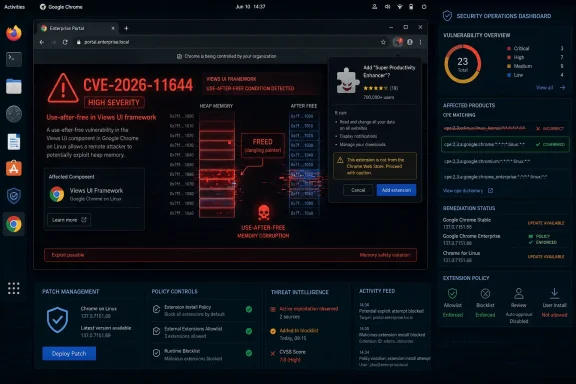 The Dangerous Part Is Chrome, Not the Kernel
CVE-2026-11644 lands in a familiar class: use after free, cataloged as CWE-416. In plain terms, software keeps using memory after it has already released it, opening the door to crashes, corruption, and, in the worst cases, attacker-controlled execution paths. Chrome has spent years hardening against this class of bug, but the sheer size of the browser makes memory safety defects a recurring tax on modern web computing.The affected component is Views, Chromium’s UI framework used for browser interface elements. That makes this vulnerability more interesting than the typical “crafted web page hits the renderer” bug. The NVD description says exploitation required convincing a user to install a malicious extension, and the attack path involved a crafted Chrome Extension.
That attacker requirement does not make the bug harmless. Extensions have long been one of the soft underbellies of browser security because they sit in the trust gap between user choice and enterprise control. A user who would never run an unknown executable may still install a productivity helper, coupon tool, PDF converter, crypto wallet companion, or “AI assistant” extension after a convincing prompt.
The result is a vulnerability that reads narrower than a drive-by browser zero-day but still has serious enterprise implications. A malicious extension is not a theoretical delivery vehicle; it is a mature ecosystem for social engineering, credential theft, traffic inspection, and persistence. CVE-2026-11644 simply adds memory corruption to a threat model that administrators already had reason to distrust.
The CPE Tells a Story, but Not Always the Story You Think
The NVD configuration shown for CVE-2026-11644 uses an AND relationship: vulnerable Google Chrome versions up to, but excluding, 149.0.7827.103, running on or with the Linux kernel. That is probably the database’s attempt to encode “Chrome on Linux.” It is not evidence that the Linux kernel itself contains the vulnerability.This is where CPEs become both useful and treacherous. Common Platform Enumeration strings are supposed to help scanners map advisories to installed software. But the moment a vulnerability is platform-specific, the database has to express a relationship between an application and an operating system. That expression can look like an application CPE plus an OS CPE, even when only the application needs patching.
So, are we missing a CPE? Possibly, but the more precise answer is that the CPE model is doing something awkward rather than necessarily incomplete. A clean representation would make it obvious that the vulnerable asset is Google Chrome for Linux, not the generic Linux kernel. If a scanner interprets the Linux kernel CPE as a vulnerable package, it is over-reading the configuration.
The version detail also deserves scrutiny. The CVE text says Linux prior to 149.0.7827.103, while several Chrome stable-channel advisories around this release used closely related platform-specific builds, including 149.0.7827.102 and 149.0.7827.103 depending on operating system. That mismatch is exactly the sort of thing that causes compliance tools to disagree for a few days after publication. Security teams should validate against the installed Chrome version and the vendor advisory rather than assume that every downstream feed has normalized the build numbers perfectly.
A “Critical” Bug With a “High” Score Is Not a Contradiction
The record is also messy in the way modern vulnerability data often is. Chromium labels the issue Critical. CISA’s ADP enrichment gives it a CVSS 3.1 base score of 7.5, which is High. NVD had not yet provided its own CVSS score in the text supplied by the user.That apparent disagreement is not unusual. Vendor severity is a product-security judgment, while CVSS is a structured scoring system. Chrome’s severity scale considers exploitability, memory-corruption potential, sandbox implications, and internal knowledge of the component. CVSS, by contrast, has to fit the issue into a vector: network attack vector, high attack complexity, no privileges required, user interaction required, unchanged scope, and high impact to confidentiality, integrity, and availability.
The “user interaction required” piece is doing a lot of work here. The attacker must persuade the victim to install a malicious extension. That is harder than sending a link to a web page, but it is not hard enough to dismiss. Extension-install lures are a well-established social-engineering path, especially when attackers imitate legitimate workplace tools or publish lookalike extensions.
In enterprise risk terms, this is not a patch-and-forget footnote. It is a reminder that CVSS can understate organizational pain when the exploit path fits common user behavior. A 7.5 can be more operationally urgent than a theoretical 9.8 if it maps cleanly to how employees actually get compromised.
Extension Risk Has Outgrown the Consumer-Browser Mental Model
The browser extension ecosystem was built around user empowerment. Install a helper, change the interface, add a password manager, translate a page, improve tabs, capture screenshots, route traffic, manage downloads. That model made sense when extensions were small conveniences in a consumer browser.In 2026, extensions are part of the enterprise software supply chain whether administrators like it or not. They can request sweeping permissions, update automatically, interact with authenticated sessions, and run inside the browser that holds the keys to SaaS identity. A malicious or compromised extension often does not need a memory-corruption vulnerability to cause damage.
CVE-2026-11644 raises the stakes because it pairs an extension delivery path with arbitrary code execution. The advisory language does not mean every extension can exploit the flaw, nor does it prove active exploitation. But it does mean the extension boundary was part of the route to impact, and that should make IT teams revisit whether their extension policy is decorative or enforceable.
The traditional user education answer — “don’t install suspicious extensions” — is inadequate. Users cannot reliably audit extension code, publisher identity, permission creep, or post-install update behavior. If the browser is a managed endpoint, extension policy should be managed too.
Linux Desktop Fleets Are Smaller, but They Are Often More Privileged
The Linux-only scope may tempt some organizations to downgrade the issue. In many Windows-heavy environments, Linux desktops are a rounding error compared with the Windows endpoint fleet. But Linux users in corporate environments are disproportionately likely to be developers, administrators, researchers, DevOps engineers, and security staff.That makes the affected population smaller but potentially more sensitive. A compromised Linux browser on a developer workstation may expose source repositories, cloud dashboards, CI/CD systems, SSH-adjacent workflows, internal documentation, or privileged SaaS sessions. The endpoint count is not the same thing as the blast radius.
Linux desktops are also more likely to sit outside the most mature parts of endpoint management. Windows fleets often benefit from well-worn patch rings, browser baselines, and EDR coverage. Linux workstations may be managed through a different toolchain, partially self-administered, or treated as exceptions because the users are technically sophisticated.
That exception culture is exactly where browser patching can lag. Developers who religiously update kernels and packages may still run a stale third-party Chrome build if it came from a manually installed repository, a vendor-provided package, or a local image. The right question is not “how many Linux desktops do we have?” but “which Linux desktops have browser access to sensitive systems?”
Patch Management Needs to Track the Browser as a First-Class Asset
Chrome updates quickly, and that is usually a strength. But rapid browser release cycles can collide with inventory systems that were designed for monthly operating-system patches. CVE-2026-11644 is another example of why browser version visibility must be near-real-time, not a quarterly audit artifact.Administrators should confirm that Linux Chrome installations have moved beyond the affected version threshold. Depending on packaging and channel, that may mean checking Chrome’s own version page, package-manager state, enterprise management console data, or endpoint inventory. The key is to verify the browser binary actually running on the endpoint, not merely the presence of an updated package in a repository.
This is especially important where Chrome coexists with Chromium builds, vendor repackages, Flatpak or Snap delivery, containerized environments, or golden images. A vulnerability database CPE may say “Google Chrome,” but the operational question is which browser builds users actually launch. Shadow browsers are still browsers.
For WindowsForum readers, the Linux scope should not create complacency on Windows. Chrome’s June 2026 desktop update train included multiple security fixes, including a separate V8 issue that attracted more urgent attention because exploitation was reportedly observed in the wild. Even when a specific CVE is Linux-only, the update event is cross-platform and should trigger a broader browser-patching check.
The NVD Lag Is a Feature of the System, Not an Excuse to Wait
The supplied record shows NVD enrichment lagging behind the initial CVE publication. Chrome supplied the description, CWE, and references on June 8. CISA-ADP added a CVSS vector shortly after. NIST added initial CPE configuration and reference typing on June 9, while NVD scoring remained unavailable in the provided detail.That timeline is normal, but it creates a dangerous window for automation. Many organizations rely on vulnerability platforms that ingest NVD, vendor advisories, CISA enrichment, scanner plugins, and third-party intelligence at different speeds. For a day or two, one dashboard may show a critical Chrome issue, another may show no score, and a third may flag a Linux kernel CPE that confuses remediation ownership.
The answer is not to distrust NVD. The answer is to understand its role. NVD is a normalization layer, not the first and final word on vendor-specific patch urgency. When Chrome publishes a security update and assigns Chromium Critical severity, waiting for every downstream field to settle is a governance choice, not a technical necessity.
Security teams should treat early records as living documents. The first version tells you something happened. The vendor advisory tells you what to update. Later enrichment helps with reporting, prioritization, and audit defensibility. Those are related jobs, but they are not the same job.
The Scanner Finding May Be Right for the Wrong Reason
If this CVE appears in a scanner as a Linux kernel problem, the remediation text should be challenged. Updating the kernel will not fix a Chrome use-after-free in Views. The remedy is updating Google Chrome to a non-affected version or removing the vulnerable browser from the system.If it appears as Chrome on Linux, the finding is more useful. Still, the scanner must correctly detect the installed version and package source. Chrome installed from Google’s repository, a distribution package, a manually downloaded .deb or .rpm, a container image, or a user-space package format may not be visible through the same inventory path.
This is why CPE matching is only one layer of vulnerability management. CPEs describe products. Real endpoints contain packages, binaries, channels, profiles, and user choices. A scanner that maps CPEs correctly can still miss the actual running application if local deployment practices are messy.
The practical test is simple: can the organization answer which Linux machines have Chrome below the fixed version, which users can install extensions, and which extensions are allowed? If not, the vulnerability has already served its purpose as a diagnostic. It has exposed a management gap.
Google’s Restricted Bug Details Are a Necessary Frustration
The Chromium issue link is access-restricted, which is common for browser security bugs shortly after patch release. Google often keeps details limited until enough users have updated, especially when exploit details could help attackers. That practice frustrates defenders who want root-cause clarity, but it is defensible in a mass-market browser ecosystem.The lack of public technical detail means administrators should avoid overfitting their response to speculation. We know the component, class, platform scope, version boundary, and attack precondition. We do not know enough from public data to write precise exploit detections or assume a particular extension permission set is required.
That uncertainty should push response toward hygiene rather than theater. Update Chrome. Review extension controls. Look for unapproved extensions. Confirm Linux endpoint coverage. Watch for vendor and scanner updates as the record stabilizes.
It should not push teams into panic. The CVE description does not state that CVE-2026-11644 is being exploited in the wild. That distinction matters because the same Chrome release cycle included other issues that drew zero-day attention. Lumping every CVE in the update into the same exploitation bucket may produce urgency, but it also degrades trust.
Enterprise Extension Policy Is the Real Control Plane
If CVE-2026-11644 teaches one lesson, it is that patching and extension governance belong together. A patched browser closes this specific memory-safety hole, but a permissive extension posture leaves the same social-engineering channel open for the next abuse case. The browser is now an application platform, and extensions are installable code.Managed Chrome environments have policy tools for allowlisting, blocklisting, permission control, extension installation sources, and forced installation of approved extensions. Those controls are often more effective than after-the-fact cleanup because they prevent the risky install from occurring in the first place. The goal is not to ban every extension; it is to make extension trust explicit.
For Linux fleets, policy enforcement may require extra attention. Chrome enterprise management is often more mature on Windows because it is tied into Group Policy, Intune, or other familiar tooling. Linux policy deployment can be just as effective, but only if someone owns it and tests it.
Developers will argue, sometimes correctly, that they need flexibility. Security teams should respond with a managed exception process rather than an unmanaged free-for-all. The right compromise is fast approval for legitimate tools, periodic review of permissions, and immediate removal of stale or suspicious extensions.
The Browser Has Become the Endpoint
The deeper story behind CVE-2026-11644 is that Chrome is no longer “just another app.” It is the front door to identity, collaboration, code, finance, administration, and AI tools. A browser compromise can be an endpoint compromise, a cloud compromise, or both.That reality makes platform-specific browser CVEs more important than their narrow wording suggests. A Linux-only Chrome bug may affect fewer endpoints, but those endpoints may hold disproportionate access. A malicious-extension precondition may sound like a user mistake, but it is really a policy and supply-chain problem. A confusing CPE may look like metadata trivia, but it can route remediation to the wrong team.
Security operations still depend on classification systems, and CPEs are part of that machinery. But no classification system can replace product understanding. When the affected product is Chrome on Linux, the fix belongs to browser patch management and extension governance, not kernel maintenance.
This is the point where vulnerability management stops being clerical. The job is not merely to clear a CVE from a dashboard. The job is to understand what path an attacker would take, which users are exposed, and which controls would break the chain.
The Linux Chrome Finding That Should Change More Than One Dashboard
The immediate response is straightforward, but the durable lesson is broader. CVE-2026-11644 should be treated as a Chrome-on-Linux browser security issue with an extension-mediated attack path, not as a generic Linux kernel flaw or an abstract database entry.- Organizations should update Google Chrome on Linux systems to a fixed build at or above the vendor’s corrected release threshold.
- Security teams should verify the running Chrome version on endpoints rather than relying only on package repository status.
- Vulnerability managers should review scanner output carefully if the finding appears tied to the Linux kernel CPE.
- Administrators should audit Chrome extension installation policy, especially for Linux workstations used by developers and privileged staff.
- Risk owners should distinguish CVE-2026-11644 from separate Chrome issues in the same release cycle that may have different exploitation status.
- Asset inventories should treat browsers and extensions as first-class software supply-chain components, not user conveniences.
References
- Primary source: NVD / Chromium
Published: 2026-06-15T19:13:52-07:00
NVD - CVE-2026-11644
 nvd.nist.gov
- Security advisory: MSRC
Published: 2026-06-15T19:13:52-07:00
Original feed URL
Security Update Guide - Microsoft Security Response Center
 msrc.microsoft.com
