

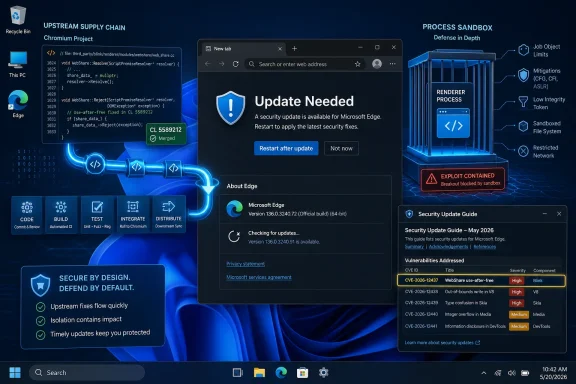
CVE-2026-12437 appears in Microsoft’s Security Update Guide because Microsoft Edge is built on Chromium, and on June 2026 Microsoft used the guide to tell Edge customers that its Chromium-based browser had absorbed the upstream fix for a WebShare use-after-free vulnerability. That small database entry is doing more than clerical bookkeeping. It is a reminder that, for modern Windows security, the browser is no longer just an app sitting on top of the operating system; it is shared infrastructure, updated on a faster clock than Windows itself. The practical answer is simple — check Edge’s version and update it — but the larger story is about how Microsoft now inherits, ships, and documents security fixes from the Chromium supply chain.
The confusing part of CVE-2026-12437 is not the vulnerability description. “Use after free in WebShare” is standard browser-security phrasing: a memory-safety flaw in a component that implements a web platform feature. The confusing part is why a Chrome CVE is sitting in Microsoft’s Security Update Guide, a place many Windows administrators still mentally associate with Windows, Office, Exchange, SQL Server, and other first-party Microsoft products.
The answer is architectural. Microsoft Edge, in its current Chromium-based form, consumes large portions of the same open-source browser engine and platform code used by Google Chrome and other Chromium-derived browsers. When a flaw is fixed upstream in Chromium, Microsoft still has to integrate, build, test, sign, and ship that fix in Edge. The vulnerability may have been found in Chromium, but Edge users are affected until Microsoft’s Chromium-based build contains the patch.
That is why the Security Update Guide entry uses language that can feel almost legalistic: the CVE is in Chromium open-source software consumed by Edge, and Microsoft documents it to announce that the latest Edge version is no longer vulnerable. In other words, Microsoft is not claiming authorship of the bug. It is claiming responsibility for telling its customers when Microsoft’s browser has stopped carrying it.
This distinction matters because enterprise patch management is built on vendor accountability, not source-code genealogy. A security team does not merely ask, “Who wrote the vulnerable component?” It asks, “Which products in my estate include that component, and which vendor update removes my exposure?” For Windows shops, Microsoft’s Security Update Guide is one of the places where that answer is expected to appear.
That hybrid arrangement is not a dodge. It is the industry’s operating model. Chromium is open source, but it is not a neutral academic library that vendors occasionally glance at. It is a massive, fast-moving body of code that implements JavaScript execution, rendering, media, graphics, networking, browser APIs, site isolation features, sandboxing layers, and cross-platform integration points. A serious bug in one of those layers is rarely “just a Chrome bug” once it lands in downstream browsers.
CVE-2026-12437 is tied to WebShare, the browser API that lets web content invoke native sharing surfaces under controlled conditions. On Windows, that kind of feature is particularly interesting because it sits near the boundary between web content and operating-system-integrated user experiences. Even when a vulnerability requires preconditions — in this case, reporting indicates the attacker would need a compromised renderer process before attempting a sandbox escape — browser vendors treat this class of bug seriously because browser exploitation often chains flaws together.
That is the key mental model. Many modern browser compromises are not one clean leap from website to system takeover. They are sequences: a renderer compromise here, a sandbox escape there, perhaps followed by persistence or credential theft through some separate mechanism. A vulnerability that “only” helps after the renderer is compromised may still be a critical piece of an exploit chain.
If a scanner flags CVE-2026-12437 on a Windows endpoint, the security team needs to know whether Edge is affected, which channel is relevant, and whether Microsoft has shipped a fixed build. Without Microsoft documenting the CVE, administrators would be stuck triangulating between Google Chrome release posts, Chromium issue trackers, third-party CVE databases, and Edge version numbers. That is a recipe for delay, duplication, and false positives.
By placing the CVE in the Security Update Guide, Microsoft gives defenders a Microsoft-owned reference point. That is especially important in regulated environments where “Google fixed it in Chrome” may not be considered sufficient evidence that “Microsoft fixed it in Edge.” Compliance teams want a vendor statement for the product they deploy, not a philosophical argument about open-source lineage.
There is also a practical scanning consequence. Vulnerability management platforms frequently key off CVE IDs, affected products, and fixed versions. If Microsoft does not map a Chromium CVE into the Edge universe, the scanner ecosystem may fill the vacuum inconsistently. Some tools will flag Edge because it contains Chromium; others may wait for Microsoft metadata; still others may mislabel the product entirely. Documentation is how Microsoft reduces that ambiguity.
That difference is more than semantics. Chrome, Edge, Brave, Opera, Vivaldi, Electron-based applications, embedded WebView runtimes, and other software can depend on different parts of Chromium at different cadences. A fix appearing in one product does not automatically mean every Chromium consumer is fixed on the same day. Each vendor must take the patch through its own build and release process.
Microsoft’s phrasing — Chromium OSS consumed by Edge — is therefore doing careful work. It tells the reader that the root issue is upstream, but the product exposure is downstream. Edge is not vulnerable because it is secretly Chrome. Edge is vulnerable, or was vulnerable, because it incorporates the affected Chromium component.
That nuance is important for WindowsForum readers because Edge is now woven into more than the icon on the taskbar. Microsoft Edge WebView2 is widely used by desktop applications to render web content inside native Windows apps. Enterprises may also deploy Edge through Stable, Extended Stable, Beta, Dev, and managed update policies. Browser security is now an estate-wide asset-management problem, not merely a user preference.
Every web platform API adds surface area. Some APIs talk to cameras, microphones, USB devices, Bluetooth devices, clipboards, payment handlers, file pickers, or operating-system sharing targets. Browsers wrap those APIs in permissions, user gestures, process separation, and sandboxing, but the implementation still has to manage complex object lifetimes and cross-process communication.
A use-after-free bug is one of the oldest and most stubborn memory-safety failure modes. It happens when software continues to use memory after it has been freed, creating an opportunity for corrupted state, crashes, or attacker-controlled behavior. In browser engines, where untrusted web content can exercise complicated code paths at scale, memory-safety flaws are especially valuable to attackers.
The reported shape of CVE-2026-12437 — a WebShare use-after-free on Windows with potential sandbox escape after renderer compromise — puts it in a category defenders should not casually dismiss. The words “had compromised the renderer process” are not an all-clear. They are an exploitation precondition. Attackers who specialize in browser chains often look for exactly this kind of second-stage primitive.
That design has raised the cost of exploitation dramatically. An attacker who gets code execution in a renderer may still be trapped in a constrained environment. To do more serious damage, the attacker often needs a second vulnerability that breaks out of the sandbox or abuses a privileged broker, service, or operating-system integration point.
This is why sandbox-escape language should focus attention rather than reduce it. A sandbox escape is not always the first bug in an exploit chain; it is often the bug that turns a browser compromise into something more consequential. If a crafted HTML page can help move from a compromised renderer toward a more privileged context, defenders have reason to patch quickly even if the vulnerability is not described as a one-click standalone system takeover.
The public advisory language around CVE-2026-12437 does not mean every Edge user was one page view away from full compromise. It does mean that vulnerable browser builds contained a flaw in a security-sensitive boundary. For enterprise risk management, that is enough to move the issue out of the “we’ll catch it next maintenance window” pile.
Patch Tuesday still matters for Windows. But browsers move differently. Chrome and Edge stable updates can arrive outside the monthly Windows servicing cadence, especially when Chromium security fixes need to move quickly. For users, that is mostly invisible. For administrators, it creates a parallel update rail that has to be monitored, tested, and enforced.
The old habit of thinking “I patched Windows this month, therefore the endpoint is covered” is not enough. Edge updates through its own mechanisms. WebView2 has its own runtime considerations. Managed environments may pin, defer, or stage browser updates. Kiosk machines, VDI images, disconnected systems, and golden images can all fall behind even when the operating system itself looks current.
That is why the question “How can I see the version of the browser?” is not a footnote. It is the operational core of the advisory. The only useful answer to a Chromium CVE in Edge is not “Microsoft says the latest version is safe.” It is “here is the version actually running on this device, and here is whether it is at or beyond the fixed build.”
Chrome uses the same basic pattern. Open the three-dot menu, choose Help, then About Google Chrome, or type
The restart detail is not pedantry. Browser updates frequently download in the background, then wait for relaunch. A user with dozens of tabs and weeks of browser uptime can appear “updated” in a management console while still running old code until the process exits. On shared systems and always-on workstations, that gap can matter.
For administrators, the version question becomes an inventory question. Endpoint management tools, configuration management databases, PowerShell scripts, vulnerability scanners, and browser management policies should all converge on the same answer: which Edge build is installed, which channel it belongs to, and whether the running version is vulnerable. If those systems disagree, the advisory has already done its job by exposing a process weakness.
Then there is WebView2. Many Windows applications use the Edge WebView2 runtime to display web content inside native applications. Microsoft’s Evergreen model is designed to keep that runtime updated, but enterprises can still run into deployment choices, offline installers, fixed-version runtimes, application compatibility testing, and packaging delays. A Chromium-class vulnerability may therefore require checking more than the browser UI.
This is where vulnerability management gets awkward. A desktop may have a patched Edge browser but an application bundle with an older embedded runtime. Or a security scanner may report Chromium exposure without clearly explaining whether it is Edge, WebView2, Chrome, an Electron app, or another bundled component. The shared Chromium ecosystem improves web compatibility, but it also creates shared ambiguity.
Microsoft’s Security Update Guide cannot solve all of that. What it can do is provide an authoritative signal for Microsoft’s own Chromium-based browser. From there, administrators still need to ask the broader estate question: where else does Chromium code live, and how quickly do those copies receive fixes?
That boringness is a security achievement. Browser vendors have spent years turning emergency patching from a manual download ritual into a background service. The system is not perfect — restarts still matter, managed policies can interfere, and unsupported operating systems complicate everything — but the default update path is far better than the plug-in chaos of the 2000s.
Still, users should not assume that “I use Edge, not Chrome” exempts them from Chrome-adjacent security news. If the vulnerable component is in Chromium, the brand name on the window is only part of the story. Edge users should care about Chromium advisories because Edge is a Chromium browser.
The reverse is also true. A fix in Chrome does not patch Edge until Microsoft ships the corresponding Edge update. In most cases the lag is short, but the correct security posture is to verify the installed product, not infer protection from a neighboring vendor’s release.
That translation is necessary because open-source consumption does not erase vendor responsibility. If Microsoft ships a product that includes Chromium code, Microsoft must tell customers when that product is vulnerable and when it is fixed. It does not matter that the bug was assigned in the Chromium ecosystem. What matters is that Edge users need a Microsoft answer.
There is a subtle benefit here for security teams: the same CVE can remain the common tracking handle across vendors. Rather than inventing a separate Microsoft-only identifier for a Chromium flaw, the industry can preserve a single vulnerability identity while each affected vendor documents its own product status. That keeps scanners, advisories, and incident tickets aligned.
But there is also a subtle cost. CVE reuse across products can make vulnerability feeds look noisier. A single Chromium issue may appear in Google, Microsoft, Linux distribution, and third-party application contexts. That is not duplication in the trivial sense. It is the same defect traveling through a software supply chain.
CVE-2026-12437 is a neat example because the product boundary is visible. The vulnerable code is upstream Chromium. The affected user-facing product may be Google Chrome, Microsoft Edge, or another Chromium consumer. The remediation is not “patch Chromium” in the abstract; it is install the vendor build that contains the Chromium fix.
That is why version numbers matter more than marketing names. “Latest Edge” is a moving target. “At or beyond the fixed build for the relevant channel” is operationally meaningful. In a managed environment, even that sentence needs translation into deployment rings, update policies, restart enforcement, and exception handling.
The browser has become one of the most security-critical applications on the endpoint precisely because it is the place where untrusted code meets trusted identity. Users authenticate to work apps, cloud consoles, password managers, banking sites, admin portals, and collaboration platforms through the browser. A browser sandbox escape is therefore not just a browser event; it is a potential foothold near the center of the user’s digital life.
That does not mean every Chromium consumer is equally exposed to every Chromium CVE. Code paths differ, features may be disabled, sandboxes vary, and platform-specific conditions matter. But defenders should not wait until after an incident to discover that a vulnerable web engine was bundled inside an application nobody thought of as a browser.
The software industry has normalized shared components because shared components are efficient. Chromium gives vendors a world-class web engine, fast standards support, and compatibility with the modern web. The security price is that everyone downstream must be disciplined about ingestion and release.
Microsoft’s Security Update Guide entry is one visible checkpoint in that chain. It tells us Edge has a Microsoft-documented fix path. It also hints at the less visible work every organization must do: map browser-derived code, update it quickly, and avoid pretending that branding changes the underlying risk.
 Microsoft’s Browser Is Now Part of Someone Else’s Security Weather
The confusing part of CVE-2026-12437 is not the vulnerability description. “Use after free in WebShare” is standard browser-security phrasing: a memory-safety flaw in a component that implements a web platform feature. The confusing part is why a Chrome CVE is sitting in Microsoft’s Security Update Guide, a place many Windows administrators still mentally associate with Windows, Office, Exchange, SQL Server, and other first-party Microsoft products.The answer is architectural. Microsoft Edge, in its current Chromium-based form, consumes large portions of the same open-source browser engine and platform code used by Google Chrome and other Chromium-derived browsers. When a flaw is fixed upstream in Chromium, Microsoft still has to integrate, build, test, sign, and ship that fix in Edge. The vulnerability may have been found in Chromium, but Edge users are affected until Microsoft’s Chromium-based build contains the patch.
That is why the Security Update Guide entry uses language that can feel almost legalistic: the CVE is in Chromium open-source software consumed by Edge, and Microsoft documents it to announce that the latest Edge version is no longer vulnerable. In other words, Microsoft is not claiming authorship of the bug. It is claiming responsibility for telling its customers when Microsoft’s browser has stopped carrying it.
This distinction matters because enterprise patch management is built on vendor accountability, not source-code genealogy. A security team does not merely ask, “Who wrote the vulnerable component?” It asks, “Which products in my estate include that component, and which vendor update removes my exposure?” For Windows shops, Microsoft’s Security Update Guide is one of the places where that answer is expected to appear.
A Chromium CVE Becomes a Microsoft Problem the Moment Edge Ships It
There was a time when a Windows administrator could think of Internet Explorer as Microsoft all the way down: Microsoft engine, Microsoft shell integration, Microsoft servicing pipeline. Edge changed that once, and Chromium Edge changed it again. The modern browser security model is a hybrid arrangement: Microsoft owns the Edge product and distribution channel, while much of the underlying web platform machinery flows from Chromium.That hybrid arrangement is not a dodge. It is the industry’s operating model. Chromium is open source, but it is not a neutral academic library that vendors occasionally glance at. It is a massive, fast-moving body of code that implements JavaScript execution, rendering, media, graphics, networking, browser APIs, site isolation features, sandboxing layers, and cross-platform integration points. A serious bug in one of those layers is rarely “just a Chrome bug” once it lands in downstream browsers.
CVE-2026-12437 is tied to WebShare, the browser API that lets web content invoke native sharing surfaces under controlled conditions. On Windows, that kind of feature is particularly interesting because it sits near the boundary between web content and operating-system-integrated user experiences. Even when a vulnerability requires preconditions — in this case, reporting indicates the attacker would need a compromised renderer process before attempting a sandbox escape — browser vendors treat this class of bug seriously because browser exploitation often chains flaws together.
That is the key mental model. Many modern browser compromises are not one clean leap from website to system takeover. They are sequences: a renderer compromise here, a sandbox escape there, perhaps followed by persistence or credential theft through some separate mechanism. A vulnerability that “only” helps after the renderer is compromised may still be a critical piece of an exploit chain.
The Security Update Guide Is Speaking to Inventory Systems, Not Just Humans
Microsoft’s Security Update Guide is not written like a magazine, and it is not meant to be. Its terse language exists because machines, vulnerability scanners, compliance tools, and security operations teams consume it. A CVE entry that looks redundant to a home user can be extremely useful to an administrator trying to reconcile scanner output against vendor advisories.If a scanner flags CVE-2026-12437 on a Windows endpoint, the security team needs to know whether Edge is affected, which channel is relevant, and whether Microsoft has shipped a fixed build. Without Microsoft documenting the CVE, administrators would be stuck triangulating between Google Chrome release posts, Chromium issue trackers, third-party CVE databases, and Edge version numbers. That is a recipe for delay, duplication, and false positives.
By placing the CVE in the Security Update Guide, Microsoft gives defenders a Microsoft-owned reference point. That is especially important in regulated environments where “Google fixed it in Chrome” may not be considered sufficient evidence that “Microsoft fixed it in Edge.” Compliance teams want a vendor statement for the product they deploy, not a philosophical argument about open-source lineage.
There is also a practical scanning consequence. Vulnerability management platforms frequently key off CVE IDs, affected products, and fixed versions. If Microsoft does not map a Chromium CVE into the Edge universe, the scanner ecosystem may fill the vacuum inconsistently. Some tools will flag Edge because it contains Chromium; others may wait for Microsoft metadata; still others may mislabel the product entirely. Documentation is how Microsoft reduces that ambiguity.
“Chrome CVE” Is a Misleading Shortcut
Calling CVE-2026-12437 a “Chrome CVE” is understandable, but imprecise. The CVE description references Google Chrome because Chrome is the most visible consumer of Chromium and often the first place users see security release notes. But the vulnerable code is in Chromium, and Chromium is a codebase, not a single branded browser.That difference is more than semantics. Chrome, Edge, Brave, Opera, Vivaldi, Electron-based applications, embedded WebView runtimes, and other software can depend on different parts of Chromium at different cadences. A fix appearing in one product does not automatically mean every Chromium consumer is fixed on the same day. Each vendor must take the patch through its own build and release process.
Microsoft’s phrasing — Chromium OSS consumed by Edge — is therefore doing careful work. It tells the reader that the root issue is upstream, but the product exposure is downstream. Edge is not vulnerable because it is secretly Chrome. Edge is vulnerable, or was vulnerable, because it incorporates the affected Chromium component.
That nuance is important for WindowsForum readers because Edge is now woven into more than the icon on the taskbar. Microsoft Edge WebView2 is widely used by desktop applications to render web content inside native Windows apps. Enterprises may also deploy Edge through Stable, Extended Stable, Beta, Dev, and managed update policies. Browser security is now an estate-wide asset-management problem, not merely a user preference.
WebShare Is a Small Door Into a Large Attack Surface
The Web Share API sounds harmless because the user-facing feature is harmless: a website can invoke a native sharing interface so a user can send a link, title, text, or file to another application. It is part of the broader effort to make web apps feel more like native apps. That convenience is exactly why the code has to be carefully policed.Every web platform API adds surface area. Some APIs talk to cameras, microphones, USB devices, Bluetooth devices, clipboards, payment handlers, file pickers, or operating-system sharing targets. Browsers wrap those APIs in permissions, user gestures, process separation, and sandboxing, but the implementation still has to manage complex object lifetimes and cross-process communication.
A use-after-free bug is one of the oldest and most stubborn memory-safety failure modes. It happens when software continues to use memory after it has been freed, creating an opportunity for corrupted state, crashes, or attacker-controlled behavior. In browser engines, where untrusted web content can exercise complicated code paths at scale, memory-safety flaws are especially valuable to attackers.
The reported shape of CVE-2026-12437 — a WebShare use-after-free on Windows with potential sandbox escape after renderer compromise — puts it in a category defenders should not casually dismiss. The words “had compromised the renderer process” are not an all-clear. They are an exploitation precondition. Attackers who specialize in browser chains often look for exactly this kind of second-stage primitive.
The Renderer Is Supposed to Be a Cage, Not a Castle
Modern browsers assume that web content is hostile. That assumption led to multi-process architectures where tabs, frames, and sensitive browser services are separated from one another. The renderer process is where untrusted page content does much of its work, and the browser sandbox is designed to limit the damage if that renderer is compromised.That design has raised the cost of exploitation dramatically. An attacker who gets code execution in a renderer may still be trapped in a constrained environment. To do more serious damage, the attacker often needs a second vulnerability that breaks out of the sandbox or abuses a privileged broker, service, or operating-system integration point.
This is why sandbox-escape language should focus attention rather than reduce it. A sandbox escape is not always the first bug in an exploit chain; it is often the bug that turns a browser compromise into something more consequential. If a crafted HTML page can help move from a compromised renderer toward a more privileged context, defenders have reason to patch quickly even if the vulnerability is not described as a one-click standalone system takeover.
The public advisory language around CVE-2026-12437 does not mean every Edge user was one page view away from full compromise. It does mean that vulnerable browser builds contained a flaw in a security-sensitive boundary. For enterprise risk management, that is enough to move the issue out of the “we’ll catch it next maintenance window” pile.
Microsoft’s Documentation Is Also a Quiet Admission About Patch Cadence
The Security Update Guide entry effectively says: do not judge Edge exposure solely by Chrome’s announcement. Judge it by the Edge build Microsoft has shipped. That is a necessary admission in the Chromium era, because browser patching no longer follows the monthly rhythm many Windows administrators grew up with.Patch Tuesday still matters for Windows. But browsers move differently. Chrome and Edge stable updates can arrive outside the monthly Windows servicing cadence, especially when Chromium security fixes need to move quickly. For users, that is mostly invisible. For administrators, it creates a parallel update rail that has to be monitored, tested, and enforced.
The old habit of thinking “I patched Windows this month, therefore the endpoint is covered” is not enough. Edge updates through its own mechanisms. WebView2 has its own runtime considerations. Managed environments may pin, defer, or stage browser updates. Kiosk machines, VDI images, disconnected systems, and golden images can all fall behind even when the operating system itself looks current.
That is why the question “How can I see the version of the browser?” is not a footnote. It is the operational core of the advisory. The only useful answer to a Chromium CVE in Edge is not “Microsoft says the latest version is safe.” It is “here is the version actually running on this device, and here is whether it is at or beyond the fixed build.”
The Version Number Is the Evidence
For an individual user, checking Edge is straightforward. Open Microsoft Edge, select the three-dot menu, go to Help and feedback, and choose About Microsoft Edge. You can also typeedge://settings/help into the address bar. That page shows the installed version and normally triggers an update check.Chrome uses the same basic pattern. Open the three-dot menu, choose Help, then About Google Chrome, or type
chrome://settings/help into the address bar. The browser displays its version and checks for updates. After a security update, users often need to restart the browser before the new binaries are actually running.The restart detail is not pedantry. Browser updates frequently download in the background, then wait for relaunch. A user with dozens of tabs and weeks of browser uptime can appear “updated” in a management console while still running old code until the process exits. On shared systems and always-on workstations, that gap can matter.
For administrators, the version question becomes an inventory question. Endpoint management tools, configuration management databases, PowerShell scripts, vulnerability scanners, and browser management policies should all converge on the same answer: which Edge build is installed, which channel it belongs to, and whether the running version is vulnerable. If those systems disagree, the advisory has already done its job by exposing a process weakness.
The Enterprise Edge Story Is Bigger Than One Browser Icon
Microsoft Edge is not only the browser a user launches. In many Windows environments, Edge is also a managed enterprise application with policies, update rings, compatibility modes, and security baselines. It may be tied into Microsoft 365 workflows, identity controls, Defender reporting, and application control policies. The more central it becomes, the less acceptable it is to treat its Chromium inheritance as somebody else’s problem.Then there is WebView2. Many Windows applications use the Edge WebView2 runtime to display web content inside native applications. Microsoft’s Evergreen model is designed to keep that runtime updated, but enterprises can still run into deployment choices, offline installers, fixed-version runtimes, application compatibility testing, and packaging delays. A Chromium-class vulnerability may therefore require checking more than the browser UI.
This is where vulnerability management gets awkward. A desktop may have a patched Edge browser but an application bundle with an older embedded runtime. Or a security scanner may report Chromium exposure without clearly explaining whether it is Edge, WebView2, Chrome, an Electron app, or another bundled component. The shared Chromium ecosystem improves web compatibility, but it also creates shared ambiguity.
Microsoft’s Security Update Guide cannot solve all of that. What it can do is provide an authoritative signal for Microsoft’s own Chromium-based browser. From there, administrators still need to ask the broader estate question: where else does Chromium code live, and how quickly do those copies receive fixes?
The Home User Version of This Story Is Boring, Which Is Good
For most home users, the right answer is refreshingly plain: open Edge’s About page, let it update, and restart the browser. If the browser says it is up to date on a current stable build, that is usually the end of the matter. The consumer browser update model is designed to make this kind of vulnerability disappear without requiring the user to understand CVEs, renderers, or sandbox escapes.That boringness is a security achievement. Browser vendors have spent years turning emergency patching from a manual download ritual into a background service. The system is not perfect — restarts still matter, managed policies can interfere, and unsupported operating systems complicate everything — but the default update path is far better than the plug-in chaos of the 2000s.
Still, users should not assume that “I use Edge, not Chrome” exempts them from Chrome-adjacent security news. If the vulnerable component is in Chromium, the brand name on the window is only part of the story. Edge users should care about Chromium advisories because Edge is a Chromium browser.
The reverse is also true. A fix in Chrome does not patch Edge until Microsoft ships the corresponding Edge update. In most cases the lag is short, but the correct security posture is to verify the installed product, not infer protection from a neighboring vendor’s release.
The Security Guide Entry Is a Translation Layer
The most useful way to read Microsoft’s CVE-2026-12437 entry is as a translation. It translates a Chromium vulnerability into Microsoft product impact. It translates an upstream security fix into an Edge customer action. It translates browser-engine risk into the language of enterprise compliance.That translation is necessary because open-source consumption does not erase vendor responsibility. If Microsoft ships a product that includes Chromium code, Microsoft must tell customers when that product is vulnerable and when it is fixed. It does not matter that the bug was assigned in the Chromium ecosystem. What matters is that Edge users need a Microsoft answer.
There is a subtle benefit here for security teams: the same CVE can remain the common tracking handle across vendors. Rather than inventing a separate Microsoft-only identifier for a Chromium flaw, the industry can preserve a single vulnerability identity while each affected vendor documents its own product status. That keeps scanners, advisories, and incident tickets aligned.
But there is also a subtle cost. CVE reuse across products can make vulnerability feeds look noisier. A single Chromium issue may appear in Google, Microsoft, Linux distribution, and third-party application contexts. That is not duplication in the trivial sense. It is the same defect traveling through a software supply chain.
The Patch Is the Product
Security teams often talk about software bills of materials as if the main challenge is knowing what components exist inside a product. That is only half the problem. The other half is knowing when those components change, who ships the change, and how quickly the patched version reaches real machines.CVE-2026-12437 is a neat example because the product boundary is visible. The vulnerable code is upstream Chromium. The affected user-facing product may be Google Chrome, Microsoft Edge, or another Chromium consumer. The remediation is not “patch Chromium” in the abstract; it is install the vendor build that contains the Chromium fix.
That is why version numbers matter more than marketing names. “Latest Edge” is a moving target. “At or beyond the fixed build for the relevant channel” is operationally meaningful. In a managed environment, even that sentence needs translation into deployment rings, update policies, restart enforcement, and exception handling.
The browser has become one of the most security-critical applications on the endpoint precisely because it is the place where untrusted code meets trusted identity. Users authenticate to work apps, cloud consoles, password managers, banking sites, admin portals, and collaboration platforms through the browser. A browser sandbox escape is therefore not just a browser event; it is a potential foothold near the center of the user’s digital life.
The Real Lesson Is to Patch the Chromium Supply Chain, Not Just Edge
The easiest mistake is to treat this as a narrow Edge advisory. The better lesson is broader: inventory every Chromium-based browser and runtime you allow, then make sure each has a reliable update mechanism. Edge is the Microsoft-managed part of the story, but the same endpoint may also carry Chrome, Brave, Electron apps, Teams components, developer tools, game launchers, or vendor applications with embedded web runtimes.That does not mean every Chromium consumer is equally exposed to every Chromium CVE. Code paths differ, features may be disabled, sandboxes vary, and platform-specific conditions matter. But defenders should not wait until after an incident to discover that a vulnerable web engine was bundled inside an application nobody thought of as a browser.
The software industry has normalized shared components because shared components are efficient. Chromium gives vendors a world-class web engine, fast standards support, and compatibility with the modern web. The security price is that everyone downstream must be disciplined about ingestion and release.
Microsoft’s Security Update Guide entry is one visible checkpoint in that chain. It tells us Edge has a Microsoft-documented fix path. It also hints at the less visible work every organization must do: map browser-derived code, update it quickly, and avoid pretending that branding changes the underlying risk.
The Edge Version Check Is the Small Ritual That Proves the Big System Works
The concrete action here is modest, but it is the action that turns advisory language into protection.- Open Microsoft Edge and visit
edge://settings/helpto see the installed version and trigger an update check. - Restart Edge after the update, because downloaded browser patches do not fully protect a still-running old process.
- In managed environments, verify the deployed Edge channel and version through endpoint inventory rather than relying only on user reports.
- Check WebView2 and other Chromium-based runtimes where line-of-business applications depend on embedded web content.
- Treat Chromium CVEs in Microsoft’s Security Update Guide as Microsoft product advisories for Edge, not as irrelevant Chrome-only noise.
- Use the CVE as a prompt to validate browser update policy, restart enforcement, and scanner accuracy across the fleet.
References
- Primary source: MSRC
Published: 2026-06-19T13:52:53-07:00
Security Update Guide - Microsoft Security Response Center
 msrc.microsoft.com
- Related coverage: sentinelone.com
CVE-2025-12437: Google Chrome Use After Free Vulnerability
CVE-2025-12437 is a use after free vulnerability in Google Chrome PageInfo. Learn about its impact, affected versions, and mitigation methods.www.sentinelone.com
- Related coverage: vulnerability.circl.lu
Vulnerability-Lookup
Vulnerability-Lookup - Fast vulnerability lookup correlation from different sources.vulnerability.circl.lu - Related coverage: rapid7.com
Rapid7 Vulnerability Database
Rapid7's VulnDB is curated repository of vetted computer software exploits and exploitable vulnerabilities.www.rapid7.com - Related coverage: wiz.io
CVE-2025-12437 Impact, Exploitability, and Mitigation Steps | Wiz
Understand the critical aspects of CVE-2025-12437 with a detailed vulnerability assessment, exploitation potential, affected technologies, and remediation guidance.www.wiz.io - Related coverage: www2.gov.bc.ca
- Related coverage: aha.org
h isac tlp white microsoft edge addresses exploited zero day vulnerability cve 2024 7971 8 23 2024
PDF documentwww.aha.org
- Official source: learn.microsoft.com
Microsoft Edge release notes for Stable Channel | Microsoft Learn
Microsoft Edge release note for the Stable Channellearn.microsoft.com - Related coverage: cirt.gy
