Microsoft documents CVE-2026-12458 in the Security Update Guide because the flaw lives in Chromium open-source code used by Microsoft Edge, and Edge Stable version 149.0.4022.80, released on June 18, 2026, incorporates the Chromium security fixes that make Edge no longer vulnerable. That is the short answer, but it understates the larger story: Microsoft’s browser security advisories are now partly a map of Google’s browser engine supply chain. A Chrome CVE can become an Edge CVE without the vulnerable code ever being written by Microsoft, because Edge is not merely inspired by Chromium; it is built on it. For Windows users and administrators, the practical question is not whether the badge says Chrome or Edge, but whether the installed Edge build has absorbed the fixed Chromium code.
The confusing part of CVE-2026-12458 is right there in the wording. “Incorrect security UI in Passwords” sounds like a Chrome problem, and in the narrowest upstream sense, it is. The issue was assigned in Chromium, the open-source browser project that supplies the rendering engine, browser plumbing, password manager components, and security surfaces used by Google Chrome and Microsoft Edge alike.
Microsoft includes it in the Security Update Guide because Edge consumes that code. When Chromium ships a fix for a security problem that affects code Edge carries, Microsoft has to tell Edge customers when the corresponding Edge build is safe. The Security Update Guide is therefore not just a list of Microsoft-originated bugs; it is also a disclosure channel for third-party and open-source components that Microsoft products embed.
That distinction matters because many Windows users still think of Edge as “Microsoft’s browser” in the same tidy way Internet Explorer was Microsoft’s browser. The modern Edge is a Microsoft product wrapped around a large Chromium core. Microsoft adds services, policies, enterprise management, sync integrations, UI choices, and Windows hooks, but much of the browser’s security inheritance comes from the Chromium project.
The result is a shared vulnerability economy. A flaw in Chromium’s password UI may be found, triaged, and fixed upstream, but it becomes operationally relevant to Edge the moment the vulnerable code path exists in Microsoft’s build. Microsoft’s role is to integrate the fix, ship an updated Edge package, and document the exposure in terms that Windows administrators can track.
That is the point of Microsoft’s wording: the vulnerability is in Chromium OSS, and Microsoft Edge is Chromium-based. If the affected component is compiled into Edge and reachable in Edge, then Edge customers need a Microsoft advisory entry even if the bug originated outside Microsoft’s own codebase. The label “Chrome CVE” is less important than the provenance of the component.
This is not unusual in modern software. Windows, Office, Edge, Teams, Visual Studio Code, and server products all depend on open-source libraries or shared platform components. When a flaw is fixed in an upstream dependency, the downstream vendor still owns the customer-facing duty to ship and document the patch.
In browsers, that dependency chain moves especially fast. Chromium security fixes can arrive outside the traditional Patch Tuesday rhythm, and Edge security release notes routinely state that a build “incorporates the latest Security Updates of the Chromium project.” That phrasing is boilerplate, but it is also an accurate description of how browser security now works.
Password managers, autofill prompts, origin indicators, permission prompts, and saved-credential surfaces all depend on users being able to tell which interface belongs to the browser and which belongs to the webpage. If attacker-controlled content can confuse that distinction, the browser has failed at a subtle but important job. Security UI is not decoration; it is part of the security boundary users are expected to reason about.
The danger with password UI bugs is that they tend to exploit normal behavior. A malicious page does not necessarily need to “hack” the password database in the cinematic sense. It may instead persuade a user to interact with a crafted page, mimic trusted interface patterns, or take advantage of a browser gesture that exposes information in a way the user does not understand.
That is why these issues often involve user interaction but still receive serious treatment. A vulnerability that requires a click, a tap, or a gesture is still a vulnerability when the entire web is built around persuading users to click, tap, and gesture. Browser security cannot assume perfect suspicion from ordinary people.
The awkwardness is that “latest” is not always the same thing across every device. Edge Stable, Extended Stable, Android, iOS, Linux, macOS, and enterprise-managed Windows deployments can move on different schedules. A home user may get the fix quietly through the Edge updater, while a managed fleet may wait for rings, policy validation, virtual desktop image refreshes, or compatibility testing.
That lag is where advisories become operational documents. A CVE entry in the Security Update Guide gives vulnerability scanners, compliance dashboards, and IT teams a canonical Microsoft record to match against installed Edge versions. Without that entry, an enterprise might see a Chrome/Chromium vulnerability and have to infer whether Edge is affected. With it, the answer is explicit.
The Microsoft advisory is also doing something subtle for procurement and governance. It tells organizations that Edge’s Chromium inheritance is not invisible. Microsoft is acknowledging the dependency and exposing it through the same mechanism customers already use for Windows and Microsoft application security tracking.
That page is more important than it looks. It is not merely an “about” screen; it is the browser’s self-check station. If an update is available and policy allows it, Edge should begin downloading it, then prompt for a restart to finish applying the new build.
On Windows, users can also check Edge’s version from Settings under Apps, but the in-browser page is usually clearer because it triggers the update check. For administrators, the version can be queried through endpoint management tools, inventory agents, PowerShell, registry checks, or Microsoft Intune reporting, depending on how the fleet is managed. The central fact remains the same: the build number is the security fact that matters.
For CVE-2026-12458, users should compare their installed build with the fixed Edge release line. If the browser reports version 149.0.4022.80 or a later build in the same or newer channel, it should include the relevant Chromium security fixes. If it reports an older build, the system should be updated or investigated for policy, updater, or connectivity problems.
A corporate Edge deployment may use update policies, rings, staged rollouts, rollback controls, Extended Stable channels, and change windows. Those controls are rational. A browser is now a line-of-business runtime, and a bad update can break authentication flows, extensions, printing, downloads, intranet apps, or kiosk workflows.
The security tradeoff is that every control can become a delay. For a Chromium CVE touching passwords or browser UI, a long delay deserves scrutiny. Even when exploitation requires user interaction, the affected surface is exposed to the public web, which makes browser vulnerabilities different from many local-only software defects.
Admins should therefore treat the Edge version as an endpoint security attribute, not a cosmetic inventory field. If vulnerability management flags CVE-2026-12458, the remediation action is not to install a separate Windows cumulative update. It is to confirm that Edge itself has moved to the fixed build for the appropriate channel.
This is exactly where modern vulnerability management gets messy. A scanner may report a CVE as “Google Chrome” because the vulnerability is described upstream that way. A Windows administrator may look at an endpoint and see no Chrome installation at all. The machine may still be affected because Edge carries the relevant Chromium component.
Conversely, a Chrome vulnerability does not automatically mean every Chromium-based browser is affected in exactly the same way. Downstream vendors can disable features, alter UI, backport fixes, ship on different schedules, or carry patches ahead of upstream stable releases. The only reliable answer is the vendor’s own advisory and the installed version.
Microsoft’s inclusion of CVE-2026-12458 is therefore not noise. It is the evidence trail that tells Edge customers, “This upstream flaw mattered to you, and this Edge release is where we addressed it.” That may be bureaucratic, but it is useful bureaucracy.
This is the price of browser consolidation. The industry avoided the worst fragmentation of the old web, but it accepted a new kind of shared dependency. A bug in a common component can ripple through products with different brands, different update mechanisms, and different enterprise support contracts.
Microsoft’s Chromium-based Edge has generally benefited from that arrangement. It receives upstream security research, rapid engine improvements, and broad website compatibility. But the model also means Edge cannot be treated as an island in Microsoft’s security universe.
For security teams, that means Chrome advisories are not just Chrome advisories anymore. They are early-warning signals for Chromium consumers. Microsoft’s Security Update Guide entry is the point at which that upstream signal becomes a Microsoft product action item.
That shift improved security in many ways. Password managers reduce reuse, encourage stronger credentials, and blunt some phishing attempts by binding autofill behavior to origins. But they also made the browser a more valuable target. If the browser’s password UI can be spoofed, confused, or made to leak cross-origin information, the attacker is operating near the user’s trust core.
This is why dismissing UI bugs as “just spoofing” misses the point. The browser UI is what tells the user whether a password prompt, permissions request, saved credential, or origin indicator is trustworthy. A flaw in that layer can turn security features into props in an attacker’s stage set.
It also explains why Microsoft needs to document the fix even when the bug is upstream. Edge is the browser Windows pushes, integrates, and manages. If its password UI inherits a Chromium flaw, Microsoft’s customers will expect Microsoft’s security machinery to say so plainly.
Managed environments should verify installed Edge versions across Windows clients, servers used for browsing, virtual desktop images, kiosk systems, and any persistent jump boxes where administrators may browse internal portals. They should also confirm whether update policies are unintentionally pinning Edge to an older release.
The password angle makes shared and privileged environments especially worth reviewing. If users sign into sensitive dashboards, password vaults, admin consoles, identity providers, or financial systems through Edge, then browser freshness is part of credential hygiene. That does not mean panic; it means the browser should be patched with the same seriousness as the operating system.
Organizations using the Extended Stable channel should check Microsoft’s channel-specific guidance rather than assuming a Stable build number applies one-to-one. Extended Stable exists to reduce churn, but security fixes still have to land. The operational question is whether the channel you chose has received the fix Microsoft says remediates the CVE.
The advisory means that a Chromium password-related UI flaw affected code consumed by Edge, and Microsoft has shipped an Edge update that incorporates the upstream security fix. That is the entire patch story in one sentence. The security story is broader: browsers are shared-code platforms, and vulnerability ownership follows the product users actually run.
For WindowsForum readers, the main trap is assuming Microsoft’s Security Update Guide only covers Windows, Office, and Microsoft-written components. Edge breaks that mental model. Its security posture is tied to Chromium’s release train, and Microsoft’s advisories increasingly reflect that dependency.
That also means browser version checking should be routine after security news involving Chromium. The browser is no longer a passive application sitting on top of Windows. It is a constantly exposed execution environment, identity surface, document viewer, app runtime, and password broker.
 Microsoft’s Browser Security Page Is Also a Chromium Ledger
The confusing part of CVE-2026-12458 is right there in the wording. “Incorrect security UI in Passwords” sounds like a Chrome problem, and in the narrowest upstream sense, it is. The issue was assigned in Chromium, the open-source browser project that supplies the rendering engine, browser plumbing, password manager components, and security surfaces used by Google Chrome and Microsoft Edge alike.Microsoft includes it in the Security Update Guide because Edge consumes that code. When Chromium ships a fix for a security problem that affects code Edge carries, Microsoft has to tell Edge customers when the corresponding Edge build is safe. The Security Update Guide is therefore not just a list of Microsoft-originated bugs; it is also a disclosure channel for third-party and open-source components that Microsoft products embed.
That distinction matters because many Windows users still think of Edge as “Microsoft’s browser” in the same tidy way Internet Explorer was Microsoft’s browser. The modern Edge is a Microsoft product wrapped around a large Chromium core. Microsoft adds services, policies, enterprise management, sync integrations, UI choices, and Windows hooks, but much of the browser’s security inheritance comes from the Chromium project.
The result is a shared vulnerability economy. A flaw in Chromium’s password UI may be found, triaged, and fixed upstream, but it becomes operationally relevant to Edge the moment the vulnerable code path exists in Microsoft’s build. Microsoft’s role is to integrate the fix, ship an updated Edge package, and document the exposure in terms that Windows administrators can track.
The CVE Name Says Chrome, but the Risk Travels With Code
CVE naming often gives users a false sense of product boundaries. A vulnerability might be described in public databases as affecting Google Chrome, because Chrome is the most visible downstream consumer of Chromium and because Google often coordinates Chromium security releases. But the vulnerable component is not automatically Chrome-exclusive.That is the point of Microsoft’s wording: the vulnerability is in Chromium OSS, and Microsoft Edge is Chromium-based. If the affected component is compiled into Edge and reachable in Edge, then Edge customers need a Microsoft advisory entry even if the bug originated outside Microsoft’s own codebase. The label “Chrome CVE” is less important than the provenance of the component.
This is not unusual in modern software. Windows, Office, Edge, Teams, Visual Studio Code, and server products all depend on open-source libraries or shared platform components. When a flaw is fixed in an upstream dependency, the downstream vendor still owns the customer-facing duty to ship and document the patch.
In browsers, that dependency chain moves especially fast. Chromium security fixes can arrive outside the traditional Patch Tuesday rhythm, and Edge security release notes routinely state that a build “incorporates the latest Security Updates of the Chromium project.” That phrasing is boilerplate, but it is also an accurate description of how browser security now works.
Password UI Bugs Are Not Just Cosmetic
“Incorrect security UI” can sound like the kind of issue security teams might safely down-rank. It is not a memory corruption bug. It is not, based on the public wording, a sandbox escape or a remote code execution flaw. But browser security UI is one of the last lines of defense between a user and a malicious page.Password managers, autofill prompts, origin indicators, permission prompts, and saved-credential surfaces all depend on users being able to tell which interface belongs to the browser and which belongs to the webpage. If attacker-controlled content can confuse that distinction, the browser has failed at a subtle but important job. Security UI is not decoration; it is part of the security boundary users are expected to reason about.
The danger with password UI bugs is that they tend to exploit normal behavior. A malicious page does not necessarily need to “hack” the password database in the cinematic sense. It may instead persuade a user to interact with a crafted page, mimic trusted interface patterns, or take advantage of a browser gesture that exposes information in a way the user does not understand.
That is why these issues often involve user interaction but still receive serious treatment. A vulnerability that requires a click, a tap, or a gesture is still a vulnerability when the entire web is built around persuading users to click, tap, and gesture. Browser security cannot assume perfect suspicion from ordinary people.
The Edge Update Is the Security Boundary Users Actually Control
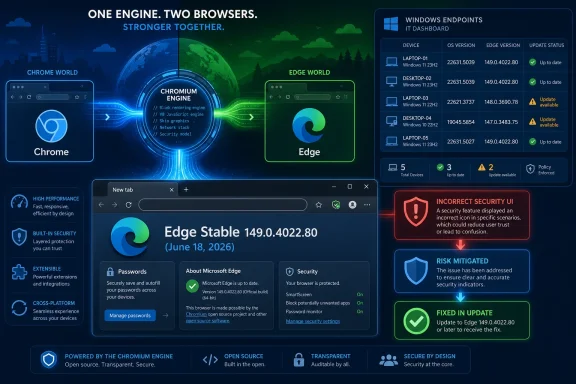
For most users, the fix path is simple: run the latest Edge. Microsoft’s June 18, 2026 Stable release, version 149.0.4022.80, is the key build identified in current Edge release notes as incorporating the latest Chromium security updates. If Edge is at that version or newer, Microsoft’s public position is that the browser is no longer vulnerable to this Chromium issue.The awkwardness is that “latest” is not always the same thing across every device. Edge Stable, Extended Stable, Android, iOS, Linux, macOS, and enterprise-managed Windows deployments can move on different schedules. A home user may get the fix quietly through the Edge updater, while a managed fleet may wait for rings, policy validation, virtual desktop image refreshes, or compatibility testing.
That lag is where advisories become operational documents. A CVE entry in the Security Update Guide gives vulnerability scanners, compliance dashboards, and IT teams a canonical Microsoft record to match against installed Edge versions. Without that entry, an enterprise might see a Chrome/Chromium vulnerability and have to infer whether Edge is affected. With it, the answer is explicit.
The Microsoft advisory is also doing something subtle for procurement and governance. It tells organizations that Edge’s Chromium inheritance is not invisible. Microsoft is acknowledging the dependency and exposing it through the same mechanism customers already use for Windows and Microsoft application security tracking.
Finding the Edge Version Is Still Too Hidden for Something This Important
To check the version of Microsoft Edge manually, open Edge, select the three-dot menu, choose Help and feedback, and then select About Microsoft Edge. You can also typeedge://settings/help in the address bar and press Enter. Edge will display the installed version and, on most unmanaged systems, automatically check for updates from that page.That page is more important than it looks. It is not merely an “about” screen; it is the browser’s self-check station. If an update is available and policy allows it, Edge should begin downloading it, then prompt for a restart to finish applying the new build.
On Windows, users can also check Edge’s version from Settings under Apps, but the in-browser page is usually clearer because it triggers the update check. For administrators, the version can be queried through endpoint management tools, inventory agents, PowerShell, registry checks, or Microsoft Intune reporting, depending on how the fleet is managed. The central fact remains the same: the build number is the security fact that matters.
For CVE-2026-12458, users should compare their installed build with the fixed Edge release line. If the browser reports version 149.0.4022.80 or a later build in the same or newer channel, it should include the relevant Chromium security fixes. If it reports an older build, the system should be updated or investigated for policy, updater, or connectivity problems.
Enterprise Edge Is Patched by Process, Not Hope
In unmanaged consumer Windows, Edge generally updates itself. That design is one reason browser vendors moved to rapid release channels in the first place: the web is too hostile for annual or monthly browser patching to be enough. But enterprises rarely live in the default world.A corporate Edge deployment may use update policies, rings, staged rollouts, rollback controls, Extended Stable channels, and change windows. Those controls are rational. A browser is now a line-of-business runtime, and a bad update can break authentication flows, extensions, printing, downloads, intranet apps, or kiosk workflows.
The security tradeoff is that every control can become a delay. For a Chromium CVE touching passwords or browser UI, a long delay deserves scrutiny. Even when exploitation requires user interaction, the affected surface is exposed to the public web, which makes browser vulnerabilities different from many local-only software defects.
Admins should therefore treat the Edge version as an endpoint security attribute, not a cosmetic inventory field. If vulnerability management flags CVE-2026-12458, the remediation action is not to install a separate Windows cumulative update. It is to confirm that Edge itself has moved to the fixed build for the appropriate channel.
The Security Update Guide Is Becoming a Supply-Chain Translator
The broader lesson is that Microsoft’s Security Update Guide has become a translator between product ownership and code ownership. Users buy, deploy, and support Microsoft Edge. Microsoft, however, ships a browser that depends on Chromium. The advisory has to bridge those facts without pretending the code lineage is simpler than it is.This is exactly where modern vulnerability management gets messy. A scanner may report a CVE as “Google Chrome” because the vulnerability is described upstream that way. A Windows administrator may look at an endpoint and see no Chrome installation at all. The machine may still be affected because Edge carries the relevant Chromium component.
Conversely, a Chrome vulnerability does not automatically mean every Chromium-based browser is affected in exactly the same way. Downstream vendors can disable features, alter UI, backport fixes, ship on different schedules, or carry patches ahead of upstream stable releases. The only reliable answer is the vendor’s own advisory and the installed version.
Microsoft’s inclusion of CVE-2026-12458 is therefore not noise. It is the evidence trail that tells Edge customers, “This upstream flaw mattered to you, and this Edge release is where we addressed it.” That may be bureaucratic, but it is useful bureaucracy.
Browser Monoculture Makes Patch Speed More Important
The Chromium ecosystem gives Windows users compatibility, performance, and web standards consistency. It also concentrates risk. When a vulnerability lands in a shared Chromium component, the blast radius can span Chrome, Edge, Brave, Opera, Vivaldi, and embedded browser runtimes, depending on the code path.This is the price of browser consolidation. The industry avoided the worst fragmentation of the old web, but it accepted a new kind of shared dependency. A bug in a common component can ripple through products with different brands, different update mechanisms, and different enterprise support contracts.
Microsoft’s Chromium-based Edge has generally benefited from that arrangement. It receives upstream security research, rapid engine improvements, and broad website compatibility. But the model also means Edge cannot be treated as an island in Microsoft’s security universe.
For security teams, that means Chrome advisories are not just Chrome advisories anymore. They are early-warning signals for Chromium consumers. Microsoft’s Security Update Guide entry is the point at which that upstream signal becomes a Microsoft product action item.
The Password Manager Is Now Critical Infrastructure
The “Passwords” component named in CVE-2026-12458 deserves special attention because browser password managers have become mainstream identity infrastructure. Many users no longer type passwords manually. They rely on saved credentials, sync, autofill, generated passwords, and biometric or OS-mediated unlock prompts.That shift improved security in many ways. Password managers reduce reuse, encourage stronger credentials, and blunt some phishing attempts by binding autofill behavior to origins. But they also made the browser a more valuable target. If the browser’s password UI can be spoofed, confused, or made to leak cross-origin information, the attacker is operating near the user’s trust core.
This is why dismissing UI bugs as “just spoofing” misses the point. The browser UI is what tells the user whether a password prompt, permissions request, saved credential, or origin indicator is trustworthy. A flaw in that layer can turn security features into props in an attacker’s stage set.
It also explains why Microsoft needs to document the fix even when the bug is upstream. Edge is the browser Windows pushes, integrates, and manages. If its password UI inherits a Chromium flaw, Microsoft’s customers will expect Microsoft’s security machinery to say so plainly.
Users Should Check the Build, Admins Should Check the Fleet
The immediate action is simple enough for consumers but more demanding for organizations. A user can openedge://settings/help, let Edge check for updates, and restart the browser. A help desk cannot stop there.Managed environments should verify installed Edge versions across Windows clients, servers used for browsing, virtual desktop images, kiosk systems, and any persistent jump boxes where administrators may browse internal portals. They should also confirm whether update policies are unintentionally pinning Edge to an older release.
The password angle makes shared and privileged environments especially worth reviewing. If users sign into sensitive dashboards, password vaults, admin consoles, identity providers, or financial systems through Edge, then browser freshness is part of credential hygiene. That does not mean panic; it means the browser should be patched with the same seriousness as the operating system.
Organizations using the Extended Stable channel should check Microsoft’s channel-specific guidance rather than assuming a Stable build number applies one-to-one. Extended Stable exists to reduce churn, but security fixes still have to land. The operational question is whether the channel you chose has received the fix Microsoft says remediates the CVE.
The Practical Reading of CVE-2026-12458 Is Narrow but Important
The most useful interpretation of this advisory is neither alarmist nor dismissive. CVE-2026-12458 is not a sign that Microsoft secretly authored a Chrome password bug. It is also not irrelevant to Edge simply because the vulnerability is described in Chromium terms.The advisory means that a Chromium password-related UI flaw affected code consumed by Edge, and Microsoft has shipped an Edge update that incorporates the upstream security fix. That is the entire patch story in one sentence. The security story is broader: browsers are shared-code platforms, and vulnerability ownership follows the product users actually run.
For WindowsForum readers, the main trap is assuming Microsoft’s Security Update Guide only covers Windows, Office, and Microsoft-written components. Edge breaks that mental model. Its security posture is tied to Chromium’s release train, and Microsoft’s advisories increasingly reflect that dependency.
That also means browser version checking should be routine after security news involving Chromium. The browser is no longer a passive application sitting on top of Windows. It is a constantly exposed execution environment, identity surface, document viewer, app runtime, and password broker.
The Build Number Is the Part That Matters This Week
CVE-2026-12458 is best understood through a few concrete facts rather than through vendor labels. The advisory is less about Chrome versus Edge than about whether a Chromium-derived password UI flaw has been fixed in the browser on your machine.- Microsoft includes the CVE because Microsoft Edge consumes Chromium open-source code affected by the vulnerability.
- The relevant Edge Stable release identified in current Microsoft release notes is version 149.0.4022.80, released on June 18, 2026.
- Users can check Edge by opening the three-dot menu, choosing Help and feedback, and selecting About Microsoft Edge.
- Typing
edge://settings/helpdirectly into the address bar opens the same version and update-check page. - Enterprise administrators should validate deployed Edge versions through their management tooling rather than assuming automatic updates have completed everywhere.
- A Chrome-labeled Chromium CVE can still matter on Windows systems that do not have Google Chrome installed.
References
- Primary source: MSRC
Published: 2026-06-19T13:52:38-07:00
Security Update Guide - Microsoft Security Response Center
 msrc.microsoft.com
- Related coverage: sentinelone.com
CVE-2026-42891: Microsoft Edge Chromium Auth Bypass Flaw
CVE-2026-42891 is an authentication bypass vulnerability in Microsoft Edge Chromium. Learn about its impact, affected versions, and mitigation methods.www.sentinelone.com
- Official source: learn.microsoft.com
Release notes for Microsoft Edge Security Updates | Microsoft Learn
Release notes for Microsoft Edge Security Updateslearn.microsoft.com - Related coverage: windowscentral.com
Microsoft Edge will load all your passwords into memory in plaintext, but Microsoft says it's not a security concern | Windows Central
A security researcher has discovered that Microsoft Edge will load all your stored passwords into memory in plaintext at startup, making it easy for malware to scrape those passwords.www.windowscentral.com - Related coverage: tomsguide.com
'Only Chromium-based browser I've tested that behaves this way': Microsoft Edge has a huge password vulnerability researcher claims | Tom's Guide
Microsoft's Chromium-based Edge browser reportedly stores saved passwords in cleartext by design.www.tomsguide.com - Related coverage: datacomm.com
- Related coverage: thewindowsupdate.com
- Related coverage: techradar.com
Google patches first Chrome zero-day of the year - so update now or face attack | TechRadar
A worrying Google Chrome bug was patchedwww.techradar.com - Related coverage: www2.gov.bc.ca
- Related coverage: cow-prod-www-v3.azurewebsites.net
- Related coverage: manuals.supernaeyeglass.com