

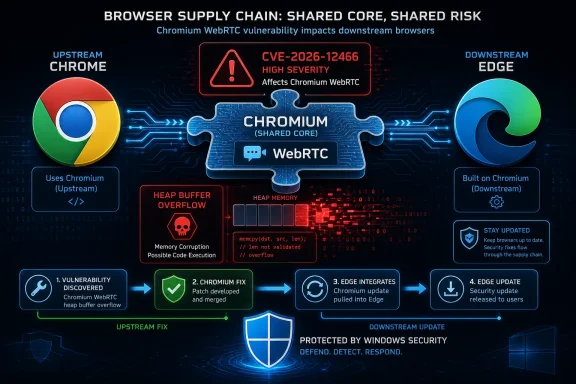
Microsoft’s Browser Is Its Own Product, but Chromium Is the Shared Attack Surface
The confusion around CVE-2026-12466 is understandable. The vulnerability is described as a heap buffer overflow in WebRTC in Google Chrome on Windows before version 149.0.7827.155, with the usual high-severity browser threat model: a remote attacker could potentially trigger code execution by convincing a user to visit a crafted HTML page. Nothing about that sentence sounds, at first glance, like a Microsoft advisory.
But Edge is not a browser written from whole cloth in Redmond. Since Microsoft moved Edge to Chromium, it has inherited Chromium’s rendering engine, JavaScript plumbing, media stack, networking assumptions, and security fixes. Microsoft adds its own enterprise controls, Microsoft account integration, SmartScreen, sidebar features, management policy surface, and Windows-specific behavior, but the foundation remains Chromium.
That is why a CVE assigned through Chrome can land in Microsoft’s Security Update Guide. Microsoft is not claiming authorship of the bug or pretending that the flaw originated in an Edge-only component. It is doing something more prosaic and more useful: telling defenders that the vulnerability affected code Edge consumed, and that a current Edge release incorporates the upstream fix.
This is the reality of shared browser infrastructure. Chrome, Edge, Brave, Opera, Vivaldi, and a long list of embedded Chromium consumers often travel through the same vulnerability cycle. A bug is found in Chromium, fixed upstream, shipped first or prominently by Google, and then absorbed by downstream vendors. The vendor names differ; the vulnerable code path may not.
The Security Update Guide Is a Map of Exposure, Not a Badge of Ownership
Microsoft’s Security Update Guide has always served two overlapping audiences. The first is the Windows admin who needs to know what must be patched. The second is the vulnerability-management system that needs structured data for asset inventory, risk scoring, and compliance evidence. CVE-2026-12466 sits squarely in that second-world logic.
A vulnerability record in the guide does not necessarily mean Microsoft wrote the defective code. It means a Microsoft product or service may have been exposed to that defective code, and Microsoft is providing an update path or status statement. That distinction matters, because the modern Windows stack contains a large amount of third-party and open-source software. Chromium is simply the most visible example because the browser is both ubiquitous and aggressively targeted.
The phrasing Microsoft uses for these Chromium entries is formulaic for a reason. It typically says the CVE was assigned by Chrome, that Microsoft Edge consumes Chromium, and that the guide entry announces that the latest Edge version is no longer vulnerable. That is not marketing copy; it is dependency disclosure.
There is a small but important administrative benefit here. If your vulnerability scanner flags CVE-2026-12466 on a Windows endpoint because Edge is installed, the Microsoft advisory gives your patch-management team a Microsoft-side artifact to track. You do not have to argue that a Google Chrome release note is “close enough” for an Edge deployment. Microsoft is putting Edge’s update state into the ecosystem where Windows shops already manage risk.
WebRTC Bugs Are Browser Bugs With Enterprise Consequences
WebRTC is one of those technologies that users experience constantly but rarely name. It powers real-time audio, video, and peer-to-peer communication in web apps: meetings, screen sharing, voice calls, remote support tools, web-based contact centers, and collaboration platforms. It is also complicated native code exposed to hostile input from the web.
That combination is exactly why WebRTC vulnerabilities keep attracting attention. A browser feature designed to handle real-time media has to parse, negotiate, encode, decode, buffer, and transmit streams under low-latency conditions. When memory safety bugs appear in that path, the browser sandbox and other mitigations become the difference between a crash, a contained renderer compromise, and a more serious chain.
A heap buffer overflow is not automatically a working exploit. Attackers still need a reliable trigger, a way around memory protections, and usually a broader exploit chain if they want to escape the browser’s sandbox or gain durable access to the machine. But from an enterprise perspective, the distinction between “potentially exploitable” and “currently weaponized in the wild” is not a reason to wait. Browser bugs are patched on a timeline measured in days because the browser is the most exposed client application in the fleet.
The crafted-page attack model is also why these flaws matter beyond people who use video calls. If the vulnerable code path can be reached from web content, the attacker’s delivery mechanism can be mundane: a malicious site, a compromised legitimate page, a phishing link, an ad chain, or a document that opens browser content. The user does not need to install a shady executable for the browser to become the first point of contact.
The Version Numbers Tell Two Stories at Once
One source of confusion in this particular CVE is that Chrome and Edge version numbers do not match exactly even when both are riding the same Chromium train. The Chrome-side vulnerability description points to Google Chrome on Windows before 149.0.7827.155. Microsoft’s Edge stable release notes for the same period show Edge Stable at version 149.0.4022.80 on June 18, 2026, with the release incorporating the latest Chromium security updates.
That mismatch is not evidence that Edge missed the fix. It is how Chromium downstream versioning works. Chrome’s product build number and Edge’s product build number are not expected to be identical, even when both contain the relevant Chromium security patch. The number administrators need to compare is the vendor’s fixed build for the product actually deployed.
For Chrome, that means Chrome’s own fixed version. For Edge, that means Microsoft Edge’s stable or extended stable release that Microsoft says incorporates the Chromium security updates. Treating Chrome’s exact build number as the Edge threshold is a common but wrong shortcut.
The better operational rule is simple: update Edge through its normal channel and verify that the browser reports the latest Microsoft Edge version available for that channel. In a managed environment, confirm through Edge management, Intune, Configuration Manager, Group Policy reporting, or your endpoint inventory system rather than relying on a user screenshot.
The Answer to “How Do I See the Browser Version?” Is Also the Patch Check
For an individual Windows user, checking Edge is straightforward. Open Microsoft Edge, select the three-dot menu, choose Help and feedback, and then select About Microsoft Edge. You can also type edge://settings/help into the address bar.
That page shows the installed Microsoft Edge version and usually triggers an update check. If an update is available, Edge will download it there. In many cases, the browser must be restarted before the new version is actually active, so the version shown after relaunch is the one that matters.
Chrome works similarly. Open Chrome’s three-dot menu, choose Help, then About Google Chrome, or type chrome://settings/help. Again, the page both displays the installed version and initiates an update check.
For Edge, administrators can also type edge://version to see more detailed component and executable information. That page is useful when troubleshooting policy, channel, profile path, command-line flags, or whether the running process is the one you think it is. For routine CVE validation, however, edge://settings/help is the cleaner answer for users.
Auto-Update Is Necessary, but It Is Not Fleet Management
Consumer browser security depends heavily on automatic updates. That model works well enough for unmanaged PCs because most users will never manually chase CVEs. The browser updates itself, asks for a restart, and the world moves on.
Enterprise IT does not get to be that casual. Edge’s update mechanism can be controlled, delayed, pinned, or broken by policy. VDI images, kiosk systems, offline networks, packaged app environments, and regulated desktops all create places where “the latest browser” is not a given. The very organizations that most need predictable patch control are often the ones with the longest tail of stale browser builds.
This is where Microsoft’s inclusion of Chromium CVEs in the Security Update Guide becomes more than clerical neatness. It gives Windows-focused security teams a way to fold Edge into the same vulnerability-management process they already use for Windows, Office, Exchange, SQL Server, and developer tooling. Browser patching becomes part of the enterprise risk register instead of an afterthought handled by background services and crossed fingers.
There is also a governance angle. If an auditor or customer asks whether CVE-2026-12466 affects your Microsoft estate, “it was a Chrome bug” is not a complete answer. If Edge is installed, the answer is: Edge consumed the affected Chromium code, Microsoft shipped an Edge update incorporating the fix, and your control evidence is the deployed Edge version across the fleet.
The Branding Problem Keeps Tripping Up Vulnerability Scanners
Security scanners are very good at finding version strings and very bad at explaining software lineage. A tool may see Edge, map it to Chromium, and flag a Chrome-origin CVE. Another tool may miss the relationship entirely unless Microsoft publishes a corresponding advisory. A third may flag the machine until it sees a very specific Edge build, even if the underlying Chromium fix has already landed.
That mess is not entirely the scanners’ fault. The industry still talks about browser vulnerabilities as if product boundaries were clean. They are not. A single bug in Chromium can ripple into many browsers, Electron-based desktop apps, embedded webviews, and specialized appliances. Some will patch quickly. Some will lag. Some will never make it obvious which Chromium revision they contain.
For Windows administrators, the lesson is to validate against vendor-supported release channels, not just generic CVE prose. If the asset is Microsoft Edge, Microsoft’s Edge release notes and Security Update Guide are the relevant references. If the asset is Google Chrome, use Chrome’s release channel. If the asset is an Electron application, you may need the application vendor’s own advisory because the browser-like code is buried inside a desktop app that does not identify itself as a browser.
That last category is often the sleeper risk. Users notice when Chrome or Edge asks to restart. They do not always notice when a messaging client, code editor, launcher, or collaboration app embeds an outdated Chromium runtime. The browser wars trained users to think in icons; attackers think in code paths.
Microsoft’s Chromium Dependency Is a Strength Until It Becomes a Timing Problem
It is easy to frame Microsoft’s adoption of Chromium as surrender, but security is more complicated than that. A shared engine means a larger research community, faster upstream discovery, and fewer web-compatibility oddities that tempt vendors into maintaining risky forks. When Google fixes a high-severity Chromium bug, Edge can often inherit that fix faster than Microsoft could have found and repaired an equivalent proprietary engine issue alone.
The trade-off is timing and transparency. Microsoft is dependent on the Chromium project’s patch cadence and on its own ability to integrate, test, and ship fixes quickly. Most of the time that system works. But every Chromium-based vendor lives with the same uncomfortable race: once a bug is patched in one place, attackers and defenders alike start hunting for the vulnerable pattern elsewhere.
That does not mean every CVE disclosure instantly becomes an exploit kit. It does mean patch latency matters. A few days of delay may be tolerable for a low-reach component; for browser code reachable by web content, those days are part of the attack surface. Enterprises that defer browser restarts for weeks are effectively opting out of the security model that makes rapid browser patching viable.
Microsoft’s job is not only to ship the fixed Edge build. It is to make the status legible to administrators. CVE-2026-12466 appearing in the Security Update Guide is part of that legibility.
Windows Users Should Treat the Browser as a First-Class Security Boundary
Windows security conversations still tend to orbit the operating system: kernel fixes, privilege escalation, Defender detections, SmartScreen, BitLocker, and identity controls. Those are all important, but the browser is the daily interpreter of untrusted code. It deserves the same seriousness as any exposed service.
This is especially true because browser compromise is rarely an end state. It is a beginning. Attackers use browser bugs to gain a foothold, steal tokens, harvest session data, pivot into cloud applications, or combine the initial compromise with local privilege escalation. Even when sandboxing works as intended, a compromised browser session can be valuable if it gives the attacker access to authenticated web apps.
Edge’s integration with Windows and Microsoft 365 raises the stakes further. That integration is useful for users and administrators, but it also means the browser sits close to identity, sync, enterprise policy, password management, and cloud access. Keeping Edge current is not just about avoiding a crash in a media component. It is about protecting the place where the modern Windows user spends much of the workday.
The good news is that browser updates are usually among the least disruptive security patches when handled properly. They do not normally require a full OS reboot, and they can be staged quickly. The bad news is that they are easy to postpone because the visible cost is a restart button users would rather ignore.
The Fix Is Boring, Which Is Exactly the Point
There is no clever mitigation that beats updating the browser in this case. Disabling WebRTC globally may reduce exposure in some controlled environments, but it can also break collaboration tools, helpdesk workflows, telehealth systems, classrooms, and contact-center software. Site isolation, sandboxing, exploit mitigations, and enhanced security modes all help reduce risk, but they are not substitutes for the patched code.
That is why the official answer keeps returning to the latest Edge version. If Microsoft says the current Edge build is no longer vulnerable, the job is to get endpoints onto that build or a later one in the appropriate channel. Anything else is compensating control territory.
For home users, the action is almost comically simple: open the About page, let Edge update, and restart it. For managed users, it depends on whether the organization allows Edge to update itself or manages updates centrally. In either case, the final control is the same: inventory should show the patched Edge version actually running, not merely downloaded or staged.
There is a subtle operational trap here. A browser can download an update and still run the old vulnerable code until it restarts. Security dashboards that report installation state but not process restart state can create a false sense of completion. The browser’s version after relaunch is the line that matters.
The Real Lesson Is That “Chrome CVE” No Longer Means “Not My Problem”
The phrase “Chrome CVE” is convenient shorthand, but it can be misleading in a Chromium world. CVE-2026-12466 is a Chrome-assigned vulnerability in Chromium OSS affecting WebRTC, and Microsoft Edge consumes that Chromium code. That is why it belongs in Microsoft’s Security Update Guide.
The same logic applies across the software stack. Open-source dependencies create shared exposure, and shared exposure demands vendor-specific patch tracking. The presence of a Microsoft advisory does not transform the bug into a Microsoft-origin defect. It transforms the remediation into something Microsoft customers can see, audit, and deploy.
This is a healthier model than silence. If Microsoft omitted Chromium CVEs from its guide, Edge administrators would still be exposed to the underlying issue; they would simply have less direct evidence of Edge’s status. By documenting the CVE, Microsoft closes the loop between upstream discovery and downstream responsibility.
It also nudges Windows shops toward a more accurate mental model. The browser is not a sealed Microsoft object. It is a Microsoft product carrying a large and active open-source engine. Security ownership therefore has layers: Chromium fixes the shared code, Microsoft ships it in Edge, administrators deploy it, and users restart the browser.
The Version Page Is the Small Control That Proves the Bigger One
The practical takeaway from CVE-2026-12466 is less dramatic than the vulnerability language suggests, but more important than the branding debate. If Edge is current, Microsoft says the Chromium-based browser is no longer vulnerable. If Edge is stale, the fact that the bug was “in Chrome” will not protect the endpoint.
- Open
edge://settings/helpin Microsoft Edge to see the installed version and trigger an update check. - Restart Edge after the update downloads, because the old browser process can continue running until relaunch.
- Use Microsoft Edge’s own release notes and Security Update Guide entries when validating Edge, rather than comparing Edge directly to Chrome’s build number.
- Treat Chromium CVEs as relevant to Edge whenever Microsoft documents that Edge consumes the affected Chromium code.
- In managed environments, verify patched Edge versions through inventory and policy reporting instead of relying on automatic update assumptions.
- Remember that browser patching is not cosmetic maintenance; it protects one of the most exposed execution surfaces on Windows.
CVE-2026-12466 is another reminder that the modern Windows security perimeter runs straight through the browser engine. Microsoft’s inclusion of a Chrome-assigned Chromium flaw in the Security Update Guide is not an oddity; it is the correct accounting for a shared codebase that millions of Edge users rely on every day. The organizations that handle this well will stop arguing over whose CVE it is and start measuring the only thing that matters: how quickly every browser carrying the vulnerable code becomes a browser that no longer does.