

CVE-2026-13824 is a high-severity Chrome Extensions vulnerability disclosed June 30, 2026, affecting Google Chrome before version 150.0.7871.47 and allowing privilege escalation after a renderer compromise through a crafted HTML page. The important part is not that a single web page magically owns the browser; it is that Chrome’s defenses are only as strong as the policy boundaries between its most privileged components. As detailed by Google’s Chrome Releases blog and reflected in the National Vulnerability Database entry, this bug sits in the awkward space where “not a zero-click apocalypse” can still mean “patch without delay.” For Windows users and administrators, it is another reminder that the browser is no longer an app at the edge of the system — it is part of the system’s attack surface.
The modern browser is built around mistrust. Web pages are supposed to be treated as hostile by default, renderer processes are intentionally constrained, and Chrome’s sandbox exists to make a compromised tab less useful to an attacker than a compromised application would have been in the Windows XP era. CVE-2026-13824 matters because it describes a failure at one of the seams in that model: the Extensions subsystem.
Google’s own advisory for the Chrome 150 stable release lists CVE-2026-13824 as “Insufficient validation of untrusted input in Extensions,” reported internally by Google on May 14, 2026. NVD’s description goes a step further in plain operational terms: a remote attacker who had already compromised the renderer process could perform privilege escalation via a crafted HTML page. That phrasing matters because it defines both the limits and the seriousness of the flaw.
This is not, on the public record, a simple drive-by bug where visiting a page directly yields full browser compromise. The attacker first needs a compromised renderer, meaning another exploit or exploit chain has already succeeded inside the browser’s web-content execution environment. But once that foothold exists, the Extensions boundary becomes the next target, and extension-related privilege is often exactly where sensitive browser state, cross-site reach, and user trust converge.
Extensions are not ordinary web pages. They can interact with tabs, inject scripts, observe browsing activity, mediate authentication flows, handle password managers, reshape enterprise workflows, and in managed environments enforce policy. That is why a vulnerability in Extensions is not just another line item in a long Chrome changelog. It is a bug in the machinery that allows Chrome to be customized, administered, and automated.
That instinct is understandable, but it can be misleading. Browser exploitation is commonly a chain, not a single magic vulnerability. One bug gets code running in a renderer; another bug escapes a sandbox, bypasses a policy boundary, reaches a broker process, abuses an extension interface, or pivots into a more privileged component. CVE-2026-13824 belongs to that second category: it becomes valuable after the first line has already been crossed.
CISA’s ADP scoring, as shown in NVD, gives the vulnerability a CVSS 3.1 base score of 7.5, with network attack vector, high attack complexity, no privileges required, user interaction required, unchanged scope, and high impact across confidentiality, integrity, and availability. That combination is telling. The exploit path is not the easiest one on the board, but the payoff, if reached, is severe.
The more useful way to read this bug is not “an attacker needs another exploit first, so relax.” It is “if another exploit exists, this one may help turn a contained renderer compromise into something much more damaging.” In 2026, that is not an abstract distinction. Chrome, Edge, Brave, Vivaldi, and other Chromium-based browsers all depend on the same underlying security architecture, and attackers have spent years learning how to stitch together partial failures.
That last sentence is familiar boilerplate, but it is also a policy choice. Google restricts many Chromium bug details after release because the public patch can become a roadmap for attackers. The company is effectively racing itself: ship the fix, allow automatic updates to spread, and only then reveal enough detail for researchers, downstream vendors, and defenders to fully analyze the flaw.
CVE-2026-13824 appears in that massive batch as a high-severity issue, not one of the critical entries at the top of the advisory. But severity labels can obscure exploit-chain value. A critical memory corruption bug may be the first domino; a high-severity extension policy bug may be the domino that turns a contained crash into privilege escalation. Administrators who patch only when they see “critical” are reading the wrong column.
The release also included numerous issues in components such as GPU, ANGLE, Dawn, Skia, WebUSB, Views, Browser, Chromecast, Updater, Chrome Tabs, Autofill, Enterprise, Settings, DOM, USB, Forms, and other subsystems. That breadth is the point. Chrome is no longer just a rendering engine and a JavaScript runtime; it is a platform with device APIs, graphics stacks, enterprise controls, web app installation machinery, remote access hooks, and identity-adjacent surfaces.
For WindowsForum readers, the Windows detail is especially relevant: Chrome 150.0.7871.47 is the build named by NVD as the threshold for CVE-2026-13824, while Google’s release post lists Windows and Mac receiving 150.0.7871.46/.47 during the stable rollout. In practical terms, users should be on 150.0.7871.47 or later, not merely somewhere in the Chrome 150 family.
That discrepancy is not just trivia for vulnerability-management obsessives. CPEs drive dashboards, exposure reports, ticket creation, asset inventories, and compliance workflows. If a scanner keys too aggressively off a less-than 150.0.7871.46 boundary while the descriptive record says less-than 150.0.7871.47, a narrow band of systems could be misclassified or require manual interpretation.
The user-facing answer is simple: if you are below 150.0.7871.47, update. The administrator-facing answer is more nuanced: confirm how your vulnerability scanner interprets this CVE, especially if it imports NVD CPE data automatically. The NVD page itself still says NVD has not provided its own CVSS assessment, while CISA-ADP has supplied a 7.5 High score. That is a useful reminder that the CVE ecosystem is a federation, not a single clean database.
Chrome’s own vendor advisory is the controlling source for the fix. NVD is essential for normalization, scoring, and downstream automation, but it can lag, correct, or temporarily disagree with vendor-supplied version language. When the affected product is a fast-moving browser with staggered platform builds, exact patch boundaries are not decorative; they determine whether thousands of endpoints get a remediation ticket.
This is also why “Are we missing a CPE?” language on NVD pages should not be dismissed as boilerplate. The CPE model is imperfect for modern software distribution. Chrome updates per channel, platform, architecture, and sometimes enterprise policy ring. A single clean CPE line rarely captures the lived reality of managed endpoints.
Google has spent years tightening the extension model, including permissions prompts, store review, enterprise controls, and the long migration from Manifest V2 to Manifest V3. Yet the basic security tension remains unresolved: extensions need elevated capabilities to be useful, and elevated capabilities create privileged interfaces that must parse, validate, and enforce policy around untrusted input.
CVE-2026-13824 is publicly described as an input-validation or policy-enforcement failure in Extensions, depending on whether one reads the Chrome source assignment or the NVD description. Those two phrases are not contradictory. A component can fail to validate data properly and, as a consequence, fail to enforce the policy boundary that was supposed to separate less-trusted web content from more-trusted browser or extension behavior.
This is why browser vendors increasingly talk about site isolation, sandboxing, process boundaries, and brokered access as layers, not guarantees. A renderer compromise should not be game over. But every API that lets a page communicate with a privileged browser feature becomes a possible bridge. Extensions, by design, include many such bridges.
For ordinary users, the message is not “delete every extension and browse like it is 2009.” It is that extensions deserve the same scrutiny as installed desktop software. An extension that can read and change data on every site is a powerful program with a friendlier installation flow. If Chrome’s extension boundary has a high-severity bug, the user’s extension sprawl becomes part of the blast radius.
That delay is sometimes rational. Enterprises test line-of-business apps, extension compatibility, identity flows, printing workflows, EDR hooks, and browser hardening policies before broad deployment. But CVE-2026-13824 is a good example of why browser update rings need to be measured in days, not weeks, unless there is a very specific breakage reason.
Google said the Chrome 150 stable release would roll out over the coming days and weeks. That phrasing is normal for consumer-scale browser deployment, but it should not be treated as a permission slip for enterprise inaction. If your fleet depends on Chrome, waiting for passive rollout means accepting that some systems will remain vulnerable while exploit developers study the patch delta.
The better model is staged urgency. Move a pilot ring first, validate the small set of business-critical extensions and web apps, then widen quickly. For high-severity browser bugs with plausible chain value, administrators should be thinking in hours for validation and days for fleet coverage. A browser is not a quarterly application anymore; it is part of the endpoint security perimeter.
This is especially true in environments where Chrome extensions are used for privileged workflows. Think SSO helpers, password managers, remote support tools, browser-based DLP, CRM overlays, accessibility tools, and internal enterprise extensions. The more privileged and business-critical the extension set, the less comfortable administrators should be with an Extensions vulnerability sitting unpatched.
Google’s release post does not describe CVE-2026-13824 as exploited in the wild. That distinction matters because Chrome advisories often explicitly say when Google is aware of active exploitation. Here, the public record does not appear to place this vulnerability in the emergency zero-day category.
Still, defenders should avoid turning “not known exploited” into “not urgent.” Chrome bug details are restricted precisely because patches are informative. Once a fix ships, attackers can compare old and new code, infer the bug class, and attempt to build a working chain before slower-moving users update. In browser security, the danger often rises after disclosure, not before it.
The exploit-chain requirement also changes the calculus. CVE-2026-13824 does not need to be the first bug used in an attack to be valuable. It only needs to be a useful second or third stage after a renderer foothold. That makes it the kind of vulnerability that may be underappreciated by severity dashboards but appreciated by exploit developers.
Security teams should therefore prioritize it as part of the June 30 Chrome 150 update, not as a lonely CVE. The release fixed hundreds of issues, including many high- and critical-severity bugs across memory safety, graphics, browser UI, updater, enterprise, and extension-related surfaces. Patch the release, not the headline.
A compromised browser session can be more valuable than a compromised local app. It may expose cookies, tokens, password-manager interactions, cloud dashboards, admin portals, and internal web apps. Even when the operating system remains intact, the user’s effective digital life can be compromised through the browser.
CVE-2026-13824 also sits at the intersection of browser and extension trust. Many Windows users install extensions once and forget them for years. Some are abandoned, some are sold to new maintainers, some request broad host permissions, and some become essential to daily work. A browser vulnerability in the extension layer magnifies the importance of extension hygiene.
Practical hygiene is not glamorous, but it is effective. Remove extensions you do not use. Prefer extensions from reputable publishers with clear update history. Avoid granting “read and change all your data on all websites” permissions unless the function truly requires it. In managed environments, enforce allowlists rather than relying on user discretion.
Chrome’s own update mechanism generally works well, but it is not magic. The browser still needs to relaunch. Users who keep dozens of tabs open for weeks may technically download a fix while continuing to run vulnerable code until restart. That tiny bit of friction is enough to keep exposure alive in real fleets.
For WindowsForum readers, Edge deserves special mention because it is embedded in the Windows ecosystem and often managed through Microsoft tooling. Microsoft typically ships Chromium security updates into Edge on its own cadence after upstream fixes land. Administrators should verify Edge patch levels separately rather than assuming Chrome remediation covers the browser estate.
The same principle applies to embedded Chromium runtimes and Electron applications, although CVE applicability can be harder to map. Many desktop apps carry browser technology inside them without looking like browsers. If the vulnerable component or execution path is absent, the risk may be lower; if the runtime lags badly, the risk may persist long after Chrome itself updates.
This is where vulnerability management becomes less about a single CVE and more about software supply chain inventory. Knowing that Chrome is patched is good. Knowing which Chromium-based applications exist in the environment, which update channel they use, and whether they expose untrusted web content is better.
The browser monoculture problem is not that Chromium is insecure in some simplistic sense. Chromium receives enormous security investment. The problem is concentration: when a flaw exists in a shared layer, the patching obligation radiates outward across products, platforms, and embedded runtimes.
Chrome’s security model assumes that untrusted input will be malicious eventually. That is why the browser isolates sites, sandboxes renderers, restricts extension permissions, and separates browser processes. CVE-2026-13824 says that one of those validation or enforcement points was not strong enough in the Extensions subsystem.
The hard truth is that browser security is not a finished architecture. It is a constant renegotiation between capability and containment. Users want richer web apps, deeper hardware access, better graphics, smoother identity flows, synchronized sessions, enterprise policy, and extensibility. Every one of those features creates new boundaries to defend.
This is why large Chrome releases can include hundreds of security fixes without implying negligence. A browser is among the most attacked, most complex pieces of software on any Windows machine. The relevant question is not whether bugs exist; they will. The relevant question is how quickly vendors find them, how clearly they describe impact, how fast patches reach users, and whether administrators treat browser updates with the urgency they deserve.
CVE-2026-13824 is not the most dramatic Chrome vulnerability of the year. It is not publicly labeled as exploited in the wild. It does not, by itself, appear to offer a one-click full compromise. But it exposes the uncomfortable middle layer of browser risk: the point after initial compromise where isolation either holds or fails.
The longer story is about whether users and administrators close the patch window before attackers find a practical chain. The public bug details remain restricted, which is normal. That protects users during rollout, but it also means defenders must act without the satisfaction of a full technical postmortem.
For most Windows users, the right move is immediate and mundane: update Chrome and relaunch it. For IT teams, the work is broader: verify fleet version reporting, check extension policies, validate critical workflows, and make sure vulnerability tooling is not confused by the CPE/version mismatch around 150.0.7871.46 versus 150.0.7871.47.
The one thing not to do is wait for exploit chatter to make the decision easier. By the time a working chain is public, the advantage has moved. Browser patching is one of the few defensive moves that can be both boring and decisive.
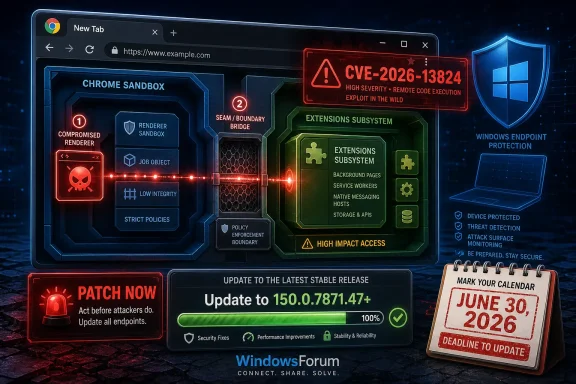 Chrome’s Extension Layer Is Where Convenience Becomes Power
The modern browser is built around mistrust. Web pages are supposed to be treated as hostile by default, renderer processes are intentionally constrained, and Chrome’s sandbox exists to make a compromised tab less useful to an attacker than a compromised application would have been in the Windows XP era. CVE-2026-13824 matters because it describes a failure at one of the seams in that model: the Extensions subsystem.Google’s own advisory for the Chrome 150 stable release lists CVE-2026-13824 as “Insufficient validation of untrusted input in Extensions,” reported internally by Google on May 14, 2026. NVD’s description goes a step further in plain operational terms: a remote attacker who had already compromised the renderer process could perform privilege escalation via a crafted HTML page. That phrasing matters because it defines both the limits and the seriousness of the flaw.
This is not, on the public record, a simple drive-by bug where visiting a page directly yields full browser compromise. The attacker first needs a compromised renderer, meaning another exploit or exploit chain has already succeeded inside the browser’s web-content execution environment. But once that foothold exists, the Extensions boundary becomes the next target, and extension-related privilege is often exactly where sensitive browser state, cross-site reach, and user trust converge.
Extensions are not ordinary web pages. They can interact with tabs, inject scripts, observe browsing activity, mediate authentication flows, handle password managers, reshape enterprise workflows, and in managed environments enforce policy. That is why a vulnerability in Extensions is not just another line item in a long Chrome changelog. It is a bug in the machinery that allows Chrome to be customized, administered, and automated.
The Renderer Compromise Requirement Is a Speed Bump, Not a Comfort Blanket
Security advisories often sound less frightening when they include prerequisites. “Requires user interaction” feels better than “wormable.” “High attack complexity” feels better than “trivial.” “Requires renderer compromise” sounds, to many readers, like the vulnerability is already downstream of a worse problem.That instinct is understandable, but it can be misleading. Browser exploitation is commonly a chain, not a single magic vulnerability. One bug gets code running in a renderer; another bug escapes a sandbox, bypasses a policy boundary, reaches a broker process, abuses an extension interface, or pivots into a more privileged component. CVE-2026-13824 belongs to that second category: it becomes valuable after the first line has already been crossed.
CISA’s ADP scoring, as shown in NVD, gives the vulnerability a CVSS 3.1 base score of 7.5, with network attack vector, high attack complexity, no privileges required, user interaction required, unchanged scope, and high impact across confidentiality, integrity, and availability. That combination is telling. The exploit path is not the easiest one on the board, but the payoff, if reached, is severe.
The more useful way to read this bug is not “an attacker needs another exploit first, so relax.” It is “if another exploit exists, this one may help turn a contained renderer compromise into something much more damaging.” In 2026, that is not an abstract distinction. Chrome, Edge, Brave, Vivaldi, and other Chromium-based browsers all depend on the same underlying security architecture, and attackers have spent years learning how to stitch together partial failures.
Google’s June 30 Release Was a Security Avalanche, Not a Routine Dot Build
The Chrome 150 stable-channel announcement on June 30 was large even by Chrome’s patch-heavy standards. Google said Chrome 150 was promoted to the stable channel for Windows, Mac, and Linux, with version 150.0.7871.46 for Linux and 150.0.7871.46/.47 for Windows and Mac. The same post said the update included 433 security fixes, with many bug details restricted until most users receive the patch.That last sentence is familiar boilerplate, but it is also a policy choice. Google restricts many Chromium bug details after release because the public patch can become a roadmap for attackers. The company is effectively racing itself: ship the fix, allow automatic updates to spread, and only then reveal enough detail for researchers, downstream vendors, and defenders to fully analyze the flaw.
CVE-2026-13824 appears in that massive batch as a high-severity issue, not one of the critical entries at the top of the advisory. But severity labels can obscure exploit-chain value. A critical memory corruption bug may be the first domino; a high-severity extension policy bug may be the domino that turns a contained crash into privilege escalation. Administrators who patch only when they see “critical” are reading the wrong column.
The release also included numerous issues in components such as GPU, ANGLE, Dawn, Skia, WebUSB, Views, Browser, Chromecast, Updater, Chrome Tabs, Autofill, Enterprise, Settings, DOM, USB, Forms, and other subsystems. That breadth is the point. Chrome is no longer just a rendering engine and a JavaScript runtime; it is a platform with device APIs, graphics stacks, enterprise controls, web app installation machinery, remote access hooks, and identity-adjacent surfaces.
For WindowsForum readers, the Windows detail is especially relevant: Chrome 150.0.7871.47 is the build named by NVD as the threshold for CVE-2026-13824, while Google’s release post lists Windows and Mac receiving 150.0.7871.46/.47 during the stable rollout. In practical terms, users should be on 150.0.7871.47 or later, not merely somewhere in the Chrome 150 family.
The NVD Version Trail Shows Why Patch Metadata Still Needs Human Reading
One of the oddities in the NVD change history is the CPE configuration. NVD’s initial analysis, dated July 1, lists Google Chrome versions up to but excluding 150.0.7871.46, alongside operating-system CPEs for Microsoft Windows, Linux kernel, and Apple macOS. Yet the CVE description itself says “prior to 150.0.7871.47,” and the affected record received from Chrome uses less-than 150.0.7871.47.That discrepancy is not just trivia for vulnerability-management obsessives. CPEs drive dashboards, exposure reports, ticket creation, asset inventories, and compliance workflows. If a scanner keys too aggressively off a less-than 150.0.7871.46 boundary while the descriptive record says less-than 150.0.7871.47, a narrow band of systems could be misclassified or require manual interpretation.
The user-facing answer is simple: if you are below 150.0.7871.47, update. The administrator-facing answer is more nuanced: confirm how your vulnerability scanner interprets this CVE, especially if it imports NVD CPE data automatically. The NVD page itself still says NVD has not provided its own CVSS assessment, while CISA-ADP has supplied a 7.5 High score. That is a useful reminder that the CVE ecosystem is a federation, not a single clean database.
Chrome’s own vendor advisory is the controlling source for the fix. NVD is essential for normalization, scoring, and downstream automation, but it can lag, correct, or temporarily disagree with vendor-supplied version language. When the affected product is a fast-moving browser with staggered platform builds, exact patch boundaries are not decorative; they determine whether thousands of endpoints get a remediation ticket.
This is also why “Are we missing a CPE?” language on NVD pages should not be dismissed as boilerplate. The CPE model is imperfect for modern software distribution. Chrome updates per channel, platform, architecture, and sometimes enterprise policy ring. A single clean CPE line rarely captures the lived reality of managed endpoints.
Extensions Remain the Browser’s Soft Underbelly
The Extensions subsystem is one of Chrome’s great strengths and one of its recurring headaches. Users want password managers, ad blockers, grammar tools, screen recorders, shopping assistants, developer utilities, identity helpers, and line-of-business integrations. Administrators want policy controls and browser customizations. Attackers want exactly the same reach, but without the consent.Google has spent years tightening the extension model, including permissions prompts, store review, enterprise controls, and the long migration from Manifest V2 to Manifest V3. Yet the basic security tension remains unresolved: extensions need elevated capabilities to be useful, and elevated capabilities create privileged interfaces that must parse, validate, and enforce policy around untrusted input.
CVE-2026-13824 is publicly described as an input-validation or policy-enforcement failure in Extensions, depending on whether one reads the Chrome source assignment or the NVD description. Those two phrases are not contradictory. A component can fail to validate data properly and, as a consequence, fail to enforce the policy boundary that was supposed to separate less-trusted web content from more-trusted browser or extension behavior.
This is why browser vendors increasingly talk about site isolation, sandboxing, process boundaries, and brokered access as layers, not guarantees. A renderer compromise should not be game over. But every API that lets a page communicate with a privileged browser feature becomes a possible bridge. Extensions, by design, include many such bridges.
For ordinary users, the message is not “delete every extension and browse like it is 2009.” It is that extensions deserve the same scrutiny as installed desktop software. An extension that can read and change data on every site is a powerful program with a friendlier installation flow. If Chrome’s extension boundary has a high-severity bug, the user’s extension sprawl becomes part of the blast radius.
Enterprise Chrome Is a Managed Platform, Not a Personal Browser
The consumer update advice for Chrome is almost boring: open the About Chrome page, let the updater run, relaunch. In a managed Windows environment, the reality is messier. Chrome may be controlled by Group Policy, Microsoft Intune, Configuration Manager, third-party patch tooling, virtual desktop images, golden master templates, or application-control regimes that deliberately delay automatic updates.That delay is sometimes rational. Enterprises test line-of-business apps, extension compatibility, identity flows, printing workflows, EDR hooks, and browser hardening policies before broad deployment. But CVE-2026-13824 is a good example of why browser update rings need to be measured in days, not weeks, unless there is a very specific breakage reason.
Google said the Chrome 150 stable release would roll out over the coming days and weeks. That phrasing is normal for consumer-scale browser deployment, but it should not be treated as a permission slip for enterprise inaction. If your fleet depends on Chrome, waiting for passive rollout means accepting that some systems will remain vulnerable while exploit developers study the patch delta.
The better model is staged urgency. Move a pilot ring first, validate the small set of business-critical extensions and web apps, then widen quickly. For high-severity browser bugs with plausible chain value, administrators should be thinking in hours for validation and days for fleet coverage. A browser is not a quarterly application anymore; it is part of the endpoint security perimeter.
This is especially true in environments where Chrome extensions are used for privileged workflows. Think SSO helpers, password managers, remote support tools, browser-based DLP, CRM overlays, accessibility tools, and internal enterprise extensions. The more privileged and business-critical the extension set, the less comfortable administrators should be with an Extensions vulnerability sitting unpatched.
The Absence of Known Exploitation Is Not a Clean Bill of Health
NVD’s change history shows CISA’s SSVC data marking exploitation as “none” at the time of its update. That is good news, but it is not the same thing as saying exploitation is impossible, unlikely forever, or irrelevant. It means there was no known exploitation reflected in that record at that time.Google’s release post does not describe CVE-2026-13824 as exploited in the wild. That distinction matters because Chrome advisories often explicitly say when Google is aware of active exploitation. Here, the public record does not appear to place this vulnerability in the emergency zero-day category.
Still, defenders should avoid turning “not known exploited” into “not urgent.” Chrome bug details are restricted precisely because patches are informative. Once a fix ships, attackers can compare old and new code, infer the bug class, and attempt to build a working chain before slower-moving users update. In browser security, the danger often rises after disclosure, not before it.
The exploit-chain requirement also changes the calculus. CVE-2026-13824 does not need to be the first bug used in an attack to be valuable. It only needs to be a useful second or third stage after a renderer foothold. That makes it the kind of vulnerability that may be underappreciated by severity dashboards but appreciated by exploit developers.
Security teams should therefore prioritize it as part of the June 30 Chrome 150 update, not as a lonely CVE. The release fixed hundreds of issues, including many high- and critical-severity bugs across memory safety, graphics, browser UI, updater, enterprise, and extension-related surfaces. Patch the release, not the headline.
Windows Users Should Treat Browser Patching Like OS Patching
The Windows desktop has changed more than patch culture has. Many users still think of Windows Update as the serious channel and browser updates as background housekeeping. That distinction no longer maps to risk. For many people, Chrome is where credentials are entered, documents are opened, SaaS consoles are administered, banking is performed, and corporate identity is mediated.A compromised browser session can be more valuable than a compromised local app. It may expose cookies, tokens, password-manager interactions, cloud dashboards, admin portals, and internal web apps. Even when the operating system remains intact, the user’s effective digital life can be compromised through the browser.
CVE-2026-13824 also sits at the intersection of browser and extension trust. Many Windows users install extensions once and forget them for years. Some are abandoned, some are sold to new maintainers, some request broad host permissions, and some become essential to daily work. A browser vulnerability in the extension layer magnifies the importance of extension hygiene.
Practical hygiene is not glamorous, but it is effective. Remove extensions you do not use. Prefer extensions from reputable publishers with clear update history. Avoid granting “read and change all your data on all websites” permissions unless the function truly requires it. In managed environments, enforce allowlists rather than relying on user discretion.
Chrome’s own update mechanism generally works well, but it is not magic. The browser still needs to relaunch. Users who keep dozens of tabs open for weeks may technically download a fix while continuing to run vulnerable code until restart. That tiny bit of friction is enough to keep exposure alive in real fleets.
Chromium’s Shared Codebase Spreads Both Fixes and Risk
Although this CVE is recorded against Google Chrome, the underlying lesson applies across Chromium-derived browsers. Microsoft Edge, Brave, Vivaldi, Opera, and other Chromium-based browsers inherit large parts of the same engine and architecture, though patch timing, feature flags, and component exposure vary. A Chrome CVE is not automatically an Edge CVE in every operational sense, but it is always a signal worth tracking.For WindowsForum readers, Edge deserves special mention because it is embedded in the Windows ecosystem and often managed through Microsoft tooling. Microsoft typically ships Chromium security updates into Edge on its own cadence after upstream fixes land. Administrators should verify Edge patch levels separately rather than assuming Chrome remediation covers the browser estate.
The same principle applies to embedded Chromium runtimes and Electron applications, although CVE applicability can be harder to map. Many desktop apps carry browser technology inside them without looking like browsers. If the vulnerable component or execution path is absent, the risk may be lower; if the runtime lags badly, the risk may persist long after Chrome itself updates.
This is where vulnerability management becomes less about a single CVE and more about software supply chain inventory. Knowing that Chrome is patched is good. Knowing which Chromium-based applications exist in the environment, which update channel they use, and whether they expose untrusted web content is better.
The browser monoculture problem is not that Chromium is insecure in some simplistic sense. Chromium receives enormous security investment. The problem is concentration: when a flaw exists in a shared layer, the patching obligation radiates outward across products, platforms, and embedded runtimes.
The CVE Wording Reveals a Broader Security Philosophy
The phrase “insufficient validation of untrusted input” sounds generic enough to numb the reader. Security advisories are full of it. But in the context of a browser, that phrase is almost philosophical. The web is untrusted input at planetary scale, arriving continuously, rendered with high performance, and connected to APIs that users expect to feel native.Chrome’s security model assumes that untrusted input will be malicious eventually. That is why the browser isolates sites, sandboxes renderers, restricts extension permissions, and separates browser processes. CVE-2026-13824 says that one of those validation or enforcement points was not strong enough in the Extensions subsystem.
The hard truth is that browser security is not a finished architecture. It is a constant renegotiation between capability and containment. Users want richer web apps, deeper hardware access, better graphics, smoother identity flows, synchronized sessions, enterprise policy, and extensibility. Every one of those features creates new boundaries to defend.
This is why large Chrome releases can include hundreds of security fixes without implying negligence. A browser is among the most attacked, most complex pieces of software on any Windows machine. The relevant question is not whether bugs exist; they will. The relevant question is how quickly vendors find them, how clearly they describe impact, how fast patches reach users, and whether administrators treat browser updates with the urgency they deserve.
CVE-2026-13824 is not the most dramatic Chrome vulnerability of the year. It is not publicly labeled as exploited in the wild. It does not, by itself, appear to offer a one-click full compromise. But it exposes the uncomfortable middle layer of browser risk: the point after initial compromise where isolation either holds or fails.
The Patch Window Is Where This Bug Either Shrinks or Grows
The concrete story is short, but the operational implications are not. Google promoted Chrome 150 to stable on June 30, 2026, and NVD published CVE-2026-13824 the same day, with later enrichment from NIST and CISA-ADP. The vulnerability affects Chrome before 150.0.7871.47, carries Chromium’s High severity, and has a CISA-ADP CVSS 3.1 score of 7.5.The longer story is about whether users and administrators close the patch window before attackers find a practical chain. The public bug details remain restricted, which is normal. That protects users during rollout, but it also means defenders must act without the satisfaction of a full technical postmortem.
For most Windows users, the right move is immediate and mundane: update Chrome and relaunch it. For IT teams, the work is broader: verify fleet version reporting, check extension policies, validate critical workflows, and make sure vulnerability tooling is not confused by the CPE/version mismatch around 150.0.7871.46 versus 150.0.7871.47.
The one thing not to do is wait for exploit chatter to make the decision easier. By the time a working chain is public, the advantage has moved. Browser patching is one of the few defensive moves that can be both boring and decisive.
The Chrome 150 Signal Windows Admins Should Not Ignore
The useful lesson from CVE-2026-13824 is not panic; it is prioritization. Treat this as part of a major Chrome security release, not as an isolated advisory to revisit after the holiday backlog.- Chrome installations should be updated to 150.0.7871.47 or later wherever Chrome is deployed on Windows or macOS, with Linux systems brought onto the fixed Chrome 150 stable build available for that platform.
- Security teams should verify how their scanners interpret the NVD CPE data, because the public description and affected-version language point to 150.0.7871.47 as the safe threshold.
- Administrators should audit high-privilege Chrome extensions, especially those with broad host permissions, identity functions, password-manager access, or enterprise workflow roles.
- Managed environments should accelerate browser update rings for this release rather than waiting passively for Google’s staged rollout to reach every endpoint.
- Chromium-based browsers and embedded runtimes should be tracked separately, because Chrome being patched does not prove the wider Chromium estate is current.
- The absence of known exploitation should reduce panic, not urgency, because post-patch analysis can turn a fixed bug into an attacker’s next chain component.
References
- Primary source: NVD / Chromium
Published: 2026-07-03T07:00:19-07:00
NVD - CVE-2026-13824
 nvd.nist.gov
- Security advisory: MSRC
Published: 2026-07-03T07:00:19-07:00
Original feed URL
Security Update Guide - Microsoft Security Response Center
 msrc.microsoft.com
- Related coverage: cvefeed.io
CVE-2026-13824 - Google Chrome Extension Privilege Escalation
Insufficient policy enforcement in Extensions in Google Chrome prior to 150.0.7871.47 allowed a remote attacker who had compromised the renderer process to perform privilege escalation via a crafted HTML page. (Chromium security severity: High)cvefeed.io - Related coverage: radar.offseq.com
CVE-2026-13891: Insufficient validation of untrusted input in Google Chrome - Live Threat Intelligence - Threat Radar | OffSeq.com
Detailed information about CVE-2026-13891: Insufficient validation of untrusted input in Google Chrome affecting Google Chrome. Get real-time updates, technicalradar.offseq.com
