

Google Chrome on Android before version 150.0.7871.47 is affected by CVE-2026-13887. The documented fix boundary is version 150.0.7871.47 or later. Desktop Chrome is not confirmed affected by the supplied record, even though the referenced Google release page has a desktop-oriented title.
Android users can update immediately: open Google Play Store > profile icon > Manage apps & device > Updates available > Chrome > Update. Then open Chrome > ⋮ > Settings > About Chrome and verify that the installed version is 150.0.7871.47 or later. Managed fleets should use their MDM or managed-Google-Play inventory and remediation workflow to deploy the update, confirm installation, and retain compliance evidence.
The issue is rated Medium and involves insufficient policy enforcement in Chrome’s NFC implementation. According to the supplied vulnerability description, a remote attacker who has already compromised the renderer process can use crafted HTML to leak data across web-origin boundaries. The renderer compromise is an important prerequisite: this is not documented as a standalone, one-click browser takeover.
CVE-2026-13887 concerns insufficient policy enforcement in NFC within Google Chrome on Android. The supplied record describes an inappropriate implementation that can permit cross-origin data leakage when an attacker already controls a compromised renderer.
A renderer is the browser process responsible for handling web content. Modern browsers isolate renderers because HTML, JavaScript, media, and other remote content form a large and continuously exposed attack surface. Gaining control of a renderer does not necessarily mean that every browser or operating-system boundary has also been defeated.
That is where CVE-2026-13887 becomes relevant. It is documented as a chain component: the attacker must first obtain renderer control and can then use the NFC policy failure to reach information that should remain separated by the browser’s origin model.
The concise interpretation is that renderer compromise is the prerequisite, while cross-origin disclosure is the documented impact. The record does not establish how the initial renderer compromise would occur, identify another vulnerability used to obtain it, or show that CVE-2026-13887 alone provides code execution.
Administrators should therefore avoid both extremes. The issue should not be presented as an unauthenticated, one-step compromise of every Android device running Chrome. It also should not be dismissed simply because another failure must come first. Browser defenses are layered, and a defect that weakens a later layer can increase the capability of an otherwise constrained compromise.
The documented consequence of CVE-2026-13887 is a confidentiality failure across that boundary. It is not described as an NFC crash, a device denial of service, a data-modification flaw, or a direct operating-system takeover. The security event is the leakage of cross-origin data after the renderer has already been compromised.
The supplied scoring assigns a CVSS 3.1 base score of 6.5, with high confidentiality impact and no recorded integrity or availability impact. That combination explains why the issue can carry a Medium overall rating while still involving information protected by a central browser isolation policy.
User interaction is included in the supplied vector, but the available material does not establish the exact action required. It does not specify a particular tap, navigation sequence, NFC tag format, permission state, browser prompt, or background condition. Those details should not be inferred from the general reference to crafted HTML and NFC.
The same evidentiary limit applies to the information at risk. The description establishes cross-origin leakage, but it does not identify particular cookies, tokens, credentials, application records, NFC data, or enterprise services that can be extracted. Those may be reasonable subjects for technical investigation, but they are not confirmed outcomes in the supplied record.
That prerequisite affects triage. A proof of concept that demonstrates only the NFC weakness would not necessarily provide the initial renderer compromise. Conversely, control of a renderer would not by itself prove that CVE-2026-13887 had been used.
The CVSS notation of no privileges required should not be read as meaning that there are no technical preconditions. In CVSS, privileges required addresses whether the attacker must possess an authorized account or privileges in the target environment. It does not erase the separate prerequisite stated in the vulnerability description.
Low attack complexity also does not establish that a complete attack is easy to build or deploy. It applies to the scored vulnerability under its documented conditions. The effort needed to obtain renderer control, select a target, induce the required interaction, or retrieve useful data is not fully described by that field.
For operational purposes, the important point is straightforward: the vulnerability is relevant to a chained attack, but the supplied record does not establish an active chain, a publicly available exploit, or a method for compromising the renderer in the first place.
The supplied facts establish the existence, title, type, and reference relationship of that page. They do not establish its complete contents, so the page should not be represented here as independently confirming the CVE listing or Android remediation details.
This mismatch does not override the affected-product record. It does mean administrators should base remediation on the explicit Android product and version boundary rather than assuming that a desktop-oriented release title changes the scope.
For an individual Android device, the verification question is simple: does Google Chrome report version 150.0.7871.47 or later?
Use this procedure:
Enterprise teams should not depend on manual screenshots as their primary fleet control. They should query their MDM, enterprise mobility management platform, Android Enterprise inventory, or managed-Google-Play reporting for the installed Chrome package version. The same platform should be used to assign or approve the corrected release, initiate remediation, identify devices that fail deployment, and record the resulting compliance state.
Desktop Chrome evidence should remain separate. A Windows computer running a similar or higher Chrome version does not prove that an Android phone is protected. The supplied record identifies Chrome on Android as the affected product and does not confirm desktop Chrome as affected.
The configuration information supplied with the record combines Google Chrome below the boundary with Android. That pairing is operationally important. A broad software search for every Chrome installation below version 150.0.7871.47 may create irrelevant desktop findings while failing to locate Android devices absent from conventional endpoint inventory.
Mobile application inventory is therefore the appropriate control. Administrators should collect, at minimum:
Where management telemetry is stale, the device should not automatically be counted as remediated. A compliant version reported weeks earlier may no longer describe the device’s current state, while a device that has not checked in may never have received the remediation command. Organizations should set a reasonable freshness requirement for inventory evidence and follow up on devices outside it.
Bring-your-own-device programs may offer less package-level visibility than fully managed corporate devices. In those environments, administrators may need to combine conditional-access policy, mobile application management, user attestation, help-desk verification, or access restrictions. The appropriate method depends on the organization’s management model, but the objective remains the same: establish that Google Chrome on Android is at version 150.0.7871.47 or later before treating the finding as closed.
The score is useful for relative prioritization, but it does not specify how many days an organization should allow for remediation. Patch timing should reflect the affected population, confidence in inventory, accessibility of sensitive web applications, and the ease with which the corrected package can be deployed.
The high confidentiality component deserves attention because the issue concerns a failure of cross-origin separation. At the same time, the supplied record does not establish which data can be obtained in a real deployment or show that enterprise sessions have been specifically targeted. Any conclusion that particular users or sessions would be especially valuable is risk analysis, not a confirmed fact about observed exploitation.
A reasonable deployment order can still be based on organizational context. Teams may choose to verify fully managed devices first because they can be measured quickly, then resolve unmanaged or stale devices that require manual intervention. They may also apply shorter internal deadlines to devices used for sensitive business functions. Those are local risk-management decisions rather than requirements contained in the CVE record.
Security tools may display different combinations of severity labels, vectors, or enrichment status depending on the data sources they import. Administrators should preserve the origin of the score in tickets and reports instead of treating every displayed number as an independently produced assessment.
Most importantly, the Medium rating should not become a reason to postpone an available browser update indefinitely. The update path is direct, the affected version boundary is explicit, and version verification can be automated for managed Android fleets.
An exploitation value of “none” means exploitation was not identified in that assessment. It is not proof that exploitation has never occurred, cannot occur, or will not be discovered later. The supplied record does not establish active exploitation, widespread scanning, a public proof of concept, or inclusion in a known attack chain.
Likewise, “automatable: no” does not prove that automation is impossible. It is an assessment of the vulnerability’s characteristics, consistent with factors such as required user interaction and the prerequisite renderer compromise.
“Technical impact: partial” aligns with the documented confidentiality failure rather than total control of the device. It should not be restated as a guarantee that every possible exploit chain would remain limited to data disclosure; the field describes this vulnerability’s assessed technical impact, not hypothetical effects produced by additional vulnerabilities.
Claims that exploitation would probably be targeted rather than widespread are plausible interpretation, but they are not established facts in the supplied record. Administrators can use the attack prerequisites to inform risk analysis without presenting a prediction of attacker behavior as confirmed intelligence.
The cross-site request forgery classification is less directly explained by the public description, which emphasizes information leakage rather than a conventional unauthorized state-changing request. It should be treated as a weakness mapping contained in the record, not as proof that familiar CSRF attack patterns, defenses, or indicators apply unchanged.
The public information is not detailed enough to identify the precise NFC API path, permission check, origin comparison, process message, tag format, or application state involved. Those mechanisms should not be invented to fill gaps in the record.
This also limits detection advice. An NFC interaction, browser permission prompt, renderer crash, or visit to an unfamiliar page is not, by itself, evidence that CVE-2026-13887 was exploited. The supplied description does not provide a reliable network signature, log pattern, indicator of compromise, or forensic artifact specific to the vulnerability.
Version-based remediation is consequently the strongest documented control. If an organization cannot immediately confirm the corrected version, it may choose to reduce browser exposure based on its own risk assessment. For example, it could restrict sensitive web access from noncompliant devices. Such steps must be labeled optional exposure reduction, not a proven workaround or mitigation for the NFC flaw.
There is no supplied evidence that limiting NFC-related browser workflows, avoiding particular sites, or reducing untrusted browsing will reliably prevent exploitation. Those actions should not substitute for installing and verifying the corrected Chrome version.
A managed deployment should follow a closed-loop process:
Sideloading is another inventory consideration, not a confirmed characteristic of affected deployments. The supplied record does not say that affected devices use sideloaded packages. Organizations that permit applications outside managed Google Play should nevertheless verify package identity and version through their established software-governance controls because those installations may not follow the standard remediation workflow.
The evidence-led lesson from CVE-2026-13887 is not that every mobile browser flaw threatens every enterprise session. The supplied record does not establish that. The lesson is that an organization cannot verify remediation if its endpoint program cannot report the version of a browser used to access organizational resources.
Traditional Windows software inventory may answer detailed questions about desktop Chrome while providing no useful visibility into Android Chrome. That creates several common operational gaps:
The supplied record does not identify particular enterprise services, privileged accounts, or user populations as targets. Prioritizing devices with broader access can still be a defensible local decision, but it must be described as organizational risk management rather than evidence of likely targeted exploitation.
A mature remediation ticket should state:
Android users can update immediately: open Google Play Store > profile icon > Manage apps & device > Updates available > Chrome > Update. Then open Chrome > ⋮ > Settings > About Chrome and verify that the installed version is 150.0.7871.47 or later. Managed fleets should use their MDM or managed-Google-Play inventory and remediation workflow to deploy the update, confirm installation, and retain compliance evidence.
The issue is rated Medium and involves insufficient policy enforcement in Chrome’s NFC implementation. According to the supplied vulnerability description, a remote attacker who has already compromised the renderer process can use crafted HTML to leak data across web-origin boundaries. The renderer compromise is an important prerequisite: this is not documented as a standalone, one-click browser takeover.
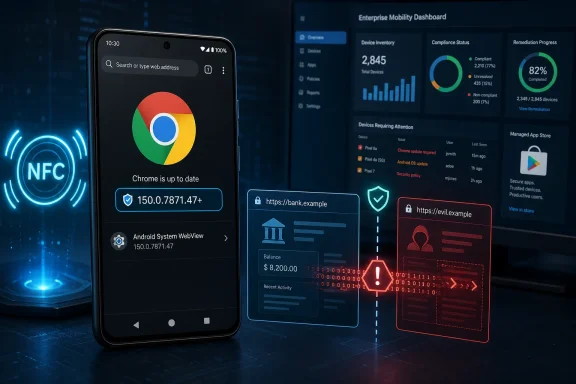 The Medium Label Hides a Chained Security-Boundary Failure
CVE-2026-13887 concerns insufficient policy enforcement in NFC within Google Chrome on Android. The supplied record describes an inappropriate implementation that can permit cross-origin data leakage when an attacker already controls a compromised renderer.A renderer is the browser process responsible for handling web content. Modern browsers isolate renderers because HTML, JavaScript, media, and other remote content form a large and continuously exposed attack surface. Gaining control of a renderer does not necessarily mean that every browser or operating-system boundary has also been defeated.
That is where CVE-2026-13887 becomes relevant. It is documented as a chain component: the attacker must first obtain renderer control and can then use the NFC policy failure to reach information that should remain separated by the browser’s origin model.
The concise interpretation is that renderer compromise is the prerequisite, while cross-origin disclosure is the documented impact. The record does not establish how the initial renderer compromise would occur, identify another vulnerability used to obtain it, or show that CVE-2026-13887 alone provides code execution.
Administrators should therefore avoid both extremes. The issue should not be presented as an unauthenticated, one-step compromise of every Android device running Chrome. It also should not be dismissed simply because another failure must come first. Browser defenses are layered, and a defect that weakens a later layer can increase the capability of an otherwise constrained compromise.
Cross-Origin Leakage Is the Security Event That Matters
The web’s origin model is designed to prevent unrelated sites from freely reading one another’s data. Users may experience Chrome as one application containing many tabs and sessions, but the browser is expected to preserve security boundaries among different origins.The documented consequence of CVE-2026-13887 is a confidentiality failure across that boundary. It is not described as an NFC crash, a device denial of service, a data-modification flaw, or a direct operating-system takeover. The security event is the leakage of cross-origin data after the renderer has already been compromised.
The supplied scoring assigns a CVSS 3.1 base score of 6.5, with high confidentiality impact and no recorded integrity or availability impact. That combination explains why the issue can carry a Medium overall rating while still involving information protected by a central browser isolation policy.
User interaction is included in the supplied vector, but the available material does not establish the exact action required. It does not specify a particular tap, navigation sequence, NFC tag format, permission state, browser prompt, or background condition. Those details should not be inferred from the general reference to crafted HTML and NFC.
The same evidentiary limit applies to the information at risk. The description establishes cross-origin leakage, but it does not identify particular cookies, tokens, credentials, application records, NFC data, or enterprise services that can be extracted. Those may be reasonable subjects for technical investigation, but they are not confirmed outcomes in the supplied record.
The Exploit Starts Where Many Browser Advisories Usually End
Many browser vulnerabilities begin with a malicious page and end with control of a renderer. This issue is described in the opposite position within a potential chain: renderer compromise must already exist before the NFC policy weakness can be used for the documented cross-origin leakage.That prerequisite affects triage. A proof of concept that demonstrates only the NFC weakness would not necessarily provide the initial renderer compromise. Conversely, control of a renderer would not by itself prove that CVE-2026-13887 had been used.
The CVSS notation of no privileges required should not be read as meaning that there are no technical preconditions. In CVSS, privileges required addresses whether the attacker must possess an authorized account or privileges in the target environment. It does not erase the separate prerequisite stated in the vulnerability description.
Low attack complexity also does not establish that a complete attack is easy to build or deploy. It applies to the scored vulnerability under its documented conditions. The effort needed to obtain renderer control, select a target, induce the required interaction, or retrieve useful data is not fully described by that field.
For operational purposes, the important point is straightforward: the vulnerability is relevant to a chained attack, but the supplied record does not establish an active chain, a publicly available exploit, or a method for compromising the renderer in the first place.
Google’s Advisory Trail Leaves Android Teams Doing Extra Work
The public record creates an awkward verification path. The affected product is identified as Google Chrome on Android, and the affected range ends before version 150.0.7871.47. The referenced Google release page, however, is categorized and titled as a desktop stable-channel release.The supplied facts establish the existence, title, type, and reference relationship of that page. They do not establish its complete contents, so the page should not be represented here as independently confirming the CVE listing or Android remediation details.
This mismatch does not override the affected-product record. It does mean administrators should base remediation on the explicit Android product and version boundary rather than assuming that a desktop-oriented release title changes the scope.
For an individual Android device, the verification question is simple: does Google Chrome report version 150.0.7871.47 or later?
Use this procedure:
- Open the Google Play Store.
- Select the profile icon.
- Open Manage apps & device.
- Select Updates available.
- Find Chrome and select Update.
- After installation, open Chrome.
- Select ⋮ > Settings > About Chrome.
- Confirm that the displayed version is 150.0.7871.47 or later.
Enterprise teams should not depend on manual screenshots as their primary fleet control. They should query their MDM, enterprise mobility management platform, Android Enterprise inventory, or managed-Google-Play reporting for the installed Chrome package version. The same platform should be used to assign or approve the corrected release, initiate remediation, identify devices that fail deployment, and record the resulting compliance state.
Desktop Chrome evidence should remain separate. A Windows computer running a similar or higher Chrome version does not prove that an Android phone is protected. The supplied record identifies Chrome on Android as the affected product and does not confirm desktop Chrome as affected.
The Version Boundary Is Clearer Than the Deployment Story
The supplied affected-version record uses 150.0.7871.47 as the boundary: versions before it are affected. The documented remediation threshold is therefore Google Chrome on Android version 150.0.7871.47 or later.| Deployment state | Product | Version condition | Recorded status | Administrative treatment |
|---|---|---|---|---|
| Vulnerable | Google Chrome on Android | Earlier than 150.0.7871.47 | Affected | Update and verify |
| At or above fix boundary | Google Chrome on Android | 150.0.7871.47 or later | Outside the documented affected range | Confirm installation and retain evidence |
| Desktop Chrome | Google Chrome outside Android | Any version | Not confirmed affected by the supplied record | Do not infer scope from matching version numbers |
| Other Chromium browsers | Non-Google Chromium-based browsers | Any version | Unconfirmed | Consult the browser vendor’s advisory |
| Android WebView | Android System WebView or embedded WebView components | Any version | Unconfirmed | Consult Google or the relevant application/vendor advisory |
Mobile application inventory is therefore the appropriate control. Administrators should collect, at minimum:
- Device or enrollment identifier
- Device ownership type
- Android management state
- Chrome package identity
- Installed Chrome version
- Last inventory or check-in time
- Update assignment state
- Post-update version
- Remediation failure reason, if any
- Date and source of compliance verification
Where management telemetry is stale, the device should not automatically be counted as remediated. A compliant version reported weeks earlier may no longer describe the device’s current state, while a device that has not checked in may never have received the remediation command. Organizations should set a reasonable freshness requirement for inventory evidence and follow up on devices outside it.
Bring-your-own-device programs may offer less package-level visibility than fully managed corporate devices. In those environments, administrators may need to combine conditional-access policy, mobile application management, user attestation, help-desk verification, or access restrictions. The appropriate method depends on the organization’s management model, but the objective remains the same: establish that Google Chrome on Android is at version 150.0.7871.47 or later before treating the finding as closed.
CVSS 6.5 Is a Prioritization Signal, Not a Patch Calendar
The supplied CVSS 3.1 assessment assigns a 6.5 Medium score. Its vector reflects network reachability, low attack complexity, no privileges required, required user interaction, unchanged scope, high confidentiality impact, and no integrity or availability impact.The score is useful for relative prioritization, but it does not specify how many days an organization should allow for remediation. Patch timing should reflect the affected population, confidence in inventory, accessibility of sensitive web applications, and the ease with which the corrected package can be deployed.
The high confidentiality component deserves attention because the issue concerns a failure of cross-origin separation. At the same time, the supplied record does not establish which data can be obtained in a real deployment or show that enterprise sessions have been specifically targeted. Any conclusion that particular users or sessions would be especially valuable is risk analysis, not a confirmed fact about observed exploitation.
A reasonable deployment order can still be based on organizational context. Teams may choose to verify fully managed devices first because they can be measured quickly, then resolve unmanaged or stale devices that require manual intervention. They may also apply shorter internal deadlines to devices used for sensitive business functions. Those are local risk-management decisions rather than requirements contained in the CVE record.
Security tools may display different combinations of severity labels, vectors, or enrichment status depending on the data sources they import. Administrators should preserve the origin of the score in tickets and reports instead of treating every displayed number as an independently produced assessment.
Most importantly, the Medium rating should not become a reason to postpone an available browser update indefinitely. The update path is direct, the affected version boundary is explicit, and version verification can be automated for managed Android fleets.
Exploitation Status Requires Careful Wording
The supplied SSVC information records exploitation as “none,” automatable as “no,” and technical impact as “partial.” These fields support a measured response, but they must not be expanded beyond what they say.An exploitation value of “none” means exploitation was not identified in that assessment. It is not proof that exploitation has never occurred, cannot occur, or will not be discovered later. The supplied record does not establish active exploitation, widespread scanning, a public proof of concept, or inclusion in a known attack chain.
Likewise, “automatable: no” does not prove that automation is impossible. It is an assessment of the vulnerability’s characteristics, consistent with factors such as required user interaction and the prerequisite renderer compromise.
“Technical impact: partial” aligns with the documented confidentiality failure rather than total control of the device. It should not be restated as a guarantee that every possible exploit chain would remain limited to data disclosure; the field describes this vulnerability’s assessed technical impact, not hypothetical effects produced by additional vulnerabilities.
Claims that exploitation would probably be targeted rather than widespread are plausible interpretation, but they are not established facts in the supplied record. Administrators can use the attack prerequisites to inform risk analysis without presenting a prediction of attacker behavior as confirmed intelligence.
Timeline
Because the supplied punch-list facts do not independently support the previously stated specific publication, enrichment, and modification dates, those dates have been removed rather than repeated as confirmed chronology.- Initial disclosure record: Google Chrome on Android was identified as the affected product, with versions before 150.0.7871.47 in the affected range.
- Scoring and decision support: The supplied record received a CVSS 3.1 assessment of 6.5 Medium and SSVC fields recording exploitation as none, automatable as no, and technical impact as partial.
- Configuration enrichment: The product configuration associated the affected Chrome version range with Android.
- Operational response: Administrators should deploy Chrome 150.0.7871.47 or later and verify the installed Android application version.
The Weakness Labels Describe Policy-Enforcement Concerns
The supplied record associates CVE-2026-13887 with CWE-346, Origin Validation Error, and CWE-352, Cross-Site Request Forgery. Origin validation maps directly to the documented cross-origin impact: a policy decision did not adequately preserve the separation expected between web origins.The cross-site request forgery classification is less directly explained by the public description, which emphasizes information leakage rather than a conventional unauthorized state-changing request. It should be treated as a weakness mapping contained in the record, not as proof that familiar CSRF attack patterns, defenses, or indicators apply unchanged.
The public information is not detailed enough to identify the precise NFC API path, permission check, origin comparison, process message, tag format, or application state involved. Those mechanisms should not be invented to fill gaps in the record.
This also limits detection advice. An NFC interaction, browser permission prompt, renderer crash, or visit to an unfamiliar page is not, by itself, evidence that CVE-2026-13887 was exploited. The supplied description does not provide a reliable network signature, log pattern, indicator of compromise, or forensic artifact specific to the vulnerability.
Version-based remediation is consequently the strongest documented control. If an organization cannot immediately confirm the corrected version, it may choose to reduce browser exposure based on its own risk assessment. For example, it could restrict sensitive web access from noncompliant devices. Such steps must be labeled optional exposure reduction, not a proven workaround or mitigation for the NFC flaw.
There is no supplied evidence that limiting NFC-related browser workflows, avoiding particular sites, or reducing untrusted browsing will reliably prevent exploitation. Those actions should not substitute for installing and verifying the corrected Chrome version.
Deployment and Verification Matter More Than Speculation
The practical challenge is not interpreting browser architecture repeatedly; it is finding every affected Android installation and proving that the corrected version is running.A managed deployment should follow a closed-loop process:
- Define scope. Identify Android devices allowed to access organizational services.
- Collect inventory. Query the installed Google Chrome package and version.
- Classify results. Mark versions before 150.0.7871.47 as affected; mark unknown or stale results as unresolved.
- Assign the update. Use managed Google Play, MDM, or the organization’s Android Enterprise workflow.
- Monitor installation. Separate pending, failed, offline, and successful states.
- Re-inventory. Confirm that Chrome reports version 150.0.7871.47 or later.
- Handle exceptions. Investigate devices unable to receive the release, devices outside management, and users who cannot complete the update.
- Retain evidence. Record the verified version, inventory timestamp, management source, and exception disposition.
- Reassess access. Apply the organization’s normal noncompliance policy to devices that remain below the boundary.
- Close only verified findings. Do not close the vulnerability solely because the update was approved or published.
Sideloading is another inventory consideration, not a confirmed characteristic of affected deployments. The supplied record does not say that affected devices use sideloaded packages. Organizations that permit applications outside managed Google Play should nevertheless verify package identity and version through their established software-governance controls because those installations may not follow the standard remediation workflow.
Mobile Fleet Management Is Where the WindowsForum Angle Becomes Operational
A Chrome-on-Android vulnerability matters to Windows-centered administrators because organizational identity and data no longer remain on Windows endpoints. Android phones routinely connect to Microsoft 365, Entra-protected applications, remote-support portals, internal web tools, and other services managed by teams that may still think primarily in terms of Windows inventory.The evidence-led lesson from CVE-2026-13887 is not that every mobile browser flaw threatens every enterprise session. The supplied record does not establish that. The lesson is that an organization cannot verify remediation if its endpoint program cannot report the version of a browser used to access organizational resources.
Traditional Windows software inventory may answer detailed questions about desktop Chrome while providing no useful visibility into Android Chrome. That creates several common operational gaps:
- Android devices may be registered for identity purposes but not enrolled for application inventory.
- Bring-your-own devices may access web services without reporting browser versions.
- Mobile application management may control organizational data without exposing full device inventory.
- Dormant devices may retain access while no longer checking in regularly.
- Compliance rules may evaluate Android patch level without evaluating the installed Chrome version.
- Reports may combine Chrome across operating systems and obscure the affected Android population.
- How many Android devices can access organizational services?
- How many report Google Chrome as installed?
- How many are below version 150.0.7871.47?
- How many report version 150.0.7871.47 or later?
- How many have unknown or stale Chrome-version data?
- How many remediation assignments remain pending or failed?
- What access policy applies to devices that cannot be verified?
Action checklist for admins
- Inventory Google Chrome specifically on Android, keeping it separate from Windows, macOS, Linux, and ChromeOS results.
- Mark Chrome versions earlier than 150.0.7871.47 as affected.
- Deploy 150.0.7871.47 or later through managed Google Play or the organization’s MDM remediation workflow.
- Re-query the installed application version after deployment.
- Treat stale, unavailable, or missing version data as unresolved rather than compliant.
- Give users the manual Play Store and About Chrome procedure when automated remediation is unavailable.
- Confirm that compliance policies evaluate the Chrome application version where the management platform supports it.
- Record devices that cannot receive the corrected release and apply the organization’s established exception process.
- Keep desktop Chrome findings separate because desktop impact is not confirmed by the supplied record.
- Preserve package-version and compliance evidence for audit and incident-response use.
- Label any temporary access restrictions as optional exposure reduction, not as a documented workaround.
- Check non-Google Chromium browsers and WebView only through their own vendor advisories.
Windows-Centered IT Cannot Treat Android Chrome as Someone Else’s Browser
Windows administration increasingly includes identity, access, application governance, and endpoint compliance across multiple operating systems. An Android browser can be an access point to the same organizational services used from a managed Windows workstation, even though it is updated through a different platform and may be visible in a different console.The supplied record does not identify particular enterprise services, privileged accounts, or user populations as targets. Prioritizing devices with broader access can still be a defensible local decision, but it must be described as organizational risk management rather than evidence of likely targeted exploitation.
A mature remediation ticket should state:
- The affected product is Google Chrome on Android.
- Versions before 150.0.7871.47 are affected.
- The documented fix boundary is 150.0.7871.47 or later.
- Desktop Chrome is not confirmed affected by the supplied record.
- The management source used for inventory and verification.
- The number of affected, corrected, unresolved, and excepted devices.
- The time at which post-deployment inventory was collected.
- Any access restrictions applied under the organization’s normal compliance policy.
What Admins Should Do Now
- Update individual devices immediately: open Google Play Store > profile icon > Manage apps & device > Updates available > Chrome > Update.
- Verify the result: open Chrome > ⋮ > Settings > About Chrome and confirm version 150.0.7871.47 or later.
- Use enterprise tooling at scale: managed fleets should use their MDM or managed-Google-Play inventory and remediation workflow rather than relying on user confirmation alone.
- Separate platforms: do not use a desktop Chrome version as proof that Android Chrome has been remediated. Desktop Chrome is not confirmed affected by the supplied record.
- Close the loop: re-inventory after deployment and retain the installed package version, verification time, and management source.
- Resolve unknowns: treat offline, stale, unmanaged, or unreported Android devices as unresolved until their Chrome version can be established.
- Avoid unsupported workarounds: optional restrictions may reduce general exposure, but the supplied record does not document NFC restrictions or reduced untrusted browsing as effective mitigations.
- Check other products separately: non-Google Chromium browsers and Android WebView are unconfirmed under the supplied record. Their status requires vendor-specific advisories and should not be inferred from Google Chrome’s version boundary.
