

Chrome on iOS before version 150.0.7871.47 is affected by CVE-2026-13889, a medium-severity side-channel vulnerability that may allow a remote attacker to use crafted HTML to leak cross-origin data through Chrome’s WebAuthentication handling. The documented impact is a browser-confidentiality failure, not code execution or device takeover. The available record does not establish active exploitation, passkey theft, or exposure in desktop Chrome, Chrome on Android, Safari, or other browsers. The practical response is straightforward: update Chrome on every affected iPhone to version 150.0.7871.47 or later.
The strongest scope conclusion in the public record is also the easiest one to miss: CVE-2026-13889 is documented as affecting Chrome on iOS before version 150.0.7871.47.
That distinction matters because the vendor reference associated with the CVE has desktop-oriented framing. Administrators who classify vulnerabilities from advisory titles alone could therefore attach the issue to Windows, macOS, or Linux Chrome deployments while overlooking the affected iPhone population.
The available record does not establish that desktop Chrome, Chrome on Android, Safari, or other iOS browsers are affected by this CVE. That should not be expanded into a claim that those products are immune to every similar issue. It means only that they are outside the documented scope of CVE-2026-13889.
For Windows-focused organizations, an iOS vulnerability can still create enterprise exposure. Employees may use iPhones to reach Microsoft 365, identity portals, remote-management tools, internal applications, financial systems, source-code platforms, and other services belonging to a predominantly Windows environment.
The relevant question is not whether the vulnerable endpoint runs Windows. It is whether an outdated Chrome installation on an iPhone can access sensitive organizational web sessions.
Cross-origin isolation is one of the web’s central security boundaries. A page controlled by one site should not be able to inspect information associated with an unrelated bank, corporate portal, email service, identity provider, or administrative console.
The available disclosure does not explain exactly what data can be inferred, how much information may be exposed, or which browser operations create the side channel. The linked Chromium issue is permission-restricted, so defenders do not have a complete public exploit narrative.
That lack of detail is a reason to avoid speculation, not a reason to postpone the update. The confirmed remediation boundary is enough to support a version-based response.
The CISA-ADP CVSS 3.1 assessment displayed in the NVD record gives the issue a base score of 6.5 with the vector
The rating also does not establish modification of browser data, arbitrary code execution, persistence, or denial of service. The reported consequence is information leakage across an origin boundary.
The documented impact does not establish that outcome.
The record does not say that private keys can be extracted, passkeys can be copied, authentication assertions can be forged, or accounts can be accessed without authorization. It describes a side-channel leak of cross-origin data involving WebAuthentication handling.
The component name identifies where the weakness manifests; it does not prove every possible security consequence associated with that component.
A side channel also differs from direct access. Instead of giving a hostile page ordinary permission to read another site’s information, a side channel may allow information to be inferred from observable differences in browser behavior, timing, state, responses, or related signals.
The public material does not identify the operative signal or the precise data exposed. Claims that the flaw reveals complete pages, passwords, account identifiers, authentication status, passkeys, or other specific information would therefore go beyond the documented evidence.
Users and administrators should not delete passkeys, replace security keys, reset every password, or re-enroll authenticators solely because an affected Chrome version is discovered. Those measures would require separate evidence of malicious-page exposure, suspicious authentication, or account compromise.
The direct remediation for this CVE is the Chrome update.
It does not reveal which WebAuthentication input was mishandled, which check was missing, or how the condition produced a cross-origin side channel.
The general security principle is clear even if the implementation details remain restricted. Browser boundaries depend on careful handling of origins, requests, state transitions, authenticator interactions, and data returned to web content. A validation failure may disclose information without corrupting memory, changing stored data, or granting conventional direct access.
That aligns with the published scoring: high confidentiality impact, but no stated integrity or availability impact.
Administrators should not fill the technical gap with assumptions drawn from unrelated WebAuthentication vulnerabilities or older browser research. The defensible facts are narrower:
That layered process can produce fields that appear, change, or are removed by one contributor while similar information remains attributed to another. Vulnerability-management teams should therefore record the source of a score or classification rather than treating every field displayed by NVD as a completed NIST assessment.
The visible 6.5 rating is a CISA-ADP CVSS 3.1 assessment. It should be described that way instead of being presented as an independent NIST score.
CISA-ADP enrichment — CISA-ADP added a CVSS 3.1 assessment and an SSVC record indicating no known exploitation, non-automatable exploitation, and partial technical impact at the time of that assessment.
Weakness-field revision — CISA-ADP later removed its copy of the CWE-20 field, while the weakness classification remained represented elsewhere in the layered record.
NIST analysis — NIST added affected software configuration information that associates the vulnerable Chrome range with Apple’s iPhone operating system and classified the attached references.
The practical lesson is that a newly published CVE entry is not necessarily static. Administrators should monitor it for changes in affected products, scoring, exploitation status, and remediation guidance, while continuing to enforce the already documented fixed-version threshold.
If the fixed release is not offered immediately, the user should retry after refreshing the App Store and confirm that the iPhone can download application updates. Until the update is available and verified, avoiding sensitive browsing in the outdated Chrome installation is a reasonable temporary precaution. It is not a permanent substitute for patching.
A device should not be marked remediated merely because:
Mobile inventory can be incomplete, especially in bring-your-own-device environments. Where direct version collection is unavailable, organizations may need to combine user instructions, compliance attestations, supported mobile-management controls, and existing access policies.
The desktop framing of the linked vendor page also deserves attention. Vulnerability scanners or ticketing rules that infer platform scope from reference titles may classify the CVE incorrectly. Security teams should verify that the affected population is built from the CVE’s documented iOS product range rather than from the advisory title alone.
Without separate evidence, users and help desks should not:
A concise help-desk message is more useful than an alarmist one:
That combination supports prompt remediation without unsupported claims of an active crisis.
The most important WindowsForum-added correction is the product boundary: despite the desktop framing of the linked vendor reference, the documented affected population is Chrome on iOS earlier than 150.0.7871.47. Security teams should direct their effort toward iPhone inventory and App Store update verification rather than assuming that every Chrome platform shares the same exposure.
Future updates to the vulnerability record may provide more technical detail, revise scoring, or change the exploitation assessment. Administrators should monitor those developments, but they do not need to wait for them. The current action remains clear and verifiable: update Chrome on affected iPhones and confirm that every installation reports version 150.0.7871.47 or later.
At a glance
Who is affected: Users running Chrome on iOS earlier than version 150.0.7871.47
What to do: Update Chrome through Apple’s App Store, then verify that the installed version is 150.0.7871.47 or later
What is not established: Passkey theft, arbitrary code execution, device takeover, desktop Chrome exposure, Android exposure, Safari exposure, or active exploitation
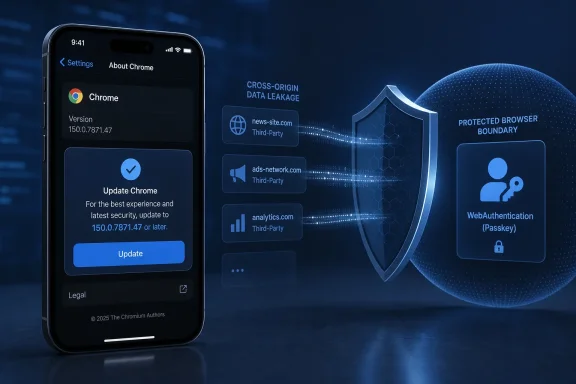 Chrome on iOS Is the Documented Product Boundary
The strongest scope conclusion in the public record is also the easiest one to miss: CVE-2026-13889 is documented as affecting Chrome on iOS before version 150.0.7871.47.That distinction matters because the vendor reference associated with the CVE has desktop-oriented framing. Administrators who classify vulnerabilities from advisory titles alone could therefore attach the issue to Windows, macOS, or Linux Chrome deployments while overlooking the affected iPhone population.
The available record does not establish that desktop Chrome, Chrome on Android, Safari, or other iOS browsers are affected by this CVE. That should not be expanded into a claim that those products are immune to every similar issue. It means only that they are outside the documented scope of CVE-2026-13889.
| Deployment state | Chrome on iOS version | Practical interpretation |
|---|---|---|
| Outdated | Earlier than 150.0.7871.47 | Affected; update the application |
| Remediated threshold | 150.0.7871.47 | Meets the stated fixed-version boundary |
| Newer release | Later than 150.0.7871.47 | Outside the documented affected range |
The relevant question is not whether the vulnerable endpoint runs Windows. It is whether an outdated Chrome installation on an iPhone can access sensitive organizational web sessions.
A Medium Rating Still Describes a Browser-Boundary Failure
CVE-2026-13889 is described as a side-channel issue involving Chrome’s WebAuthentication handling. A crafted HTML page may allow a remote attacker to leak cross-origin data from a vulnerable browser.Cross-origin isolation is one of the web’s central security boundaries. A page controlled by one site should not be able to inspect information associated with an unrelated bank, corporate portal, email service, identity provider, or administrative console.
The available disclosure does not explain exactly what data can be inferred, how much information may be exposed, or which browser operations create the side channel. The linked Chromium issue is permission-restricted, so defenders do not have a complete public exploit narrative.
That lack of detail is a reason to avoid speculation, not a reason to postpone the update. The confirmed remediation boundary is enough to support a version-based response.
The CISA-ADP CVSS 3.1 assessment displayed in the NVD record gives the issue a base score of 6.5 with the vector
CVSS:3.1/AV:N/AC:L/PR:N/UI:R/S:U/C:H/I:N/A:N. In practical terms, the assessment characterizes the issue as:- Reachable through network-delivered content
- Low in attack complexity
- Requiring no attacker privileges
- Requiring some user interaction
- Carrying high confidentiality impact
- Carrying no stated integrity or availability impact
The rating also does not establish modification of browser data, arbitrary code execution, persistence, or denial of service. The reported consequence is information leakage across an origin boundary.
WebAuthentication Does Not Mean Passkeys Were Stolen
WebAuthentication is associated with passkeys, security keys, device-backed credentials, and strong sign-in flows. Its appearance in the vulnerability description understandably raises questions about credential theft.The documented impact does not establish that outcome.
The record does not say that private keys can be extracted, passkeys can be copied, authentication assertions can be forged, or accounts can be accessed without authorization. It describes a side-channel leak of cross-origin data involving WebAuthentication handling.
The component name identifies where the weakness manifests; it does not prove every possible security consequence associated with that component.
A side channel also differs from direct access. Instead of giving a hostile page ordinary permission to read another site’s information, a side channel may allow information to be inferred from observable differences in browser behavior, timing, state, responses, or related signals.
The public material does not identify the operative signal or the precise data exposed. Claims that the flaw reveals complete pages, passwords, account identifiers, authentication status, passkeys, or other specific information would therefore go beyond the documented evidence.
Users and administrators should not delete passkeys, replace security keys, reset every password, or re-enroll authenticators solely because an affected Chrome version is discovered. Those measures would require separate evidence of malicious-page exposure, suspicious authentication, or account compromise.
The direct remediation for this CVE is the Chrome update.
“Improper Input Validation” Describes the Weakness Class
The record associates CVE-2026-13889 with CWE-20, Improper Input Validation. That is a broad weakness category indicating that untrusted input was not validated adequately before being processed or interpreted.It does not reveal which WebAuthentication input was mishandled, which check was missing, or how the condition produced a cross-origin side channel.
The general security principle is clear even if the implementation details remain restricted. Browser boundaries depend on careful handling of origins, requests, state transitions, authenticator interactions, and data returned to web content. A validation failure may disclose information without corrupting memory, changing stored data, or granting conventional direct access.
That aligns with the published scoring: high confidentiality impact, but no stated integrity or availability impact.
Administrators should not fill the technical gap with assumptions drawn from unrelated WebAuthentication vulnerabilities or older browser research. The defensible facts are narrower:
- The affected product is Chrome on iOS.
- Versions before 150.0.7871.47 are affected.
- Crafted HTML is the documented attack vehicle.
- User interaction is required.
- The reported consequence is cross-origin data leakage.
- The available record does not establish active exploitation.
The Public Record Was Built in Layers
The vulnerability record reflects contributions from multiple sources. The original CVE material supplied the description and product information, CISA-ADP added scoring and decision-support fields, and NIST added affected-platform analysis and reference classifications.That layered process can produce fields that appear, change, or are removed by one contributor while similar information remains attributed to another. Vulnerability-management teams should therefore record the source of a score or classification rather than treating every field displayed by NVD as a completed NIST assessment.
The visible 6.5 rating is a CISA-ADP CVSS 3.1 assessment. It should be described that way instead of being presented as an independent NIST score.
Publication timeline
Initial CVE publication — NVD published the CVE record with the vulnerability description, affected-version boundary, weakness information, and references supplied with the record.CISA-ADP enrichment — CISA-ADP added a CVSS 3.1 assessment and an SSVC record indicating no known exploitation, non-automatable exploitation, and partial technical impact at the time of that assessment.
Weakness-field revision — CISA-ADP later removed its copy of the CWE-20 field, while the weakness classification remained represented elsewhere in the layered record.
NIST analysis — NIST added affected software configuration information that associates the vulnerable Chrome range with Apple’s iPhone operating system and classified the attached references.
The practical lesson is that a newly published CVE entry is not necessarily static. Administrators should monitor it for changes in affected products, scoring, exploitation status, and remediation guidance, while continuing to enforce the already documented fixed-version threshold.
Exact iPhone Remediation Steps
Updating Chrome on a Windows PC does not update Chrome on an iPhone. Each affected iPhone must receive the iOS application update independently.Update Chrome through the App Store
- Open the App Store on the iPhone.
- Tap the user’s profile picture or account button in the upper-right corner.
- Scroll to the pending app updates.
- Find Google Chrome.
- Tap Update next to Chrome.
- If Chrome is not listed, pull down on the account screen to refresh the available updates.
- Wait for the installation to complete, then reopen Chrome.
Verify the installed Chrome version
After the update:- Open Chrome.
- Tap More, represented by the three-dot menu.
- Tap Settings.
- Tap Google Chrome.
- Read the installed version shown on that screen.
- Confirm that it is 150.0.7871.47 or later.
If the fixed release is not offered immediately, the user should retry after refreshing the App Store and confirm that the iPhone can download application updates. Until the update is available and verified, avoiding sensitive browsing in the outdated Chrome installation is a reasonable temporary precaution. It is not a permanent substitute for patching.
Sparse Disclosure Makes Version Evidence More Important
Because the underlying issue details are restricted, organizations cannot reliably build a detection rule around a publicly documented exploit sequence. Version evidence is therefore the clearest basis for finding and closing exposure.A device should not be marked remediated merely because:
- The Chrome update was assigned
- Automatic application updates are enabled
- The App Store reports that an update is available
- The device checked in before the update was released
- Chrome is listed as an installed application without a version number
Mobile inventory can be incomplete, especially in bring-your-own-device environments. Where direct version collection is unavailable, organizations may need to combine user instructions, compliance attestations, supported mobile-management controls, and existing access policies.
The desktop framing of the linked vendor page also deserves attention. Vulnerability scanners or ticketing rules that infer platform scope from reference titles may classify the CVE incorrectly. Security teams should verify that the affected population is built from the CVE’s documented iOS product range rather than from the advisory title alone.
Practical Guidance for Administrators
The immediate task is to identify outdated Chrome installations and verify the update. Broader incident-response action is not justified without additional evidence.Action checklist for admins
- Inventory Chrome on managed or enrolled iPhones, including the installed version and latest check-in time.
- Mark every Chrome on iOS installation earlier than 150.0.7871.47 as affected.
- Push or require the current App Store release through the organization’s normal mobile application-management process.
- Recheck the installed version after deployment rather than treating update assignment as proof of remediation.
- Review scanner and ticket-routing rules for errors caused by the desktop-oriented framing of the linked advisory.
- Prioritize verification on devices used for administrative, identity-sensitive, financial, healthcare, development, or other confidential web sessions.
- Use established noncompliance or access-control procedures for devices that remain outdated, where organizational policy permits.
- Monitor the NVD record and vendor communications for changes in scope, exploitation status, or technical guidance.
What Users and Help Desks Should Not Do
Finding an affected version is not proof that data was leaked. A vulnerable application becomes an incident only when relevant exposure and exploitation conditions are present.Without separate evidence, users and help desks should not:
- Reset all passwords
- Delete or replace passkeys
- Re-enroll every authenticator
- Wipe the iPhone
- Disable WebAuthentication across the organization
- Remove Chrome synchronization from every account
- Treat every affected user as compromised
- Assume desktop Chrome or Android Chrome is exposed to this CVE
- Report that attackers are actively exploiting the flaw
A concise help-desk message is more useful than an alarmist one:
Update Google Chrome from the iPhone App Store. Then open Chrome and go to More, Settings, Google Chrome. Confirm the version is 150.0.7871.47 or later. No password or passkey reset is required solely because of this update notice.
The Risk Calls for Prompt Patching, Not an Emergency Declaration
The available scoring presents a measured picture. CVE-2026-13889 is remotely reachable, low complexity, requires no attacker privileges, and may have significant confidentiality consequences. It also requires user interaction, has no stated integrity or availability impact, and had no known exploitation in the referenced assessment.That combination supports prompt remediation without unsupported claims of an active crisis.
The most important WindowsForum-added correction is the product boundary: despite the desktop framing of the linked vendor reference, the documented affected population is Chrome on iOS earlier than 150.0.7871.47. Security teams should direct their effort toward iPhone inventory and App Store update verification rather than assuming that every Chrome platform shares the same exposure.
Future updates to the vulnerability record may provide more technical detail, revise scoring, or change the exploitation assessment. Administrators should monitor those developments, but they do not need to wait for them. The current action remains clear and verifiable: update Chrome on affected iPhones and confirm that every installation reports version 150.0.7871.47 or later.
References
- Primary source: NVD / Chromium
Published: 2026-07-11T15:40:14-07:00
NVD - CVE-2026-13889
 nvd.nist.gov
- Security advisory: MSRC
Published: 2026-07-11T15:40:14-07:00
Original feed URL
Security Update Guide - Microsoft Security Response Center
 msrc.microsoft.com
- Related coverage: chromium.googlesource.com
- Related coverage: vulnerability.circl.lu
Vulnerability-Lookup
Vulnerability-Lookup - Fast vulnerability lookup correlation from different sources.vulnerability.circl.lu