

CVE-2026-13908 is a Medium-severity vulnerability affecting Chrome on iOS before version 150.0.7871.47. According to the Chrome-sourced description, insufficient validation of untrusted input in the Omnibox could allow a remote attacker to use malicious network traffic, together with specific user-interface gestures, to bypass navigation restrictions. The practical response is direct: update Chrome on iOS to version 150.0.7871.47 or later, then verify the complete installed version rather than relying on the major release number, application presence, or an update assignment alone.
The central administrative distinction is between three different states: Chrome is present, an update has been assigned, and refreshed device inventory confirms that a non-affected version is installed. Only the third state verifies remediation. Desktop Chrome compliance does not establish Chrome-on-iOS compliance for this CVE.
Administrators should make installed-version evidence the basis of the response:
That distinction is foundational to browser security. A page can reproduce logos, prompts, forms, and other visual elements inside its content area, but it is not supposed to control Chrome’s own navigation behavior. Users and security teams depend on that separation when deciding whether a browsing action is proceeding as intended.
According to the Chrome-sourced CVE description, insufficient validation of untrusted input in the Omnibox allowed a remote attacker to bypass navigation restrictions through malicious network traffic after convincing the user to perform specific interface gestures.
The public description does not identify those gestures, the precise restriction being bypassed, or the exact trigger sequence. The associated Chromium issue is permission-restricted, leaving defenders with a product scope, attack preconditions, impact classification, and fixed-version boundary rather than a complete technical reconstruction.
The confirmed facts are therefore narrow but actionable. The issue affects Chrome on iOS, involves improper validation of untrusted input, requires malicious network traffic and specific user-interface gestures, and can result in a navigation-restriction bypass. Chrome versions before 150.0.7871.47 are listed in the affected range.
This is more specific than a generic warning about unsafe browsing, but it should not be expanded into claims that are absent from the record. It is a defect in a browser security boundary, and moving Chrome outside the listed affected range is the appropriate remedy.
The network attack vector indicates that the vulnerable path can be reached remotely rather than requiring local physical access to the device. The no-privileges metric indicates that the scored attack does not depend on the attacker already having an authenticated or administrative position in Chrome.
User interaction remains a necessary condition. The Chrome-sourced description says the attacker must convince the user to perform specific interface gestures. The record does not identify those gestures, so defenders should not publish a hypothetical series of taps, swipes, tab changes, address-bar actions, or navigation steps as though it were a confirmed exploit procedure.
The high-integrity impact is consistent with the stated navigation-restriction bypass. The score does not add impacts beyond those described in the record.
The table does not guarantee that later Chrome releases are free from every vulnerability. It means only that version 150.0.7871.47 and later are outside the affected range listed for CVE-2026-13908.
The phrase “malicious network traffic” is similarly important but limited. It establishes that attacker-controlled or attacker-influenced traffic is involved in the vulnerable path. It does not, by itself, identify a particular delivery channel.
Those boundaries should shape internal communications. Administrators can advise users to be cautious about unexpected instructions involving unusual browser interactions, but they should not present an invented gesture sequence or campaign scenario as confirmed fact.
The weakness displayed in the CVE record is CWE-20, Improper Input Validation, sourced from Chrome. That broad classification is consistent with the description: untrusted input was not validated sufficiently before affecting an Omnibox-related navigation restriction.
User awareness may reduce exposure to interaction-dependent attacks, but awareness training cannot correct Chrome’s input-validation behavior. Updating remains the primary remediation.
“Exploitation: none” must be read as the CISA-ADP assessment reflected at its recorded timestamp. It is not a universal or permanent finding, and it should not be converted into a guarantee about all past, current, or future activity.
“Automatable: no” is consistent with a vulnerability that requires a human target to perform specific interface gestures. An interaction-dependent attack is less suitable for fully automated exploitation than a flaw triggered entirely by an unauthenticated request.
“Technical impact: partial” is also consistent with the narrower impact described in the CVE. These factors support prompt, routine security remediation rather than conclusions unsupported by the public record.
The operational target remains unchanged: Chrome on iOS installations below 150.0.7871.47 should be updated, and the resulting installed version should be verified.
That record supports treating applicable Chrome-on-iOS installations below the fixed version as affected. It does not, on its own, operationally establish separate iPad coverage, so administrators should avoid broadening the formal scope beyond what their own vendor documentation and inventory establish.
The key WindowsForum point is shorter and sharper: a compliant desktop Chrome deployment does not establish Chrome-on-iOS compliance for this CVE. Desktop and mobile copies are separate application installations with separate version evidence.
Administrators should distinguish among:
This distinction is the most important operational lesson in the record. A management console may display a successful policy assignment while a device remains offline, has not checked in, has not completed installation, or continues to return an older application version. Those possibilities should be resolved through inventory evidence rather than assumptions.
A user report or inventory result showing only the major release cannot demonstrate that the device is outside the affected range. A dashboard that reports Chrome as installed but omits its version is equally insufficient. So is a deployment system that shows an update assignment without returning post-installation inventory.
Version verification should use the complete application version whenever the management platform exposes it. Devices can be classified as follows:
Version comparisons should be made across the complete sequence rather than by reading only the first component. An inventory tool should compare the normalized version value as a multi-part software version, not as an ordinary decimal number or unstructured text string.
For example, a result beginning with 150 is not automatically compliant. The remaining components determine whether it is lower than, equal to, or greater than 150.0.7871.47.
NVD classifies a Chrome Releases URL as a vendor advisory. Based on the referenced URL, the page appears oriented toward Chrome’s desktop channel even though the CVE description is scoped to Chrome on iOS. The supplied record does not independently establish the page’s full title or detailed platform applicability, so those details should not be asserted beyond what can reasonably be inferred from the URL.
That apparent mismatch does not alter the affected range stated in the CVE. It does make triage less intuitive for administrators who use advisory links or release-channel labels as their first platform signal.
The second reference leads to a permission-restricted Chromium issue. Restricting technical details can be reasonable during coordinated vulnerability handling, but the result is that public defenders cannot reconstruct the exact gestures, input path, or navigation restriction from the issue.
WindowsForum’s practical value is not to fill those gaps with speculation. It is to make the deployment boundary and evidence requirements explicit:
Record enrichment: CISA-ADP supplied a CVSS 3.1 score of 6.5 and SSVC information listing exploitation as none, automatable as no, and technical impact as partial.
Affected-product configuration: The structured configuration associated Chrome before 150.0.7871.47 with the listed Apple mobile operating-system platform.
Displayed weakness information: The record displays CWE-20, Improper Input Validation, sourced from Chrome. The change history also records removal of a CISA-ADP CWE contribution, but that history should not be expanded into a more detailed chronology without supporting evidence.
This timeline deliberately avoids assigning unsupported calendar dates or precise modification times to the record.
An application-presence result answers whether Chrome was detected. It may support asset discovery, but it cannot establish whether the installation is above or below the fixed-version boundary.
An update assignment answers whether the management system instructed a device to obtain a release, made the release available, or associated the device with an application policy. Its exact meaning depends on the platform. Assignment is useful workflow evidence, but it is not necessarily evidence of completed installation.
A returned installed-version result answers the question that matters for CVE-2026-13908: what complete Chrome version did the device report after remediation?
Administrators should preserve those distinctions in dashboards and incident tickets. A useful status model might include:
The final two states provide much stronger evidence than the first three. Where possible, remediation reporting should show both the returned version and the inventory timestamp so that administrators can distinguish a current result from an old device record.
Unknown results should remain visible. Hiding missing versions inside a general “deployed” or “healthy” count can overstate compliance. A device that has not returned a complete version is unverified, not confirmed safe.
For unmanaged devices, organizations may not have direct access to application inventory. In that case, users can be instructed to install the current Chrome update through Apple’s supported application-update mechanism and provide or confirm the complete installed version through an available application or device information view.
The exact end-user menu labels and version-check path may vary by Apple and Chrome release. They should not be presented as verified by the CVE record. Support teams should use current vendor documentation or device-specific guidance when directing users through those interfaces.
Where the complete version cannot be collected, the device remains unverified. Organizations can apply their established supported-software and access-control policies to that situation, particularly for sensitive services, but the response should remain proportionate to the documented vulnerability.
The objective is not to infer compromise from missing inventory. It is to avoid misclassifying missing evidence as successful remediation.
The public record does not provide the detail needed to reconstruct the triggering gestures or malicious input, and the referenced vendor-advisory URL appears desktop-channel-oriented despite the mobile scope in the CVE description. Neither issue changes the fixed-version boundary.
Administrators should inventory complete Chrome versions, target installations below 150.0.7871.47, deploy the current release, refresh device inventory, and verify the versions returned afterward. Devices with missing or stale version data should remain unverified until adequate evidence arrives.
That final verification step separates activity from outcome. Chrome being present is not proof of compliance. An update being assigned is not proof that it was installed. A refreshed inventory result showing Chrome 150.0.7871.47 or later is the evidence that the reported installation has moved outside the affected range for this CVE.
For Windows-focused teams overseeing mixed application estates, that is the durable lesson: remediation is complete only when the installed mobile-app version—not the desktop browser status, application-presence flag, or deployment command—confirms it.
The central administrative distinction is between three different states: Chrome is present, an update has been assigned, and refreshed device inventory confirms that a non-affected version is installed. Only the third state verifies remediation. Desktop Chrome compliance does not establish Chrome-on-iOS compliance for this CVE.
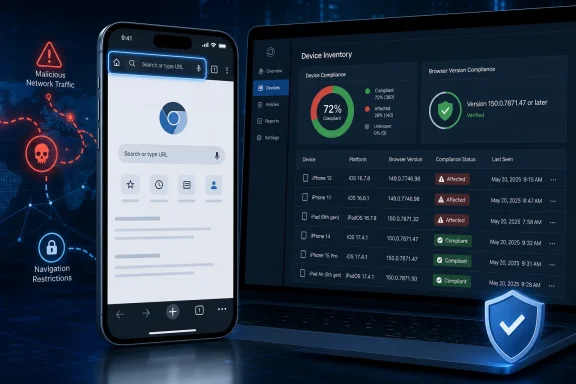 Administrator Workflow: Deploy, Refresh, and Verify
Administrators should make installed-version evidence the basis of the response:- Inventory the complete installed version. Query the organization’s device-management or asset-inventory platform for Chrome installations on managed iOS devices. Collect the full application version rather than only the major release or an “installed” status.
- Identify affected and unverified devices. Target every returned version lower than 150.0.7871.47. Place devices with missing, truncated, or stale version information in a separate unverified group rather than treating them as compliant.
- Deploy the current Chrome release. Use the organization’s supported application-distribution process to make or assign the current Chrome release to the targeted devices. The exact controls and terminology will vary by management platform.
- Refresh the inventory. Use the platform’s documented synchronization, check-in, or inventory-refresh function where available. If an immediate refresh is not supported, wait for the next reported inventory result instead of assuming that assignment equals installation.
- Verify the returned installed version. Confirm that each device reports Chrome 150.0.7871.47 or later. Keep devices reporting an older, missing, or stale version in the remediation group.
- Escalate unresolved devices. Follow the organization’s established process for devices that remain offline, fail to report inventory, or continue to return an affected version. Do not infer the reason for a failed update without device-specific evidence.
A Medium Bug Reaches Chrome’s Most Trusted Surface
The Omnibox is not simply a field for entering searches and web addresses. It is part of the browser-controlled interface that separates navigation behavior from content drawn by a website.That distinction is foundational to browser security. A page can reproduce logos, prompts, forms, and other visual elements inside its content area, but it is not supposed to control Chrome’s own navigation behavior. Users and security teams depend on that separation when deciding whether a browsing action is proceeding as intended.
According to the Chrome-sourced CVE description, insufficient validation of untrusted input in the Omnibox allowed a remote attacker to bypass navigation restrictions through malicious network traffic after convincing the user to perform specific interface gestures.
The public description does not identify those gestures, the precise restriction being bypassed, or the exact trigger sequence. The associated Chromium issue is permission-restricted, leaving defenders with a product scope, attack preconditions, impact classification, and fixed-version boundary rather than a complete technical reconstruction.
The confirmed facts are therefore narrow but actionable. The issue affects Chrome on iOS, involves improper validation of untrusted input, requires malicious network traffic and specific user-interface gestures, and can result in a navigation-restriction bypass. Chrome versions before 150.0.7871.47 are listed in the affected range.
This is more specific than a generic warning about unsafe browsing, but it should not be expanded into claims that are absent from the record. It is a defect in a browser security boundary, and moving Chrome outside the listed affected range is the appropriate remedy.
The Score Describes an Integrity Problem
CISA-ADP assigned CVE-2026-13908 a CVSS 3.1 base score of 6.5, categorized as Medium. The vector describes a network-reachable issue with low attack complexity, no privileges required, required user interaction, unchanged scope, no scored confidentiality impact, high integrity impact, and no availability impact.The network attack vector indicates that the vulnerable path can be reached remotely rather than requiring local physical access to the device. The no-privileges metric indicates that the scored attack does not depend on the attacker already having an authenticated or administrative position in Chrome.
User interaction remains a necessary condition. The Chrome-sourced description says the attacker must convince the user to perform specific interface gestures. The record does not identify those gestures, so defenders should not publish a hypothetical series of taps, swipes, tab changes, address-bar actions, or navigation steps as though it were a confirmed exploit procedure.
The high-integrity impact is consistent with the stated navigation-restriction bypass. The score does not add impacts beyond those described in the record.
| Security dimension | Versions before 150.0.7871.47 | Version 150.0.7871.47 or later |
|---|---|---|
| CVE status | Inside the listed affected range | Outside the listed affected range |
| Confirmed product scope | Chrome on iOS | Chrome on iOS |
| Relevant component | Omnibox | Same product component, but outside the listed affected range |
| Attack conditions | Malicious network traffic and specific UI gestures | The CVE does not list these versions as affected |
| Scored impact | High integrity impact; no scored confidentiality or availability impact | No claim beyond being outside the listed affected range for this CVE |
| Administrative evidence | Full returned version indicates exposure | Full returned version verifies the listed boundary has been crossed |
User Interaction Narrows the Attack Without Fixing the Software
“User interaction required” is an attack precondition, not proof that a user must knowingly accept a security risk. In this case, the public description is more specific than a generic requirement to open content: an attacker must convince the target to perform particular interface gestures.The phrase “malicious network traffic” is similarly important but limited. It establishes that attacker-controlled or attacker-influenced traffic is involved in the vulnerable path. It does not, by itself, identify a particular delivery channel.
Those boundaries should shape internal communications. Administrators can advise users to be cautious about unexpected instructions involving unusual browser interactions, but they should not present an invented gesture sequence or campaign scenario as confirmed fact.
The weakness displayed in the CVE record is CWE-20, Improper Input Validation, sourced from Chrome. That broad classification is consistent with the description: untrusted input was not validated sufficiently before affecting an Omnibox-related navigation restriction.
User awareness may reduce exposure to interaction-dependent attacks, but awareness training cannot correct Chrome’s input-validation behavior. Updating remains the primary remediation.
SSVC Changes Triage, Not the Version Boundary
The CISA-ADP Stakeholder-Specific Vulnerability Categorization material lists exploitation as none, automatable as no, and technical impact as partial.“Exploitation: none” must be read as the CISA-ADP assessment reflected at its recorded timestamp. It is not a universal or permanent finding, and it should not be converted into a guarantee about all past, current, or future activity.
“Automatable: no” is consistent with a vulnerability that requires a human target to perform specific interface gestures. An interaction-dependent attack is less suitable for fully automated exploitation than a flaw triggered entirely by an unauthenticated request.
“Technical impact: partial” is also consistent with the narrower impact described in the CVE. These factors support prompt, routine security remediation rather than conclusions unsupported by the public record.
The operational target remains unchanged: Chrome on iOS installations below 150.0.7871.47 should be updated, and the resulting installed version should be verified.
What is not confirmed
The public record does not confirm active exploitation, a specific delivery channel, a zero-click trigger, credential theft, arbitrary code execution, persistence, access to other applications, or full control of the device. It also does not disclose the required gestures, the exact malicious input, or the precise navigation restriction involved. The CISA-ADP “exploitation: none” value reflects that assessment at its timestamp rather than a permanent assurance.
Scope: Chrome on iOS, Not Desktop Chrome
CVE-2026-13908 is scoped to Chrome on iOS rather than Chrome across every operating system. The supplied affected configuration pairs Google Chrome before 150.0.7871.47 with Apple’s iPhone OS platform naming.That record supports treating applicable Chrome-on-iOS installations below the fixed version as affected. It does not, on its own, operationally establish separate iPad coverage, so administrators should avoid broadening the formal scope beyond what their own vendor documentation and inventory establish.
The key WindowsForum point is shorter and sharper: a compliant desktop Chrome deployment does not establish Chrome-on-iOS compliance for this CVE. Desktop and mobile copies are separate application installations with separate version evidence.
Administrators should distinguish among:
- Application presence: Inventory shows that Chrome is installed.
- Update assignment: A management platform shows that a release or update has been made available, assigned, or deployed.
- Returned installed-version evidence: Refreshed inventory reports the complete Chrome version actually installed on the device.
This distinction is the most important operational lesson in the record. A management console may display a successful policy assignment while a device remains offline, has not checked in, has not completed installation, or continues to return an older application version. Those possibilities should be resolved through inventory evidence rather than assumptions.
Full Version Numbers Matter More Than Major Release Labels
“Chrome 150” is too imprecise for this remediation. The boundary is a four-part version number: 150.0.7871.47.A user report or inventory result showing only the major release cannot demonstrate that the device is outside the affected range. A dashboard that reports Chrome as installed but omits its version is equally insufficient. So is a deployment system that shows an update assignment without returning post-installation inventory.
Version verification should use the complete application version whenever the management platform exposes it. Devices can be classified as follows:
- Confirmed affected: The returned version is lower than 150.0.7871.47.
- Confirmed outside the listed range: The returned version is 150.0.7871.47 or later.
- Unknown: Chrome is present, but the complete version is missing, truncated, or stale.
- Pending verification: An update has been assigned or deployed, but refreshed inventory has not confirmed the installed result.
Version comparisons should be made across the complete sequence rather than by reading only the first component. An inventory tool should compare the normalized version value as a multi-part software version, not as an ordinary decimal number or unstructured text string.
For example, a result beginning with 150 is not automatically compliant. The remaining components determine whether it is lower than, equal to, or greater than 150.0.7871.47.
The Advisory Reference Has an Awkward Scope Signal
The CVE reference trail creates a documentation issue worth separating from the confirmed vulnerability facts.NVD classifies a Chrome Releases URL as a vendor advisory. Based on the referenced URL, the page appears oriented toward Chrome’s desktop channel even though the CVE description is scoped to Chrome on iOS. The supplied record does not independently establish the page’s full title or detailed platform applicability, so those details should not be asserted beyond what can reasonably be inferred from the URL.
That apparent mismatch does not alter the affected range stated in the CVE. It does make triage less intuitive for administrators who use advisory links or release-channel labels as their first platform signal.
The second reference leads to a permission-restricted Chromium issue. Restricting technical details can be reasonable during coordinated vulnerability handling, but the result is that public defenders cannot reconstruct the exact gestures, input path, or navigation restriction from the issue.
WindowsForum’s practical value is not to fill those gaps with speculation. It is to make the deployment boundary and evidence requirements explicit:
- The confirmed product scope is Chrome on iOS.
- Versions before 150.0.7871.47 are listed as affected.
- Version 150.0.7871.47 and later are outside the listed affected range.
- Desktop Chrome compliance does not verify Chrome-on-iOS compliance.
- Application presence does not verify the installed version.
- Update assignment does not verify successful installation.
- Refreshed inventory returning the complete installed version provides the strongest remediation evidence.
Record timeline
Initial CVE publication: The Chrome-sourced description identified Chrome on iOS before 150.0.7871.47 as affected by an Omnibox input-validation vulnerability that could permit a navigation-restriction bypass under the stated network and user-interaction conditions.Record enrichment: CISA-ADP supplied a CVSS 3.1 score of 6.5 and SSVC information listing exploitation as none, automatable as no, and technical impact as partial.
Affected-product configuration: The structured configuration associated Chrome before 150.0.7871.47 with the listed Apple mobile operating-system platform.
Displayed weakness information: The record displays CWE-20, Improper Input Validation, sourced from Chrome. The change history also records removal of a CISA-ADP CWE contribution, but that history should not be expanded into a more detailed chronology without supporting evidence.
This timeline deliberately avoids assigning unsupported calendar dates or precise modification times to the record.
Evidence Matters More Than Deployment Intent
Application-management systems commonly expose several status fields, but those fields do not all answer the same question.An application-presence result answers whether Chrome was detected. It may support asset discovery, but it cannot establish whether the installation is above or below the fixed-version boundary.
An update assignment answers whether the management system instructed a device to obtain a release, made the release available, or associated the device with an application policy. Its exact meaning depends on the platform. Assignment is useful workflow evidence, but it is not necessarily evidence of completed installation.
A returned installed-version result answers the question that matters for CVE-2026-13908: what complete Chrome version did the device report after remediation?
Administrators should preserve those distinctions in dashboards and incident tickets. A useful status model might include:
| Administrative status | What it establishes | What remains unknown |
|---|---|---|
| Chrome detected | The application is present | Whether its version is affected |
| Update assigned | The device is targeted for deployment | Whether the installation completed |
| Installation reported | The platform reports an installation event or state | Whether inventory is current and complete |
| Full version returned | The device reported a specific installed version | Whether the report later becomes stale |
| Version verified at or above 150.0.7871.47 | The reported installation is outside this CVE’s listed affected range | Whether unrelated vulnerabilities affect that release |
Unknown results should remain visible. Hiding missing versions inside a general “deployed” or “healthy” count can overstate compliance. A device that has not returned a complete version is unverified, not confirmed safe.
Handling Managed and Unmanaged Devices
Managed devices should be assessed through the organization’s supported inventory and application-distribution tools. Administrators should use the complete application version returned by those tools and retain affected or unknown devices in the remediation group until updated evidence is received.For unmanaged devices, organizations may not have direct access to application inventory. In that case, users can be instructed to install the current Chrome update through Apple’s supported application-update mechanism and provide or confirm the complete installed version through an available application or device information view.
The exact end-user menu labels and version-check path may vary by Apple and Chrome release. They should not be presented as verified by the CVE record. Support teams should use current vendor documentation or device-specific guidance when directing users through those interfaces.
Where the complete version cannot be collected, the device remains unverified. Organizations can apply their established supported-software and access-control policies to that situation, particularly for sensitive services, but the response should remain proportionate to the documented vulnerability.
The objective is not to infer compromise from missing inventory. It is to avoid misclassifying missing evidence as successful remediation.
Action checklist for administrators
- Inventory Chrome on managed iOS devices.
- Collect the complete installed version, not only the major release.
- Identify every returned version lower than 150.0.7871.47.
- Treat missing, truncated, or stale version data as unverified.
- Deploy the current Chrome release through the organization’s supported application-distribution process.
- Use the management platform’s documented refresh or check-in capabilities.
- Verify that refreshed inventory returns Chrome 150.0.7871.47 or later.
- Keep devices with affected or unknown versions in the remediation group.
- Record the inventory timestamp alongside the returned version where possible.
- Do not treat application presence as proof of compliance.
- Do not treat update assignment as proof of installation.
- Do not use desktop Chrome compliance as evidence of Chrome-on-iOS compliance.
- Use current vendor guidance for end-user update and version-check procedures rather than assuming fixed interface labels.
The Right Response Is Verification, Not Speculation
CVE-2026-13908 presents a narrow technical finding and a broader inventory challenge. Insufficient validation of untrusted input in Chrome’s Omnibox can permit a remote attacker, using malicious network traffic and required interface gestures, to bypass navigation restrictions. Chrome on iOS before 150.0.7871.47 is within the listed affected range.The public record does not provide the detail needed to reconstruct the triggering gestures or malicious input, and the referenced vendor-advisory URL appears desktop-channel-oriented despite the mobile scope in the CVE description. Neither issue changes the fixed-version boundary.
Administrators should inventory complete Chrome versions, target installations below 150.0.7871.47, deploy the current release, refresh device inventory, and verify the versions returned afterward. Devices with missing or stale version data should remain unverified until adequate evidence arrives.
That final verification step separates activity from outcome. Chrome being present is not proof of compliance. An update being assigned is not proof that it was installed. A refreshed inventory result showing Chrome 150.0.7871.47 or later is the evidence that the reported installation has moved outside the affected range for this CVE.
For Windows-focused teams overseeing mixed application estates, that is the durable lesson: remediation is complete only when the installed mobile-app version—not the desktop browser status, application-presence flag, or deployment command—confirms it.
References
- Primary source: NVD / Chromium
Published: 2026-07-11T15:40:22-07:00
Loading…
nvd.nist.gov - Security advisory: MSRC
Published: 2026-07-11T15:40:22-07:00
Original feed URL
Loading…
msrc.microsoft.com - Related coverage: chromium.googlesource.com
Loading…
chromium.googlesource.com - Related coverage: issues.chromium.org
Loading…
issues.chromium.org - Related coverage: vulnerability.circl.lu
Loading…
vulnerability.circl.lu - Related coverage: cvefeed.io
CVE-2026-14068 - Google Chrome iOS Omnibox UXSS
Inappropriate implementation in Omnibox in Google Chrome on iOS prior to 150.0.7871.47 allowed a remote attacker who convinced a user to engage in specific UI gestures to inject arbitrary scripts or HTML (UXSS) via a crafted HTML page. (Chromium security severity: Low)cvefeed.io