

Google disclosed CVE-2026-13919 on June 30, 2026, as a medium-severity Chrome Extensions flaw fixed before version 150.0.7871.47, where a renderer-compromise attacker could use a crafted HTML page to bypass site isolation. The terse description, now reflected in the National Vulnerability Database and Chrome’s own release notes, is easy to underrate because it is not described as a code-execution bug or an in-the-wild zero-day. That would be the wrong read. This is the sort of browser weakness that matters because it sits at the seam between Chrome’s extension model, renderer isolation, and the security assumptions enterprises make when they let the browser become the operating system’s most exposed application.
CVE-2026-13919 is not, on its face, the kind of Chrome advisory that sends incident responders into emergency mode. CISA’s ADP enrichment gives it a CVSS 3.1 score of 6.5, with network attack vector, low complexity, no privileges required, and required user interaction. The technical impact is framed around integrity rather than confidentiality or availability.
But browser vulnerabilities are rarely dangerous only in isolation. The phrase “remote attacker who had compromised the renderer process” is doing a lot of work here. It means CVE-2026-13919 is not the first punch in the attack chain; it is a follow-on weakness that becomes interesting after another bug, malicious page, or exploit path has already won code execution or meaningful control in the renderer sandbox.
That makes it less glamorous and more operationally relevant. Chrome’s security architecture assumes that renderers are hostile terrain. Site isolation, process boundaries, and extension policy enforcement exist precisely because web content should not be trusted merely because it is running inside a tab.
When a bug lets a compromised renderer bypass site isolation, the problem is not just that one web page misbehaved. The problem is that a containment layer meant to limit the blast radius may have been less dependable than administrators assumed.
That context matters because CVE-2026-13919 was one item in a very large maintenance and security train. It did not receive the banner treatment of a known exploited zero-day. Google’s public entry points users toward the stable update, while the Chromium issue tracker entry remains permission-restricted, the usual posture while details could still help attackers or while related projects are catching up.
The National Vulnerability Database entry adds the cleanest public summary: insufficient policy enforcement in Extensions allowed a renderer-compromise attacker to bypass site isolation via crafted HTML. CISA’s enrichment attaches CWE-602, “Client-Side Enforcement of Server-Side Security,” which is an interesting classification because it points less to memory corruption and more to misplaced trust in a client-side boundary.
In plain English, Chrome had a policy enforcement failure in the extensions subsystem that could matter after a renderer was already compromised. That is not the same as “visit a page and instantly lose the machine.” It is closer to “one layer of Chrome’s defense-in-depth stack did not hold as intended once another layer was breached.”
That is why an Extensions bug tied to site isolation deserves attention even at medium severity. Extensions often have elevated visibility into browsing activity, privileged APIs, or access patterns that ordinary web pages do not. Chrome’s extension permission model is designed to keep those privileges scoped and brokered rather than casually reachable by hostile web content.
The deeper problem is that extension security is a layered promise. Users see a permission prompt or an enterprise policy. Administrators see allowlists, blocklists, and managed extension settings. Browser engineers see process models, IPC pathways, origin checks, and policy enforcement code that has to keep all of those intentions aligned under hostile conditions.
CVE-2026-13919 appears to live in that alignment problem. The public wording does not say an attacker could install extensions, read all extension data, or escape the OS sandbox. It says a renderer compromise could be leveraged to bypass site isolation through the Extensions component. That narrower phrasing is important, but it still points to a class of bug that defenders should not dismiss.
For users, this is invisible plumbing. For attackers, it is friction. A renderer exploit is much less useful if it remains trapped in one site’s process and cannot cross boundaries to reach other origins, privileged browser surfaces, or sensitive data loaded elsewhere.
That is why “bypass site isolation” changes the tone of an otherwise modest CVE. It suggests a route around one of Chrome’s principal containment assumptions. Even if the bug required a prior renderer compromise, the whole point of site isolation is to remain meaningful after the renderer is compromised.
This is also why the vulnerability’s “medium” label needs translation. Severity systems score discrete weaknesses, but modern browser exploitation is compositional. A medium bug that chains cleanly with a high-severity renderer issue can become more valuable than its standalone score implies.
Phishing, malvertising, compromised legitimate sites, poisoned search results, and internal web apps all give attackers routes to user interaction. The practical difference between “network exploitable with user interaction” and “network exploitable without user interaction” is real, but it is not wide enough to justify slow patching of a mainstream browser.
The good news is that CISA’s SSVC data listed exploitation as “none” at the time of enrichment and automatable as “no.” That lowers the immediate temperature. There is no public indication, based on the supplied NVD record and public reporting, that CVE-2026-13919 is being exploited in the wild.
The bad news is that exploitability changes after disclosure. Even when Chromium bug details are restricted, attackers can diff patches, study behavioral changes, and look for adjacent weaknesses. The window between a Chrome stable fix and full ecosystem absorption across Chromium-based browsers is often where defenders have to move fastest.
There is, however, a small wrinkle in the CVE record as presented. The “Affected” JSON shown in the submission uses version “150.0.7871.47” with “lessThan: 150.0.7871.47” and status “affected,” which can look contradictory to non-specialists. In practice, the human-readable description and NVD CPE configuration are the parts administrators should follow: Chrome prior to 150.0.7871.47 is affected.
For WindowsForum readers, the practical inventory question is simpler than the CPE notation. If managed Windows or macOS systems are running Chrome below 150.0.7871.47, they should be treated as exposed to this CVE. If Linux systems are on the corresponding 150.0.7871.46 stable build from the same release train, administrators should verify against Google’s platform-specific release notes rather than blindly applying the Windows/macOS version string.
The larger Chromium ecosystem is harder. Microsoft Edge, Brave, Vivaldi, Opera, and other Chromium-derived browsers consume the underlying codebase on their own schedules, sometimes with Extended Stable variants or vendor-specific patch trains. A Chrome CPE does not automatically prove every Chromium-based browser is affected, but it is a strong signal that administrators should check vendor advisories rather than assume safety.
That is not an argument against rapid updates. It is an argument against pretending browser patching is a low-stakes background chore. Chrome is often the application through which users reach identity providers, SaaS consoles, internal dashboards, ticketing systems, admin portals, and sensitive documents.
When a release contains hundreds of security fixes, the risk math is not subtle. Delaying the update preserves short-term compatibility at the cost of leaving known vulnerabilities in the most internet-exposed desktop application. Pushing the update immediately may surface regressions, but it also restores the browser security model that the rest of the environment assumes.
Enterprises that still treat browser updates as occasional desktop maintenance are running an old playbook. The modern approach is staged fast deployment: pilot rings, accelerated validation, emergency rollback procedures, extension inventory checks, and telemetry that confirms the update actually installed. The goal is not to avoid change. The goal is to make change routine enough that security releases do not become mini-crises.
The Windows-specific concern is not that Chrome’s CVE magically becomes a Windows vulnerability. It does not. The concern is that Windows endpoints often carry multiple Chromium-based browsers, some user-installed and some managed. Chrome may be patched while Edge is lagging, or vice versa, and portable or niche Chromium builds may sit outside normal update controls entirely.
This is where asset management either earns its keep or gets exposed. Knowing that a CVE affects Chrome prior to 150.0.7871.47 is only useful if an organization can answer which machines have Chrome, which version they run, whether auto-update is healthy, and whether any users have installed alternate Chromium browsers outside the approved software catalog.
Consumer Windows users have the simpler task: open Chrome’s About page, let it update, and restart the browser. That restart is not optional theater. Browser updates often stage while the old executable keeps running, leaving users with the comforting illusion of being patched before the fixed build is actually active.
In this case, the public description is sparse enough that defenders cannot infer the exact policy check that failed or the precise site isolation boundary that could be bypassed. That is by design. The meaningful public facts are the affected version range, component, impact shape, and remediation version.
Security teams should resist two equally bad instincts. One is to demand exploit-level detail before patching. The other is to overstate the bug as a confirmed sandbox escape or active campaign. The available record supports neither complacency nor panic.
A disciplined reading says this: Chrome fixed a medium-severity Extensions policy enforcement flaw that could help an attacker with renderer compromise bypass site isolation; no public exploitation is indicated in the supplied NVD and CISA data; patching to the fixed stable build is the correct response. That is enough to act.
CVE-2026-13919 is a seam bug. It is not described as a catastrophic collapse of Chrome’s architecture. It is a reminder that the architecture is only as good as the policy enforcement paths that implement it, especially when extensions and renderer processes meet.
This matters because enterprises increasingly rely on browser boundaries to compensate for everything else becoming web-delivered. Sensitive admin consoles run in tabs. Corporate identity sessions live in cookies and tokens. Password managers and endpoint extensions mediate trust. If the browser’s internal boundaries weaken, the blast radius of a web compromise can widen quickly.
The security industry often talks about “zero trust” as though distrust stops at the network edge. Chrome’s design shows the more important version: distrust inside the application. A compromised renderer is assumed. A malicious page is assumed. Site isolation exists because the browser must survive partial compromise. CVE-2026-13919 is notable precisely because it touched that assumption.
Still, the affected range is clear enough. Chrome versions before 150.0.7871.47 on platforms using that fixed build should be moved forward, and Linux systems should be checked against Google’s corresponding 150.0.7871.46 release for that platform. Managed fleets should verify the installed and running browser version after restart, not merely the presence of an update package.
Extension hygiene should be part of the response. This CVE does not mean every extension is suspect, but the component involved makes it a good moment to re-check which extensions are force-installed, which are merely allowed, and which legacy or abandoned extensions still have broad host permissions. The least glamorous browser control — a clean extension allowlist — remains one of the most useful.
Security teams should also watch for follow-up advisories from Chromium-based browser vendors. Chrome is the first obvious fix point because Google published the advisory, but the code lineage extends beyond Google’s own browser. The right question is not “Do we use Chrome?” but “Where do we run Chromium code?”
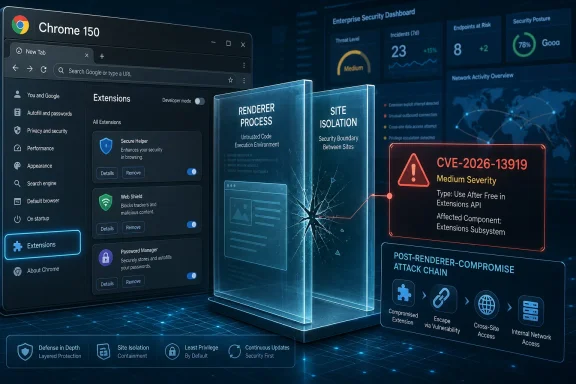 The Bug Is Medium Severity, but the Boundary It Touches Is Not
CVE-2026-13919 is not, on its face, the kind of Chrome advisory that sends incident responders into emergency mode. CISA’s ADP enrichment gives it a CVSS 3.1 score of 6.5, with network attack vector, low complexity, no privileges required, and required user interaction. The technical impact is framed around integrity rather than confidentiality or availability.But browser vulnerabilities are rarely dangerous only in isolation. The phrase “remote attacker who had compromised the renderer process” is doing a lot of work here. It means CVE-2026-13919 is not the first punch in the attack chain; it is a follow-on weakness that becomes interesting after another bug, malicious page, or exploit path has already won code execution or meaningful control in the renderer sandbox.
That makes it less glamorous and more operationally relevant. Chrome’s security architecture assumes that renderers are hostile terrain. Site isolation, process boundaries, and extension policy enforcement exist precisely because web content should not be trusted merely because it is running inside a tab.
When a bug lets a compromised renderer bypass site isolation, the problem is not just that one web page misbehaved. The problem is that a containment layer meant to limit the blast radius may have been less dependable than administrators assumed.
Chrome’s Release Notes Tell a Bigger Story Than One CVE
The underlying fix arrived in Google’s Stable Channel update for desktop Chrome at the end of June, with the Windows and macOS stable channel moving to 150.0.7871.46/.47 and Linux to 150.0.7871.46, according to Google’s Chrome Releases blog. Third-party coverage from Malwarebytes and TechRepublic highlighted the unusually large scale of the update, reporting hundreds of security fixes in the Chrome 150 stable release.That context matters because CVE-2026-13919 was one item in a very large maintenance and security train. It did not receive the banner treatment of a known exploited zero-day. Google’s public entry points users toward the stable update, while the Chromium issue tracker entry remains permission-restricted, the usual posture while details could still help attackers or while related projects are catching up.
The National Vulnerability Database entry adds the cleanest public summary: insufficient policy enforcement in Extensions allowed a renderer-compromise attacker to bypass site isolation via crafted HTML. CISA’s enrichment attaches CWE-602, “Client-Side Enforcement of Server-Side Security,” which is an interesting classification because it points less to memory corruption and more to misplaced trust in a client-side boundary.
In plain English, Chrome had a policy enforcement failure in the extensions subsystem that could matter after a renderer was already compromised. That is not the same as “visit a page and instantly lose the machine.” It is closer to “one layer of Chrome’s defense-in-depth stack did not hold as intended once another layer was breached.”
Extensions Remain Chrome’s Most Useful Attack Surface
Chrome extensions are not just cosmetic browser add-ons anymore. They are password managers, endpoint agents, ad blockers, SSO helpers, developer tools, document workflows, finance plug-ins, and enterprise control points. In many organizations, the browser extension list reveals more about the company’s daily work than the Start menu does.That is why an Extensions bug tied to site isolation deserves attention even at medium severity. Extensions often have elevated visibility into browsing activity, privileged APIs, or access patterns that ordinary web pages do not. Chrome’s extension permission model is designed to keep those privileges scoped and brokered rather than casually reachable by hostile web content.
The deeper problem is that extension security is a layered promise. Users see a permission prompt or an enterprise policy. Administrators see allowlists, blocklists, and managed extension settings. Browser engineers see process models, IPC pathways, origin checks, and policy enforcement code that has to keep all of those intentions aligned under hostile conditions.
CVE-2026-13919 appears to live in that alignment problem. The public wording does not say an attacker could install extensions, read all extension data, or escape the OS sandbox. It says a renderer compromise could be leveraged to bypass site isolation through the Extensions component. That narrower phrasing is important, but it still points to a class of bug that defenders should not dismiss.
Site Isolation Was Built for Exactly This Failure Mode
Site isolation is one of Chrome’s most consequential security investments of the past decade. Its purpose is to make sure that content from different sites is separated into different processes so that a compromised renderer cannot freely inspect or interfere with unrelated origins. It became especially prominent after Spectre forced browser vendors to treat process isolation as a core web security primitive rather than an optional hardening feature.For users, this is invisible plumbing. For attackers, it is friction. A renderer exploit is much less useful if it remains trapped in one site’s process and cannot cross boundaries to reach other origins, privileged browser surfaces, or sensitive data loaded elsewhere.
That is why “bypass site isolation” changes the tone of an otherwise modest CVE. It suggests a route around one of Chrome’s principal containment assumptions. Even if the bug required a prior renderer compromise, the whole point of site isolation is to remain meaningful after the renderer is compromised.
This is also why the vulnerability’s “medium” label needs translation. Severity systems score discrete weaknesses, but modern browser exploitation is compositional. A medium bug that chains cleanly with a high-severity renderer issue can become more valuable than its standalone score implies.
The Required User Interaction Is Not Much Comfort
CISA’s vector says user interaction is required. In desktop browser land, that usually means the victim must load or interact with a crafted page. That condition sounds reassuring until one remembers that loading pages is the browser’s entire job.Phishing, malvertising, compromised legitimate sites, poisoned search results, and internal web apps all give attackers routes to user interaction. The practical difference between “network exploitable with user interaction” and “network exploitable without user interaction” is real, but it is not wide enough to justify slow patching of a mainstream browser.
The good news is that CISA’s SSVC data listed exploitation as “none” at the time of enrichment and automatable as “no.” That lowers the immediate temperature. There is no public indication, based on the supplied NVD record and public reporting, that CVE-2026-13919 is being exploited in the wild.
The bad news is that exploitability changes after disclosure. Even when Chromium bug details are restricted, attackers can diff patches, study behavioral changes, and look for adjacent weaknesses. The window between a Chrome stable fix and full ecosystem absorption across Chromium-based browsers is often where defenders have to move fastest.
The CPE Confusion Is Real, but the Affected Product Is Not
The NVD entry’s “Known Affected Software Configurations” language may look messy while enrichment is still settling. The record says NVD added a CPE configuration for Google Chrome versions up to, but excluding, 150.0.7871.47. The “Are we missing a CPE here?” prompt is standard NVD interface language, not evidence that the affected software is unknown.There is, however, a small wrinkle in the CVE record as presented. The “Affected” JSON shown in the submission uses version “150.0.7871.47” with “lessThan: 150.0.7871.47” and status “affected,” which can look contradictory to non-specialists. In practice, the human-readable description and NVD CPE configuration are the parts administrators should follow: Chrome prior to 150.0.7871.47 is affected.
For WindowsForum readers, the practical inventory question is simpler than the CPE notation. If managed Windows or macOS systems are running Chrome below 150.0.7871.47, they should be treated as exposed to this CVE. If Linux systems are on the corresponding 150.0.7871.46 stable build from the same release train, administrators should verify against Google’s platform-specific release notes rather than blindly applying the Windows/macOS version string.
The larger Chromium ecosystem is harder. Microsoft Edge, Brave, Vivaldi, Opera, and other Chromium-derived browsers consume the underlying codebase on their own schedules, sometimes with Extended Stable variants or vendor-specific patch trains. A Chrome CPE does not automatically prove every Chromium-based browser is affected, but it is a strong signal that administrators should check vendor advisories rather than assume safety.
The Browser Patch Cadence Has Become an Enterprise Reliability Test
The Chrome 150 update illustrates the uncomfortable bargain enterprise IT has made with browsers. Security fixes need to land quickly, but browsers are now application platforms in their own right. A single stable update can patch hundreds of vulnerabilities while also changing behavior that business-critical web apps, extensions, or media workflows quietly depended on.That is not an argument against rapid updates. It is an argument against pretending browser patching is a low-stakes background chore. Chrome is often the application through which users reach identity providers, SaaS consoles, internal dashboards, ticketing systems, admin portals, and sensitive documents.
When a release contains hundreds of security fixes, the risk math is not subtle. Delaying the update preserves short-term compatibility at the cost of leaving known vulnerabilities in the most internet-exposed desktop application. Pushing the update immediately may surface regressions, but it also restores the browser security model that the rest of the environment assumes.
Enterprises that still treat browser updates as occasional desktop maintenance are running an old playbook. The modern approach is staged fast deployment: pilot rings, accelerated validation, emergency rollback procedures, extension inventory checks, and telemetry that confirms the update actually installed. The goal is not to avoid change. The goal is to make change routine enough that security releases do not become mini-crises.
Microsoft Shops Should Watch Edge Without Waiting for Drama
For Windows-heavy organizations, Chrome advisories are also Edge advisories until proven otherwise. Microsoft Edge is Chromium-based, and while Microsoft ships its own browser builds and security notes, the underlying dependency means Chrome security fixes often have Edge implications. Administrators should track Microsoft’s Edge release notes and security update guide alongside Google’s Chrome Releases blog.The Windows-specific concern is not that Chrome’s CVE magically becomes a Windows vulnerability. It does not. The concern is that Windows endpoints often carry multiple Chromium-based browsers, some user-installed and some managed. Chrome may be patched while Edge is lagging, or vice versa, and portable or niche Chromium builds may sit outside normal update controls entirely.
This is where asset management either earns its keep or gets exposed. Knowing that a CVE affects Chrome prior to 150.0.7871.47 is only useful if an organization can answer which machines have Chrome, which version they run, whether auto-update is healthy, and whether any users have installed alternate Chromium browsers outside the approved software catalog.
Consumer Windows users have the simpler task: open Chrome’s About page, let it update, and restart the browser. That restart is not optional theater. Browser updates often stage while the old executable keeps running, leaving users with the comforting illusion of being patched before the fixed build is actually active.
Google’s Silence on the Bug Details Is a Feature, Not a Cover-Up
Every Chrome security release attracts the same complaint: the advisory is vague, the bug tracker is restricted, and the public cannot see the proof-of-concept. That opacity is frustrating for defenders who want to understand exposure, but it is also part of how Google prevents fresh patches from becoming exploit tutorials before most users update.In this case, the public description is sparse enough that defenders cannot infer the exact policy check that failed or the precise site isolation boundary that could be bypassed. That is by design. The meaningful public facts are the affected version range, component, impact shape, and remediation version.
Security teams should resist two equally bad instincts. One is to demand exploit-level detail before patching. The other is to overstate the bug as a confirmed sandbox escape or active campaign. The available record supports neither complacency nor panic.
A disciplined reading says this: Chrome fixed a medium-severity Extensions policy enforcement flaw that could help an attacker with renderer compromise bypass site isolation; no public exploitation is indicated in the supplied NVD and CISA data; patching to the fixed stable build is the correct response. That is enough to act.
The Real Lesson Is Defense in Depth Needs Maintenance Too
Browser security is often sold as a set of sturdy conceptual walls: sandboxing, site isolation, same-origin policy, extension permissions, safe browsing, memory safety work, and exploit mitigations. In practice, those walls are software, and software has seams.CVE-2026-13919 is a seam bug. It is not described as a catastrophic collapse of Chrome’s architecture. It is a reminder that the architecture is only as good as the policy enforcement paths that implement it, especially when extensions and renderer processes meet.
This matters because enterprises increasingly rely on browser boundaries to compensate for everything else becoming web-delivered. Sensitive admin consoles run in tabs. Corporate identity sessions live in cookies and tokens. Password managers and endpoint extensions mediate trust. If the browser’s internal boundaries weaken, the blast radius of a web compromise can widen quickly.
The security industry often talks about “zero trust” as though distrust stops at the network edge. Chrome’s design shows the more important version: distrust inside the application. A compromised renderer is assumed. A malicious page is assumed. Site isolation exists because the browser must survive partial compromise. CVE-2026-13919 is notable precisely because it touched that assumption.
The Practical Reading for Chrome 150.0.7871.47
Administrators should treat this as a patch-now browser issue rather than a breach-now incident. Nothing in the public record supplied by NVD, CISA, or Google indicates active exploitation of CVE-2026-13919. The vulnerability also depends on a compromised renderer, which means it is most dangerous as part of a chain rather than as a standalone entry point.Still, the affected range is clear enough. Chrome versions before 150.0.7871.47 on platforms using that fixed build should be moved forward, and Linux systems should be checked against Google’s corresponding 150.0.7871.46 release for that platform. Managed fleets should verify the installed and running browser version after restart, not merely the presence of an update package.
Extension hygiene should be part of the response. This CVE does not mean every extension is suspect, but the component involved makes it a good moment to re-check which extensions are force-installed, which are merely allowed, and which legacy or abandoned extensions still have broad host permissions. The least glamorous browser control — a clean extension allowlist — remains one of the most useful.
Security teams should also watch for follow-up advisories from Chromium-based browser vendors. Chrome is the first obvious fix point because Google published the advisory, but the code lineage extends beyond Google’s own browser. The right question is not “Do we use Chrome?” but “Where do we run Chromium code?”
The Chrome Advisory Says More Than Its Severity Score
The actionable story here is compact, but it is not trivial. CVE-2026-13919 is a medium-severity flaw with a high-value boundary in its path, fixed in a major Chrome stable update that administrators should already be deploying.- Chrome versions prior to 150.0.7871.47 are affected by CVE-2026-13919 according to the NVD record and Google’s release information.
- The bug sits in Chrome’s Extensions component and could let an attacker with renderer compromise bypass site isolation using crafted HTML.
- CISA’s enrichment scores the issue as medium severity and reports no known exploitation at the time of its July 1, 2026 update.
- The vulnerability is best understood as a chainable defense-in-depth failure, not a standalone remote code execution bug.
- Windows and macOS Chrome users should verify they are on 150.0.7871.47 or later, while Linux users should compare against Google’s platform-specific stable release number.
- Organizations should check Chromium-based browsers beyond Chrome, because downstream vendors may publish their own builds and timelines.
References
- Primary source: NVD / Chromium
Published: 2026-07-03T07:00:32-07:00
NVD - CVE-2026-13919
 nvd.nist.gov
- Security advisory: MSRC
Published: 2026-07-03T07:00:32-07:00
Original feed URL
Security Update Guide - Microsoft Security Response Center
 msrc.microsoft.com
