

Google’s Chrome team assigned CVE-2026-13920 on June 30, 2026, to a Windows-only Chrome Media input-validation flaw fixed in Chrome 150.0.7871.47, where an attacker who had already compromised the renderer could potentially use a crafted HTML page to escape the browser sandbox. The National Vulnerability Database later enriched the entry with a Windows operating-system condition, which is why the CPE configuration matters more than usual. The short answer is that this does not look like a missing Chrome CPE so much as a deliberately constrained one: vulnerable Google Chrome builds, on Microsoft Windows, before 150.0.7871.47. The longer answer is more interesting, because it shows how browser vulnerability metadata can make a medium-severity Chromium bug look like a critical enterprise exposure.
The NVD change history for CVE-2026-13920 shows a configuration that effectively says: Google Chrome versions before 150.0.7871.47 are affected when paired with Microsoft Windows. That is not the same thing as saying every platform shipping Chromium’s Media code is affected. It is a product-and-platform intersection, and for once that distinction is not bureaucratic trivia.
The Chrome-provided description is explicit: “Google Chrome on Windows prior to 150.0.7871.47.” That wording matters. Chrome vulnerabilities often land as cross-platform advisories because the faulty component exists across Windows, macOS, Linux, Android, or ChromeOS. Here, the public CVE text narrows the condition to Windows, and NVD’s CPE enrichment mirrors that by combining the Chrome application CPE with the Microsoft Windows operating-system CPE.
So if the question is whether the NVD entry is missing a CPE for Google Chrome, the answer appears to be no. The Chrome application CPE is present, with the version range ending before 150.0.7871.47. If the question is whether the entry should enumerate every supported Windows version, or include more granular Microsoft Windows CPEs, that is a different metadata-quality debate rather than evidence that the vulnerability scope is wrong.
This is exactly the kind of case where CPEs can confuse readers. A vulnerability in Chrome is not normally thought of as a Windows vulnerability, but CPE configurations need to express where the vulnerable product is exploitable. NVD’s “AND” relationship is the clue: the affected state requires both the vulnerable Chrome build and the Windows platform.
Chromium severity is shaped by exploitability inside Chrome’s layered architecture. A bug that requires the renderer process to be compromised first is not the first domino in an attack chain. It is the second or third. Google’s “medium” label reflects that prerequisite.
CVSS, by contrast, is often more interested in what happens if the vulnerability is successfully used. A sandbox escape can be catastrophic because it turns code execution inside a tightly restricted browser process into code execution with broader access to the host. That is why the CISA ADP vector can land in critical territory even when Chromium’s own severity label is more restrained.
For defenders, the practical reading is simple: do not let the word “medium” lull you into treating this like cosmetic browser hardening. A sandbox escape is rarely the opening move, but it is often the move that makes the opening move worth something.
Chrome’s sandbox exists because the web is hostile by design. Tabs render untrusted code, parse untrusted formats, decode untrusted media, and execute complex JavaScript from sites users barely think about. The renderer is supposed to be expendable. A sandbox escape attacks that assumption.
That is why CVE-2026-13920 deserves attention even without public evidence of exploitation in the wild. CISA’s SSVC enrichment reportedly listed exploitation as “none” and automatable as “no,” but technical impact as “total.” In plain English: there was no public sign of active abuse at the time of enrichment, but if an attacker can pair it with the right renderer bug, the consequences are severe.
This is also why browser vendors often restrict bug details after release. The Chromium issue tracker entry linked from NVD requires permission, which is normal for recently fixed security bugs. Google’s longstanding practice is to keep details restricted until most users have updated, especially when the bug could help attackers build a working exploit chain.
Chrome’s security model depends on velocity. Google ships frequently, attackers diff binaries quickly, and downstream Chromium-based browsers must decide how fast to absorb fixes. A Windows-only sandbox escape in Media may not generate the same headlines as an actively exploited zero-day, but it lands in a release train where delaying the update also delays dozens or hundreds of other fixes.
For WindowsForum readers, the version number is the operational line in the sand. Chrome on Windows should be at 150.0.7871.47 or later to clear CVE-2026-13920. If a fleet is still running a prior 150 build, or an older 149 build held back for compatibility reasons, this CVE is one more reason to end the exception.
There is a secondary wrinkle for organizations using Chrome Extended Stable, managed update rings, VDI images, kiosk systems, or application allow-listing. The fact that a fix exists does not mean it has reached every endpoint. Chrome’s auto-update story is good for consumers, but enterprise reality includes frozen golden images, disconnected networks, restart deferrals, proxy weirdness, and users who keep browsers open for weeks.
But Windows administrators cannot stop the analysis there. Edge consumes Chromium code, and Microsoft ships its own browser updates on its own channel. When a Chromium bug affects a shared component, the question becomes whether Microsoft’s fork inherited the vulnerable code path and whether Microsoft has issued a corresponding Edge update or advisory. That determination should come from Microsoft’s Edge release notes or security update guidance, not assumption.
For Chrome specifically, the NVD CPE points at Google Chrome. For Windows fleet management, the practical response is broader: inventory all Chromium-based browsers, confirm their update status, and avoid treating “Chrome patched” as a synonym for “all Chromium risk removed.” Brave, Vivaldi, Opera, Electron-based apps, embedded WebView runtimes, and specialized Chromium shells may have different patch cadences.
This is where CPEs can underserve defenders. They tell you what the CVE record currently names. They do not give you a complete software supply-chain map of every product that incorporated the vulnerable code.
Attackers like complexity. Media code has to accept data from the open web and transform it quickly enough to feel invisible to users. It also has to interact with GPU processes, operating-system APIs, sandbox boundaries, and sometimes proprietary platform capabilities. A small validation failure in that world can become a serious privilege-boundary issue.
The public CVE description does not reveal the exact malformed input, the code path, or the exploit technique. That is appropriate for a newly patched browser flaw. But the pattern is familiar: crafted HTML triggers browser behavior that reaches the vulnerable component, and the attacker needs another bug or condition to get the renderer into a compromised state first.
For defenders, the lack of detail should not translate into lack of urgency. Browser security is one of the few places where patching quickly is more realistic than building reliable compensating controls. You can filter known bad domains, isolate risky browsing, and harden endpoints, but you cannot write a firewall rule for “all future crafted HTML that reaches a subtle media validation bug.”
That sequence is normal, but it is worth spelling out because CVE pages often look more authoritative than they are in their first hours. Vendor advisories, CNA descriptions, CISA enrichment, and NVD analysis arrive in layers. During that window, fields may be blank, changed, removed, restored, or reinterpreted.
The CWE history illustrates the point. The entry shows CWE-20 added by Chrome, modified by CISA ADP, and then removed in one of the CISA ADP changes. The visible record still presents improper input validation as the weakness associated with the Chrome source, but the change log reminds readers that vulnerability metadata is a living artifact, not a stone tablet.
This matters to the CPE question. If a scanner ingests the CVE before NVD completes enrichment, it may lack platform constraints. If it ingests after the enrichment, it may understand the Windows condition. If a vendor’s scanner flattens an “AND” configuration into a simpler match, it may overreport or underreport. The quality of your vulnerability dashboard depends not just on the CVE, but on how your tooling interprets the CVE.
If your scanner reports vulnerable Chrome installations on Windows below 150.0.7871.47, that finding should be treated as actionable. The fix is straightforward: update Chrome. If the scanner reports the CVE against non-Windows Chrome builds, that deserves scrutiny, because the public CVE description is Windows-specific. It may be a scanner logic issue, a conservative vendor rule, or later intelligence not reflected in the text you are reading.
If the scanner reports Microsoft Windows itself as vulnerable without tying the finding to Chrome, that is also worth challenging. The Windows CPE in NVD’s configuration is a platform condition, not proof that Windows ships the vulnerable code. The vulnerable product named by the CVE is Google Chrome.
This is where administrators should ask vendors precise questions. Does the detection require both Chrome and Windows? Does it check the Chrome executable version? Does it distinguish Google Chrome from Chromium and other Chromium-based browsers? Does it handle per-user Chrome installs as well as machine-wide installs? Does it inspect dormant profiles or only active software inventory?
The worst response is to suppress the CVE because “it’s only medium in Chrome” or because “the CPE looks weird.” The better response is to validate the detection logic, patch the browser, and then use the case to improve how your environment handles browser vulnerability metadata.
The renderer prerequisite also changes who should worry most. A casual home user should update because it is easy and because browser updates carry many fixes at once. An enterprise defending high-value users — administrators, developers, finance staff, executives, journalists, or researchers — should worry because targeted attackers think in chains, not single CVEs.
This is especially true on Windows, where Chrome is deeply embedded in daily work. Users authenticate to SaaS apps, handle documents, join meetings, preview media, and click links from email, chat, ticketing systems, and collaboration platforms. A browser sandbox escape does not have to be wormable to be dangerous. It only has to work reliably against the right person.
The practical risk model is therefore not “Can any random website instantly own my PC with this one CVE?” The better model is: “If an attacker already has or later obtains a renderer exploit, does this bug help them cross a boundary that Chrome was supposed to enforce?” For CVE-2026-13920, the public answer is yes.
Administrators should confirm Chrome version reporting through endpoint management rather than assuming auto-update succeeded. Chrome can be installed per user or per machine. It can be pinned by policy. It can be stranded in nonpersistent environments. It can be blocked by security products, broken proxies, or change-control windows that made sense for legacy software but are risky for browsers.
The minimum target is clear: Chrome for Windows should be at 150.0.7871.47 or newer. Anything older remains inside the affected version range described by Chrome and reflected by NVD. If compatibility testing is holding the fleet back, this is the moment to ask whether that testing process is calibrated for a browser that ships security fixes at internet speed.
There is also a user-behavior angle. Browser updates often complete only after restart. Enterprises that proudly report “update installed” while allowing month-long browser sessions may be overstating protection. A fixed binary that has not replaced a running vulnerable process is not the same thing as a fixed endpoint.
That does not mean the record is perfect. NVD CPEs often lag, and broad operating-system CPEs can be less precise than administrators would like. A scanner may still need better detection logic than the CVE page alone provides. But the visible configuration is consistent with the vendor wording.
The more important lesson is that browser CVEs should be read as product behavior, not just database rows. “Chrome on Windows” is a meaningful boundary. “Renderer already compromised” is a meaningful prerequisite. “Sandbox escape” is a meaningful impact. “Medium” and “9.6 critical” can both be defensible depending on the scoring lens.
Security teams that flatten all of that into one red or green dashboard cell are giving away the advantage that good vulnerability intelligence is supposed to provide.
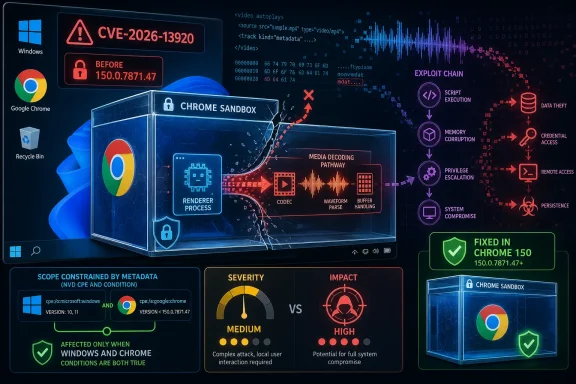 The CPE Is Doing More Than Filing Paperwork
The NVD change history for CVE-2026-13920 shows a configuration that effectively says: Google Chrome versions before 150.0.7871.47 are affected when paired with Microsoft Windows. That is not the same thing as saying every platform shipping Chromium’s Media code is affected. It is a product-and-platform intersection, and for once that distinction is not bureaucratic trivia.The Chrome-provided description is explicit: “Google Chrome on Windows prior to 150.0.7871.47.” That wording matters. Chrome vulnerabilities often land as cross-platform advisories because the faulty component exists across Windows, macOS, Linux, Android, or ChromeOS. Here, the public CVE text narrows the condition to Windows, and NVD’s CPE enrichment mirrors that by combining the Chrome application CPE with the Microsoft Windows operating-system CPE.
So if the question is whether the NVD entry is missing a CPE for Google Chrome, the answer appears to be no. The Chrome application CPE is present, with the version range ending before 150.0.7871.47. If the question is whether the entry should enumerate every supported Windows version, or include more granular Microsoft Windows CPEs, that is a different metadata-quality debate rather than evidence that the vulnerability scope is wrong.
This is exactly the kind of case where CPEs can confuse readers. A vulnerability in Chrome is not normally thought of as a Windows vulnerability, but CPE configurations need to express where the vulnerable product is exploitable. NVD’s “AND” relationship is the clue: the affected state requires both the vulnerable Chrome build and the Windows platform.
A Medium Chromium Bug With Critical-Looking Consequences
Google rated CVE-2026-13920 as medium severity in Chromium’s security taxonomy, according to the CVE description and the Chrome Releases material referenced by NVD. CISA’s ADP enrichment, however, supplied a CVSS 3.1 score of 9.6, with high confidentiality, integrity, and availability impact and a changed scope. That mismatch is not necessarily a contradiction. It is a clash between two scoring cultures.Chromium severity is shaped by exploitability inside Chrome’s layered architecture. A bug that requires the renderer process to be compromised first is not the first domino in an attack chain. It is the second or third. Google’s “medium” label reflects that prerequisite.
CVSS, by contrast, is often more interested in what happens if the vulnerability is successfully used. A sandbox escape can be catastrophic because it turns code execution inside a tightly restricted browser process into code execution with broader access to the host. That is why the CISA ADP vector can land in critical territory even when Chromium’s own severity label is more restrained.
For defenders, the practical reading is simple: do not let the word “medium” lull you into treating this like cosmetic browser hardening. A sandbox escape is rarely the opening move, but it is often the move that makes the opening move worth something.
The Renderer Prerequisite Is a Speed Bump, Not a Wall
The public description says the attacker must have already compromised the renderer process. That condition is important, but it is not comforting. Modern browser exploitation often works as a chain: first compromise a renderer through a memory-corruption, type-confusion, JIT, media, graphics, or script-engine issue; then use a sandbox escape to reach the operating system with fewer constraints.Chrome’s sandbox exists because the web is hostile by design. Tabs render untrusted code, parse untrusted formats, decode untrusted media, and execute complex JavaScript from sites users barely think about. The renderer is supposed to be expendable. A sandbox escape attacks that assumption.
That is why CVE-2026-13920 deserves attention even without public evidence of exploitation in the wild. CISA’s SSVC enrichment reportedly listed exploitation as “none” and automatable as “no,” but technical impact as “total.” In plain English: there was no public sign of active abuse at the time of enrichment, but if an attacker can pair it with the right renderer bug, the consequences are severe.
This is also why browser vendors often restrict bug details after release. The Chromium issue tracker entry linked from NVD requires permission, which is normal for recently fixed security bugs. Google’s longstanding practice is to keep details restricted until most users have updated, especially when the bug could help attackers build a working exploit chain.
Chrome 150.0.7871.47 Was Not a One-CVE Patch
The fix for CVE-2026-13920 arrived in the broader Chrome Stable Channel update issued at the end of June 2026. Malwarebytes described that release as a large update containing hundreds of security fixes, while Google’s Chrome Releases blog listed the stable desktop move to the 150.0.7871.46/.47 line for Windows and macOS and 150.0.7871.46 for Linux. That broader context matters because enterprises rarely patch for one CVE in isolation.Chrome’s security model depends on velocity. Google ships frequently, attackers diff binaries quickly, and downstream Chromium-based browsers must decide how fast to absorb fixes. A Windows-only sandbox escape in Media may not generate the same headlines as an actively exploited zero-day, but it lands in a release train where delaying the update also delays dozens or hundreds of other fixes.
For WindowsForum readers, the version number is the operational line in the sand. Chrome on Windows should be at 150.0.7871.47 or later to clear CVE-2026-13920. If a fleet is still running a prior 150 build, or an older 149 build held back for compatibility reasons, this CVE is one more reason to end the exception.
There is a secondary wrinkle for organizations using Chrome Extended Stable, managed update rings, VDI images, kiosk systems, or application allow-listing. The fact that a fix exists does not mean it has reached every endpoint. Chrome’s auto-update story is good for consumers, but enterprise reality includes frozen golden images, disconnected networks, restart deferrals, proxy weirdness, and users who keep browsers open for weeks.
Windows Is the Boundary Line, and That Makes Edge Part of the Conversation
The CVE text names Google Chrome on Windows, not Microsoft Edge. That distinction should be preserved. A Chrome CVE is not automatically an Edge CVE merely because both browsers share Chromium.But Windows administrators cannot stop the analysis there. Edge consumes Chromium code, and Microsoft ships its own browser updates on its own channel. When a Chromium bug affects a shared component, the question becomes whether Microsoft’s fork inherited the vulnerable code path and whether Microsoft has issued a corresponding Edge update or advisory. That determination should come from Microsoft’s Edge release notes or security update guidance, not assumption.
For Chrome specifically, the NVD CPE points at Google Chrome. For Windows fleet management, the practical response is broader: inventory all Chromium-based browsers, confirm their update status, and avoid treating “Chrome patched” as a synonym for “all Chromium risk removed.” Brave, Vivaldi, Opera, Electron-based apps, embedded WebView runtimes, and specialized Chromium shells may have different patch cadences.
This is where CPEs can underserve defenders. They tell you what the CVE record currently names. They do not give you a complete software supply-chain map of every product that incorporated the vulnerable code.
The Media Stack Remains a Rich Attack Surface
The affected component is listed as Media, with CWE-20 improper input validation. That description is broad, but the component name is enough to explain why security teams should care. Media parsers and decoders sit at the intersection of complex file formats, hardware acceleration, codecs, streaming protocols, and browser-exposed APIs.Attackers like complexity. Media code has to accept data from the open web and transform it quickly enough to feel invisible to users. It also has to interact with GPU processes, operating-system APIs, sandbox boundaries, and sometimes proprietary platform capabilities. A small validation failure in that world can become a serious privilege-boundary issue.
The public CVE description does not reveal the exact malformed input, the code path, or the exploit technique. That is appropriate for a newly patched browser flaw. But the pattern is familiar: crafted HTML triggers browser behavior that reaches the vulnerable component, and the attacker needs another bug or condition to get the renderer into a compromised state first.
For defenders, the lack of detail should not translate into lack of urgency. Browser security is one of the few places where patching quickly is more realistic than building reliable compensating controls. You can filter known bad domains, isolate risky browsing, and harden endpoints, but you cannot write a firewall rule for “all future crafted HTML that reaches a subtle media validation bug.”
NVD’s Change History Shows the Messy Middle of Vulnerability Intelligence
The NVD entry’s change history is unusually instructive. The CVE was received from Chrome on June 30, 2026. CISA ADP enrichment followed on July 1 with a CVSS vector, CWE association, and SSVC assessment. NIST’s initial analysis later added the CPE configuration and references.That sequence is normal, but it is worth spelling out because CVE pages often look more authoritative than they are in their first hours. Vendor advisories, CNA descriptions, CISA enrichment, and NVD analysis arrive in layers. During that window, fields may be blank, changed, removed, restored, or reinterpreted.
The CWE history illustrates the point. The entry shows CWE-20 added by Chrome, modified by CISA ADP, and then removed in one of the CISA ADP changes. The visible record still presents improper input validation as the weakness associated with the Chrome source, but the change log reminds readers that vulnerability metadata is a living artifact, not a stone tablet.
This matters to the CPE question. If a scanner ingests the CVE before NVD completes enrichment, it may lack platform constraints. If it ingests after the enrichment, it may understand the Windows condition. If a vendor’s scanner flattens an “AND” configuration into a simpler match, it may overreport or underreport. The quality of your vulnerability dashboard depends not just on the CVE, but on how your tooling interprets the CVE.
Scanner Results Need Human Reading, Not Blind Suppression
A common enterprise failure mode is to dismiss browser CVEs as noisy because Chrome updates itself. Another is to panic at every critical CVSS score even when exploitability requires a chained condition. CVE-2026-13920 sits directly between those mistakes.If your scanner reports vulnerable Chrome installations on Windows below 150.0.7871.47, that finding should be treated as actionable. The fix is straightforward: update Chrome. If the scanner reports the CVE against non-Windows Chrome builds, that deserves scrutiny, because the public CVE description is Windows-specific. It may be a scanner logic issue, a conservative vendor rule, or later intelligence not reflected in the text you are reading.
If the scanner reports Microsoft Windows itself as vulnerable without tying the finding to Chrome, that is also worth challenging. The Windows CPE in NVD’s configuration is a platform condition, not proof that Windows ships the vulnerable code. The vulnerable product named by the CVE is Google Chrome.
This is where administrators should ask vendors precise questions. Does the detection require both Chrome and Windows? Does it check the Chrome executable version? Does it distinguish Google Chrome from Chromium and other Chromium-based browsers? Does it handle per-user Chrome installs as well as machine-wide installs? Does it inspect dormant profiles or only active software inventory?
The worst response is to suppress the CVE because “it’s only medium in Chrome” or because “the CPE looks weird.” The better response is to validate the detection logic, patch the browser, and then use the case to improve how your environment handles browser vulnerability metadata.
The Real Risk Is the Attack Chain You Do Not See Yet
No public reporting available at the time of writing indicates that CVE-2026-13920 is being exploited in the wild. That is good news, but it should not be overread. Browser exploit chains are often assembled from multiple bugs, and a sandbox escape can become more valuable later when paired with a newly discovered renderer issue.The renderer prerequisite also changes who should worry most. A casual home user should update because it is easy and because browser updates carry many fixes at once. An enterprise defending high-value users — administrators, developers, finance staff, executives, journalists, or researchers — should worry because targeted attackers think in chains, not single CVEs.
This is especially true on Windows, where Chrome is deeply embedded in daily work. Users authenticate to SaaS apps, handle documents, join meetings, preview media, and click links from email, chat, ticketing systems, and collaboration platforms. A browser sandbox escape does not have to be wormable to be dangerous. It only has to work reliably against the right person.
The practical risk model is therefore not “Can any random website instantly own my PC with this one CVE?” The better model is: “If an attacker already has or later obtains a renderer exploit, does this bug help them cross a boundary that Chrome was supposed to enforce?” For CVE-2026-13920, the public answer is yes.
Patch Management Wins This Round, If It Actually Runs
Chrome’s update mechanism is one of the better pieces of consumer security infrastructure on Windows. For unmanaged users, visiting Chrome’s About page or restarting the browser is often enough to land on the fixed build. For managed users, the story depends on policy, rings, restart behavior, and whether update telemetry is trusted.Administrators should confirm Chrome version reporting through endpoint management rather than assuming auto-update succeeded. Chrome can be installed per user or per machine. It can be pinned by policy. It can be stranded in nonpersistent environments. It can be blocked by security products, broken proxies, or change-control windows that made sense for legacy software but are risky for browsers.
The minimum target is clear: Chrome for Windows should be at 150.0.7871.47 or newer. Anything older remains inside the affected version range described by Chrome and reflected by NVD. If compatibility testing is holding the fleet back, this is the moment to ask whether that testing process is calibrated for a browser that ships security fixes at internet speed.
There is also a user-behavior angle. Browser updates often complete only after restart. Enterprises that proudly report “update installed” while allowing month-long browser sessions may be overstating protection. A fixed binary that has not replaced a running vulnerable process is not the same thing as a fixed endpoint.
The CPE Answer Is Narrow, but the Operational Lesson Is Broad
The narrow CPE answer is that NVD’s configuration appears to express the intended vulnerable set: Google Chrome before 150.0.7871.47 on Microsoft Windows. The Chrome CPE is present. The Windows CPE acts as a platform condition. The entry does not, based on the public description, obviously need to add macOS, Linux, Android, or ChromeOS CPEs for this specific CVE.That does not mean the record is perfect. NVD CPEs often lag, and broad operating-system CPEs can be less precise than administrators would like. A scanner may still need better detection logic than the CVE page alone provides. But the visible configuration is consistent with the vendor wording.
The more important lesson is that browser CVEs should be read as product behavior, not just database rows. “Chrome on Windows” is a meaningful boundary. “Renderer already compromised” is a meaningful prerequisite. “Sandbox escape” is a meaningful impact. “Medium” and “9.6 critical” can both be defensible depending on the scoring lens.
Security teams that flatten all of that into one red or green dashboard cell are giving away the advantage that good vulnerability intelligence is supposed to provide.
The Practical Reading for Windows Shops
CVE-2026-13920 is not a panic button, but it is a useful test of whether an organization understands browser risk. The fix is ordinary. The impact, in the right chain, is not. The metadata is subtle enough to expose weak scanner logic and weak patch assumptions.- Chrome on Windows should be updated to 150.0.7871.47 or later to address CVE-2026-13920.
- The public CPE configuration appears to require both vulnerable Google Chrome and Microsoft Windows, rather than treating Windows alone as the vulnerable product.
- The bug requires a compromised renderer process first, which lowers standalone exploitability but makes it valuable as part of a browser exploit chain.
- Google’s medium Chromium severity and CISA ADP’s critical CVSS score reflect different scoring models, not necessarily a factual disagreement.
- Non-Windows Chrome findings should be checked against scanner logic unless later vendor intelligence expands the affected platform list.
- Enterprises should verify running browser versions and restart completion, not merely assume Chrome auto-update has finished the job.
References
- Primary source: NVD / Chromium
Published: 2026-07-03T07:00:33-07:00
NVD - CVE-2026-13920
 nvd.nist.gov
- Security advisory: MSRC
Published: 2026-07-03T07:00:33-07:00
Original feed URL
Security Update Guide - Microsoft Security Response Center
 msrc.microsoft.com
- Related coverage: cvefeed.io
CVE-2026-13920 - Chrome Media Sandbox Escape
Insufficient validation of untrusted input in Media in Google Chrome on Windows prior to 150.0.7871.47 allowed a remote attacker who had compromised the renderer process to potentially perform a sandbox escape via a crafted HTML page. (Chromium security severity: Medium)cvefeed.io
