

Google disclosed CVE-2026-7344 on April 28, 2026, as a critical use-after-free flaw in Chrome’s Accessibility component on Windows before version 147.0.7727.138 that could let an attacker escape the browser sandbox after compromising the renderer. The bug is not just another Chrome memory-safety entry in a long table of CVEs. It is a reminder that the browser’s least glamorous subsystems — the compatibility and accessibility plumbing that makes the Web usable — now sit directly on the front line of endpoint security. For Windows administrators, the practical answer is simple: Chrome needs to be at 147.0.7727.138 or later, and Chromium-based fleets need to be audited rather than assumed safe.
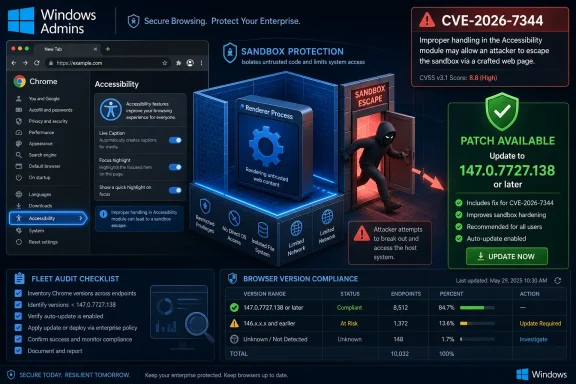
The most important phrase in the CVE description is not “use after free,” even though that is the class of bug security teams have learned to dread. It is “sandbox escape.” A compromised renderer is bad; a compromised renderer that can break into the rest of the system is the moment a browser bug stops being a browser problem and becomes an endpoint problem.
Chrome’s process architecture was designed around the assumption that untrusted Web content should be isolated. The renderer handles hostile HTML, JavaScript, CSS, images, fonts, and the increasingly elaborate machinery of the modern Web. The browser process, operating system interfaces, GPU paths, accessibility frameworks, and privileged services are supposed to stand behind stronger barriers.
CVE-2026-7344 lands in that uncomfortable boundary zone. According to the public description, a remote attacker would first need to have compromised the renderer process and then use a crafted HTML page to potentially perform a sandbox escape on Windows. That means this bug is unlikely to be the whole chain by itself, but it may be the part of the chain that turns code execution inside Chrome into something more consequential.
That distinction matters because modern browser exploitation is rarely a single clean vulnerability. Attackers chain bugs: one issue gains a foothold in the renderer, another escapes a sandbox, another persists, steals tokens, or moves laterally. The industry’s shorthand of “visit a malicious page” understates the choreography, but it captures the user-facing reality: browser bugs remain one of the shortest paths between a victim and attacker-controlled code.
On Windows, that puts browser accessibility code in conversation with platform APIs, UI automation, screen readers, input systems, and sometimes enterprise software that hooks deeply into the desktop. It is exactly the sort of complicated translation layer where security boundaries become messy: the browser must describe untrusted Web content in a form that trusted local components can understand.
This is not an argument against accessibility. The opposite is true. Accessibility is core browser functionality, and treating it as optional is both technically wrong and socially unacceptable. The security lesson is that essential compatibility surfaces deserve the same threat modeling attention as JavaScript engines and graphics stacks.
The Web’s attack surface has expanded because the browser’s job has expanded. A browser is no longer a document viewer. It is a runtime, media stack, GPU client, identity broker, PDF reader, app launcher, password manager, sync engine, accessibility provider, and policy enforcement point. Every one of those roles creates seams, and attackers hunt seams.
The CVSS vector attached by CISA-ADP is network exploitable, low complexity, no privileges required, user interaction required, unchanged scope, and high impact to confidentiality, integrity, and availability. In ordinary language, that describes a bug reachable remotely through browsing activity, requiring the victim to interact with attacker-controlled content, with severe consequences if successfully chained.
Chromium’s severity system, meanwhile, is tuned to the browser’s architecture. A sandbox escape is treated with exceptional seriousness because the sandbox is the security contract Chrome makes with the operating system and the user. Once that contract is violated, the difference between “inside the renderer” and “on the machine” becomes less theoretical.
This is why vulnerability triage cannot be reduced to one number. CVSS is useful for prioritization, especially at scale, but browser vendors know which internal boundary failures tend to show up in real exploit chains. A critical Chromium sandbox escape deserves fast handling even when the public CVSS label stops at High.
Use-after-free vulnerabilities occur when software continues to reference memory after it has been freed. In benign circumstances, that produces instability or crashes. In hostile circumstances, it can become a way for an attacker to influence what data or object occupies that memory next, bending program execution in directions the original code never intended.
Chrome has invested heavily in fuzzing, sanitizers, compiler hardening, site isolation, sandboxing, and memory-safety mitigations. Yet the vulnerability list for a typical Chrome release still reads like a tour of the browser’s most complex subsystems: GPU, WebRTC, Skia, Media, ANGLE, V8, Blink, Canvas, Views, Navigation, and more. The codebase is hardened, but it is also huge, fast-moving, and exposed to hostile inputs all day.
That is the uncomfortable reality for defenders. A fully patched browser is not “safe” in the abstract; it is merely current against the known set of fixed issues. That is still enormously valuable. But the recurrence of use-after-free flaws shows why browser patch latency remains one of the most important measurable risks in enterprise desktop management.
That distinction is worth preserving. Cross-platform Chromium code can share a vulnerability class while the exploitability, impact, or affected build threshold differs by operating system. A bug in a browser component might be reachable everywhere but only escape the sandbox through a Windows-specific interface. Or the patch may land across platforms because shared code was fixed even if the most severe known consequence was platform-specific.
For WindowsForum readers, the practical implication is not subtle. Chrome on Windows before 147.0.7727.138 is the named risk. Administrators should not assume that a macOS or Linux version string maps perfectly onto the Windows exposure, nor should they assume that an Edge, Brave, Vivaldi, Opera, or Electron-based application is safe merely because Chrome has been patched.
Chromium is an ecosystem, not a single product. Google’s patch lands in Chrome first, but downstream browsers and embedded runtimes have their own release pipelines, enterprise controls, lag times, and packaging quirks. The same underlying defect can move through the software supply chain at different speeds.
That split can confuse administrators. Microsoft publishes security guidance for Edge and maps Chromium issues into its Security Update Guide, while Google publishes Chrome releases and Chromium bug references. NVD ingests the CVE record and adds enrichment such as CVSS vectors and CPE configurations. Security scanners then build detections from some mixture of all three.
The result is a familiar enterprise problem: one vulnerability, several authorities, and slightly different timing. If your endpoint management console says Chrome is patched but your vulnerability scanner still flags CVE-2026-7344, the question may not be whether the machine is exposed. It may be whether the scanner has fresh CPE logic, whether Chrome has completed its relaunch cycle, or whether a stale copy of the binary remains on disk.
Microsoft Edge adds another layer. Edge is Chromium-based, but it does not use Chrome’s version numbers. A Chrome fix at 147.0.7727.138 does not mean Edge should be searched for that exact string. Edge administrators need to track Microsoft’s Edge security release notes and the Security Update Guide entry rather than treating Google Chrome’s version threshold as a direct Edge compliance rule.
This is where many organizations still stumble. They patch the OS through Windows Update, patch Microsoft 365 through its own channel, patch Chrome through Google Update or a deployment tool, and patch Edge through a Microsoft channel — then discover that their security posture depends on all of those clocks agreeing.
The renderer is the place where untrusted Web content runs. It is deliberately constrained, but it is also where JavaScript engines, layout engines, media decoders, parsers, and Web APIs are constantly processing attacker-controlled material. A renderer compromise without a sandbox escape may be limited, but it is still a beachhead.
The sandbox escape is what gives that beachhead strategic value. It can enable broader access to files, credentials, tokens, local services, or the operating system environment depending on the chain and the mitigations in place. That is why attackers prize these bugs and why vendors restrict bug details until enough users have updated.
Google’s release note repeated the standard warning that access to bug details may remain restricted until a majority of users are updated. This is not secrecy for its own sake. Once a patch ships, skilled attackers can compare old and new code, infer the vulnerability, and race lagging organizations. Patch Tuesday culture trained enterprises to think in monthly cycles; browser exploit development runs on a much shorter clock.
A malicious page can be delivered by phishing, malvertising, compromised legitimate sites, poisoned search results, chat links, watering-hole attacks, or embedded content. In an enterprise, the page may not even be obviously “the Web” to the user. It might be opened inside a browser tab, a webview, an internal portal, a helpdesk ticket, a collaboration tool, or a SaaS dashboard.
That is why “user interaction required” should not be overread as “low risk.” The required interaction may be as little as loading or navigating to attacker-controlled content, depending on the exploit. The user may believe they are visiting a legitimate page, and in many real attacks, they are: the site was compromised first.
The browser has become the place where identity, productivity, and endpoint security converge. A crafted page no longer just tries to pop a calculator. It may target session tokens, extension APIs, password managers, device-bound credentials, enterprise SSO flows, and local integrations. A sandbox escape expands the menu.
Chrome’s auto-update model is one of the great security success stories of the modern desktop. For consumers, it works well enough that many users never think about browser patching. In managed environments, however, auto-update is often modified, delayed, proxied, monitored, or overridden. The reasons are understandable: compatibility testing, bandwidth control, change windows, kiosk stability, and regulated workflows.
But CVE-2026-7344 is an example of why the default bias should favor browser speed. A critical sandbox escape in the stable channel is not the same class of operational risk as a minor UI regression. Enterprises that stretch browser updates across long rings should be honest about what they are buying with that delay.
There is also a restart problem. Chrome can download an update but continue running old code until the browser relaunches. In a culture of persistent tabs, restored sessions, and users who only reboot when Windows forces them, “installed” and “effective” are not synonyms. Endpoint tools should verify the running version, not just the presence of an updated installer.
For Windows admins, the minimum useful question is simple: can you identify every device running Chrome before 147.0.7727.138, and can you force or prompt a browser relaunch quickly enough to matter? If the answer is no, CVE-2026-7344 is not just a Chrome bug. It is an inventory bug.
Not every Chromium-based product is automatically affected in the same way. Platform, build flags, component exposure, sandbox architecture, patch level, and whether the affected code is present all matter. But from an operational standpoint, administrators should treat a critical Chromium memory-safety fix as the start of a search, not the end of one.
Electron deserves particular attention. Many enterprise desktop apps are effectively bundled browsers with application-specific wrappers. Their Chromium versions can lag upstream, and their update mechanisms may be separate from both Chrome and Edge. Security teams that inventory “browsers” but not embedded browser runtimes miss a large part of the modern Windows attack surface.
The same is true for unmanaged developer tools. IDE extensions, local documentation apps, API clients, chat clients, and test harnesses may ship embedded Chromium components. An attacker does not always need the default browser if another application will render hostile content through an outdated engine.
The browser monoculture argument is sometimes overstated, but the dependency risk is real. Chromium’s dominance means a single class of bug can ripple through an extraordinary number of products. The upside is that fixes can also propagate quickly — if vendors and administrators move.
That instinct should be resisted unless a vendor explicitly recommends it for a specific exposure. Accessibility support is not a luxury setting. Disabling it can break screen readers, automation workflows, assistive input tools, testing frameworks, and compliance obligations. It may also create a false sense of security if the vulnerable code remains reachable through other paths.
The better response is patching, verification, and least-privilege browser policy. Organizations can review extension hygiene, isolate high-risk browsing, enforce update policies, and reduce unnecessary local integrations without treating accessibility as expendable. Security that works by making systems less usable for disabled users is not mature security.
This is also why browser vendors need to keep investing in safer implementation patterns for these boundary layers. Accessibility trees, UI automation bridges, and platform adapters are complex by design. They translate dynamic, hostile, Web-originated content into trusted local semantics. That is a job for memory-safe languages, strict object lifetime discipline, fuzzing, and defense-in-depth — not heroic assumptions.
CPEs were designed to identify products and versions in a structured way. In practice, browser versioning, cross-platform packaging, downstream forks, embedded components, and vendor-specific release channels make clean mapping difficult. A vulnerability can be real, the patch can be available, and the scanner logic can still be noisy.
For CVE-2026-7344, the meaningful human statement is straightforward: Google Chrome on Windows before 147.0.7727.138 is vulnerable to the described sandbox escape scenario. The machine-readable ecosystem then has to express that in configurations that scanners, asset tools, and dashboards can consume. That translation is where false positives and false negatives are born.
Security teams should not wait for perfect metadata before acting on a critical browser update. But they also should not ignore metadata drift, because it affects reporting, service-level agreements, cyber insurance evidence, and executive dashboards. A patched fleet that still appears vulnerable erodes confidence; an exposed fleet that looks clean is worse.
The answer is to pair CVE-based scanning with direct software inventory. Query the installed Chrome version. Query the running Chrome version. Check the update channel. Validate Edge separately. Look for embedded runtimes where practical. Treat CPE as useful input, not the final truth.
Before disclosure, exploitation would require private knowledge or independent discovery. After disclosure, attackers can study the patch, watch for delayed enterprise rollouts, and use the CVE as a filter for target selection. That does not mean exploitation is inevitable. It does mean the economics change.
The absence of a public proof of concept, if none is known, should be treated as a temporary comfort rather than a strategic defense. Browser patch diffing is a professional skill. The more severe the bug, the more attention it attracts. The more lagging endpoints an attacker expects to find, the more worthwhile that investment becomes.
Enterprises often talk about “mean time to patch,” but for browsers the more relevant measure is “mean time to safety.” That includes update availability, deployment, installation, process restart, user relaunch, inventory confirmation, and scanner reconciliation. A browser sitting open for five days after an update was downloaded is not meaningfully safe for those five days.
CVE-2026-7344 also demonstrates why critical browser updates should not be buried inside general patch noise. April 2026 already had its share of Microsoft and third-party security activity. But a browser sandbox escape deserves a separate operational lane, because the browser is the most exposed application on most endpoints.
A more realistic enterprise posture assumes that users will browse, links will be clicked, and hostile content will be rendered. The control stack should make exploitation harder and impact smaller. That means current browsers, current operating systems, exploit mitigations, endpoint detection, application control where feasible, restrained extension policies, and identity protections that limit what a stolen session can do.
For Windows environments, browser policy is part of endpoint policy. Chrome and Edge both support enterprise controls for update behavior, extension installation, safe browsing features, password manager behavior, site isolation, and certificate handling. The value of those controls depends on whether they are deployed consistently and monitored.
Extensions deserve special mention. A browser with a critical sandbox escape is dangerous enough; a browser full of overprivileged extensions increases the blast radius of ordinary Web compromise. Extension governance is not a direct mitigation for CVE-2026-7344, but it is part of the same risk surface.
The best security programs avoid theatrical controls and focus on boring reliability. Know what is installed. Keep it current. Force restarts when the risk justifies it. Reduce unnecessary privileges. Confirm the result. CVE-2026-7344 rewards exactly that discipline.
Most users will never read a CVE description, and they should not have to. Browser vendors built automatic updates because the consumer security model cannot depend on everyone understanding use-after-free exploitation. The weak point is the relaunch step: if Chrome says an update is ready, postponing the restart keeps old code alive.
Users of other Chromium browsers should update those browsers through their own built-in mechanisms. Edge users should check Edge’s About page and allow Microsoft’s update channel to complete. Brave, Opera, Vivaldi, and other Chromium-derived browsers publish their own builds, and each needs its own confirmation.
The broader lesson for home users is that browser updates are operating-system-grade security events now. The browser holds passwords, sessions, payment flows, work accounts, and access to local files. Treating it as a casual app is a habit from an earlier era.
Source: NVD / Chromium Security Update Guide - Microsoft Security Response Center
 The Browser Sandbox Is Only as Strong as Its Exit Doors
The most important phrase in the CVE description is not “use after free,” even though that is the class of bug security teams have learned to dread. It is “sandbox escape.” A compromised renderer is bad; a compromised renderer that can break into the rest of the system is the moment a browser bug stops being a browser problem and becomes an endpoint problem.Chrome’s process architecture was designed around the assumption that untrusted Web content should be isolated. The renderer handles hostile HTML, JavaScript, CSS, images, fonts, and the increasingly elaborate machinery of the modern Web. The browser process, operating system interfaces, GPU paths, accessibility frameworks, and privileged services are supposed to stand behind stronger barriers.
CVE-2026-7344 lands in that uncomfortable boundary zone. According to the public description, a remote attacker would first need to have compromised the renderer process and then use a crafted HTML page to potentially perform a sandbox escape on Windows. That means this bug is unlikely to be the whole chain by itself, but it may be the part of the chain that turns code execution inside Chrome into something more consequential.
That distinction matters because modern browser exploitation is rarely a single clean vulnerability. Attackers chain bugs: one issue gains a foothold in the renderer, another escapes a sandbox, another persists, steals tokens, or moves laterally. The industry’s shorthand of “visit a malicious page” understates the choreography, but it captures the user-facing reality: browser bugs remain one of the shortest paths between a victim and attacker-controlled code.
Accessibility Is Not Peripheral Code Anymore
The Accessibility component sounds, to many readers, like a corner of the browser used only by assistive technologies. That mental model is outdated. Accessibility support requires the browser to expose a structured representation of page content, interface elements, focus state, live regions, controls, and text to operating system services and third-party tools.On Windows, that puts browser accessibility code in conversation with platform APIs, UI automation, screen readers, input systems, and sometimes enterprise software that hooks deeply into the desktop. It is exactly the sort of complicated translation layer where security boundaries become messy: the browser must describe untrusted Web content in a form that trusted local components can understand.
This is not an argument against accessibility. The opposite is true. Accessibility is core browser functionality, and treating it as optional is both technically wrong and socially unacceptable. The security lesson is that essential compatibility surfaces deserve the same threat modeling attention as JavaScript engines and graphics stacks.
The Web’s attack surface has expanded because the browser’s job has expanded. A browser is no longer a document viewer. It is a runtime, media stack, GPU client, identity broker, PDF reader, app launcher, password manager, sync engine, accessibility provider, and policy enforcement point. Every one of those roles creates seams, and attackers hunt seams.
Critical Severity With a High CVSS Score Is Not a Contradiction
Some administrators will notice an apparent mismatch: Chromium labels the issue critical, while the CISA-ADP CVSS 3.1 score listed by NVD is 8.8, which falls into the “High” band rather than the “Critical” band. That does not mean the vulnerability is overblown, and it does not mean the label is meaningless. It means different scoring systems emphasize different dimensions of risk.The CVSS vector attached by CISA-ADP is network exploitable, low complexity, no privileges required, user interaction required, unchanged scope, and high impact to confidentiality, integrity, and availability. In ordinary language, that describes a bug reachable remotely through browsing activity, requiring the victim to interact with attacker-controlled content, with severe consequences if successfully chained.
Chromium’s severity system, meanwhile, is tuned to the browser’s architecture. A sandbox escape is treated with exceptional seriousness because the sandbox is the security contract Chrome makes with the operating system and the user. Once that contract is violated, the difference between “inside the renderer” and “on the machine” becomes less theoretical.
This is why vulnerability triage cannot be reduced to one number. CVSS is useful for prioritization, especially at scale, but browser vendors know which internal boundary failures tend to show up in real exploit chains. A critical Chromium sandbox escape deserves fast handling even when the public CVSS label stops at High.
The Patch Was Part of a Larger Memory-Safety Bonfire
The April 28 Chrome stable update moved Windows and macOS users to 147.0.7727.137 or 147.0.7727.138, while Linux moved to 147.0.7727.137. Google said the release included 30 security fixes, four of which were marked critical: use-after-free bugs in Canvas, iOS, Accessibility, and Views. That concentration is the story behind the story.Use-after-free vulnerabilities occur when software continues to reference memory after it has been freed. In benign circumstances, that produces instability or crashes. In hostile circumstances, it can become a way for an attacker to influence what data or object occupies that memory next, bending program execution in directions the original code never intended.
Chrome has invested heavily in fuzzing, sanitizers, compiler hardening, site isolation, sandboxing, and memory-safety mitigations. Yet the vulnerability list for a typical Chrome release still reads like a tour of the browser’s most complex subsystems: GPU, WebRTC, Skia, Media, ANGLE, V8, Blink, Canvas, Views, Navigation, and more. The codebase is hardened, but it is also huge, fast-moving, and exposed to hostile inputs all day.
That is the uncomfortable reality for defenders. A fully patched browser is not “safe” in the abstract; it is merely current against the known set of fixed issues. That is still enormously valuable. But the recurrence of use-after-free flaws shows why browser patch latency remains one of the most important measurable risks in enterprise desktop management.
Windows Is Named Because the Escape Path Matters
The public CVE language specifically says “Google Chrome on Windows prior to 147.0.7727.138.” NVD’s later configuration history also references Chrome with operating systems including Windows, Linux, and macOS in its CPE logic, but the human-readable vulnerability description is narrower: the sandbox escape condition is described for Windows.That distinction is worth preserving. Cross-platform Chromium code can share a vulnerability class while the exploitability, impact, or affected build threshold differs by operating system. A bug in a browser component might be reachable everywhere but only escape the sandbox through a Windows-specific interface. Or the patch may land across platforms because shared code was fixed even if the most severe known consequence was platform-specific.
For WindowsForum readers, the practical implication is not subtle. Chrome on Windows before 147.0.7727.138 is the named risk. Administrators should not assume that a macOS or Linux version string maps perfectly onto the Windows exposure, nor should they assume that an Edge, Brave, Vivaldi, Opera, or Electron-based application is safe merely because Chrome has been patched.
Chromium is an ecosystem, not a single product. Google’s patch lands in Chrome first, but downstream browsers and embedded runtimes have their own release pipelines, enterprise controls, lag times, and packaging quirks. The same underlying defect can move through the software supply chain at different speeds.
Microsoft’s Role Is Both Central and Secondary
The user-facing source in this case comes through Microsoft’s Security Response Center, which tracks Chromium vulnerabilities relevant to Microsoft Edge and the Windows ecosystem. But the vulnerability itself originates from Chrome/Chromium, and Google’s release channel is the primary patch signal for Chrome.That split can confuse administrators. Microsoft publishes security guidance for Edge and maps Chromium issues into its Security Update Guide, while Google publishes Chrome releases and Chromium bug references. NVD ingests the CVE record and adds enrichment such as CVSS vectors and CPE configurations. Security scanners then build detections from some mixture of all three.
The result is a familiar enterprise problem: one vulnerability, several authorities, and slightly different timing. If your endpoint management console says Chrome is patched but your vulnerability scanner still flags CVE-2026-7344, the question may not be whether the machine is exposed. It may be whether the scanner has fresh CPE logic, whether Chrome has completed its relaunch cycle, or whether a stale copy of the binary remains on disk.
Microsoft Edge adds another layer. Edge is Chromium-based, but it does not use Chrome’s version numbers. A Chrome fix at 147.0.7727.138 does not mean Edge should be searched for that exact string. Edge administrators need to track Microsoft’s Edge security release notes and the Security Update Guide entry rather than treating Google Chrome’s version threshold as a direct Edge compliance rule.
This is where many organizations still stumble. They patch the OS through Windows Update, patch Microsoft 365 through its own channel, patch Chrome through Google Update or a deployment tool, and patch Edge through a Microsoft channel — then discover that their security posture depends on all of those clocks agreeing.
Renderer Compromise Is Not a Comforting Prerequisite
A tempting reading of CVE-2026-7344 is that it requires the attacker to have already compromised the renderer process, so perhaps the bug is only a second-stage concern. That is technically true and operationally misleading. Browser exploit chains are built precisely because first-stage renderer bugs are common enough to be useful.The renderer is the place where untrusted Web content runs. It is deliberately constrained, but it is also where JavaScript engines, layout engines, media decoders, parsers, and Web APIs are constantly processing attacker-controlled material. A renderer compromise without a sandbox escape may be limited, but it is still a beachhead.
The sandbox escape is what gives that beachhead strategic value. It can enable broader access to files, credentials, tokens, local services, or the operating system environment depending on the chain and the mitigations in place. That is why attackers prize these bugs and why vendors restrict bug details until enough users have updated.
Google’s release note repeated the standard warning that access to bug details may remain restricted until a majority of users are updated. This is not secrecy for its own sake. Once a patch ships, skilled attackers can compare old and new code, infer the vulnerability, and race lagging organizations. Patch Tuesday culture trained enterprises to think in monthly cycles; browser exploit development runs on a much shorter clock.
The Crafted HTML Page Is the Oldest Trick in the Modern Playbook
The attack vector described here is a crafted HTML page. That sounds almost quaint in 2026, after years of cloud identity compromises, malicious OAuth applications, supply-chain implants, and AI-themed phishing kits. But HTML remains the universal delivery format for untrusted computation.A malicious page can be delivered by phishing, malvertising, compromised legitimate sites, poisoned search results, chat links, watering-hole attacks, or embedded content. In an enterprise, the page may not even be obviously “the Web” to the user. It might be opened inside a browser tab, a webview, an internal portal, a helpdesk ticket, a collaboration tool, or a SaaS dashboard.
That is why “user interaction required” should not be overread as “low risk.” The required interaction may be as little as loading or navigating to attacker-controlled content, depending on the exploit. The user may believe they are visiting a legitimate page, and in many real attacks, they are: the site was compromised first.
The browser has become the place where identity, productivity, and endpoint security converge. A crafted page no longer just tries to pop a calculator. It may target session tokens, extension APIs, password managers, device-bound credentials, enterprise SSO flows, and local integrations. A sandbox escape expands the menu.
Patch Latency Is the Vulnerability Enterprises Actually Own
Google shipped the fix. That part is done. The remaining risk belongs to organizations that cannot quickly determine which endpoints are running which browser builds, which users have restarted, which packaged applications bundle stale Chromium runtimes, and which unmanaged devices still reach corporate data.Chrome’s auto-update model is one of the great security success stories of the modern desktop. For consumers, it works well enough that many users never think about browser patching. In managed environments, however, auto-update is often modified, delayed, proxied, monitored, or overridden. The reasons are understandable: compatibility testing, bandwidth control, change windows, kiosk stability, and regulated workflows.
But CVE-2026-7344 is an example of why the default bias should favor browser speed. A critical sandbox escape in the stable channel is not the same class of operational risk as a minor UI regression. Enterprises that stretch browser updates across long rings should be honest about what they are buying with that delay.
There is also a restart problem. Chrome can download an update but continue running old code until the browser relaunches. In a culture of persistent tabs, restored sessions, and users who only reboot when Windows forces them, “installed” and “effective” are not synonyms. Endpoint tools should verify the running version, not just the presence of an updated installer.
For Windows admins, the minimum useful question is simple: can you identify every device running Chrome before 147.0.7727.138, and can you force or prompt a browser relaunch quickly enough to matter? If the answer is no, CVE-2026-7344 is not just a Chrome bug. It is an inventory bug.
Chromium’s Downstream Shadow Is Bigger Than Chrome
The public advisory names Google Chrome, but Chromium’s reach extends far beyond Google’s branded browser. Microsoft Edge, Brave, Opera, Vivaldi, Electron applications, embedded webviews, kiosk shells, enterprise launchers, and countless specialized tools borrow from the Chromium stack in different ways.Not every Chromium-based product is automatically affected in the same way. Platform, build flags, component exposure, sandbox architecture, patch level, and whether the affected code is present all matter. But from an operational standpoint, administrators should treat a critical Chromium memory-safety fix as the start of a search, not the end of one.
Electron deserves particular attention. Many enterprise desktop apps are effectively bundled browsers with application-specific wrappers. Their Chromium versions can lag upstream, and their update mechanisms may be separate from both Chrome and Edge. Security teams that inventory “browsers” but not embedded browser runtimes miss a large part of the modern Windows attack surface.
The same is true for unmanaged developer tools. IDE extensions, local documentation apps, API clients, chat clients, and test harnesses may ship embedded Chromium components. An attacker does not always need the default browser if another application will render hostile content through an outdated engine.
The browser monoculture argument is sometimes overstated, but the dependency risk is real. Chromium’s dominance means a single class of bug can ripple through an extraordinary number of products. The upside is that fixes can also propagate quickly — if vendors and administrators move.
Accessibility Bugs Carry a Trust Penalty
There is a second-order concern with vulnerabilities in accessibility surfaces: mitigations must not punish users who rely on those features. Security teams sometimes respond to component-specific browser issues by disabling features broadly, and accessibility has historically been treated as a candidate for such blunt controls.That instinct should be resisted unless a vendor explicitly recommends it for a specific exposure. Accessibility support is not a luxury setting. Disabling it can break screen readers, automation workflows, assistive input tools, testing frameworks, and compliance obligations. It may also create a false sense of security if the vulnerable code remains reachable through other paths.
The better response is patching, verification, and least-privilege browser policy. Organizations can review extension hygiene, isolate high-risk browsing, enforce update policies, and reduce unnecessary local integrations without treating accessibility as expendable. Security that works by making systems less usable for disabled users is not mature security.
This is also why browser vendors need to keep investing in safer implementation patterns for these boundary layers. Accessibility trees, UI automation bridges, and platform adapters are complex by design. They translate dynamic, hostile, Web-originated content into trusted local semantics. That is a job for memory-safe languages, strict object lifetime discipline, fuzzing, and defense-in-depth — not heroic assumptions.
The NVD CPE Question Is a Symptom of a Larger Metadata Problem
The pasted NVD change history asks, in effect, whether a CPE is missing. That tiny line captures a recurring frustration in vulnerability management: the metadata used to find vulnerable software is often less crisp than the vulnerability itself.CPEs were designed to identify products and versions in a structured way. In practice, browser versioning, cross-platform packaging, downstream forks, embedded components, and vendor-specific release channels make clean mapping difficult. A vulnerability can be real, the patch can be available, and the scanner logic can still be noisy.
For CVE-2026-7344, the meaningful human statement is straightforward: Google Chrome on Windows before 147.0.7727.138 is vulnerable to the described sandbox escape scenario. The machine-readable ecosystem then has to express that in configurations that scanners, asset tools, and dashboards can consume. That translation is where false positives and false negatives are born.
Security teams should not wait for perfect metadata before acting on a critical browser update. But they also should not ignore metadata drift, because it affects reporting, service-level agreements, cyber insurance evidence, and executive dashboards. A patched fleet that still appears vulnerable erodes confidence; an exposed fleet that looks clean is worse.
The answer is to pair CVE-based scanning with direct software inventory. Query the installed Chrome version. Query the running Chrome version. Check the update channel. Validate Edge separately. Look for embedded runtimes where practical. Treat CPE as useful input, not the final truth.
The Real Risk Window Opens After Disclosure
The public disclosure date, April 28, 2026, is not just a timestamp. It is the point at which defenders and attackers both received confirmation that a critical Accessibility use-after-free was fixed in Chrome 147.0.7727.137/138, with the Windows threshold called out as 147.0.7727.138.Before disclosure, exploitation would require private knowledge or independent discovery. After disclosure, attackers can study the patch, watch for delayed enterprise rollouts, and use the CVE as a filter for target selection. That does not mean exploitation is inevitable. It does mean the economics change.
The absence of a public proof of concept, if none is known, should be treated as a temporary comfort rather than a strategic defense. Browser patch diffing is a professional skill. The more severe the bug, the more attention it attracts. The more lagging endpoints an attacker expects to find, the more worthwhile that investment becomes.
Enterprises often talk about “mean time to patch,” but for browsers the more relevant measure is “mean time to safety.” That includes update availability, deployment, installation, process restart, user relaunch, inventory confirmation, and scanner reconciliation. A browser sitting open for five days after an update was downloaded is not meaningfully safe for those five days.
CVE-2026-7344 also demonstrates why critical browser updates should not be buried inside general patch noise. April 2026 already had its share of Microsoft and third-party security activity. But a browser sandbox escape deserves a separate operational lane, because the browser is the most exposed application on most endpoints.
Enterprise Controls Should Assume the User Will Browse
The classic security advice around browser bugs is “avoid untrusted websites.” That advice is both correct and inadequate. Users do not reliably know which websites are trustworthy, and legitimate websites become untrustworthy when compromised or when they serve malicious ads or scripts from third parties.A more realistic enterprise posture assumes that users will browse, links will be clicked, and hostile content will be rendered. The control stack should make exploitation harder and impact smaller. That means current browsers, current operating systems, exploit mitigations, endpoint detection, application control where feasible, restrained extension policies, and identity protections that limit what a stolen session can do.
For Windows environments, browser policy is part of endpoint policy. Chrome and Edge both support enterprise controls for update behavior, extension installation, safe browsing features, password manager behavior, site isolation, and certificate handling. The value of those controls depends on whether they are deployed consistently and monitored.
Extensions deserve special mention. A browser with a critical sandbox escape is dangerous enough; a browser full of overprivileged extensions increases the blast radius of ordinary Web compromise. Extension governance is not a direct mitigation for CVE-2026-7344, but it is part of the same risk surface.
The best security programs avoid theatrical controls and focus on boring reliability. Know what is installed. Keep it current. Force restarts when the risk justifies it. Reduce unnecessary privileges. Confirm the result. CVE-2026-7344 rewards exactly that discipline.
Home Users Should Not Need a CVE Vocabulary
For individual Windows users, the practical advice is less elaborate. Open Chrome’s About page, let it check for updates, and relaunch when prompted. If the version is 147.0.7727.138 or later on Windows, the named Chrome exposure is addressed.Most users will never read a CVE description, and they should not have to. Browser vendors built automatic updates because the consumer security model cannot depend on everyone understanding use-after-free exploitation. The weak point is the relaunch step: if Chrome says an update is ready, postponing the restart keeps old code alive.
Users of other Chromium browsers should update those browsers through their own built-in mechanisms. Edge users should check Edge’s About page and allow Microsoft’s update channel to complete. Brave, Opera, Vivaldi, and other Chromium-derived browsers publish their own builds, and each needs its own confirmation.
The broader lesson for home users is that browser updates are operating-system-grade security events now. The browser holds passwords, sessions, payment flows, work accounts, and access to local files. Treating it as a casual app is a habit from an earlier era.
The 147.0.7727.138 Line in the Sand
The useful operational picture is narrower than the noise around it. CVE-2026-7344 is a critical Chromium-reported use-after-free in Accessibility, with the most serious described impact on Chrome for Windows before 147.0.7727.138. The patch shipped in a stable release that also fixed a large batch of other security issues.- Chrome on Windows should be updated to 147.0.7727.138 or later, and administrators should verify the running browser version after relaunch.
- The vulnerability requires a compromised renderer first, but that prerequisite fits the normal structure of serious browser exploit chains.
- The issue is described as a sandbox escape, which makes it more important than an isolated renderer crash or contained code execution bug.
- Chromium-based products should be tracked through their own vendor updates rather than assumed safe because Chrome has shipped a fix.
- NVD and scanner metadata may lag or appear inconsistent, so direct asset inventory should be used alongside CVE dashboards.
- Accessibility should not be disabled as a blanket workaround unless a vendor explicitly instructs it; the right mitigation is patching and verification.
Source: NVD / Chromium Security Update Guide - Microsoft Security Response Center
