

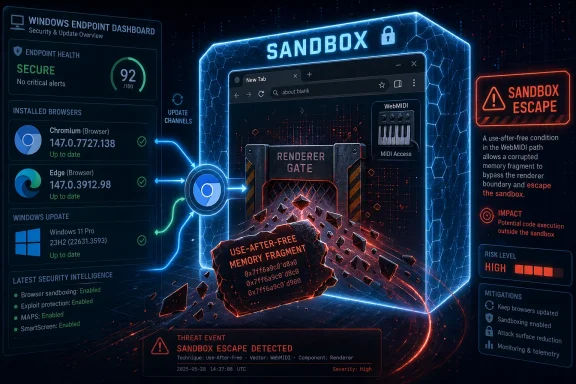
On April 28, 2026, Google shipped Chrome 147.0.7727.137/138 for desktop to fix 30 security flaws, including CVE-2026-7350, a high-severity use-after-free bug in WebMIDI that could help an attacker escape Chrome’s sandbox after compromising the renderer process. The line that matters for WindowsForum readers is not the obscure WebMIDI acronym; it is the phrase sandbox escape. This is the sort of browser vulnerability that turns “don’t click sketchy links” into an inadequate security policy, because the browser is now the operating system’s most exposed application layer. Microsoft’s Edge advisory trail confirms the other uncomfortable truth: when Chromium moves, Windows fleets have to move with it.
CVE-2026-7350 is, on paper, a narrow bug. It sits in WebMIDI, the browser interface that allows web applications to communicate with MIDI devices such as keyboards, controllers, synthesizers, and other music hardware. That sounds like the sort of surface area most enterprise administrators would assume they do not use, and many probably do not.
But modern browser risk rarely maps cleanly to whether a user intentionally uses a feature. A vulnerable component does not need to be central to your business workflow to become part of an exploit chain. If the code is present, reachable, and exposed through a crafted page under the right conditions, it becomes part of the browser’s attack surface.
The official description is carefully worded. The flaw allowed a remote attacker who had already compromised the renderer process to potentially perform a sandbox escape using a crafted HTML page. That is not a one-click full-device compromise by itself, but it is also not a routine cosmetic browser fix. It describes a second-stage capability: once attacker-controlled code is running inside the renderer, this bug may help it get out of the cage.
That distinction matters. Chrome’s security architecture assumes that renderer compromise can happen, then tries to contain the blast radius. A sandbox escape is the moment containment becomes the story.
The sandbox is supposed to make that first break less catastrophic. If a malicious page gets code execution in the renderer, the browser should still prevent easy access to files, system resources, device interfaces, or other privileged parts of the host. In practice, this model has been one of Chrome’s biggest security successes.
But the model also creates a grim hierarchy of bugs. A renderer remote-code-execution flaw is bad; a sandbox escape is the bug that completes the bridge from browser compromise toward host compromise. CVE-2026-7350 belongs to that second category, which is why its CVSS vector includes changed scope and high impact to confidentiality, integrity, and availability.
The user interaction requirement should not lull anyone to sleep. In browser terms, “user interaction” often means convincing a person to open a page, click a link, visit a compromised site, or load a malicious frame through a path they already trust. That is not an exotic condition in 2026. It is the web’s normal operating environment with a better lure.
What makes the Chrome 147 update notable is not that one use-after-free appeared. It is that the release notes show a pattern: use-after-free bugs across Canvas, Accessibility, Views, GPU, ANGLE, Animation, Navigation, Media, WebMIDI, Cast, Codecs, WebView, WebRTC, and other areas. The browser is not a single application in the old sense; it is an operating environment with a graphics stack, media engine, scripting runtime, hardware acceleration layer, remoting hooks, accessibility plumbing, and permissioned device APIs.
This is why memory safety has become the background music of the browser wars. Google has invested heavily in fuzzing, sanitizers, control-flow integrity, and safer language work, but Chrome still has an enormous C++ inheritance. The result is a steady march of high-severity memory bugs found by internal teams, external researchers, and automation.
The good news is that many of these bugs are found and patched before public exploitation. The bad news is that the cadence has trained users and admins to treat major browser security releases as routine noise. That is exactly backwards. Routine is not the same thing as low stakes.
A permission prompt is not a memory-safety boundary. A user may need to grant access for certain WebMIDI operations, and enterprise policy can often restrict risky APIs, but the presence of permission checks does not automatically neutralize implementation flaws. The vulnerability description’s reference to a crafted HTML page tells us the web content path mattered, not that the victim had to be running a digital audio workstation in the browser.
That is the administrative lesson. Reducing exposed browser features is useful, but it does not replace patching. Disabling unneeded APIs can shrink the attack surface, yet the only durable fix for this CVE is the patched Chromium build.
For managed Windows environments, this is where browser policy and update policy intersect. If your organization blocks WebMIDI, that may reduce practical exposure. If your organization delays Chrome or Edge updates for compatibility theater, it may be preserving precisely the class of bug that attackers chain with something else later.
That does not make it unimportant. In fact, large bundled browser updates are how defenders usually receive fixes for vulnerabilities that are dangerous but not yet loudly exploited. The absence of a “known exploited in the wild” label should influence triage, not justify delay.
Google also repeated its standard warning that bug details and links may remain restricted until most users are updated. This is sensible engineering and responsible disclosure, but it creates a familiar blind spot for defenders. The people who most want technical proof before prioritizing a patch are often asking for the very details vendors intentionally withhold until patch saturation improves.
In other words, the lack of exploit detail is not evidence of low risk. It is often part of the mitigation strategy.
That version number does not match Chrome’s version number, because Edge has its own build numbering. The relevant point is not numerical symmetry; it is Chromium lineage. When the underlying Chromium project fixes a browser engine flaw, downstream Chromium browsers must ingest that fix through their own release processes.
This is where enterprise patch dashboards sometimes go wrong. A vulnerability scanner may flag Chrome by CPE and leave Edge to a separate Microsoft advisory. Another tool may report “Chromium” generically while asset owners think only Google Chrome is in scope. Meanwhile, users may have Chrome, Edge, Brave, Opera, Vivaldi, Electron-based applications, WebView2 runtimes, or embedded Chromium components installed on the same Windows endpoint.
For CVE-2026-7350, the clean administrative question is not “Do we use WebMIDI?” It is “Which Chromium-derived surfaces in our fleet included the vulnerable code path, and have they received the appropriate upstream fix?”
CPE data often lags, misses downstream products, or describes vendor packages in a way that does not map neatly to how software is actually deployed. The NVD entry itself asks whether a CPE is missing, which is a refreshingly blunt hint that vulnerability metadata remains a living artifact. Security teams that treat CPE presence as the full scope of exposure are outsourcing judgment to an incomplete taxonomy.
In Windows environments, the CPE problem is especially visible with browsers. Chrome may be installed per-user or system-wide. Edge is built into modern Windows servicing assumptions but updates through its own channel. WebView2 may be present because a line-of-business app depends on it. A vulnerability may be inherited from Chromium while the remediation path depends on Google, Microsoft, or another vendor’s packaging.
The right use of CPE here is as a starting point. It tells you that Chrome before 147.0.7727.138 is vulnerable. It does not prove that every Chromium-based exposure in your environment has been identified.
The “attacker who had compromised the renderer process” language is crucial. CVE-2026-7350 is not presented as the initial renderer compromise. It is the escape route after that first step. That makes it particularly relevant to exploit-chain thinking.
Browser attacks often work as composites. One vulnerability gets code running where web content runs. Another escapes the sandbox. A third abuses the OS, a driver, a broker process, or a misconfiguration to persist or elevate. Defenders who rank each CVE in isolation can miss how attackers value them as parts.
That is also why patched-but-undiscussed bugs can become dangerous after the fact. Once a patch ships, attackers can diff code, infer what changed, and attempt to reconstruct the bug. The clock does not start when proof-of-concept code appears on a forum; it starts when the fix becomes available to reverse engineer.
Browsers stay open for days. Users postpone restarts. VDI images lag behind. Application control rules block update helpers. Test rings are treated as parking lots. Security teams assume desktop engineering owns the browser, desktop engineering assumes the browser auto-updates, and neither group owns the version inventory with enough precision.
The practical mitigation for CVE-2026-7350 is brutally simple: get Chrome to 147.0.7727.138 or later on affected desktop platforms, and get Edge to the Microsoft release that incorporates the relevant Chromium fixes. But simplicity at the endpoint does not mean simplicity at fleet scale.
An organization that cannot answer how many machines are still running yesterday’s browser build is not managing browser risk; it is hoping update telemetry eventually converges. That may be acceptable for a low-severity UI bug. It is not acceptable for a sandbox escape candidate.
Electron applications complicate this picture. They package Chromium inside desktop apps, often with their own update cadence and vendor dependency chain. A Chrome browser update does not automatically patch every Electron application, and not every Chromium CVE applies equally to every embedded runtime. Still, the general lesson holds: Chromium’s ubiquity means browser engine bugs often have a longer tail than browser vendors’ release notes suggest.
WebView2 deserves special attention in Windows shops because it is the sanctioned way many applications embed web content using Microsoft’s Chromium-based runtime. Evergreen WebView2 installations update through Microsoft’s mechanism, but fixed-version deployments exist for compatibility reasons. Those fixed runtimes can become security debt if nobody tracks them.
This is the unglamorous work that separates mature endpoint security from dashboard compliance. The browser is not just an app users open. It is a dependency layer.
This creates an awkward information asymmetry. Attackers can reverse engineer patches, researchers may eventually reconstruct the issue, but defenders initially receive a terse sentence, a severity rating, and a version number. That can feel insufficient, particularly to administrators asked to justify emergency work.
Yet this is the compact modern browser security depends on. Users and enterprises get rapid fixes before full technical disclosure. Vendors withhold enough detail to reduce opportunistic exploitation during rollout. Defenders have to act on sparse but credible signals.
For CVE-2026-7350, those signals are credible enough: high severity, use-after-free, WebMIDI, sandbox escape potential, compromised renderer precondition, patched in Chrome 147.0.7727.138, included in a broader 30-fix release. Waiting for a public exploit would be waiting for the wrong milestone.
Those facts matter. They mean this is not the same operational event as a confirmed active zero-day with mass exploitation. Security teams should prioritize accordingly, especially if they are juggling emergency fixes across identity, VPN, email, and endpoint agents.
But high attack complexity is not the same as impractical. Sophisticated browser exploit chains are, by definition, complex. The actors most interested in sandbox escapes are not always commodity phishers; they include surveillance vendors, state-aligned operators, and high-end criminal groups that buy or develop chains for targeted compromise.
The sensible position is neither panic nor dismissal. This is a patch-now vulnerability, not necessarily a shut-the-company-down vulnerability. The longer vulnerable builds remain in circulation, the less comforting the initial complexity becomes.
There is a temptation to frame constant browser updates as vendor failure. Sometimes that criticism is fair, especially when old bug classes recur. But the alternative is not a serene world where complex browsers have no vulnerabilities. The alternative is a slower disclosure and patch pipeline.
For IT departments, the challenge is cultural as much as technical. Browsers must be treated like operating system components with emergency servicing requirements, not optional productivity tools. The browser version belongs in the same operational conversation as Windows build numbers, Defender platform versions, VPN client builds, and identity agent releases.
That is a shift many organizations still have not completed. They inventory Windows and Microsoft 365 with rigor, then let browser patching drift because auto-update feels automatic. CVE-2026-7350 is another reminder that automatic does not mean accountable.
Source: NVD / Chromium Security Update Guide - Microsoft Security Response Center
 A Niche Browser API Becomes a Very Real Endpoint Problem
CVE-2026-7350 is, on paper, a narrow bug. It sits in WebMIDI, the browser interface that allows web applications to communicate with MIDI devices such as keyboards, controllers, synthesizers, and other music hardware. That sounds like the sort of surface area most enterprise administrators would assume they do not use, and many probably do not.But modern browser risk rarely maps cleanly to whether a user intentionally uses a feature. A vulnerable component does not need to be central to your business workflow to become part of an exploit chain. If the code is present, reachable, and exposed through a crafted page under the right conditions, it becomes part of the browser’s attack surface.
The official description is carefully worded. The flaw allowed a remote attacker who had already compromised the renderer process to potentially perform a sandbox escape using a crafted HTML page. That is not a one-click full-device compromise by itself, but it is also not a routine cosmetic browser fix. It describes a second-stage capability: once attacker-controlled code is running inside the renderer, this bug may help it get out of the cage.
That distinction matters. Chrome’s security architecture assumes that renderer compromise can happen, then tries to contain the blast radius. A sandbox escape is the moment containment becomes the story.
The Renderer Was Always Supposed to Be Disposable
Chrome’s multiprocess model changed browser security by treating web content as hostile and isolating it in renderer processes. The renderer can parse HTML, run JavaScript, decode media, handle complex document lifecycles, and generally do the messy work of the web. It is also the part attackers most often try to break first.The sandbox is supposed to make that first break less catastrophic. If a malicious page gets code execution in the renderer, the browser should still prevent easy access to files, system resources, device interfaces, or other privileged parts of the host. In practice, this model has been one of Chrome’s biggest security successes.
But the model also creates a grim hierarchy of bugs. A renderer remote-code-execution flaw is bad; a sandbox escape is the bug that completes the bridge from browser compromise toward host compromise. CVE-2026-7350 belongs to that second category, which is why its CVSS vector includes changed scope and high impact to confidentiality, integrity, and availability.
The user interaction requirement should not lull anyone to sleep. In browser terms, “user interaction” often means convincing a person to open a page, click a link, visit a compromised site, or load a malicious frame through a path they already trust. That is not an exotic condition in 2026. It is the web’s normal operating environment with a better lure.
Use-After-Free Is Still the Bug Class That Will Not Die
The flaw is classified as CWE-416, a use-after-free. That means memory is accessed after it has already been released, leaving the program vulnerable to crashes, corruption, or attacker-shaped behavior depending on the surrounding conditions. It is one of the oldest memory-safety bug classes still haunting modern software.What makes the Chrome 147 update notable is not that one use-after-free appeared. It is that the release notes show a pattern: use-after-free bugs across Canvas, Accessibility, Views, GPU, ANGLE, Animation, Navigation, Media, WebMIDI, Cast, Codecs, WebView, WebRTC, and other areas. The browser is not a single application in the old sense; it is an operating environment with a graphics stack, media engine, scripting runtime, hardware acceleration layer, remoting hooks, accessibility plumbing, and permissioned device APIs.
This is why memory safety has become the background music of the browser wars. Google has invested heavily in fuzzing, sanitizers, control-flow integrity, and safer language work, but Chrome still has an enormous C++ inheritance. The result is a steady march of high-severity memory bugs found by internal teams, external researchers, and automation.
The good news is that many of these bugs are found and patched before public exploitation. The bad news is that the cadence has trained users and admins to treat major browser security releases as routine noise. That is exactly backwards. Routine is not the same thing as low stakes.
WebMIDI Is a Reminder That Permissioned Features Still Expand the Battlefield
WebMIDI is not a household name, but it is part of a broader trend: browsers keep absorbing capabilities that once belonged to native applications. Cameras, microphones, USB devices, serial ports, file system access, Bluetooth, HID devices, and MIDI hardware all have legitimate uses. They also expand the number of subsystems that must be exposed, mediated, permissioned, and hardened.A permission prompt is not a memory-safety boundary. A user may need to grant access for certain WebMIDI operations, and enterprise policy can often restrict risky APIs, but the presence of permission checks does not automatically neutralize implementation flaws. The vulnerability description’s reference to a crafted HTML page tells us the web content path mattered, not that the victim had to be running a digital audio workstation in the browser.
That is the administrative lesson. Reducing exposed browser features is useful, but it does not replace patching. Disabling unneeded APIs can shrink the attack surface, yet the only durable fix for this CVE is the patched Chromium build.
For managed Windows environments, this is where browser policy and update policy intersect. If your organization blocks WebMIDI, that may reduce practical exposure. If your organization delays Chrome or Edge updates for compatibility theater, it may be preserving precisely the class of bug that attackers chain with something else later.
The Chrome Patch Was Bigger Than One CVE
Google’s April 28 stable-channel update fixed 30 security issues. Four were listed as critical, and many more were high severity. CVE-2026-7350 was one item in a large security bundle rather than the headline-grabbing zero-day of the week.That does not make it unimportant. In fact, large bundled browser updates are how defenders usually receive fixes for vulnerabilities that are dangerous but not yet loudly exploited. The absence of a “known exploited in the wild” label should influence triage, not justify delay.
Google also repeated its standard warning that bug details and links may remain restricted until most users are updated. This is sensible engineering and responsible disclosure, but it creates a familiar blind spot for defenders. The people who most want technical proof before prioritizing a patch are often asking for the very details vendors intentionally withhold until patch saturation improves.
In other words, the lack of exploit detail is not evidence of low risk. It is often part of the mitigation strategy.
Microsoft Edge Is Not a Separate Island
The user-provided source points to Microsoft’s Security Response Center page for CVE-2026-7350, and Microsoft’s Edge release notes show why that matters for Windows readers. Edge is Chromium-based, and Microsoft regularly ships Edge updates that incorporate Chromium security fixes. On April 30, 2026, Microsoft listed Edge Stable version 147.0.3912.98 as incorporating the latest Chromium security updates.That version number does not match Chrome’s version number, because Edge has its own build numbering. The relevant point is not numerical symmetry; it is Chromium lineage. When the underlying Chromium project fixes a browser engine flaw, downstream Chromium browsers must ingest that fix through their own release processes.
This is where enterprise patch dashboards sometimes go wrong. A vulnerability scanner may flag Chrome by CPE and leave Edge to a separate Microsoft advisory. Another tool may report “Chromium” generically while asset owners think only Google Chrome is in scope. Meanwhile, users may have Chrome, Edge, Brave, Opera, Vivaldi, Electron-based applications, WebView2 runtimes, or embedded Chromium components installed on the same Windows endpoint.
For CVE-2026-7350, the clean administrative question is not “Do we use WebMIDI?” It is “Which Chromium-derived surfaces in our fleet included the vulnerable code path, and have they received the appropriate upstream fix?”
The CPE Entry Tells a Small but Useful Truth
The NVD change history added a CPE configuration for Google Chrome versions before 147.0.7727.138 across Windows, Linux, and macOS. That is useful, but it is also a reminder that CPE matching is a model of the world, not the world itself.CPE data often lags, misses downstream products, or describes vendor packages in a way that does not map neatly to how software is actually deployed. The NVD entry itself asks whether a CPE is missing, which is a refreshingly blunt hint that vulnerability metadata remains a living artifact. Security teams that treat CPE presence as the full scope of exposure are outsourcing judgment to an incomplete taxonomy.
In Windows environments, the CPE problem is especially visible with browsers. Chrome may be installed per-user or system-wide. Edge is built into modern Windows servicing assumptions but updates through its own channel. WebView2 may be present because a line-of-business app depends on it. A vulnerability may be inherited from Chromium while the remediation path depends on Google, Microsoft, or another vendor’s packaging.
The right use of CPE here is as a starting point. It tells you that Chrome before 147.0.7727.138 is vulnerable. It does not prove that every Chromium-based exposure in your environment has been identified.
The CVSS Score Says “High,” but the Chain Says More
CISA’s ADP score for the vulnerability is 8.3 high under CVSS 3.1, with network attack vector, high attack complexity, no privileges required, required user interaction, changed scope, and high impacts across confidentiality, integrity, and availability. That is a mouthful, but it tells a coherent story. This is a remotely reachable browser flaw that likely requires chaining or a precondition, and the payoff may cross a security boundary.The “attacker who had compromised the renderer process” language is crucial. CVE-2026-7350 is not presented as the initial renderer compromise. It is the escape route after that first step. That makes it particularly relevant to exploit-chain thinking.
Browser attacks often work as composites. One vulnerability gets code running where web content runs. Another escapes the sandbox. A third abuses the OS, a driver, a broker process, or a misconfiguration to persist or elevate. Defenders who rank each CVE in isolation can miss how attackers value them as parts.
That is also why patched-but-undiscussed bugs can become dangerous after the fact. Once a patch ships, attackers can diff code, infer what changed, and attempt to reconstruct the bug. The clock does not start when proof-of-concept code appears on a forum; it starts when the fix becomes available to reverse engineer.
Patch Latency Is Now the Browser’s Real Vulnerability
Chrome’s update mechanism is generally good, and Edge’s servicing cadence has improved dramatically since the old Internet Explorer era. For consumers, the browser may quietly update in the background and finish the job after a restart. For enterprises, the story is messier.Browsers stay open for days. Users postpone restarts. VDI images lag behind. Application control rules block update helpers. Test rings are treated as parking lots. Security teams assume desktop engineering owns the browser, desktop engineering assumes the browser auto-updates, and neither group owns the version inventory with enough precision.
The practical mitigation for CVE-2026-7350 is brutally simple: get Chrome to 147.0.7727.138 or later on affected desktop platforms, and get Edge to the Microsoft release that incorporates the relevant Chromium fixes. But simplicity at the endpoint does not mean simplicity at fleet scale.
An organization that cannot answer how many machines are still running yesterday’s browser build is not managing browser risk; it is hoping update telemetry eventually converges. That may be acceptable for a low-severity UI bug. It is not acceptable for a sandbox escape candidate.
Windows Admins Should Look Beyond the Browser Icon
The obvious check is Chrome’s version page. The less obvious check is whether all Chromium-based runtimes on a Windows endpoint have moved. That includes Edge, Chrome installations in nonstandard paths, portable browsers, developer builds, beta channels, and application bundles that ship their own Chromium components.Electron applications complicate this picture. They package Chromium inside desktop apps, often with their own update cadence and vendor dependency chain. A Chrome browser update does not automatically patch every Electron application, and not every Chromium CVE applies equally to every embedded runtime. Still, the general lesson holds: Chromium’s ubiquity means browser engine bugs often have a longer tail than browser vendors’ release notes suggest.
WebView2 deserves special attention in Windows shops because it is the sanctioned way many applications embed web content using Microsoft’s Chromium-based runtime. Evergreen WebView2 installations update through Microsoft’s mechanism, but fixed-version deployments exist for compatibility reasons. Those fixed runtimes can become security debt if nobody tracks them.
This is the unglamorous work that separates mature endpoint security from dashboard compliance. The browser is not just an app users open. It is a dependency layer.
The Public Bug Is Restricted, and That Is the Point
The Chromium issue linked to CVE-2026-7350 is marked in a way that indicates restricted access. That is normal for fresh browser vulnerabilities, especially those with security implications. Vendors want users patched before exploit writers get a roadmap.This creates an awkward information asymmetry. Attackers can reverse engineer patches, researchers may eventually reconstruct the issue, but defenders initially receive a terse sentence, a severity rating, and a version number. That can feel insufficient, particularly to administrators asked to justify emergency work.
Yet this is the compact modern browser security depends on. Users and enterprises get rapid fixes before full technical disclosure. Vendors withhold enough detail to reduce opportunistic exploitation during rollout. Defenders have to act on sparse but credible signals.
For CVE-2026-7350, those signals are credible enough: high severity, use-after-free, WebMIDI, sandbox escape potential, compromised renderer precondition, patched in Chrome 147.0.7727.138, included in a broader 30-fix release. Waiting for a public exploit would be waiting for the wrong milestone.
The Exploitability Debate Should Not Become an Excuse
It is reasonable to ask whether CVE-2026-7350 is easy to exploit. The CVSS vector says attack complexity is high. The description says the renderer must already be compromised. There is no public indication in the provided data that Google labeled this particular CVE as exploited in the wild.Those facts matter. They mean this is not the same operational event as a confirmed active zero-day with mass exploitation. Security teams should prioritize accordingly, especially if they are juggling emergency fixes across identity, VPN, email, and endpoint agents.
But high attack complexity is not the same as impractical. Sophisticated browser exploit chains are, by definition, complex. The actors most interested in sandbox escapes are not always commodity phishers; they include surveillance vendors, state-aligned operators, and high-end criminal groups that buy or develop chains for targeted compromise.
The sensible position is neither panic nor dismissal. This is a patch-now vulnerability, not necessarily a shut-the-company-down vulnerability. The longer vulnerable builds remain in circulation, the less comforting the initial complexity becomes.
Browser Release Cadence Has Become Security Theater and Security Reality
One reason users ignore browser updates is that there are so many of them. Chrome 147 reached stable earlier in April, and by April 28 it already needed a substantial security update. To a casual observer, that looks like instability. To a security engineer, it looks like the cost of maintaining a massively exposed codebase at internet scale.There is a temptation to frame constant browser updates as vendor failure. Sometimes that criticism is fair, especially when old bug classes recur. But the alternative is not a serene world where complex browsers have no vulnerabilities. The alternative is a slower disclosure and patch pipeline.
For IT departments, the challenge is cultural as much as technical. Browsers must be treated like operating system components with emergency servicing requirements, not optional productivity tools. The browser version belongs in the same operational conversation as Windows build numbers, Defender platform versions, VPN client builds, and identity agent releases.
That is a shift many organizations still have not completed. They inventory Windows and Microsoft 365 with rigor, then let browser patching drift because auto-update feels automatic. CVE-2026-7350 is another reminder that automatic does not mean accountable.
The April Chrome Bundle Leaves a Clear Work Order
The most useful response to this CVE is not a dramatic hunt for WebMIDI usage. It is a disciplined browser and runtime patch sweep with verification afterward. The relevant facts are concrete enough to turn into action.- Chrome desktop installations earlier than 147.0.7727.138 should be treated as exposed to CVE-2026-7350 and the rest of the April 28 security bundle.
- Microsoft Edge Stable 147.0.3912.98, released on April 30, 2026, is the relevant Edge-side milestone that incorporates the latest Chromium security updates from this cycle.
- The vulnerability is best understood as a potential sandbox escape after renderer compromise, which makes it more valuable as part of an exploit chain than as a standalone headline.
- WebMIDI’s niche status should not be used as a reason to defer patching, because vulnerable browser components can matter even when users do not knowingly rely on them.
- Asset inventory should include Chrome, Edge, WebView2, fixed Chromium runtimes, and Chromium-based third-party browsers where they are allowed in the environment.
- Administrators should verify running browser versions after update deployment, because a downloaded browser update often does not protect the user until the browser restarts.
Source: NVD / Chromium Security Update Guide - Microsoft Security Response Center
