

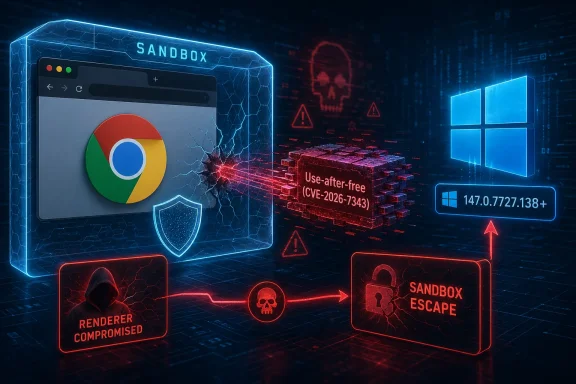
Google disclosed CVE-2026-7343 on April 28, 2026, as a critical use-after-free flaw in Chrome’s Views component on Windows before version 147.0.7727.138, enabling a renderer-compromising attacker to potentially escape the browser sandbox via crafted HTML. That dry sentence is the whole drama in miniature: a memory-safety bug, a browser UI framework, a Windows-specific escape path, and the uncomfortable phrase every admin hates to see — sandbox escape. This is not a routine “update when convenient” browser bug. It is a reminder that the browser patch cadence is now part of the operating system’s security boundary.
CVE-2026-7343 sits in Chromium’s Views component, the cross-platform UI framework used heavily in Chrome’s browser interface. On paper, that sounds less glamorous than V8, Skia, WebRTC, or GPU code. In practice, “boring” browser plumbing is exactly where modern exploit chains look for the second step.
The key wording is not merely “use after free.” It is that an attacker who had already compromised the renderer process could potentially perform a sandbox escape. That makes CVE-2026-7343 less like a one-click remote-code-execution bug and more like a bridge: something an exploit chain may need after the initial browser foothold.
That distinction matters for defenders. A renderer compromise alone is supposed to be contained by Chrome’s sandbox. A sandbox escape is what turns browser compromise from “bad tab” into “potentially bad endpoint,” depending on the privileges, mitigations, and surrounding controls in place.
The user-visible action remains simple: Chrome on Windows needs to be at 147.0.7727.138 or later. But the enterprise meaning is broader. If you treat browser updates as application hygiene rather than endpoint security, this is the kind of CVE that punishes the distinction.
That is not just bureaucratic churn. It reflects the ambiguity of chained browser exploitation. If a bug only becomes useful after the renderer is already compromised, then the vulnerability’s standalone score becomes harder to express cleanly in CVSS.
Admins should resist the temptation to read the revised 7.5 “High” score as a downgrade in practical urgency. A sandbox escape that requires a renderer compromise is still exactly the sort of bug attackers pair with a separate renderer exploit. In the real world, exploit chains are assembled from parts, and the second part can be as strategically valuable as the first.
This is why Chromium’s own severity label matters. Google marked CVE-2026-7343 as critical in its Chrome security notes, and that should carry more operational weight than the comfort of a single numeric score.
Views does not have that same public mythology. It is part of Chromium’s UI infrastructure, and that can make it feel less exposed. CVE-2026-7343 shows why that intuition is dangerous.
Modern browsers are not a neat stack where the web content lives in one box and the browser chrome lives safely in another. They are sprawling, multi-process platforms with IPC boundaries, UI surfaces, accessibility paths, compositors, GPU processes, extension hooks, profile state, and platform-specific integration. Bugs at the seams can matter because the seams are where containment has to hold.
The Windows specificity is especially important. The description says Chrome on Windows prior to 147.0.7727.138, and the claimed impact is sandbox escape after renderer compromise. That does not automatically mean every Chromium build on every operating system is equally exposed in the same way, even if vulnerability databases sometimes struggle to model the affected software cleanly.
The description is Windows-specific. The CPE modeling, at least as shown in the change record, looks broader. That mismatch is not a trivial paperwork problem; it can cause scanners to flag Linux and macOS fleets in ways that may not reflect the vulnerability description.
This is where CVE management becomes an operational art rather than a database lookup. A scanner finding is not the same thing as a validated exposure. Security teams should check the vendor advisory, the platform language, the installed browser version, and the product actually deployed.
For WindowsForum readers, the practical answer is blunt: Windows Chrome below 147.0.7727.138 is in scope. Other platforms still received the broader Chrome 147.0.7727.137/138 security update and should be patched, but CVE-2026-7343’s described sandbox-escape condition is specifically tied to Windows.
CVE-2026-7343 was one of several critical use-after-free issues disclosed in that batch. Others included critical bugs in Canvas, iOS, and Accessibility, alongside a long list of high-severity memory-safety flaws across GPU, ANGLE, Animation, Navigation, Media, WebRTC, Cast, Codecs, WebView, and related components.
That density is the real story. Chrome’s security updates increasingly read less like isolated bug fixes and more like monthly audits of a moving city. The browser is effectively a userland operating system, and its attack surface is distributed across rendering, media, UI, graphics, input, and platform glue.
For endpoint teams, this changes the patching conversation. Waiting for a particular CVE to become famous is the wrong threshold. By the time the famous CVE arrives, it may already be the missing piece in a chain that began elsewhere.
This creates a recurring enterprise problem: admins may patch Chrome quickly because Google’s release notes are visible, while Edge is assumed to be “handled by Windows.” That assumption is only partly true. Edge has its own update channel, its own updater behavior, its own enterprise policies, and its own lag or rollout considerations depending on how an organization manages endpoints.
On unmanaged consumer Windows machines, Edge usually updates quietly enough that most users never think about it. In managed environments, however, update rings, maintenance windows, application control, VDI images, and offline systems can all slow adoption. The presence of an MSRC entry should be read as a nudge to check Edge as well as Chrome.
Chromium vulnerabilities do not respect vendor branding. If the shared engine carries a fix, the operational question is not “Do we use Chrome?” It is “Which Chromium-based browsers exist anywhere in our fleet, and are they actually current?”
Chrome has invested heavily in mitigations, fuzzing, sanitizers, isolation, and memory-safety hardening. The April 28 release notes again credited tools such as AddressSanitizer, MemorySanitizer, UndefinedBehaviorSanitizer, Control Flow Integrity, libFuzzer, and AFL as part of the broader bug-finding pipeline. And yet the release still contains a striking number of use-after-free fixes.
That is not evidence of failure so much as evidence of the scale of the target. Chromium is large, fast-moving, and deeply exposed to adversarial input. Every new capability adds code, every platform integration adds edges, and every performance optimization can complicate object lifetime.
The long-term answer is memory-safe implementation where feasible, better compartmentalization where not, and relentless fuzzing everywhere. The short-term answer is less philosophically satisfying: patch faster than attackers can chain.
That is precisely why sandbox escapes matter so much. They represent the attacker’s answer to modern browser architecture. If the first exploit opens the door into a constrained room, the sandbox escape looks for the hallway.
CVE-2026-7343’s precondition — a compromised renderer process — should not lull anyone into complacency. The renderer is where hostile web content lives. It is also where a large share of browser exploitation begins.
The right mental model is not “this bug requires another bug, so it is less important.” The better model is “this bug may be the second stage another bug needs.” That is why criticality in browser-land often has to be understood as chain potential, not just standalone exploitability.
CVE-2026-7343 landed in a Tuesday Chrome stable update, but not as part of a neat Microsoft monthly cycle. That matters because many enterprise patch processes still privilege monthly OS baselines and treat browser updates as secondary application maintenance. Attackers do not share that taxonomy.
A serious browser flaw can expose a fully patched Windows machine if the browser layer is stale. Conversely, a fast browser update can neutralize a major web-delivered risk before the next OS maintenance window arrives. The browser has become a first-class patch domain.
The best shops already know this. They monitor browser channels, enforce update policies, inventory installed versions, and make exceptions for emergency rollouts. The laggards are still arguing whether a browser restart is too disruptive.
In corporate environments, the failure mode is different. Chrome and Edge may be pinned open for days on workstations, conference-room PCs, jump boxes, lab machines, kiosks, and shared terminals. Browser sessions become semi-permanent infrastructure.
That is why update compliance should measure the running version, not just the installed package. A machine that has downloaded a patched build but not relaunched the browser is still an exposure. A VDI image patched in the golden template but not refreshed in active sessions is still a problem.
This is one of the quiet absurdities of modern security: a critical sandbox-escape fix can depend on whether someone tolerates a browser restart. The engineering may be sophisticated; the last mile is still human and operational.
That restraint is sensible. Full technical disclosure before broad patch uptake can help attackers more than defenders. But it also means security teams must make decisions under uncertainty.
The absence of public exploit code is not the same as safety. The absence of a “known exploited” tag is not the same as irrelevance. Many bugs are patched before public weaponization, and some become more interesting only after researchers and attackers reverse the fix.
For CVE-2026-7343, the correct response is not panic. It is speed. Patch the affected browsers, verify the version, and move on before the bug becomes more useful to people who study diffs for a living.
CVE-2026-7343 is about Google Chrome’s Views component on Windows, but the broader patch event reminds us that Chromium is an ecosystem, not a product. Some fixes flow quickly through downstream browsers. Others depend on vendor release timing, packaging, and enterprise deployment choices.
Security teams need to know which Chromium-based software exists on endpoints, not just which browser is set as default. That inventory should include version data, update source, channel, and whether the software can self-update or requires central deployment.
The hardest exposures are often not the obvious browsers. They are legacy apps embedding old runtimes, packaged enterprise tools with frozen Chromium builds, and systems where self-update was disabled years ago for change-control reasons nobody remembers.
The organizations most troubled by it are those that still handle browser patching as a ticket. A critical browser update should not require manual packaging heroics, three approval meetings, and a two-week pilot unless there is a very specific operational constraint. By then, the internet has moved on.
There is a reasonable middle ground. Enterprises can stage updates, test high-risk internal apps, and use update rings without turning every browser fix into a mini migration project. But the default posture has to be motion.
Security debt often disguises itself as stability. In browser patching, old builds are not stable; they are documented liabilities with a nicer icon.
That detail matters because vulnerability scanners may disagree during the first days after disclosure. Some may key off the CVE. Some may key off package versions. Some may ingest NVD CPE data that looks broader than the vendor wording. Some may report based on browser family rather than platform nuance.
Do not let that noise delay the obvious action. Patch first, normalize scanner interpretation second. If a tool flags macOS or Linux specifically for the Windows-described sandbox escape, document the vendor language and still ensure those platforms have received the April 28 Chrome security update.
The worst outcome is not a false positive. The worst outcome is treating metadata confusion as a reason to postpone a real Windows browser fix.
Source: NVD / Chromium Security Update Guide - Microsoft Security Response Center
 A Chrome Bug Becomes a Windows Problem
CVE-2026-7343 sits in Chromium’s Views component, the cross-platform UI framework used heavily in Chrome’s browser interface. On paper, that sounds less glamorous than V8, Skia, WebRTC, or GPU code. In practice, “boring” browser plumbing is exactly where modern exploit chains look for the second step.The key wording is not merely “use after free.” It is that an attacker who had already compromised the renderer process could potentially perform a sandbox escape. That makes CVE-2026-7343 less like a one-click remote-code-execution bug and more like a bridge: something an exploit chain may need after the initial browser foothold.
That distinction matters for defenders. A renderer compromise alone is supposed to be contained by Chrome’s sandbox. A sandbox escape is what turns browser compromise from “bad tab” into “potentially bad endpoint,” depending on the privileges, mitigations, and surrounding controls in place.
The user-visible action remains simple: Chrome on Windows needs to be at 147.0.7727.138 or later. But the enterprise meaning is broader. If you treat browser updates as application hygiene rather than endpoint security, this is the kind of CVE that punishes the distinction.
The CVSS Argument Tells Its Own Story
The scoring history around CVE-2026-7343 is unusually instructive. CISA’s ADP entry reportedly first carried a CVSS 3.1 vector with low attack complexity and no user interaction, then changed it to a lower-scored but still high-severity vector requiring user interaction and high attack complexity.That is not just bureaucratic churn. It reflects the ambiguity of chained browser exploitation. If a bug only becomes useful after the renderer is already compromised, then the vulnerability’s standalone score becomes harder to express cleanly in CVSS.
Admins should resist the temptation to read the revised 7.5 “High” score as a downgrade in practical urgency. A sandbox escape that requires a renderer compromise is still exactly the sort of bug attackers pair with a separate renderer exploit. In the real world, exploit chains are assembled from parts, and the second part can be as strategically valuable as the first.
This is why Chromium’s own severity label matters. Google marked CVE-2026-7343 as critical in its Chrome security notes, and that should carry more operational weight than the comfort of a single numeric score.
Views Is Not the Flashiest Component, Which Is Why It Matters
Browser security coverage tends to orbit the same famous subsystems. V8 gets attention because JavaScript engine bugs are easy to imagine as web-delivered compromise. Skia gets attention because graphics parsing is a rich attack surface. WebRTC gets attention because real-time media stacks are complicated, network-adjacent, and historically fertile.Views does not have that same public mythology. It is part of Chromium’s UI infrastructure, and that can make it feel less exposed. CVE-2026-7343 shows why that intuition is dangerous.
Modern browsers are not a neat stack where the web content lives in one box and the browser chrome lives safely in another. They are sprawling, multi-process platforms with IPC boundaries, UI surfaces, accessibility paths, compositors, GPU processes, extension hooks, profile state, and platform-specific integration. Bugs at the seams can matter because the seams are where containment has to hold.
The Windows specificity is especially important. The description says Chrome on Windows prior to 147.0.7727.138, and the claimed impact is sandbox escape after renderer compromise. That does not automatically mean every Chromium build on every operating system is equally exposed in the same way, even if vulnerability databases sometimes struggle to model the affected software cleanly.
The CPE Confusion Is More Than Metadata
The NVD change history supplied for the CVE shows an affected configuration that appears to combine Google Chrome versions before 147.0.7727.138 with operating-system CPEs for Windows, Linux kernel, and macOS. That is the kind of entry that makes vulnerability managers groan.The description is Windows-specific. The CPE modeling, at least as shown in the change record, looks broader. That mismatch is not a trivial paperwork problem; it can cause scanners to flag Linux and macOS fleets in ways that may not reflect the vulnerability description.
This is where CVE management becomes an operational art rather than a database lookup. A scanner finding is not the same thing as a validated exposure. Security teams should check the vendor advisory, the platform language, the installed browser version, and the product actually deployed.
For WindowsForum readers, the practical answer is blunt: Windows Chrome below 147.0.7727.138 is in scope. Other platforms still received the broader Chrome 147.0.7727.137/138 security update and should be patched, but CVE-2026-7343’s described sandbox-escape condition is specifically tied to Windows.
The Patch Was Part of a Bigger Security Drop
Google’s April 28 stable-channel update was not a single-CVE event. The Chrome release moved desktop builds to 147.0.7727.137/138 for Windows and Mac, and 147.0.7727.137 for Linux, with 30 security fixes in the release.CVE-2026-7343 was one of several critical use-after-free issues disclosed in that batch. Others included critical bugs in Canvas, iOS, and Accessibility, alongside a long list of high-severity memory-safety flaws across GPU, ANGLE, Animation, Navigation, Media, WebRTC, Cast, Codecs, WebView, and related components.
That density is the real story. Chrome’s security updates increasingly read less like isolated bug fixes and more like monthly audits of a moving city. The browser is effectively a userland operating system, and its attack surface is distributed across rendering, media, UI, graphics, input, and platform glue.
For endpoint teams, this changes the patching conversation. Waiting for a particular CVE to become famous is the wrong threshold. By the time the famous CVE arrives, it may already be the missing piece in a chain that began elsewhere.
Edge Admins Should Not Treat Chromium as Somebody Else’s Problem
The user-provided source points to Microsoft’s Security Update Guide entry for CVE-2026-7343, and that is not incidental. Microsoft Edge is Chromium-based, and Chromium security fixes routinely flow into Edge’s security release process.This creates a recurring enterprise problem: admins may patch Chrome quickly because Google’s release notes are visible, while Edge is assumed to be “handled by Windows.” That assumption is only partly true. Edge has its own update channel, its own updater behavior, its own enterprise policies, and its own lag or rollout considerations depending on how an organization manages endpoints.
On unmanaged consumer Windows machines, Edge usually updates quietly enough that most users never think about it. In managed environments, however, update rings, maintenance windows, application control, VDI images, and offline systems can all slow adoption. The presence of an MSRC entry should be read as a nudge to check Edge as well as Chrome.
Chromium vulnerabilities do not respect vendor branding. If the shared engine carries a fix, the operational question is not “Do we use Chrome?” It is “Which Chromium-based browsers exist anywhere in our fleet, and are they actually current?”
Use-After-Free Is Still the Browser Bug That Will Not Die
Use-after-free vulnerabilities remain stubborn because they exploit a basic failure of memory lifetime management. Software frees an object, then later uses a stale reference to it. In a complex program, that can become a crash, a controlled memory corruption primitive, or a route into more serious exploitation.Chrome has invested heavily in mitigations, fuzzing, sanitizers, isolation, and memory-safety hardening. The April 28 release notes again credited tools such as AddressSanitizer, MemorySanitizer, UndefinedBehaviorSanitizer, Control Flow Integrity, libFuzzer, and AFL as part of the broader bug-finding pipeline. And yet the release still contains a striking number of use-after-free fixes.
That is not evidence of failure so much as evidence of the scale of the target. Chromium is large, fast-moving, and deeply exposed to adversarial input. Every new capability adds code, every platform integration adds edges, and every performance optimization can complicate object lifetime.
The long-term answer is memory-safe implementation where feasible, better compartmentalization where not, and relentless fuzzing everywhere. The short-term answer is less philosophically satisfying: patch faster than attackers can chain.
The Sandbox Is a Promise Attackers Keep Testing
Chrome’s sandbox is one of the major reasons browser exploitation became harder over the last decade. It forces attackers to do more work. A renderer bug that once might have been enough now often needs a second vulnerability to cross a privilege or process boundary.That is precisely why sandbox escapes matter so much. They represent the attacker’s answer to modern browser architecture. If the first exploit opens the door into a constrained room, the sandbox escape looks for the hallway.
CVE-2026-7343’s precondition — a compromised renderer process — should not lull anyone into complacency. The renderer is where hostile web content lives. It is also where a large share of browser exploitation begins.
The right mental model is not “this bug requires another bug, so it is less important.” The better model is “this bug may be the second stage another bug needs.” That is why criticality in browser-land often has to be understood as chain potential, not just standalone exploitability.
Patch Management Has Outgrown the Monthly Ritual
Windows administrators are still trained by Patch Tuesday. That rhythm remains useful for Microsoft’s monthly operating-system and product updates, but browser security has moved to a different tempo. Chrome, Edge, Firefox, and other browsers ship security fixes whenever the risk justifies it.CVE-2026-7343 landed in a Tuesday Chrome stable update, but not as part of a neat Microsoft monthly cycle. That matters because many enterprise patch processes still privilege monthly OS baselines and treat browser updates as secondary application maintenance. Attackers do not share that taxonomy.
A serious browser flaw can expose a fully patched Windows machine if the browser layer is stale. Conversely, a fast browser update can neutralize a major web-delivered risk before the next OS maintenance window arrives. The browser has become a first-class patch domain.
The best shops already know this. They monitor browser channels, enforce update policies, inventory installed versions, and make exceptions for emergency rollouts. The laggards are still arguing whether a browser restart is too disruptive.
Users See a Relaunch Button; Attackers See a Window
For individual users, the fix may be as simple as closing and reopening Chrome after the update downloads. But that tiny action is one of the most common failure points in consumer browser security. The update is staged, the button is visible, and the risky version keeps running until the process restarts.In corporate environments, the failure mode is different. Chrome and Edge may be pinned open for days on workstations, conference-room PCs, jump boxes, lab machines, kiosks, and shared terminals. Browser sessions become semi-permanent infrastructure.
That is why update compliance should measure the running version, not just the installed package. A machine that has downloaded a patched build but not relaunched the browser is still an exposure. A VDI image patched in the golden template but not refreshed in active sessions is still a problem.
This is one of the quiet absurdities of modern security: a critical sandbox-escape fix can depend on whether someone tolerates a browser restart. The engineering may be sophisticated; the last mile is still human and operational.
The Public Bug Is Not the Whole Bug
Google’s release note says access to bug details may remain restricted until most users are updated, and that is standard practice for Chrome security issues. For defenders, this creates an information gap. The CVE description is intentionally sparse, the Chromium issue may be permission-restricted, and exploitability details are withheld.That restraint is sensible. Full technical disclosure before broad patch uptake can help attackers more than defenders. But it also means security teams must make decisions under uncertainty.
The absence of public exploit code is not the same as safety. The absence of a “known exploited” tag is not the same as irrelevance. Many bugs are patched before public weaponization, and some become more interesting only after researchers and attackers reverse the fix.
For CVE-2026-7343, the correct response is not panic. It is speed. Patch the affected browsers, verify the version, and move on before the bug becomes more useful to people who study diffs for a living.
Windows Fleets Need Browser Inventory, Not Browser Assumptions
The Windows endpoint estate has become messier than the old “one default browser” model suggests. A single business laptop may have Edge, Chrome, Brave, Opera, Electron-based applications, WebView2 runtime dependencies, and vendor-bundled Chromium components.CVE-2026-7343 is about Google Chrome’s Views component on Windows, but the broader patch event reminds us that Chromium is an ecosystem, not a product. Some fixes flow quickly through downstream browsers. Others depend on vendor release timing, packaging, and enterprise deployment choices.
Security teams need to know which Chromium-based software exists on endpoints, not just which browser is set as default. That inventory should include version data, update source, channel, and whether the software can self-update or requires central deployment.
The hardest exposures are often not the obvious browsers. They are legacy apps embedding old runtimes, packaged enterprise tools with frozen Chromium builds, and systems where self-update was disabled years ago for change-control reasons nobody remembers.
The April 28 Fix Rewards the Teams That Automate
The organizations least troubled by CVE-2026-7343 are not the ones with the longest risk committees. They are the ones with automatic browser updates, short restart grace periods, and reliable reporting. They already know where Chrome is installed and which machines missed the update.The organizations most troubled by it are those that still handle browser patching as a ticket. A critical browser update should not require manual packaging heroics, three approval meetings, and a two-week pilot unless there is a very specific operational constraint. By then, the internet has moved on.
There is a reasonable middle ground. Enterprises can stage updates, test high-risk internal apps, and use update rings without turning every browser fix into a mini migration project. But the default posture has to be motion.
Security debt often disguises itself as stability. In browser patching, old builds are not stable; they are documented liabilities with a nicer icon.
The Version Number Is the Control
For this CVE, the most concrete defensive control is also the least glamorous: verify the version. Chrome on Windows must be 147.0.7727.138 or later to clear the specific issue described. The broader stable update also shipped 147.0.7727.137/138 for Windows and Mac and 147.0.7727.137 for Linux.That detail matters because vulnerability scanners may disagree during the first days after disclosure. Some may key off the CVE. Some may key off package versions. Some may ingest NVD CPE data that looks broader than the vendor wording. Some may report based on browser family rather than platform nuance.
Do not let that noise delay the obvious action. Patch first, normalize scanner interpretation second. If a tool flags macOS or Linux specifically for the Windows-described sandbox escape, document the vendor language and still ensure those platforms have received the April 28 Chrome security update.
The worst outcome is not a false positive. The worst outcome is treating metadata confusion as a reason to postpone a real Windows browser fix.
The Practical Lesson Is Hiding in the Version String
CVE-2026-7343 is small enough to summarize in one sentence and serious enough to justify immediate operational attention. It is not a story about one exotic bug; it is a story about how browser security now depends on the speed and accuracy of fleet management.- Chrome on Windows should be updated to 147.0.7727.138 or later to address CVE-2026-7343.
- The vulnerability is a use-after-free in Chromium’s Views component and is classified by Chromium as critical.
- The described attack requires a compromised renderer process, which makes the bug especially relevant as a potential second stage in an exploit chain.
- Vulnerability teams should treat the NVD CPE/platform modeling carefully because the description is Windows-specific while update metadata may appear broader.
- Edge and other Chromium-based browsers should be checked separately rather than assumed safe because Chromium fixes must be consumed by downstream products.
- Browser restart compliance matters because a downloaded update does not fully protect users who continue running the vulnerable process.
Source: NVD / Chromium Security Update Guide - Microsoft Security Response Center
