

Google and Microsoft disclosed CVE-2026-7340 on April 28, 2026, as a medium-severity Chrome-on-Windows flaw in ANGLE fixed in Chrome 147.0.7727.138, where a crafted HTML page could trigger an integer overflow and cause an out-of-bounds memory read. The bug is not the scariest item in April’s Chrome security bundle, but it is the sort of browser vulnerability that matters precisely because it sits in the graphics path users rarely think about. For Windows admins, the lesson is blunt: the modern browser is not just an app on top of the OS; it is one of the OS’s most exposed execution environments.
CVE-2026-7340 is easy to underrate. It is not currently described as a zero-day. It is not scored as remote code execution. The CISA-ADP CVSS 3.1 score attached to the entry is 4.3, with confidentiality impact only, user interaction required, and no privileges required.
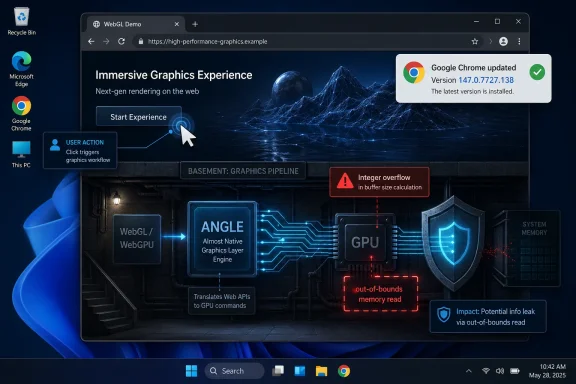
That sounds modest until you remember the attack surface. The trigger is a crafted HTML page, the delivery mechanism is the web, and the affected component is ANGLE, the translation layer Chrome uses to make graphics APIs behave consistently across platforms. In plain English, this is a flaw in the machinery that helps web content talk to GPU-backed graphics features on Windows.
The phrase “out-of-bounds memory read” also deserves more weight than it usually gets in patch dashboards. A read primitive may not immediately let an attacker run code, but it can expose memory that was supposed to remain private. In exploit chains, information disclosure bugs often play the supporting role that makes the headline bug possible.
That is why medium-severity browser bugs should not be treated like optional maintenance. They are often the connective tissue between a theoretical vulnerability and a working attack chain.
That last point is the key. Browser graphics code processes content supplied by remote sites. It must accept complex inputs, validate them, translate them, hand work to the GPU stack, and do all of that fast enough that users do not complain. The web platform keeps asking the graphics path to do more, and the security model keeps insisting that untrusted pages should not learn or corrupt anything outside their lane.
Integer overflow bugs are familiar residents of that world. They happen when arithmetic crosses a boundary the code did not properly guard against: a size calculation wraps, a buffer is smaller than expected, or a later operation trusts a value that has already lost its original meaning. In a graphics engine, where dimensions, offsets, texture sizes, and buffer lengths are constantly computed, a single bad assumption can become a memory safety flaw.
CVE-2026-7340, as described by Chrome and reflected in Microsoft’s security guide, is specific to Chrome on Windows before 147.0.7727.138. That platform specificity matters. It suggests the bug is not simply “Chrome everywhere,” but a defect whose exploitability or affected path depends on the Windows ANGLE backend or Chrome’s Windows graphics configuration.
This is not just pedantry for vulnerability database librarians. CPE modeling drives scanners, compliance dashboards, risk scores, patch SLAs, and the noisy reports that land in sysadmin inboxes. If a vulnerability is Windows-specific but metadata appears to drag in macOS and Linux through a broad platform configuration, administrators can lose time chasing ghosts.
The practical reading is that the affected Chrome version threshold is the operational anchor, while the public description narrows the meaningful exposure to Windows. Ubuntu’s security tracker, for example, lists its chromium-browser entries as not affected, which aligns with the idea that this is not a general Linux Chromium package emergency. But the database ecosystem often takes time to settle, and during that window, scanners may overmatch or undermatch.
That is the risk of machine-readable security truth. Everyone wants automation until the automation has to interpret a vulnerability that lives at the intersection of an application, a rendering engine, a graphics abstraction layer, and a specific operating system backend. CVE-2026-7340 is a small case study in how vulnerability metadata can be technically accurate in one field and operationally confusing in another.
For enterprise teams, the answer is not to ignore scanner output. It is to normalize it against vendor advisories, browser version inventory, and platform reality. If the asset is Chrome on Windows and it is below 147.0.7727.138, treat it as vulnerable. If the asset is Chrome on another desktop platform, read the vendor release notes carefully and watch for downstream clarification rather than assuming the broadest possible interpretation is correct.
That context matters because browser patching is rarely about one CVE. Admins may enter the ticket because of CVE-2026-7340, but the package they deploy remediates a cluster of memory safety and logic defects. In Chrome’s release model, the browser is a moving target; the practical security boundary is often “current stable” rather than “patched for the one CVE that triggered the email.”
Google also repeated its standard warning that bug details and links may remain restricted until most users are updated, or until dependent third-party projects have had time to fix shared code. That opacity can frustrate defenders, but it is rational. Publishing a clean technical recipe before the patch has propagated would help attackers more than administrators.
This is the uncomfortable rhythm of browser security in 2026. The public gets enough information to prioritize updates, but not always enough to fully model exploitability. The gap is deliberate, and for most organizations the correct response is operational rather than investigative: reduce exposure time.
But CVE-2026-7340’s text names Google Chrome on Windows, not Edge. That distinction should be preserved. A Chromium vulnerability can affect multiple downstream browsers, but it does not automatically mean every Chromium-based product is vulnerable in the same way, on the same day, or with the same version boundary. Vendors ship different branches, compile flags, sandbox changes, feature gates, and platform integrations.
For Windows administrators, the policy implication is still broad. You need inventory for every Chromium-based browser installed in the environment, not just the one Microsoft preinstalls. Chrome, Edge, Brave, Vivaldi, Electron-based applications, WebView2-dependent business software, and embedded browser runtimes can each inherit pieces of the Chromium ecosystem at different speeds.
The neat mental model — “Patch Windows on Tuesday, browsers update themselves” — has been obsolete for years. Browser engines now live across the desktop estate. Some update silently, some are pinned by application owners, some are packaged into line-of-business apps, and some are stranded because a vendor certified against a specific build six months ago.
CVE-2026-7340 is not a panic event. It is a reminder that browser exposure is an asset-management problem before it is a CVSS problem.
Modern attackers do not need to persuade every user to download a suspicious executable. They need to place hostile content where a browser will process it. Malvertising, watering-hole attacks, compromised content management systems, phishing pages, and abused collaboration links all exist because the web is the delivery mechanism users are trained to trust.
The better comfort is that this bug is described as an out-of-bounds memory read, not arbitrary code execution, and it carries only low confidentiality impact in the available CVSS data. That matters. Defenders should not inflate every medium Chrome issue into a catastrophe.
But “not catastrophic” is not the same as “safe to defer.” Memory disclosure can undermine address-space layout randomization, expose tokens or page data under certain conditions, or provide a useful primitive when paired with another vulnerability. Security engineering is full of bugs that look limited in isolation and dangerous in combination.
This is especially true in browsers, where exploit chains are assembled from parts. One flaw leaks information, another corrupts memory, a third escapes a sandbox, and a fourth elevates privileges. Most users only hear about the final chain. Patch managers have to care about the parts.
For organizations, the hard part is not downloading the update. It is proving coverage. Chrome’s rolling update model means Google can say the release will roll out over days or weeks, while security teams need a same-week answer to a concrete question: how many Windows endpoints are still running a vulnerable build?
That answer should come from endpoint management, not optimism. Microsoft Intune, Configuration Manager, Group Policy-managed enterprise Chrome deployments, third-party patch tools, EDR inventory, and browser management consoles all have a role depending on the environment. The control objective is straightforward: identify Chrome for Windows below 147.0.7727.138, update it, and verify the browser actually restarted.
The restart piece is frequently where patch compliance lies. A machine may have staged the update, but users with long-running browser sessions can remain on an older executable until Chrome relaunches. In high-risk environments, forcing a browser restart after a grace period is not overreach; it is the difference between “installed” and “active.”
There is also a communications angle. Security teams should avoid breathless warnings for medium CVEs, because alert fatigue is real. A short message that says “Chrome on Windows must be restarted to complete a security update; save your work” will outperform an all-caps bulletin about integer overflows in ANGLE.
This is another reason not to turn CVE metadata into scripture. CVSS vectors, CWE labels, CPE configurations, and vendor blurbs are all useful. They are also lossy summaries of engineering reality, often generated or enriched under time pressure and revised after publication.
For defenders, the right posture is layered skepticism. Trust the vendor’s fixed version. Trust the public exploitability indicators only as far as they go. Treat database enrichment as helpful but provisional. And when a record’s fields disagree, privilege the narrowest operationally relevant fact: which product, which platform, which version, which remediation.
Browser vulnerabilities amplify these metadata problems because browsers are not single products in the old sense. Chrome contains Chromium, V8, Blink, Skia, ANGLE, Dawn, media codecs, sandbox layers, network stacks, and platform-specific glue. A single CVE can be rooted in a component used by multiple products, exploitable only through one feature path, and visible to scanners as a version comparison.
The industry has improved vulnerability transparency, but the browser supply chain keeps outrunning the filing system. CVE-2026-7340 is not a failure of that system. It is a reminder that the system is an abstraction, and abstractions leak.
ANGLE’s role reinforces that point. Graphics drivers have historically been a messy boundary between performance and security. Browsers moved GPU work into separate processes and sandboxes for good reasons, but isolation does not erase the attack surface. It compartmentalizes it, narrows it, and buys defenders time.
Windows admins have also spent years learning that web content can be the front door to everything else. Identity sessions live in browsers. Admin portals live in browsers. SaaS consoles live in browsers. Password managers, SSO flows, device enrollment pages, remote management tools, and helpdesk workflows all pass through the same rendering engine.
So a medium Chrome bug with confidentiality impact is not merely about whether an attacker can read a few bytes. It is about maintaining confidence in the browser as the interface to the modern enterprise. That confidence is earned patch by patch, restart by restart.
Source: NVD / Chromium Security Update Guide - Microsoft Security Response Center
 A Medium Bug in the Browser’s Graphics Basement Still Deserves Respect
CVE-2026-7340 is easy to underrate. It is not currently described as a zero-day. It is not scored as remote code execution. The CISA-ADP CVSS 3.1 score attached to the entry is 4.3, with confidentiality impact only, user interaction required, and no privileges required.That sounds modest until you remember the attack surface. The trigger is a crafted HTML page, the delivery mechanism is the web, and the affected component is ANGLE, the translation layer Chrome uses to make graphics APIs behave consistently across platforms. In plain English, this is a flaw in the machinery that helps web content talk to GPU-backed graphics features on Windows.
The phrase “out-of-bounds memory read” also deserves more weight than it usually gets in patch dashboards. A read primitive may not immediately let an attacker run code, but it can expose memory that was supposed to remain private. In exploit chains, information disclosure bugs often play the supporting role that makes the headline bug possible.
That is why medium-severity browser bugs should not be treated like optional maintenance. They are often the connective tissue between a theoretical vulnerability and a working attack chain.
ANGLE Is the Compatibility Layer Nobody Patches Directly
ANGLE stands for “Almost Native Graphics Layer Engine,” and in Chromium’s world it functions as a translation layer between web graphics APIs and the underlying graphics stack. On Windows, that has historically meant helping WebGL and related browser graphics workloads map cleanly onto Direct3D and driver-specific realities. Users see a spinning 3D demo, a browser game, a video effect, or a web app canvas; underneath, the browser is juggling shader compilation, buffer management, GPU process isolation, and a hostile input model.That last point is the key. Browser graphics code processes content supplied by remote sites. It must accept complex inputs, validate them, translate them, hand work to the GPU stack, and do all of that fast enough that users do not complain. The web platform keeps asking the graphics path to do more, and the security model keeps insisting that untrusted pages should not learn or corrupt anything outside their lane.
Integer overflow bugs are familiar residents of that world. They happen when arithmetic crosses a boundary the code did not properly guard against: a size calculation wraps, a buffer is smaller than expected, or a later operation trusts a value that has already lost its original meaning. In a graphics engine, where dimensions, offsets, texture sizes, and buffer lengths are constantly computed, a single bad assumption can become a memory safety flaw.
CVE-2026-7340, as described by Chrome and reflected in Microsoft’s security guide, is specific to Chrome on Windows before 147.0.7727.138. That platform specificity matters. It suggests the bug is not simply “Chrome everywhere,” but a defect whose exploitability or affected path depends on the Windows ANGLE backend or Chrome’s Windows graphics configuration.
The CPE Confusion Is a Symptom of a Bigger Metadata Problem
The NVD change history for CVE-2026-7340 is more interesting than it first appears. The initial analysis added a Chrome application CPE with versions up to but excluding 147.0.7727.138, and then paired it with operating system CPEs for Windows, Linux, and macOS in the configuration logic. That sits awkwardly beside the vulnerability description, which says “Google Chrome on Windows.”This is not just pedantry for vulnerability database librarians. CPE modeling drives scanners, compliance dashboards, risk scores, patch SLAs, and the noisy reports that land in sysadmin inboxes. If a vulnerability is Windows-specific but metadata appears to drag in macOS and Linux through a broad platform configuration, administrators can lose time chasing ghosts.
The practical reading is that the affected Chrome version threshold is the operational anchor, while the public description narrows the meaningful exposure to Windows. Ubuntu’s security tracker, for example, lists its chromium-browser entries as not affected, which aligns with the idea that this is not a general Linux Chromium package emergency. But the database ecosystem often takes time to settle, and during that window, scanners may overmatch or undermatch.
That is the risk of machine-readable security truth. Everyone wants automation until the automation has to interpret a vulnerability that lives at the intersection of an application, a rendering engine, a graphics abstraction layer, and a specific operating system backend. CVE-2026-7340 is a small case study in how vulnerability metadata can be technically accurate in one field and operationally confusing in another.
For enterprise teams, the answer is not to ignore scanner output. It is to normalize it against vendor advisories, browser version inventory, and platform reality. If the asset is Chrome on Windows and it is below 147.0.7727.138, treat it as vulnerable. If the asset is Chrome on another desktop platform, read the vendor release notes carefully and watch for downstream clarification rather than assuming the broadest possible interpretation is correct.
Chrome’s April 28 Update Was Bigger Than This One CVE
The April 28 Stable Channel update moved Chrome to 147.0.7727.137/138 for Windows and Mac, and 147.0.7727.137 for Linux. Google said the update included 30 security fixes, with multiple externally reported bugs listed across familiar high-risk browser components. CVE-2026-7340 was one medium-severity item in a release that also included higher-severity issues, including use-after-free bugs.That context matters because browser patching is rarely about one CVE. Admins may enter the ticket because of CVE-2026-7340, but the package they deploy remediates a cluster of memory safety and logic defects. In Chrome’s release model, the browser is a moving target; the practical security boundary is often “current stable” rather than “patched for the one CVE that triggered the email.”
Google also repeated its standard warning that bug details and links may remain restricted until most users are updated, or until dependent third-party projects have had time to fix shared code. That opacity can frustrate defenders, but it is rational. Publishing a clean technical recipe before the patch has propagated would help attackers more than administrators.
This is the uncomfortable rhythm of browser security in 2026. The public gets enough information to prioritize updates, but not always enough to fully model exploitability. The gap is deliberate, and for most organizations the correct response is operational rather than investigative: reduce exposure time.
The Edge Angle Is Impossible to Ignore on Windows
The user-facing CVE entry comes through Microsoft’s Security Update Guide, which is why this bug lands squarely in WindowsForum territory. Microsoft Edge is Chromium-based, Windows fleets often carry both Edge and Chrome, and many vulnerability management programs treat Chromium CVEs as a shared browser-platform concern until vendor-specific release channels prove otherwise.But CVE-2026-7340’s text names Google Chrome on Windows, not Edge. That distinction should be preserved. A Chromium vulnerability can affect multiple downstream browsers, but it does not automatically mean every Chromium-based product is vulnerable in the same way, on the same day, or with the same version boundary. Vendors ship different branches, compile flags, sandbox changes, feature gates, and platform integrations.
For Windows administrators, the policy implication is still broad. You need inventory for every Chromium-based browser installed in the environment, not just the one Microsoft preinstalls. Chrome, Edge, Brave, Vivaldi, Electron-based applications, WebView2-dependent business software, and embedded browser runtimes can each inherit pieces of the Chromium ecosystem at different speeds.
The neat mental model — “Patch Windows on Tuesday, browsers update themselves” — has been obsolete for years. Browser engines now live across the desktop estate. Some update silently, some are pinned by application owners, some are packaged into line-of-business apps, and some are stranded because a vendor certified against a specific build six months ago.
CVE-2026-7340 is not a panic event. It is a reminder that browser exposure is an asset-management problem before it is a CVSS problem.
The User Interaction Requirement Is Not Much Comfort
The CVSS vector says user interaction is required. In a browser bug, that usually means the user needs to visit or be directed to malicious content. That sounds like a meaningful barrier until you translate it into daily life: clicking a link, opening a compromised site, following a redirect, loading an ad, or visiting a page inside a web app workflow.Modern attackers do not need to persuade every user to download a suspicious executable. They need to place hostile content where a browser will process it. Malvertising, watering-hole attacks, compromised content management systems, phishing pages, and abused collaboration links all exist because the web is the delivery mechanism users are trained to trust.
The better comfort is that this bug is described as an out-of-bounds memory read, not arbitrary code execution, and it carries only low confidentiality impact in the available CVSS data. That matters. Defenders should not inflate every medium Chrome issue into a catastrophe.
But “not catastrophic” is not the same as “safe to defer.” Memory disclosure can undermine address-space layout randomization, expose tokens or page data under certain conditions, or provide a useful primitive when paired with another vulnerability. Security engineering is full of bugs that look limited in isolation and dangerous in combination.
This is especially true in browsers, where exploit chains are assembled from parts. One flaw leaks information, another corrupts memory, a third escapes a sandbox, and a fourth elevates privileges. Most users only hear about the final chain. Patch managers have to care about the parts.
The Fix Is Simple; Proving It Landed Is the Work
For individual users, the advice is boring because it is correct: update Chrome to 147.0.7727.138 or later on Windows. Open Chrome’s About page, let the updater run, and restart the browser. The restart is not a courtesy; until the running browser process is replaced, the old code may still be in memory.For organizations, the hard part is not downloading the update. It is proving coverage. Chrome’s rolling update model means Google can say the release will roll out over days or weeks, while security teams need a same-week answer to a concrete question: how many Windows endpoints are still running a vulnerable build?
That answer should come from endpoint management, not optimism. Microsoft Intune, Configuration Manager, Group Policy-managed enterprise Chrome deployments, third-party patch tools, EDR inventory, and browser management consoles all have a role depending on the environment. The control objective is straightforward: identify Chrome for Windows below 147.0.7727.138, update it, and verify the browser actually restarted.
The restart piece is frequently where patch compliance lies. A machine may have staged the update, but users with long-running browser sessions can remain on an older executable until Chrome relaunches. In high-risk environments, forcing a browser restart after a grace period is not overreach; it is the difference between “installed” and “active.”
There is also a communications angle. Security teams should avoid breathless warnings for medium CVEs, because alert fatigue is real. A short message that says “Chrome on Windows must be restarted to complete a security update; save your work” will outperform an all-caps bulletin about integer overflows in ANGLE.
Vulnerability Feeds Still Struggle With Browser Reality
The CVE record’s CWE assignment is also odd enough to mention. The entry lists CWE-472, “External Control of Assumed-Immutable Web Parameter,” even though the description points to an integer overflow. That mismatch may be a classification artifact, a placeholder, or a sign that the underlying bug has nuance not visible in the public text.This is another reason not to turn CVE metadata into scripture. CVSS vectors, CWE labels, CPE configurations, and vendor blurbs are all useful. They are also lossy summaries of engineering reality, often generated or enriched under time pressure and revised after publication.
For defenders, the right posture is layered skepticism. Trust the vendor’s fixed version. Trust the public exploitability indicators only as far as they go. Treat database enrichment as helpful but provisional. And when a record’s fields disagree, privilege the narrowest operationally relevant fact: which product, which platform, which version, which remediation.
Browser vulnerabilities amplify these metadata problems because browsers are not single products in the old sense. Chrome contains Chromium, V8, Blink, Skia, ANGLE, Dawn, media codecs, sandbox layers, network stacks, and platform-specific glue. A single CVE can be rooted in a component used by multiple products, exploitable only through one feature path, and visible to scanners as a version comparison.
The industry has improved vulnerability transparency, but the browser supply chain keeps outrunning the filing system. CVE-2026-7340 is not a failure of that system. It is a reminder that the system is an abstraction, and abstractions leak.
Windows Remains the Most Important Browser Battlefield
It is not an accident that this bug’s public description calls out Windows. The Windows desktop remains the enterprise browser battlefield: massive installed base, heterogeneous hardware, long-lived endpoints, legacy applications, privileged user habits, and a dense mix of consumer and managed software. A browser bug on Windows is never just a browser bug.ANGLE’s role reinforces that point. Graphics drivers have historically been a messy boundary between performance and security. Browsers moved GPU work into separate processes and sandboxes for good reasons, but isolation does not erase the attack surface. It compartmentalizes it, narrows it, and buys defenders time.
Windows admins have also spent years learning that web content can be the front door to everything else. Identity sessions live in browsers. Admin portals live in browsers. SaaS consoles live in browsers. Password managers, SSO flows, device enrollment pages, remote management tools, and helpdesk workflows all pass through the same rendering engine.
So a medium Chrome bug with confidentiality impact is not merely about whether an attacker can read a few bytes. It is about maintaining confidence in the browser as the interface to the modern enterprise. That confidence is earned patch by patch, restart by restart.
The Practical Reading for Windows Shops Is Narrow but Urgent
This is not the Chrome emergency that should ruin a weekend. It is the Chrome update that should already be in motion by the time the vulnerability scanner starts shouting. The correct response is disciplined, bounded, and fast.- Chrome for Windows installations earlier than 147.0.7727.138 should be treated as exposed to CVE-2026-7340 and updated promptly.
- The vulnerability requires user interaction, but visiting a crafted page is a low enough bar that web-delivered exploitation remains a realistic concern.
- The known impact is an out-of-bounds memory read rather than confirmed code execution, which makes the bug medium severity but still relevant to exploit-chain risk.
- Scanner output may be noisy because public CPE enrichment can lag or overgeneralize platform details, so teams should validate against vendor release information and actual installed browser versions.
- Completing the update requires a browser restart, and enterprise compliance reporting should distinguish between an update being staged and the fixed version actually running.
- Chromium-based software beyond Google Chrome deserves inventory attention, even when a specific CVE description names only Chrome, because shared components can move through downstream products unevenly.
Source: NVD / Chromium Security Update Guide - Microsoft Security Response Center
