

Google and Microsoft disclosed CVE-2026-7903 on May 6, 2026, an integer-overflow flaw in Chromium’s ANGLE graphics layer affecting Google Chrome on Windows and macOS before version 148.0.7778.96 and tracked by Microsoft because Edge inherits Chromium security fixes. That makes this a browser bug with a WindowsForum audience: not a Windows kernel panic, not an Edge-only emergency, but a graphics-stack vulnerability sitting exactly where web content meets GPU translation code. The uncomfortable lesson is familiar: modern browser security is no longer just JavaScript engines and sandboxing, but an expanding supply chain of parsers, compilers, renderers, codecs, drivers, and compatibility layers. CVE-2026-7903 is worth patching quickly not because it is spectacular, but because it is ordinary in the most dangerous way.
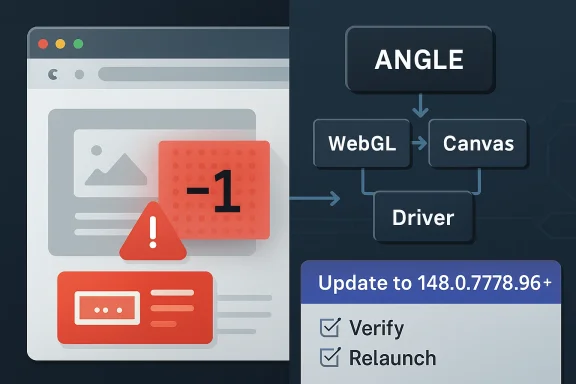
The short description says “integer overflow in ANGLE,” but that compact phrase hides a lot of the modern browser threat model. ANGLE is the Almost Native Graphics Layer Engine, a Chromium component that translates graphics APIs so web content can use hardware acceleration across different operating systems and GPU back ends. In plain English, it is one of the reasons complex WebGL and graphics-heavy pages work consistently on Windows and macOS instead of collapsing into a driver compatibility swamp.
That architectural convenience is also why ANGLE bugs matter. A browser tab is not merely rendering text and images anymore; it is often feeding shader code, buffers, textures, and state transitions through an abstraction layer that exists to make hostile, untrusted web content appear portable and fast. When something goes wrong in that boundary layer, the bug is not a cosmetic rendering defect. It is a potential memory-corruption primitive delivered through a web page.
CVE-2026-7903 is described as allowing a remote attacker to potentially exploit heap corruption via a crafted HTML page. The attacker still needs user interaction in the CVSS sense, because the target must visit or be induced to load the malicious content. But in browser security, “user interaction required” is not much comfort. Clicking a link, opening a compromised site, or viewing a malicious ad chain is precisely the kind of interaction browsers are built to perform all day.
The reported CVSS 3.1 vector from CISA’s ADP enrichment lands at 8.8, high severity, with network attack vector, low attack complexity, no privileges required, and high impact across confidentiality, integrity, and availability. That score does not mean exploitation is guaranteed or public exploit code is circulating. It means the shape of the bug, if successfully exploited, maps to the kind of browser compromise defenders have learned not to wave away.
That distinction matters because browser updating is one of those security chores that looks automatic until it collides with enterprise reality. Users leave browsers open for days. VDI images lag behind. Kiosks are frozen. Application owners ask for testing windows. Security teams point at the CVE; endpoint teams point at change freezes; desktop teams point at line-of-business web apps that still depend on fragile behavior from three versions ago.
CVE-2026-7903 is not, based on the public information at disclosure, described as actively exploited in the wild. That should affect panic levels, not patch urgency. High-severity browser memory-corruption bugs have a short shelf life as purely theoretical concerns, especially when the fix diff, crash behavior, and related issue references begin attracting attention from researchers and attackers alike.
There is also the Chromium ecosystem problem. Microsoft tracks this CVE through MSRC because Edge is Chromium-based, even though the NVD wording supplied by Chrome specifically names Google Chrome on Windows and macOS before 148.0.7778.96. Edge, Brave, Vivaldi, Opera, Electron-based apps, and embedded Chromium runtimes all live downstream of the same security current, though their patch timing and exposure can differ. The right enterprise question is not merely “Is Chrome patched?” but “Where is Chromium present in our fleet?”
That makes it both valuable and exposed. It parses and transforms inputs that originate from web content, then works through lower-level graphics APIs and drivers that were not designed with the web’s hostile input model as their first assumption. The browser sandbox helps contain damage, but the sandbox is not a magic erase button. A memory corruption bug in a renderer-adjacent or GPU-adjacent component can become one link in a chain.
Integer overflows are a classic class of bug because they sit between arithmetic and memory safety. A calculation that should determine the size of an allocation, offset, buffer, or count can wrap around when a value exceeds the integer range the program expects. The code may then allocate too little, copy too much, index incorrectly, or otherwise treat one size as if it were another. In C and C++ codebases, that arithmetic mistake can become heap corruption.
The phrase crafted HTML page can make the issue sound almost quaint, as if an attacker merely sprinkles malformed tags into a document. In modern Chromium, a crafted page can orchestrate JavaScript, WebGL calls, canvas operations, GPU resources, timing behavior, and browser feature interactions. The HTML is the delivery vessel; the exploit surface is the entire rendering and graphics machinery behind it.
That mapping matters for Windows shops. Many organizations do not run vulnerability management from Google’s release blog. They run it from Microsoft Defender Vulnerability Management, Intune reporting, WSUS-adjacent workflows, security baselines, and MSRC update feeds. If a Chromium CVE has an MSRC page, it becomes visible to teams whose patch processes are centered around Microsoft’s ecosystem, even when the vulnerable code was not born in Redmond.
The CPE configuration shown by NVD is also a reminder of how clumsy vulnerability metadata can be. The NVD entry associates vulnerable Chrome application versions up to, but excluding, 148.0.7778.96, combined with Windows or macOS operating-system CPEs. That is not the same as saying every Windows or macOS installation is vulnerable. It means the vulnerable application condition is scoped to those operating systems for this advisory.
This is where automated scanners can create noise. A scanner that keys too broadly on the operating-system CPE may overstate exposure. A scanner that only looks for Chrome and misses Edge or other Chromium-based runtimes may understate it. The job for defenders is to translate public vulnerability metadata into actual installed software, actual version telemetry, and actual browser update policy.
What the public record does not yet say is equally important. There is no public indication in the provided disclosure that Google has observed active exploitation. The Chromium issue tracker reference is restricted, as is common for browser security bugs while users are still updating. NVD had not supplied its own CVSS score at the time reflected in the user-provided detail, relying instead on enrichment from another source.
That leaves defenders in the usual gap between disclosure and full technical understanding. Waiting for exploit details is a bad strategy because the details may emerge only after attackers have already derived them. Treating every high-severity Chrome bug as an all-hands emergency is also unsustainable. The practical middle ground is fast, routine browser patching with verification, not drama.
For home users, that means opening the browser’s About page, letting the update apply, and restarting the browser. For administrators, it means checking policy-controlled update cadence, stale running processes, version reporting, and exceptions. The relaunch step is still the part many organizations miss. A browser can download an update and remain vulnerable until the running process actually restarts into the patched build.
CWE assignments are useful for trend analysis, secure development programs, and vulnerability databases. They are less useful when they become a substitute for reading the actual vulnerability description. In this case, the meaningful description is the one that says integer overflow in ANGLE could lead to heap corruption through a crafted page. The CWE label may be corrected later, refined by NVD, or simply remain an awkward artifact of the disclosure pipeline.
Security teams should not let taxonomy weirdness distract from impact. Whether the bug is filed under an arithmetic overflow, a validation mistake, or a web-parameter category, the defensive action is the same: update Chromium-based browsers and confirm the patched version is running. Classification helps the postmortem; version compliance fixes the exposure.
There is also a broader lesson for vulnerability-management dashboards. A CVE card is not a source of truth in the philosophical sense. It is a negotiated object assembled from vendor text, CNA submissions, enrichment, CPE mappings, scanner interpretation, and sometimes incomplete private bug data. The closer a team gets to automation, the more it needs humans who understand when metadata looks off.
This is why patch velocity has become part of the security perimeter. A company that patches Windows monthly but lets browsers drift for three weeks has not implemented a modern endpoint strategy. Attackers do not care that the OS is current if the browser is an older, memory-unsafe entry point with direct exposure to untrusted content.
Chrome’s update model is built to move quickly, but enterprise control can slow it down. That control is not inherently bad. Organizations need staged rollouts, rollback plans, compatibility testing, and change visibility. But for browser security fixes, “controlled” should not become a synonym for “late.”
The most mature organizations treat browser updates like a continuous service. They measure lag, enforce relaunches, monitor channel selection, and isolate the handful of systems that genuinely require delay. They do not negotiate every high-severity Chromium bug from scratch. The policy is already written before the advisory lands.
That long tail is where inventory becomes decisive. An enterprise can have excellent Chrome compliance and still carry Chromium exposure through unmanaged apps. A security team can close the headline browser and miss the embedded runtime used by a vendor console, a chat client, or an internal tool. The common engine is an advantage for web compatibility and a complication for security accounting.
This does not mean every Electron app is automatically vulnerable to CVE-2026-7903. Vulnerability inheritance depends on the bundled Chromium version, build configuration, exposed features, and whether the vulnerable component is reachable in that app’s context. But defenders rarely have that granularity at disclosure time. They need software inventory good enough to ask the question.
For Windows administrators, the practical move is to widen the search beyond
The browser’s update UI is deceptively important here. On Chrome, the About page triggers a check and shows whether a relaunch is needed. On Edge, the About Microsoft Edge page serves the same practical role for most users. The action is mundane, but it is exactly the kind of mundane action that prevents web-delivered bugs from becoming incident reports.
Users should also be wary of fake update prompts. High-profile browser vulnerabilities are routinely abused in social-engineering campaigns that tell people to download “security updates” from random pages. Real Chrome and Edge updates should come through the browser’s built-in updater or official enterprise deployment channels, not through a pop-up on a website claiming your browser is unsafe.
There is no need to disable WebGL globally for most users as a first response to this disclosure. That kind of mitigation can break sites and is difficult to manage consistently. In higher-risk environments, reducing attack surface may be part of a layered strategy, but the primary fix remains the patched browser build.
For CVE-2026-7903, administrators should confirm installed and running versions, not just policy settings. A machine with Chrome downloaded but not relaunched is not equivalent to a machine running the fixed build. A device that has been offline, sleeping, or stuck behind a broken update service may not behave like the rest of the fleet. A browser profile locked in a long-running session may quietly extend exposure.
Managed Chrome and Edge environments should already have policies for update frequency, relaunch notification, and forced relaunch deadlines. If those policies are absent, this CVE is a good excuse to build them. If they exist, this is a good excuse to test whether they work under real conditions.
Security teams should also resist the temptation to close the ticket when the first dashboard turns green. Vulnerability scanners, EDR inventory, browser management consoles, and software deployment tools often disagree. That disagreement is not an annoyance; it is information. The devices that appear in one system but not another are frequently the devices that break patch assumptions.
This creates an asymmetry. Defenders are asked to act without the satisfying details: no proof-of-concept, no crash analysis, no patch diff explanation, no exploitability essay. Attackers may be trying to infer those details anyway. Vendors are trying to release enough information to trigger patching without accelerating exploitation. Nobody gets the ideal outcome.
The compromise works only if patch adoption is fast. If users and enterprises delay, restricted disclosure buys less and less. The browser vendor can keep the bug private for a while, but the patched code eventually becomes available, researchers start comparing changes, and exploit developers begin their own reconstruction. Time is the scarce resource.
For the WindowsForum crowd, this is where the old instinct to “wait and see” needs updating. In the browser world, waiting for more technical detail can mean waiting until the attacker community has it too. The absence of a public exploit is not a reason to ignore a high-severity memory-corruption fix; it is the window in which patching is most valuable.
Chromium is a shared upstream project. Google Chrome is one downstream product. Microsoft Edge is another. Other browsers and applications consume pieces of the same codebase at different times, with different branding and update mechanisms. A clean CPE for Chrome on Windows and macOS helps, but it does not fully describe the operational exposure across an enterprise.
This is why organizations increasingly need software bill of materials thinking even for desktop software. Not every vulnerability response requires a formal SBOM, but the mindset matters. What components do we run? Which products embed them? Who updates them? How fast? How do we know?
CVE-2026-7903 will not be the last Chromium component bug where the metadata feels narrower than the real-world concern. The vulnerability-management industry still struggles with software that is both a product and a dependency. Browser engines are among the clearest examples of that mismatch.
Still, CVE-2026-7903 is a useful lens because it sits at the intersection of several trends. Web content is more capable. Browser internals are more complex. GPU acceleration is everywhere. Memory-unsafe languages remain deeply embedded in high-performance components. Vulnerability disclosure metadata is both indispensable and imperfect.
The result is a security model built on relentless maintenance. Sandboxing, site isolation, exploit mitigations, and safer coding practices all help, but they do not abolish the need to update. The modern browser is one of the most aggressively defended pieces of consumer software ever shipped, and it still produces high-severity memory-corruption CVEs on a regular cadence.
That should not produce fatalism. It should produce discipline. The right lesson is not that browsers are hopelessly insecure; it is that browsers are important enough to deserve operational seriousness. A patched browser is a moving target. An unpatched browser is a standing invitation.
Source: NVD / Chromium Security Update Guide - Microsoft Security Response Center
 The Browser Bug Is Really a Graphics Bug
The short description says “integer overflow in ANGLE,” but that compact phrase hides a lot of the modern browser threat model. ANGLE is the Almost Native Graphics Layer Engine, a Chromium component that translates graphics APIs so web content can use hardware acceleration across different operating systems and GPU back ends. In plain English, it is one of the reasons complex WebGL and graphics-heavy pages work consistently on Windows and macOS instead of collapsing into a driver compatibility swamp.That architectural convenience is also why ANGLE bugs matter. A browser tab is not merely rendering text and images anymore; it is often feeding shader code, buffers, textures, and state transitions through an abstraction layer that exists to make hostile, untrusted web content appear portable and fast. When something goes wrong in that boundary layer, the bug is not a cosmetic rendering defect. It is a potential memory-corruption primitive delivered through a web page.
CVE-2026-7903 is described as allowing a remote attacker to potentially exploit heap corruption via a crafted HTML page. The attacker still needs user interaction in the CVSS sense, because the target must visit or be induced to load the malicious content. But in browser security, “user interaction required” is not much comfort. Clicking a link, opening a compromised site, or viewing a malicious ad chain is precisely the kind of interaction browsers are built to perform all day.
The reported CVSS 3.1 vector from CISA’s ADP enrichment lands at 8.8, high severity, with network attack vector, low attack complexity, no privileges required, and high impact across confidentiality, integrity, and availability. That score does not mean exploitation is guaranteed or public exploit code is circulating. It means the shape of the bug, if successfully exploited, maps to the kind of browser compromise defenders have learned not to wave away.
Version 148.0.7778.96 Is the Line Administrators Should Care About
The operational fact is simple: Chrome prior to 148.0.7778.96 on Windows and macOS is listed as vulnerable. Google’s stable-channel update for desktop moved Chrome to the 148.0.7778.96 line, with Windows and Mac receiving the patched stable build as part of the broader May 2026 release. For managed environments, that version number is the control point, not the CVE prose.That distinction matters because browser updating is one of those security chores that looks automatic until it collides with enterprise reality. Users leave browsers open for days. VDI images lag behind. Kiosks are frozen. Application owners ask for testing windows. Security teams point at the CVE; endpoint teams point at change freezes; desktop teams point at line-of-business web apps that still depend on fragile behavior from three versions ago.
CVE-2026-7903 is not, based on the public information at disclosure, described as actively exploited in the wild. That should affect panic levels, not patch urgency. High-severity browser memory-corruption bugs have a short shelf life as purely theoretical concerns, especially when the fix diff, crash behavior, and related issue references begin attracting attention from researchers and attackers alike.
There is also the Chromium ecosystem problem. Microsoft tracks this CVE through MSRC because Edge is Chromium-based, even though the NVD wording supplied by Chrome specifically names Google Chrome on Windows and macOS before 148.0.7778.96. Edge, Brave, Vivaldi, Opera, Electron-based apps, and embedded Chromium runtimes all live downstream of the same security current, though their patch timing and exposure can differ. The right enterprise question is not merely “Is Chrome patched?” but “Where is Chromium present in our fleet?”
ANGLE Sits at the Awkward Boundary Between Web Standards and GPU Reality
ANGLE exists because graphics on the web has always been a compromise between standards and the messy physical world. The browser wants to expose portable APIs such as WebGL and related graphics capabilities. Operating systems expose different graphics stacks. GPU vendors ship drivers with their own quirks. ANGLE is the compatibility machinery that keeps the whole arrangement moving.That makes it both valuable and exposed. It parses and transforms inputs that originate from web content, then works through lower-level graphics APIs and drivers that were not designed with the web’s hostile input model as their first assumption. The browser sandbox helps contain damage, but the sandbox is not a magic erase button. A memory corruption bug in a renderer-adjacent or GPU-adjacent component can become one link in a chain.
Integer overflows are a classic class of bug because they sit between arithmetic and memory safety. A calculation that should determine the size of an allocation, offset, buffer, or count can wrap around when a value exceeds the integer range the program expects. The code may then allocate too little, copy too much, index incorrectly, or otherwise treat one size as if it were another. In C and C++ codebases, that arithmetic mistake can become heap corruption.
The phrase crafted HTML page can make the issue sound almost quaint, as if an attacker merely sprinkles malformed tags into a document. In modern Chromium, a crafted page can orchestrate JavaScript, WebGL calls, canvas operations, GPU resources, timing behavior, and browser feature interactions. The HTML is the delivery vessel; the exploit surface is the entire rendering and graphics machinery behind it.
Microsoft’s Role Is Not Cosmetic
Some readers will look at the MSRC entry and wonder why Microsoft is involved when the description says Google Chrome. The answer is that Edge is a Chromium browser, and Microsoft participates in the vulnerability tracking and update pipeline for Chromium-derived defects that affect its browser. MSRC is not claiming Windows itself has an ANGLE integer overflow. It is helping enterprises map a Chromium vulnerability into the Microsoft security-management universe.That mapping matters for Windows shops. Many organizations do not run vulnerability management from Google’s release blog. They run it from Microsoft Defender Vulnerability Management, Intune reporting, WSUS-adjacent workflows, security baselines, and MSRC update feeds. If a Chromium CVE has an MSRC page, it becomes visible to teams whose patch processes are centered around Microsoft’s ecosystem, even when the vulnerable code was not born in Redmond.
The CPE configuration shown by NVD is also a reminder of how clumsy vulnerability metadata can be. The NVD entry associates vulnerable Chrome application versions up to, but excluding, 148.0.7778.96, combined with Windows or macOS operating-system CPEs. That is not the same as saying every Windows or macOS installation is vulnerable. It means the vulnerable application condition is scoped to those operating systems for this advisory.
This is where automated scanners can create noise. A scanner that keys too broadly on the operating-system CPE may overstate exposure. A scanner that only looks for Chrome and misses Edge or other Chromium-based runtimes may understate it. The job for defenders is to translate public vulnerability metadata into actual installed software, actual version telemetry, and actual browser update policy.
The CVSS Score Says “High,” but the Exploit Story Is Still Incomplete
CISA’s ADP enrichment gives CVE-2026-7903 a CVSS 3.1 base score of 8.8. The vector tells a familiar browser story: remotely reachable, low complexity, no authentication, user interaction required, unchanged scope, and high impact if exploitation succeeds. It is the profile of a serious web-delivered memory-corruption vulnerability.What the public record does not yet say is equally important. There is no public indication in the provided disclosure that Google has observed active exploitation. The Chromium issue tracker reference is restricted, as is common for browser security bugs while users are still updating. NVD had not supplied its own CVSS score at the time reflected in the user-provided detail, relying instead on enrichment from another source.
That leaves defenders in the usual gap between disclosure and full technical understanding. Waiting for exploit details is a bad strategy because the details may emerge only after attackers have already derived them. Treating every high-severity Chrome bug as an all-hands emergency is also unsustainable. The practical middle ground is fast, routine browser patching with verification, not drama.
For home users, that means opening the browser’s About page, letting the update apply, and restarting the browser. For administrators, it means checking policy-controlled update cadence, stale running processes, version reporting, and exceptions. The relaunch step is still the part many organizations miss. A browser can download an update and remain vulnerable until the running process actually restarts into the patched build.
The CWE Label Is Odd Enough to Deserve Skepticism
One strange detail in the NVD record is the weakness classification: CWE-472, “External Control of Assumed-Immutable Web Parameter.” That label does not intuitively match a classic integer overflow, which many security practitioners would expect to see mapped to CWE-190 or a related numeric-error category. This does not invalidate the CVE, but it does illustrate how imperfect automated or vendor-supplied vulnerability taxonomy can be.CWE assignments are useful for trend analysis, secure development programs, and vulnerability databases. They are less useful when they become a substitute for reading the actual vulnerability description. In this case, the meaningful description is the one that says integer overflow in ANGLE could lead to heap corruption through a crafted page. The CWE label may be corrected later, refined by NVD, or simply remain an awkward artifact of the disclosure pipeline.
Security teams should not let taxonomy weirdness distract from impact. Whether the bug is filed under an arithmetic overflow, a validation mistake, or a web-parameter category, the defensive action is the same: update Chromium-based browsers and confirm the patched version is running. Classification helps the postmortem; version compliance fixes the exposure.
There is also a broader lesson for vulnerability-management dashboards. A CVE card is not a source of truth in the philosophical sense. It is a negotiated object assembled from vendor text, CNA submissions, enrichment, CPE mappings, scanner interpretation, and sometimes incomplete private bug data. The closer a team gets to automation, the more it needs humans who understand when metadata looks off.
Patch Velocity Is the New Browser Security Perimeter
The browser used to be treated as an application. Now it behaves more like a constantly exposed, internet-facing platform runtime. It has a JavaScript engine, a rendering engine, a network stack, a PDF viewer, a media pipeline, a graphics translation layer, extension APIs, enterprise policy controls, password and identity surfaces, and update infrastructure. That is far more than a shortcut on the taskbar.This is why patch velocity has become part of the security perimeter. A company that patches Windows monthly but lets browsers drift for three weeks has not implemented a modern endpoint strategy. Attackers do not care that the OS is current if the browser is an older, memory-unsafe entry point with direct exposure to untrusted content.
Chrome’s update model is built to move quickly, but enterprise control can slow it down. That control is not inherently bad. Organizations need staged rollouts, rollback plans, compatibility testing, and change visibility. But for browser security fixes, “controlled” should not become a synonym for “late.”
The most mature organizations treat browser updates like a continuous service. They measure lag, enforce relaunches, monitor channel selection, and isolate the handful of systems that genuinely require delay. They do not negotiate every high-severity Chromium bug from scratch. The policy is already written before the advisory lands.
The Enterprise Risk Is Not One CVE, but the Long Tail of Chromium
CVE-2026-7903 is formally about Chrome before 148.0.7778.96 on Windows and macOS. In practice, Chromium’s reach is much wider. Edge is the obvious case on Windows, but many organizations also run Chromium-based third-party browsers, webview controls, kiosk shells, collaboration tools, packaged desktop apps, and Electron applications. Some update themselves. Some update through app stores. Some are bundled and forgotten.That long tail is where inventory becomes decisive. An enterprise can have excellent Chrome compliance and still carry Chromium exposure through unmanaged apps. A security team can close the headline browser and miss the embedded runtime used by a vendor console, a chat client, or an internal tool. The common engine is an advantage for web compatibility and a complication for security accounting.
This does not mean every Electron app is automatically vulnerable to CVE-2026-7903. Vulnerability inheritance depends on the bundled Chromium version, build configuration, exposed features, and whether the vulnerable component is reachable in that app’s context. But defenders rarely have that granularity at disclosure time. They need software inventory good enough to ask the question.
For Windows administrators, the practical move is to widen the search beyond
chrome.exe. Look at Edge, application bundles, software asset data, installed browser channels, portable apps, developer tools, and vendor-packaged runtimes. A Chromium CVE is not just a Chrome story anymore; it is an ecosystem story wearing a Chrome version number.The Home User Fix Is Boring, Which Is Why It Works
For individuals, CVE-2026-7903 does not require elaborate mitigation. Update Chrome to the fixed version or later, restart it, and do the same for other Chromium-based browsers as their vendors publish patched builds. If automatic updates are working, the main risk is delay between download and relaunch.The browser’s update UI is deceptively important here. On Chrome, the About page triggers a check and shows whether a relaunch is needed. On Edge, the About Microsoft Edge page serves the same practical role for most users. The action is mundane, but it is exactly the kind of mundane action that prevents web-delivered bugs from becoming incident reports.
Users should also be wary of fake update prompts. High-profile browser vulnerabilities are routinely abused in social-engineering campaigns that tell people to download “security updates” from random pages. Real Chrome and Edge updates should come through the browser’s built-in updater or official enterprise deployment channels, not through a pop-up on a website claiming your browser is unsafe.
There is no need to disable WebGL globally for most users as a first response to this disclosure. That kind of mitigation can break sites and is difficult to manage consistently. In higher-risk environments, reducing attack surface may be part of a layered strategy, but the primary fix remains the patched browser build.
The Admin Playbook Is Verification, Not Hope
The most dangerous phrase in endpoint security is “it should auto-update.” It probably should. It often does. But the difference between intended state and actual state is where attackers live.For CVE-2026-7903, administrators should confirm installed and running versions, not just policy settings. A machine with Chrome downloaded but not relaunched is not equivalent to a machine running the fixed build. A device that has been offline, sleeping, or stuck behind a broken update service may not behave like the rest of the fleet. A browser profile locked in a long-running session may quietly extend exposure.
Managed Chrome and Edge environments should already have policies for update frequency, relaunch notification, and forced relaunch deadlines. If those policies are absent, this CVE is a good excuse to build them. If they exist, this is a good excuse to test whether they work under real conditions.
Security teams should also resist the temptation to close the ticket when the first dashboard turns green. Vulnerability scanners, EDR inventory, browser management consoles, and software deployment tools often disagree. That disagreement is not an annoyance; it is information. The devices that appear in one system but not another are frequently the devices that break patch assumptions.
The Restricted Bug Tracker Is a Feature, Not a Cover-Up
The Chromium issue linked for CVE-2026-7903 is restricted. That will irritate some readers, particularly those who prefer full technical disclosure at the moment a CVE appears. But restricted access is standard practice for browser vulnerabilities while updates are still rolling out. The aim is to avoid handing attackers a blueprint before a majority of users have received the fix.This creates an asymmetry. Defenders are asked to act without the satisfying details: no proof-of-concept, no crash analysis, no patch diff explanation, no exploitability essay. Attackers may be trying to infer those details anyway. Vendors are trying to release enough information to trigger patching without accelerating exploitation. Nobody gets the ideal outcome.
The compromise works only if patch adoption is fast. If users and enterprises delay, restricted disclosure buys less and less. The browser vendor can keep the bug private for a while, but the patched code eventually becomes available, researchers start comparing changes, and exploit developers begin their own reconstruction. Time is the scarce resource.
For the WindowsForum crowd, this is where the old instinct to “wait and see” needs updating. In the browser world, waiting for more technical detail can mean waiting until the attacker community has it too. The absence of a public exploit is not a reason to ignore a high-severity memory-corruption fix; it is the window in which patching is most valuable.
The CPE Question Points to a Bigger Data Problem
The user-provided NVD text asks, “Are we missing a CPE here?” That line is easy to skip, but it captures a real weakness in vulnerability management. CPEs are supposed to map vulnerabilities to affected products, yet modern software does not always fit neatly into one vendor, one application, one operating system, one version string.Chromium is a shared upstream project. Google Chrome is one downstream product. Microsoft Edge is another. Other browsers and applications consume pieces of the same codebase at different times, with different branding and update mechanisms. A clean CPE for Chrome on Windows and macOS helps, but it does not fully describe the operational exposure across an enterprise.
This is why organizations increasingly need software bill of materials thinking even for desktop software. Not every vulnerability response requires a formal SBOM, but the mindset matters. What components do we run? Which products embed them? Who updates them? How fast? How do we know?
CVE-2026-7903 will not be the last Chromium component bug where the metadata feels narrower than the real-world concern. The vulnerability-management industry still struggles with software that is both a product and a dependency. Browser engines are among the clearest examples of that mismatch.
The Security Lesson Hidden in a Routine Chrome Advisory
This release was not just about CVE-2026-7903. The Chrome 148 stable update included a large batch of security fixes, and ANGLE was not the only graphics-related area receiving attention. That is another reason defenders should avoid treating single-CVE analysis as the whole story. The patched build matters because it closes a cluster of issues, not because one CVE happens to have a memorable description.Still, CVE-2026-7903 is a useful lens because it sits at the intersection of several trends. Web content is more capable. Browser internals are more complex. GPU acceleration is everywhere. Memory-unsafe languages remain deeply embedded in high-performance components. Vulnerability disclosure metadata is both indispensable and imperfect.
The result is a security model built on relentless maintenance. Sandboxing, site isolation, exploit mitigations, and safer coding practices all help, but they do not abolish the need to update. The modern browser is one of the most aggressively defended pieces of consumer software ever shipped, and it still produces high-severity memory-corruption CVEs on a regular cadence.
That should not produce fatalism. It should produce discipline. The right lesson is not that browsers are hopelessly insecure; it is that browsers are important enough to deserve operational seriousness. A patched browser is a moving target. An unpatched browser is a standing invitation.
The Patch Window Is Shorter Than the Meeting Cycle
The concrete response to CVE-2026-7903 is not complicated, but it does require follow-through. Treat 148.0.7778.96 as the minimum fixed Chrome version named in the disclosure, watch Edge and other Chromium-based vendors for corresponding updates, and verify relaunches rather than assuming the updater has finished the job.- Chrome installations on Windows and macOS should be updated to version 148.0.7778.96 or later.
- Microsoft Edge administrators should track Microsoft’s Chromium-based security release notes and confirm that Edge has received the corresponding upstream fix.
- Managed fleets should verify the running browser version after relaunch, not merely the downloaded update package.
- Vulnerability teams should examine other Chromium-based browsers and embedded runtimes instead of limiting the search to Google Chrome.
- The lack of public exploitation reporting should lower panic, not justify delay.
- The odd CWE mapping in public databases should be treated as metadata noise, not as a reason to downgrade the vulnerability.
Source: NVD / Chromium Security Update Guide - Microsoft Security Response Center
