

Google published CVE-2026-7346 on April 28, 2026, as a high-severity Chrome vulnerability in Tint, fixed before version 147.0.7727.138, that could let a remote attacker trigger out-of-bounds memory access through a crafted HTML page on desktop browsers. The interesting part is not that Chrome had another memory bug; it is where this one sits. Tint lives in the graphics and WebGPU-adjacent plumbing that modern browsers increasingly rely on, which makes this a reminder that the browser attack surface is no longer just JavaScript engines and media parsers. For Windows users and enterprise admins, the practical answer is blunt: move Chrome and Chromium-based browsers to the patched build line, then verify that the update actually landed.
CVE-2026-7346 is described as an “inappropriate implementation” in Tint, with the consequence being out-of-bounds memory access. That phrasing is dry, but it points to a familiar class of browser risk: code receives web-controlled input, processes it through a complex subsystem, and touches memory it should not touch.
Tint is not a household browser component, even among many power users. It is part of the machinery Chromium uses around shader translation and validation, a layer made more important by the rise of WebGPU and increasingly capable web graphics APIs. In plain English, browsers now do far more than render documents and run scripts; they broker access to the GPU, translate graphics programs, and enforce safety rules across hardware and driver boundaries.
That makes a bug in Tint qualitatively different from an ordinary UI flaw. A crafted page is enough to reach the vulnerable path, according to the CVE description, and the attacker does not need local access or authentication. User interaction is still part of the scoring, which usually means the victim must open or be directed to malicious web content, but that is hardly a comforting limitation in a world built around links, ads, embeds, and single-sign-on portals.
The CISA-ADP CVSS 3.1 vector gives the vulnerability an 8.1 high score, with network attack vector, low attack complexity, no privileges required, user interaction required, unchanged scope, and high confidentiality and integrity impact. Availability is not scored as impacted in that vector, which suggests the most serious modeled outcomes are data exposure or modification rather than simply crashing the browser.
That matters because CVE-2026-7346 arrived in a batch containing several critical and high-severity issues across Canvas, iOS, Accessibility, Views, GPU, ANGLE, Animation, Navigation, Skia, Media, MHTML, WebMIDI, Cast, Codecs, WebRTC, V8, Chromoting, Feedback, and WebView. The lesson for administrators is not to isolate one CVE and treat it as the whole patch story. Chrome’s security model is a constantly repaired city, not a single locked door.
Google listed CVE-2026-7346 as high severity and said it was reported by Google on April 13, 2026. The public bug tracker entry is restricted, which is normal for Chrome security issues while users are still moving to fixed builds or when dependent projects may still need time to patch. That restriction is not evidence of active exploitation; it is part of the browser ecosystem’s attempt to avoid handing out implementation details too early.
Still, secrecy cuts both ways. Defenders cannot inspect the bug in detail, but attackers often do not need the original report to begin diffing patched and unpatched builds. Once a fix ships, the clock starts on patch-gap exploitation, especially for high-value targets that lag behind stable channel updates.
That is why browser vulnerabilities remain so attractive. The web is the one hostile content platform that users are expected to visit all day. Even locked-down enterprises routinely allow browsers to touch external SaaS, partner portals, support sites, webmail, documentation, dashboards, and identity providers.
User interaction does not necessarily mean a dramatic mistake. It may mean clicking a link in a phishing email, opening a compromised site, following a search result, loading an ad frame, or visiting a legitimate site that has been abused upstream. The browser is built to ingest untrusted content; the question is whether every parser and translator along the way keeps its promises.
Out-of-bounds memory access is especially concerning because it sits in the family of bugs that can sometimes be shaped into information disclosure, memory corruption, or code execution primitives. The CVE text does not claim remote code execution, and defenders should avoid overstating what has been published. But memory safety bugs in browser-adjacent components deserve fast patching precisely because the exploitability story can evolve after researchers and attackers study the fix.
WebGPU and modern graphics APIs promise better performance, richer browser-based applications, and more direct access to hardware acceleration. That is good news for games, CAD tools, machine-learning demos, scientific visualization, and heavy web apps that would once have required native clients. It also means the browser must safely process shader-like programs and graphics workloads submitted by untrusted websites.
The security bargain is difficult. The browser has to accept complex input from the web, translate it into forms acceptable to different graphics backends, and keep the operating system, GPU driver, and hardware from becoming an attack trampoline. Every extra translation layer is another place where validation mistakes can hide.
This is why CVE-2026-7346 deserves attention even if it is not known to be exploited in the wild. It is a marker for where browser risk is going. The more the browser becomes a universal runtime, the more security attention must move into components that traditional patch dashboards may describe only with cryptic names.
For WindowsForum readers, this is the operational trap: checking Chrome is not enough if Edge is installed, used by the organization, invoked by WebView2 apps, or retained as the default browser on some endpoints. Modern Windows environments often contain multiple Chromium consumers. Chrome may be the user-facing browser, Edge may handle enterprise SSO flows, and embedded web runtimes may appear inside business applications.
The CPE data in NVD is also a useful reminder of how vulnerability metadata can lag or look odd during enrichment. The entry described Chrome versions before 147.0.7727.138 and associated the affected application with Windows, Linux, and macOS platform CPEs. That does not mean Windows itself has a Tint bug. It means the vulnerable software runs on those operating systems.
This distinction matters in reporting and patch prioritization. A Chrome vulnerability on Windows is not a Windows kernel vulnerability, and it should not be handled like a monthly cumulative update issue. It belongs in the browser patch lane: Chrome enterprise update policies, Edge update channels, software inventory, endpoint management, and post-deployment verification.
That last phrase — or later — is doing real work. Browser updates move quickly, and by the time an enterprise change window opens, the exact patched release may already have been superseded. The goal is not to freeze on 147.0.7727.138 forever; it is to ensure the deployed version contains the fix and is not stuck on a vulnerable pre-fix build.
For unmanaged users, the browser’s built-in updater usually handles this quietly, but only if the browser restarts. Chrome can download an update and still leave users running vulnerable code until the process is relaunched. That makes “Chrome says it is up to date” less useful than checking the actual version after restart.
For managed fleets, the problem is visibility. Admins need to know which devices failed to update, which are pinned by policy, which are offline, and which are running nonstandard Chromium-based browsers outside the normal patch workflow. The long tail is where browser CVEs linger.
This staged enrichment is useful because it turns a terse vendor advisory into data that scanners, dashboards, and risk systems can consume. It is also frustrating because early records often appear incomplete, inconsistent, or not yet scored by NVD itself. Security teams watching the feed in real time can see “N/A” fields one hour and enriched vectors the next.
That is not a reason to wait. Browser vendors’ own stable-channel advisories are often the most immediate patch signal. If Google says a high-severity Chrome vulnerability is fixed in a given version, defenders should not hold deployment until every vulnerability database has finished polishing the record.
The “missing CPE” language in NVD can also be misunderstood. CPEs are vulnerability database identifiers, not an exhaustive map of every downstream consumer of Chromium code. A scanner may identify Google Chrome cleanly while missing a Chromium fork, an Electron app, or an embedded browser runtime that carries related code. Metadata helps; it does not replace asset knowledge.
But “not known exploited” is not the same as “low priority.” The vulnerability is remotely reachable through web content, has low attack complexity in the published CVSS vector, requires no privileges, and carries high confidentiality and integrity impact. That combination is enough to justify rapid browser patching in most environments.
The more nuanced priority decision is not whether to patch; it is how aggressively to hunt. For most organizations, this is a verification and exposure-reduction task rather than an incident-response trigger. Patch the browser, restart it, confirm the version, and watch for vendor updates or threat intelligence that changes the exploitation picture.
High-risk groups may choose to do more. Organizations with exposed users, sensitive browsing workflows, or a history of browser-targeted intrusion should review browser crash telemetry, EDR signals around renderer and GPU processes, and suspicious navigation patterns. The bug’s restricted details make precise hunting difficult, so broad behavioral monitoring is more realistic than signature-driven detection.
That is why restart enforcement has become a security control. Gentle prompts are fine for low-risk maintenance, but high-severity memory bugs in web-reachable components deserve a shorter grace period. Administrators should think in hours or a small number of days, not weeks.
The challenge is political as much as technical. Browsers are now the front end for line-of-business work, and forcing restarts can interrupt support sessions, dashboards, cloud IDEs, call-center tools, and finance workflows. But the alternative is a fleet that looks compliant in inventory while still running vulnerable processes in memory.
A mature browser update policy includes update velocity, restart deadlines, rollback handling, and exception reporting. If the only metric is “package deployed,” the organization is measuring the easy part and missing the security outcome.
For Windows admins, Edge deserves special attention because it is both a browser and a platform dependency. Even organizations that standardize on Chrome may find Edge used for system links, Microsoft 365 flows, WebView2-based applications, or user fallback. Removing it from the mental inventory is a mistake.
Linux administrators face a different problem: distribution packaging. A Chrome update from Google and a Chromium package in a distro repository may not arrive with identical timing or version numbers. Scanner output can become noisy when one feed knows about the CVE before another package maintainer has shipped or labeled the fix.
The broader point is that browser security is now supply-chain security. The vulnerable code may originate upstream, but the responsibility to deploy the fix lands separately in each product, channel, and operating environment.
Security professionals sometimes complain about this opacity, and the complaint is fair. It is difficult to assess exploitability, compensating controls, or detection opportunities when the technical details are sealed. “Inappropriate implementation” is especially unsatisfying because it describes the category of mistake rather than the mechanism.
But the alternative can be worse. Publishing detailed bug mechanics before the ecosystem is patched gives attackers a map. Browser vendors operate at a scale where even a small percentage of unpatched users represents millions of targets.
The result is an awkward trust relationship. Defenders must act on sparse vendor language, while researchers and attackers wait for patches, diffs, and eventual bug disclosure. In that environment, disciplined version verification beats speculation.
Browser asset management should include stable, extended stable, beta, dev, and unmanaged installs. It should include user-installed copies where policy allows them, portable browsers where they are tolerated, and legacy systems that no longer receive normal updates. It should also include server-like endpoints where browsers are installed for administrative convenience and then forgotten.
Security teams should resist the temptation to treat browser patching as consumer software hygiene. The browser is a privileged business application that handles identity, credentials, documents, SaaS data, clipboard content, downloads, and internal portals. A high-severity browser memory bug is not a footnote just because it arrives outside Patch Tuesday.
The healthiest organizations will use this CVE as a drill. They will compare what their patch tool says, what endpoint telemetry says, what the browser reports after restart, and what vulnerability scanners still find. The gaps between those systems are where the next browser emergency will hurt.
The concrete takeaways are simple, but they are not optional:
Source: NVD / Chromium Security Update Guide - Microsoft Security Response Center
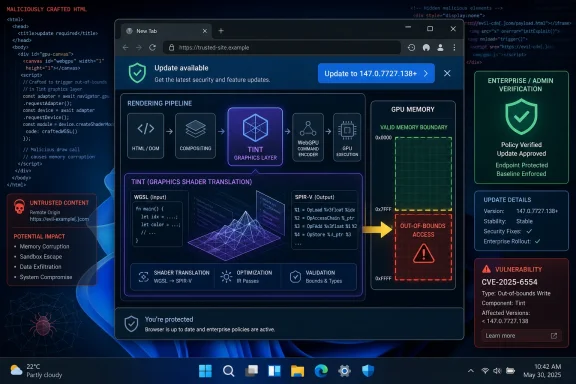 A High-Severity Bug Hiding in the Browser’s New Graphics Basement
CVE-2026-7346 is described as an “inappropriate implementation” in Tint, with the consequence being out-of-bounds memory access. That phrasing is dry, but it points to a familiar class of browser risk: code receives web-controlled input, processes it through a complex subsystem, and touches memory it should not touch.Tint is not a household browser component, even among many power users. It is part of the machinery Chromium uses around shader translation and validation, a layer made more important by the rise of WebGPU and increasingly capable web graphics APIs. In plain English, browsers now do far more than render documents and run scripts; they broker access to the GPU, translate graphics programs, and enforce safety rules across hardware and driver boundaries.
That makes a bug in Tint qualitatively different from an ordinary UI flaw. A crafted page is enough to reach the vulnerable path, according to the CVE description, and the attacker does not need local access or authentication. User interaction is still part of the scoring, which usually means the victim must open or be directed to malicious web content, but that is hardly a comforting limitation in a world built around links, ads, embeds, and single-sign-on portals.
The CISA-ADP CVSS 3.1 vector gives the vulnerability an 8.1 high score, with network attack vector, low attack complexity, no privileges required, user interaction required, unchanged scope, and high confidentiality and integrity impact. Availability is not scored as impacted in that vector, which suggests the most serious modeled outcomes are data exposure or modification rather than simply crashing the browser.
Chrome’s April 28 Update Was a Crowd, Not a One-Off
The stable channel update that carried the fix was not a surgical patch for one lonely CVE. Google’s April 28 desktop release included 30 security fixes and moved the stable channel to 147.0.7727.137/138 for Windows and Mac, and 147.0.7727.137 for Linux, rolling out over the usual staged window.That matters because CVE-2026-7346 arrived in a batch containing several critical and high-severity issues across Canvas, iOS, Accessibility, Views, GPU, ANGLE, Animation, Navigation, Skia, Media, MHTML, WebMIDI, Cast, Codecs, WebRTC, V8, Chromoting, Feedback, and WebView. The lesson for administrators is not to isolate one CVE and treat it as the whole patch story. Chrome’s security model is a constantly repaired city, not a single locked door.
Google listed CVE-2026-7346 as high severity and said it was reported by Google on April 13, 2026. The public bug tracker entry is restricted, which is normal for Chrome security issues while users are still moving to fixed builds or when dependent projects may still need time to patch. That restriction is not evidence of active exploitation; it is part of the browser ecosystem’s attempt to avoid handing out implementation details too early.
Still, secrecy cuts both ways. Defenders cannot inspect the bug in detail, but attackers often do not need the original report to begin diffing patched and unpatched builds. Once a fix ships, the clock starts on patch-gap exploitation, especially for high-value targets that lag behind stable channel updates.
The Crafted HTML Detail Is the Part Users Should Not Dismiss
The phrase “crafted HTML page” can sound almost quaint, as if this were an old-school web bug from the era of blinking banners and malformed tables. In 2026, that phrase is more dangerous than it looks. HTML is the delivery envelope for an entire application runtime, and a page can exercise graphics stacks, codecs, fonts, scripting engines, IPC boundaries, GPU processes, storage layers, and extension interfaces.That is why browser vulnerabilities remain so attractive. The web is the one hostile content platform that users are expected to visit all day. Even locked-down enterprises routinely allow browsers to touch external SaaS, partner portals, support sites, webmail, documentation, dashboards, and identity providers.
User interaction does not necessarily mean a dramatic mistake. It may mean clicking a link in a phishing email, opening a compromised site, following a search result, loading an ad frame, or visiting a legitimate site that has been abused upstream. The browser is built to ingest untrusted content; the question is whether every parser and translator along the way keeps its promises.
Out-of-bounds memory access is especially concerning because it sits in the family of bugs that can sometimes be shaped into information disclosure, memory corruption, or code execution primitives. The CVE text does not claim remote code execution, and defenders should avoid overstating what has been published. But memory safety bugs in browser-adjacent components deserve fast patching precisely because the exploitability story can evolve after researchers and attackers study the fix.
Tint Shows How WebGPU Expands the Trust Boundary
For years, browser security coverage has trained people to look first at V8, Blink, Skia, WebRTC, and the media stack. Those names still matter, and the same April release included issues in several of them. But Tint belongs to a newer category of browser infrastructure that exists because the web platform keeps moving closer to native application capability.WebGPU and modern graphics APIs promise better performance, richer browser-based applications, and more direct access to hardware acceleration. That is good news for games, CAD tools, machine-learning demos, scientific visualization, and heavy web apps that would once have required native clients. It also means the browser must safely process shader-like programs and graphics workloads submitted by untrusted websites.
The security bargain is difficult. The browser has to accept complex input from the web, translate it into forms acceptable to different graphics backends, and keep the operating system, GPU driver, and hardware from becoming an attack trampoline. Every extra translation layer is another place where validation mistakes can hide.
This is why CVE-2026-7346 deserves attention even if it is not known to be exploited in the wild. It is a marker for where browser risk is going. The more the browser becomes a universal runtime, the more security attention must move into components that traditional patch dashboards may describe only with cryptic names.
Windows Users Should Treat Edge as Part of the Same Patch Conversation
The user-supplied MSRC reference is important because Microsoft tracks Chromium vulnerabilities through its own security ecosystem for Microsoft Edge. Edge is not Chrome with a different logo, but it is Chromium-based, and that means many upstream Chromium flaws become Edge-relevant once the affected code is present in Microsoft’s browser build.For WindowsForum readers, this is the operational trap: checking Chrome is not enough if Edge is installed, used by the organization, invoked by WebView2 apps, or retained as the default browser on some endpoints. Modern Windows environments often contain multiple Chromium consumers. Chrome may be the user-facing browser, Edge may handle enterprise SSO flows, and embedded web runtimes may appear inside business applications.
The CPE data in NVD is also a useful reminder of how vulnerability metadata can lag or look odd during enrichment. The entry described Chrome versions before 147.0.7727.138 and associated the affected application with Windows, Linux, and macOS platform CPEs. That does not mean Windows itself has a Tint bug. It means the vulnerable software runs on those operating systems.
This distinction matters in reporting and patch prioritization. A Chrome vulnerability on Windows is not a Windows kernel vulnerability, and it should not be handled like a monthly cumulative update issue. It belongs in the browser patch lane: Chrome enterprise update policies, Edge update channels, software inventory, endpoint management, and post-deployment verification.
The Version Number Is the Control, Not the Advisory
The cleanest mitigation is to run a fixed build. For Google Chrome on desktop, the relevant fixed line from the advisory is 147.0.7727.137/138 depending on platform, with the CVE description naming Chrome prior to 147.0.7727.138. In practice, Windows administrators should verify that Chrome reports the patched version or later.That last phrase — or later — is doing real work. Browser updates move quickly, and by the time an enterprise change window opens, the exact patched release may already have been superseded. The goal is not to freeze on 147.0.7727.138 forever; it is to ensure the deployed version contains the fix and is not stuck on a vulnerable pre-fix build.
For unmanaged users, the browser’s built-in updater usually handles this quietly, but only if the browser restarts. Chrome can download an update and still leave users running vulnerable code until the process is relaunched. That makes “Chrome says it is up to date” less useful than checking the actual version after restart.
For managed fleets, the problem is visibility. Admins need to know which devices failed to update, which are pinned by policy, which are offline, and which are running nonstandard Chromium-based browsers outside the normal patch workflow. The long tail is where browser CVEs linger.
NVD’s Moving Parts Are a Feature and a Frustration
The NVD record for CVE-2026-7346 shows the usual choreography of modern vulnerability publication. Chrome issued the CVE and vendor advisory on April 28. CISA-ADP added CVSS and CWE enrichment on April 29. NIST’s analysis on April 30 added CPE configuration data, including Chrome versions up to but excluding the fixed build and the desktop operating systems on which Chrome runs.This staged enrichment is useful because it turns a terse vendor advisory into data that scanners, dashboards, and risk systems can consume. It is also frustrating because early records often appear incomplete, inconsistent, or not yet scored by NVD itself. Security teams watching the feed in real time can see “N/A” fields one hour and enriched vectors the next.
That is not a reason to wait. Browser vendors’ own stable-channel advisories are often the most immediate patch signal. If Google says a high-severity Chrome vulnerability is fixed in a given version, defenders should not hold deployment until every vulnerability database has finished polishing the record.
The “missing CPE” language in NVD can also be misunderstood. CPEs are vulnerability database identifiers, not an exhaustive map of every downstream consumer of Chromium code. A scanner may identify Google Chrome cleanly while missing a Chromium fork, an Electron app, or an embedded browser runtime that carries related code. Metadata helps; it does not replace asset knowledge.
Exploitation Is Not Confirmed, but the Patch Window Is Real
There is no public indication in the provided advisory text that CVE-2026-7346 was being exploited in the wild at publication. That distinction matters. Chrome’s release notes often call out known exploitation when the Chromium team is aware of it, and defenders should not inflate every high-severity browser bug into a zero-day emergency.But “not known exploited” is not the same as “low priority.” The vulnerability is remotely reachable through web content, has low attack complexity in the published CVSS vector, requires no privileges, and carries high confidentiality and integrity impact. That combination is enough to justify rapid browser patching in most environments.
The more nuanced priority decision is not whether to patch; it is how aggressively to hunt. For most organizations, this is a verification and exposure-reduction task rather than an incident-response trigger. Patch the browser, restart it, confirm the version, and watch for vendor updates or threat intelligence that changes the exploitation picture.
High-risk groups may choose to do more. Organizations with exposed users, sensitive browsing workflows, or a history of browser-targeted intrusion should review browser crash telemetry, EDR signals around renderer and GPU processes, and suspicious navigation patterns. The bug’s restricted details make precise hunting difficult, so broad behavioral monitoring is more realistic than signature-driven detection.
Enterprise Patch Management Still Trips Over the Browser Restart
The hardest part of browser patching is rarely downloading the update. It is closing the loop. A browser can be updated on disk while old processes continue running, and users are notoriously good at keeping sessions alive for days.That is why restart enforcement has become a security control. Gentle prompts are fine for low-risk maintenance, but high-severity memory bugs in web-reachable components deserve a shorter grace period. Administrators should think in hours or a small number of days, not weeks.
The challenge is political as much as technical. Browsers are now the front end for line-of-business work, and forcing restarts can interrupt support sessions, dashboards, cloud IDEs, call-center tools, and finance workflows. But the alternative is a fleet that looks compliant in inventory while still running vulnerable processes in memory.
A mature browser update policy includes update velocity, restart deadlines, rollback handling, and exception reporting. If the only metric is “package deployed,” the organization is measuring the easy part and missing the security outcome.
Chromium Monoculture Turns One Bug Into Many Work Queues
CVE-2026-7346 also illustrates the uncomfortable bargain of Chromium’s dominance. Shared code means shared fixes, fast upstream engineering, and a massive security research ecosystem. It also means one upstream flaw can ripple through Chrome, Edge, Chromium packages on Linux, enterprise browser variants, and products that embed browser technology.For Windows admins, Edge deserves special attention because it is both a browser and a platform dependency. Even organizations that standardize on Chrome may find Edge used for system links, Microsoft 365 flows, WebView2-based applications, or user fallback. Removing it from the mental inventory is a mistake.
Linux administrators face a different problem: distribution packaging. A Chrome update from Google and a Chromium package in a distro repository may not arrive with identical timing or version numbers. Scanner output can become noisy when one feed knows about the CVE before another package maintainer has shipped or labeled the fix.
The broader point is that browser security is now supply-chain security. The vulnerable code may originate upstream, but the responsibility to deploy the fix lands separately in each product, channel, and operating environment.
The Security Language Is Vague Because the Ecosystem Depends on Delay
Google’s advisory gives just enough information to act and not enough to reproduce the bug. That is deliberate. The Chrome release note says bug details and links may remain restricted until most users have updated, and restrictions may remain longer when the issue affects third-party libraries or other projects that also need fixes.Security professionals sometimes complain about this opacity, and the complaint is fair. It is difficult to assess exploitability, compensating controls, or detection opportunities when the technical details are sealed. “Inappropriate implementation” is especially unsatisfying because it describes the category of mistake rather than the mechanism.
But the alternative can be worse. Publishing detailed bug mechanics before the ecosystem is patched gives attackers a map. Browser vendors operate at a scale where even a small percentage of unpatched users represents millions of targets.
The result is an awkward trust relationship. Defenders must act on sparse vendor language, while researchers and attackers wait for patches, diffs, and eventual bug disclosure. In that environment, disciplined version verification beats speculation.
This Patch Is Also a Test of Browser Asset Management
The most useful question for an IT team is not “How bad is CVE-2026-7346 in theory?” It is “Can we prove where vulnerable Chromium builds still exist by tomorrow morning?” If that question causes discomfort, the vulnerability has already served a purpose.Browser asset management should include stable, extended stable, beta, dev, and unmanaged installs. It should include user-installed copies where policy allows them, portable browsers where they are tolerated, and legacy systems that no longer receive normal updates. It should also include server-like endpoints where browsers are installed for administrative convenience and then forgotten.
Security teams should resist the temptation to treat browser patching as consumer software hygiene. The browser is a privileged business application that handles identity, credentials, documents, SaaS data, clipboard content, downloads, and internal portals. A high-severity browser memory bug is not a footnote just because it arrives outside Patch Tuesday.
The healthiest organizations will use this CVE as a drill. They will compare what their patch tool says, what endpoint telemetry says, what the browser reports after restart, and what vulnerability scanners still find. The gaps between those systems are where the next browser emergency will hurt.
The Practical Reading of CVE-2026-7346 Is Narrow but Urgent
CVE-2026-7346 is not, based on the public record, a confirmed zero-day fire. It is a high-severity Chromium vulnerability in a complex graphics-related component, reachable through crafted web content, fixed in the late-April Chrome stable update, and relevant to the wider Chromium ecosystem. That combination is enough to demand prompt action without panic.The concrete takeaways are simple, but they are not optional:
- Chrome on desktop should be updated to the fixed 147.0.7727.137/138 build line or any later build that includes the April 28 security fixes.
- Windows administrators should verify Microsoft Edge separately, because Chromium-based Edge follows its own release and update channel even when the upstream vulnerability comes from Chromium.
- Browser restarts should be enforced after deployment, because downloaded updates do not protect users who continue running old browser processes.
- Vulnerability scanners should be checked against actual software inventory, since CPE enrichment may not capture every Chromium-based browser or embedded runtime in an environment.
- The absence of confirmed exploitation should lower the incident-response temperature, not the patch priority.
- Restricted Chromium bug details are normal during rollout, so defenders should focus on version compliance rather than waiting for exploit-level technical disclosure.
Source: NVD / Chromium Security Update Guide - Microsoft Security Response Center
