

Google Chrome on Android versions earlier than 150.0.7871.47 are vulnerable to CVE-2026-13936, a Medium-severity flaw that can let a remote attacker use crafted HTML to obtain potentially sensitive information from browser process memory after user interaction. The vulnerability is associated with Chrome’s Passwords implementation, but the public record does not establish that an attacker can download the saved-password database or reliably recover specific credentials. For users and administrators, version 150.0.7871.47 is the security boundary: update Chrome and verify the installed version rather than assuming an automatic update has completed.
CVE-2026-13936 is easy to underestimate because Chrome categorizes it as Medium and the CISA-ADP CVSS v3.1 assessment assigns a base score of 6.5. That sounds measured rather than urgent, particularly in environments where critical browser vulnerabilities and actively exploited flaws compete for attention.
The vector shows why the issue still deserves prompt remediation. It is network-accessible, requires low attack complexity, requires no attacker privileges, and depends on user interaction. Its scored impact is concentrated in confidentiality, which CISA-ADP rates High; integrity and availability are rated None.
In practical terms, the attacker does not need an account on the Android device, local access, or an established foothold. The documented scenario involves crafted HTML processed by a vulnerable Chrome installation after the user interacts with malicious content. Successful exploitation can expose potentially sensitive information from browser process memory.
The evidence boundary should remain clear. The public description does not identify the exact memory structures, values, or secrets that can be recovered. It does not establish remote code execution, a sandbox escape, persistent Android compromise, or a universal saved-password extraction technique. It also provides no CVE-specific indicator that would allow an administrator to determine conclusively whether a particular device was previously targeted.
That uncertainty should not delay remediation. The corrected-version boundary is much clearer than the undisclosed exploit mechanics: Chrome on Android below 150.0.7871.47 remains affected and should be updated.
A component name, however, is not a forensic inventory of exposed data. The Chrome-originated description and the National Vulnerability Database record say that the flaw permits access to potentially sensitive information from process memory. They do not state that the complete saved-password store is exposed, that all autofill information is readable, or that every successful trigger yields credentials.
The associated Chromium issue is access-restricted, preventing public examination of the implementation, trigger, reliability, and likely data yield. No public proof of concept, technical root-cause analysis, or data-recovery demonstration is established by the supplied record.
Administrators should therefore patch based on the confirmed memory-disclosure condition, not on claims that every password has been exposed. Likewise, discovering an old Chrome version proves that a device was vulnerable; it does not, by itself, prove that the device was exploited or that its credentials were stolen.
This distinction affects incident response. A fleet-wide credential reset is not justified solely by an inventory showing versions below the threshold. Credential rotation becomes more defensible when there is additional evidence, such as suspicious browsing activity, anomalous identity events, a known malicious destination, or later technical disclosure establishing that specific secrets were reliably recoverable.
Opening the Play Store is not proof that remediation occurred. Seeing Chrome in an update queue is not proof that remediation occurred. An automatic-update setting is also not proof that remediation occurred. The useful evidence is the complete version reported after installation.
If the Play Store does not offer the update or Chrome continues to report an earlier version, the user should check for a managed-device restriction, pending Play Store activity, storage problems, connectivity limitations, or an organization-controlled rollout. On a corporate device, the unresolved version should be reported through the organization’s normal support process rather than dismissed as an expected rollout delay.
The affected-product configuration is narrow: Google Chrome, running on Android, with a version earlier than 150.0.7871.47. Administrators should preserve all three elements when creating scanner rules, remediation tickets, and compliance reports.
The record does not identify the Android operating system itself as independently vulnerable. Installing an Android system update while leaving the Chrome application below the threshold does not satisfy the documented remediation requirement.
The record also does not establish that desktop Chrome, Android WebView, Microsoft Edge, or every other Chromium-derived browser is affected by this specific CVE. Those products require separate vendor-specific applicability evidence.
NVD lists a Chrome release reference whose title is desktop-oriented, while its affected-product record identifies Chrome on Android. The supplied evidence does not establish the contents of that release post or support claims about related desktop build numbers. This remains an unresolved mismatch between a desktop-titled reference and the Android-specific affected-product record. It should not be used either to expand the CVE automatically to desktop Chrome or to dismiss the Android finding.
The visible 6.5 CVSS v3.1 score comes from CISA-ADP rather than an independent NVD calculation. That provenance should be preserved in vulnerability tickets and reporting. It is accurate to say that CISA-ADP contributed a 6.5 Medium assessment displayed by NVD; it is not accurate to say that NVD independently calculated that score if its own assessment is unavailable in the supplied record.
The CVSS vector is useful for prioritization because it records a network attack vector, low attack complexity, no required privileges, required user interaction, unchanged scope, High confidentiality impact, and no scored integrity or availability impact. Administrators do not need to turn those values into speculative exploit narratives. The operational conclusion is already sufficient: a remotely reachable confidentiality flaw remains present until Chrome crosses the documented version boundary.
CISA-ADP’s SSVC contribution records exploitation as none, automatable as no, and technical impact as partial. Those values should be treated as point-in-time assessment fields, not guarantees. “Exploitation: none” does not prove that exploitation can never occur, and “automatable: no” does not mean malicious pages or links cannot be distributed broadly. At the same time, the record does not support treating every affected installation as compromised.
The public material supplies no validated malicious domain, HTML signature, crash pattern, browser warning, file indicator, or distinctive log event for this CVE. Routine vulnerability management must therefore rely primarily on installed-version evidence. Incident-response teams can investigate suspicious browser and identity activity using their normal telemetry, but they should not label a generic browser event as exploitation of CVE-2026-13936 without additional evidence.
A policy permitting automatic Google Play updates does not prove that every endpoint has installed a particular Chrome build. Devices may be offline, unenrolled, subject to a staged managed-store rollout, blocked by policy, low on storage, or no longer reporting reliable application inventory. Unknown and stale results must not be counted as fixed.
Administrators should build the compliance rule around the Android package name and full installed version:
A practical remediation record should include the device identifier, Android management mode, package name, pre-update Chrome version, observation time, deployment action, post-update version, and owner of any unresolved exception.
That prioritization does not require a claim that passwords were definitely exposed. It reflects the value of information that may be present in the browser process and the importance of the accounts used from the device.
The user-interaction requirement reduces exploitability relative to a vulnerability that triggers without user action, but it does not eliminate the need to patch. Administrators should avoid overinterpreting either side of the rating. “Medium” does not mean harmless, and “Passwords” does not mean that every saved credential has been stolen.
There is no evidence in the supplied record supporting an automatic organization-wide credential reset merely because devices were running affected Chrome versions. A proportionate response is:
CISA-ADP assessment: CISA-ADP contributed the CVSS v3.1 vector and 6.5 Medium base score, together with its SSVC assessment fields.
NVD and NIST presentation: The supplied NVD record presented the vulnerability information, references, contributed assessments, and affected-product configuration associating the Chrome version range with Android.
Restricted technical reference: The linked Chromium issue remained access-controlled, leaving implementation details and exploit mechanics unavailable for independent public review.
Established correction threshold: Chrome 150.0.7871.47 or later is outside the stated affected range.
This sequence explains why vulnerability tools can display different fields or levels of detail. A score shown on an NVD page is not necessarily calculated by NVD, and a record modification does not automatically indicate a new exploit, a changed severity, or an expanded affected-product scope.
Administrators should inspect field provenance and current affected-version data rather than infer urgency from a generic “record updated” timestamp.
The correct WindowsForum operational takeaway is not to open unsupported Chrome-for-Windows tickets. It is to ensure that Android application inventory is not excluded from a vulnerability-management process simply because the organization’s primary desktop platform is Windows.
Scanner and ticket validation should use three fields:
Other Chromium-derived browsers should be evaluated separately. Shared Chromium ancestry does not prove that another vendor shipped the vulnerable implementation, exposed the same code path, or uses Chrome’s corrected version number. Android WebView, Microsoft Edge, and other mobile browsers need product-specific advisories or version mappings before this CVE is assigned to them.
A valid desktop exception should be explicit: the supplied affected-product configuration identifies Chrome on Android below 150.0.7871.47, and no supplied product-specific evidence establishes applicability to Chrome on Windows. That wording is more auditable than a generic “false positive” label and can be revisited if authoritative scope information later changes.
The response should be equally precise. Android users should open Play Store > profile icon > Manage apps & device > See details or Updates available > Google Chrome > Update, then open Chrome > ⋮ > Settings > About Chrome and verify version 150.0.7871.47 or later. Menu labels may differ, but the full post-update version is the required evidence.
Administrators should query the MDM or EMM inventory field for the
Patch promptly, prioritize devices used for sensitive work, and preserve accurate scope. Do not inflate the finding into an unsupported password catastrophe, but do not let a Medium label or an automatic-update setting stand in for action. The practical finish line is simple: every in-scope Android device must report Chrome 150.0.7871.47 or later, or remain assigned to an owner with a documented remediation plan.
What to do now
- Affected platform: Google Chrome on Android.
- Affected versions: Anything earlier than 150.0.7871.47.
- User update path: Open Play Store > profile icon > Manage apps & device > See details or Updates available > Google Chrome > Update. Menu labels can vary by device and Play Store version.
- User verification: Open Chrome > ⋮ > Settings > About Chrome and confirm that the complete version is 150.0.7871.47 or later.
- Administrator requirement: Query the installed version of the
com.android.chromepackage, remediate every lower or unknown result, and re-query after deployment.- Credential response: The current evidence does not support automatic fleet-wide password or credential resets solely because a device ran an affected version.
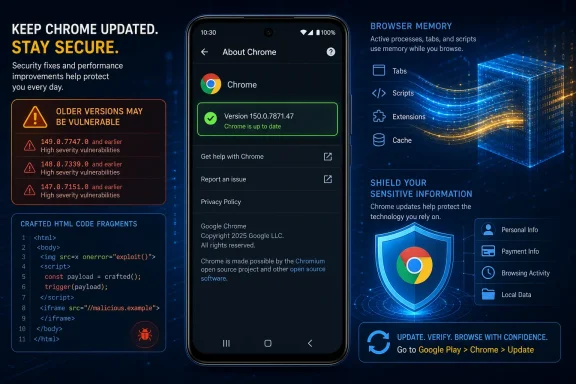 A Medium Rating Hides a Significant Confidentiality Failure
CVE-2026-13936 is easy to underestimate because Chrome categorizes it as Medium and the CISA-ADP CVSS v3.1 assessment assigns a base score of 6.5. That sounds measured rather than urgent, particularly in environments where critical browser vulnerabilities and actively exploited flaws compete for attention.The vector shows why the issue still deserves prompt remediation. It is network-accessible, requires low attack complexity, requires no attacker privileges, and depends on user interaction. Its scored impact is concentrated in confidentiality, which CISA-ADP rates High; integrity and availability are rated None.
In practical terms, the attacker does not need an account on the Android device, local access, or an established foothold. The documented scenario involves crafted HTML processed by a vulnerable Chrome installation after the user interacts with malicious content. Successful exploitation can expose potentially sensitive information from browser process memory.
The evidence boundary should remain clear. The public description does not identify the exact memory structures, values, or secrets that can be recovered. It does not establish remote code execution, a sandbox escape, persistent Android compromise, or a universal saved-password extraction technique. It also provides no CVE-specific indicator that would allow an administrator to determine conclusively whether a particular device was previously targeted.
That uncertainty should not delay remediation. The corrected-version boundary is much clearer than the undisclosed exploit mechanics: Chrome on Android below 150.0.7871.47 remains affected and should be updated.
The Passwords Label Is Important, but It Is Not a Data Inventory
The most eye-catching word in the vulnerability description is “Passwords.” It identifies the Chrome component associated with the flawed implementation and reasonably raises the priority of the issue, particularly on devices used for identity administration, privileged access, financial work, or access to regulated information.A component name, however, is not a forensic inventory of exposed data. The Chrome-originated description and the National Vulnerability Database record say that the flaw permits access to potentially sensitive information from process memory. They do not state that the complete saved-password store is exposed, that all autofill information is readable, or that every successful trigger yields credentials.
The associated Chromium issue is access-restricted, preventing public examination of the implementation, trigger, reliability, and likely data yield. No public proof of concept, technical root-cause analysis, or data-recovery demonstration is established by the supplied record.
Administrators should therefore patch based on the confirmed memory-disclosure condition, not on claims that every password has been exposed. Likewise, discovering an old Chrome version proves that a device was vulnerable; it does not, by itself, prove that the device was exploited or that its credentials were stolen.
This distinction affects incident response. A fleet-wide credential reset is not justified solely by an inventory showing versions below the threshold. Credential rotation becomes more defensible when there is additional evidence, such as suspicious browsing activity, anomalous identity events, a known malicious destination, or later technical disclosure establishing that specific secrets were reliably recoverable.
Update Chrome on Android, Then Verify the Result
The immediate end-user procedure is straightforward:- Open the Google Play Store.
- Select the profile icon.
- Select Manage apps & device.
- Select See details or Updates available.
- Locate Google Chrome.
- Select Update.
- When the update has finished, open Chrome.
- Select the three-dot menu, ⋮.
- Open Settings > About Chrome.
- Confirm that the complete version is 150.0.7871.47 or later.
Opening the Play Store is not proof that remediation occurred. Seeing Chrome in an update queue is not proof that remediation occurred. An automatic-update setting is also not proof that remediation occurred. The useful evidence is the complete version reported after installation.
If the Play Store does not offer the update or Chrome continues to report an earlier version, the user should check for a managed-device restriction, pending Play Store activity, storage problems, connectivity limitations, or an organization-controlled rollout. On a corporate device, the unresolved version should be reported through the organization’s normal support process rather than dismissed as an expected rollout delay.
Affected Chrome Builds at a Glance
| Environment | Chrome version | Status | Documented risk | Required response |
|---|---|---|---|---|
| Android | Earlier than 150.0.7871.47 | Affected | Crafted HTML can expose potentially sensitive process-memory information | Update and verify |
| Android | Exactly 150.0.7871.47 | Meets the documented threshold | Outside the stated affected range | Confirm the installed version |
| Android | Later than 150.0.7871.47 | Outside the affected range | Not identified as vulnerable to this CVE | Maintain update compliance |
| Android | Missing, partial, stale, or conflicting version | Unknown | Exposure cannot be determined | Re-query and keep the finding open |
The record does not identify the Android operating system itself as independently vulnerable. Installing an Android system update while leaving the Chrome application below the threshold does not satisfy the documented remediation requirement.
The record also does not establish that desktop Chrome, Android WebView, Microsoft Edge, or every other Chromium-derived browser is affected by this specific CVE. Those products require separate vendor-specific applicability evidence.
NVD lists a Chrome release reference whose title is desktop-oriented, while its affected-product record identifies Chrome on Android. The supplied evidence does not establish the contents of that release post or support claims about related desktop build numbers. This remains an unresolved mismatch between a desktop-titled reference and the Android-specific affected-product record. It should not be used either to expand the CVE automatically to desktop Chrome or to dismiss the Android finding.
Limited Public Technical Detail Transfers Work to Defenders
Chrome vulnerability disclosures often provide enough information to identify the affected product and corrected version while restricting the underlying Chromium issue. In this case, defenders can see the vulnerability category, affected platform, version boundary, general attack path, and confidentiality impact, but not the detailed implementation mechanics.The visible 6.5 CVSS v3.1 score comes from CISA-ADP rather than an independent NVD calculation. That provenance should be preserved in vulnerability tickets and reporting. It is accurate to say that CISA-ADP contributed a 6.5 Medium assessment displayed by NVD; it is not accurate to say that NVD independently calculated that score if its own assessment is unavailable in the supplied record.
The CVSS vector is useful for prioritization because it records a network attack vector, low attack complexity, no required privileges, required user interaction, unchanged scope, High confidentiality impact, and no scored integrity or availability impact. Administrators do not need to turn those values into speculative exploit narratives. The operational conclusion is already sufficient: a remotely reachable confidentiality flaw remains present until Chrome crosses the documented version boundary.
CISA-ADP’s SSVC contribution records exploitation as none, automatable as no, and technical impact as partial. Those values should be treated as point-in-time assessment fields, not guarantees. “Exploitation: none” does not prove that exploitation can never occur, and “automatable: no” does not mean malicious pages or links cannot be distributed broadly. At the same time, the record does not support treating every affected installation as compromised.
The public material supplies no validated malicious domain, HTML signature, crash pattern, browser warning, file indicator, or distinctive log event for this CVE. Routine vulnerability management must therefore rely primarily on installed-version evidence. Incident-response teams can investigate suspicious browser and identity activity using their normal telemetry, but they should not label a generic browser event as exploitation of CVE-2026-13936 without additional evidence.
Mobile Browser Patching Is an Inventory and Verification Problem
Consumer remediation ends with an update and a version check. Enterprise remediation requires inventory, deployment, exception handling, and post-deployment evidence.A policy permitting automatic Google Play updates does not prove that every endpoint has installed a particular Chrome build. Devices may be offline, unenrolled, subject to a staged managed-store rollout, blocked by policy, low on storage, or no longer reporting reliable application inventory. Unknown and stale results must not be counted as fixed.
Administrators should build the compliance rule around the Android package name and full installed version:
- Package:
com.android.chrome - Affected condition: Installed version earlier than
150.0.7871.47 - Compliant condition: Installed version
150.0.7871.47or later - Unknown condition: No version, an incomplete major-version result, stale inventory, or conflicting reports
Deployment procedure for administrators
- Locate the application inventory field.
In the organization’s mobile device management or enterprise mobility management platform, identify the field that reports the installed application version for the Android packagecom.android.chrome. Depending on the product, it may be called application version, app version, version name, installed version, package version, or discovered-app version. - Query the managed Android population.
Retrieve the device identifier, enrollment state, last inventory time, package name, and complete installed version for every managed Android device reportingcom.android.chrome. - Flag vulnerable and unresolved devices.
Mark every version below 150.0.7871.47 as affected. Place devices with missing, stale, truncated, or conflicting application-version data in an unresolved group rather than treating them as compliant. - Approve or force the managed Google Play update.
Through managed Google Play, approve the corrected Chrome release and deploy it using the organization’s supported required-install, forced-update, high-priority, or equivalent application policy. If the management platform supports only approval or automatic-update policy rather than an immediate forced installation, document that limitation and shorten the verification interval. - Account for work profiles and ownership modes.
Confirm whether the inventory and update policy apply to the personal profile, work profile, fully managed device, corporate-owned work profile, dedicated device, or another Android Enterprise ownership mode. Do not assume that observing one profile proves that every Chrome installation on the device is current. - Re-query after deployment.
Collect fresh application inventory after the update window. Verify thatcom.android.chromenow reports version 150.0.7871.47 or later on each in-scope device. - Investigate failures and unknowns.
Identify devices that remain below the threshold because they are offline, unenrolled, update-blocked, storage-constrained, incompatible, or no longer checking in. Assign an owner and next action to every exception. - Close only with version evidence.
Do not close the finding based solely on “update approved,” “policy assigned,” “deployment sent,” or “automatic updates enabled.” Closure requires a current installed-version result at or above 150.0.7871.47.
com.android.chrome, flag versions below the threshold, deploy the update, and re-query the installed version.A practical remediation record should include the device identifier, Android management mode, package name, pre-update Chrome version, observation time, deployment action, post-update version, and owner of any unresolved exception.
Prioritize Sensitive Devices Without Declaring Them Compromised
Not every vulnerable Android endpoint has the same organizational risk. Devices used for identity administration, privileged cloud consoles, financial approvals, executive communications, customer data, or regulated workloads deserve a shorter remediation window because the documented impact is a High loss of confidentiality.That prioritization does not require a claim that passwords were definitely exposed. It reflects the value of information that may be present in the browser process and the importance of the accounts used from the device.
The user-interaction requirement reduces exploitability relative to a vulnerability that triggers without user action, but it does not eliminate the need to patch. Administrators should avoid overinterpreting either side of the rating. “Medium” does not mean harmless, and “Passwords” does not mean that every saved credential has been stolen.
There is no evidence in the supplied record supporting an automatic organization-wide credential reset merely because devices were running affected Chrome versions. A proportionate response is:
- Patch Chrome and verify the installed version.
- Preserve relevant identity, proxy, DNS, mobile, and access telemetry when suspicious activity is already under investigation.
- Review anomalous authentication events associated with a device or user when other evidence warrants it.
- Rotate specific credentials when exposure is reasonably suspected or later technical information identifies them as recoverable.
- Avoid telling users that their passwords were stolen without supporting evidence.
Record Timeline Without Unsupported Dates
The public vulnerability record developed through contributions from multiple organizations. Exact calendar dates are not required to understand the operational sequence and should not be asserted when the supplied evidence does not confirm them.Timeline
Chrome-originated vulnerability information: The record identified Google Chrome on Android, the Passwords component, crafted HTML, potential disclosure of sensitive process-memory information, the Medium severity, and the affected boundary below 150.0.7871.47.CISA-ADP assessment: CISA-ADP contributed the CVSS v3.1 vector and 6.5 Medium base score, together with its SSVC assessment fields.
NVD and NIST presentation: The supplied NVD record presented the vulnerability information, references, contributed assessments, and affected-product configuration associating the Chrome version range with Android.
Restricted technical reference: The linked Chromium issue remained access-controlled, leaving implementation details and exploit mechanics unavailable for independent public review.
Established correction threshold: Chrome 150.0.7871.47 or later is outside the stated affected range.
This sequence explains why vulnerability tools can display different fields or levels of detail. A score shown on an NVD page is not necessarily calculated by NVD, and a record modification does not automatically indicate a new exploit, a changed severity, or an expanded affected-product scope.
Administrators should inspect field provenance and current affected-version data rather than infer urgency from a generic “record updated” timestamp.
Windows-Centric Teams Still Need an Android Response
CVE-2026-13936 is not identified as a Windows vulnerability in the supplied affected-product record, but it remains relevant to Windows-centered IT organizations. The teams responsible for Microsoft identity, Microsoft 365 access, cloud administration, endpoint compliance, vulnerability management, and incident response may also govern the Android devices from which those services are accessed.The correct WindowsForum operational takeaway is not to open unsupported Chrome-for-Windows tickets. It is to ensure that Android application inventory is not excluded from a vulnerability-management process simply because the organization’s primary desktop platform is Windows.
Scanner and ticket validation should use three fields:
- Product: Google Chrome.
- Platform: Android.
- Version: Earlier than 150.0.7871.47.
Other Chromium-derived browsers should be evaluated separately. Shared Chromium ancestry does not prove that another vendor shipped the vulnerable implementation, exposed the same code path, or uses Chrome’s corrected version number. Android WebView, Microsoft Edge, and other mobile browsers need product-specific advisories or version mappings before this CVE is assigned to them.
A valid desktop exception should be explicit: the supplied affected-product configuration identifies Chrome on Android below 150.0.7871.47, and no supplied product-specific evidence establishes applicability to Chrome on Windows. That wording is more auditable than a generic “false positive” label and can be revisited if authoritative scope information later changes.
What Defenders Should Carry Forward
CVE-2026-13936 is a narrowly scoped Chrome for Android vulnerability with a clear correction threshold and limited public technical detail. The current record supports a remotely reachable, user-interaction-dependent disclosure of potentially sensitive browser process memory. It does not establish a universal saved-password extraction technique, active fleet-wide compromise, or applicability to every Chromium-based browser and desktop platform.The response should be equally precise. Android users should open Play Store > profile icon > Manage apps & device > See details or Updates available > Google Chrome > Update, then open Chrome > ⋮ > Settings > About Chrome and verify version 150.0.7871.47 or later. Menu labels may differ, but the full post-update version is the required evidence.
Administrators should query the MDM or EMM inventory field for the
com.android.chrome package, flag every version below 150.0.7871.47, approve or force the managed Google Play update, and re-query the installed version after deployment. Missing and stale inventory should remain open as unresolved, and a policy assignment should never substitute for post-deployment verification.Patch promptly, prioritize devices used for sensitive work, and preserve accurate scope. Do not inflate the finding into an unsupported password catastrophe, but do not let a Medium label or an automatic-update setting stand in for action. The practical finish line is simple: every in-scope Android device must report Chrome 150.0.7871.47 or later, or remain assigned to an owner with a documented remediation plan.