

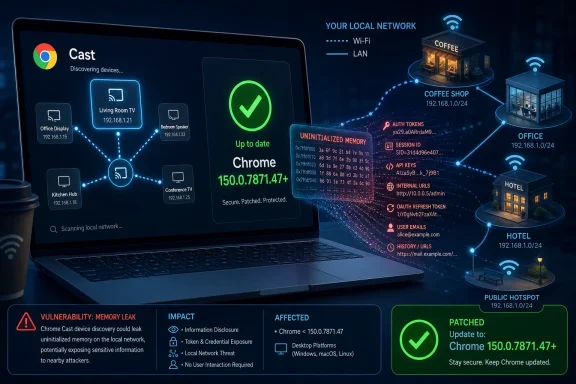
Google disclosed CVE-2026-13940 on June 30, 2026, as a medium-severity uninitialized-use flaw in Chrome’s Cast component, fixed in Chrome 150.0.7871.47 for Windows and Mac and affecting earlier Chrome builds. The bug is not the kind of headline-grabbing browser zero-day that sends incident responders into weekend mode, but it is a useful reminder that “medium” in a browser can still mean meaningful exposure. In this case, the important phrase is not remote code execution; it is local network segment. For Windows users and administrators, that makes this less of a web-drive-by story and more of a coffee-shop, office LAN, hotel Wi-Fi, conference network, and enterprise segmentation story.
The National Vulnerability Database entry, Google’s Chrome Releases advisory, and CISA’s enrichment data all point to the same basic shape: malicious network traffic could allow an attacker on the same local network segment to obtain potentially sensitive information from process memory. NVD listed the issue as CVE-2026-13940, tied it to CWE-457, “Use of Uninitialized Variable,” and added a vulnerable configuration for Google Chrome versions before 150.0.7871.47. CISA’s ADP scoring put the vulnerability at CVSS 3.1 base score 6.5, medium severity, with high confidentiality impact but no integrity or availability impact.
Chrome vulnerabilities usually arrive in one of two familiar narratives. Either they are catastrophic memory-safety bugs in JavaScript, WebAssembly, graphics, or media parsing, or they are quieter flaws buried in the enormous machinery that makes the browser behave like an operating system. CVE-2026-13940 belongs to the second category.
The flaw sits in Cast, the Chromium subsystem associated with device discovery and streaming workflows. That matters because Cast is not a normal web page feature in the way a JavaScript engine bug is. It is network-adjacent, discovery-friendly, and designed to notice nearby devices. When a vulnerability description says an attacker on the local network segment can use malicious network traffic to read potentially sensitive process memory, the story shifts from “don’t click the bad link” to “what else is talking on this network?”
That is why the vulnerability’s CVSS vector is more interesting than its medium label. CISA’s vector describes adjacent-network attack complexity as low, requiring no privileges and no user interaction. The scope is unchanged, and the impact is confidentiality-only, but confidentiality-only is not nothing inside a browser process that may hold tokens, URLs, fragments of page data, extension state, or other transient material.
Google’s advisory, as summarized in the Chrome Releases notes for the June 30 stable channel update, lists CVE-2026-13940 as medium severity. NVD’s change history shows the CVE was received from Chrome on June 30, modified by CISA-ADP later that day, and then enriched by NIST on July 2 with the CPE configuration and references. That chronology is worth spelling out because enterprise vulnerability management often depends on exactly those enrichment steps before a finding becomes visible in scanners, dashboards, and patch SLAs.
Chrome is not a single-purpose app. It is a credential broker, document viewer, media stack, password manager interface, web app runtime, enterprise SSO front end, remote work portal, and sometimes the only thing standing between an attacker and a user’s cloud session. Even a vulnerability with no code execution can matter if it leaks the right memory at the wrong time.
CVE-2026-13940 is not described as exploited in the wild. CISA’s SSVC enrichment lists exploitation as “none,” automatable as “no,” and technical impact as “partial.” Those labels should keep panic out of the room. But they should not keep patching out of the room.
The subtlety is that adjacent-network bugs are situational. A home desktop behind a trusted router faces a different risk than a laptop that moves among airports, universities, customer sites, managed offices, and shared Wi-Fi. A kiosk, meeting-room PC, or developer workstation on a flat internal network faces a different risk again. “Medium” is a global average; the network you actually use is the local multiplier.
That context matters for administrators. The right operational answer is not to build a bespoke response only around this one Cast flaw. The right answer is to treat Chrome 150 as a major security rollup and verify deployment across the fleet.
Browser patching has become a rhythm problem. Chrome updates rapidly; Chromium-based browsers inherit or adapt fixes on their own schedules; endpoint management tools sometimes lag behind vendor release notes; and users often assume the browser has updated because the icon still opens. The gap between “Google has shipped a fix” and “the device in front of the employee is actually running it” is where avoidable exposure lives.
On Windows, the target version called out in the CVE data is Chrome prior to 150.0.7871.47. That makes verification straightforward. If Chrome reports 150.0.7871.47 or later on Windows or Mac, this specific CVE should be addressed. If it reports an earlier version, the machine remains in scope.
Cast-style functionality lives in that messy neighborhood. Discovery protocols and nearby-device features are useful precisely because they reduce friction. They also enlarge the amount of code exposed to traffic that did not originate from a trusted website.
That is the uncomfortable lesson of CVE-2026-13940. The browser’s attack surface is not confined to HTML, CSS, JavaScript, and downloads. It includes everything that lets the browser participate in the local environment: media routing, device discovery, graphics acceleration, authentication helpers, extensions, sync, printing, and system integration.
For WindowsForum readers, this should feel familiar. Windows security has spent years moving from perimeter thinking to zero trust, least privilege, device compliance, and network segmentation. Browsers need to be understood in the same way. A browser on a trusted corporate LAN is not merely “inside”; it is a complex, network-aware application with privileged access to the user’s working life.
For a browser, stale data is the scary part. Process memory is not an abstract concept. It can contain fragments of recently handled content, internal state, protocol data, or values that were never meant to cross a boundary. Modern browsers use process isolation, sandboxing, site isolation, and other hardening techniques to limit damage, but the entire point of memory disclosure bugs is that they can reveal something the attacker should not see.
The CVE description does not say what specific data could be exposed, and responsible reporting should not invent it. “Potentially sensitive information” is intentionally broad. It is enough to say that a confidentiality impact rated high by CISA is not something administrators should wave away merely because the Chromium severity is medium.
There is also a defensive lesson here. Memory-safe languages, compiler hardening, fuzzing, sanitizers, and sandboxing have all made browsers harder to exploit. They have not eliminated the long tail of memory-state bugs in large C++ codebases. Chromium is one of the most heavily tested software projects on the planet, and still its security bulletins remain full because its surface area is enormous.
That lag matters. Many vulnerability management systems rely on CPE data to match CVEs to installed software. If a CVE arrives before its CPE enrichment, scanners may ingest the advisory but fail to map it cleanly to assets. The result is an awkward interval in which security teams know a vulnerability exists but their tooling may not fully reflect exposure.
This is not unique to CVE-2026-13940. NVD enrichment delays have become a recurring operational issue, and organizations increasingly need to combine vendor advisories, CISA enrichment, browser version telemetry, and endpoint management data rather than waiting for one database to become perfect. The Chrome release channel moves faster than many enterprise reporting pipelines.
For this particular case, the practical answer is to key off version inventory. If Google Chrome is installed and the version is below 150.0.7871.47 on Windows or Mac, treat it as affected. If your scanner did not flag it before July 2, that may reflect enrichment timing rather than absence of risk.
Microsoft Edge, Brave, Vivaldi, Opera, Electron-based apps, and other Chromium-derived products share large parts of the Chromium codebase, though not every Chromium vulnerability maps identically to every downstream browser. Cast-specific exposure depends on whether the relevant code is present, enabled, reachable, and patched in that product’s build. Administrators should resist both lazy extremes: assuming every Chromium app is vulnerable in exactly the same way, or assuming only Google Chrome matters.
For Microsoft Edge environments, the right move is to check Microsoft’s release notes and deployed Edge versions rather than mechanically applying Chrome’s CPE. Edge has its own update cadence, policies, and channel behavior, including Stable and Extended Stable considerations. In a Windows enterprise, Edge may also be more deeply integrated into baseline images, web app shortcuts, and managed browser policies than teams realize.
The broader point is that Chromium has become infrastructure. When a Chromium security update lands, it is not merely a consumer browser story. It is a downstream dependency event for enterprise desktops, embedded browsers, productivity workflows, and app frameworks.
The relaunch part is easy to underestimate. Chrome can download an update but remain on the old executable until the browser restarts. Users who keep dozens of tabs open for weeks can silently extend the vulnerability window. Administrators should measure not just update availability but active running version.
The more mature response also includes network hygiene. Because this issue involves an attacker on the local network segment, segmentation and untrusted-network assumptions matter. Guest Wi-Fi should be isolated. Meeting-room and IoT networks should not share space with employee endpoints. Developer and admin workstations should not sit casually beside unmanaged devices.
None of that is specific to CVE-2026-13940, and that is the point. Medium-severity adjacent-network bugs are the kind of findings that reward organizations that already did the boring work. If your endpoint patching, browser telemetry, and network segmentation are healthy, this CVE is a routine verification exercise. If they are not, it becomes one more reminder that browser security is now part of infrastructure security.
But it is still a useful diagnostic for how an organization handles browser risk. Did the security team notice the Chrome 150 release when Google posted it? Did endpoint inventory show which machines were below 150.0.7871.47? Did vulnerability tooling ingest the CPE only after NVD enrichment? Did anyone account for laptops on hostile local networks? Did browser restart compliance become visible?
Those questions matter because the next Chromium flaw may not be medium. Earlier Chrome security updates this year have included actively exploited issues, and the browser remains one of the highest-value targets on any desktop. A team that treats CVE-2026-13940 as a miniature drill will be better prepared for the next emergency.
The National Vulnerability Database entry, Google’s Chrome Releases advisory, and CISA’s enrichment data all point to the same basic shape: malicious network traffic could allow an attacker on the same local network segment to obtain potentially sensitive information from process memory. NVD listed the issue as CVE-2026-13940, tied it to CWE-457, “Use of Uninitialized Variable,” and added a vulnerable configuration for Google Chrome versions before 150.0.7871.47. CISA’s ADP scoring put the vulnerability at CVSS 3.1 base score 6.5, medium severity, with high confidentiality impact but no integrity or availability impact.
 The Cast Bug Is Small, but the Boundary It Crosses Is Not
Chrome vulnerabilities usually arrive in one of two familiar narratives. Either they are catastrophic memory-safety bugs in JavaScript, WebAssembly, graphics, or media parsing, or they are quieter flaws buried in the enormous machinery that makes the browser behave like an operating system. CVE-2026-13940 belongs to the second category.The flaw sits in Cast, the Chromium subsystem associated with device discovery and streaming workflows. That matters because Cast is not a normal web page feature in the way a JavaScript engine bug is. It is network-adjacent, discovery-friendly, and designed to notice nearby devices. When a vulnerability description says an attacker on the local network segment can use malicious network traffic to read potentially sensitive process memory, the story shifts from “don’t click the bad link” to “what else is talking on this network?”
That is why the vulnerability’s CVSS vector is more interesting than its medium label. CISA’s vector describes adjacent-network attack complexity as low, requiring no privileges and no user interaction. The scope is unchanged, and the impact is confidentiality-only, but confidentiality-only is not nothing inside a browser process that may hold tokens, URLs, fragments of page data, extension state, or other transient material.
Google’s advisory, as summarized in the Chrome Releases notes for the June 30 stable channel update, lists CVE-2026-13940 as medium severity. NVD’s change history shows the CVE was received from Chrome on June 30, modified by CISA-ADP later that day, and then enriched by NIST on July 2 with the CPE configuration and references. That chronology is worth spelling out because enterprise vulnerability management often depends on exactly those enrichment steps before a finding becomes visible in scanners, dashboards, and patch SLAs.
“Medium” Is Doing Too Much Work Here
The security industry has trained users to think in colors and scores. Critical means drop everything. High means act soon. Medium means place it somewhere between printer firmware and the backlog of mildly embarrassing SaaS misconfigurations. That shorthand breaks down for browsers.Chrome is not a single-purpose app. It is a credential broker, document viewer, media stack, password manager interface, web app runtime, enterprise SSO front end, remote work portal, and sometimes the only thing standing between an attacker and a user’s cloud session. Even a vulnerability with no code execution can matter if it leaks the right memory at the wrong time.
CVE-2026-13940 is not described as exploited in the wild. CISA’s SSVC enrichment lists exploitation as “none,” automatable as “no,” and technical impact as “partial.” Those labels should keep panic out of the room. But they should not keep patching out of the room.
The subtlety is that adjacent-network bugs are situational. A home desktop behind a trusted router faces a different risk than a laptop that moves among airports, universities, customer sites, managed offices, and shared Wi-Fi. A kiosk, meeting-room PC, or developer workstation on a flat internal network faces a different risk again. “Medium” is a global average; the network you actually use is the local multiplier.
The Chrome 150 Update Was Already a Security Event
CVE-2026-13940 did not ship alone. Malwarebytes described the June 30 Chrome 150 stable release as a large security update containing hundreds of fixes, and Google’s Chrome Releases listing for that desktop update says Chrome 150.0.7871.46 for Linux and 150.0.7871.46/.47 for Windows and Mac contained numerous fixes and improvements. The same release notes identify CVE-2026-13940 as an uninitialized use in Cast.That context matters for administrators. The right operational answer is not to build a bespoke response only around this one Cast flaw. The right answer is to treat Chrome 150 as a major security rollup and verify deployment across the fleet.
Browser patching has become a rhythm problem. Chrome updates rapidly; Chromium-based browsers inherit or adapt fixes on their own schedules; endpoint management tools sometimes lag behind vendor release notes; and users often assume the browser has updated because the icon still opens. The gap between “Google has shipped a fix” and “the device in front of the employee is actually running it” is where avoidable exposure lives.
On Windows, the target version called out in the CVE data is Chrome prior to 150.0.7871.47. That makes verification straightforward. If Chrome reports 150.0.7871.47 or later on Windows or Mac, this specific CVE should be addressed. If it reports an earlier version, the machine remains in scope.
The Local Network Is Still an Attack Surface
The phrase “local network segment” sounds quaint until you remember how modern work actually happens. Laptops roam. Contractors bring unmanaged devices. Employees join guest Wi-Fi. Smart TVs, conferencing bars, printers, dev boards, phones, and IoT appliances share broadcast domains more often than network architects would like to admit.Cast-style functionality lives in that messy neighborhood. Discovery protocols and nearby-device features are useful precisely because they reduce friction. They also enlarge the amount of code exposed to traffic that did not originate from a trusted website.
That is the uncomfortable lesson of CVE-2026-13940. The browser’s attack surface is not confined to HTML, CSS, JavaScript, and downloads. It includes everything that lets the browser participate in the local environment: media routing, device discovery, graphics acceleration, authentication helpers, extensions, sync, printing, and system integration.
For WindowsForum readers, this should feel familiar. Windows security has spent years moving from perimeter thinking to zero trust, least privilege, device compliance, and network segmentation. Browsers need to be understood in the same way. A browser on a trusted corporate LAN is not merely “inside”; it is a complex, network-aware application with privileged access to the user’s working life.
Uninitialized Memory Bugs Are Boring Until They Leak the Wrong Thing
CWE-457, the weakness assigned here, is use of an uninitialized variable. In plain English, software may read from memory before that memory has been set to a known safe value. Depending on where the bug appears, the result can range from a harmless crash to unpredictable behavior to disclosure of stale data.For a browser, stale data is the scary part. Process memory is not an abstract concept. It can contain fragments of recently handled content, internal state, protocol data, or values that were never meant to cross a boundary. Modern browsers use process isolation, sandboxing, site isolation, and other hardening techniques to limit damage, but the entire point of memory disclosure bugs is that they can reveal something the attacker should not see.
The CVE description does not say what specific data could be exposed, and responsible reporting should not invent it. “Potentially sensitive information” is intentionally broad. It is enough to say that a confidentiality impact rated high by CISA is not something administrators should wave away merely because the Chromium severity is medium.
There is also a defensive lesson here. Memory-safe languages, compiler hardening, fuzzing, sanitizers, and sandboxing have all made browsers harder to exploit. They have not eliminated the long tail of memory-state bugs in large C++ codebases. Chromium is one of the most heavily tested software projects on the planet, and still its security bulletins remain full because its surface area is enormous.
NVD’s CPE Lag Is Not a Footnote for Enterprises
The user-facing question around this CVE is simple: are we missing a CPE? Based on the NVD change history provided, NIST added a CPE configuration on July 2, 2026: Google Chrome versions up to, but excluding, 150.0.7871.47. That means the record was not permanently missing a CPE, but there was a timing gap between the CVE arriving on June 30 and NVD enrichment on July 2.That lag matters. Many vulnerability management systems rely on CPE data to match CVEs to installed software. If a CVE arrives before its CPE enrichment, scanners may ingest the advisory but fail to map it cleanly to assets. The result is an awkward interval in which security teams know a vulnerability exists but their tooling may not fully reflect exposure.
This is not unique to CVE-2026-13940. NVD enrichment delays have become a recurring operational issue, and organizations increasingly need to combine vendor advisories, CISA enrichment, browser version telemetry, and endpoint management data rather than waiting for one database to become perfect. The Chrome release channel moves faster than many enterprise reporting pipelines.
For this particular case, the practical answer is to key off version inventory. If Google Chrome is installed and the version is below 150.0.7871.47 on Windows or Mac, treat it as affected. If your scanner did not flag it before July 2, that may reflect enrichment timing rather than absence of risk.
Edge and Other Chromium Browsers Complicate the Simple Answer
Chrome’s CVE record names Google Chrome. That is appropriate because Google issued the advisory for Chrome and the affected product data in the CVE entry points to Chrome. But Windows administrators rarely manage a Chrome-only world.Microsoft Edge, Brave, Vivaldi, Opera, Electron-based apps, and other Chromium-derived products share large parts of the Chromium codebase, though not every Chromium vulnerability maps identically to every downstream browser. Cast-specific exposure depends on whether the relevant code is present, enabled, reachable, and patched in that product’s build. Administrators should resist both lazy extremes: assuming every Chromium app is vulnerable in exactly the same way, or assuming only Google Chrome matters.
For Microsoft Edge environments, the right move is to check Microsoft’s release notes and deployed Edge versions rather than mechanically applying Chrome’s CPE. Edge has its own update cadence, policies, and channel behavior, including Stable and Extended Stable considerations. In a Windows enterprise, Edge may also be more deeply integrated into baseline images, web app shortcuts, and managed browser policies than teams realize.
The broader point is that Chromium has become infrastructure. When a Chromium security update lands, it is not merely a consumer browser story. It is a downstream dependency event for enterprise desktops, embedded browsers, productivity workflows, and app frameworks.
Admins Should Patch, Then Prove the Patch Landed
The remediation is wonderfully unglamorous: update Chrome. On unmanaged systems, that usually means opening Chrome’s About page and letting the browser check for updates, then relaunching. On managed Windows fleets, it means verifying Google Update policy, endpoint management rings, browser restart behavior, and version reporting.The relaunch part is easy to underestimate. Chrome can download an update but remain on the old executable until the browser restarts. Users who keep dozens of tabs open for weeks can silently extend the vulnerability window. Administrators should measure not just update availability but active running version.
The more mature response also includes network hygiene. Because this issue involves an attacker on the local network segment, segmentation and untrusted-network assumptions matter. Guest Wi-Fi should be isolated. Meeting-room and IoT networks should not share space with employee endpoints. Developer and admin workstations should not sit casually beside unmanaged devices.
None of that is specific to CVE-2026-13940, and that is the point. Medium-severity adjacent-network bugs are the kind of findings that reward organizations that already did the boring work. If your endpoint patching, browser telemetry, and network segmentation are healthy, this CVE is a routine verification exercise. If they are not, it becomes one more reminder that browser security is now part of infrastructure security.
The Real Signal Is in the Patch Pipeline
CVE-2026-13940 is unlikely to be remembered as the defining Chrome vulnerability of 2026. It has no public exploitation claim in the data provided. It is not described as a sandbox escape or remote code execution flaw. It does not require users to click a malicious page. Its severity is medium.But it is still a useful diagnostic for how an organization handles browser risk. Did the security team notice the Chrome 150 release when Google posted it? Did endpoint inventory show which machines were below 150.0.7871.47? Did vulnerability tooling ingest the CPE only after NVD enrichment? Did anyone account for laptops on hostile local networks? Did browser restart compliance become visible?
Those questions matter because the next Chromium flaw may not be medium. Earlier Chrome security updates this year have included actively exploited issues, and the browser remains one of the highest-value targets on any desktop. A team that treats CVE-2026-13940 as a miniature drill will be better prepared for the next emergency.
The Patch Is Simple; the Lesson Is Not
CVE-2026-13940 should not produce panic, but it should produce action. The concrete response is short, and the strategic response is longer.- Chrome installations on Windows and Mac should be updated to 150.0.7871.47 or later to address this specific vulnerability.
- Security teams should verify the running browser version, not merely whether an update has been downloaded.
- NVD’s CPE enrichment was added after the initial CVE publication, so scanner visibility may have lagged the vendor advisory.
- The adjacent-network attack vector makes this more relevant for roaming laptops, shared Wi-Fi, flat office networks, and poorly isolated guest environments.
- Chromium-based browsers and embedded Chromium runtimes should be reviewed through their own vendor advisories rather than assumed safe or unsafe by association.
References
- Primary source: NVD / Chromium
Published: 2026-07-03T07:00:48-07:00
NVD - CVE-2026-13940
 nvd.nist.gov
- Security advisory: MSRC
Published: 2026-07-03T07:00:48-07:00
Original feed URL
Security Update Guide - Microsoft Security Response Center
 msrc.microsoft.com
- Related coverage: cvefeed.io
CVE-2026-13940 - Google Chrome Uninitialized Use
Uninitialized Use in Cast in Google Chrome prior to 150.0.7871.47 allowed an attacker on the local network segment to obtain potentially sensitive information from process memory via malicious network traffic. (Chromium security severity: Medium)cvefeed.io - Official source: nist.gov
National Vulnerability Database
NIST maintains the National Vulnerability Database (NVD), a repository of information on software and hardware flaws that can compromise computer security. This is a key piece of the nation’s cybersecurity infrastructure.www.nist.gov - Related coverage: labs.cloudsecurityalliance.org
NVD Enrichment Triage: Enterprise Vulnerability Programs Must Adapt
PDF documentlabs.cloudsecurityalliance.org
- Official source: nvlpubs.nist.gov
Technical Specification for the Security Content Automation Protocol (SCAP): SCAP Version 1.4
The Security Content Automation Protocol (SCAP) is a suite of specifications that standardize the format and nomenclature by which software flaw and security configuration information is communicated, both to machines and humans. This publication, along with its annex (NIST Special Publication...nvlpubs.nist.gov
