

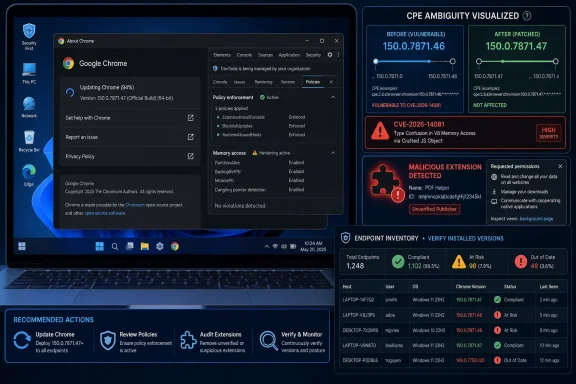
Google Chrome’s CVE-2026-14081, published by NVD on June 30, 2026 and modified on July 1, describes a DevTools policy-enforcement flaw fixed in Chrome 150.0.7871.47 that could let a malicious extension expose sensitive process-memory data after user installation. The awkward part is not just the bug. It is the metadata around the bug: Google says “prior to 150.0.7871.47,” while NVD’s change history shows a vulnerable Chrome CPE range up to, but excluding, 150.0.7871.46. For defenders who live and die by scanner output, that one-build ambiguity is exactly where low-severity browser bugs become operational noise.
CVE-2026-14081 is not the kind of Chrome vulnerability that normally sets off emergency patch calls by itself. The description requires a user to install a malicious extension, and Chromium rates the issue as Low severity. CISA’s ADP enrichment, however, assigns a CVSS 3.1 score of 6.5, driven by high confidentiality impact and a user-interaction requirement rather than remote code execution.
That split is familiar to anyone who tracks browser CVEs. Chromium severity reflects Google’s internal security model and exploitability assumptions; CVSS tries to express impact in a more generic enterprise-risk language. A bug that cannot execute code, cannot break the sandbox, and cannot corrupt data may still be ugly if it leaks process memory under the right conditions.
The more interesting wrinkle is the affected-version metadata. The NVD page text says Chrome prior to 150.0.7871.47 is affected, matching the CVE description from Chrome. But the NVD change record cited by the submitter shows a CPE configuration for
That matters because machines do not read advisories like humans do. Vulnerability scanners, asset platforms, SBOM pipelines, compliance dashboards, and patch SLAs often consume CPE ranges as structured truth. If the prose says one thing and the CPE range says another, the scanner becomes less a source of certainty than a venue for argument.
That release context is important. CVE-2026-14081 is one item in a much larger Chrome 150 security train. Administrators are not deciding whether to patch only this DevTools flaw; they are deciding whether Chrome 150’s security fixes, compatibility risks, extension-policy changes, and staged rollout behavior justify acceleration beyond normal browser-update cadence.
For consumers, the answer is simple: update Chrome. For enterprises, the answer is also “update Chrome,” but with more paperwork. Browser updates are now application-platform updates, identity-boundary updates, extension-runtime updates, and sometimes business-app compatibility events all at once.
Chrome’s version numbers also complicate the casual reading of this CVE. Google’s release post presents different platform builds, while the CVE says the bug is fixed before 150.0.7871.47. If Windows and macOS may see .46 or .47 in the same release family, and Linux is listed at .46, CPE metadata must be precise or it risks either missing exposed systems or flagging already-fixed ones.
That is why the submitter’s question — “Are we missing a CPE here?” — is the right question. It is not pedantry. It is how security automation either earns trust or slowly trains administrators to ignore it.
The NVD change-history line, however, reportedly added a Chrome CPE configuration with versions up to, but excluding, 150.0.7871.46. That would make 150.0.7871.46 appear non-vulnerable in CPE-based matching, even though the plain-English CVE description says the fixed boundary is 150.0.7871.47.
There are several possible explanations, and they do not all imply a mistake. Google’s desktop stable update may have shipped .46 and .47 across Windows and macOS in a way that maps differently by platform, architecture, or staged rollout. It is also possible that one build contains equivalent fixes even if the CVE’s generic “prior to .47” language uses the highest fixed version as the public boundary.
But from the outside, defenders cannot assume that nuance. If NVD has not completed its own assessment and the only structured CPE range appears to stop at .46 while the vendor-origin CVE text points to .47, the safer editorial conclusion is that the CPE entry is either incomplete, imprecise, or at least insufficiently explained.
That is not the same as saying NVD is wrong. It is saying the metadata does not fully resolve the advisory. For security operations, that distinction is not academic: uncertainty should become a patching note, not an unexamined green checkmark.
The CVE wording says the flaw involved insufficient policy enforcement in DevTools and could be triggered through a crafted Chrome Extension. That suggests the issue is less about a hostile website directly stealing secrets and more about a malicious extension crossing a boundary it should not have crossed.
Extensions are already a privileged attack surface. Users install them to block ads, manage passwords, rewrite pages, capture screenshots, integrate with productivity tools, and automate browser behavior. Every one of those use cases asks Chrome to let third-party code sit closer to the user’s session than an ordinary website can.
That is why “convince a user to install a malicious extension” should not be dismissed too quickly. Extension installation is a real social-engineering path, especially in environments where users are accustomed to browser add-ons for line-of-business workflows. A flaw that requires malicious extension installation may be low severity in isolation, but it still belongs in the same risk family as OAuth consent abuse and fake productivity-tool campaigns.
The memory angle sharpens the concern. “Potentially sensitive information from process memory” is necessarily vague, and Google often keeps Chrome bug details restricted until enough users are patched. But process memory can be where session state, tokens, page content, user data, and internal browser structures briefly live. The practical impact depends on what memory was reachable, under what permissions, and how reliably an attacker could extract useful material.
That model explains the gap between Chromium’s Low and CISA’s Medium. Google can reasonably say the exploit path is constrained: the user must install a malicious extension, and the bug does not appear to grant code execution. CISA can reasonably say that if the bug works, the data exposure could be serious.
Neither framing is inherently dishonest. They serve different audiences. Chromium severity helps prioritize engineering response inside a browser-security program; CVSS helps organizations sort risk across thousands of software products and vendors.
The danger comes when organizations flatten those signals into a single number. A 6.5 Chrome issue with malicious-extension prerequisites is not the same operational event as a 6.5 VPN gateway flaw exposed to the internet. It also is not nothing. It belongs in the browser-hygiene bucket: update quickly, audit extensions, and verify policy enforcement on managed endpoints.
For Windows admins, the right answer is not panic. It is disciplined routine. Chrome’s attack surface is too important to run casually, and extension governance is too important to treat as a user-preference setting.
A malicious extension does not need to behave like malware at first glance. It can present itself as a coupon finder, PDF helper, tab manager, AI summarizer, screenshot tool, or developer utility. It can request permissions that appear plausible to a nontechnical user. It can then wait.
CVE-2026-14081 fits that broader pattern. The reported exploit path starts with extension installation, then abuses a DevTools policy failure to obtain potentially sensitive process-memory information. Even if the individual bug is narrow, the ecosystem lesson is broad: browser extension trust is endpoint trust.
Enterprise controls exist, but they are unevenly deployed. Chrome policies can block extension installation, allowlist approved extensions, force-install managed extensions, and restrict developer tools. Yet many organizations still rely on informal user discretion, especially outside heavily managed fleets.
The irony is that the browser has become the primary work environment just as extension governance remains one of the least consistently enforced parts of endpoint management. That mismatch gives low-severity browser bugs room to matter.
The obvious check is
The extension side is just as important. If an organization allows arbitrary extension installation, this CVE is another reminder that the browser is not a neutral container. An extension allowlist is no longer a luxury control for locked-down environments; it is a baseline expectation for any organization that handles sensitive data in web apps.
Admins should also look at DevTools policy. Some organizations disable DevTools for managed users to reduce data exfiltration and tampering risks, while others need it enabled for developers, analysts, and support teams. The correct policy is role-based, not universal. Developers need tools; finance users probably do not.
The key is to avoid pretending that browser policy is separate from security policy. Chrome is an application runtime, a credential surface, a document viewer, a SaaS terminal, and a software supply-chain endpoint. Its configuration deserves the same seriousness as Office macros, PowerShell execution policy, and local administrator rights.
This is how modern vulnerability management often feels: the vendor publishes a terse advisory, CVE records arrive, CISA enriches them, NVD adds or adjusts CPEs, third-party databases scrape and normalize the data, and scanners turn that into tickets. At every step, small interpretation differences compound.
The issue is worse with browsers because fixed versions can vary by platform and rollout channel. Stable, Extended Stable, early stable, enterprise-managed updates, Linux distributions, and Chromium-derived browsers do not all move in perfect lockstep. CPEs prefer clean version ranges; browser reality is messier.
That does not make CPE useless. It makes CPE a starting point. When a CPE range appears inconsistent with vendor language, defenders should preserve the discrepancy in their internal advisory notes and use observed installed versions as the deciding factor.
In this case, the practical rule is simple: treat Chrome versions earlier than the fixed Chrome 150 desktop release as needing update, and do not rely solely on a CPE exclusion boundary of 150.0.7871.46 unless Google or NVD clarifies that .46 is fixed for the relevant platform. That may over-patch by one build. In browser security, over-patching by one build is rarely the worst mistake.
The user-provided NVD material names Google Chrome as the affected product, and it would be irresponsible to claim specific downstream impact without vendor advisories from each browser maker. But the general risk pattern is well understood: when Chromium fixes a security bug in shared components, derivative browsers may need to merge and ship the fix on their own schedules.
For Windows environments, Microsoft Edge is the obvious adjacent concern. Edge has its own update channel, enterprise policies, and security advisories. A Chrome CVE does not automatically equal an Edge CVE, but administrators should watch Edge release notes when the affected component is Chromium-shared rather than Chrome-only.
The same logic applies to niche Chromium browsers used by developers, privacy-conscious users, or specialized business workflows. Asset inventories often capture Chrome and Edge while missing portable browsers, user-installed alternatives, or embedded Chromium runtimes. That blind spot matters when the vulnerable component lives below the brand layer.
This is where software inventory has to be more than a procurement spreadsheet. If your estate includes Chromium-based browsers outside standard management, Chrome’s patch train is only part of the answer. You also need to know who is downstream of Chromium, how quickly they ship, and whether users can install them without approval.
For individual users, that means opening Chrome’s About page and letting the browser complete the update and relaunch. For managed Windows fleets, it means confirming installed versions through inventory and closing the loop on devices that missed the rollout. Laptops asleep in drawers, VDI images, kiosk systems, and lab machines are the usual stragglers.
Extension hygiene is the second fix. Remove extensions that are no longer used, block installation from outside approved sources, and prefer allowlists over after-the-fact cleanup. If users can install arbitrary extensions, a malicious-extension prerequisite is not much of a prerequisite.
DevTools policy deserves a narrower review. Disabling DevTools everywhere can break legitimate workflows, but leaving it enabled everywhere is usually unnecessary. The mature approach is to separate developer workstations and managed production users rather than applying a single browser posture to every employee.
The important thing is not to turn CVE-2026-14081 into theater. It does not demand weekend war rooms. It does demand that browser patching, extension control, and vulnerability metadata review be treated as one connected process.
 The Bug Is Low-Severity; the Inventory Problem Is Not
CVE-2026-14081 is not the kind of Chrome vulnerability that normally sets off emergency patch calls by itself. The description requires a user to install a malicious extension, and Chromium rates the issue as Low severity. CISA’s ADP enrichment, however, assigns a CVSS 3.1 score of 6.5, driven by high confidentiality impact and a user-interaction requirement rather than remote code execution.That split is familiar to anyone who tracks browser CVEs. Chromium severity reflects Google’s internal security model and exploitability assumptions; CVSS tries to express impact in a more generic enterprise-risk language. A bug that cannot execute code, cannot break the sandbox, and cannot corrupt data may still be ugly if it leaks process memory under the right conditions.
The more interesting wrinkle is the affected-version metadata. The NVD page text says Chrome prior to 150.0.7871.47 is affected, matching the CVE description from Chrome. But the NVD change record cited by the submitter shows a CPE configuration for
google:chrome with versions up to, but excluding, 150.0.7871.46.That matters because machines do not read advisories like humans do. Vulnerability scanners, asset platforms, SBOM pipelines, compliance dashboards, and patch SLAs often consume CPE ranges as structured truth. If the prose says one thing and the CPE range says another, the scanner becomes less a source of certainty than a venue for argument.
Chrome 150 Arrived as a Bundle, Not a Single Security Story
Google’s Chrome Releases blog announced the Stable Channel update for desktop on June 30, 2026, moving Windows and macOS to Chrome 150.0.7871.46/.47 and Linux to 150.0.7871.46. Born’s IT and Windows Blog, PCWorld, and other security-tracking outlets quickly picked up the broader story: Chrome 150 landed with a very large bundle of fixes, not a single headline CVE.That release context is important. CVE-2026-14081 is one item in a much larger Chrome 150 security train. Administrators are not deciding whether to patch only this DevTools flaw; they are deciding whether Chrome 150’s security fixes, compatibility risks, extension-policy changes, and staged rollout behavior justify acceleration beyond normal browser-update cadence.
For consumers, the answer is simple: update Chrome. For enterprises, the answer is also “update Chrome,” but with more paperwork. Browser updates are now application-platform updates, identity-boundary updates, extension-runtime updates, and sometimes business-app compatibility events all at once.
Chrome’s version numbers also complicate the casual reading of this CVE. Google’s release post presents different platform builds, while the CVE says the bug is fixed before 150.0.7871.47. If Windows and macOS may see .46 or .47 in the same release family, and Linux is listed at .46, CPE metadata must be precise or it risks either missing exposed systems or flagging already-fixed ones.
That is why the submitter’s question — “Are we missing a CPE here?” — is the right question. It is not pedantry. It is how security automation either earns trust or slowly trains administrators to ignore it.
The CPE Range Looks Suspicious Against the CVE Text
On the information provided, yes, the CPE data deserves scrutiny. The CVE description says Google Chrome prior to 150.0.7871.47 is affected. A literal reading means versions below 150.0.7871.47 should be considered vulnerable unless platform-specific release notes say otherwise.The NVD change-history line, however, reportedly added a Chrome CPE configuration with versions up to, but excluding, 150.0.7871.46. That would make 150.0.7871.46 appear non-vulnerable in CPE-based matching, even though the plain-English CVE description says the fixed boundary is 150.0.7871.47.
There are several possible explanations, and they do not all imply a mistake. Google’s desktop stable update may have shipped .46 and .47 across Windows and macOS in a way that maps differently by platform, architecture, or staged rollout. It is also possible that one build contains equivalent fixes even if the CVE’s generic “prior to .47” language uses the highest fixed version as the public boundary.
But from the outside, defenders cannot assume that nuance. If NVD has not completed its own assessment and the only structured CPE range appears to stop at .46 while the vendor-origin CVE text points to .47, the safer editorial conclusion is that the CPE entry is either incomplete, imprecise, or at least insufficiently explained.
That is not the same as saying NVD is wrong. It is saying the metadata does not fully resolve the advisory. For security operations, that distinction is not academic: uncertainty should become a patching note, not an unexamined green checkmark.
DevTools Is a Strange Place for a Memory-Exposure Bug
DevTools is usually thought of as a developer feature, but in Chrome it sits close to powerful browser internals. It can inspect pages, profile execution, view network activity, examine memory behavior, and expose state that ordinary web content should never see. That makes policy enforcement around DevTools especially important.The CVE wording says the flaw involved insufficient policy enforcement in DevTools and could be triggered through a crafted Chrome Extension. That suggests the issue is less about a hostile website directly stealing secrets and more about a malicious extension crossing a boundary it should not have crossed.
Extensions are already a privileged attack surface. Users install them to block ads, manage passwords, rewrite pages, capture screenshots, integrate with productivity tools, and automate browser behavior. Every one of those use cases asks Chrome to let third-party code sit closer to the user’s session than an ordinary website can.
That is why “convince a user to install a malicious extension” should not be dismissed too quickly. Extension installation is a real social-engineering path, especially in environments where users are accustomed to browser add-ons for line-of-business workflows. A flaw that requires malicious extension installation may be low severity in isolation, but it still belongs in the same risk family as OAuth consent abuse and fake productivity-tool campaigns.
The memory angle sharpens the concern. “Potentially sensitive information from process memory” is necessarily vague, and Google often keeps Chrome bug details restricted until enough users are patched. But process memory can be where session state, tokens, page content, user data, and internal browser structures briefly live. The practical impact depends on what memory was reachable, under what permissions, and how reliably an attacker could extract useful material.
CVSS Says “Medium” Because Confidentiality Still Counts
CISA’s ADP vector for this CVE isAV:N/AC:L/PR:N/UI:R/S:U/C:H/I:N/A:N, producing a 6.5 Medium score. In plain English, that means the attack is considered network-adjacent in delivery, low complexity, does not require prior privileges, requires user interaction, does not cross scope, and has high confidentiality impact without integrity or availability impact.That model explains the gap between Chromium’s Low and CISA’s Medium. Google can reasonably say the exploit path is constrained: the user must install a malicious extension, and the bug does not appear to grant code execution. CISA can reasonably say that if the bug works, the data exposure could be serious.
Neither framing is inherently dishonest. They serve different audiences. Chromium severity helps prioritize engineering response inside a browser-security program; CVSS helps organizations sort risk across thousands of software products and vendors.
The danger comes when organizations flatten those signals into a single number. A 6.5 Chrome issue with malicious-extension prerequisites is not the same operational event as a 6.5 VPN gateway flaw exposed to the internet. It also is not nothing. It belongs in the browser-hygiene bucket: update quickly, audit extensions, and verify policy enforcement on managed endpoints.
For Windows admins, the right answer is not panic. It is disciplined routine. Chrome’s attack surface is too important to run casually, and extension governance is too important to treat as a user-preference setting.
Browser Extensions Have Become the Soft Underbelly of Endpoint Security
The security industry spent years hardening operating systems, browsers, and authentication flows, only to leave a surprising amount of trust in browser extensions. Extensions can observe pages, modify traffic, read clipboard-adjacent data, interact with identity sessions, and persist across browsing contexts. That is precisely why attackers like them.A malicious extension does not need to behave like malware at first glance. It can present itself as a coupon finder, PDF helper, tab manager, AI summarizer, screenshot tool, or developer utility. It can request permissions that appear plausible to a nontechnical user. It can then wait.
CVE-2026-14081 fits that broader pattern. The reported exploit path starts with extension installation, then abuses a DevTools policy failure to obtain potentially sensitive process-memory information. Even if the individual bug is narrow, the ecosystem lesson is broad: browser extension trust is endpoint trust.
Enterprise controls exist, but they are unevenly deployed. Chrome policies can block extension installation, allowlist approved extensions, force-install managed extensions, and restrict developer tools. Yet many organizations still rely on informal user discretion, especially outside heavily managed fleets.
The irony is that the browser has become the primary work environment just as extension governance remains one of the least consistently enforced parts of endpoint management. That mismatch gives low-severity browser bugs room to matter.
Windows Shops Should Treat This as a Chrome Governance Test
For WindowsForum readers, the Windows angle is practical rather than exotic. Chrome on Windows is often auto-updated, but “often” is not a control. Enterprises need to know whether endpoints actually moved to a fixed version, whether update deferrals are in place, and whether third-party Chromium browsers lag behind Google’s stable channel.The obvious check is
chrome://settings/help, but that does not scale. Managed environments should validate browser versions through endpoint-management inventory, vulnerability scanners, or Chrome Browser Cloud Management where deployed. The goal is not merely to see that Chrome eventually updates, but to confirm that the update completed across the fleet.The extension side is just as important. If an organization allows arbitrary extension installation, this CVE is another reminder that the browser is not a neutral container. An extension allowlist is no longer a luxury control for locked-down environments; it is a baseline expectation for any organization that handles sensitive data in web apps.
Admins should also look at DevTools policy. Some organizations disable DevTools for managed users to reduce data exfiltration and tampering risks, while others need it enabled for developers, analysts, and support teams. The correct policy is role-based, not universal. Developers need tools; finance users probably do not.
The key is to avoid pretending that browser policy is separate from security policy. Chrome is an application runtime, a credential surface, a document viewer, a SaaS terminal, and a software supply-chain endpoint. Its configuration deserves the same seriousness as Office macros, PowerShell execution policy, and local administrator rights.
The NVD Entry Shows Why “Low” Bugs Still Consume Admin Time
The NVD page for CVE-2026-14081 says NVD assessment was not yet provided for CVSS at the time reflected in the submitter’s material, while CISA-ADP supplied CVSS and CWE enrichment. It also includes CWE-602, “Client-Side Enforcement of Server-Side Security,” which is not an obvious one-sentence match for every Chrome DevTools policy bug but broadly points to misplaced or insufficient enforcement boundaries.This is how modern vulnerability management often feels: the vendor publishes a terse advisory, CVE records arrive, CISA enriches them, NVD adds or adjusts CPEs, third-party databases scrape and normalize the data, and scanners turn that into tickets. At every step, small interpretation differences compound.
The issue is worse with browsers because fixed versions can vary by platform and rollout channel. Stable, Extended Stable, early stable, enterprise-managed updates, Linux distributions, and Chromium-derived browsers do not all move in perfect lockstep. CPEs prefer clean version ranges; browser reality is messier.
That does not make CPE useless. It makes CPE a starting point. When a CPE range appears inconsistent with vendor language, defenders should preserve the discrepancy in their internal advisory notes and use observed installed versions as the deciding factor.
In this case, the practical rule is simple: treat Chrome versions earlier than the fixed Chrome 150 desktop release as needing update, and do not rely solely on a CPE exclusion boundary of 150.0.7871.46 unless Google or NVD clarifies that .46 is fixed for the relevant platform. That may over-patch by one build. In browser security, over-patching by one build is rarely the worst mistake.
Chromium Derivatives Are the Delayed Blast Radius
Chrome is the named product in CVE-2026-14081, but the underlying codebase is Chromium. That raises the usual downstream question: what about Microsoft Edge, Brave, Vivaldi, Opera, and other Chromium-based browsers?The user-provided NVD material names Google Chrome as the affected product, and it would be irresponsible to claim specific downstream impact without vendor advisories from each browser maker. But the general risk pattern is well understood: when Chromium fixes a security bug in shared components, derivative browsers may need to merge and ship the fix on their own schedules.
For Windows environments, Microsoft Edge is the obvious adjacent concern. Edge has its own update channel, enterprise policies, and security advisories. A Chrome CVE does not automatically equal an Edge CVE, but administrators should watch Edge release notes when the affected component is Chromium-shared rather than Chrome-only.
The same logic applies to niche Chromium browsers used by developers, privacy-conscious users, or specialized business workflows. Asset inventories often capture Chrome and Edge while missing portable browsers, user-installed alternatives, or embedded Chromium runtimes. That blind spot matters when the vulnerable component lives below the brand layer.
This is where software inventory has to be more than a procurement spreadsheet. If your estate includes Chromium-based browsers outside standard management, Chrome’s patch train is only part of the answer. You also need to know who is downstream of Chromium, how quickly they ship, and whether users can install them without approval.
The Real Fix Is Boring, Which Is Why It Works
There is no clever mitigation that beats updating Chrome here. The vulnerable condition is in the browser, the fix is in the browser, and Google has already shipped the stable-channel update. The only defensible question is how quickly an organization can verify uptake.For individual users, that means opening Chrome’s About page and letting the browser complete the update and relaunch. For managed Windows fleets, it means confirming installed versions through inventory and closing the loop on devices that missed the rollout. Laptops asleep in drawers, VDI images, kiosk systems, and lab machines are the usual stragglers.
Extension hygiene is the second fix. Remove extensions that are no longer used, block installation from outside approved sources, and prefer allowlists over after-the-fact cleanup. If users can install arbitrary extensions, a malicious-extension prerequisite is not much of a prerequisite.
DevTools policy deserves a narrower review. Disabling DevTools everywhere can break legitimate workflows, but leaving it enabled everywhere is usually unnecessary. The mature approach is to separate developer workstations and managed production users rather than applying a single browser posture to every employee.
The important thing is not to turn CVE-2026-14081 into theater. It does not demand weekend war rooms. It does demand that browser patching, extension control, and vulnerability metadata review be treated as one connected process.
The Practical Read on CVE-2026-14081
The cleanest reading of this advisory is that Chrome 150.0.7871.47 is the fixed boundary named in the CVE description, while the CPE data shown in the NVD change history appears potentially incomplete or at least ambiguous for environments trying to distinguish .46 from .47. That is the kind of discrepancy administrators should document, not hand-wave.- Chrome users should update to the current Chrome 150 stable build available for their platform and relaunch the browser to complete installation.
- Security teams should not treat a CPE range ending before 150.0.7871.46 as definitive if the CVE prose says the flaw affects Chrome prior to 150.0.7871.47.
- Managed Windows environments should verify browser versions through endpoint inventory rather than assuming Chrome’s automatic updater reached every device.
- Organizations should review Chrome extension allowlists because this vulnerability depends on malicious extension installation.
- Administrators should check whether Chromium-based browsers beyond Google Chrome need separate vendor updates or validation.
- DevTools access should be role-based, because developer convenience becomes unnecessary exposure when enabled for users who do not need it.
References
- Primary source: NVD / Chromium
Published: 2026-07-03T07:00:07-07:00
NVD - CVE-2026-14081
 nvd.nist.gov
- Security advisory: MSRC
Published: 2026-07-03T07:00:07-07:00
Original feed URL
Security Update Guide - Microsoft Security Response Center
 msrc.microsoft.com
- Related coverage: cvefeed.io
CVE-2026-14081 - Google Chrome DevTools Information Disclosure
Insufficient policy enforcement in DevTools in Google Chrome prior to 150.0.7871.47 allowed an attacker who convinced a user to install a malicious extension to obtain potentially sensitive information from process memory via a crafted Chrome Extension. (Chromium security severity: Low)cvefeed.io
