

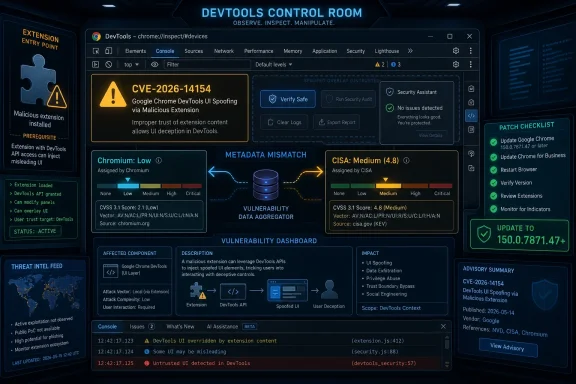
Google Chrome CVE-2026-14154 is a DevTools UI-spoofing flaw disclosed June 30, 2026, affecting Chrome versions before 150.0.7871.47 and requiring an attacker to persuade a user to install a malicious Chrome extension. NVD lists the issue as sourced from Chrome, while CISA’s enrichment assigns a medium CVSS 3.1 score despite Chromium’s own “Low” severity label. The real story is not that Chrome has another catastrophic browser bug; it is that extension trust, DevTools power, and vulnerability metadata are colliding in ways that make patch triage harder than it should be.
CVE-2026-14154 is not the kind of Chrome vulnerability that usually triggers emergency war rooms. Google’s description says the flaw sits in DevTools, involves “inappropriate implementation,” and can allow UI spoofing through a crafted Chrome extension after a user installs something malicious. That is a far cry from a drive-by renderer exploit or a V8 type-confusion bug that compromises a browser simply by visiting a web page.
But “low” does not mean “irrelevant.” UI spoofing is a security problem because modern browsers train users and administrators to trust interface boundaries: extension prompts, DevTools panels, browser-owned warnings, permission surfaces, and diagnostic views. If a malicious extension can misrepresent what the browser is showing, the attack shifts from raw code execution to deception inside a trusted frame.
The issue was published by NVD on June 30 and modified on July 1, according to the NVD entry supplied for this report. CISA’s ADP enrichment added CWE-451, “User Interface Misrepresentation of Critical Information,” and scored the issue 4.8 under CVSS 3.1. That scoring puts it in medium territory, even while Chromium’s own security severity stays at low.
That mismatch matters for defenders. Chrome’s label tells a user, “This is not the bug to panic over.” CISA’s score tells a vulnerability management dashboard, “This still deserves a ticket.” Both can be true, and that tension is exactly where enterprise patching often gets noisy.
That does not absolve Chrome. DevTools is not an ordinary browser surface. It is where developers inspect live pages, network traffic, storage, source maps, console output, permissions, frames, and sometimes internal application state that was never intended for casual inspection. If an extension can spoof something meaningful in or around that environment, the deception may be narrow, but it is operating near sensitive workflows.
Security researchers have warned for years that browser extensions occupy a strange middle ground between web content and desktop software. Academic work such as the “Chrowned by an Extension” research on Chrome’s debugger API showed how extension capabilities can intersect with the Chrome DevTools Protocol in powerful ways. More recent research into malicious and risky extensions has continued to underline the same point: users treat extensions like accessories, but browsers often treat them like semi-privileged actors.
That is why CVE-2026-14154 should not be dismissed as “just spoofing.” Spoofing is often the layer that makes another action possible. A fake prompt, misleading status display, deceptive DevTools panel, or altered interface cue may not steal data by itself, but it can make a victim believe an unsafe action is safe.
For administrators, the fix is both simpler and more complicated. Simple, because Chrome’s auto-update machinery usually does its job quickly on unmanaged systems. Complicated, because managed fleets are full of exceptions: pinned versions, VDI images, kiosk profiles, update rings, break-glass browser packages, and business applications certified against very specific browser builds.
The “prior to 150.0.7871.47” wording is also worth reading carefully. The vulnerability boundary is not “Chrome 150” in general; it is builds before that specific patched release. Any asset inventory that flattens Chrome into a major version without tracking the full build number will be too imprecise for this case.
There is also the Chromium ecosystem problem. Chrome may be the named product in the CVE record, but Chromium-derived browsers inherit large chunks of the same engine and, depending on implementation, may inherit related fixes at different times. Microsoft Edge, Brave, Vivaldi, Opera, and enterprise Chromium builds do not all publish or ingest Chromium security updates in identical ways, so defenders should check each vendor’s own release notes rather than assuming Chrome’s version number maps one-to-one.
That apparent off-by-one version boundary is the kind of detail that can create bad scanner behavior. If a vulnerability record says “fixed in 150.0.7871.47” but a CPE configuration excludes only up to 150.0.7871.46, tools may disagree about whether 150.0.7871.46 is vulnerable, fixed, or merely unmodeled. Vulnerability managers know this pain well: the bug is real, the fix exists, but the metadata turns into a debate.
There is also a conceptual issue with operating-system CPEs attached to a browser vulnerability. Chrome on Windows, macOS, and Linux is relevant, but the vulnerable product is still Chrome. When CPE configurations are represented as compound platform-and-application logic, scanner vendors must interpret whether the OS is a condition, a target platform, or a separate affected component.
The cleanest reading is that the missing or confusing CPE is not a new affected product so much as a metadata quality issue. Chrome itself is the product named by the CNA, the affected version boundary is the important operational fact, and platform CPEs should not distract from patching the browser. But in automated environments, metadata quality is not cosmetic; it decides whether dashboards show a red item, a green item, or nothing at all.
The odd part is the “UI:N” element. The vulnerability description explicitly says the attacker must convince a user to install a malicious extension. CVSS scoring often treats prerequisite installation and exploitation interaction in ways that can feel detached from real-world user behavior, but for defenders this is not a technicality. Social engineering is central to the scenario.
Chromium’s “Low” label is therefore doing a different job than CISA’s CVSS. Google is ranking the issue among browser security bugs, where memory corruption and sandbox escape vulnerabilities rightly dominate attention. CISA is enriching a national vulnerability record for broader risk tracking, where even partial UI misrepresentation gets translated into a structured score.
Neither system captures the human factor particularly well. A malicious extension installed by one developer with production access can be more damaging than a theoretical high-severity bug on a machine nobody uses. A low-severity spoof inside DevTools may matter more in an engineering org than on a family laptop.
That is the persistent weakness of severity labels: they describe the vulnerability, not your environment. CVE-2026-14154 is low drama for most consumers, but it intersects with exactly the browser surfaces that developers, support engineers, QA teams, and incident responders are most likely to trust.
That makes DevTools a valuable target for deception. If a malicious extension can make a trusted interface lie, the attacker may not need to compromise Chrome’s renderer or the operating system. The attacker only needs to persuade a user that what they are seeing is legitimate.
The impact might be narrow, but narrow does not mean harmless. A spoofed DevTools element could plausibly steer a developer away from suspicious behavior, disguise extension activity, mimic benign diagnostics, or interfere with the user’s interpretation of a site or application state. The public description does not provide those details, and Google’s underlying Chromium issue is commonly restricted until users have updated, so we should not invent an exploit path that is not in the record.
Still, the category is understandable. CWE-451 is about misrepresenting critical information in a user interface. In the browser world, critical information is not only passwords and credit-card warnings; it is also origin identity, permissions, extension status, debugging context, and whether a surface belongs to the browser or to something pretending to be the browser.
Google has spent years tightening extension policies, pushing Manifest V3, improving review systems, and removing malicious extensions from the Chrome Web Store. Those efforts help, but they do not eliminate the basic asymmetry. A user sees a productivity tool; the browser sees code with access to tabs, pages, events, storage, and sometimes debugging-related capabilities.
For Windows administrators, the right control point is policy. Chrome and Edge both support enterprise extension allowlists and blocklists, and managed environments should treat them as baseline browser hardening rather than optional hygiene. The most important question is not “Did a user install a malicious extension?” but “Why was an unapproved extension installable on that device in the first place?”
This is especially true for developers and IT staff. The people most likely to open DevTools are often the same people with elevated access to code repositories, admin consoles, staging environments, cloud dashboards, and production telemetry. A malicious extension that can mislead that audience sits uncomfortably close to high-value workflows.
That does not mean Edge administrators can ignore it. The practical move is to verify Edge release notes and installed versions across the fleet, especially if a vulnerability scanner starts flagging Chromium CVEs against Edge. Microsoft’s Edge security release notes usually state when an Edge update incorporates the latest Chromium project security updates, but the exact mapping can lag or differ from Chrome’s public build identifiers.
This is where asset management gets ugly. A Windows endpoint may have Chrome, Edge, WebView2 Runtime, Electron applications, and bundled Chromium components inside third-party software. A Chrome CVE does not automatically mean every embedded Chromium runtime is vulnerable in the same way, particularly for a DevTools-and-extension bug, but it does mean defenders need enough inventory depth to tell the difference.
For home users, the advice is simpler: update Chrome if you use Chrome, update Edge if you use Edge, and remove extensions you do not actively need. For managed Windows environments, the advice is more procedural: confirm browser build numbers, check vendor advisories, review extension policy, and avoid treating a scanner result as the whole truth.
In this case, the thin public record actually reinforces the conservative response. There is no public claim of active exploitation in the supplied NVD material. CISA’s SSVC entry says exploitation is “none,” automatable is “no,” and technical impact is “partial.” That is not an emergency signal.
But the absence of known exploitation is not a reason to defer normal browser updates. Chrome releases move quickly because the browser is a frontline application. Attackers do not need every bug to be remotely exploitable when they can combine social engineering, malicious extensions, OAuth abuse, fake developer tools, and ordinary user fatigue.
The right posture is boring discipline. Patch the browser. Audit extensions. Do not overstate the bug. Do not ignore the category.
That machinery is good when it works. It is also exhausting. Each CVE carries a version boundary, a product mapping, a severity label, and sometimes a platform condition. If any one of those is incomplete or inconsistent, the operational burden shifts from the vendor to the defender.
CVE-2026-14154 is a useful example because it is not sensational. It shows how even a low-severity Chrome flaw can create real questions: Is 150.0.7871.46 vulnerable? Does the CPE exclude the right build? Should Edge be flagged? Is the issue meaningful if extensions are locked down? Is the scanner following NVD, CISA enrichment, vendor release notes, or its own detection logic?
This is where IT teams need policy more than heroics. If browsers auto-update within a short service-level window, if extensions are allowlisted, and if scanner exceptions require evidence rather than guesswork, a CVE like this becomes routine. Without those controls, even low-severity issues become ticket churn.
 A Low-Severity Chrome Bug Still Lands in an Awkward Place
CVE-2026-14154 is not the kind of Chrome vulnerability that usually triggers emergency war rooms. Google’s description says the flaw sits in DevTools, involves “inappropriate implementation,” and can allow UI spoofing through a crafted Chrome extension after a user installs something malicious. That is a far cry from a drive-by renderer exploit or a V8 type-confusion bug that compromises a browser simply by visiting a web page.But “low” does not mean “irrelevant.” UI spoofing is a security problem because modern browsers train users and administrators to trust interface boundaries: extension prompts, DevTools panels, browser-owned warnings, permission surfaces, and diagnostic views. If a malicious extension can misrepresent what the browser is showing, the attack shifts from raw code execution to deception inside a trusted frame.
The issue was published by NVD on June 30 and modified on July 1, according to the NVD entry supplied for this report. CISA’s ADP enrichment added CWE-451, “User Interface Misrepresentation of Critical Information,” and scored the issue 4.8 under CVSS 3.1. That scoring puts it in medium territory, even while Chromium’s own security severity stays at low.
That mismatch matters for defenders. Chrome’s label tells a user, “This is not the bug to panic over.” CISA’s score tells a vulnerability management dashboard, “This still deserves a ticket.” Both can be true, and that tension is exactly where enterprise patching often gets noisy.
The Vulnerability Depends on the Oldest Browser Weakness: Trust
The exploit chain described here starts with a user installing a malicious extension. That precondition is important because it means the browser has already lost part of the battle before CVE-2026-14154 enters the picture. A crafted extension is not a passive web page; it is software the user or administrator has allowed into the browser’s privilege ecosystem.That does not absolve Chrome. DevTools is not an ordinary browser surface. It is where developers inspect live pages, network traffic, storage, source maps, console output, permissions, frames, and sometimes internal application state that was never intended for casual inspection. If an extension can spoof something meaningful in or around that environment, the deception may be narrow, but it is operating near sensitive workflows.
Security researchers have warned for years that browser extensions occupy a strange middle ground between web content and desktop software. Academic work such as the “Chrowned by an Extension” research on Chrome’s debugger API showed how extension capabilities can intersect with the Chrome DevTools Protocol in powerful ways. More recent research into malicious and risky extensions has continued to underline the same point: users treat extensions like accessories, but browsers often treat them like semi-privileged actors.
That is why CVE-2026-14154 should not be dismissed as “just spoofing.” Spoofing is often the layer that makes another action possible. A fake prompt, misleading status display, deceptive DevTools panel, or altered interface cue may not steal data by itself, but it can make a victim believe an unsafe action is safe.
Google Patched the Browser, but the Patch Is Only Half the Defense
The vendor fix is straightforward: update Chrome to 150.0.7871.47 or later. Google’s Chrome Releases blog is listed as the vendor advisory in the NVD change history, and third-party vulnerability databases repeating the Chrome description point to the same version boundary. For ordinary users, the practical advice is refreshingly boring: open Chrome’s update page, let the browser check, and restart.For administrators, the fix is both simpler and more complicated. Simple, because Chrome’s auto-update machinery usually does its job quickly on unmanaged systems. Complicated, because managed fleets are full of exceptions: pinned versions, VDI images, kiosk profiles, update rings, break-glass browser packages, and business applications certified against very specific browser builds.
The “prior to 150.0.7871.47” wording is also worth reading carefully. The vulnerability boundary is not “Chrome 150” in general; it is builds before that specific patched release. Any asset inventory that flattens Chrome into a major version without tracking the full build number will be too imprecise for this case.
There is also the Chromium ecosystem problem. Chrome may be the named product in the CVE record, but Chromium-derived browsers inherit large chunks of the same engine and, depending on implementation, may inherit related fixes at different times. Microsoft Edge, Brave, Vivaldi, Opera, and enterprise Chromium builds do not all publish or ingest Chromium security updates in identical ways, so defenders should check each vendor’s own release notes rather than assuming Chrome’s version number maps one-to-one.
The CPE Entry Is Messy, and That Is More Than Bureaucracy
The user-supplied NVD history raises the right eyebrow: “Are we missing a CPE here?” The initial NIST analysis reportedly added a configuration with Google Chrome up to, but excluding, 150.0.7871.46, combined with operating-system CPEs for Windows, Linux kernel, and macOS. Yet the CVE description says Chrome prior to 150.0.7871.47 is affected.That apparent off-by-one version boundary is the kind of detail that can create bad scanner behavior. If a vulnerability record says “fixed in 150.0.7871.47” but a CPE configuration excludes only up to 150.0.7871.46, tools may disagree about whether 150.0.7871.46 is vulnerable, fixed, or merely unmodeled. Vulnerability managers know this pain well: the bug is real, the fix exists, but the metadata turns into a debate.
There is also a conceptual issue with operating-system CPEs attached to a browser vulnerability. Chrome on Windows, macOS, and Linux is relevant, but the vulnerable product is still Chrome. When CPE configurations are represented as compound platform-and-application logic, scanner vendors must interpret whether the OS is a condition, a target platform, or a separate affected component.
The cleanest reading is that the missing or confusing CPE is not a new affected product so much as a metadata quality issue. Chrome itself is the product named by the CNA, the affected version boundary is the important operational fact, and platform CPEs should not distract from patching the browser. But in automated environments, metadata quality is not cosmetic; it decides whether dashboards show a red item, a green item, or nothing at all.
CVSS Makes the Bug Look Worse Than Chromium’s Label Does
CISA’s ADP score of 4.8 is not absurd. The vector supplied in the NVD material is AV:N/AC:H/PR:N/UI:N/S:U/C:N/I:L/A:L. In plain English, that says the attack is network reachable, complex, does not require attacker privileges, does not require user interaction as represented in the vector, stays within the same security scope, and has low integrity and availability impact.The odd part is the “UI:N” element. The vulnerability description explicitly says the attacker must convince a user to install a malicious extension. CVSS scoring often treats prerequisite installation and exploitation interaction in ways that can feel detached from real-world user behavior, but for defenders this is not a technicality. Social engineering is central to the scenario.
Chromium’s “Low” label is therefore doing a different job than CISA’s CVSS. Google is ranking the issue among browser security bugs, where memory corruption and sandbox escape vulnerabilities rightly dominate attention. CISA is enriching a national vulnerability record for broader risk tracking, where even partial UI misrepresentation gets translated into a structured score.
Neither system captures the human factor particularly well. A malicious extension installed by one developer with production access can be more damaging than a theoretical high-severity bug on a machine nobody uses. A low-severity spoof inside DevTools may matter more in an engineering org than on a family laptop.
That is the persistent weakness of severity labels: they describe the vulnerability, not your environment. CVE-2026-14154 is low drama for most consumers, but it intersects with exactly the browser surfaces that developers, support engineers, QA teams, and incident responders are most likely to trust.
DevTools Is a Workbench, Not a Toy
Chrome DevTools has grown from a web-inspection panel into a full diagnostic environment. Developers use it to debug authentication flows, test APIs, inspect storage, view headers, replay requests, simulate devices, profile performance, and diagnose production failures. In many organizations, it is where engineers observe the guts of internal applications.That makes DevTools a valuable target for deception. If a malicious extension can make a trusted interface lie, the attacker may not need to compromise Chrome’s renderer or the operating system. The attacker only needs to persuade a user that what they are seeing is legitimate.
The impact might be narrow, but narrow does not mean harmless. A spoofed DevTools element could plausibly steer a developer away from suspicious behavior, disguise extension activity, mimic benign diagnostics, or interfere with the user’s interpretation of a site or application state. The public description does not provide those details, and Google’s underlying Chromium issue is commonly restricted until users have updated, so we should not invent an exploit path that is not in the record.
Still, the category is understandable. CWE-451 is about misrepresenting critical information in a user interface. In the browser world, critical information is not only passwords and credit-card warnings; it is also origin identity, permissions, extension status, debugging context, and whether a surface belongs to the browser or to something pretending to be the browser.
Extensions Remain the Browser’s Supply-Chain Problem
The extension precondition should push this discussion beyond one CVE. Browser extensions update silently, request permissions that many users do not understand, and can be acquired, repurposed, abandoned, or compromised after installation. That makes them a supply-chain risk packaged as convenience.Google has spent years tightening extension policies, pushing Manifest V3, improving review systems, and removing malicious extensions from the Chrome Web Store. Those efforts help, but they do not eliminate the basic asymmetry. A user sees a productivity tool; the browser sees code with access to tabs, pages, events, storage, and sometimes debugging-related capabilities.
For Windows administrators, the right control point is policy. Chrome and Edge both support enterprise extension allowlists and blocklists, and managed environments should treat them as baseline browser hardening rather than optional hygiene. The most important question is not “Did a user install a malicious extension?” but “Why was an unapproved extension installable on that device in the first place?”
This is especially true for developers and IT staff. The people most likely to open DevTools are often the same people with elevated access to code repositories, admin consoles, staging environments, cloud dashboards, and production telemetry. A malicious extension that can mislead that audience sits uncomfortably close to high-value workflows.
Windows Shops Should Watch Edge, but Not Confuse It With Chrome
WindowsForum readers naturally care about Microsoft Edge. Edge is Chromium-based, and Microsoft regularly incorporates Chromium security fixes into Edge Stable and Extended Stable updates. But this CVE record names Google Chrome, not Edge, and vulnerability teams should resist the urge to blindly transpose Chrome’s CPE onto every Chromium browser without vendor confirmation.That does not mean Edge administrators can ignore it. The practical move is to verify Edge release notes and installed versions across the fleet, especially if a vulnerability scanner starts flagging Chromium CVEs against Edge. Microsoft’s Edge security release notes usually state when an Edge update incorporates the latest Chromium project security updates, but the exact mapping can lag or differ from Chrome’s public build identifiers.
This is where asset management gets ugly. A Windows endpoint may have Chrome, Edge, WebView2 Runtime, Electron applications, and bundled Chromium components inside third-party software. A Chrome CVE does not automatically mean every embedded Chromium runtime is vulnerable in the same way, particularly for a DevTools-and-extension bug, but it does mean defenders need enough inventory depth to tell the difference.
For home users, the advice is simpler: update Chrome if you use Chrome, update Edge if you use Edge, and remove extensions you do not actively need. For managed Windows environments, the advice is more procedural: confirm browser build numbers, check vendor advisories, review extension policy, and avoid treating a scanner result as the whole truth.
The Public Record Is Thin by Design
The Chromium issue linked from NVD is listed as requiring permissions or restricted access, which is common for newly patched browser vulnerabilities. Vendors often keep details private until a majority of users receive the fix, both to prevent easy weaponization and to give downstream projects time to patch. That leaves defenders with an uncomfortable but familiar gap: enough information to know what to patch, not enough to fully model the exploit.In this case, the thin public record actually reinforces the conservative response. There is no public claim of active exploitation in the supplied NVD material. CISA’s SSVC entry says exploitation is “none,” automatable is “no,” and technical impact is “partial.” That is not an emergency signal.
But the absence of known exploitation is not a reason to defer normal browser updates. Chrome releases move quickly because the browser is a frontline application. Attackers do not need every bug to be remotely exploitable when they can combine social engineering, malicious extensions, OAuth abuse, fake developer tools, and ordinary user fatigue.
The right posture is boring discipline. Patch the browser. Audit extensions. Do not overstate the bug. Do not ignore the category.
The Patch Cadence Is Becoming the Real Operational Burden
Chrome security updates now arrive at a pace that can make every individual CVE feel both urgent and forgettable. A low-severity DevTools spoofing issue appears beside medium and high bugs, metadata is enriched by multiple agencies, scanners ingest the record, tickets appear, and administrators must decide whether the fix is already present or still pending.That machinery is good when it works. It is also exhausting. Each CVE carries a version boundary, a product mapping, a severity label, and sometimes a platform condition. If any one of those is incomplete or inconsistent, the operational burden shifts from the vendor to the defender.
CVE-2026-14154 is a useful example because it is not sensational. It shows how even a low-severity Chrome flaw can create real questions: Is 150.0.7871.46 vulnerable? Does the CPE exclude the right build? Should Edge be flagged? Is the issue meaningful if extensions are locked down? Is the scanner following NVD, CISA enrichment, vendor release notes, or its own detection logic?
This is where IT teams need policy more than heroics. If browsers auto-update within a short service-level window, if extensions are allowlisted, and if scanner exceptions require evidence rather than guesswork, a CVE like this becomes routine. Without those controls, even low-severity issues become ticket churn.
The Practical Lesson Hidden in Chrome 150.0.7871.47
The concrete lesson from CVE-2026-14154 is not “panic about DevTools.” It is that browser security depends on three layers working together: vendor patching, trustworthy metadata, and local control over extensions. If any layer is weak, even modest vulnerabilities become harder to reason about than they should be.- Chrome users should be on version 150.0.7871.47 or later to receive the fix described in Google’s advisory and the NVD record.
- Administrators should verify full browser build numbers rather than relying only on the Chrome major version.
- Security teams should treat the apparent CPE/version-boundary ambiguity as a validation item for scanners, not as evidence of a separate operating-system vulnerability.
- Extension allowlisting remains the strongest mitigation for the attack precondition described in this CVE.
- Edge and other Chromium-based browsers should be checked through their own vendor release notes instead of assumed vulnerable or assumed fixed from Chrome metadata alone.
- The lack of known exploitation lowers urgency, but it does not remove the need to patch on the normal browser update cadence.
References
- Primary source: NVD / Chromium
Published: 2026-07-03T07:00:25-07:00
NVD - CVE-2026-14154
 nvd.nist.gov
- Security advisory: MSRC
Published: 2026-07-03T07:00:25-07:00
Original feed URL
Security Update Guide - Microsoft Security Response Center
 msrc.microsoft.com
- Related coverage: cvefeed.io
CVE-2026-14154 - Google Chrome DevTools UI Spoofing
Inappropriate implementation in DevTools in Google Chrome prior to 150.0.7871.47 allowed an attacker who convinced a user to install a malicious extension to perform UI spoofing via a crafted Chrome Extension. (Chromium security severity: Low)cvefeed.io
