

Google Chrome before 150.0.7871.47 contains CVE-2026-14091, a DevTools use-after-free flaw disclosed June 30, 2026, that can let a remote attacker execute arbitrary code inside Chrome’s sandbox through a crafted HTML page when user interaction is involved. That sounds like a contradiction in terms: Chromium calls it “Low,” while CISA’s ADP enrichment scores it as a high-impact CVSS 8.8. The real story is not that one side is obviously wrong. It is that browser vulnerability metadata is now doing three jobs at once — developer triage, enterprise prioritization, and public risk signaling — and CVE-2026-14091 shows how easily those jobs collide.
The vulnerability landed in the National Vulnerability Database as a Chrome-sourced CVE tied to Google’s Stable Channel Update for Desktop, with the fix appearing in Chrome 150.0.7871.47 for Windows and macOS and adjacent 150.0.7871.46 builds for some channels. NVD’s change history shows CISA-ADP later adding a CVSS 3.1 vector of AV:N/AC:L/PR:N/UI:R/S:U/C:H/I:H/A:H, while NIST had not yet supplied its own CVSS score at the time reflected in the record. That gap matters because many patch dashboards, scanners, and ticketing systems treat CVSS as the executive summary of risk, even when the underlying vendor severity says something more nuanced.
Chromium’s “Low” severity label is not a promise that exploitation would be harmless. It is a statement about how Google’s Chrome security team classified the bug inside its own threat model, reward process, and exploitability assumptions. In this case, the description says arbitrary code execution is possible inside a sandbox, via a crafted HTML page, in the DevTools component.
That phrase, “inside a sandbox,” is doing a lot of work. Browser vendors spend enormous engineering effort making sure that renderer compromise is not the same thing as full machine compromise. If an attacker gains code execution in a constrained browser process but cannot escape into the operating system, steal broadly from other apps, or persist, the result is still serious but materially different from a complete endpoint takeover.
CISA’s ADP enrichment, by contrast, appears to score the vulnerability according to the possible confidentiality, integrity, and availability impact within the affected security scope. Its vector says network reachable, low complexity, no privileges required, user interaction required, unchanged scope, and high impact across confidentiality, integrity, and availability. That produces the kind of 8.8 score that wakes up vulnerability management systems.
Neither framing is useless. The vendor view is closer to exploit-chain reality: this bug by itself appears to stop at the sandbox boundary. The CVSS view is closer to policy automation: a remote web-triggered memory safety bug with potential code execution should not be buried just because it happens to live in a component developers use.
But DevTools has become more than a developer accessory. Power users open it to bypass broken web interfaces, inspect privacy behavior, test extensions, debug enterprise web apps, or copy network requests. Support desks routinely ask users to open it when diagnosing single sign-on failures, certificate errors, CORS problems, blocked resources, or flaky internal portals.
That human pattern is why “user interaction required” deserves respect. A vulnerability that requires a user to open DevTools, interact with a page, or perform a particular gesture is less wormable than a silent drive-by exploit. It is not imaginary, however, especially in environments where users can be socially engineered with instructions that look like troubleshooting steps.
The same week Chrome 150.0.7871.47 circulated, user discussions around Chrome changes included people invoking DevTools as a workaround for extension and page behavior. That does not prove exploitation of CVE-2026-14091, and the CISA enrichment explicitly listed exploitation as “none.” But it illustrates the larger issue: DevTools is no longer a place only professional developers go, and attackers do not need every user to open it. They need the right user to open it at the wrong time.
CVE-2026-14091, as described, allows arbitrary code execution inside a sandbox. That is not a full-chain compromise in the public record. There is no stated sandbox escape, no known exploitation, and no indication from the NVD entry that attackers are using it in the wild.
For administrators, the practical consequence is prioritization rather than panic. A fully patched Chrome estate should move past 150.0.7871.47 or equivalent fixed builds, but this is not the same operational emergency as a confirmed zero-day with observed exploitation. It belongs in the “patch promptly and verify coverage” bucket, not the “disconnect systems and convene crisis bridge” bucket.
Still, defenders should avoid the opposite mistake. Browser sandbox boundaries are strong, not magical. Attackers routinely chain bugs: one flaw for initial code execution, another for escape, another for persistence or credential access. A low-rated DevTools bug can become a useful link if paired with something worse.
That difference is exactly the sort of thing that causes scanner weirdness. If a vulnerability record says “prior to 150.0.7871.47” but the machine-readable configuration excludes only up to 150.0.7871.46, tools may differ on whether 150.0.7871.46 is vulnerable, fixed, or platform-dependent. Google’s Stable Channel posts often contain slightly different build numbers across Windows, macOS, Linux, and Android, which complicates a single clean version boundary.
So, are we missing a CPE? The better answer is that the CPE model may be under-expressive for how Chrome actually ships. A single Chrome release event can involve multiple platform-specific build numbers, staged rollouts, extended stable variants, and Chromium-derived downstream browsers that ingest fixes on their own schedules. CPE wants a tidy product-version-platform tuple; Chrome’s release train often gives it a braid.
For WindowsForum readers, the point is not to litigate NVD schema design. It is to avoid treating CPE presence as the same thing as real exposure. If your asset inventory says Chrome is below the fixed version documented by Google for that platform, patch it. If your scanner says a device is clean because the CPE match missed the edge case, verify the actual browser version before closing the ticket.
A Chrome update is an aggregate risk decision. Administrators are not only deciding whether DevTools use-after-free deserves a maintenance window. They are deciding whether the browser’s entire security delta — memory safety fixes, UI issues, component bugs, internal hardening, and undisclosed details — justifies accelerating deployment.
The answer for browsers is usually yes. Chrome, Edge, Brave, Vivaldi, Opera, and other Chromium-derived browsers sit directly on the internet-facing edge of user behavior. They parse hostile code all day. They are also credential brokers, document viewers, video players, PDF handlers, password managers, SSO front ends, and extension platforms.
That is why arguing over “Low” versus “High” can become a distraction. The useful operational unit is not the label attached to CVE-2026-14091. It is whether endpoints have received the Chrome 150 security train that contains the fix.
But Edge is Chromium-based, and Chromium component vulnerabilities often matter to Edge once the affected code exists in the shared project. The responsible stance for Windows administrators is not to assume exposure from a Chrome CVE alone, but also not to ignore it because the product field says Google. Microsoft’s Edge release notes and security update guide are the authoritative sources for Edge-specific remediation, but Chrome CVEs are early smoke from the same upstream fire.
This is especially relevant in Windows shops where Chrome and Edge coexist. Many organizations standardize on Edge for Microsoft 365 integration while still allowing Chrome for developer workflows, vendor portals, or user preference. DevTools-heavy users — developers, QA engineers, security analysts, web admins — are precisely the population most likely to have multiple Chromium browsers installed.
A tidy enterprise dashboard might show Chrome patched and Edge separately compliant. Reality is messier: portable browsers, unmanaged user installs, old test VMs, lab machines, kiosk profiles, and developer sandboxes often sit outside the cleanest patch rings. CVE-2026-14091 is a reminder to inventory the browsers people actually run, not just the one the enterprise officially blesses.
But “user interaction required” can be dangerously soothing in browser land. Phishing is user interaction. Fake support pages are user interaction. Malicious “debug this login issue” instructions are user interaction. A crafted HTML page plus a plausible reason to open DevTools is not the hardest social-engineering story on the internet.
The DevTools angle also intersects with a recurring genre of dubious online advice: paste this into the console, disable that attribute, inspect this element, run this snippet to fix your account, extract this token, or bypass this broken button. Security professionals have warned for years that asking users to paste commands into browser consoles is effectively asking them to execute code in a sensitive context.
CVE-2026-14091 does not need to be the centerpiece of a mass campaign to be worth fixing. It only needs to be useful against developers, administrators, or support personnel with access to internal applications. Those are exactly the users attackers like because their browsers are often full of privileged sessions.
Your environment has a different context. A developer workstation with production cloud credentials, GitHub access, internal dashboards, and multiple authenticated admin consoles is not a casual home browsing session. A low-severity browser bug on that machine may deserve faster remediation than a higher-scored vulnerability on an isolated kiosk.
This is where CVSS can help, but only if treated as an input rather than an oracle. CISA’s vector says the technical impact could be total within the scored scope, which is a useful warning. Chromium’s Low severity says exploitation constraints and sandboxing reduce practical severity, which is also useful. The administrator’s job is to merge those views with asset criticality.
A sane policy would patch this quickly across the fleet, prioritize developer and admin machines, and verify that unmanaged Chrome installations are not lagging. That is neither complacency nor theatrics. It is the mature middle ground between “Low means ignore” and “8.8 means emergency.”
That lag creates downstream consequences. One tool may flag CVE-2026-14091 as high because it ingests CISA-ADP. Another may show it as unscored because it waits for NVD’s own assessment. A third may suppress it because the vendor severity is low. A fourth may mis-handle the version boundary because of CPE ambiguity.
Security teams should expect that inconsistency and design process around it. The first response to a fresh Chrome CVE should be to check the vendor release, the installed version, and whether exploitation is known. The score can inform urgency, but the browser update itself is usually the simplest remediation.
The more interesting policy question is whether vulnerability management platforms should display vendor severity and enrichment severity side by side instead of collapsing them into one number. CVE-2026-14091 is a good argument for doing exactly that. A single red badge cannot explain “remote code execution, but sandboxed; user interaction required; no known exploitation; vendor low; ADP high.”
The risk is that the metadata debate becomes an excuse for delay. While teams argue over severity, the fix is already available. For most users, opening Chrome’s About page or relaunching the browser after auto-update is enough. For managed fleets, the work is ensuring policy does not freeze vulnerable builds beyond the organization’s acceptable exposure window.
Chrome version 150.0.7871.47 is the important Windows and macOS number in the public description supplied for this CVE. Linux and Android release numbers can differ across the same update wave, so administrators should consult platform-specific release notes rather than blindly applying a Windows build number everywhere. The principle is simple even when the versions are not: be on the fixed release for your platform.
Restart discipline remains the overlooked control. Browsers can download updates and still run old vulnerable code until users relaunch. In organizations that keep Chrome open for days or weeks, “update deployed” and “risk removed” are not the same sentence.
CVE-2026-14091 is not remarkable because it is unique. It is remarkable because it is ordinary. Another component, another dangling pointer, another crafted page, another patch train, another argument over severity.
That ordinariness should not numb us. Browsers are among the most attacked software products in existence because they combine enormous codebases, hostile input, privileged user data, and constant exposure. Every fixed memory corruption bug is one less primitive available to exploit developers, and every delayed patch is another interval in which attackers can compare old and new code.
The long-term answer is not only faster patching. It is more memory-safe code, stronger isolation, narrower DevTools exposure, better warnings around console abuse, and enterprise controls that make dangerous debugging workflows less normal for nontechnical users. But those are strategic improvements. Today’s control is still the update button.
For developers and support teams, the behavioral lesson is sharper. Treat DevTools as a privileged interface, not a casual troubleshooting toy. Do not paste untrusted code into the console, do not follow random “inspect element” repair recipes, and be suspicious of support flows that ask users to open debugging tools on an unfamiliar page.
For vulnerability managers, CVE-2026-14091 is a metadata case study. The discrepancy between Chromium’s Low severity and CISA-ADP’s high CVSS score should not be “resolved” by choosing whichever number best fits a dashboard. It should be preserved as context: the bug has exploit constraints, but the affected software is a high-value internet-facing browser.
The vulnerability landed in the National Vulnerability Database as a Chrome-sourced CVE tied to Google’s Stable Channel Update for Desktop, with the fix appearing in Chrome 150.0.7871.47 for Windows and macOS and adjacent 150.0.7871.46 builds for some channels. NVD’s change history shows CISA-ADP later adding a CVSS 3.1 vector of AV:N/AC:L/PR:N/UI:R/S:U/C:H/I:H/A:H, while NIST had not yet supplied its own CVSS score at the time reflected in the record. That gap matters because many patch dashboards, scanners, and ticketing systems treat CVSS as the executive summary of risk, even when the underlying vendor severity says something more nuanced.
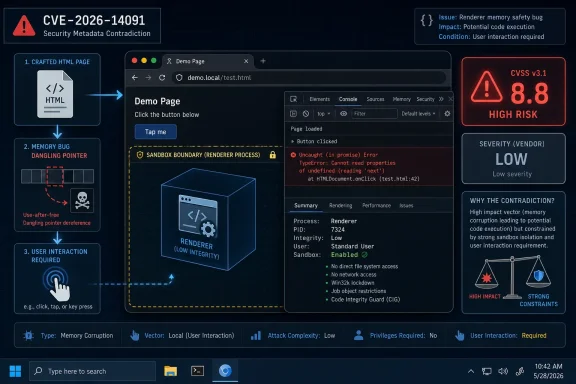 A Low-Severity Chrome Bug Can Still Look High on Paper
Chromium’s “Low” severity label is not a promise that exploitation would be harmless. It is a statement about how Google’s Chrome security team classified the bug inside its own threat model, reward process, and exploitability assumptions. In this case, the description says arbitrary code execution is possible inside a sandbox, via a crafted HTML page, in the DevTools component.That phrase, “inside a sandbox,” is doing a lot of work. Browser vendors spend enormous engineering effort making sure that renderer compromise is not the same thing as full machine compromise. If an attacker gains code execution in a constrained browser process but cannot escape into the operating system, steal broadly from other apps, or persist, the result is still serious but materially different from a complete endpoint takeover.
CISA’s ADP enrichment, by contrast, appears to score the vulnerability according to the possible confidentiality, integrity, and availability impact within the affected security scope. Its vector says network reachable, low complexity, no privileges required, user interaction required, unchanged scope, and high impact across confidentiality, integrity, and availability. That produces the kind of 8.8 score that wakes up vulnerability management systems.
Neither framing is useless. The vendor view is closer to exploit-chain reality: this bug by itself appears to stop at the sandbox boundary. The CVSS view is closer to policy automation: a remote web-triggered memory safety bug with potential code execution should not be buried just because it happens to live in a component developers use.
DevTools Is Supposed to Be a Workbench, Not an Attack Surface
The awkward part of CVE-2026-14091 is the component. DevTools is Chrome’s built-in debugging and inspection environment, the place developers use to examine DOM structure, network traffic, storage, performance, and JavaScript execution. It is not supposed to be part of the ordinary browsing threat surface in the same way as V8, Blink, WebRTC, PDFium, or image codecs.But DevTools has become more than a developer accessory. Power users open it to bypass broken web interfaces, inspect privacy behavior, test extensions, debug enterprise web apps, or copy network requests. Support desks routinely ask users to open it when diagnosing single sign-on failures, certificate errors, CORS problems, blocked resources, or flaky internal portals.
That human pattern is why “user interaction required” deserves respect. A vulnerability that requires a user to open DevTools, interact with a page, or perform a particular gesture is less wormable than a silent drive-by exploit. It is not imaginary, however, especially in environments where users can be socially engineered with instructions that look like troubleshooting steps.
The same week Chrome 150.0.7871.47 circulated, user discussions around Chrome changes included people invoking DevTools as a workaround for extension and page behavior. That does not prove exploitation of CVE-2026-14091, and the CISA enrichment explicitly listed exploitation as “none.” But it illustrates the larger issue: DevTools is no longer a place only professional developers go, and attackers do not need every user to open it. They need the right user to open it at the wrong time.
The Sandbox Boundary Is the Difference Between Incident and Outbreak
Modern Chrome security is built around compartmentalization. The browser assumes hostile web content will eventually trigger memory corruption somewhere, then tries to prevent that first foothold from becoming operating-system control. That is why Chrome exploit writeups so often distinguish renderer code execution from sandbox escape.CVE-2026-14091, as described, allows arbitrary code execution inside a sandbox. That is not a full-chain compromise in the public record. There is no stated sandbox escape, no known exploitation, and no indication from the NVD entry that attackers are using it in the wild.
For administrators, the practical consequence is prioritization rather than panic. A fully patched Chrome estate should move past 150.0.7871.47 or equivalent fixed builds, but this is not the same operational emergency as a confirmed zero-day with observed exploitation. It belongs in the “patch promptly and verify coverage” bucket, not the “disconnect systems and convene crisis bridge” bucket.
Still, defenders should avoid the opposite mistake. Browser sandbox boundaries are strong, not magical. Attackers routinely chain bugs: one flaw for initial code execution, another for escape, another for persistence or credential access. A low-rated DevTools bug can become a useful link if paired with something worse.
The CPE Oddity Is More Than Bureaucratic Noise
The user-facing NVD record includes the familiar prompt: “Are we missing a CPE here?” In this case, the CPE configuration shown in the change history is worth reading carefully because it appears to model Google Chrome versions up to, but excluding, 150.0.7871.46, while the CVE description says Chrome prior to 150.0.7871.47 is affected.That difference is exactly the sort of thing that causes scanner weirdness. If a vulnerability record says “prior to 150.0.7871.47” but the machine-readable configuration excludes only up to 150.0.7871.46, tools may differ on whether 150.0.7871.46 is vulnerable, fixed, or platform-dependent. Google’s Stable Channel posts often contain slightly different build numbers across Windows, macOS, Linux, and Android, which complicates a single clean version boundary.
So, are we missing a CPE? The better answer is that the CPE model may be under-expressive for how Chrome actually ships. A single Chrome release event can involve multiple platform-specific build numbers, staged rollouts, extended stable variants, and Chromium-derived downstream browsers that ingest fixes on their own schedules. CPE wants a tidy product-version-platform tuple; Chrome’s release train often gives it a braid.
For WindowsForum readers, the point is not to litigate NVD schema design. It is to avoid treating CPE presence as the same thing as real exposure. If your asset inventory says Chrome is below the fixed version documented by Google for that platform, patch it. If your scanner says a device is clean because the CPE match missed the edge case, verify the actual browser version before closing the ticket.
Chrome’s Release Train Has Made “One Bug” an Artificial Unit
CVE-2026-14091 did not arrive alone. Google’s late-June Chrome 150 desktop update was part of a very large security release, with third-party reporting from Malwarebytes noting hundreds of fixes in the same update family. That matters because enterprise patching rarely happens one CVE at a time, even if vulnerability management systems pretend otherwise.A Chrome update is an aggregate risk decision. Administrators are not only deciding whether DevTools use-after-free deserves a maintenance window. They are deciding whether the browser’s entire security delta — memory safety fixes, UI issues, component bugs, internal hardening, and undisclosed details — justifies accelerating deployment.
The answer for browsers is usually yes. Chrome, Edge, Brave, Vivaldi, Opera, and other Chromium-derived browsers sit directly on the internet-facing edge of user behavior. They parse hostile code all day. They are also credential brokers, document viewers, video players, PDF handlers, password managers, SSO front ends, and extension platforms.
That is why arguing over “Low” versus “High” can become a distraction. The useful operational unit is not the label attached to CVE-2026-14091. It is whether endpoints have received the Chrome 150 security train that contains the fix.
Microsoft Edge Admins Should Read This as a Chromium Warning, Not a Chrome-Only Footnote
The NVD entry is about Google Chrome, not Microsoft Edge. That distinction matters for formal vulnerability tracking. Edge has its own release notes, update cadence, enterprise policies, and Microsoft Security Response Center handling.But Edge is Chromium-based, and Chromium component vulnerabilities often matter to Edge once the affected code exists in the shared project. The responsible stance for Windows administrators is not to assume exposure from a Chrome CVE alone, but also not to ignore it because the product field says Google. Microsoft’s Edge release notes and security update guide are the authoritative sources for Edge-specific remediation, but Chrome CVEs are early smoke from the same upstream fire.
This is especially relevant in Windows shops where Chrome and Edge coexist. Many organizations standardize on Edge for Microsoft 365 integration while still allowing Chrome for developer workflows, vendor portals, or user preference. DevTools-heavy users — developers, QA engineers, security analysts, web admins — are precisely the population most likely to have multiple Chromium browsers installed.
A tidy enterprise dashboard might show Chrome patched and Edge separately compliant. Reality is messier: portable browsers, unmanaged user installs, old test VMs, lab machines, kiosk profiles, and developer sandboxes often sit outside the cleanest patch rings. CVE-2026-14091 is a reminder to inventory the browsers people actually run, not just the one the enterprise officially blesses.
User Interaction Is Not a Get-Out-of-Patching Card
Security teams have become trained to sort vulnerabilities by exploit preconditions. That is rational. A remote, unauthenticated, no-click bug is generally more urgent than one requiring a user to click, open a tool, or follow instructions.But “user interaction required” can be dangerously soothing in browser land. Phishing is user interaction. Fake support pages are user interaction. Malicious “debug this login issue” instructions are user interaction. A crafted HTML page plus a plausible reason to open DevTools is not the hardest social-engineering story on the internet.
The DevTools angle also intersects with a recurring genre of dubious online advice: paste this into the console, disable that attribute, inspect this element, run this snippet to fix your account, extract this token, or bypass this broken button. Security professionals have warned for years that asking users to paste commands into browser consoles is effectively asking them to execute code in a sensitive context.
CVE-2026-14091 does not need to be the centerpiece of a mass campaign to be worth fixing. It only needs to be useful against developers, administrators, or support personnel with access to internal applications. Those are exactly the users attackers like because their browsers are often full of privileged sessions.
The “Low” Label Reflects Chrome’s Internal Math, Not Your Environment
Vendor severity is always contextual. Google sees the bug, the patch, the exploitability details, the affected component, and the sandbox implications. It also has to maintain a severity taxonomy across thousands of Chromium issues without turning every memory bug into a five-alarm fire.Your environment has a different context. A developer workstation with production cloud credentials, GitHub access, internal dashboards, and multiple authenticated admin consoles is not a casual home browsing session. A low-severity browser bug on that machine may deserve faster remediation than a higher-scored vulnerability on an isolated kiosk.
This is where CVSS can help, but only if treated as an input rather than an oracle. CISA’s vector says the technical impact could be total within the scored scope, which is a useful warning. Chromium’s Low severity says exploitation constraints and sandboxing reduce practical severity, which is also useful. The administrator’s job is to merge those views with asset criticality.
A sane policy would patch this quickly across the fleet, prioritize developer and admin machines, and verify that unmanaged Chrome installations are not lagging. That is neither complacency nor theatrics. It is the mature middle ground between “Low means ignore” and “8.8 means emergency.”
NVD Enrichment Is Still Catching Up With Modern Browser Reality
The NVD record shows no NIST CVSS score yet, while CISA-ADP has supplied enrichment. This is increasingly common in the messy interval after a CVE is published: one database has the description, another has a score, a vendor advisory has the fix, and scanners race to normalize the information.That lag creates downstream consequences. One tool may flag CVE-2026-14091 as high because it ingests CISA-ADP. Another may show it as unscored because it waits for NVD’s own assessment. A third may suppress it because the vendor severity is low. A fourth may mis-handle the version boundary because of CPE ambiguity.
Security teams should expect that inconsistency and design process around it. The first response to a fresh Chrome CVE should be to check the vendor release, the installed version, and whether exploitation is known. The score can inform urgency, but the browser update itself is usually the simplest remediation.
The more interesting policy question is whether vulnerability management platforms should display vendor severity and enrichment severity side by side instead of collapsing them into one number. CVE-2026-14091 is a good argument for doing exactly that. A single red badge cannot explain “remote code execution, but sandboxed; user interaction required; no known exploitation; vendor low; ADP high.”
Patch Rings Need to Move Faster Than the Metadata
Chrome’s auto-update model is one of the great quiet successes of consumer security, but enterprise environments often slow it down deliberately. Admins test extensions, validate line-of-business applications, manage restart behavior, and stagger rollouts to avoid breaking workflows. That caution is understandable, especially when a browser update can disrupt authentication flows, video playback, legacy extensions, or web apps.The risk is that the metadata debate becomes an excuse for delay. While teams argue over severity, the fix is already available. For most users, opening Chrome’s About page or relaunching the browser after auto-update is enough. For managed fleets, the work is ensuring policy does not freeze vulnerable builds beyond the organization’s acceptable exposure window.
Chrome version 150.0.7871.47 is the important Windows and macOS number in the public description supplied for this CVE. Linux and Android release numbers can differ across the same update wave, so administrators should consult platform-specific release notes rather than blindly applying a Windows build number everywhere. The principle is simple even when the versions are not: be on the fixed release for your platform.
Restart discipline remains the overlooked control. Browsers can download updates and still run old vulnerable code until users relaunch. In organizations that keep Chrome open for days or weeks, “update deployed” and “risk removed” are not the same sentence.
The DevTools Bug Is a Small Window Into a Larger Memory-Safety Bill
Use-after-free flaws are a familiar class of memory safety bug: software continues to use memory after it has been freed, potentially allowing corrupted state, crashes, or code execution. Chromium has spent years investing in sandboxing, site isolation, fuzzing, MiraclePtr-style mitigations, safer allocators, and broader hardening because C and C++ memory hazards remain stubbornly productive for attackers.CVE-2026-14091 is not remarkable because it is unique. It is remarkable because it is ordinary. Another component, another dangling pointer, another crafted page, another patch train, another argument over severity.
That ordinariness should not numb us. Browsers are among the most attacked software products in existence because they combine enormous codebases, hostile input, privileged user data, and constant exposure. Every fixed memory corruption bug is one less primitive available to exploit developers, and every delayed patch is another interval in which attackers can compare old and new code.
The long-term answer is not only faster patching. It is more memory-safe code, stronger isolation, narrower DevTools exposure, better warnings around console abuse, and enterprise controls that make dangerous debugging workflows less normal for nontechnical users. But those are strategic improvements. Today’s control is still the update button.
The Practical Reading Is Written in the Version Number
For Windows users, the immediate action is boring by design: make sure Chrome is updated to a fixed build and restart it. The same applies to other Chromium-based browsers once their vendors ship corresponding fixes. Administrators should confirm actual installed versions rather than relying solely on CPE-derived scanner status.For developers and support teams, the behavioral lesson is sharper. Treat DevTools as a privileged interface, not a casual troubleshooting toy. Do not paste untrusted code into the console, do not follow random “inspect element” repair recipes, and be suspicious of support flows that ask users to open debugging tools on an unfamiliar page.
For vulnerability managers, CVE-2026-14091 is a metadata case study. The discrepancy between Chromium’s Low severity and CISA-ADP’s high CVSS score should not be “resolved” by choosing whichever number best fits a dashboard. It should be preserved as context: the bug has exploit constraints, but the affected software is a high-value internet-facing browser.
The Patch Is Small; the Lesson Is Not
CVE-2026-14091 does not currently read like a public internet emergency, but it does read like a clean test of browser patch discipline. The facts are concrete enough to act on and nuanced enough to punish lazy scoring.- Chrome users should update past versions prior to 150.0.7871.47 on affected desktop platforms and restart the browser so the new code is actually running.
- Enterprise administrators should prioritize developer, administrator, and support workstations because those users are more likely to open DevTools and hold privileged sessions.
- Vulnerability teams should treat the CPE and version-boundary details carefully, especially where scanner output appears to conflict with Google’s release wording.
- Microsoft Edge and other Chromium-browser administrators should track their own vendor advisories rather than assuming a Google Chrome CVE is irrelevant to them.
- Security awareness guidance should explicitly warn users against opening DevTools or pasting console commands based on instructions from untrusted pages.
References
- Primary source: NVD / Chromium
Published: 2026-07-03T07:00:19-07:00
NVD - CVE-2026-14091
 nvd.nist.gov
- Security advisory: MSRC
Published: 2026-07-03T07:00:19-07:00
Original feed URL
Security Update Guide - Microsoft Security Response Center
 msrc.microsoft.com
- Related coverage: cvefeed.io
CVE-2026-14091 - Google Chrome DevTools Use-After-Free Remote Code Execution
Use after free in DevTools in Google Chrome prior to 150.0.7871.47 allowed a remote attacker to execute arbitrary code inside a sandbox via a crafted HTML page. (Chromium security severity: Low)cvefeed.io - Related coverage: vuldb.com
CVE-2026-14091 Google Chrome DevTools use after free (ID 513208)
A weakness has been identified in Google Chrome. The identification of this vulnerability is CVE-2026-14091. It is recommended to upgrade the affected component.vuldb.com
