

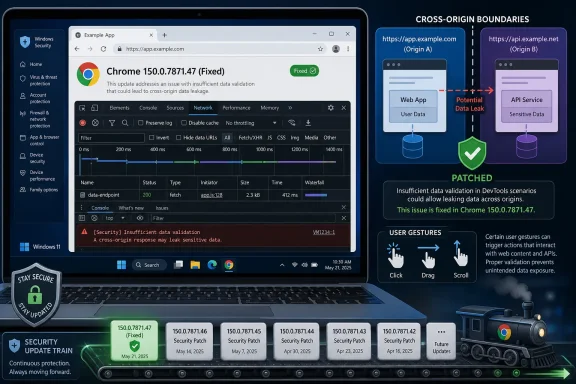
Google fixed CVE-2026-14118 on June 30, 2026, in Chrome 150.0.7871.47 for Windows and Mac, after a low-severity DevTools validation flaw could let a remote attacker leak cross-origin data if a user performed specific UI gestures on a crafted page. The bug is not the kind of Chrome emergency that sends defenders racing for an out-of-band patch window, but it is a useful reminder that “low” in Chromium’s taxonomy does not mean “irrelevant” in real environments. NVD’s subsequent scoring at 6.5 medium, alongside CISA-ADP’s enrichment, tells the more interesting story: browser security now depends as much on strange user-interface edge cases as it does on memory corruption.
Google’s Chrome Releases blog announced the Stable Channel promotion of Chrome 150 on June 30, 2026, with Windows and macOS moving to 150.0.7871.46/.47 and Linux to 150.0.7871.46. The same release carried hundreds of security fixes, including critical and high-severity issues across extensions, GPU, ANGLE, Dawn, Skia, WebUSB, Views, and other browser subsystems.
That release context matters because CVE-2026-14118 is easy to miss. It sits in the long tail of a sprawling Chrome security update, not at the top of the advisory where the use-after-free and sandbox-adjacent bugs naturally draw attention. But browser risk is not only measured by exploit glamour; it is also measured by the assumptions that fail quietly.
The National Vulnerability Database describes CVE-2026-14118 as insufficient data validation in DevTools before Chrome 150.0.7871.47. According to NVD’s entry, an attacker would need to convince a user to engage in specific UI gestures on a crafted HTML page, after which cross-origin data could be leaked. Google’s own Chromium severity is Low, while NVD and CISA-ADP both attach a CVSS 3.1 base score of 6.5, with different emphases on whether the impact is confidentiality or integrity.
That mismatch is not necessarily a contradiction. Google is assessing the bug inside Chromium’s internal severity model, where exploitability, reachability, mitigations, and component exposure all matter. NVD and CISA are fitting the flaw into standardized scoring systems intended for cross-vendor comparison. The result is the kind of split that frustrates patch dashboards but accurately reflects the modern browser: a vulnerability can be constrained, non-automatable, and still security-relevant.
That instinct is partly right, but only partly. Chrome DevTools is no longer a dusty diagnostic panel hiding behind a keyboard shortcut. It is a richly privileged inspection environment wired into page state, storage, script execution, network activity, frames, origins, and browser-internal assumptions about what the user is allowed to see.
The browser’s same-origin policy exists to prevent one site from freely reading data from another. The web would collapse without it: an attacker’s page could otherwise peer into webmail, banking sessions, admin portals, SSO flows, or internal dashboards. A cross-origin leak, even one requiring gesture choreography, is therefore not merely a cosmetic violation.
The phrase specific UI gestures is doing a lot of work here. It suggests the bug was not a one-click exploit in the usual sense, and CISA-ADP’s SSVC entry reportedly marks exploitation as none and automatable as no. But UI-mediated browser bugs have a long history of being underestimated because they depend on human behavior, and human behavior is exactly what phishing, malvertising, and social engineering are built to manipulate.
This is why validation matters. DevTools must constantly decide which data belongs to which origin, which frame, which execution context, which source map, which network request, and which visible or hidden document state. A validation failure in that decision-making does not need to corrupt memory to matter; it only needs to let one origin’s data become observable from the wrong place.
NVD’s classification includes CWE-290, authentication bypass by spoofing, while CISA-ADP maps the issue to CWE-20, improper input validation. Those are different lenses on the same basic failure pattern. One lens sees a trust boundary being fooled; the other sees insufficient scrutiny of data before it is acted upon.
For Windows administrators, this is the kind of bug that should trigger process discipline rather than panic. If Chrome auto-update is working and browsers have reached 150.0.7871.47 or later, the immediate exposure is closed. If update controls, VDI images, kiosk systems, lab workstations, or developer machines lag behind the stable channel, the issue becomes one more reason not to treat browser patching as a casual background process.
In practice, it shows how much interpretation is embedded in CVSS. The public description says “leak cross-origin data,” which naturally points toward confidentiality. Yet the mechanics of UI spoofing or DevTools state confusion could also be interpreted as manipulating what the browser believes the user or interface is doing, which can drag integrity into the model.
Security teams should not overfit their response to that split. The operational answer is simpler than the scoring debate: vulnerable Chrome builds before 150.0.7871.47 should be updated, and environments that expose DevTools heavily should receive particular attention. The distinction between “C:H” and “I:H” is useful for analysts, but it should not become an excuse for delayed remediation.
The more useful data point is CISA-ADP’s SSVC enrichment, which reportedly lists no known exploitation, no automation, and partial technical impact. That combination tells defenders to place the bug below actively exploited Chrome zero-days and sandbox escapes, but above purely theoretical hygiene issues. It is patch-now-through-normal-channels material, not wake-the-CISO-at-midnight material.
Chrome is an operating environment in all but name. It runs untrusted code, brokers credentials, syncs identity, mediates local file access, handles enterprise policy, renders GPU-accelerated content, and serves as the front door to SaaS. In that world, even a “small” bug can become meaningful if it combines with a social-engineering lure, an extension behavior, a compromised site, or a second vulnerability.
The release also illustrates Google’s usual disclosure posture. Bug details and links can remain restricted until most users have updated, especially when the bug may affect shared third-party components or when premature detail would help attackers more than defenders. That leaves administrators with the familiar browser-security bargain: patch first, understand fully later.
There is a good reason for that bargain. Chrome’s update velocity is one of its core defenses. The browser ecosystem assumes that users and enterprises can absorb frequent updates, and that researchers can disclose issues into a pipeline that moves faster than most traditional enterprise software release cycles.
Still, the practical lesson carries over. Chromium-component vulnerabilities often propagate across the Chromium ecosystem unless a given product does not include the affected code path or has already merged the relevant fix. Organizations that standardize on Edge should verify Microsoft’s release notes and deployed Edge versions rather than assuming Chrome’s version string is the only source of truth.
The harder reality is that many Windows environments run both browsers. Developers may use Chrome for testing, help desks may use Edge by policy, executives may install Chrome for familiarity, and line-of-business tools may hard-code browser assumptions that outlive any clean standardization plan. Browser vulnerability management therefore has to inventory actual executables, not theoretical standards.
That is especially true for developer workstations. DevTools bugs are more relevant where DevTools is used routinely, and developer machines often have broad internal access, local secrets, test credentials, cloud CLIs, and relaxed controls. A bug that looks marginal on a locked-down kiosk can look more interesting on a full-stack engineer’s laptop.
But the security industry has learned, repeatedly, that required interaction is not the same thing as impractical exploitation. Users can be guided. Interfaces can be mimicked. Troubleshooting prompts can be abused. “Open DevTools and click here” may sound implausible for the average consumer, but not for developers, support staff, students, bug bounty participants, crypto users, or anyone following instructions from a convincing forum post or fake diagnostic page.
Chrome’s own DevTools culture can amplify that risk. The web is full of legitimate instructions telling users to inspect elements, paste snippets, check console errors, capture network logs, or reproduce bugs with developer tools open. Attackers do not need to invent the behavioral pattern; they can ride on a pattern users already recognize.
That does not mean CVE-2026-14118 is secretly catastrophic. It means the mitigation model should be honest. User interaction reduces exploitability, but it does not eliminate the vulnerability’s value in targeted scenarios where the attacker can tailor instructions to the victim.
Chrome 150.0.7871.47 is the key Windows and Mac fixed build for CVE-2026-14118 as described by NVD. Administrators should confirm that managed devices are at that version or later, and should remember that the Chrome Releases post listed Linux at 150.0.7871.46 for the corresponding stable release. The vulnerable CPE configuration in NVD is versions up to, but excluding, 150.0.7871.47 for Google Chrome.
There is a small but familiar wrinkle here: build numbers are not always a clean substitute for vendor advisories across platforms and channels. Security teams should rely on the vendor’s release notes, their endpoint inventory, and their browser management console rather than hand-copying version thresholds into spreadsheets. That is doubly true in fleets that include Chrome, Edge, Brave, Vivaldi, Electron-based applications, and embedded Chromium runtimes.
The fix path is not exotic. Open Chrome’s About page, let the update apply, relaunch the browser, and verify the version. In managed environments, force update checks through policy and monitoring rather than relying on users to close a browser with 47 pinned tabs and a month-old pending relaunch.
This creates an awkward space for defenders and journalists. We can say the vulnerability involves insufficient data validation in DevTools, cross-origin data leakage, crafted HTML, and required UI gestures. We should not pretend to know the exact gesture sequence, data path, or exploit primitive unless Google or researchers publish more detail.
The restraint matters. Overstating a low-severity bug into a dramatic breach scenario makes users numb. Understating it because the component sounds niche makes administrators sloppy. The responsible middle is to treat the public record as enough to justify timely patching, while acknowledging that the absence of exploit detail is intentional and temporary.
It also means proof-of-concept chatter should be handled carefully. If working exploit details surface, the risk calculus changes. Until then, the available public information supports routine urgent patching, focused validation on high-value developer systems, and continued monitoring for downstream Chromium-based browser advisories.
The better reading is that the browser has become one of the most aggressively tested pieces of software on the planet. Fuzzers, internal audits, bug bounty researchers, academic teams, and real attackers are all pushing against the same attack surface. The result is a constant stream of flaws, many found and fixed before they become practical threats.
That does not absolve vendors. A browser handling authentication, enterprise apps, financial sessions, and device capabilities should be held to a brutal standard. But it does mean that the raw count of fixed bugs is not, by itself, a scandal. The scandal would be a browser that accumulated comparable bugs silently and shipped patches slowly.
For Windows users, the operational lesson is mundane but critical: browser updates are not optional maintenance. They are part of endpoint security, identity security, and data-loss prevention. A low-severity DevTools flaw in a 433-fix release is not a headline-grabbing crisis, but it is one tile in the mosaic of why stale browsers are indefensible.
CVE-2026-14118 belongs to that class. The public description does not point to arbitrary code execution, sandbox escape, or full account compromise. It points to a leak across origin boundaries caused by insufficient validation and mediated through user gestures. That is less dramatic, but it attacks one of the web’s core promises: one site should not get to read another site’s data just because it can trick the browser interface.
This is also why security severity and user severity diverge. A low-severity browser bug may still involve data that users care about. If the leaked material is a token, internal response, private page fragment, or sensitive workflow artifact, the real-world impact depends on context more than on the CVE label.
Security teams should therefore ask a practical question: where would this bug matter most if exploited? The answer is likely not the average home user casually browsing news sites. It is the user with privileged web sessions, developer tools open, internal apps reachable, and enough technical confidence to follow attacker-supplied instructions.
Many organizations still treat browsers as user-managed convenience apps rather than tier-one enterprise software. That model has not matched reality for years. The browser is where identity tokens live, where SaaS data is rendered, where password managers integrate, where admin portals run, and where phishing pages fight security controls in real time.
The best response to this CVE is not a special emergency memo about DevTools. It is a check that Chrome update enforcement works, that pending relaunches are visible, that unmanaged browser installations are discoverable, and that developer workstations are not exempt from patch baselines. A small vulnerability is often most useful as a test of whether the big process works.
There is also a communication lesson. Users do not need a lecture on CWE mappings or CVSS vector disagreements. They need a simple instruction: restart Chrome after the update, and do not follow unsolicited instructions that ask them to open DevTools or perform unusual browser actions on untrusted pages.
It shows how browser flaws increasingly occur in the seams: between user intent and UI interpretation, between developer tooling and page isolation, between internal severity labels and external vulnerability scoring. Those seams are exactly where modern attackers like to work, because they can produce useful outcomes without triggering the spectacle of a classic memory-corruption exploit.
For WindowsForum readers, the concrete implications are narrow but worth acting on:
 A Low-Severity Chrome Bug Lands in a High-Volume Patch Train
Google’s Chrome Releases blog announced the Stable Channel promotion of Chrome 150 on June 30, 2026, with Windows and macOS moving to 150.0.7871.46/.47 and Linux to 150.0.7871.46. The same release carried hundreds of security fixes, including critical and high-severity issues across extensions, GPU, ANGLE, Dawn, Skia, WebUSB, Views, and other browser subsystems.That release context matters because CVE-2026-14118 is easy to miss. It sits in the long tail of a sprawling Chrome security update, not at the top of the advisory where the use-after-free and sandbox-adjacent bugs naturally draw attention. But browser risk is not only measured by exploit glamour; it is also measured by the assumptions that fail quietly.
The National Vulnerability Database describes CVE-2026-14118 as insufficient data validation in DevTools before Chrome 150.0.7871.47. According to NVD’s entry, an attacker would need to convince a user to engage in specific UI gestures on a crafted HTML page, after which cross-origin data could be leaked. Google’s own Chromium severity is Low, while NVD and CISA-ADP both attach a CVSS 3.1 base score of 6.5, with different emphases on whether the impact is confidentiality or integrity.
That mismatch is not necessarily a contradiction. Google is assessing the bug inside Chromium’s internal severity model, where exploitability, reachability, mitigations, and component exposure all matter. NVD and CISA are fitting the flaw into standardized scoring systems intended for cross-vendor comparison. The result is the kind of split that frustrates patch dashboards but accurately reflects the modern browser: a vulnerability can be constrained, non-automatable, and still security-relevant.
DevTools Is Not Just for Developers Anymore
The instinctive reaction to a DevTools bug is to downgrade it mentally. DevTools sounds like a specialist interface, something for web developers, QA engineers, browser tinkerers, and the occasional power user poking through network requests. If the attacker must involve DevTools-style interaction, the blast radius appears smaller than a conventional drive-by browser exploit.That instinct is partly right, but only partly. Chrome DevTools is no longer a dusty diagnostic panel hiding behind a keyboard shortcut. It is a richly privileged inspection environment wired into page state, storage, script execution, network activity, frames, origins, and browser-internal assumptions about what the user is allowed to see.
The browser’s same-origin policy exists to prevent one site from freely reading data from another. The web would collapse without it: an attacker’s page could otherwise peer into webmail, banking sessions, admin portals, SSO flows, or internal dashboards. A cross-origin leak, even one requiring gesture choreography, is therefore not merely a cosmetic violation.
The phrase specific UI gestures is doing a lot of work here. It suggests the bug was not a one-click exploit in the usual sense, and CISA-ADP’s SSVC entry reportedly marks exploitation as none and automatable as no. But UI-mediated browser bugs have a long history of being underestimated because they depend on human behavior, and human behavior is exactly what phishing, malvertising, and social engineering are built to manipulate.
The Same-Origin Policy Keeps Meeting the User Interface
CVE-2026-14118 appears to live at the boundary where browser security rules meet interactive tooling. That boundary is especially treacherous because DevTools is supposed to reveal things. It is designed to inspect, expose, replay, override, and debug the very material that the normal page sandbox carefully abstracts away.This is why validation matters. DevTools must constantly decide which data belongs to which origin, which frame, which execution context, which source map, which network request, and which visible or hidden document state. A validation failure in that decision-making does not need to corrupt memory to matter; it only needs to let one origin’s data become observable from the wrong place.
NVD’s classification includes CWE-290, authentication bypass by spoofing, while CISA-ADP maps the issue to CWE-20, improper input validation. Those are different lenses on the same basic failure pattern. One lens sees a trust boundary being fooled; the other sees insufficient scrutiny of data before it is acted upon.
For Windows administrators, this is the kind of bug that should trigger process discipline rather than panic. If Chrome auto-update is working and browsers have reached 150.0.7871.47 or later, the immediate exposure is closed. If update controls, VDI images, kiosk systems, lab workstations, or developer machines lag behind the stable channel, the issue becomes one more reason not to treat browser patching as a casual background process.
The CVSS Split Says More About Scoring Than About the Bug
The NVD entry gives CVE-2026-14118 a 6.5 medium score with a vector that emphasizes integrity impact and no confidentiality impact. CISA-ADP also scores it 6.5 medium, but its vector emphasizes high confidentiality impact and no integrity impact. That is the sort of discrepancy that can make vulnerability management teams question whether the data feed is broken.In practice, it shows how much interpretation is embedded in CVSS. The public description says “leak cross-origin data,” which naturally points toward confidentiality. Yet the mechanics of UI spoofing or DevTools state confusion could also be interpreted as manipulating what the browser believes the user or interface is doing, which can drag integrity into the model.
Security teams should not overfit their response to that split. The operational answer is simpler than the scoring debate: vulnerable Chrome builds before 150.0.7871.47 should be updated, and environments that expose DevTools heavily should receive particular attention. The distinction between “C:H” and “I:H” is useful for analysts, but it should not become an excuse for delayed remediation.
The more useful data point is CISA-ADP’s SSVC enrichment, which reportedly lists no known exploitation, no automation, and partial technical impact. That combination tells defenders to place the bug below actively exploited Chrome zero-days and sandbox escapes, but above purely theoretical hygiene issues. It is patch-now-through-normal-channels material, not wake-the-CISO-at-midnight material.
Chrome’s June 30 Release Was Bigger Than This One CVE
The June 30 Chrome 150 stable release is notable because CVE-2026-14118 arrived inside a very large security bundle. Google’s release notes say the update includes 433 security fixes, and third-party security outlets such as Malwarebytes highlighted the sheer scale of the patch train. That matters because users rarely install a browser update for one low-severity DevTools issue; they install it because the browser is a permanently exposed runtime.Chrome is an operating environment in all but name. It runs untrusted code, brokers credentials, syncs identity, mediates local file access, handles enterprise policy, renders GPU-accelerated content, and serves as the front door to SaaS. In that world, even a “small” bug can become meaningful if it combines with a social-engineering lure, an extension behavior, a compromised site, or a second vulnerability.
The release also illustrates Google’s usual disclosure posture. Bug details and links can remain restricted until most users have updated, especially when the bug may affect shared third-party components or when premature detail would help attackers more than defenders. That leaves administrators with the familiar browser-security bargain: patch first, understand fully later.
There is a good reason for that bargain. Chrome’s update velocity is one of its core defenses. The browser ecosystem assumes that users and enterprises can absorb frequent updates, and that researchers can disclose issues into a pipeline that moves faster than most traditional enterprise software release cycles.
Windows Shops Should Watch Edge Without Pretending It Is Chrome
For WindowsForum readers, the obvious adjacent question is Microsoft Edge. Edge is Chromium-based, but the presence of a Chrome CVE does not automatically mean the same build number, timing, or exposure maps one-to-one onto Edge. Microsoft packages, validates, and ships its own browser releases, and Edge’s enterprise channels may trail or differ from Google Chrome’s stable channel.Still, the practical lesson carries over. Chromium-component vulnerabilities often propagate across the Chromium ecosystem unless a given product does not include the affected code path or has already merged the relevant fix. Organizations that standardize on Edge should verify Microsoft’s release notes and deployed Edge versions rather than assuming Chrome’s version string is the only source of truth.
The harder reality is that many Windows environments run both browsers. Developers may use Chrome for testing, help desks may use Edge by policy, executives may install Chrome for familiarity, and line-of-business tools may hard-code browser assumptions that outlive any clean standardization plan. Browser vulnerability management therefore has to inventory actual executables, not theoretical standards.
That is especially true for developer workstations. DevTools bugs are more relevant where DevTools is used routinely, and developer machines often have broad internal access, local secrets, test credentials, cloud CLIs, and relaxed controls. A bug that looks marginal on a locked-down kiosk can look more interesting on a full-stack engineer’s laptop.
User Gesture Requirements Are a Speed Bump, Not a Wall
The attacker requirement in CVE-2026-14118 is important: the user must be convinced to engage in specific UI gestures. That lowers the risk compared with a vulnerability triggered by simply loading a page. It also makes the bug less attractive for automated mass exploitation.But the security industry has learned, repeatedly, that required interaction is not the same thing as impractical exploitation. Users can be guided. Interfaces can be mimicked. Troubleshooting prompts can be abused. “Open DevTools and click here” may sound implausible for the average consumer, but not for developers, support staff, students, bug bounty participants, crypto users, or anyone following instructions from a convincing forum post or fake diagnostic page.
Chrome’s own DevTools culture can amplify that risk. The web is full of legitimate instructions telling users to inspect elements, paste snippets, check console errors, capture network logs, or reproduce bugs with developer tools open. Attackers do not need to invent the behavioral pattern; they can ride on a pattern users already recognize.
That does not mean CVE-2026-14118 is secretly catastrophic. It means the mitigation model should be honest. User interaction reduces exploitability, but it does not eliminate the vulnerability’s value in targeted scenarios where the attacker can tailor instructions to the victim.
Enterprise Controls Need to Treat Browsers as Managed Software
The safest Chrome installation is the one that updates without becoming a project. For consumers, that usually means letting Chrome’s built-in updater do its job and relaunching promptly when the browser asks. For enterprises, it means making sure update policies, maintenance windows, security tools, and change-control habits do not quietly turn “rolls out over the coming days/weeks” into “still vulnerable next quarter.”Chrome 150.0.7871.47 is the key Windows and Mac fixed build for CVE-2026-14118 as described by NVD. Administrators should confirm that managed devices are at that version or later, and should remember that the Chrome Releases post listed Linux at 150.0.7871.46 for the corresponding stable release. The vulnerable CPE configuration in NVD is versions up to, but excluding, 150.0.7871.47 for Google Chrome.
There is a small but familiar wrinkle here: build numbers are not always a clean substitute for vendor advisories across platforms and channels. Security teams should rely on the vendor’s release notes, their endpoint inventory, and their browser management console rather than hand-copying version thresholds into spreadsheets. That is doubly true in fleets that include Chrome, Edge, Brave, Vivaldi, Electron-based applications, and embedded Chromium runtimes.
The fix path is not exotic. Open Chrome’s About page, let the update apply, relaunch the browser, and verify the version. In managed environments, force update checks through policy and monitoring rather than relying on users to close a browser with 47 pinned tabs and a month-old pending relaunch.
The Public Details Are Thin by Design
The Chromium issue referenced for CVE-2026-14118 is access-restricted at the time of public tracking. That is normal for Chrome vulnerabilities shortly after release. Google often limits access to bug details until the patched version has reached most users, because detailed repro steps can become an exploit-development roadmap.This creates an awkward space for defenders and journalists. We can say the vulnerability involves insufficient data validation in DevTools, cross-origin data leakage, crafted HTML, and required UI gestures. We should not pretend to know the exact gesture sequence, data path, or exploit primitive unless Google or researchers publish more detail.
The restraint matters. Overstating a low-severity bug into a dramatic breach scenario makes users numb. Understating it because the component sounds niche makes administrators sloppy. The responsible middle is to treat the public record as enough to justify timely patching, while acknowledging that the absence of exploit detail is intentional and temporary.
It also means proof-of-concept chatter should be handled carefully. If working exploit details surface, the risk calculus changes. Until then, the available public information supports routine urgent patching, focused validation on high-value developer systems, and continued monitoring for downstream Chromium-based browser advisories.
The Browser Patch Machine Is Now Security Infrastructure
Chrome’s rapid patch cadence can feel absurd from the outside. One week brings a major update, another brings a zero-day fix, another brings hundreds of security entries in a single train. It is tempting to see this as evidence of fragility.The better reading is that the browser has become one of the most aggressively tested pieces of software on the planet. Fuzzers, internal audits, bug bounty researchers, academic teams, and real attackers are all pushing against the same attack surface. The result is a constant stream of flaws, many found and fixed before they become practical threats.
That does not absolve vendors. A browser handling authentication, enterprise apps, financial sessions, and device capabilities should be held to a brutal standard. But it does mean that the raw count of fixed bugs is not, by itself, a scandal. The scandal would be a browser that accumulated comparable bugs silently and shipped patches slowly.
For Windows users, the operational lesson is mundane but critical: browser updates are not optional maintenance. They are part of endpoint security, identity security, and data-loss prevention. A low-severity DevTools flaw in a 433-fix release is not a headline-grabbing crisis, but it is one tile in the mosaic of why stale browsers are indefensible.
DevTools Bugs Expose the Gap Between Power and Trust
DevTools is powerful because it is trusted. It lets users and developers see what the page is doing, and in some cases influence how it behaves. That trust creates a special class of browser risk where the line between “debugging feature” and “confused deputy” can become thin.CVE-2026-14118 belongs to that class. The public description does not point to arbitrary code execution, sandbox escape, or full account compromise. It points to a leak across origin boundaries caused by insufficient validation and mediated through user gestures. That is less dramatic, but it attacks one of the web’s core promises: one site should not get to read another site’s data just because it can trick the browser interface.
This is also why security severity and user severity diverge. A low-severity browser bug may still involve data that users care about. If the leaked material is a token, internal response, private page fragment, or sensitive workflow artifact, the real-world impact depends on context more than on the CVE label.
Security teams should therefore ask a practical question: where would this bug matter most if exploited? The answer is likely not the average home user casually browsing news sites. It is the user with privileged web sessions, developer tools open, internal apps reachable, and enough technical confidence to follow attacker-supplied instructions.
The Patch Is Simple; The Discipline Is Not
The remediation for CVE-2026-14118 is straightforward: update Chrome to a fixed version, which for Windows and Mac means 150.0.7871.47 or later according to NVD’s affected-version data and Google’s stable release. The discipline around that remediation is the hard part.Many organizations still treat browsers as user-managed convenience apps rather than tier-one enterprise software. That model has not matched reality for years. The browser is where identity tokens live, where SaaS data is rendered, where password managers integrate, where admin portals run, and where phishing pages fight security controls in real time.
The best response to this CVE is not a special emergency memo about DevTools. It is a check that Chrome update enforcement works, that pending relaunches are visible, that unmanaged browser installations are discoverable, and that developer workstations are not exempt from patch baselines. A small vulnerability is often most useful as a test of whether the big process works.
There is also a communication lesson. Users do not need a lecture on CWE mappings or CVSS vector disagreements. They need a simple instruction: restart Chrome after the update, and do not follow unsolicited instructions that ask them to open DevTools or perform unusual browser actions on untrusted pages.
Chrome 150 Turns a Niche DevTools Flaw Into a Fleet Hygiene Test
CVE-2026-14118 will not be remembered as the defining Chrome vulnerability of 2026. It may never receive a public exploit narrative, and it may remain one entry among hundreds in the Chrome 150 security ledger. That does not make it useless as a signal.It shows how browser flaws increasingly occur in the seams: between user intent and UI interpretation, between developer tooling and page isolation, between internal severity labels and external vulnerability scoring. Those seams are exactly where modern attackers like to work, because they can produce useful outcomes without triggering the spectacle of a classic memory-corruption exploit.
For WindowsForum readers, the concrete implications are narrow but worth acting on:
- Chrome users on Windows and macOS should be on 150.0.7871.47 or later to receive the fix for CVE-2026-14118.
- The vulnerability requires user interaction and is not currently described by CISA-ADP as automated or known exploited.
- The bug involves DevTools and cross-origin data leakage, so developer workstations and technically inclined users deserve special attention.
- NVD and CISA-ADP both score the issue as 6.5 medium, even though Chromium labels it low severity.
- Administrators should verify actual deployed browser versions rather than assuming auto-update has completed across the fleet.
- Users should be wary of web pages, forum posts, or support messages that instruct them to open DevTools and perform unfamiliar actions.
References
- Primary source: NVD / Chromium
Published: 2026-07-03T07:00:47-07:00
NVD - CVE-2026-14118
 nvd.nist.gov
- Security advisory: MSRC
Published: 2026-07-03T07:00:47-07:00
Original feed URL
Security Update Guide - Microsoft Security Response Center
 msrc.microsoft.com
- Related coverage: cvefeed.io
CVE-2026-14118 - Google Chrome DevTools Cross-Origin Data Leak
Insufficient data validation in DevTools in Google Chrome prior to 150.0.7871.47 allowed a remote attacker who convinced a user to engage in specific UI gestures to leak cross-origin data via a crafted HTML page. (Chromium security severity: Low)cvefeed.io - Related coverage: windowsforum.com
Chrome CVE-2026-14116 DevTools Fix: Patch Before 150.0.7871.47 | Windows Forum
Google fixed CVE-2026-14116 in Chrome 150.0.7871.47 for Windows and Mac as part of the June 30, 2026 stable desktop release, after documenting a...windowsforum.com - Related coverage: vuldb.com
CVE-2026-14118 Google Chrome DevTools cross-domain policy (ID 513772)
A weakness has been identified in Google Chrome. This vulnerability is tracked as CVE-2026-14118. The affected component should be upgraded.vuldb.com
