

Google Chrome before version 150.0.7871.47 contained CVE-2026-13963, a medium-severity DevTools flaw disclosed on June 30, 2026, that could let a remote attacker leak cross-origin data from a crafted HTML page after persuading a user to perform specific interface gestures. The bug is not the sort of headline-grabbing memory-corruption zero-day that sends incident responders into all-hands mode. But it sits in a more uncomfortable place for Windows users and administrators: the boundary between browser security assumptions, developer tooling, and human interaction. As documented by the National Vulnerability Database and Google’s Chrome Releases advisory, this is a reminder that “medium” does not mean “irrelevant” when the affected component is a privileged inspection surface built into the world’s most widely deployed browser.
CVE-2026-13963 is described in deliberately sparse language: “inappropriate implementation in DevTools” in Google Chrome prior to 150.0.7871.47. The attack requires a crafted HTML page and a user who can be convinced to perform specific UI gestures. The impact, according to the published description, is a leak of cross-origin data.
That phrasing matters. Cross-origin protections are one of the foundations of modern browser security. The web works because Chrome, Edge, Firefox, and Safari are supposed to prevent one site from casually reading another site’s data, even when both are open in the same browser session.
The fact that this bug lives in DevTools makes it more specialized than the usual drive-by browser flaw. DevTools is not just another settings pane. It is an inspection and debugging environment with unusually deep visibility into page state, network traffic, storage, scripts, frames, and browser behavior.
That does not automatically make every DevTools bug catastrophic. It does mean that browser vendors have to treat DevTools as a sensitive surface, even though many ordinary users never intentionally open it.
That sounds reassuring until one remembers how many real-world browser attacks depend on user interaction. Phishing, fake support pages, malicious “copy and paste this into DevTools” scams, and social-engineered troubleshooting flows all live in the space between a technical weakness and a human decision.
The important phrase here is “specific UI gestures.” Google and Chromium do not fully disclose exploit mechanics immediately, and that restraint is normal while patches are still propagating. But the broad shape is clear enough: an attacker cannot merely host a page and silently extract data from every visitor; the victim must do something.
That requirement narrows the threat. It does not erase it. A well-crafted lure aimed at developers, administrators, crypto users, gamers, or help-desk staff can turn “user interaction required” into a practical condition rather than an academic limitation.
Chrome and Edge both display warnings when users paste code into the DevTools console, precisely because browser vendors know this behavior is dangerous. But warnings are friction, not force fields. Users who believe they are following instructions from a support agent, influencer, forum post, or fake troubleshooting guide may still proceed.
CVE-2026-13963 appears to fit into that broader category of bugs where the browser’s own power-user interface becomes part of the attack story. The flaw is not described as remote code execution. It is not described as sandbox escape. It is a data leak tied to cross-origin boundaries and UI manipulation.
That distinction is important for risk triage. It is also why administrators should not file it away as harmless. Confidentiality bugs often become useful when chained with account context, session state, intranet access, or targeted social engineering.
NVD’s change history shows that the CVE was received from Chrome on June 30, 2026, modified by CISA-ADP on July 1, and enriched by NIST on July 2 with the Chrome CPE configuration for versions before 150.0.7871.47. That sequence is typical of modern vulnerability publication: the vendor ships, the CVE record appears, enrichment follows, and scanners catch up.
For Windows administrators, the lag matters. A vulnerability can be patched upstream before every inventory product, exposure dashboard, and compliance report agrees on the affected-product mapping. In this case, NVD’s note about CPE loading and the added Chrome CPE is not just database housekeeping; it affects whether vulnerability scanners correctly flag older Chrome installations.
The CPE listed by NVD identifies Google Chrome versions up to, but excluding, 150.0.7871.47 as vulnerable. If an asset system is not detecting that configuration yet, the absence of a finding should not be treated as proof of safety.
That is where a medium Chrome CVE becomes an IT operations story. The question is not merely whether Google fixed it. The question is whether every system that can open sensitive internal web applications is actually running the fixed build.
Administrators should care about three classes of machines. The first is developer workstations, where DevTools is open frequently and users are accustomed to inspecting pages. The second is privileged administrative workstations, where browser sessions may carry access to dashboards, identity portals, cloud consoles, and internal apps. The third is unmanaged or lightly managed endpoints, where Chrome may update eventually but not necessarily on the timeline risk teams expect.
Microsoft Edge users should also watch Chromium-based browser updates closely, even though this CVE record names Google Chrome. Edge, Brave, Vivaldi, Opera, and other Chromium-derived browsers do not always ship fixes on precisely the same day as Chrome. A Chromium flaw becomes an ecosystem issue when the affected code is shared, but each vendor’s release notes determine the specific patched version and timeline for its browser.
That hierarchy is reasonable, but it can become lazy. CVE-2026-13963 has a low CISA-ADP CVSS score because exploitation is not straightforward and the disclosed impact is limited to confidentiality. Yet the business relevance of confidentiality depends on whose browser is affected and what that browser can see.
A data leak from a consumer news site is one thing. A data leak involving an administrator logged into an identity provider, a developer viewing a staging environment, or an analyst accessing customer records is another. Browser vulnerabilities do not need kernel privileges to matter when the browser is already the front door to SaaS, cloud control planes, and internal web tools.
This is where Chrome’s ubiquity cuts both ways. A single browser security fix reaches enormous scale quickly through auto-update, but a single Chrome vulnerability also has an enormous potential target population before that update lands.
Without same-origin protections and related controls, the web would be unusable for banking, email, administration, collaboration, and commerce. Any random page could attempt to peer into authenticated sessions elsewhere. Modern browsers add layers of defenses around that model, from CORS and site isolation to process sandboxing and cookie controls.
CVE-2026-13963 does not say those defenses are broadly broken. It says a DevTools implementation flaw could allow leakage under specific conditions. That is narrower, but the category still deserves respect because it touches the browser’s promise that one site cannot simply harvest another site’s data.
For WindowsForum readers, the practical lesson is not to panic about every cross-origin bug. It is to understand that the browser is now an operating environment in its own right. The old mental model of “Windows is the platform and the browser is an app” understates how much sensitive work now happens inside tabs.
That restraint frustrates defenders who want to understand exploitability immediately. It also prevents attackers from receiving a ready-made exploit recipe while the patch is still rolling out. In browser security, disclosure is a race between transparency and weaponization.
NVD’s record adds useful context but not exploit mechanics. CISA-ADP assigned CWE-352, Cross-Site Request Forgery, although the public description emphasizes cross-origin data leakage through DevTools. That classification should be read as enrichment, not a complete technical root-cause analysis.
The safe interpretation is conservative: do not assume the bug is exploitable in the wild, because CISA’s SSVC entry says exploitation is “none” at the time of enrichment; do not assume it is trivial, because attack complexity is high; and do not assume it is irrelevant, because the affected feature can expose sensitive browser state.
That context is important. When a release carries hundreds of security fixes, individual medium-severity entries can disappear into the noise. Administrators may see “Chrome update available” rather than “a DevTools data-leak bug affects versions before 150.0.7871.47.”
Large patch bundles create a communications problem. The cumulative security value is high, but the specificity that drives urgency is low. Users rarely read Chrome release notes, and many IT teams rely on endpoint tooling to translate vendor advisories into risk.
That translation can lag, especially when NVD enrichment arrives after the vendor release. The result is a short window in which the fixed build exists, the CVE exists, but internal dashboards may not yet tell the whole story.
Chrome can download an update without fully applying it until restart. In consumer contexts, that usually resolves itself. In enterprise contexts, users may keep sessions open for days, virtual desktops may revert, and managed devices may sit behind policies that delay deployment.
The most reliable control is central visibility. Microsoft Intune, Configuration Manager, third-party RMM tools, enterprise browser management, EDR inventory, and vulnerability scanners should all be able to report Chrome versions. The catch is that those systems need to be queried for the exact build, not merely for “Chrome installed.”
For unmanaged users, the path remains the familiar one: open Chrome’s About page or navigate to the help section, let the browser check for updates, and restart when prompted. It is boring advice because browser security has succeeded in making the right thing boring. The dangerous part is assuming boring means optional.
This is a delicate tradeoff. Developers, QA engineers, support teams, and web administrators need DevTools to do their jobs. Blocking it broadly in those groups would create shadow workflows and resentment. But allowing DevTools everywhere by default may no longer be the best baseline for heavily managed endpoints.
The better approach is role-based. Developer machines get DevTools and faster patch rings. Kiosks, shared workstations, call-center devices, and tightly controlled administrative machines get stricter browser policies. Privileged access workstations should be treated as special, because their browser sessions are special.
The bigger cultural shift is to stop treating DevTools as harmless because it is built in. Built-in tools can still be dangerous in the wrong context. PowerShell is built into Windows; that has never made it risk-free.
That advice should be especially prominent for communities that trade browser tweaks and workarounds. Reddit threads, Discord servers, gaming forums, extension communities, and crypto groups often normalize DevTools manipulation as a quick fix. Attackers only need to make malicious instructions look like one more workaround.
This is where security awareness has to become more specific. “Don’t click suspicious links” is too broad to change behavior. “Don’t open DevTools and perform steps you do not understand just because a page tells you to” is concrete enough to matter.
For IT teams, the message should be paired with policy and patching, not substituted for them. User training is a weak control by itself. But when a vulnerability explicitly depends on user gestures, reducing the supply of willing gestures is part of defense.
This is a common source of confusion. NVD pages can show transitional language while enrichment is in progress, and downstream tools may ingest CVE metadata on their own schedules. A vulnerability record may be technically updated before a particular scanner, SBOM platform, or asset-management product reflects it.
The affected product information from Chrome also appears slightly awkward in the CVE record, because it lists version 150.0.7871.47 with a less-than relationship to the same version. In practical terms, the intended meaning is clear: versions earlier than 150.0.7871.47 are affected, and 150.0.7871.47 is the fixed threshold.
For compliance reporting, that distinction matters. A report should not mark 150.0.7871.47 itself as vulnerable if the comparison is “less than 150.0.7871.47.” Administrators should verify how their tooling interprets the version boundary rather than relying solely on the textual appearance of the affected-version object.
But modern endpoint security is not made of single bugs in isolation. It is made of accumulated exceptions: the browser has DevTools, DevTools has privileged visibility, the user can be coached into gestures, enterprise patching may lag, and cross-origin data may be more valuable than its CVSS score suggests.
That is why the right response is measured urgency. Patch Chrome. Confirm the build. Watch Chromium-based browsers. Review where DevTools should be allowed. Warn users against DevTools-based “fixes” from untrusted sources.
The security industry often reserves its attention for the spectacular: zero-days, ransomware chains, kernel bugs, supply-chain compromises. CVE-2026-13963 is less dramatic. Its value is in showing how much risk now lives in the seams between ordinary web behavior and extraordinary browser capability.
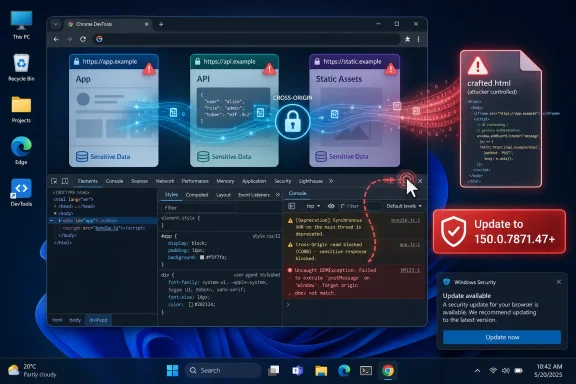 Chrome’s DevTools Bug Is Small, but the Boundary It Crosses Is Not
CVE-2026-13963 is described in deliberately sparse language: “inappropriate implementation in DevTools” in Google Chrome prior to 150.0.7871.47. The attack requires a crafted HTML page and a user who can be convinced to perform specific UI gestures. The impact, according to the published description, is a leak of cross-origin data.That phrasing matters. Cross-origin protections are one of the foundations of modern browser security. The web works because Chrome, Edge, Firefox, and Safari are supposed to prevent one site from casually reading another site’s data, even when both are open in the same browser session.
The fact that this bug lives in DevTools makes it more specialized than the usual drive-by browser flaw. DevTools is not just another settings pane. It is an inspection and debugging environment with unusually deep visibility into page state, network traffic, storage, scripts, frames, and browser behavior.
That does not automatically make every DevTools bug catastrophic. It does mean that browser vendors have to treat DevTools as a sensitive surface, even though many ordinary users never intentionally open it.
The Attack Requires a User, Which Is Exactly Why It Should Not Be Dismissed
CISA’s ADP enrichment gives the vulnerability a CVSS 3.1 score of 3.1, placing it in the low range despite Chromium labeling the security severity as medium. The vector tells the story: network attack vector, high attack complexity, no privileges required, user interaction required, unchanged scope, and low confidentiality impact.That sounds reassuring until one remembers how many real-world browser attacks depend on user interaction. Phishing, fake support pages, malicious “copy and paste this into DevTools” scams, and social-engineered troubleshooting flows all live in the space between a technical weakness and a human decision.
The important phrase here is “specific UI gestures.” Google and Chromium do not fully disclose exploit mechanics immediately, and that restraint is normal while patches are still propagating. But the broad shape is clear enough: an attacker cannot merely host a page and silently extract data from every visitor; the victim must do something.
That requirement narrows the threat. It does not erase it. A well-crafted lure aimed at developers, administrators, crypto users, gamers, or help-desk staff can turn “user interaction required” into a practical condition rather than an academic limitation.
DevTools Has Become a Social-Engineering Target
For years, DevTools was treated as a developer-only feature. That framing is outdated. Attackers have learned that DevTools can be repurposed as a psychological prop: “open the console,” “paste this command,” “inspect this element,” “disable this warning,” “change this value.”Chrome and Edge both display warnings when users paste code into the DevTools console, precisely because browser vendors know this behavior is dangerous. But warnings are friction, not force fields. Users who believe they are following instructions from a support agent, influencer, forum post, or fake troubleshooting guide may still proceed.
CVE-2026-13963 appears to fit into that broader category of bugs where the browser’s own power-user interface becomes part of the attack story. The flaw is not described as remote code execution. It is not described as sandbox escape. It is a data leak tied to cross-origin boundaries and UI manipulation.
That distinction is important for risk triage. It is also why administrators should not file it away as harmless. Confidentiality bugs often become useful when chained with account context, session state, intranet access, or targeted social engineering.
The Patch Line Is Clear: Chrome 150.0.7871.47 or Later
The operational answer is simple: Chrome must be updated to 150.0.7871.47 or later on affected desktop systems. Google’s Stable Channel Update for Desktop, published through the Chrome Releases blog, is the vendor advisory NVD associates with the CVE.NVD’s change history shows that the CVE was received from Chrome on June 30, 2026, modified by CISA-ADP on July 1, and enriched by NIST on July 2 with the Chrome CPE configuration for versions before 150.0.7871.47. That sequence is typical of modern vulnerability publication: the vendor ships, the CVE record appears, enrichment follows, and scanners catch up.
For Windows administrators, the lag matters. A vulnerability can be patched upstream before every inventory product, exposure dashboard, and compliance report agrees on the affected-product mapping. In this case, NVD’s note about CPE loading and the added Chrome CPE is not just database housekeeping; it affects whether vulnerability scanners correctly flag older Chrome installations.
The CPE listed by NVD identifies Google Chrome versions up to, but excluding, 150.0.7871.47 as vulnerable. If an asset system is not detecting that configuration yet, the absence of a finding should not be treated as proof of safety.
The Browser Patch Problem Is Really an Inventory Problem
Chrome’s auto-update system is one of the better consumer patching mechanisms in the industry, but enterprise Windows environments are rarely pure consumer environments. Browser updates may be governed by Group Policy, endpoint management rings, software deployment windows, golden images, nonpersistent virtual desktops, kiosk builds, or application compatibility gates.That is where a medium Chrome CVE becomes an IT operations story. The question is not merely whether Google fixed it. The question is whether every system that can open sensitive internal web applications is actually running the fixed build.
Administrators should care about three classes of machines. The first is developer workstations, where DevTools is open frequently and users are accustomed to inspecting pages. The second is privileged administrative workstations, where browser sessions may carry access to dashboards, identity portals, cloud consoles, and internal apps. The third is unmanaged or lightly managed endpoints, where Chrome may update eventually but not necessarily on the timeline risk teams expect.
Microsoft Edge users should also watch Chromium-based browser updates closely, even though this CVE record names Google Chrome. Edge, Brave, Vivaldi, Opera, and other Chromium-derived browsers do not always ship fixes on precisely the same day as Chrome. A Chromium flaw becomes an ecosystem issue when the affected code is shared, but each vendor’s release notes determine the specific patched version and timeline for its browser.
“Medium” Is a Vendor Word, Not a Business Decision
Security teams have become fluent in severity labels, sometimes too fluent. Critical flaws get emergency change windows. High flaws get accelerated patching. Medium and low flaws often fall into the next routine cycle.That hierarchy is reasonable, but it can become lazy. CVE-2026-13963 has a low CISA-ADP CVSS score because exploitation is not straightforward and the disclosed impact is limited to confidentiality. Yet the business relevance of confidentiality depends on whose browser is affected and what that browser can see.
A data leak from a consumer news site is one thing. A data leak involving an administrator logged into an identity provider, a developer viewing a staging environment, or an analyst accessing customer records is another. Browser vulnerabilities do not need kernel privileges to matter when the browser is already the front door to SaaS, cloud control planes, and internal web tools.
This is where Chrome’s ubiquity cuts both ways. A single browser security fix reaches enormous scale quickly through auto-update, but a single Chrome vulnerability also has an enormous potential target population before that update lands.
Cross-Origin Data Is the Prize Browsers Were Built to Protect
The phrase cross-origin data can sound abstract, but it is central to the browser security model. An origin is roughly the combination of scheme, host, and port: the security boundary that prevents one website from reading another website’s content.Without same-origin protections and related controls, the web would be unusable for banking, email, administration, collaboration, and commerce. Any random page could attempt to peer into authenticated sessions elsewhere. Modern browsers add layers of defenses around that model, from CORS and site isolation to process sandboxing and cookie controls.
CVE-2026-13963 does not say those defenses are broadly broken. It says a DevTools implementation flaw could allow leakage under specific conditions. That is narrower, but the category still deserves respect because it touches the browser’s promise that one site cannot simply harvest another site’s data.
For WindowsForum readers, the practical lesson is not to panic about every cross-origin bug. It is to understand that the browser is now an operating environment in its own right. The old mental model of “Windows is the platform and the browser is an app” understates how much sensitive work now happens inside tabs.
Google’s Disclosure Is Sparse by Design
Google’s Chrome security advisories are famously restrained. They identify CVEs, severity, affected components, bug IDs, and sometimes rewards, but they often withhold technical detail until most users have updated. The Chromium issue linked from NVD for CVE-2026-13963 requires permissions, which is common for still-sensitive bug reports.That restraint frustrates defenders who want to understand exploitability immediately. It also prevents attackers from receiving a ready-made exploit recipe while the patch is still rolling out. In browser security, disclosure is a race between transparency and weaponization.
NVD’s record adds useful context but not exploit mechanics. CISA-ADP assigned CWE-352, Cross-Site Request Forgery, although the public description emphasizes cross-origin data leakage through DevTools. That classification should be read as enrichment, not a complete technical root-cause analysis.
The safe interpretation is conservative: do not assume the bug is exploitable in the wild, because CISA’s SSVC entry says exploitation is “none” at the time of enrichment; do not assume it is trivial, because attack complexity is high; and do not assume it is irrelevant, because the affected feature can expose sensitive browser state.
The June 30 Chrome Update Was Bigger Than One CVE
CVE-2026-13963 landed inside a large Chrome stable update, not as a standalone emergency advisory. Reporting from Malwarebytes and Born’s IT and Windows Blog noted the unusually large number of fixes in the Chrome 150.0.7871.46/.47 release train, with Google’s update covering hundreds of security changes across desktop platforms.That context is important. When a release carries hundreds of security fixes, individual medium-severity entries can disappear into the noise. Administrators may see “Chrome update available” rather than “a DevTools data-leak bug affects versions before 150.0.7871.47.”
Large patch bundles create a communications problem. The cumulative security value is high, but the specificity that drives urgency is low. Users rarely read Chrome release notes, and many IT teams rely on endpoint tooling to translate vendor advisories into risk.
That translation can lag, especially when NVD enrichment arrives after the vendor release. The result is a short window in which the fixed build exists, the CVE exists, but internal dashboards may not yet tell the whole story.
Windows Shops Should Treat Browser Updates Like Endpoint Security Updates
The practical advice for Windows administrators is not exotic. Confirm Chrome’s version. Confirm update policy. Confirm restart behavior. Confirm that the browser has actually relaunched into the fixed build.Chrome can download an update without fully applying it until restart. In consumer contexts, that usually resolves itself. In enterprise contexts, users may keep sessions open for days, virtual desktops may revert, and managed devices may sit behind policies that delay deployment.
The most reliable control is central visibility. Microsoft Intune, Configuration Manager, third-party RMM tools, enterprise browser management, EDR inventory, and vulnerability scanners should all be able to report Chrome versions. The catch is that those systems need to be queried for the exact build, not merely for “Chrome installed.”
For unmanaged users, the path remains the familiar one: open Chrome’s About page or navigate to the help section, let the browser check for updates, and restart when prompted. It is boring advice because browser security has succeeded in making the right thing boring. The dangerous part is assuming boring means optional.
DevTools Policy Is No Longer Just a Developer Preference
Organizations that do not need DevTools on general-purpose endpoints should consider whether policy restrictions make sense. Chrome Enterprise policies allow administrators to control developer tools availability in managed environments. That is not a substitute for patching, but it can reduce the usefulness of DevTools-centered social engineering on machines where users have no business opening the panel.This is a delicate tradeoff. Developers, QA engineers, support teams, and web administrators need DevTools to do their jobs. Blocking it broadly in those groups would create shadow workflows and resentment. But allowing DevTools everywhere by default may no longer be the best baseline for heavily managed endpoints.
The better approach is role-based. Developer machines get DevTools and faster patch rings. Kiosks, shared workstations, call-center devices, and tightly controlled administrative machines get stricter browser policies. Privileged access workstations should be treated as special, because their browser sessions are special.
The bigger cultural shift is to stop treating DevTools as harmless because it is built in. Built-in tools can still be dangerous in the wrong context. PowerShell is built into Windows; that has never made it risk-free.
Users Need a Better Warning Than “Update Chrome”
The standard security message — update your browser — is true but incomplete. CVE-2026-13963’s social-engineering angle suggests a second message: do not follow instructions from a website, chat message, video, or stranger that asks you to open DevTools and perform unexplained actions.That advice should be especially prominent for communities that trade browser tweaks and workarounds. Reddit threads, Discord servers, gaming forums, extension communities, and crypto groups often normalize DevTools manipulation as a quick fix. Attackers only need to make malicious instructions look like one more workaround.
This is where security awareness has to become more specific. “Don’t click suspicious links” is too broad to change behavior. “Don’t open DevTools and perform steps you do not understand just because a page tells you to” is concrete enough to matter.
For IT teams, the message should be paired with policy and patching, not substituted for them. User training is a weak control by itself. But when a vulnerability explicitly depends on user gestures, reducing the supply of willing gestures is part of defense.
The Scanner Gap Is Where False Confidence Lives
The user’s question asks whether a CPE is missing. Based on NVD’s change history, NIST added a Chrome CPE configuration on July 2, 2026: Google Chrome versions up to, but excluding, 150.0.7871.47. That means the public record does contain a vulnerable software configuration, though scanner and database synchronization may still vary.This is a common source of confusion. NVD pages can show transitional language while enrichment is in progress, and downstream tools may ingest CVE metadata on their own schedules. A vulnerability record may be technically updated before a particular scanner, SBOM platform, or asset-management product reflects it.
The affected product information from Chrome also appears slightly awkward in the CVE record, because it lists version 150.0.7871.47 with a less-than relationship to the same version. In practical terms, the intended meaning is clear: versions earlier than 150.0.7871.47 are affected, and 150.0.7871.47 is the fixed threshold.
For compliance reporting, that distinction matters. A report should not mark 150.0.7871.47 itself as vulnerable if the comparison is “less than 150.0.7871.47.” Administrators should verify how their tooling interprets the version boundary rather than relying solely on the textual appearance of the affected-version object.
The Real Lesson Is That Browser Trust Has Too Many Quiet Exceptions
CVE-2026-13963 is not a crisis on its own. There is no public indication in the supplied NVD data that it is being exploited in the wild, and CISA’s SSVC enrichment says exploitation was not observed at the time. The attack complexity is high, the user-interaction requirement is real, and the disclosed impact is limited.But modern endpoint security is not made of single bugs in isolation. It is made of accumulated exceptions: the browser has DevTools, DevTools has privileged visibility, the user can be coached into gestures, enterprise patching may lag, and cross-origin data may be more valuable than its CVSS score suggests.
That is why the right response is measured urgency. Patch Chrome. Confirm the build. Watch Chromium-based browsers. Review where DevTools should be allowed. Warn users against DevTools-based “fixes” from untrusted sources.
The security industry often reserves its attention for the spectacular: zero-days, ransomware chains, kernel bugs, supply-chain compromises. CVE-2026-13963 is less dramatic. Its value is in showing how much risk now lives in the seams between ordinary web behavior and extraordinary browser capability.
The Chrome 150 Fix Leaves Administrators With a Short Checklist
This is one of those browser advisories where the mitigation is easier than the explanation. The nuance belongs in risk assessment; the action belongs in patch management.- Chrome installations on Windows, macOS, and Linux should be checked against the fixed Chrome 150.0.7871.47 desktop release line identified in Google’s advisory and NVD’s enrichment.
- Vulnerability scanners should be reviewed for the NVD CPE configuration that marks Google Chrome versions before 150.0.7871.47 as affected.
- Administrators should verify that Chrome has restarted after updating, because downloaded browser updates do not fully protect a still-running old process.
- Managed environments should consider restricting DevTools where users do not need it, especially on shared, kiosk, call-center, and privileged-access systems.
- Security awareness messaging should explicitly warn users not to open DevTools or perform interface gestures at the direction of an untrusted page, message, or forum post.
- Chromium-based browsers other than Chrome should be tracked separately, because shared upstream code does not guarantee identical vendor release timing.
References
- Primary source: NVD / Chromium
Published: 2026-07-03T07:00:08-07:00
NVD - CVE-2026-13963
 nvd.nist.gov
- Security advisory: MSRC
Published: 2026-07-03T07:00:08-07:00
Original feed URL
Security Update Guide - Microsoft Security Response Center
 msrc.microsoft.com
- Related coverage: cvefeed.io
CVE-2026-13963 - Google Chrome DevTools Cross-Origin Data Leak
Inappropriate implementation in DevTools in Google Chrome prior to 150.0.7871.47 allowed a remote attacker who convinced a user to engage in specific UI gestures to leak cross-origin data via a crafted HTML page. (Chromium security severity: Medium)cvefeed.io - Related coverage: windowsforum.com
Chrome CVE-2026-14116 DevTools Fix: Patch Before 150.0.7871.47 | Windows Forum
Google fixed CVE-2026-14116 in Chrome 150.0.7871.47 for Windows and Mac as part of the June 30, 2026 stable desktop release, after documenting a...windowsforum.com - Related coverage: vuldb.com
CVE-2026-13963 Google Chrome DevTools escalationi di privilegi (ID 513727)
Una vulnerabilità è stata trovata in Google Chrome. Questa vulnerabilità è registrata come CVE-2026-13963. Si raccomanda di procedere con l’aggiornamento del componente interessato.vuldb.com
