

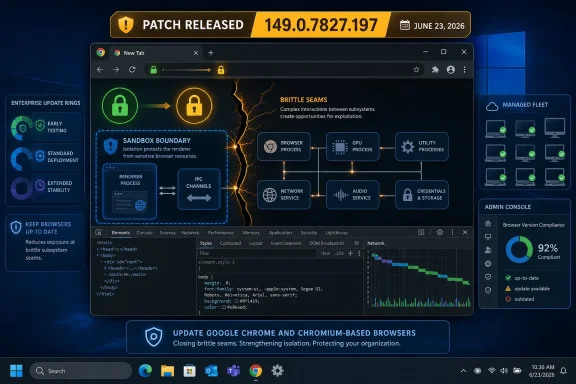
Google published Chrome 149.0.7827.196/197 for desktop on June 23, 2026, fixing CVE-2026-13025, a high-severity DevTools validation flaw that could help a renderer-compromise attacker escape Chrome’s sandbox through a crafted HTML page. The bug is not the loudest item in this Chrome drop, but it is one of the more revealing ones. It shows why browser security in 2026 is less about a single catastrophic memory bug and more about the brittle seams between privileged browser subsystems. For Windows users and administrators, the practical answer is simple: get Chrome, Edge, Brave, Vivaldi, Opera, and any Chromium-dependent runtime onto builds that include the 149.0.7827.197-era fixes as quickly as your environment allows.
DevTools has an odd place in the mental model of browser security. Users think of it as something developers open with F12, not as part of the attack surface exposed by ordinary browsing. CVE-2026-13025 is a reminder that Chrome is not a single wall; it is a city of walls, gates, internal services, debug plumbing, rendering machinery, JavaScript engines, GPU paths, credential stores, and policy-controlled privileges.
The disclosed description is terse: a race in DevTools, insufficient validation of untrusted input, renderer process already compromised, possible sandbox escape, crafted HTML page. That wording matters. It does not describe a one-click universal takeover from a clean state. It describes a second-stage primitive: once an attacker has code running inside the renderer, this bug may help move beyond the renderer sandbox into a more damaging security context.
That distinction should not make anyone comfortable. Chrome’s sandbox exists because renderer compromise is an expected class of failure in a browser that processes hostile web content all day. A sandbox escape is the bridge between “the tab is in trouble” and “the system may now be in trouble,” particularly when chained with a renderer bug, a scripting engine flaw, or a browser feature that can be nudged into a confused state.
The DevTools angle is also culturally important. Security teams often prioritize obvious user-facing features and memory corruption in high-throughput engines such as Blink, V8, WebGL, or GPU components. But developer tooling inside the browser is privileged, complex, and deeply integrated. It can inspect pages, mediate debugging sessions, talk to internal protocols, and interact with state that normal page script should never directly control.
That makes the bug harder to exploit than a straightforward remote code execution flaw triggered by visiting a web page. CISA’s enrichment reflects that by assigning high attack complexity and requiring user interaction, while still rating the impact as severe across confidentiality, integrity, and availability. In plain English, the bug may not be easy, but the payoff is big.
This is how serious browser exploitation tends to work in the real world. A crafted page may first exploit a renderer vulnerability, type confusion, use-after-free, out-of-bounds access, or logic flaw. Once the attacker has execution inside the renderer, the sandbox becomes the main obstacle. A separate bug in IPC, GPU handling, permissions, DevTools, extensions, or another privileged browser component can become the escape hatch.
For enterprise defenders, that means patch prioritization cannot rely only on whether a single CVE is known to be exploited in the wild. A vulnerability like CVE-2026-13025 is dangerous because it can become valuable when paired with another flaw. Even if public exploitation is not reported, exploit developers think in chains, not isolated CVE entries.
That spread is the more uncomfortable part of the advisory. The modern browser has become a general-purpose application runtime, hardware abstraction layer, identity broker, password manager, credential container, payments helper, file-access mediator, graphics engine, and policy enforcement surface. Chrome’s attack surface is not one component; it is the sum of everything the web platform has absorbed.
The DevTools flaw sits in that ecosystem as a relatively specialized component, but the release around it looks broad and hot. Four critical items in one desktop update should get attention from administrators even if CVE-2026-13025 itself is “only” high severity. Attackers do not care which CVE name wins the headline if the release gives them several possible links in a chain.
The timing also matters. NVD received the CVE on June 24 and modified the entry on June 25, while Google’s advisory is dated June 23. In other words, the public metadata followed the patch, as it often does. The fix is the operational fact; the database enrichment is the paperwork catching up.
The important part is that the vulnerable application is Google Chrome before 149.0.7827.197. The operating system CPEs are there to express supported platform conditions, not because Windows, Linux, or macOS are themselves vulnerable to this Chrome bug. This distinction matters for vulnerability scanners, asset inventories, and ticketing systems, because bad CPE interpretation can turn a browser update into a noisy operating-system finding.
There is also a subtle versioning wrinkle. Google’s advisory says 149.0.7827.196/197 for Windows and Mac, and 149.0.7827.196 for Linux. The CVE wording says “prior to 149.0.7827.197,” which is simple but not perfectly expressive across platforms. Some security tools will normalize that as “update to at least .197,” while Linux packages may show .196 as the fixed branch depending on distribution and channel handling.
That is why administrators should validate against vendor package state and browser self-reporting rather than blindly chasing one CPE string. On managed Windows fleets, Chrome’s own version, update channel, policy state, and installed executable path are more reliable than a scanner entry that may lag behind the vendor advisory. On Linux, distribution packaging and Chromium-derived browser maintainers may introduce still more lag and naming confusion.
CVE-2026-13025 is a bug in the “contain them” part of the story. A sandbox escape is not merely another browser crash or tab compromise. It is an attempted failure of the boundary that keeps hostile web content from reaching broader browser or system privileges.
That does not mean every sandbox escape immediately grants full Windows administrator rights. Browser compromise exists on a spectrum: escaping the renderer can expose browser-process privileges, user-profile data, tokens, cookies, local files accessible to the user, enterprise single sign-on context, and a launching point for further privilege escalation. The danger is not only malware installation; it is the theft and abuse of the authenticated user’s world.
This is why security teams should treat browser sandbox escapes as high-priority even when the exploit requires user interaction. The user interaction is visiting or being led to a crafted page, which is not a meaningful barrier in phishing-heavy environments. If a vulnerability can be reached through ordinary browsing behavior, it belongs in the urgent patch lane.
That does not mean the vulnerability is trivially reachable in every configuration. Google has restricted bug details, which is normal until enough users are patched, and the CVE description does not provide a public proof of concept. But absence of detail is not absence of risk. It is a deliberate delay designed to avoid handing attackers a recipe before the update reaches most machines.
There is a broader lesson here for locked-down enterprise endpoints. Disabling obvious developer features for users may reduce some misuse, but it is not a substitute for updating the browser. Policy can shrink reachable surface in specific cases, yet vulnerabilities in internal validation logic must be fixed in code. A managed browser that is old but heavily configured is still an old browser.
The same applies to developer workstations, which are often among the most exposed and least uniform systems in a company. Developers run local proxies, test certificates, preview builds, automation frameworks, browser extensions, remote debugging ports, and experimental tooling. A DevTools-class sandbox escape should get special attention in those environments because the boundary between browser, tooling, credentials, and source access is unusually porous.
Microsoft Edge typically absorbs Chromium security fixes quickly, but “quickly” is not the same as “already fixed everywhere.” Enterprise Edge update channels, offline installers, frozen virtual desktop images, kiosk systems, app-control baselines, and managed update rings can all delay delivery. Third-party Chromium browsers may move at different speeds, especially when they add their own UI, privacy layers, or release gates.
Electron complicates the story further. A desktop application can embed an older Chromium runtime long after Chrome itself has patched. That does not automatically mean every Electron app is exploitable through CVE-2026-13025; reachability depends on how the app exposes web content, DevTools features, remote content, sandboxing, and integration with local privileges. But it does mean browser CVEs increasingly require an application inventory, not just a browser inventory.
Windows administrators should therefore think in layers. First patch Chrome and Edge through normal update mechanisms. Then check other installed Chromium browsers. Then identify high-risk embedded Chromium surfaces: collaboration tools, password managers, admin consoles, kiosk apps, remote support utilities, line-of-business applications, and anything that renders untrusted web content with local privileges.
High complexity often makes business owners ask whether a patch can wait. In browser exploitation, high complexity should be read differently. It means the bug may be difficult to use reliably, not that it is unimportant. Sophisticated attackers, exploit brokers, and targeted intrusion operators specialize in combining difficult bugs into reliable chains.
The “no exploitation observed” SSVC status is useful, but it is not a shield. It says there was no known exploitation at the time of assessment. It does not say the bug is unexploitable, uninteresting, or safely ignorable. Browser exploit timelines can move quickly after a patch lands, because attackers can diff changes, study restricted hints, and infer the shape of the bug from code movement.
The calendar should be driven by exposure and asset value. Internet-facing browsing endpoints, executive workstations, developer machines, systems with privileged cloud access, and devices used for administrative consoles deserve faster treatment than generic lab machines. The browser is the workstation’s front door to hostile content; patching it is not hygiene theater.
The risk is especially acute for non-persistent virtual desktops and golden images. A user may see Chrome update during a session, but the next reboot returns the machine to an old image. If image maintenance lags behind live patching, every morning becomes a time machine back to the vulnerable version.
Offline and semi-managed systems create similar problems. Conference-room PCs, signage controllers, lab equipment, training-room desktops, and jump boxes often sit outside normal user update rhythms. They may not be used for casual browsing, but they frequently authenticate to valuable internal portals, admin tools, or cloud dashboards when someone finally needs them.
Browser update verification should therefore be explicit. “Chrome auto-updates” is not evidence. Evidence is a fleet query, an endpoint-management report, or a software inventory snapshot showing fixed versions across real devices. The difference between assumed patching and measured patching is where old browser CVEs survive.
The restriction is not unusual. Browser vendors sit in a difficult disclosure window: publish enough information for defenders to act, but not enough to give exploit writers a working path while billions of devices are still updating. CVE-2026-13025’s public description gives defenders what they need for prioritization: affected product, fixed version, component, impact class, and attack precondition.
That said, restricted details make communication harder inside large organizations. A security team asking for emergency patch approval may face application owners who want proof of exploitability. The right answer is not to overclaim. The right answer is to explain the chain potential: renderer compromise plus DevTools race plus sandbox escape is precisely the kind of browser sequence that justifies accelerated patching.
There is also no need to dramatize the bug into a confirmed zero-day if the record does not support that. The current public material indicates no known exploitation in CISA’s assessment. That is good news. It is not a reason to postpone the update.
That last point is not trivial. Browser update systems are excellent at downloading patches and mediocre at forcing humans to stop using their tab hoards. A patched binary waiting behind a relaunch prompt does not protect the active browsing session in the way users imagine. The browser must actually restart into the fixed build.
On Windows, Edge users should check Microsoft’s update channel rather than assume Chrome’s version number maps one-to-one. Other Chromium browsers will publish their own builds, sometimes with different version strings even when they incorporate the same upstream fixes. The practical question is not whether the version text looks identical to Google’s; it is whether the vendor has shipped the Chromium security update containing the fix.
Administrators should also watch for policy conflicts. Some organizations disable automatic updates, pin versions for compatibility, or route updates through internal distribution systems. Those choices may be defensible in tightly controlled environments, but they turn every browser CVE into a race against the organization’s own change process.
The issue is not only alternative browsers. It is security appliances with web dashboards, identity tools with embedded login windows, chat clients rendering rich links, productivity apps with embedded web surfaces, and developer tools that spin up Chromium for previews. Some update automatically. Some update only with the parent application. Some are pinned for years.
Windows has made this more complicated and more manageable at the same time. WebView2 gives developers a supported Evergreen runtime path, which is better than bundling a stale browser engine forever. But legacy embedded runtimes and vendor-frozen Chromium builds still exist, especially in enterprise software that prioritizes certification stability over upstream security freshness.
The right response is not panic-scanning every executable for a Chromium string and opening a thousand tickets. It is risk ranking. Anything that renders remote or user-supplied content, runs with user credentials, exposes DevTools or remote debugging, or bridges web content to local files and native APIs deserves attention before a static help viewer buried in an offline tool.
That is why Windows security increasingly runs through browser security. A compromised browser session can touch identity, files, cloud control planes, password stores, enterprise SaaS data, device trust signals, and administrative portals. The browser has become the place where the user, the operating system, and the organization’s crown jewels meet.
CVE-2026-13025 is particularly useful as a teaching example because it is not a glamorous V8 headline. It is not the obvious “JavaScript engine bug eats the world” story. It is a validation and race-condition problem in tooling that many users do not think about, able to matter only after another boundary has already failed.
That is how mature platforms get attacked. The obvious doors get stronger, so attackers look for interior corridors, confused deputies, stale assumptions, and components that were designed for trusted workflows but now sit adjacent to hostile content. DevTools is powerful because developers need power. Powerful internal surfaces require relentless validation because the web will eventually find any path to them.
 A DevTools Bug Is Still a Browser Bug
DevTools has an odd place in the mental model of browser security. Users think of it as something developers open with F12, not as part of the attack surface exposed by ordinary browsing. CVE-2026-13025 is a reminder that Chrome is not a single wall; it is a city of walls, gates, internal services, debug plumbing, rendering machinery, JavaScript engines, GPU paths, credential stores, and policy-controlled privileges.The disclosed description is terse: a race in DevTools, insufficient validation of untrusted input, renderer process already compromised, possible sandbox escape, crafted HTML page. That wording matters. It does not describe a one-click universal takeover from a clean state. It describes a second-stage primitive: once an attacker has code running inside the renderer, this bug may help move beyond the renderer sandbox into a more damaging security context.
That distinction should not make anyone comfortable. Chrome’s sandbox exists because renderer compromise is an expected class of failure in a browser that processes hostile web content all day. A sandbox escape is the bridge between “the tab is in trouble” and “the system may now be in trouble,” particularly when chained with a renderer bug, a scripting engine flaw, or a browser feature that can be nudged into a confused state.
The DevTools angle is also culturally important. Security teams often prioritize obvious user-facing features and memory corruption in high-throughput engines such as Blink, V8, WebGL, or GPU components. But developer tooling inside the browser is privileged, complex, and deeply integrated. It can inspect pages, mediate debugging sessions, talk to internal protocols, and interact with state that normal page script should never directly control.
The Attack Chain Is the Story
The most important phrase in the CVE description is “who had compromised the renderer process.” That phrase is not a footnote; it is the threat model. CVE-2026-13025 appears to require an attacker to arrive with a foothold already established inside the sandboxed renderer, then use a DevTools race condition to attempt a breakout.That makes the bug harder to exploit than a straightforward remote code execution flaw triggered by visiting a web page. CISA’s enrichment reflects that by assigning high attack complexity and requiring user interaction, while still rating the impact as severe across confidentiality, integrity, and availability. In plain English, the bug may not be easy, but the payoff is big.
This is how serious browser exploitation tends to work in the real world. A crafted page may first exploit a renderer vulnerability, type confusion, use-after-free, out-of-bounds access, or logic flaw. Once the attacker has execution inside the renderer, the sandbox becomes the main obstacle. A separate bug in IPC, GPU handling, permissions, DevTools, extensions, or another privileged browser component can become the escape hatch.
For enterprise defenders, that means patch prioritization cannot rely only on whether a single CVE is known to be exploited in the wild. A vulnerability like CVE-2026-13025 is dangerous because it can become valuable when paired with another flaw. Even if public exploitation is not reported, exploit developers think in chains, not isolated CVE entries.
Chrome’s June Patch Train Was Not a Routine Maintenance Stop
Google’s June 23 stable-channel update did not ship CVE-2026-13025 in isolation. It arrived alongside 18 security fixes, including multiple critical vulnerabilities in WebGL, Blink interest groups, and Autofill, plus a long list of high-severity flaws across Navigation, GPU, Digital Credentials, FileSystem, Web Authentication, Passwords, Bluetooth, Blink, and WebView.That spread is the more uncomfortable part of the advisory. The modern browser has become a general-purpose application runtime, hardware abstraction layer, identity broker, password manager, credential container, payments helper, file-access mediator, graphics engine, and policy enforcement surface. Chrome’s attack surface is not one component; it is the sum of everything the web platform has absorbed.
The DevTools flaw sits in that ecosystem as a relatively specialized component, but the release around it looks broad and hot. Four critical items in one desktop update should get attention from administrators even if CVE-2026-13025 itself is “only” high severity. Attackers do not care which CVE name wins the headline if the release gives them several possible links in a chain.
The timing also matters. NVD received the CVE on June 24 and modified the entry on June 25, while Google’s advisory is dated June 23. In other words, the public metadata followed the patch, as it often does. The fix is the operational fact; the database enrichment is the paperwork catching up.
NVD’s CPE Trail Says More Than It Seems
The user-facing annoyance in this CVE entry is the CPE section. NVD shows Chrome versions up to, but excluding, 149.0.7827.197, with Windows, Linux kernel, and macOS platform entries in the configuration tree. That can look strange if you expect a neat standalone product identifier and a simple “affected” list.The important part is that the vulnerable application is Google Chrome before 149.0.7827.197. The operating system CPEs are there to express supported platform conditions, not because Windows, Linux, or macOS are themselves vulnerable to this Chrome bug. This distinction matters for vulnerability scanners, asset inventories, and ticketing systems, because bad CPE interpretation can turn a browser update into a noisy operating-system finding.
There is also a subtle versioning wrinkle. Google’s advisory says 149.0.7827.196/197 for Windows and Mac, and 149.0.7827.196 for Linux. The CVE wording says “prior to 149.0.7827.197,” which is simple but not perfectly expressive across platforms. Some security tools will normalize that as “update to at least .197,” while Linux packages may show .196 as the fixed branch depending on distribution and channel handling.
That is why administrators should validate against vendor package state and browser self-reporting rather than blindly chasing one CPE string. On managed Windows fleets, Chrome’s own version, update channel, policy state, and installed executable path are more reliable than a scanner entry that may lag behind the vendor advisory. On Linux, distribution packaging and Chromium-derived browser maintainers may introduce still more lag and naming confusion.
The Sandbox Is Working Until It Is Not
Chrome’s security story has long rested on process isolation and sandboxing. Untrusted web content runs in a constrained renderer, while more privileged browser services sit behind brokered interfaces. That design accepts that rendering complex web content will produce bugs and tries to contain them before they become system compromise.CVE-2026-13025 is a bug in the “contain them” part of the story. A sandbox escape is not merely another browser crash or tab compromise. It is an attempted failure of the boundary that keeps hostile web content from reaching broader browser or system privileges.
That does not mean every sandbox escape immediately grants full Windows administrator rights. Browser compromise exists on a spectrum: escaping the renderer can expose browser-process privileges, user-profile data, tokens, cookies, local files accessible to the user, enterprise single sign-on context, and a launching point for further privilege escalation. The danger is not only malware installation; it is the theft and abuse of the authenticated user’s world.
This is why security teams should treat browser sandbox escapes as high-priority even when the exploit requires user interaction. The user interaction is visiting or being led to a crafted page, which is not a meaningful barrier in phishing-heavy environments. If a vulnerability can be reached through ordinary browsing behavior, it belongs in the urgent patch lane.
DevTools Is Not Just for Developers Anymore
The name “DevTools” can mislead non-developers into thinking the component is dormant unless someone opens the panel. In Chromium, DevTools is also a protocol, an instrumentation layer, and a set of internal capabilities used in debugging, automation, inspection, testing, extension workflows, browser integrations, and remote-control scenarios. Even when the visible UI is closed, the code is part of the browser’s installed attack surface.That does not mean the vulnerability is trivially reachable in every configuration. Google has restricted bug details, which is normal until enough users are patched, and the CVE description does not provide a public proof of concept. But absence of detail is not absence of risk. It is a deliberate delay designed to avoid handing attackers a recipe before the update reaches most machines.
There is a broader lesson here for locked-down enterprise endpoints. Disabling obvious developer features for users may reduce some misuse, but it is not a substitute for updating the browser. Policy can shrink reachable surface in specific cases, yet vulnerabilities in internal validation logic must be fixed in code. A managed browser that is old but heavily configured is still an old browser.
The same applies to developer workstations, which are often among the most exposed and least uniform systems in a company. Developers run local proxies, test certificates, preview builds, automation frameworks, browser extensions, remote debugging ports, and experimental tooling. A DevTools-class sandbox escape should get special attention in those environments because the boundary between browser, tooling, credentials, and source access is unusually porous.
Windows Shops Have a Chromium Problem, Not Just a Chrome Problem
For WindowsForum readers, the natural instinct is to ask whether this is a Google Chrome issue or a Windows issue. The answer is that it is a Chromium issue with Windows consequences. Chrome is the named affected product in the CVE, but Chromium’s codebase feeds Edge, Brave, Vivaldi, Opera, Electron-based apps, embedded WebViews, kiosk shells, and countless vendor-packaged runtimes.Microsoft Edge typically absorbs Chromium security fixes quickly, but “quickly” is not the same as “already fixed everywhere.” Enterprise Edge update channels, offline installers, frozen virtual desktop images, kiosk systems, app-control baselines, and managed update rings can all delay delivery. Third-party Chromium browsers may move at different speeds, especially when they add their own UI, privacy layers, or release gates.
Electron complicates the story further. A desktop application can embed an older Chromium runtime long after Chrome itself has patched. That does not automatically mean every Electron app is exploitable through CVE-2026-13025; reachability depends on how the app exposes web content, DevTools features, remote content, sandboxing, and integration with local privileges. But it does mean browser CVEs increasingly require an application inventory, not just a browser inventory.
Windows administrators should therefore think in layers. First patch Chrome and Edge through normal update mechanisms. Then check other installed Chromium browsers. Then identify high-risk embedded Chromium surfaces: collaboration tools, password managers, admin consoles, kiosk apps, remote support utilities, line-of-business applications, and anything that renders untrusted web content with local privileges.
The CVSS Score Is a Floor, Not a Calendar
CISA-ADP’s CVSS 3.1 score of 8.3 puts CVE-2026-13025 in high territory, with network attack vector, high complexity, no privileges required, user interaction required, changed scope, and high impact across confidentiality, integrity, and availability. That is a reasonable machine-readable summary, but it can also flatten the operational nuance.High complexity often makes business owners ask whether a patch can wait. In browser exploitation, high complexity should be read differently. It means the bug may be difficult to use reliably, not that it is unimportant. Sophisticated attackers, exploit brokers, and targeted intrusion operators specialize in combining difficult bugs into reliable chains.
The “no exploitation observed” SSVC status is useful, but it is not a shield. It says there was no known exploitation at the time of assessment. It does not say the bug is unexploitable, uninteresting, or safely ignorable. Browser exploit timelines can move quickly after a patch lands, because attackers can diff changes, study restricted hints, and infer the shape of the bug from code movement.
The calendar should be driven by exposure and asset value. Internet-facing browsing endpoints, executive workstations, developer machines, systems with privileged cloud access, and devices used for administrative consoles deserve faster treatment than generic lab machines. The browser is the workstation’s front door to hostile content; patching it is not hygiene theater.
The Quiet Risk Lives in Delayed Rings and Stale Images
Chrome’s stable update “over the coming days/weeks” language is familiar and sensible for a global consumer fleet. For enterprises, it can become a trap. If update rings, maintenance windows, or change freezes push browser fixes out by weeks, the organization is stretching the exact window attackers study most closely.The risk is especially acute for non-persistent virtual desktops and golden images. A user may see Chrome update during a session, but the next reboot returns the machine to an old image. If image maintenance lags behind live patching, every morning becomes a time machine back to the vulnerable version.
Offline and semi-managed systems create similar problems. Conference-room PCs, signage controllers, lab equipment, training-room desktops, and jump boxes often sit outside normal user update rhythms. They may not be used for casual browsing, but they frequently authenticate to valuable internal portals, admin tools, or cloud dashboards when someone finally needs them.
Browser update verification should therefore be explicit. “Chrome auto-updates” is not evidence. Evidence is a fleet query, an endpoint-management report, or a software inventory snapshot showing fixed versions across real devices. The difference between assumed patching and measured patching is where old browser CVEs survive.
Restricted Bug Details Are a Feature, Not a Cover-Up
Google’s advisory notes that bug details and links may remain restricted until a majority of users receive the fix. This routinely frustrates defenders who want full technical detail immediately. It also feeds suspicion among users who see a severe vulnerability but cannot inspect the underlying issue.The restriction is not unusual. Browser vendors sit in a difficult disclosure window: publish enough information for defenders to act, but not enough to give exploit writers a working path while billions of devices are still updating. CVE-2026-13025’s public description gives defenders what they need for prioritization: affected product, fixed version, component, impact class, and attack precondition.
That said, restricted details make communication harder inside large organizations. A security team asking for emergency patch approval may face application owners who want proof of exploitability. The right answer is not to overclaim. The right answer is to explain the chain potential: renderer compromise plus DevTools race plus sandbox escape is precisely the kind of browser sequence that justifies accelerated patching.
There is also no need to dramatize the bug into a confirmed zero-day if the record does not support that. The current public material indicates no known exploitation in CISA’s assessment. That is good news. It is not a reason to postpone the update.
The User Fix Is Boring, Which Is Why It Works
For individual Windows users, the fix is almost insultingly simple: update the browser and relaunch it. Chrome users can check the version from the About Chrome page, and managed environments should confirm that the running build includes the June 23 stable-channel security fixes. If Chrome reports a pending relaunch, the update is not fully applied until the browser restarts.That last point is not trivial. Browser update systems are excellent at downloading patches and mediocre at forcing humans to stop using their tab hoards. A patched binary waiting behind a relaunch prompt does not protect the active browsing session in the way users imagine. The browser must actually restart into the fixed build.
On Windows, Edge users should check Microsoft’s update channel rather than assume Chrome’s version number maps one-to-one. Other Chromium browsers will publish their own builds, sometimes with different version strings even when they incorporate the same upstream fixes. The practical question is not whether the version text looks identical to Google’s; it is whether the vendor has shipped the Chromium security update containing the fix.
Administrators should also watch for policy conflicts. Some organizations disable automatic updates, pin versions for compatibility, or route updates through internal distribution systems. Those choices may be defensible in tightly controlled environments, but they turn every browser CVE into a race against the organization’s own change process.
The Real Patch Target Is the Browser Supply Chain
CVE-2026-13025 belongs to a larger class of problems that enterprise IT still struggles to inventory: rapidly moving open-source browser code embedded across commercial software. Chromium’s security model is strong partly because it moves fast. That speed becomes a liability when downstream consumers move slowly.The issue is not only alternative browsers. It is security appliances with web dashboards, identity tools with embedded login windows, chat clients rendering rich links, productivity apps with embedded web surfaces, and developer tools that spin up Chromium for previews. Some update automatically. Some update only with the parent application. Some are pinned for years.
Windows has made this more complicated and more manageable at the same time. WebView2 gives developers a supported Evergreen runtime path, which is better than bundling a stale browser engine forever. But legacy embedded runtimes and vendor-frozen Chromium builds still exist, especially in enterprise software that prioritizes certification stability over upstream security freshness.
The right response is not panic-scanning every executable for a Chromium string and opening a thousand tickets. It is risk ranking. Anything that renders remote or user-supplied content, runs with user credentials, exposes DevTools or remote debugging, or bridges web content to local files and native APIs deserves attention before a static help viewer buried in an offline tool.
The June Chrome Advisory Draws a Map of Modern Browser Risk
The most striking thing about the June 23 advisory is not any single bug. It is the component map. WebGL, Blink, Autofill, Navigation, GPU, Digital Credentials, FileSystem, Web Authentication, Passwords, Bluetooth, WebView, and DevTools together describe the browser as an operating environment rather than an application.That is why Windows security increasingly runs through browser security. A compromised browser session can touch identity, files, cloud control planes, password stores, enterprise SaaS data, device trust signals, and administrative portals. The browser has become the place where the user, the operating system, and the organization’s crown jewels meet.
CVE-2026-13025 is particularly useful as a teaching example because it is not a glamorous V8 headline. It is not the obvious “JavaScript engine bug eats the world” story. It is a validation and race-condition problem in tooling that many users do not think about, able to matter only after another boundary has already failed.
That is how mature platforms get attacked. The obvious doors get stronger, so attackers look for interior corridors, confused deputies, stale assumptions, and components that were designed for trusted workflows but now sit adjacent to hostile content. DevTools is powerful because developers need power. Powerful internal surfaces require relentless validation because the web will eventually find any path to them.
The Patch Notes Leave Three Jobs for Windows Administrators
The immediate work is narrower than the threat model, but it should be done with discipline. CVE-2026-13025 is not a reason to rebuild the workstation security program. It is a reason to verify that the browser patch program is real, fast, and broad enough to include Chromium beyond the obvious Chrome icon.- Administrators should verify Chrome desktop installations are updated to builds containing the June 23, 2026 security fixes, not merely trust that automatic updates are enabled.
- Security teams should check Microsoft Edge and other Chromium-based browsers through their own vendor channels, because version numbers and release timing may not match Chrome exactly.
- Fleet owners should pay special attention to developer workstations, privileged users, jump boxes, VDI images, kiosks, and systems that authenticate to administrative portals.
- Asset inventories should include Chromium runtimes embedded in applications that render remote or user-supplied content, especially where DevTools, automation, or local-file bridges are exposed.
- Change managers should treat “high complexity” browser sandbox escapes as chainable vulnerabilities, not as low-priority defects that can wait for the next leisurely maintenance cycle.
References
- Primary source: NVD / Chromium
Published: 2026-06-26T17:46:34-07:00
NVD - CVE-2026-13025
 nvd.nist.gov
- Security advisory: MSRC
Published: 2026-06-26T17:46:34-07:00
Original feed URL
Security Update Guide - Microsoft Security Response Center
 msrc.microsoft.com
- Related coverage: thehackerwire.com
Google Chrome DevTools Information Disclosure (CVE-2026-11250) – TheHackerWire
Summary CVE-2026-11250 identifies a critical 9.6 CVSS vulnerability in Google Chrome, published on June 5, 2026. This flaw, an inappropriate implementation w...www.thehackerwire.com
- Related coverage: govcert.gov.hk
GovCERT.HK - Security Alert (A26-06-27): Multiple Vulnerabilities in Google Chrome
Security Alert (A26-06-27): Multiple Vulnerabilities in Google Chromewww.govcert.gov.hk
