

Google Chrome on Android before version 150.0.7871.47 is affected by CVE-2026-13941, a medium-severity SiteSettings flaw published June 30, 2026, that can let a remote attacker spoof browser UI through a crafted HTML page. The bug is not a code-execution headline grabber, but it lands in one of the browser’s most sensitive trust zones: the place where users decide what a site is allowed to do. NVD is still enriching the record, while CISA’s ADP assessment gives it a CVSS 3.1 score of 4.3 and maps it to UI misrepresentation. That combination should tell administrators exactly how to treat it: not as a panic event, but as another reminder that browser security is increasingly about what users think they are seeing.
As detailed in the National Vulnerability Database entry and tied back to Google’s Chrome release notes, CVE-2026-13941 affects Chrome on Android prior to 150.0.7871.47. Malwarebytes separately noted that Google’s late-June Chrome 150 update was a very large security release, with hundreds of fixes across Chrome’s supported platforms. The Android-specific angle matters because mobile browsers are cramped, gesture-driven, and permission-heavy — exactly the conditions in which spoofed UI can become more persuasive than it looks on paper.
The modern vulnerability news cycle has trained readers to look for a few magic phrases: “zero-day,” “remote code execution,” “sandbox escape,” and “actively exploited.” CVE-2026-13941 does not appear to be one of those, at least based on the public record available now. CISA’s SSVC data says exploitation is “none,” the issue is not automatable, and the technical impact is partial.
That does not make it irrelevant. UI spoofing sits in the awkward middle ground between software exploit and social engineering. The attacker is not necessarily breaking out of Chrome’s sandbox or stealing memory directly; the attacker is manipulating the user’s interpretation of the browser environment. In practice, that can be enough.
Site settings are not decorative. They are where Chrome communicates whether a page has camera access, microphone access, notification rights, location permissions, pop-up privileges, or other trust-sensitive affordances. If a crafted page can misrepresent a critical part of that experience, the browser has failed at one of its quietest but most important jobs: helping users distinguish the site from the browser.
That distinction is particularly fragile on Android. Desktop Chrome has more chrome — in the literal interface sense — and more room for visual separation. On a phone, the address bar, permission prompts, sheet-style menus, and full-screen web content all compete for a few inches of glass. The security boundary is partly technical and partly theatrical.
A browser can have an excellent internal permission architecture and still fail if the user cannot tell what is real. If a malicious page can imitate or distort the interface around permissions and trust indicators, it does not need to defeat encryption or exploit kernel memory. It can ask the user to do the wrong thing while appearing to be Chrome itself.
That is why CISA’s mapping to CWE-451 — User Interface Misrepresentation of Critical Information — is more useful than the raw CVSS number. A 4.3 medium rating tells patch teams where to place the ticket in a queue. CWE-451 tells defenders what kind of failure they are dealing with. The browser displayed, or allowed content to display, something in a way that could mislead the user about a security-relevant decision.
This is also why security teams should be careful not to dismiss the phrase “crafted HTML page.” In Chrome advisories, that wording can cover everything from severe memory corruption chains to comparatively modest spoofing flaws. Here it points to a web-delivered attack surface that needs user interaction, not a silent worm. But phishing campaigns, fake login flows, malicious ads, and mobile redirection chains all live in that same delivery world.
That is a very CVSS way of saying the attacker likely needs to lure someone to a page and persuade them to act on a misleading interface. The score is not high because the public description does not indicate data theft, direct compromise, or service disruption by itself. It is medium because the browser may help an attacker tamper with a user’s decision-making environment.
For consumers, that sounds abstract. For enterprise administrators, it is not. Mobile browsers increasingly sit in front of corporate identity providers, device enrollment portals, SaaS dashboards, password managers, passkey prompts, and conditional access flows. A UI spoofing weakness in the browser is not automatically an identity compromise, but it can become one ingredient in a broader deception chain.
That is the recurring weakness of CVSS for browser bugs. It scores the vulnerability as a discrete technical object. Attackers use it as a stage prop inside a larger play.
The awkwardness comes from how CPEs model products. Chrome is an application, Android is an operating system, and the vulnerability exists at their intersection. A CPE entry for Chrome alone might overstate exposure on Windows, macOS, Linux, or iOS. A CPE entry for Android alone would be plainly wrong, because the affected software is Chrome, not Android’s base operating system.
So the apparent AND relationship — Chrome plus Android — is a reasonable way to express platform-specific exposure. It tells scanners that vulnerable inventory is not simply “any Chrome below 150.0.7871.47,” but Chrome running in the Android context. That said, vulnerability management tools vary widely in how well they interpret compound CPE logic, and this is where false positives and false negatives creep in.
There is also a small oddity in the CVE “affected” version language as shown in the record. It lists version 150.0.7871.47 with a lessThan value of 150.0.7871.47 and status affected, which reads strangely to humans because the fixed version and the comparison boundary share the same number. The intended meaning from the description is clear enough: versions prior to 150.0.7871.47 are affected. But this is exactly the kind of metadata wrinkle that can confuse automated pipelines.
For administrators, the practical rule is simpler than the version-number archaeology: make sure managed Android devices receive the current Chrome stable update from Google Play or the organization’s managed app channel. Do not assume a desktop Chrome compliance dashboard covers this exposure. It probably does not.
Android fleet management also has a timing problem. Chrome updates through the Play Store, but devices can lag because of user behavior, managed update deferrals, OEM constraints, network policies, or stale enrollment states. A browser patch that exists upstream is not the same thing as a browser patch installed on every phone used to approve MFA prompts and open corporate links.
On WindowsForum.com, that Android caveat is worth stressing because many Windows-heavy shops now treat mobile as an identity edge rather than a separate platform. The laptop may be patched by Intune, Configuration Manager, or another endpoint stack, while the Android phone receives less scrutiny. Attackers do not care which device the user trusts most; they care which one can be fooled.
A crafted page exploiting CVE-2026-13941 would still need a scenario. The public description does not say it grants permissions by itself or bypasses the same-origin policy. But a convincing spoof can steer a victim into accepting a permission, trusting a fake origin, entering credentials, or following a malicious instruction under the belief that Chrome has endorsed the flow.
This is where mobile phishing has become more sophisticated. Attackers do not need pixel-perfect clones of entire websites anymore. They need just enough borrowed authority from the browser, the identity provider, or the operating system to make the next tap feel safe. A flaw in SiteSettings can widen that gap between what the user sees and what the browser actually means.
The right comparison is not a memory corruption bug. It is a fake padlock, a misleading permission dialog, or a fraudulent “secure browser verification” screen. The danger is cumulative. Each successful illusion lowers the user’s suspicion at the exact moment suspicion matters.
For IT teams, this creates a triage paradox. The browser is one of the most exposed applications in the enterprise, but Chrome updates arrive frequently and often bundle hundreds of changes. Treating every Chrome release as an emergency is exhausting. Treating them as routine background noise is dangerous.
CVE-2026-13941 illustrates the problem neatly. It is not the scariest item in the Chrome 150 family of fixes, and it probably will not be the one that gets the biggest headlines. Yet it affects a sensitive mobile trust surface, has a low-complexity network attack vector, and requires no attacker privileges. That is exactly the sort of bug that can disappear inside a massive advisory while still being operationally relevant.
The answer is not to hand-sort every CVE in a Chrome release. The answer is to make browser freshness a baseline control. If the organization cannot quickly determine which Android devices are running current Chrome builds, the problem is not CVE-2026-13941. The problem is visibility.
That uncertainty cuts both ways. It prevents defenders from understanding the exact user journey an attacker might abuse. It also prevents would-be attackers from receiving a ready-made recipe. Browser vendors routinely hold back bug details until a majority of users have updated, and that tradeoff is usually justified.
Still, the lack of public detail means security teams should avoid overclaiming. CVE-2026-13941 is not publicly documented as an account-takeover bug. It is not publicly documented as a sandbox escape. It is not currently described by CISA as exploited. The responsible reading is narrower: a Chrome for Android UI spoofing flaw in SiteSettings was fixed, and users should be moved to the patched build.
That narrow reading is enough. A browser’s permission and settings UI is part of its security model, not a cosmetic layer. When that layer can be spoofed, the patch deserves attention.
For administrators, the better question is whether Chrome for Android is covered by the same discipline as desktop browsers. Managed Google Play, enterprise mobility management, and mobile threat defense tooling should be able to report installed versions or at least enforce update freshness. If they cannot, this bug is a useful excuse to close that gap.
There is also a communication challenge. Telling users “update because of CVE-2026-13941” will not land. Telling them “Chrome fixed a bug that could let a malicious web page fake important browser settings on Android” is more intelligible. Security awareness works best when it explains the failure mode without turning into a scare campaign.
The advice for Windows-centric environments is similarly practical. Do not let platform ownership boundaries blur accountability. If identity approvals, Teams links, SharePoint access, password resets, or admin portals are routinely opened on Android phones, then Chrome on Android is part of the Windows enterprise security perimeter whether the endpoint team likes it or not.
As detailed in the National Vulnerability Database entry and tied back to Google’s Chrome release notes, CVE-2026-13941 affects Chrome on Android prior to 150.0.7871.47. Malwarebytes separately noted that Google’s late-June Chrome 150 update was a very large security release, with hundreds of fixes across Chrome’s supported platforms. The Android-specific angle matters because mobile browsers are cramped, gesture-driven, and permission-heavy — exactly the conditions in which spoofed UI can become more persuasive than it looks on paper.
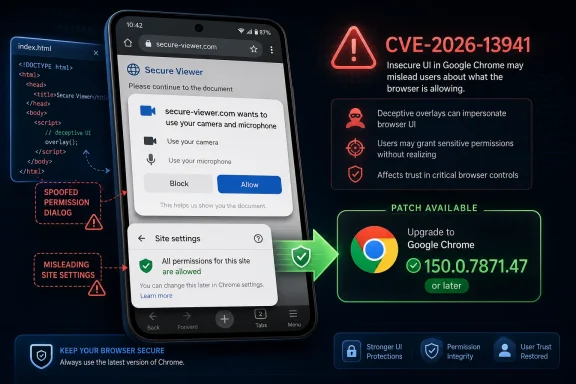 This Is a Trust Bug, Not a Spectacle Bug
The modern vulnerability news cycle has trained readers to look for a few magic phrases: “zero-day,” “remote code execution,” “sandbox escape,” and “actively exploited.” CVE-2026-13941 does not appear to be one of those, at least based on the public record available now. CISA’s SSVC data says exploitation is “none,” the issue is not automatable, and the technical impact is partial.That does not make it irrelevant. UI spoofing sits in the awkward middle ground between software exploit and social engineering. The attacker is not necessarily breaking out of Chrome’s sandbox or stealing memory directly; the attacker is manipulating the user’s interpretation of the browser environment. In practice, that can be enough.
Site settings are not decorative. They are where Chrome communicates whether a page has camera access, microphone access, notification rights, location permissions, pop-up privileges, or other trust-sensitive affordances. If a crafted page can misrepresent a critical part of that experience, the browser has failed at one of its quietest but most important jobs: helping users distinguish the site from the browser.
That distinction is particularly fragile on Android. Desktop Chrome has more chrome — in the literal interface sense — and more room for visual separation. On a phone, the address bar, permission prompts, sheet-style menus, and full-screen web content all compete for a few inches of glass. The security boundary is partly technical and partly theatrical.
SiteSettings Is Where Chrome Turns Security Into Human Language
The component name in the CVE, SiteSettings, sounds administrative, almost boring. That is misleading. Site settings are the translation layer between Chromium’s permission model and the person holding the device.A browser can have an excellent internal permission architecture and still fail if the user cannot tell what is real. If a malicious page can imitate or distort the interface around permissions and trust indicators, it does not need to defeat encryption or exploit kernel memory. It can ask the user to do the wrong thing while appearing to be Chrome itself.
That is why CISA’s mapping to CWE-451 — User Interface Misrepresentation of Critical Information — is more useful than the raw CVSS number. A 4.3 medium rating tells patch teams where to place the ticket in a queue. CWE-451 tells defenders what kind of failure they are dealing with. The browser displayed, or allowed content to display, something in a way that could mislead the user about a security-relevant decision.
This is also why security teams should be careful not to dismiss the phrase “crafted HTML page.” In Chrome advisories, that wording can cover everything from severe memory corruption chains to comparatively modest spoofing flaws. Here it points to a web-delivered attack surface that needs user interaction, not a silent worm. But phishing campaigns, fake login flows, malicious ads, and mobile redirection chains all live in that same delivery world.
The Medium Rating Is Doing Two Jobs at Once
CISA’s CVSS vector for CVE-2026-13941 is AV:N/AC:L/PR:N/UI:R/S:U/C:N/I:L/A:N. In plain English, the attack is network-reachable, low complexity, requires no privileges, requires user interaction, does not cross a changed scope, and has low integrity impact without confidentiality or availability impact.That is a very CVSS way of saying the attacker likely needs to lure someone to a page and persuade them to act on a misleading interface. The score is not high because the public description does not indicate data theft, direct compromise, or service disruption by itself. It is medium because the browser may help an attacker tamper with a user’s decision-making environment.
For consumers, that sounds abstract. For enterprise administrators, it is not. Mobile browsers increasingly sit in front of corporate identity providers, device enrollment portals, SaaS dashboards, password managers, passkey prompts, and conditional access flows. A UI spoofing weakness in the browser is not automatically an identity compromise, but it can become one ingredient in a broader deception chain.
That is the recurring weakness of CVSS for browser bugs. It scores the vulnerability as a discrete technical object. Attackers use it as a stage prop inside a larger play.
The CPE Record Looks Awkward Because Android Is the Real Constraint
The user-facing question buried in the NVD change history is whether the record is “missing a CPE.” NVD’s initial analysis added a configuration that combines Google Chrome versions before 150.0.7871.47 with Google Android. That shape is not accidental: the vulnerability description is explicitly Chrome on Android, not desktop Chrome generally.The awkwardness comes from how CPEs model products. Chrome is an application, Android is an operating system, and the vulnerability exists at their intersection. A CPE entry for Chrome alone might overstate exposure on Windows, macOS, Linux, or iOS. A CPE entry for Android alone would be plainly wrong, because the affected software is Chrome, not Android’s base operating system.
So the apparent AND relationship — Chrome plus Android — is a reasonable way to express platform-specific exposure. It tells scanners that vulnerable inventory is not simply “any Chrome below 150.0.7871.47,” but Chrome running in the Android context. That said, vulnerability management tools vary widely in how well they interpret compound CPE logic, and this is where false positives and false negatives creep in.
There is also a small oddity in the CVE “affected” version language as shown in the record. It lists version 150.0.7871.47 with a lessThan value of 150.0.7871.47 and status affected, which reads strangely to humans because the fixed version and the comparison boundary share the same number. The intended meaning from the description is clear enough: versions prior to 150.0.7871.47 are affected. But this is exactly the kind of metadata wrinkle that can confuse automated pipelines.
Patch Teams Should Track the Android Build, Not Just the Desktop Release
One trap in Chrome security coverage is that desktop release notes often become the canonical public artifact even when a CVE affects a platform-specific build. Malwarebytes reported that the late-June Chrome 150 stable update moved Windows and Mac to 150.0.7871.46/.47, Linux to 150.0.7871.46, and Android to 150.0.7871.63. The NVD record for this CVE uses “prior to 150.0.7871.47” in its Android description, while the broader Android rollout may show a later patch build.For administrators, the practical rule is simpler than the version-number archaeology: make sure managed Android devices receive the current Chrome stable update from Google Play or the organization’s managed app channel. Do not assume a desktop Chrome compliance dashboard covers this exposure. It probably does not.
Android fleet management also has a timing problem. Chrome updates through the Play Store, but devices can lag because of user behavior, managed update deferrals, OEM constraints, network policies, or stale enrollment states. A browser patch that exists upstream is not the same thing as a browser patch installed on every phone used to approve MFA prompts and open corporate links.
On WindowsForum.com, that Android caveat is worth stressing because many Windows-heavy shops now treat mobile as an identity edge rather than a separate platform. The laptop may be patched by Intune, Configuration Manager, or another endpoint stack, while the Android phone receives less scrutiny. Attackers do not care which device the user trusts most; they care which one can be fooled.
Spoofing Bugs Thrive Where Users Have Been Trained to Click Through
Browser vendors have spent years teaching users to respond to security UI quickly. Permission prompts are dismissed, cookie banners are swatted away, notification requests are reflexively blocked or accepted, and account prompts are judged in seconds. That behavioral backdrop makes UI spoofing flaws more valuable than their severity label suggests.A crafted page exploiting CVE-2026-13941 would still need a scenario. The public description does not say it grants permissions by itself or bypasses the same-origin policy. But a convincing spoof can steer a victim into accepting a permission, trusting a fake origin, entering credentials, or following a malicious instruction under the belief that Chrome has endorsed the flow.
This is where mobile phishing has become more sophisticated. Attackers do not need pixel-perfect clones of entire websites anymore. They need just enough borrowed authority from the browser, the identity provider, or the operating system to make the next tap feel safe. A flaw in SiteSettings can widen that gap between what the user sees and what the browser actually means.
The right comparison is not a memory corruption bug. It is a fake padlock, a misleading permission dialog, or a fraudulent “secure browser verification” screen. The danger is cumulative. Each successful illusion lowers the user’s suspicion at the exact moment suspicion matters.
Google’s Giant Chrome Updates Are Becoming Their Own Operational Problem
The broader Chrome 150 release context is hard to ignore. According to Malwarebytes, Google’s late-June update included 382 security fixes, most found internally, with a set of critical issues among them. That is good news in the sense that bugs were found and fixed. It is bad news in the sense that browser update streams are now so dense that individual vulnerabilities blur together.For IT teams, this creates a triage paradox. The browser is one of the most exposed applications in the enterprise, but Chrome updates arrive frequently and often bundle hundreds of changes. Treating every Chrome release as an emergency is exhausting. Treating them as routine background noise is dangerous.
CVE-2026-13941 illustrates the problem neatly. It is not the scariest item in the Chrome 150 family of fixes, and it probably will not be the one that gets the biggest headlines. Yet it affects a sensitive mobile trust surface, has a low-complexity network attack vector, and requires no attacker privileges. That is exactly the sort of bug that can disappear inside a massive advisory while still being operationally relevant.
The answer is not to hand-sort every CVE in a Chrome release. The answer is to make browser freshness a baseline control. If the organization cannot quickly determine which Android devices are running current Chrome builds, the problem is not CVE-2026-13941. The problem is visibility.
The Public Record Still Leaves Important Gaps
There are limits to what can responsibly be said today. The Chromium issue linked from NVD may remain restricted, which is normal for browser vulnerabilities while patches roll out. The public description does not provide a proof of concept, a detailed affected UI path, or evidence of exploitation in the wild. NVD has not yet provided its own CVSS assessment.That uncertainty cuts both ways. It prevents defenders from understanding the exact user journey an attacker might abuse. It also prevents would-be attackers from receiving a ready-made recipe. Browser vendors routinely hold back bug details until a majority of users have updated, and that tradeoff is usually justified.
Still, the lack of public detail means security teams should avoid overclaiming. CVE-2026-13941 is not publicly documented as an account-takeover bug. It is not publicly documented as a sandbox escape. It is not currently described by CISA as exploited. The responsible reading is narrower: a Chrome for Android UI spoofing flaw in SiteSettings was fixed, and users should be moved to the patched build.
That narrow reading is enough. A browser’s permission and settings UI is part of its security model, not a cosmetic layer. When that layer can be spoofed, the patch deserves attention.
The Fix Is Simple; Proving It Landed Is the Hard Part
For individual users, the action is mundane: update Chrome on Android through Google Play and restart the browser if needed. Chrome’s automatic update model will handle many devices, but automatic does not mean immediate. Users who rarely connect to reliable networks, disable auto-updates, or use constrained work profiles can lag behind.For administrators, the better question is whether Chrome for Android is covered by the same discipline as desktop browsers. Managed Google Play, enterprise mobility management, and mobile threat defense tooling should be able to report installed versions or at least enforce update freshness. If they cannot, this bug is a useful excuse to close that gap.
There is also a communication challenge. Telling users “update because of CVE-2026-13941” will not land. Telling them “Chrome fixed a bug that could let a malicious web page fake important browser settings on Android” is more intelligible. Security awareness works best when it explains the failure mode without turning into a scare campaign.
The advice for Windows-centric environments is similarly practical. Do not let platform ownership boundaries blur accountability. If identity approvals, Teams links, SharePoint access, password resets, or admin portals are routinely opened on Android phones, then Chrome on Android is part of the Windows enterprise security perimeter whether the endpoint team likes it or not.
The Small Android Spoofing Bug That Belongs on the Patch Radar
CVE-2026-13941 is a reminder that browser risk is not measured only by exploit chains and remote shells. It is also measured by whether users can trust the interface that tells them what a site is doing. In this case, the concrete lessons are narrow but useful.- Chrome on Android versions before 150.0.7871.47 are the affected target described in the NVD record for CVE-2026-13941.
- CISA’s ADP scoring rates the flaw as medium severity with low integrity impact and required user interaction.
- The weakness is categorized as UI misrepresentation of critical information, which fits a spoofing issue in Chrome’s SiteSettings area.
- The CPE logic appears intended to capture Chrome running on Android, not every desktop installation of Chrome below the same version.
- Administrators should verify Android Chrome update compliance directly rather than assuming desktop Chrome patch status covers mobile devices.
- The public record does not currently show active exploitation, but the attack surface is credible because mobile browser trust UI is heavily used in phishing and permission-abuse scenarios.
References
- Primary source: NVD / Chromium
Published: 2026-07-03T07:00:50-07:00
NVD - CVE-2026-13941
 nvd.nist.gov
- Security advisory: MSRC
Published: 2026-07-03T07:00:50-07:00
Original feed URL
Security Update Guide - Microsoft Security Response Center
 msrc.microsoft.com
- Related coverage: cvefeed.io
CVE-2026-13941 - Google Chrome Android UI Spoofing
Inappropriate implementation in SiteSettings in Google Chrome on Android prior to 150.0.7871.47 allowed a remote attacker to perform UI spoofing via a crafted HTML page. (Chromium security severity: Medium)cvefeed.io
