

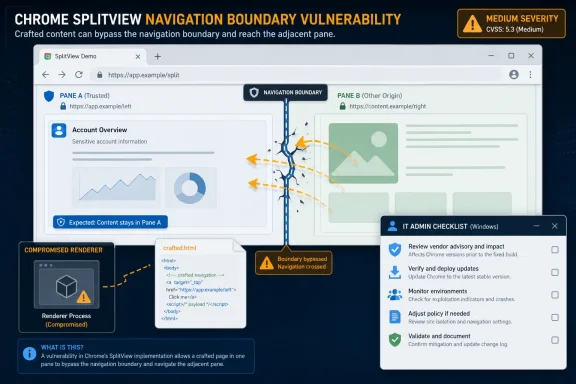
Google Chrome before version 150.0.7871.47 contains CVE-2026-13953, a medium-severity SplitView flaw published June 30, 2026, that could let an attacker who already compromised Chrome’s renderer bypass navigation restrictions using a crafted HTML page. The bug is not the kind of headline-grabbing browser zero-day that sends incident rooms into weekend mode. But it is exactly the sort of defect that explains why modern browser security is less about a single catastrophic hole than about chains of smaller failures. As documented by NVD, CISA’s enrichment, and Google’s Chrome Releases advisory, this is a navigation-boundary bug sitting inside a browser feature that many users may not even think of as security-sensitive.
CVE-2026-13953 is easy to underrate because the attacker does not begin from the open internet with full control. The description says the attacker must already have compromised the renderer process, which means this vulnerability is not the first step in an attack so much as a way to make an existing foothold more useful.
That distinction matters. Chrome’s security model assumes that renderers are exposed to hostile web content and therefore treats them as confined, relatively untrusted processes. When a renderer compromise occurs, the browser’s remaining defenses are supposed to limit what the attacker can do next.
A navigation restriction bypass does not sound as dramatic as remote code execution. But navigation controls are part of the browser’s containment architecture: they help decide what content can move where, what a compromised context can influence, and which boundaries remain meaningful after one component has failed.
CISA’s ADP scoring puts the CVSS 3.1 base score at 6.5, with network attack vector, low complexity, no privileges required, user interaction required, unchanged scope, high integrity impact, and no confidentiality or availability impact. That combination is telling. The danger is not data theft by itself; the danger is that a malicious page can interfere with trust boundaries after the renderer is already under attacker control.
Security engineers do not get the luxury of treating those changes as cosmetic. Every new way to display, embed, pair, or navigate pages creates fresh rules about which document owns which frame, what a click means, where a navigation is allowed to land, and which restrictions survive when content is moved into a new viewing mode.
That is why the phrase inappropriate implementation deserves more attention than it usually receives in CVE summaries. It often means the concept was reasonable, the feature worked well enough for normal users, but some edge condition failed to preserve the intended security boundary. In browser security, edge conditions are where real attackers live.
The fact that this bug involves a crafted HTML page also places it squarely in familiar territory. The web remains the delivery mechanism, the user must interact, and the browser must decide whether a page’s behavior is ordinary, hostile, or merely clever enough to fall between rules.
Browsers routinely patch renderer bugs because rendering untrusted web content is one of the hardest jobs in consumer software. JavaScript engines, layout engines, media parsers, graphics stacks, form handling, font processing, and document viewers all sit close to attacker-supplied input. Chrome’s sandbox exists precisely because Google assumes that some of these surfaces will fail.
In that architecture, vulnerabilities like CVE-2026-13953 become chain components. An attacker may pair an initial memory corruption bug with a second flaw that relaxes navigation constraints, then use that altered state to increase control over what the victim sees or where browser-controlled flows go.
This does not mean every medium Chromium issue is secretly a nation-state exploit. It means severity labels describe isolated defects, while real attacks often combine defects. A medium bug can be boring alone and valuable in a chain.
That timeline is normal in the browser world and still remarkable in the broader software world. The patch lands, the CVE entry fills in, scoring appears, and the public advisory contains enough information to prioritize updating without providing a cookbook for exploitation.
There is an asymmetry here that administrators know too well. Defenders must roll patches through fleets, test line-of-business apps, manage browser restarts, and answer help-desk complaints about changed behavior. Attackers only need to notice which organizations are slow.
Chrome’s auto-update system narrows that window for consumers. Enterprises, kiosks, virtual desktops, regulated environments, and app compatibility labs can widen it again. The browser may update itself, but enterprise reality often has other ideas.
The listed weakness, CWE-284, is “Improper Access Control.” That is a broad bucket, but it fits the story: a component allowed something it should have restricted. In this case, the restricted action involved navigation behavior inside SplitView after renderer compromise.
The SSVC data is equally useful because it is operational rather than theatrical. CISA marked exploitation as none, automation as no, and technical impact as partial. For most organizations, that means patch promptly through normal browser maintenance rather than invoking emergency change control.
Still, “normal” should not mean “eventually.” Chrome is a frontline application exposed to arbitrary internet content every day. A medium browser flaw ages badly when public metadata, patch diffs, and related bug patterns start accumulating.
Microsoft Edge, Brave, Vivaldi, Opera, and other Chromium-based browsers do not necessarily ship Google’s exact version number on the same day. They consume Chromium fixes on their own schedules, add their own layers, and expose different enterprise controls. The practical question is not “Is Chrome fixed?” but “Has every Chromium-based browser in the environment consumed the relevant upstream fix?”
That question is harder than it sounds. Many organizations standardize on Edge but still have Chrome installed for compatibility. Developers may run Chrome Canary, Chromium snapshots, Electron applications, WebView2-based tools, or vendor-packaged browsers embedded in management consoles.
CVE-2026-13953 is therefore a reminder to inventory browser engines, not just browser icons. If an application quietly embeds Chromium, its exposure may not be obvious from the Start menu.
But CPE data has always been an imperfect bridge between vulnerability disclosure and real-world software. It maps named products and versions, not necessarily every downstream package, fork, embedded runtime, or vendor-specific Chromium build. A CPE can tell a scanner that Google Chrome is affected; it may not tell you whether a third-party app ships a vulnerable Chromium component in a private directory.
That gap matters more as browsers become infrastructure. Chromium is not just an app; it is a platform component for desktop software, internal tools, packaged SaaS clients, and administrative front ends. Vulnerability metadata often trails that reality.
Security teams should treat the Chrome CPE as necessary but not sufficient. It identifies the canonical affected product, but it should trigger a broader review of Chromium-derived software wherever browser-grade web content is rendered.
The whole job of a browser is user interaction. Phishing, malvertising, compromised websites, poisoned search results, malicious support pages, and chat links are all interaction delivery systems. A requirement that the user load a crafted page is not a high wall; it is the web’s normal operating model.
The more meaningful limiter is the renderer-compromise prerequisite. CVE-2026-13953 by itself is not described as compromising the renderer. It becomes dangerous when paired with another renderer bug or when an attacker already has that foothold.
That makes it particularly relevant to organizations tracking exploit chains rather than isolated CVEs. Browser attacks often progress through stages, and each stage may receive a different severity score even though the combined chain is what matters.
Integrity in this context means the attacker may be able to cause the browser to perform or accept navigation behavior it should not. That can affect what page appears where, what boundaries are enforced, or how trusted flows are controlled. In user-facing terms, integrity bugs can help make the browser lie.
That matters because modern web security depends heavily on the browser being a trustworthy referee. Users rely on address bars, site isolation, permissions prompts, navigation limits, and UI boundaries to distinguish safe from unsafe behavior. If an attacker can bend those rules after gaining renderer control, the browser’s role as referee weakens.
This is why interface bugs should not be dismissed as “only UI.” In browsers, UI is part of the security model. A bad navigation decision can become the hinge between contained compromise and persuasive deception.
For administrators, the work is less glamorous. Verify the deployed version, confirm policy does not defer the update longer than intended, check whether Extended Stable channels are in use, and watch for users who keep sessions alive for days. Browser patch compliance often fails not because the update is unavailable, but because the process never closes.
There is also the compatibility tension. Chrome 150 is a major branch, and major browser updates can disrupt extensions, enterprise web apps, and embedded workflows. Reports around Chrome 150 have already included user complaints about extension behavior and media controls, although such reports should be treated as anecdotal unless confirmed by vendor advisories.
That is the trade-off IT lives with: update quickly enough to close exploit paths, but not so blindly that the browser becomes the outage. The answer is not to delay indefinitely; it is to test on a fast lane and push security fixes on a disciplined cadence.
CVE-2026-13953 follows that pattern. The Chromium issue tracker reference exists, but access may require permissions. The public knows the affected component, the fixed version, the broad condition, and the impact category. That is enough to patch; it is not enough to trivially reproduce.
The downside is that defenders must reason from sparse facts. “SplitView navigation restriction bypass after renderer compromise” is descriptive but not exhaustive. It does not reveal the exact restriction, the exploit primitive, or how easily it composes with other bugs.
In practice, this means security teams should avoid both extremes. Do not sensationalize it as an active zero-day when CISA’s enrichment says no known exploitation. Do not bury it simply because the public write-up is short.
Some of that volume reflects healthier disclosure, fuzzing, and internal hardening. More bugs found and fixed before exploitation is good news. But high patch volume also forces a maturity test on enterprise IT: can an organization absorb frequent browser security updates without treating each one as exceptional?
The old model of browser patching as a monthly chore is dead. Browsers are operating environments, identity surfaces, document viewers, media engines, password managers, and application platforms. Their update tempo reflects that centrality.
CVE-2026-13953 is not the loudest bug in the batch. It is useful precisely because it is ordinary. Ordinary browser bugs are now part of the background radiation of Windows security.
A browser used to be a document viewer with scripting. It is now a policy enforcement engine wrapped in a productivity shell. Every new shell feature must preserve origin boundaries, navigation rules, process isolation assumptions, and permission semantics.
That does not mean vendors should stop building features. It means features that change how pages coexist must be threat-modeled as security features, even when marketed as usability improvements. SplitView is not merely a way to see two pages at once if it changes the rules governing how pages navigate.
The industry has learned this lesson repeatedly with pop-ups, iframes, downloads, extensions, password prompts, permission chips, and address-bar spoofing. UI and security are not separate layers. They are interlocked.
 A Medium Bug With Chain-Building Written All Over It
CVE-2026-13953 is easy to underrate because the attacker does not begin from the open internet with full control. The description says the attacker must already have compromised the renderer process, which means this vulnerability is not the first step in an attack so much as a way to make an existing foothold more useful.That distinction matters. Chrome’s security model assumes that renderers are exposed to hostile web content and therefore treats them as confined, relatively untrusted processes. When a renderer compromise occurs, the browser’s remaining defenses are supposed to limit what the attacker can do next.
A navigation restriction bypass does not sound as dramatic as remote code execution. But navigation controls are part of the browser’s containment architecture: they help decide what content can move where, what a compromised context can influence, and which boundaries remain meaningful after one component has failed.
CISA’s ADP scoring puts the CVSS 3.1 base score at 6.5, with network attack vector, low complexity, no privileges required, user interaction required, unchanged scope, high integrity impact, and no confidentiality or availability impact. That combination is telling. The danger is not data theft by itself; the danger is that a malicious page can interfere with trust boundaries after the renderer is already under attacker control.
SplitView Turns Interface Design Into Attack Surface
SplitView is the kind of browser feature that sounds purely ergonomic. It belongs to the modern wave of interface changes that try to make browsers feel more like workspaces: tabs become grouped, pages sit side by side, and the browser window becomes a paneled productivity environment rather than a single-page viewport.Security engineers do not get the luxury of treating those changes as cosmetic. Every new way to display, embed, pair, or navigate pages creates fresh rules about which document owns which frame, what a click means, where a navigation is allowed to land, and which restrictions survive when content is moved into a new viewing mode.
That is why the phrase inappropriate implementation deserves more attention than it usually receives in CVE summaries. It often means the concept was reasonable, the feature worked well enough for normal users, but some edge condition failed to preserve the intended security boundary. In browser security, edge conditions are where real attackers live.
The fact that this bug involves a crafted HTML page also places it squarely in familiar territory. The web remains the delivery mechanism, the user must interact, and the browser must decide whether a page’s behavior is ordinary, hostile, or merely clever enough to fall between rules.
The Renderer Requirement Is a Limitation, Not a Comfort Blanket
It is tempting to read “attacker who had compromised the renderer process” and move on. That would be a mistake. Renderer compromise is a major prerequisite, but it is not a fantasy prerequisite.Browsers routinely patch renderer bugs because rendering untrusted web content is one of the hardest jobs in consumer software. JavaScript engines, layout engines, media parsers, graphics stacks, form handling, font processing, and document viewers all sit close to attacker-supplied input. Chrome’s sandbox exists precisely because Google assumes that some of these surfaces will fail.
In that architecture, vulnerabilities like CVE-2026-13953 become chain components. An attacker may pair an initial memory corruption bug with a second flaw that relaxes navigation constraints, then use that altered state to increase control over what the victim sees or where browser-controlled flows go.
This does not mean every medium Chromium issue is secretly a nation-state exploit. It means severity labels describe isolated defects, while real attacks often combine defects. A medium bug can be boring alone and valuable in a chain.
Google’s Patch Cadence Is Doing Quiet Emergency Work
Google’s Chrome Releases blog lists the fix in the Stable Channel Update for Desktop that moved Chrome to 150.0.7871.46 and 150.0.7871.47 across desktop platforms. NVD’s change history shows the CVE arriving from Chrome on June 30, followed by CISA’s enrichment and NIST’s initial analysis on July 2.That timeline is normal in the browser world and still remarkable in the broader software world. The patch lands, the CVE entry fills in, scoring appears, and the public advisory contains enough information to prioritize updating without providing a cookbook for exploitation.
There is an asymmetry here that administrators know too well. Defenders must roll patches through fleets, test line-of-business apps, manage browser restarts, and answer help-desk complaints about changed behavior. Attackers only need to notice which organizations are slow.
Chrome’s auto-update system narrows that window for consumers. Enterprises, kiosks, virtual desktops, regulated environments, and app compatibility labs can widen it again. The browser may update itself, but enterprise reality often has other ideas.
The NVD Entry Is Sparse, but the Signal Is Clear
NVD had not provided its own CVSS score at the time reflected in the supplied entry, but the absence of a NIST score should not be confused with absence of risk. CISA’s ADP enrichment already gives defenders enough to classify the issue as a medium-priority integrity problem with no known exploitation and no automation flag.The listed weakness, CWE-284, is “Improper Access Control.” That is a broad bucket, but it fits the story: a component allowed something it should have restricted. In this case, the restricted action involved navigation behavior inside SplitView after renderer compromise.
The SSVC data is equally useful because it is operational rather than theatrical. CISA marked exploitation as none, automation as no, and technical impact as partial. For most organizations, that means patch promptly through normal browser maintenance rather than invoking emergency change control.
Still, “normal” should not mean “eventually.” Chrome is a frontline application exposed to arbitrary internet content every day. A medium browser flaw ages badly when public metadata, patch diffs, and related bug patterns start accumulating.
Windows Admins Should Watch Chromium, Not Just Chrome
For WindowsForum readers, the Chrome version number is only the beginning. Chromium is the base for multiple Windows browsers and embedded web experiences, and security fixes often matter beyond Google-branded Chrome.Microsoft Edge, Brave, Vivaldi, Opera, and other Chromium-based browsers do not necessarily ship Google’s exact version number on the same day. They consume Chromium fixes on their own schedules, add their own layers, and expose different enterprise controls. The practical question is not “Is Chrome fixed?” but “Has every Chromium-based browser in the environment consumed the relevant upstream fix?”
That question is harder than it sounds. Many organizations standardize on Edge but still have Chrome installed for compatibility. Developers may run Chrome Canary, Chromium snapshots, Electron applications, WebView2-based tools, or vendor-packaged browsers embedded in management consoles.
CVE-2026-13953 is therefore a reminder to inventory browser engines, not just browser icons. If an application quietly embeds Chromium, its exposure may not be obvious from the Start menu.
The CPE Confusion Is a Symptom of a Bigger Metadata Problem
The supplied NVD text asks, in effect, whether a CPE is missing. NIST’s change history shows a CPE configuration being added for Google Chrome versions up to but excluding 150.0.7871.47, which is the basic vulnerable product mapping defenders expect.But CPE data has always been an imperfect bridge between vulnerability disclosure and real-world software. It maps named products and versions, not necessarily every downstream package, fork, embedded runtime, or vendor-specific Chromium build. A CPE can tell a scanner that Google Chrome is affected; it may not tell you whether a third-party app ships a vulnerable Chromium component in a private directory.
That gap matters more as browsers become infrastructure. Chromium is not just an app; it is a platform component for desktop software, internal tools, packaged SaaS clients, and administrative front ends. Vulnerability metadata often trails that reality.
Security teams should treat the Chrome CPE as necessary but not sufficient. It identifies the canonical affected product, but it should trigger a broader review of Chromium-derived software wherever browser-grade web content is rendered.
User Interaction Keeps the Bug in the Real World
CISA’s vector includes user interaction, which means exploitation requires the victim to do something: visit a page, click a link, open content, or otherwise engage with attacker-controlled HTML. That condition lowers exploitability compared with a wormable network service, but for browsers it is hardly reassuring.The whole job of a browser is user interaction. Phishing, malvertising, compromised websites, poisoned search results, malicious support pages, and chat links are all interaction delivery systems. A requirement that the user load a crafted page is not a high wall; it is the web’s normal operating model.
The more meaningful limiter is the renderer-compromise prerequisite. CVE-2026-13953 by itself is not described as compromising the renderer. It becomes dangerous when paired with another renderer bug or when an attacker already has that foothold.
That makes it particularly relevant to organizations tracking exploit chains rather than isolated CVEs. Browser attacks often progress through stages, and each stage may receive a different severity score even though the combined chain is what matters.
The Integrity Impact Is the Story
The CISA vector assigns high impact to integrity and none to confidentiality or availability. That is an unusual profile for casual readers who associate browser bugs with data theft or crashes, but it is coherent for a navigation restriction bypass.Integrity in this context means the attacker may be able to cause the browser to perform or accept navigation behavior it should not. That can affect what page appears where, what boundaries are enforced, or how trusted flows are controlled. In user-facing terms, integrity bugs can help make the browser lie.
That matters because modern web security depends heavily on the browser being a trustworthy referee. Users rely on address bars, site isolation, permissions prompts, navigation limits, and UI boundaries to distinguish safe from unsafe behavior. If an attacker can bend those rules after gaining renderer control, the browser’s role as referee weakens.
This is why interface bugs should not be dismissed as “only UI.” In browsers, UI is part of the security model. A bad navigation decision can become the hinge between contained compromise and persuasive deception.
The Patch Is Simple; the Fleet Reality Is Not
For individual users, the advice is straightforward: update Chrome to 150.0.7871.47 or later and restart the browser. Chrome’s update page will usually do the work, but the restart is what actually moves most users onto the new build.For administrators, the work is less glamorous. Verify the deployed version, confirm policy does not defer the update longer than intended, check whether Extended Stable channels are in use, and watch for users who keep sessions alive for days. Browser patch compliance often fails not because the update is unavailable, but because the process never closes.
There is also the compatibility tension. Chrome 150 is a major branch, and major browser updates can disrupt extensions, enterprise web apps, and embedded workflows. Reports around Chrome 150 have already included user complaints about extension behavior and media controls, although such reports should be treated as anecdotal unless confirmed by vendor advisories.
That is the trade-off IT lives with: update quickly enough to close exploit paths, but not so blindly that the browser becomes the outage. The answer is not to delay indefinitely; it is to test on a fast lane and push security fixes on a disciplined cadence.
Google’s Disclosure Style Still Balances Help and Restraint
Google’s public Chrome advisories typically disclose the affected component, severity, CVE, and a short description while keeping bug details restricted until enough users have updated. That restraint frustrates researchers and defenders who want full technical clarity immediately, but it is a rational compromise for a browser with billions of installations.CVE-2026-13953 follows that pattern. The Chromium issue tracker reference exists, but access may require permissions. The public knows the affected component, the fixed version, the broad condition, and the impact category. That is enough to patch; it is not enough to trivially reproduce.
The downside is that defenders must reason from sparse facts. “SplitView navigation restriction bypass after renderer compromise” is descriptive but not exhaustive. It does not reveal the exact restriction, the exploit primitive, or how easily it composes with other bugs.
In practice, this means security teams should avoid both extremes. Do not sensationalize it as an active zero-day when CISA’s enrichment says no known exploitation. Do not bury it simply because the public write-up is short.
Chrome’s Security Story Is Now a Volume Story
The broader context is the sheer number of Chrome vulnerabilities patched in recent releases. Google’s stable channel updates around Chrome 149 and Chrome 150 have involved hundreds of fixes, according to Chrome Releases and secondary reporting from outlets such as Born’s IT and Windows Blog.Some of that volume reflects healthier disclosure, fuzzing, and internal hardening. More bugs found and fixed before exploitation is good news. But high patch volume also forces a maturity test on enterprise IT: can an organization absorb frequent browser security updates without treating each one as exceptional?
The old model of browser patching as a monthly chore is dead. Browsers are operating environments, identity surfaces, document viewers, media engines, password managers, and application platforms. Their update tempo reflects that centrality.
CVE-2026-13953 is not the loudest bug in the batch. It is useful precisely because it is ordinary. Ordinary browser bugs are now part of the background radiation of Windows security.
The Lesson Hiding in SplitView’s Name
SplitView sounds like a convenience feature, and that is why the vulnerability is instructive. The more browsers absorb window management, workspace organization, tab intelligence, sidebars, AI assistants, and app-like behaviors, the more the attack surface moves into places users perceive as harmless.A browser used to be a document viewer with scripting. It is now a policy enforcement engine wrapped in a productivity shell. Every new shell feature must preserve origin boundaries, navigation rules, process isolation assumptions, and permission semantics.
That does not mean vendors should stop building features. It means features that change how pages coexist must be threat-modeled as security features, even when marketed as usability improvements. SplitView is not merely a way to see two pages at once if it changes the rules governing how pages navigate.
The industry has learned this lesson repeatedly with pop-ups, iframes, downloads, extensions, password prompts, permission chips, and address-bar spoofing. UI and security are not separate layers. They are interlocked.
The Practical Read for Windows Shops Running Chrome 150
This is a patch-now issue, not a panic-now issue. CVE-2026-13953 has a medium score, no known exploitation in CISA’s SSVC entry, and a prerequisite that limits standalone usefulness. But it affects a high-exposure application and can matter inside an exploit chain, which means slow patching is the wrong bet.- Organizations should verify that Google Chrome is at version 150.0.7871.47 or later on Windows and macOS systems where that build applies.
- Administrators should check Chromium-based browsers beyond Chrome, because upstream Chromium fixes may reach downstream products on different schedules.
- Security teams should treat CPE matching as a starting point, not a complete inventory of Chromium exposure across embedded applications.
- Help desks should expect some noise around Chrome 150 behavior changes, but compatibility complaints should be handled through fast testing rather than broad update deferral.
- Risk teams should classify CVE-2026-13953 as a chain-enabling browser flaw with integrity impact, not as an isolated data-theft bug.
References
- Primary source: NVD / Chromium
Published: 2026-07-03T07:00:59-07:00
NVD - CVE-2026-13953
 nvd.nist.gov
- Security advisory: MSRC
Published: 2026-07-03T07:00:59-07:00
Original feed URL
Security Update Guide - Microsoft Security Response Center
 msrc.microsoft.com
- Related coverage: cvefeed.io
CVE-2026-13953 - Google Chrome SplitView Navigation Restriction Bypass
Inappropriate implementation in SplitView in Google Chrome prior to 150.0.7871.47 allowed a remote attacker who had compromised the renderer process to bypass navigation restrictions via a crafted HTML page. (Chromium security severity: Medium)cvefeed.io
