

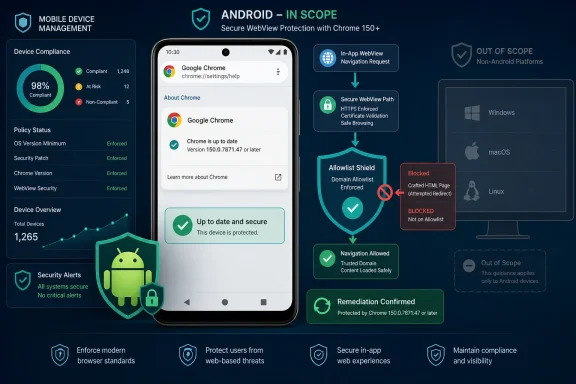
CVE-2026-13964 is a medium-severity Chrome vulnerability affecting Android versions before 150.0.7871.47. The public description says insufficient policy enforcement in WebView could allow a remote attacker using crafted HTML to bypass navigation restrictions after user interaction. CISA’s assessment records no identified exploitation, but the flaw concerns a boundary that Android applications may rely on when displaying web content.What to do now
- Scope: Treat CVE-2026-13964 as an Android Chrome/WebView-context vulnerability, not a desktop Chrome finding.
- Affected versions: Google Chrome for Android versions earlier than 150.0.7871.47.
- Remediation: Update affected Android devices to Chrome 150.0.7871.47 or later and verify the installed version.
- Desktop warning: Do not infer that Chrome on Windows, macOS, or Linux is affected merely because the referenced Chrome Releases advisory has a desktop-oriented title.
For users and administrators, the immediate response is straightforward: get Android installations to Chrome 150.0.7871.47 or later and verify the result. The broader engineering lesson is equally important. An application should not treat a WebView navigation allowlist as its sole proof that displayed content, a destination, or a completed workflow is trustworthy.
A Medium Rating Hides an Integrity Failure
The public description of CVE-2026-13964 is concise: insufficient policy enforcement in WebView allowed a remote attacker to bypass navigation restrictions through a crafted HTML page. Chromium classifies the vulnerability as Medium, while the CISA-ADP CVSS 3.1 assessment assigns a base score of 6.5.
The CISA-ADP vector is CVSS:3.1/AV:N/AC:L/PR:N/UI:R/S:U/C:N/I:H/A:N. It describes a network-reachable attack with low attack complexity and no required attacker privileges. User interaction is required. The assessed impact is high for integrity, with no scored confidentiality or availability impact, and the security scope remains unchanged.
That does not describe a silent takeover of every vulnerable Android device. Nor does it establish a mechanism for stealing all data visible to Chrome, escaping the Android application sandbox, executing native code, or taking control of the operating system.
The documented failure is narrower: WebView did not sufficiently enforce a navigation restriction. That matters because a host application may use navigation decisions to determine which web destinations can remain within an embedded experience and which should be rejected, opened elsewhere, or handled by native code.
A bypass can therefore undermine an application’s control over where embedded content is allowed to go. The high-integrity rating reflects the potential to alter a navigation outcome that the host intended to prevent. The public record does not establish what additional consequences, if any, can be achieved in a particular application.
Sensitive examples such as authentication, banking, payment, device enrollment, or administration are useful only as generic risk context. They are common categories of mobile workflows in which navigation controls can matter, but they are not demonstrated exploit scenarios for CVE-2026-13964.
The correct interpretation is disciplined: the vulnerability breaks a navigation-policy decision, and applications should not assume that such a decision is sufficient by itself to establish trust.
The Affected Context Is Android
The affected-product information identifies Google Chrome in conjunction with Android and establishes a fixed-version boundary of 150.0.7871.47. It does not identify Chrome on Windows, macOS, or Linux as affected by this CVE.
That platform qualification is especially important because one of the referenced Chrome Releases pages carries a desktop-update title. The available facts establish that this page is used as a release-notes or vendor-advisory reference. They do not establish that the page itself lists CVE-2026-13964, nor that it serves as a collection of Android WebView fixes.
Administrators should therefore avoid deriving affected platforms from the advisory headline. The structured vulnerability description and affected-version data are the safer basis for asset matching.
| Deployment state | Platform | Chrome version | CVE-2026-13964 status | Operational interpretation |
|---|---|---|---|---|
| Unpatched installation | Android | Earlier than 150.0.7871.47 | Affected | Falls inside the disclosed vulnerable range |
| Patched installation | Android | 150.0.7871.47 or later | Outside the affected range | Meets the disclosed remediation threshold |
| Desktop Chrome installation | Windows, macOS, or Linux | Not specified by this CVE | Not listed as affected | Do not infer exposure from the referenced advisory’s desktop title |
This is not a semantic distinction. A vulnerability-management system that reduces the record to “Chrome vulnerability” may produce misleading findings unless it retains the Android platform requirement and the affected version boundary.
Conversely, a mobile inventory that reports only the Android operating-system version may not provide enough information to determine whether the installed Chrome package has reached 150.0.7871.47.
The reliable question is not simply, “Is Chrome installed?” It is:
- Is the device running Android?
- What Chrome version is installed?
- Is that version earlier than 150.0.7871.47?
- After remediation, can the organization confirm that the installed version meets or exceeds the fixed threshold?
The public record does not provide enough information to prescribe which package-management workflow every Android model or enterprise configuration must use. Update behavior can vary by device, Android release, vendor configuration, and management system. The version installed on the device remains the authoritative operational check.
Navigation Restrictions Are Part of the Security Boundary
The phrase “navigation restriction” can sound cosmetic, but in an embedded web experience it can represent a meaningful application control.
A host application may decide which destinations are allowed to remain inside an embedded view. It may block an unexpected destination, hand a link to another application, or invoke native handling for a particular transition. Those decisions help the application preserve the boundaries of the experience it intends to provide.
CVE-2026-13964 indicates that the affected implementation did not enforce some navigation policy sufficiently. The public description does not identify the precise policy, browser mechanism, navigation type, or application pattern involved.
It does not say whether the bypass depends on a redirect, frame transition, alternate scheme, popup, gesture, URL-parsing edge case, or another behavior. Defenders should not invent those details or build detection logic around an assumed exploit primitive.
The lack of public implementation detail also limits the value of application-specific workarounds. A developer cannot responsibly conclude that one callback, one URL comparison, or one network rule neutralizes the vulnerability unless that conclusion is supported by more detailed technical information.
The disclosed version boundary is therefore the clearest remediation rule: update Chrome on Android to 150.0.7871.47 or later.
For application developers, the disclosure reinforces a separate defense-in-depth principle. A navigation allowlist should not become the final trust decision for a sensitive operation. The application or its server should independently validate whether authentication, authorization, enrollment, payment, or another consequential action actually succeeded.
Those workflow categories are not claims about the demonstrated behavior of CVE-2026-13964. They illustrate why an application should verify security-sensitive state independently instead of accepting arrival at a URL as conclusive proof.
An embedded web surface should be treated as active, network-controlled content—not as an inherently trusted document viewer.
User Interaction Is Required, but the Exact Action Is Not Public
The CVSS assessment marks user interaction as required. That condition lowers the severity score because the documented attack path is not assessed as completely independent of a user’s actions.
The public description does not specify what that interaction looks like. It would be unsupported to say that receiving a message alone is sufficient. It would be equally unsupported to claim that exploitation requires an elaborate sequence of prompts or taps.
What the record establishes is narrower:
- A remote attacker can supply crafted HTML.
- The vulnerability affects enforcement of WebView navigation restrictions.
- The assessed attack path requires user interaction.
- The vulnerable range ends at Chrome 150.0.7871.47.
Opening a link, loading content in an application, following a redirect, or interacting with a displayed page are generic examples of browser-related user activity. They should not be presented as confirmed trigger conditions for this CVE.
Likewise, phishing, malicious advertising, messaging links, QR codes, email, or collaboration platforms are generic delivery contexts—not documented exploitation methods for CVE-2026-13964.
The distinction matters for both urgency and accuracy. The vulnerability should not be inflated into a demonstrated no-click compromise. It also should not be dismissed merely because some form of interaction is required. The proper response is prompt update deployment and version verification, not speculation about an unpublished exploit chain.
CISA Records No Identified Exploitation
CISA-ADP’s SSVC assessment records exploitation as “none,” automatable as “no,” and technical impact as “partial.” That weighs against describing CVE-2026-13964 as an active, internet-wide emergency.
“None” should be read carefully. It records that exploitation was not identified in that assessment. It does not prove that exploitation is impossible, that no researcher has studied the issue privately, or that the assessment can never change.
The “not automatable” designation is also an assessment, not a guarantee that exploitation could never be operationalized. It supports a more measured prioritization than would be appropriate for a known-exploited, no-click remote-code-execution vulnerability.
CISA-ADP maps the flaw to CWE-284, Improper Access Control. That broad category is consistent with the described policy-enforcement failure. It does not establish that the attacker obtains Android permissions, application privileges, native code execution, arbitrary file access, or control over unrelated resources.
The available CVSS 3.1 score comes from CISA-ADP. It should not be presented as an independent NVD score. Database records can combine information supplied or assessed by several organizations, so preserving attribution is important.
For defenders, the current record supports prompt routine remediation with verification, particularly where Android devices participate in sensitive business workflows. It does not support emergency device shutdowns, mass factory resets, or claims that affected phones have already been remotely compromised.
Record timeline
Initial CVE record — The vulnerability record described insufficient WebView policy enforcement in Chrome on Android, a crafted-HTML attack path, required user interaction, and an affected range before 150.0.7871.47.
CISA-ADP enrichment — CISA-ADP supplied the CVSS 3.1 assessment, associated the issue with CWE-284, and recorded its SSVC judgments of no identified exploitation, no automation, and partial technical impact.
NIST analysis — NIST’s analysis associated the Chrome product with the Android platform and classified the referenced Chrome Releases page as release notes and a vendor advisory.
The supplied information includes database dates and timestamps, but it does not establish a sufficiently clear chronology to characterize one organization’s publication as occurring before or after a separate Chrome submission event. The timeline therefore preserves the documented record stages without asserting unsupported publication sequencing.
The Desktop-Titled Reference Does Not Expand the Scope
The Chrome Releases reference can confuse administrators because its title concerns a desktop Stable Channel update while the CVE description is specific to Chrome on Android.
The existence of that reference does not make Windows, macOS, or Linux affected. Nor should readers assume that the page itself enumerates this CVE or collects Android WebView fixes unless the page’s contents independently establish those facts.
For CVE-2026-13964, asset matching should follow the affected-product record:
- The product is Google Chrome.
- The relevant platform context is Android.
- Versions earlier than 150.0.7871.47 are affected.
- Chrome 150.0.7871.47 is the disclosed fixed-version threshold.
A Windows administrator who sees the desktop title should not automatically add this CVE to the Windows Chrome queue. An Android administrator should not dismiss the vulnerability because its reference has a desktop-oriented headline.
This is a broader vulnerability-management problem. Reference titles are designed for human readers and may cover a larger release event. They are not always precise statements of every CVE’s affected platform.
Organizations should ensure that their tooling preserves platform qualifiers and version ranges instead of flattening every product match into a generic Chrome finding. Analysts should also review the underlying CVE data before escalating or suppressing a result based on the title of one referenced page.
Mobile Compliance Must Include the Installed Version
CVE-2026-13964 is remediated according to a Chrome version boundary, not merely an Android operating-system patch level. A device can therefore look broadly healthy while still requiring verification of the installed Chrome version.
Organizations with mobile-management tools should determine whether those tools report application versions accurately enough to identify Chrome releases earlier than 150.0.7871.47. Capabilities differ among device-management, application-management, inventory, and managed-store products, so administrators should verify what their own platform can observe and enforce.
Where package-version telemetry is available, it can provide stronger evidence than a policy stating that automatic updates are allowed. Where it is not available, organizations may need another verification method, including guided user checks or a documented attestation process.
Potential update obstacles—such as a disabled application, a pinned package, staged deployment, store restrictions, or a device that has not checked in—are reasonable troubleshooting considerations. They are not facts established by the CVE record. Administrators should investigate them only as possibilities supported by their own environment and management platform.
The same qualification applies to Android System WebView and managed Google Play. Depending on the device and management arrangement, these components may be visible or controllable in different ways. The supplied vulnerability facts establish the affected Chrome version and Android context; they do not define a universal package architecture or enterprise deployment procedure.
Version verification avoids that uncertainty. If Chrome reports 150.0.7871.47 or later on the Android device, it meets the disclosed remediation threshold for this CVE.
Action checklist for admins
- Inventory Chrome versions on managed Android devices where the management platform provides reliable application-version data.
- Identify Android installations running Chrome earlier than 150.0.7871.47.
- Approve or deploy Chrome 150.0.7871.47 or later through the organization’s normal managed application process.
- Verify the installed version after deployment rather than relying solely on update availability or policy configuration.
- Investigate devices that remain below the threshold using the controls and telemetry available in the organization’s specific management platform.
- Do not create Windows, macOS, or Linux findings solely from the desktop-oriented title of the referenced release advisory.
- Identify business applications that display web content and rely on navigation filtering for sensitive workflows.
- Regression-test important embedded-web workflows after patching, especially redirects, rejected destinations, domain transitions, and handoffs to other applications.
- Review application designs that treat arrival at an expected URL as proof that a security-sensitive operation succeeded.
- Monitor for unexpected navigation behavior, but do not label an event as exploitation of CVE-2026-13964 without supporting evidence.
End-user update procedure
On an Android device:
- Open the Google Play Store.
- Search for Chrome.
- Open the Chrome application listing and select Update, if that option appears.
- After the update completes, open Chrome.
- Open the three-dot menu.
- Select Settings, then About Chrome.
- Confirm that the displayed version is 150.0.7871.47 or later.
Menu names and the exact path can differ by device, Android version, Chrome release, manufacturer interface, or organizational management policy. If the Play Store does not offer an update and the installed version remains below the threshold, the user should contact the organization’s administrator rather than assume the device is compliant.
Developers Should Not Make Navigation the Final Authority
The most durable lesson from CVE-2026-13964 is that an embedded renderer should not become the final authority over a security-sensitive transaction.
Developers often use domain checks and navigation callbacks to keep users inside an expected workflow. Those controls can reduce exposure and remain worth implementing. They should not, however, be treated as cryptographic or transactional proof that a trusted operation occurred.
A stronger design validates outcomes outside the embedded content:
- Authentication should be confirmed through a valid session, token, or server response.
- Authorization should be checked against current server-side state.
- Enrollment should be confirmed through the resulting device or account status.
- A transaction should be verified by the system that records it.
- Privileged native actions should require explicit application-side validation.
These are general secure-design examples. The public record does not claim that CVE-2026-13964 successfully compromises any one of those workflows.
URL allowlists also need careful implementation. Exact origin and destination handling is safer than broad substring checks or assumptions based on visual similarity. Developers should distinguish scheme, host, port, path, and redirect behavior according to the application’s actual threat model.
Again, the CVE description does not say that weak allowlist code is required for exploitation. The point is defense in depth: application-level validation can reduce the consequence of a renderer or policy-enforcement failure.
The supplied facts do not support a specific recommendation to replace WebView with Custom Tabs, nor do they establish detailed architectural relationships among Chrome, WebView, separate applications, or historical Android packaging. Those claims should not be used to explain or remediate this CVE without separate authoritative support.
Where an application must display external or untrusted web content, the development team should select a presentation model based on current platform documentation, required capabilities, and a documented threat analysis. Regardless of the chosen component, privileged application behavior should not depend solely on the renderer staying within an expected navigation path.
The exact underlying Chromium issue is not publicly detailed in the supplied record. Until more technical information is available, the defensible response is to patch the affected version range and audit the application’s trust decisions rather than speculate about hidden implementation details.
Windows Shops Still Own the Android Risk
CVE-2026-13964 is not a Windows vulnerability. Chrome on Windows should not be declared affected based on the current product configuration or the title of the referenced release page.
Even so, Windows-centered organizations may still own the operational risk because Android devices often participate in access to corporate identity systems, cloud applications, administrative portals, support tools, and collaboration services.
That connection should not be overstated. The CVE record does not demonstrate compromise of Microsoft accounts, multifactor authentication, corporate portals, or Windows administration. These are examples of why enterprise mobile patching can matter to an organization whose primary endpoint platform is Windows.
Visibility may be more difficult where an organization manages only selected applications rather than the full device. Mobile application management products differ in what device and package details they expose. Security teams should verify the capabilities of their own product before assuming they can see the installed Chrome version across every enrolled or unenrolled device.
Where direct visibility is unavailable, the organization can still establish a clear minimum requirement: Android devices used for covered business workflows should run Chrome 150.0.7871.47 or later. The organization can then decide how to validate that requirement through its existing access, enrollment, support, or compliance processes.
The response should remain proportional. There is no documented basis for treating every embedded page as hostile or every unexpected redirect as confirmed exploitation. There is, however, a clear reason to close the vulnerable version range and review any application architecture that places too much trust in navigation controls.
CVE-2026-13964 is ultimately a manageable update problem with a useful design warning attached. Patch Android Chrome to the fixed threshold, verify the installed version, keep desktop Chrome out of scope unless later evidence says otherwise, and ensure that navigation filtering is only one layer in the application’s trust model.
The vulnerability record may gain more technical detail or revised assessments over time. If it does, defenders can revisit detection, exploitation likelihood, and application-specific consequences. Until then, version-boundary verification is more reliable than speculation—and independent validation of sensitive workflow state remains the best preparation for the next embedded-browser policy failure.
References
- Chromium: CVE-2026-13964 Insufficient policy enforcement in WebView NVD / Chromium · 2026-07-11T15:41:24-07:00