

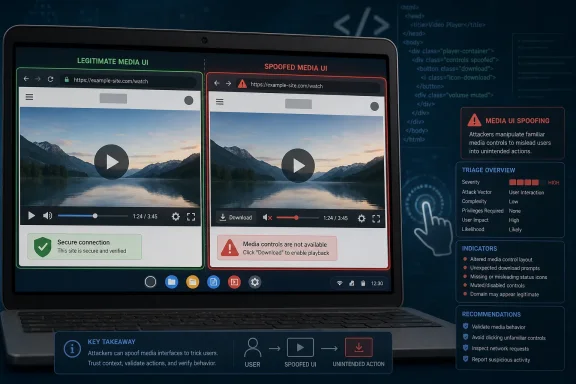
Google Chrome on ChromeOS before version 150.0.7871.47 is affected by CVE-2026-13986, a medium-severity Media UI spoofing flaw disclosed June 30, 2026, that lets a remote attacker use a crafted HTML page and specific user gestures to misrepresent browser interface information. The bug is not a remote-code-execution panic button, but it lands in a part of the browser where trust is visual, contextual, and easy to abuse. As documented by NVD from Chrome’s own CVE submission and reflected in CISA’s ADP scoring, this is the kind of vulnerability that looks modest in a scanner and more interesting in a phishing chain.
CVE-2026-13986 is described as an “inappropriate implementation” in Chrome’s Media UI on ChromeOS. In plain English, that means some piece of Chrome’s media-related interface could be made to show, hide, or imply the wrong thing when a user interacts with a malicious page in a particular way. The attacker does not get magic code execution from the CVE description alone; the attacker gets a chance to spoof UI.
That distinction matters because browser security has spent decades teaching users that interface chrome is more trustworthy than page content. A web page can lie, animate, mimic, and manipulate. The browser frame, permission prompts, media controls, site identity surfaces, and platform-owned panels are supposed to be the boundary between the page’s theater and the user’s operating environment.
UI spoofing bugs attack that boundary by making something look like it belongs to the browser or operating system when it is actually under attacker influence, or by making a legitimate interface convey the wrong state. In this case, the affected component is Media UI, which is especially sensitive because users already expect it to float above pages, react to gestures, and behave differently from ordinary HTML.
The Chrome team classified the issue as medium severity. CISA’s ADP assessment gives it a CVSS 3.1 base score of 4.2, with network attack vector, high attack complexity, no required privileges, required user interaction, unchanged scope, no confidentiality impact, low integrity impact, and low availability impact. That is not the profile of a catastrophic bug, but it is the profile of a vulnerability that can make a social-engineering attack more convincing.
That is exactly why administrators should resist the urge to flatten every Chrome CVE into the same remediation bucket. Chrome’s codebase is shared across platforms, but vulnerability impact is often mediated by platform integration. A media control surface on ChromeOS can behave differently from one on Windows, macOS, Linux, or Android, and the security boundary may sit partly in browser code and partly in OS shell behavior.
The CPE entry is also worth watching because it reflects how the public vulnerability ecosystem converts a vendor statement into machine-readable inventory logic. NVD initially added a configuration that pairs the Chrome application CPE with Chrome OS. That should help scanners avoid flagging every desktop Chrome installation in exactly the same way, but it may also expose the usual rough edges in CPE matching.
For WindowsForum readers, the Windows angle is therefore indirect but still practical. Many organizations manage Chrome across Windows endpoints, ChromeOS fleets, and mixed BYOD estates using the same vulnerability dashboards. A ChromeOS-specific CVE can still show up in enterprise reports, ticket queues, and compliance exceptions if the tooling treats “Google Chrome before 150.0.7871.47” as the whole story and drops the operating-system qualifier.
Modern phishing and fraud attacks are built around gestures. Users are routinely instructed to click a button, drag a slider, press play, accept a prompt, expand a panel, share a screen, start a call, or interact with a fake verification workflow. A vulnerability that requires a gesture may be poorly suited for worms, but it can still fit cleanly into a targeted lure.
Media UI is an especially plausible stage for that kind of manipulation. Audio and video prompts already ask users to press play, confirm permissions, adjust controls, recover playback, or interact with overlays. The browser has trained users to accept that media surfaces may behave asynchronously, appear outside the main page flow, or respond to hardware keys and system-level panels.
That is the uncomfortable lesson of CVE-2026-13986. The web’s trust model is not only about memory safety and sandbox boundaries. It is also about whether the user can tell which part of the screen is speaking with browser authority and which part is just a crafted page performing confidence tricks.
But medium does not mean irrelevant. In a browser, an integrity-impacting UI bug can help an attacker redirect a user’s decision. It can be the difference between a suspicious prompt and a believable one, between a failed credential harvest and a successful one, or between a blocked workflow and a user who thinks Chrome itself is asking for the next step.
CISA’s SSVC fields for this CVE are restrained: exploitation listed as none, automatable as no, and technical impact as partial. That is useful context. There is no public signal in the supplied data that this issue is being exploited in the wild, and the requirement for specific gestures limits mass automation.
Still, administrators should read those fields as prioritization inputs, not permission slips. If a ChromeOS fleet is already on an aggressive update cadence, this patch should flow naturally. If devices are pinned, offline, kiosk-like, or controlled by delayed release channels, the more relevant question is whether those machines expose users to untrusted web content and media-heavy workflows.
Enterprise reality is less tidy. ChromeOS devices may be constrained by update policies, long-term support channels, staged rollouts, device model support windows, or organizational testing gates. Some fleets also run in shared-device, kiosk, education, retail, or healthcare scenarios where the browser is both the application platform and the user interface to the business.
That makes version verification more important than advisory reading. Security teams should confirm the actual Chrome and ChromeOS versions reported by management tooling rather than assume that the presence of an update policy equals deployment. Where possible, they should segment ChromeOS reporting from Windows and macOS Chrome reporting so platform-specific CVEs do not create noisy or misleading remediation tickets.
The most common failure mode in browser patching is not ignorance of the advisory. It is the lag between “available,” “downloaded,” “installed,” and “actually restarted into the fixed build.” Chrome’s background updater is excellent, but the browser and OS still need to complete the transition. A dormant patched payload does not protect a running vulnerable session.
For CVE-2026-13986, NVD’s initial analysis added a CPE configuration with Chrome versions up to, but excluding, 150.0.7871.47 and Chrome OS. That is likely an attempt to encode the platform qualifier in Google’s description. It is also exactly the sort of structure that can be mishandled by scanners that simplify conditions or flatten logical operators.
Security teams should look carefully at how their tools render the affected products. If a report says “Google Chrome before 150.0.7871.47” without indicating ChromeOS, it may be overbroad for this specific CVE. If a report ignores ChromeOS entirely and only tracks desktop Chrome packages, it may miss the affected fleet. Both errors are plausible because CPE logic is often treated as plumbing until it breaks.
This is also where CISA’s ADP enrichment is useful. The ADP record supplies a CVSS vector, CWE mapping, and SSVC assessment before NVD has necessarily completed its own scoring. That helps vulnerability managers triage, but it does not eliminate the need to read the vendor description. The shortest path to a wrong ticket is to treat every enrichment field as equally authoritative without checking what the CVE actually says.
A spoofing bug does not necessarily defeat the sandbox. It defeats the user’s ability to interpret the sandbox. If the page can make a browser-owned surface appear misleading, or can cause a user to mistake page content for trusted UI, the attacker can route around some of the browser’s strongest technical defenses by convincing the human to authorize the wrong thing.
That is why CWE-451, “User Interface Misrepresentation of Critical Information,” is the right conceptual bucket. Critical information is not always a password field or a TLS indicator. It can be the origin of a prompt, the identity of the page asking for a gesture, the state of media playback, or whether a control belongs to Chrome rather than the site.
The web has made this harder by design. Browsers are no longer static frames around documents. They are operating environments for video conferencing, web apps, notifications, payments, authentication ceremonies, remote desktops, passkeys, and device permissions. The more capable the browser becomes, the more valuable its own interface becomes as an attack surface.
That is good and bad. It is good because users and administrators do not need to build a bespoke mitigation plan for each Chrome CVE in the bundle. The operational answer is usually to move to the fixed stable version. Browser vendors have made patching frequent enough that the cadence itself is a control.
It is bad because the bundling encourages shallow thinking. A critical sandbox escape and a medium UI spoofing bug may share a version number, but they have different exploitation paths, different detection opportunities, and different user-education implications. Treating the bundle as one blob of “Chrome risk” helps patch deployment but hurts defensive understanding.
For Windows and macOS admins, the Chrome 150 train also creates a subtle communication challenge. Users may hear “Chrome 150.0.7871.47 fixes security bugs” and assume every CVE in the release applies identically to their machine. In reality, some entries are platform-specific, some are component-specific, and some are only meaningful under particular configurations. The patch message can be simple; the risk explanation should not be sloppy.
Media-heavy environments deserve special attention. Education platforms, training portals, telehealth systems, conferencing apps, streaming dashboards, and customer-support workflows all normalize interaction with media controls. When a bug lives in Media UI, user behavior around media becomes part of the exploitability story.
Administrators should also think about user messaging. “A malicious page may spoof browser UI after specific gestures” is too abstract for most users. “Do not trust unexpected media prompts or browser-like controls on unfamiliar pages, and restart your Chromebook to complete updates” is closer to useful.
For high-control environments, the best mitigation remains boring: enforce updates, minimize delay windows, restrict untrusted browsing where possible, and monitor fleet versions. For lower-control environments, the realistic goal is to reduce dwell time on vulnerable builds. ChromeOS’s update model is one of its strengths, but only if devices actually receive and boot into the update.
In mixed fleets, vulnerability management often becomes a language problem. A scanner says Chrome is vulnerable. A ticket says update Chrome. A desktop team says the machine is already on the latest Windows Chrome build. A security team points to the CVE. Somewhere in the middle, the platform condition has been lost.
The fix is not to dismiss scanners. It is to insist on richer asset context. Operating system, channel, browser version, management domain, restart state, and device class all matter. A ChromeOS-only issue should land in the ChromeOS queue; a cross-platform renderer bug should land everywhere Chrome runs; a Windows-specific Chrome flaw should not wake the Chromebook team.
That division is increasingly important because browsers are now patched at a velocity that can overwhelm manual triage. If every medium Chrome CVE creates a universal all-hands ticket, teams stop reading them. If platform scope is preserved, medium-severity flaws can be handled quickly without burning credibility.
That leaves defenders with a familiar asymmetry. We know the affected component, the broad vulnerability class, the fixed version, the platform qualifier, and the expected attack shape. We do not know the exact UI sequence, the exact media surface involved, or the most convincing exploit scenario.
That uncertainty should not be filled with fantasy. There is no public basis in the supplied record to claim active exploitation, credential theft, sandbox escape, or arbitrary code execution from CVE-2026-13986 by itself. The correct story is narrower: a crafted HTML page plus user gestures could spoof UI in ChromeOS Media UI before the fixed version.
Narrow does not mean meaningless. Security is full of vulnerabilities whose direct impact is modest but whose value increases when chained with persuasion, brand impersonation, malicious ads, fake support pages, or credential workflows. UI bugs live in that gray zone where the attacker’s technical exploit and social script are inseparable.
The more interesting answer is institutional. Organizations need to stop treating browser CVEs as either existential emergencies or ignorable background noise. A medium UI spoofing bug is neither. It is a reminder that the browser is not just a renderer and a sandbox; it is a persuasion surface with security meaning.
That point is especially relevant as passkeys, device-bound credentials, web-based productivity suites, and browser-mediated identity flows become ordinary. If users make security decisions inside browser UI, then browser UI correctness is part of the security model. When that UI can be spoofed, even partially, the attack may not need to break encryption or memory isolation to win.
The best security programs will therefore treat CVE-2026-13986 as a small but useful test. Can the organization identify affected ChromeOS devices? Can it distinguish them from Windows Chrome installs? Can it verify the fixed version after restart? Can it communicate the issue without either downplaying it into nothing or overselling it into panic?
 The Bug Is Small, but the Trust Boundary Is Not
CVE-2026-13986 is described as an “inappropriate implementation” in Chrome’s Media UI on ChromeOS. In plain English, that means some piece of Chrome’s media-related interface could be made to show, hide, or imply the wrong thing when a user interacts with a malicious page in a particular way. The attacker does not get magic code execution from the CVE description alone; the attacker gets a chance to spoof UI.That distinction matters because browser security has spent decades teaching users that interface chrome is more trustworthy than page content. A web page can lie, animate, mimic, and manipulate. The browser frame, permission prompts, media controls, site identity surfaces, and platform-owned panels are supposed to be the boundary between the page’s theater and the user’s operating environment.
UI spoofing bugs attack that boundary by making something look like it belongs to the browser or operating system when it is actually under attacker influence, or by making a legitimate interface convey the wrong state. In this case, the affected component is Media UI, which is especially sensitive because users already expect it to float above pages, react to gestures, and behave differently from ordinary HTML.
The Chrome team classified the issue as medium severity. CISA’s ADP assessment gives it a CVSS 3.1 base score of 4.2, with network attack vector, high attack complexity, no required privileges, required user interaction, unchanged scope, no confidentiality impact, low integrity impact, and low availability impact. That is not the profile of a catastrophic bug, but it is the profile of a vulnerability that can make a social-engineering attack more convincing.
ChromeOS Makes the Narrow Scope More Interesting
The wording matters: Google’s description says “Google Chrome on ChromeOS prior to 150.0.7871.47.” NVD’s change history shows an affected configuration that combines Google Chrome versions before 150.0.7871.47 with Chrome OS, which is an important nuance for inventory teams. This is not simply “all Chromium everywhere” based on the public description.That is exactly why administrators should resist the urge to flatten every Chrome CVE into the same remediation bucket. Chrome’s codebase is shared across platforms, but vulnerability impact is often mediated by platform integration. A media control surface on ChromeOS can behave differently from one on Windows, macOS, Linux, or Android, and the security boundary may sit partly in browser code and partly in OS shell behavior.
The CPE entry is also worth watching because it reflects how the public vulnerability ecosystem converts a vendor statement into machine-readable inventory logic. NVD initially added a configuration that pairs the Chrome application CPE with Chrome OS. That should help scanners avoid flagging every desktop Chrome installation in exactly the same way, but it may also expose the usual rough edges in CPE matching.
For WindowsForum readers, the Windows angle is therefore indirect but still practical. Many organizations manage Chrome across Windows endpoints, ChromeOS fleets, and mixed BYOD estates using the same vulnerability dashboards. A ChromeOS-specific CVE can still show up in enterprise reports, ticket queues, and compliance exceptions if the tooling treats “Google Chrome before 150.0.7871.47” as the whole story and drops the operating-system qualifier.
The Attack Requires a User, Which Is Not the Comfort It Sounds Like
The public description says an attacker would need to convince a user to engage in specific UI gestures. That phrase tends to calm dashboards because “UI:R” is less alarming than a no-click remote exploit. It should not calm defenders too much.Modern phishing and fraud attacks are built around gestures. Users are routinely instructed to click a button, drag a slider, press play, accept a prompt, expand a panel, share a screen, start a call, or interact with a fake verification workflow. A vulnerability that requires a gesture may be poorly suited for worms, but it can still fit cleanly into a targeted lure.
Media UI is an especially plausible stage for that kind of manipulation. Audio and video prompts already ask users to press play, confirm permissions, adjust controls, recover playback, or interact with overlays. The browser has trained users to accept that media surfaces may behave asynchronously, appear outside the main page flow, or respond to hardware keys and system-level panels.
That is the uncomfortable lesson of CVE-2026-13986. The web’s trust model is not only about memory safety and sandbox boundaries. It is also about whether the user can tell which part of the screen is speaking with browser authority and which part is just a crafted page performing confidence tricks.
The Severity Score Hides the Operational Reality
A CVSS score of 4.2 is medium, and medium vulnerabilities often drown in enterprise backlogs. They lack the drama of zero-days, kernel bugs, and browser sandbox escapes. They also tend to arrive in clusters, especially in Chrome releases where dozens or hundreds of CVEs may be documented at once.But medium does not mean irrelevant. In a browser, an integrity-impacting UI bug can help an attacker redirect a user’s decision. It can be the difference between a suspicious prompt and a believable one, between a failed credential harvest and a successful one, or between a blocked workflow and a user who thinks Chrome itself is asking for the next step.
CISA’s SSVC fields for this CVE are restrained: exploitation listed as none, automatable as no, and technical impact as partial. That is useful context. There is no public signal in the supplied data that this issue is being exploited in the wild, and the requirement for specific gestures limits mass automation.
Still, administrators should read those fields as prioritization inputs, not permission slips. If a ChromeOS fleet is already on an aggressive update cadence, this patch should flow naturally. If devices are pinned, offline, kiosk-like, or controlled by delayed release channels, the more relevant question is whether those machines expose users to untrusted web content and media-heavy workflows.
The Patch Is Simple; Proving Coverage Is the Hard Part
The fix line is straightforward: Chrome on ChromeOS should be at 150.0.7871.47 or later for this CVE. Google’s Chrome Releases post for the June 30 stable update is the vendor anchor, and NVD records the CVE as published June 30 and last modified July 2. In a consumer context, the answer is boring in the best possible way: update ChromeOS and let Chrome restart when prompted.Enterprise reality is less tidy. ChromeOS devices may be constrained by update policies, long-term support channels, staged rollouts, device model support windows, or organizational testing gates. Some fleets also run in shared-device, kiosk, education, retail, or healthcare scenarios where the browser is both the application platform and the user interface to the business.
That makes version verification more important than advisory reading. Security teams should confirm the actual Chrome and ChromeOS versions reported by management tooling rather than assume that the presence of an update policy equals deployment. Where possible, they should segment ChromeOS reporting from Windows and macOS Chrome reporting so platform-specific CVEs do not create noisy or misleading remediation tickets.
The most common failure mode in browser patching is not ignorance of the advisory. It is the lag between “available,” “downloaded,” “installed,” and “actually restarted into the fixed build.” Chrome’s background updater is excellent, but the browser and OS still need to complete the transition. A dormant patched payload does not protect a running vulnerable session.
NVD’s CPE Trail Shows Why Vulnerability Data Still Needs Humans
The user-submitted NVD excerpt includes a telling line: “Are we missing a CPE here? Please let us know.” That boilerplate is more than bureaucratic clutter. It is a reminder that vulnerability databases are not the vulnerability; they are a translation layer between vendor disclosure and operational reality.For CVE-2026-13986, NVD’s initial analysis added a CPE configuration with Chrome versions up to, but excluding, 150.0.7871.47 and Chrome OS. That is likely an attempt to encode the platform qualifier in Google’s description. It is also exactly the sort of structure that can be mishandled by scanners that simplify conditions or flatten logical operators.
Security teams should look carefully at how their tools render the affected products. If a report says “Google Chrome before 150.0.7871.47” without indicating ChromeOS, it may be overbroad for this specific CVE. If a report ignores ChromeOS entirely and only tracks desktop Chrome packages, it may miss the affected fleet. Both errors are plausible because CPE logic is often treated as plumbing until it breaks.
This is also where CISA’s ADP enrichment is useful. The ADP record supplies a CVSS vector, CWE mapping, and SSVC assessment before NVD has necessarily completed its own scoring. That helps vulnerability managers triage, but it does not eliminate the need to read the vendor description. The shortest path to a wrong ticket is to treat every enrichment field as equally authoritative without checking what the CVE actually says.
UI Spoofing Is the Browser Security Problem That Never Really Goes Away
Chrome has spent years hardening the browser against classic exploitation: use-after-free bugs, type confusion, out-of-bounds access, JIT abuse, sandbox escapes, and compromised renderers. Those bugs are still serious, and June 2026’s Chrome releases included plenty of memory-safety and sandbox-relevant fixes that deserve attention. But UI spoofing occupies a different category of risk.A spoofing bug does not necessarily defeat the sandbox. It defeats the user’s ability to interpret the sandbox. If the page can make a browser-owned surface appear misleading, or can cause a user to mistake page content for trusted UI, the attacker can route around some of the browser’s strongest technical defenses by convincing the human to authorize the wrong thing.
That is why CWE-451, “User Interface Misrepresentation of Critical Information,” is the right conceptual bucket. Critical information is not always a password field or a TLS indicator. It can be the origin of a prompt, the identity of the page asking for a gesture, the state of media playback, or whether a control belongs to Chrome rather than the site.
The web has made this harder by design. Browsers are no longer static frames around documents. They are operating environments for video conferencing, web apps, notifications, payments, authentication ceremonies, remote desktops, passkeys, and device permissions. The more capable the browser becomes, the more valuable its own interface becomes as an attack surface.
Chrome’s Giant Patch Trains Make Individual CVEs Easy to Misread
CVE-2026-13986 arrived as part of a broader Chrome 150 update cycle, and that context matters. Reporting from Malwarebytes and Born’s IT and Windows Blog noted the unusually large number of security fixes in the Chrome 150 stable update, while Google’s own Chrome Releases post is the canonical source for the release train. In that kind of patch dump, a medium UI flaw can look like one grain of sand on a beach.That is good and bad. It is good because users and administrators do not need to build a bespoke mitigation plan for each Chrome CVE in the bundle. The operational answer is usually to move to the fixed stable version. Browser vendors have made patching frequent enough that the cadence itself is a control.
It is bad because the bundling encourages shallow thinking. A critical sandbox escape and a medium UI spoofing bug may share a version number, but they have different exploitation paths, different detection opportunities, and different user-education implications. Treating the bundle as one blob of “Chrome risk” helps patch deployment but hurts defensive understanding.
For Windows and macOS admins, the Chrome 150 train also creates a subtle communication challenge. Users may hear “Chrome 150.0.7871.47 fixes security bugs” and assume every CVE in the release applies identically to their machine. In reality, some entries are platform-specific, some are component-specific, and some are only meaningful under particular configurations. The patch message can be simple; the risk explanation should not be sloppy.
ChromeOS Fleets Should Treat This as a Trust-Surface Patch
ChromeOS administrators should not overreact to CVE-2026-13986, but they should give it a clean path through the normal patch process. The practical risk depends heavily on exposure. A managed device used only for locked-down internal apps faces a different threat model than a student Chromebook, a shared retail device, or a front-line worker device used to browse arbitrary links.Media-heavy environments deserve special attention. Education platforms, training portals, telehealth systems, conferencing apps, streaming dashboards, and customer-support workflows all normalize interaction with media controls. When a bug lives in Media UI, user behavior around media becomes part of the exploitability story.
Administrators should also think about user messaging. “A malicious page may spoof browser UI after specific gestures” is too abstract for most users. “Do not trust unexpected media prompts or browser-like controls on unfamiliar pages, and restart your Chromebook to complete updates” is closer to useful.
For high-control environments, the best mitigation remains boring: enforce updates, minimize delay windows, restrict untrusted browsing where possible, and monitor fleet versions. For lower-control environments, the realistic goal is to reduce dwell time on vulnerable builds. ChromeOS’s update model is one of its strengths, but only if devices actually receive and boot into the update.
The Windows Lesson Is About Inventory, Not Panic
WindowsForum readers naturally ask whether a Chrome CVE affects Windows desktops. For this one, the public description points specifically to Chrome on ChromeOS. That does not mean Windows admins can ignore the Chrome 150 update; it means they should avoid misclassifying this particular CVE when explaining risk or writing exceptions.In mixed fleets, vulnerability management often becomes a language problem. A scanner says Chrome is vulnerable. A ticket says update Chrome. A desktop team says the machine is already on the latest Windows Chrome build. A security team points to the CVE. Somewhere in the middle, the platform condition has been lost.
The fix is not to dismiss scanners. It is to insist on richer asset context. Operating system, channel, browser version, management domain, restart state, and device class all matter. A ChromeOS-only issue should land in the ChromeOS queue; a cross-platform renderer bug should land everywhere Chrome runs; a Windows-specific Chrome flaw should not wake the Chromebook team.
That division is increasingly important because browsers are now patched at a velocity that can overwhelm manual triage. If every medium Chrome CVE creates a universal all-hands ticket, teams stop reading them. If platform scope is preserved, medium-severity flaws can be handled quickly without burning credibility.
The Public Record Leaves Some Questions Deliberately Unanswered
Google’s Chromium issue tracker entry for CVE-2026-13986 is linked from NVD but marked in a way that indicates access restrictions or permissions requirements. That is normal for browser security bugs shortly after release. Vendors often restrict details until a sufficient portion of the user base has updated, especially when a bug could be turned into a working exploit from a precise technical description.That leaves defenders with a familiar asymmetry. We know the affected component, the broad vulnerability class, the fixed version, the platform qualifier, and the expected attack shape. We do not know the exact UI sequence, the exact media surface involved, or the most convincing exploit scenario.
That uncertainty should not be filled with fantasy. There is no public basis in the supplied record to claim active exploitation, credential theft, sandbox escape, or arbitrary code execution from CVE-2026-13986 by itself. The correct story is narrower: a crafted HTML page plus user gestures could spoof UI in ChromeOS Media UI before the fixed version.
Narrow does not mean meaningless. Security is full of vulnerabilities whose direct impact is modest but whose value increases when chained with persuasion, brand impersonation, malicious ads, fake support pages, or credential workflows. UI bugs live in that gray zone where the attacker’s technical exploit and social script are inseparable.
Patch Management Beats Perfect Classification
The operational answer to CVE-2026-13986 is not exotic. ChromeOS devices should move to 150.0.7871.47 or later, administrators should verify deployment, and vulnerability teams should make sure their tools preserve the ChromeOS scope. Users should restart when prompted and be skeptical of unexpected media-driven interactions on unfamiliar sites.The more interesting answer is institutional. Organizations need to stop treating browser CVEs as either existential emergencies or ignorable background noise. A medium UI spoofing bug is neither. It is a reminder that the browser is not just a renderer and a sandbox; it is a persuasion surface with security meaning.
That point is especially relevant as passkeys, device-bound credentials, web-based productivity suites, and browser-mediated identity flows become ordinary. If users make security decisions inside browser UI, then browser UI correctness is part of the security model. When that UI can be spoofed, even partially, the attack may not need to break encryption or memory isolation to win.
The best security programs will therefore treat CVE-2026-13986 as a small but useful test. Can the organization identify affected ChromeOS devices? Can it distinguish them from Windows Chrome installs? Can it verify the fixed version after restart? Can it communicate the issue without either downplaying it into nothing or overselling it into panic?
The Media UI Flaw Is a Reminder to Read Past the Score
CVE-2026-13986 should leave administrators with a handful of concrete actions rather than a vague sense that Chrome had another busy week.- ChromeOS systems running Chrome before 150.0.7871.47 should be updated to the fixed version or later.
- Vulnerability teams should confirm that scanner logic preserves the ChromeOS platform condition instead of treating the CVE as a generic desktop Chrome issue.
- The public record does not indicate active exploitation, and CISA’s SSVC assessment lists exploitation as none and automation as no.
- The user-interaction requirement lowers wormability but still fits realistic phishing and social-engineering workflows.
- Media-heavy environments such as schools, conferencing-heavy workplaces, kiosks, and shared ChromeOS devices should prioritize fast restart and version verification.
- Administrators should treat UI spoofing as a trust-boundary issue, not as a cosmetic bug.
References
- Primary source: NVD / Chromium
Published: 2026-07-03T07:00:28-07:00
NVD - CVE-2026-13986
 nvd.nist.gov
- Security advisory: MSRC
Published: 2026-07-03T07:00:28-07:00
Original feed URL
Security Update Guide - Microsoft Security Response Center
 msrc.microsoft.com
- Related coverage: cvefeed.io
CVE-2026-13986 - Google Chrome UI Spoofing
Inappropriate implementation in Media UI in Google Chrome on ChromeOS prior to 150.0.7871.47 allowed a remote attacker who convinced a user to engage in specific UI gestures to perform UI spoofing via a crafted HTML page. (Chromium security severity: Medium)cvefeed.io - Official source: nist.gov
National Vulnerability Database
NIST maintains the National Vulnerability Database (NVD), a repository of information on software and hardware flaws that can compromise computer security. This is a key piece of the nation’s cybersecurity infrastructure.www.nist.gov - Related coverage: labs.cloudsecurityalliance.org
NVD Enrichment Triage: Enterprise Vulnerability Programs Must Adapt
PDF documentlabs.cloudsecurityalliance.org
