

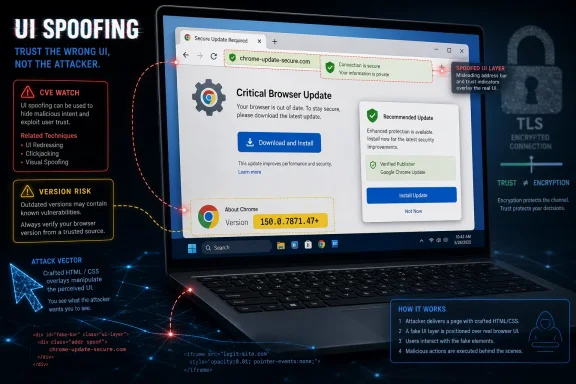
Google Chrome CVE-2026-13988 is a medium-severity UI spoofing flaw in Chrome’s Paint component, fixed for desktop users in version 150.0.7871.47 after disclosure on June 30, 2026, and later enriched by NIST and CISA on July 1. The bug is not the scariest item in Chrome’s enormous late-June security release, but it is exactly the kind of browser weakness administrators tend to underestimate. A crafted HTML page that can misrepresent critical interface information does not need kernel access to matter; it needs a user who trusts what the browser appears to be telling them. For Windows users and IT teams, the practical answer is simple: treat 150.0.7871.47 as the line in the sand and verify that Chrome, Chromium-based browsers, and managed endpoints have crossed it.
CVE-2026-13988 sits in an awkward category of browser vulnerability: it does not promise remote code execution, sandbox escape, or stolen memory. According to the NVD entry sourced from Chrome, the flaw involves an “inappropriate implementation in Paint” that allowed a remote attacker to perform UI spoofing through a crafted HTML page. CISA’s ADP enrichment assigns it a CVSS 3.1 score of 6.5, with network attack vector, low complexity, no privileges required, and user interaction required.
That score sounds reassuring until you remember what the browser UI is supposed to do. Chrome’s interface is not just decoration; it is the line between web content and browser authority. When the address bar, page surface, permission prompts, or security-adjacent visual cues can be made ambiguous, attackers do not need to break encryption. They can attack the user’s interpretation of it.
The weakness classification attached by CISA, CWE-451, is especially telling: User Interface Misrepresentation of Critical Information. That is not a memory-safety bug hiding in a renderer subsystem. It is a trust bug, and trust bugs age badly because attackers can combine them with phishing kits, credential prompts, fake payment pages, browser permission lures, and enterprise single sign-on flows.
Google’s Chrome Releases blog, as referenced by NVD, ties the fix to the June 30 Stable Channel update for desktop. That update moved Windows and macOS builds to the 150.0.7871.46/.47 range, with Linux at 150.0.7871.46. NIST’s change history then added the vulnerable CPE configuration for Google Chrome versions before 150.0.7871.47 on July 1, answering the narrow inventory question: yes, the CPE did arrive, and it is the expected
That matters because modern phishing no longer depends solely on laughable emails and misspelled domains. The best attacks are choreography. A user lands on a page, sees a familiar flow, accepts a prompt, enters a code, approves a passkey challenge, or believes a browser state that appears ordinary. UI spoofing bugs give that choreography better stage lighting.
The NVD description does not say the flaw allows spoofing of the omnibox, permissions UI, or any specific browser chrome element. That restraint is important. Google often withholds technical details until a majority of users have updated, and the linked Chromium issue is permission-restricted. The responsible reading is that the bug allowed some form of critical visual misrepresentation via crafted HTML, not that every part of Chrome’s interface was forgeable.
Still, security teams should not dismiss a UI spoofing vulnerability merely because the public write-up is sparse. Sparse disclosure is normal for browser bugs in the immediate patch window. The absence of exploit code in the advisory is not proof of harmlessness; it is proof that defenders are expected to patch before researchers and attackers finish diffing the fix.
This distinction matters in enterprise operations. A CVE without a CPE can exist in the database but fail to light up properly in tools that depend on structured product matching. Once the CPE lands, the vulnerability becomes easier to query, report, and enforce against. The change from narrative vulnerability to machine-actionable inventory item is where many patch programs actually begin.
There is one wrinkle: Google’s own release versioning around Chrome updates often includes adjacent build numbers for different platforms. The relevant CVE language says Chrome prior to 150.0.7871.47, and the NVD CPE uses that exclusion point. For Windows administrators, the safe operational rule is not to debate whether 150.0.7871.46 is close enough; it is to get Windows Chrome to 150.0.7871.47 or later.
For Chromium-based downstream browsers, the CPE answer is less satisfying. The NVD entry is for Google Chrome, not every Chromium derivative. Microsoft Edge, Brave, Vivaldi, Opera, and Electron-based applications inherit Chromium code on their own schedules, and their exposure depends on whether they included the vulnerable code and when they pulled the fix. That is where product-specific advisories matter more than the Google Chrome CPE.
The same vector says no privileges are required and the attack is network-accessible with low complexity. That combination should prevent complacency. A bug that requires a user to load a crafted page is still a web-scale bug if the lure can be delivered through email, ads, compromised sites, collaboration tools, or search results.
The technical impact in CISA’s SSVC data is marked partial, and exploitation is listed as none at the time of enrichment. That is useful context. This is not, based on public data, a known exploited zero-day being actively used in the wild. It also is not a bug administrators should leave to the next quarterly maintenance cycle.
The enterprise reality is that UI spoofing flaws often produce second-order compromise. The browser might not hand over code execution, but the user might hand over credentials. The browser might not escape the sandbox, but the user might approve a malicious OAuth consent screen, install a rogue extension, or type a one-time passcode into a fake workflow. “Medium” can still be the first step in a high-impact incident.
Browser updates increasingly bundle a sprawling mix of memory corruption, UI, policy, extension, rendering, media, and platform-specific issues. Some are severe enough to deserve emergency language; others are quiet hardening fixes. But from an operations standpoint, the patch vehicle is the same. You do not deploy a separate fix for CVE-2026-13988; you deploy the Chrome build that contains it.
That is why version verification beats CVE-by-CVE debate. On unmanaged Windows machines, users can open Chrome’s About page and let the browser check for updates. In managed environments, administrators should confirm the deployed version through their endpoint management stack, browser management console, software inventory, or vulnerability scanner. The question is not whether this CVE sounds frightening enough. The question is whether the browser is still before 150.0.7871.47.
There is also a cadence lesson here. Chrome’s rapid release model is a security advantage only if organizations let it work. Environments that freeze browser versions for compatibility reasons accumulate exactly the sort of medium and high vulnerabilities attackers like to chain together. A frozen browser is not stability; it is deferred risk with a nicer name.
Microsoft Edge does not become vulnerable merely because Chrome has a CVE, but it often consumes related Chromium fixes through Microsoft’s own release pipeline. The same logic applies to other Chromium-based browsers and to applications built on embedded Chromium frameworks. The right question for each product is not “is it Chrome?” but “which Chromium baseline is it using, and has the relevant upstream fix landed?”
This is where vulnerability management gets messy. NVD may have a clean CPE for Google Chrome while a third-party browser or application lags behind without an obvious matching CVE entry. Security teams that rely only on one product name can miss inherited exposure. Asset inventory needs to capture browser versions, embedded browser runtimes, and application release notes when those applications expose web content from untrusted or semi-trusted sources.
For home users, the advice is more direct. Update Chrome, restart it, and do not assume that closing a tab is the same as applying the patch. Chrome can download updates in the background, but the old process may remain alive until restart. The version number is the receipt.
This is why browser vendors have spent years hardening address bars, origin displays, permission prompts, full-screen transitions, file download warnings, password manager flows, and mixed-content indicators. Those details can look fussy until they fail. A browser’s security model depends not only on process isolation and sandboxing, but on visual boundaries the user can understand.
CVE-2026-13988’s public description does not tell us exactly which visual boundary was at risk. That is frustrating but unsurprising. The more specific the public exploit recipe, the more likely lagging users become targets. Google’s habit of restricting bug details until updates propagate is imperfect for researchers and administrators, but defensible for an internet-scale browser.
The uncomfortable truth is that UI spoofing bugs exploit the gap between cryptographic reality and human perception. TLS can be valid, site isolation can be working, and the sandbox can be intact, while the user still sees something misleading enough to make the wrong move. Security architecture that ends at the process boundary is unfinished.
Administrators should also watch for stale browser processes. A machine may report that the installer has updated Chrome while a user session still has old browser processes running. In high-risk environments, restart enforcement or browser relaunch prompts are not bureaucracy; they are the difference between patched on paper and patched in memory.
Virtual desktop infrastructure adds another layer. Golden images, persistent profiles, app layering, and non-persistent pools can all produce odd patch states. If the image is updated but user-attached app data preserves an older channel or executable path, the vulnerability story becomes less clean than a dashboard suggests. Browser patching in VDI should be validated from inside an actual user session, not only from the image maintenance console.
The same caution applies to software restriction and update control policies. Some organizations pin Chrome versions, disable auto-update, or route updates through internal testing rings. That may be justified for compatibility, but it creates an obligation to move quickly when a security release lands. If a policy blocks the fix, the policy is part of the vulnerability.
That is a strange kind of integrity. It is not necessarily file integrity or database integrity. It is interface integrity: the assurance that the browser’s representation of security-relevant information has not been manipulated by web content. In a cloud-first workplace, that can be the integrity layer between an attacker and a company’s identity provider.
Consider how much now happens in the browser. Administrative consoles, SaaS finance tools, password resets, device enrollment, help desk workflows, source repositories, customer data platforms, and privileged access portals all live behind web interfaces. A convincing visual lie in that environment can be more useful than a crash.
This does not mean CVE-2026-13988 should be treated like a critical zero-day. It means “medium” should not become “ignore.” The right response is fast routine patching, targeted verification, and awareness that UI-layer flaws are part of the credential theft and social engineering threat model.
Managed Chrome environments should confirm update policy health, not merely version state. A fleet that happens to be current today but has broken update telemetry will fail the next browser release. Google’s rapid patch cadence rewards organizations that monitor update mechanisms as infrastructure, not as an afterthought.
Security teams should also check whether browser hardening controls are doing what they think. Enterprise policies for safe browsing, extension control, password manager behavior, site isolation, download restrictions, and sign-in boundaries do not patch CVE-2026-13988, but they can reduce the blast radius of attacks that start with deceptive pages. Browser security is layered, and UI spoofing is one reason the layers exist.
Help desks may see user confusion after large Chrome updates, especially when release trains change extension behavior or media behavior alongside security fixes. That is not a reason to delay security updates broadly. It is a reason to communicate, stage where appropriate, and maintain rollback plans that do not strand users on vulnerable builds longer than necessary.
 The Bug Is Medium, but the Trust Boundary Is Not
CVE-2026-13988 sits in an awkward category of browser vulnerability: it does not promise remote code execution, sandbox escape, or stolen memory. According to the NVD entry sourced from Chrome, the flaw involves an “inappropriate implementation in Paint” that allowed a remote attacker to perform UI spoofing through a crafted HTML page. CISA’s ADP enrichment assigns it a CVSS 3.1 score of 6.5, with network attack vector, low complexity, no privileges required, and user interaction required.That score sounds reassuring until you remember what the browser UI is supposed to do. Chrome’s interface is not just decoration; it is the line between web content and browser authority. When the address bar, page surface, permission prompts, or security-adjacent visual cues can be made ambiguous, attackers do not need to break encryption. They can attack the user’s interpretation of it.
The weakness classification attached by CISA, CWE-451, is especially telling: User Interface Misrepresentation of Critical Information. That is not a memory-safety bug hiding in a renderer subsystem. It is a trust bug, and trust bugs age badly because attackers can combine them with phishing kits, credential prompts, fake payment pages, browser permission lures, and enterprise single sign-on flows.
Google’s Chrome Releases blog, as referenced by NVD, ties the fix to the June 30 Stable Channel update for desktop. That update moved Windows and macOS builds to the 150.0.7871.46/.47 range, with Linux at 150.0.7871.46. NIST’s change history then added the vulnerable CPE configuration for Google Chrome versions before 150.0.7871.47 on July 1, answering the narrow inventory question: yes, the CPE did arrive, and it is the expected
cpe:2.3:a:google:chrome:*:*:*:*:*:*:*:* pattern with versions up to, but excluding, 150.0.7871.47.Chrome’s Paint Layer Becomes Part of the Phishing Surface
The word “Paint” can make the vulnerability sound almost quaint, as if this were about drawing pixels incorrectly. In a browser, however, painting is where abstract page state becomes the thing a user sees and acts upon. If that pipeline mishandles how content is rendered or layered, the result can be a screen that tells a convincing lie.That matters because modern phishing no longer depends solely on laughable emails and misspelled domains. The best attacks are choreography. A user lands on a page, sees a familiar flow, accepts a prompt, enters a code, approves a passkey challenge, or believes a browser state that appears ordinary. UI spoofing bugs give that choreography better stage lighting.
The NVD description does not say the flaw allows spoofing of the omnibox, permissions UI, or any specific browser chrome element. That restraint is important. Google often withholds technical details until a majority of users have updated, and the linked Chromium issue is permission-restricted. The responsible reading is that the bug allowed some form of critical visual misrepresentation via crafted HTML, not that every part of Chrome’s interface was forgeable.
Still, security teams should not dismiss a UI spoofing vulnerability merely because the public write-up is sparse. Sparse disclosure is normal for browser bugs in the immediate patch window. The absence of exploit code in the advisory is not proof of harmlessness; it is proof that defenders are expected to patch before researchers and attackers finish diffing the fix.
The CPE Question Has a Boring but Important Answer
The user-facing NVD page includes the familiar “Are we missing a CPE?” prompt, but the change history shows that NIST added a CPE configuration during initial analysis on July 1, 2026. The configuration marks Google Chrome versions before 150.0.7871.47 as vulnerable. That is exactly what vulnerability scanners, asset inventories, and compliance dashboards need in order to stop treating the CVE as a floating description and start matching it to installed software.This distinction matters in enterprise operations. A CVE without a CPE can exist in the database but fail to light up properly in tools that depend on structured product matching. Once the CPE lands, the vulnerability becomes easier to query, report, and enforce against. The change from narrative vulnerability to machine-actionable inventory item is where many patch programs actually begin.
There is one wrinkle: Google’s own release versioning around Chrome updates often includes adjacent build numbers for different platforms. The relevant CVE language says Chrome prior to 150.0.7871.47, and the NVD CPE uses that exclusion point. For Windows administrators, the safe operational rule is not to debate whether 150.0.7871.46 is close enough; it is to get Windows Chrome to 150.0.7871.47 or later.
For Chromium-based downstream browsers, the CPE answer is less satisfying. The NVD entry is for Google Chrome, not every Chromium derivative. Microsoft Edge, Brave, Vivaldi, Opera, and Electron-based applications inherit Chromium code on their own schedules, and their exposure depends on whether they included the vulnerable code and when they pulled the fix. That is where product-specific advisories matter more than the Google Chrome CPE.
“User Interaction Required” Is Not the Comfort It Used to Be
CISA’s vector marks user interaction as required, and that will tempt some organizations to downgrade urgency. In old risk models, that meant an exploit needed someone to click something dumb. In 2026, it can mean only that a user must visit a page in a browser, which is the ordinary condition of work.The same vector says no privileges are required and the attack is network-accessible with low complexity. That combination should prevent complacency. A bug that requires a user to load a crafted page is still a web-scale bug if the lure can be delivered through email, ads, compromised sites, collaboration tools, or search results.
The technical impact in CISA’s SSVC data is marked partial, and exploitation is listed as none at the time of enrichment. That is useful context. This is not, based on public data, a known exploited zero-day being actively used in the wild. It also is not a bug administrators should leave to the next quarterly maintenance cycle.
The enterprise reality is that UI spoofing flaws often produce second-order compromise. The browser might not hand over code execution, but the user might hand over credentials. The browser might not escape the sandbox, but the user might approve a malicious OAuth consent screen, install a rogue extension, or type a one-time passcode into a fake workflow. “Medium” can still be the first step in a high-impact incident.
The June 30 Chrome Update Was Bigger Than This One CVE
CVE-2026-13988 arrived inside a very large Chrome security update, not as a lonely advisory. Malwarebytes described the late-June release as addressing hundreds of security fixes, and Google’s Stable Channel post is the upstream anchor for the update. That context matters because patch prioritization should not isolate this one medium bug from the broader release train.Browser updates increasingly bundle a sprawling mix of memory corruption, UI, policy, extension, rendering, media, and platform-specific issues. Some are severe enough to deserve emergency language; others are quiet hardening fixes. But from an operations standpoint, the patch vehicle is the same. You do not deploy a separate fix for CVE-2026-13988; you deploy the Chrome build that contains it.
That is why version verification beats CVE-by-CVE debate. On unmanaged Windows machines, users can open Chrome’s About page and let the browser check for updates. In managed environments, administrators should confirm the deployed version through their endpoint management stack, browser management console, software inventory, or vulnerability scanner. The question is not whether this CVE sounds frightening enough. The question is whether the browser is still before 150.0.7871.47.
There is also a cadence lesson here. Chrome’s rapid release model is a security advantage only if organizations let it work. Environments that freeze browser versions for compatibility reasons accumulate exactly the sort of medium and high vulnerabilities attackers like to chain together. A frozen browser is not stability; it is deferred risk with a nicer name.
Windows Shops Should Look Beyond Google Chrome Alone
For WindowsForum readers, the Chrome label is only half the story. Many Windows fleets run Chrome as the default browser, Edge as the built-in browser, and multiple Chromium-based runtimes inside desktop applications. The Chromium ecosystem has become a shared foundation, which means administrators need to think in families rather than icons.Microsoft Edge does not become vulnerable merely because Chrome has a CVE, but it often consumes related Chromium fixes through Microsoft’s own release pipeline. The same logic applies to other Chromium-based browsers and to applications built on embedded Chromium frameworks. The right question for each product is not “is it Chrome?” but “which Chromium baseline is it using, and has the relevant upstream fix landed?”
This is where vulnerability management gets messy. NVD may have a clean CPE for Google Chrome while a third-party browser or application lags behind without an obvious matching CVE entry. Security teams that rely only on one product name can miss inherited exposure. Asset inventory needs to capture browser versions, embedded browser runtimes, and application release notes when those applications expose web content from untrusted or semi-trusted sources.
For home users, the advice is more direct. Update Chrome, restart it, and do not assume that closing a tab is the same as applying the patch. Chrome can download updates in the background, but the old process may remain alive until restart. The version number is the receipt.
UI Spoofing Is a Browser Security Problem, Not Just a Phishing Problem
It is fashionable to blame users for phishing, and sometimes users do make bad decisions. But UI spoofing vulnerabilities remind us that security training assumes the interface is telling the truth. If the browser can be induced to misrepresent critical information, the user is being asked to make a trust decision with corrupted evidence.This is why browser vendors have spent years hardening address bars, origin displays, permission prompts, full-screen transitions, file download warnings, password manager flows, and mixed-content indicators. Those details can look fussy until they fail. A browser’s security model depends not only on process isolation and sandboxing, but on visual boundaries the user can understand.
CVE-2026-13988’s public description does not tell us exactly which visual boundary was at risk. That is frustrating but unsurprising. The more specific the public exploit recipe, the more likely lagging users become targets. Google’s habit of restricting bug details until updates propagate is imperfect for researchers and administrators, but defensible for an internet-scale browser.
The uncomfortable truth is that UI spoofing bugs exploit the gap between cryptographic reality and human perception. TLS can be valid, site isolation can be working, and the sandbox can be intact, while the user still sees something misleading enough to make the wrong move. Security architecture that ends at the process boundary is unfinished.
The Scanner Will Be Right Only If the Inventory Is
The NVD enrichment makes this CVE easier for scanners to detect, but it does not make detection automatic in every environment. A scanner needs a reliable installed version, the correct application identity, and enough endpoint coverage to distinguish patched, unpatched, dormant, and portable installations. Chrome installed per-user can complicate that picture on Windows.Administrators should also watch for stale browser processes. A machine may report that the installer has updated Chrome while a user session still has old browser processes running. In high-risk environments, restart enforcement or browser relaunch prompts are not bureaucracy; they are the difference between patched on paper and patched in memory.
Virtual desktop infrastructure adds another layer. Golden images, persistent profiles, app layering, and non-persistent pools can all produce odd patch states. If the image is updated but user-attached app data preserves an older channel or executable path, the vulnerability story becomes less clean than a dashboard suggests. Browser patching in VDI should be validated from inside an actual user session, not only from the image maintenance console.
The same caution applies to software restriction and update control policies. Some organizations pin Chrome versions, disable auto-update, or route updates through internal testing rings. That may be justified for compatibility, but it creates an obligation to move quickly when a security release lands. If a policy blocks the fix, the policy is part of the vulnerability.
The Severity Score Undersells the Operational Stakes
CVSS is useful, but it is not a business impact model. CVE-2026-13988 gets a medium score because the public characteristics do not include confidentiality loss, availability loss, or direct code execution. Integrity impact is high in CISA’s vector, which is the clue that the bug can materially affect what the user believes or does.That is a strange kind of integrity. It is not necessarily file integrity or database integrity. It is interface integrity: the assurance that the browser’s representation of security-relevant information has not been manipulated by web content. In a cloud-first workplace, that can be the integrity layer between an attacker and a company’s identity provider.
Consider how much now happens in the browser. Administrative consoles, SaaS finance tools, password resets, device enrollment, help desk workflows, source repositories, customer data platforms, and privileged access portals all live behind web interfaces. A convincing visual lie in that environment can be more useful than a crash.
This does not mean CVE-2026-13988 should be treated like a critical zero-day. It means “medium” should not become “ignore.” The right response is fast routine patching, targeted verification, and awareness that UI-layer flaws are part of the credential theft and social engineering threat model.
The Fix Is Simple; the Assurance Is the Work
For individual users, the fix path is almost boring: update Chrome to 150.0.7871.47 or later and restart the browser. For administrators, the work is proving that happened everywhere it matters. That includes laptops off VPN, shared workstations, VDI pools, developer machines, kiosks, and systems where users lack rights but browser updates are supposed to run through a service.Managed Chrome environments should confirm update policy health, not merely version state. A fleet that happens to be current today but has broken update telemetry will fail the next browser release. Google’s rapid patch cadence rewards organizations that monitor update mechanisms as infrastructure, not as an afterthought.
Security teams should also check whether browser hardening controls are doing what they think. Enterprise policies for safe browsing, extension control, password manager behavior, site isolation, download restrictions, and sign-in boundaries do not patch CVE-2026-13988, but they can reduce the blast radius of attacks that start with deceptive pages. Browser security is layered, and UI spoofing is one reason the layers exist.
Help desks may see user confusion after large Chrome updates, especially when release trains change extension behavior or media behavior alongside security fixes. That is not a reason to delay security updates broadly. It is a reason to communicate, stage where appropriate, and maintain rollback plans that do not strand users on vulnerable builds longer than necessary.
The Practical Reading of CVE-2026-13988
The most useful way to read this CVE is not as a spectacular exploit, but as a reminder that browser security includes the pixels users trust. The database entries are now structured enough for enterprise tooling, the affected Chrome version range is clear, and there is no public signal from CISA that exploitation was underway when it enriched the record. That makes this a patch-management story with a phishing-resilience edge.- Chrome versions before 150.0.7871.47 are the relevant vulnerable target for the Google Chrome CPE added by NIST on July 1, 2026.
- CISA’s enrichment rates the flaw as medium severity with low attack complexity, no privileges required, and user interaction required.
- The weakness is categorized as CWE-451, which means the security concern is misrepresentation of critical UI information rather than a classic memory-corruption crash.
- There was no exploitation reported in CISA’s SSVC data at the time of the July 1 enrichment, but the bug remains remotely reachable through crafted web content.
- Windows administrators should verify the running Chrome version after restart, not just the installed package version reported by inventory tooling.
- Chromium-based browsers and embedded Chromium runtimes should be checked through their own vendor advisories because the NVD CPE is specific to Google Chrome.
References
- Primary source: NVD / Chromium
Published: 2026-07-03T07:00:29-07:00
NVD - CVE-2026-13988
 nvd.nist.gov
- Security advisory: MSRC
Published: 2026-07-03T07:00:29-07:00
Original feed URL
Security Update Guide - Microsoft Security Response Center
 msrc.microsoft.com
- Related coverage: cvefeed.io
CVE-2026-13988 - Google Chrome UI Spoofing
Inappropriate implementation in Paint in Google Chrome prior to 150.0.7871.47 allowed a remote attacker to perform UI spoofing via a crafted HTML page. (Chromium security severity: Medium)cvefeed.io - Related coverage: radar.offseq.com
CVE-2026-13988: Inappropriate implementation in Google Chrome - Live Threat Intelligence - Threat Radar | OffSeq.com
Detailed information about CVE-2026-13988: Inappropriate implementation in Google Chrome affecting Google Chrome. Get real-time updates, technical details, andradar.offseq.com
