

Google fixed CVE-2026-13992 in Chrome 150.0.7871.47, a Medium-severity UI-spoofing flaw affecting Chrome on macOS before that release. According to Chrome’s submission, a remote attacker could use crafted HTML and carefully induced user gestures to misrepresent browser interface elements. The vulnerability is not documented as a silent browser takeover or arbitrary code-execution flaw, and the supplied record does not establish exploitation in the wild. It is a narrower failure at the boundary between web content and trusted browser interface—a boundary that phishing attempts routinely try to blur.
Chrome describes CVE-2026-13992 as an “inappropriate implementation in UI.” On Mac versions before 150.0.7871.47, a remote attacker could reportedly prepare an HTML page that produced UI spoofing after persuading the visitor to perform specific interface gestures.
The public description does not identify the precise gesture sequence, the browser component being imitated, or the resulting visual effect. The linked Chromium issue requires permission to view. Restricted technical details are common in vulnerability records, but the supplied material does not establish why access to this particular issue is restricted. Defenders should therefore stay close to the facts that are public: the issue affects Chrome on macOS, requires crafted HTML and user interaction, and is corrected at version 150.0.7871.47.
There is no basis in the supplied record for describing CVE-2026-13992 as arbitrary code execution, a sandbox escape, automatic credential theft, or direct access to private browser data. The authoritative weakness assignment is CWE-451, User Interface Misrepresentation of Critical Information.
UI spoofing concerns misleading a user about the context or meaning of an interface. In this case, the crafted page reportedly could not complete the attack merely by loading; the visitor had to perform particular gestures under the required conditions. That interaction requirement helps explain why the CVSS vector assigns high attack complexity and requires user participation.
That is a restrained technical assessment, not a declaration that the flaw is harmless. The score reflects the need to bring a user to crafted content, induce the necessary behavior, and meet conditions more demanding than ordinary page viewing. The supplied record also does not assign direct confidentiality loss to the vulnerability.
The risk is that interface misrepresentation could make a malicious instruction or page state appear more trustworthy. The public record does not disclose exactly what Chrome element or security information could be imitated, so specific attack stories should not be presented as established behavior. A hypothetical social-engineering scenario might involve a page coaching a user through unusual gestures or transitions, but that is threat-model commentary rather than a documented exploitation method for this CVE.
Organizations should therefore patch without inflating the issue into an active browser emergency. The vulnerability has a network attack vector and requires no prior account or foothold on the Mac, but successful spoofing still depends on user interaction and high-complexity conditions.
For WindowsForum readers, the operational conclusion is clear: CVE-2026-13992 is not documented as a Windows Chrome vulnerability. Mixed-platform organizations may nevertheless have Macs in their environment, so Windows-centered endpoint teams should check whether those devices are visible in their browser and software inventories.
Vulnerability-management tools can create noise when they match only the product name. A useful detection rule must consider both the Chrome version and the host operating system. Teams should review alerts that assign CVE-2026-13992 to Windows or Linux systems and determine whether the scanner has correctly processed the platform condition.
The reverse data-quality problem is also possible: Macs may be absent from a Windows-focused inventory even though they access the same organizational services. The relevant asset question is therefore: “Which Macs run Chrome below 150.0.7871.47?”
NIST’s initial CPE expression is awkward when compared with that direct wording. Administrators should not try to turn the CPE expression into a narrower exception or assume that an intermediate build is safe. For remediation, use the vendor’s explicit threshold:
Any Chrome installation on macOS below 150.0.7871.47 should be updated.
This is a data-quality caveat rather than evidence of a different affected range. CPE records, CVE data, scanner logic, and software inventories can encode version boundaries differently. Operational rules should follow the clearest vendor-originated fixed-version statement unless later authoritative guidance changes the threshold.
The visible 4.2 Medium score is contributed through CISA-ADP rather than presented as an independent NVD assessment. Reports should preserve that attribution instead of treating every field displayed in an aggregated vulnerability record as originating from the same organization.
CWE-451 describes that general failure mode as misrepresentation of critical information in a user interface. The deception has a human-facing result, but the weakness originates in software behavior.
The reference to “specific UI gestures” indicates that CVE-2026-13992 is more specific than a website simply drawing a fake browser window inside its page. Any page can display deceptive graphics; that alone does not establish a browser vulnerability. Chrome’s record says its Mac implementation enabled UI spoofing under particular user-driven conditions.
The supplied material does not identify the relevant macOS gesture, browser state, component, or visual effect. It would therefore be speculative to attribute the issue to full-screen behavior, trackpad input, a permission prompt, the address bar, a download interface, or any other particular feature.
A concise user-awareness message can still help during remediation: stop if an unexpected page instructs you to perform an unusual or highly specific sequence of browser gestures, transitions, or interface changes. That advice addresses the documented interaction requirement without claiming knowledge of the undisclosed mechanics.
CISA-ADP’s SSVC assessment records exploitation as none, automatable as no, and technical impact as partial. Those labels support a measured response: update affected Macs, but do not describe the available record as evidence of active, self-propagating, or automatically scalable exploitation.
“Exploitation: none” should also be interpreted narrowly. It reflects the status represented in that assessment; it is not proof that exploitation could never occur or that every security provider has exhaustively ruled out all attempts.
Specific claims about likely victims or attacker workflows would go beyond the CVE record. For example, attackers could hypothetically incorporate a gesture-dependent spoof into a guided phishing or support-themed interaction, but the supplied evidence does not establish targeting of executives, payment personnel, help-desk workers, administrators, kiosk users, or remote-support customers. Remediation priority should be based first on the confirmed platform and version boundary, followed by each organization’s own exposure and asset criticality.
Shared Chromium components can justify checking other browser vendors’ advisories, but they do not justify automatically assigning this CVE to every Chromium-based browser. Branded browsers can differ in their interface code, platform integration, release schedules, and vulnerability identifiers. Similarity is a reason to investigate, not proof of impact.
The same caution applies to macOS versions. The supplied operating-system configuration identifies macOS generally and does not provide a narrower release range. Administrators should not declare particular macOS generations affected or immune without additional vendor guidance.
CISA-ADP enrichment: CISA-ADP adds the CVSS 3.1 vector, the 4.2 Medium score, the CWE-451 classification, and an SSVC assessment recording no identified exploitation, no automation, and partial technical impact.
NIST configuration analysis: NIST associates the affected Chrome product with Apple macOS and classifies the Chrome release material as a vendor advisory.
This sequence shows why vulnerability data should be refreshed after initial ingestion. Product mappings, scoring fields, reference classifications, and configuration data may be added or revised as the record matures.
It also shows why later machine-readable enrichment still requires human review. In this case, the clearest remediation rule comes from Chrome’s direct fixed-version boundary rather than an attempt to operationalize the awkward CPE expression.
The administrator-ready path is:
Post-update version collection is an operational verification recommendation. It gives administrators stronger evidence of compliance than deployment status alone and helps identify stale inventory, offline Macs, or workflows that did not reach their expected endpoint.
The practical lesson is straightforward: a browser can prevent direct code execution or data access while still presenting misleading security information to a user. That makes prompt remediation appropriate even though the vulnerability requires interaction and carries a 4.2 CVSS score.Affected: Chrome on macOS below 150.0.7871.47.
Not documented as affected: Windows or Linux.
Action: Update Chrome on Mac to 150.0.7871.47 or later, relaunch the browser, and verify the displayed version.
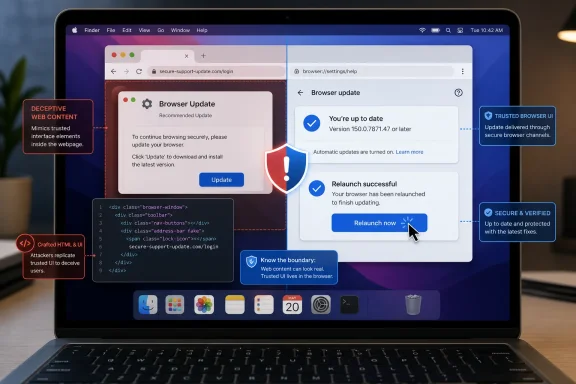 Chrome Patched a Trust Failure, Not a Conventional Takeover
Chrome describes CVE-2026-13992 as an “inappropriate implementation in UI.” On Mac versions before 150.0.7871.47, a remote attacker could reportedly prepare an HTML page that produced UI spoofing after persuading the visitor to perform specific interface gestures.The public description does not identify the precise gesture sequence, the browser component being imitated, or the resulting visual effect. The linked Chromium issue requires permission to view. Restricted technical details are common in vulnerability records, but the supplied material does not establish why access to this particular issue is restricted. Defenders should therefore stay close to the facts that are public: the issue affects Chrome on macOS, requires crafted HTML and user interaction, and is corrected at version 150.0.7871.47.
There is no basis in the supplied record for describing CVE-2026-13992 as arbitrary code execution, a sandbox escape, automatic credential theft, or direct access to private browser data. The authoritative weakness assignment is CWE-451, User Interface Misrepresentation of Critical Information.
UI spoofing concerns misleading a user about the context or meaning of an interface. In this case, the crafted page reportedly could not complete the attack merely by loading; the visitor had to perform particular gestures under the required conditions. That interaction requirement helps explain why the CVSS vector assigns high attack complexity and requires user participation.
A Medium Score Still Warrants Prompt Patching
CISA-ADP assigned CVE-2026-13992 a CVSS 3.1 base score of 4.2, placing it in the Medium category. Its vector isCVSS:3.1/AV:N/AC:H/PR:N/UI:R/S:U/C:N/I:L/A:L: the attack is network reachable, requires no existing privileges, demands user interaction, has high complexity, does not change security scope, and is assessed with no direct confidentiality impact but low integrity and availability impacts.That is a restrained technical assessment, not a declaration that the flaw is harmless. The score reflects the need to bring a user to crafted content, induce the necessary behavior, and meet conditions more demanding than ordinary page viewing. The supplied record also does not assign direct confidentiality loss to the vulnerability.
The risk is that interface misrepresentation could make a malicious instruction or page state appear more trustworthy. The public record does not disclose exactly what Chrome element or security information could be imitated, so specific attack stories should not be presented as established behavior. A hypothetical social-engineering scenario might involve a page coaching a user through unusual gestures or transitions, but that is threat-model commentary rather than a documented exploitation method for this CVE.
Organizations should therefore patch without inflating the issue into an active browser emergency. The vulnerability has a network attack vector and requires no prior account or foothold on the Mac, but successful spoofing still depends on user interaction and high-complexity conditions.
The Platform Boundary Is Unusually Clear
The primary description narrows the vulnerability to Google Chrome on macOS before 150.0.7871.47. NIST’s initial configuration analysis likewise associates the Chrome application with Apple macOS rather than identifying Windows or Linux as affected operating systems.For WindowsForum readers, the operational conclusion is clear: CVE-2026-13992 is not documented as a Windows Chrome vulnerability. Mixed-platform organizations may nevertheless have Macs in their environment, so Windows-centered endpoint teams should check whether those devices are visible in their browser and software inventories.
| Deployment state | CVE-2026-13992 status | Required condition | Practical response |
|---|---|---|---|
| Chrome on macOS below 150.0.7871.47 | Affected | Crafted HTML plus specific user gestures | Update, relaunch, and verify the displayed version |
| Chrome on macOS at 150.0.7871.47 or later | Not described as affected | Corrected version is installed | Record post-update version and OS inventory |
| Chrome on Windows | Not identified as affected by this CVE | No Windows configuration is listed in the supplied record | Do not assign this CVE solely because Chrome is installed |
| Chrome on Linux | Not identified as affected by this CVE | No Linux configuration is listed in the supplied record | Do not assign this CVE solely because Chrome is installed |
The reverse data-quality problem is also possible: Macs may be absent from a Windows-focused inventory even though they access the same organizational services. The relevant asset question is therefore: “Which Macs run Chrome below 150.0.7871.47?”
Treat the CPE Expression as a Data-Quality Caveat
Chrome’s plain-language description provides the useful remediation threshold: Chrome on macOS prior to 150.0.7871.47 is affected. The affected-version information also identifies 150.0.7871.47 as the correction boundary.NIST’s initial CPE expression is awkward when compared with that direct wording. Administrators should not try to turn the CPE expression into a narrower exception or assume that an intermediate build is safe. For remediation, use the vendor’s explicit threshold:
Any Chrome installation on macOS below 150.0.7871.47 should be updated.
This is a data-quality caveat rather than evidence of a different affected range. CPE records, CVE data, scanner logic, and software inventories can encode version boundaries differently. Operational rules should follow the clearest vendor-originated fixed-version statement unless later authoritative guidance changes the threshold.
The visible 4.2 Medium score is contributed through CISA-ADP rather than presented as an independent NVD assessment. Reports should preserve that attribution instead of treating every field displayed in an aggregated vulnerability record as originating from the same organization.
UI Spoofing Attacks Perception
A browser’s trusted interface helps users determine which site controls a page, whether a prompt belongs to the browser or the website, and what action is about to occur. Web content can imitate many interface elements visually, but a browser vulnerability exists when implementation behavior undermines a distinction the browser is expected to preserve.CWE-451 describes that general failure mode as misrepresentation of critical information in a user interface. The deception has a human-facing result, but the weakness originates in software behavior.
The reference to “specific UI gestures” indicates that CVE-2026-13992 is more specific than a website simply drawing a fake browser window inside its page. Any page can display deceptive graphics; that alone does not establish a browser vulnerability. Chrome’s record says its Mac implementation enabled UI spoofing under particular user-driven conditions.
The supplied material does not identify the relevant macOS gesture, browser state, component, or visual effect. It would therefore be speculative to attribute the issue to full-screen behavior, trackpad input, a permission prompt, the address bar, a download interface, or any other particular feature.
A concise user-awareness message can still help during remediation: stop if an unexpected page instructs you to perform an unusual or highly specific sequence of browser gestures, transitions, or interface changes. That advice addresses the documented interaction requirement without claiming knowledge of the undisclosed mechanics.
High Complexity Is Friction, Not Immunity
The CVSS designation of high attack complexity does not mean the vulnerability is impossible to exploit. It means successful exploitation depends on conditions beyond simply reaching the vulnerable browser component. Based on the public description, those conditions include crafted HTML and specific user gestures.CISA-ADP’s SSVC assessment records exploitation as none, automatable as no, and technical impact as partial. Those labels support a measured response: update affected Macs, but do not describe the available record as evidence of active, self-propagating, or automatically scalable exploitation.
“Exploitation: none” should also be interpreted narrowly. It reflects the status represented in that assessment; it is not proof that exploitation could never occur or that every security provider has exhaustively ruled out all attempts.
Specific claims about likely victims or attacker workflows would go beyond the CVE record. For example, attackers could hypothetically incorporate a gesture-dependent spoof into a guided phishing or support-themed interaction, but the supplied evidence does not establish targeting of executives, payment personnel, help-desk workers, administrators, kiosk users, or remote-support customers. Remediation priority should be based first on the confirmed platform and version boundary, followed by each organization’s own exposure and asset criticality.
Chrome’s Sparse Disclosure Still Defines the Response
Although the linked Chromium issue is permission-restricted, the public submission supplies four useful boundaries:- The affected product is Google Chrome.
- The affected platform is macOS.
- Versions below 150.0.7871.47 are affected.
- Exploitation requires crafted HTML and specific user gestures.
Shared Chromium components can justify checking other browser vendors’ advisories, but they do not justify automatically assigning this CVE to every Chromium-based browser. Branded browsers can differ in their interface code, platform integration, release schedules, and vulnerability identifiers. Similarity is a reason to investigate, not proof of impact.
The same caution applies to macOS versions. The supplied operating-system configuration identifies macOS generally and does not provide a narrower release range. Administrators should not declare particular macOS generations affected or immune without additional vendor guidance.
The Public Record Was Enriched in Stages
The available record developed through contributions from Chrome, CISA-ADP, and NIST. Those additions produced a usable description, score, weakness classification, and product configuration, while also leaving an awkward version expression in the CPE data.Timeline
Initial Chrome submission: Chrome identifies an inappropriate UI implementation affecting Chrome on macOS before 150.0.7871.47. The record includes a vendor reference and a permission-restricted Chromium issue.CISA-ADP enrichment: CISA-ADP adds the CVSS 3.1 vector, the 4.2 Medium score, the CWE-451 classification, and an SSVC assessment recording no identified exploitation, no automation, and partial technical impact.
NIST configuration analysis: NIST associates the affected Chrome product with Apple macOS and classifies the Chrome release material as a vendor advisory.
This sequence shows why vulnerability data should be refreshed after initial ingestion. Product mappings, scoring fields, reference classifications, and configuration data may be added or revised as the record matures.
It also shows why later machine-readable enrichment still requires human review. In this case, the clearest remediation rule comes from Chrome’s direct fixed-version boundary rather than an attempt to operationalize the awkward CPE expression.
End Users: Update, Relaunch, and Verify
Mac users can verify the corrected version directly in Chrome:- Open Google Chrome on the Mac.
- In the macOS menu bar, select Chrome > About Google Chrome.
- Allow Chrome to check for and install an available update.
- Confirm that the displayed version is 150.0.7871.47 or later.
- If Chrome presents a Relaunch button or otherwise prompts for a relaunch, relaunch the browser.
- Return to Chrome > About Google Chrome and confirm that the displayed version remains 150.0.7871.47 or later.
Administrators: Use Existing macOS Deployment Controls
Teams should remediate through their existing macOS mobile-device-management or software-deployment workflow. The objective is not merely to send an update package, but to produce verified inventory showing that affected Macs have moved beyond the vulnerable version boundary.The administrator-ready path is:
- Query browser and operating-system inventory to identify devices running macOS with Google Chrome below 150.0.7871.47.
- Target that device population through the organization’s existing macOS MDM or software-deployment system.
- Deliver or trigger the approved Chrome update using the deployment mechanism already established by the organization.
- Require users to relaunch Chrome so the remediation workflow reaches a clear completion point.
- Collect post-update inventory containing both the detected Chrome version and the host operating system.
- Confirm that targeted Macs report Chrome 150.0.7871.47 or later.
- Investigate devices that remain below the threshold, are offline, lack current inventory, or failed the update.
- Review scanner findings on Windows and Linux and suppress or correct them if they result from product-only matching rather than the documented macOS condition.
Post-update version collection is an operational verification recommendation. It gives administrators stronger evidence of compliance than deployment status alone and helps identify stale inventory, offline Macs, or workflows that did not reach their expected endpoint.
Action checklist for admins
- Inventory Chrome versions together with the operating system.
- Identify macOS devices running Chrome below 150.0.7871.47.
- Use the existing macOS MDM or software-deployment workflow to remediate those devices.
- Require a Chrome relaunch as part of the update process.
- Collect post-update Chrome version and macOS inventory.
- Confirm that every targeted Mac reports Chrome 150.0.7871.47 or later.
- Investigate failed, offline, unmanaged, and stale-inventory devices.
- Review Windows and Linux findings for incorrect product-only matching.
- Give users concise guidance about unexpected pages requesting unusual, precise browser gestures.
- Continue monitoring vendor and vulnerability records for revised scope or remediation guidance.
References
- Primary source: NVD / Chromium
Published: 2026-07-11T15:39:46-07:00
NVD - CVE-2026-13992
 nvd.nist.gov
- Security advisory: MSRC
Published: 2026-07-11T15:39:46-07:00
Original feed URL
Security Update Guide - Microsoft Security Response Center
 msrc.microsoft.com
- Related coverage: cvefeed.io
CVE-2026-13992 - Google Chrome UI Spoofing
Inappropriate implementation in UI in Google Chrome on Mac prior to 150.0.7871.47 allowed a remote attacker who convinced a user to engage in specific UI gestures to perform UI spoofing via a crafted HTML page. (Chromium security severity: Medium)cvefeed.io - Related coverage: security.snyk.io
CVE-2026-13992 in chromium | CVE-2026-13992 | Snyk
CVE-2026-13992 in chromium | CVE-2026-13992security.snyk.io - Related coverage: vulnerability.circl.lu
Vulnerability-Lookup
Vulnerability-Lookup - Fast vulnerability lookup correlation from different sources.vulnerability.circl.lu