

Google’s CVE-2026-13995 fixes a medium-severity Autofill input-validation flaw in Chrome for Android before version 150.0.7871.47. A remote attacker could use a crafted HTML page to spoof browser interface elements and mislead a user into taking an unintended action inside the browser.
The vulnerability is not described as a password-stealing exploit, sandbox escape, or route to remote code execution. The documented issue is narrower: untrusted HTML could cause UI spoofing in Chrome’s Android Autofill component. Users and administrators should update promptly, verify the installed version, and avoid treating the presence of an older version as proof that compromise occurred.
Autofill is usually discussed as a convenience feature, but any browser-owned interface displayed alongside website-controlled content must maintain a clear trust boundary. A website controls its HTML and page presentation; Chrome controls browser interface elements that users may treat as more trustworthy than the page itself.
CVE-2026-13995 sits at that boundary. According to the Chrome-authored vulnerability description published through the National Vulnerability Database, insufficient validation of untrusted input in the Android Autofill implementation could allow a crafted HTML page to produce UI spoofing.
The phrase UI spoofing matters. The documented outcome is not that an attacker automatically reads a stored password or silently extracts payment-card data. It is that a crafted page can create a misleading browser presentation that may cause the user to misunderstand what Chrome is showing or to take an unintended action.
That is an integrity problem. The user remains present and must interact with the page, but the presentation influencing that interaction may be deceptive.
The public record does not disclose the exact visual sequence, triggering conditions, or browser behavior used to produce the spoof. It therefore supports a limited technical conclusion: crafted HTML could exploit insufficient input validation in Android Autofill to produce UI spoofing. More specific claims about overlays, focus changes, buttons, prompts, credential dialogs, or payment workflows would be speculation unless supported by additional technical evidence.
The vector provides useful limits on what can responsibly be claimed. The supplied record does not characterize the vulnerability as directly exposing confidential information, crashing Chrome, compromising Android, or enabling attacker-controlled code execution. Its scored technical consequence is limited integrity impact.
The network attack vector means the attacker can present the malicious content remotely rather than first obtaining local access to the device. The user-interaction requirement means that reaching the crafted page is not, by itself, enough to complete the attack. The victim must participate in the deceptive interaction.
That requirement helps explain the moderate score, but it does not make the flaw irrelevant. UI-spoofing attacks are designed to influence human judgment. The appropriate response is therefore proportionate: patch promptly and verify compliance, but do not describe every device below the fixed version as compromised.
Organizations that use severity thresholds as patching gates should avoid allowing the MEDIUM label to conceal the unusually straightforward remediation. Chrome can be updated through the Play Store or an Android Enterprise management channel, and the CVE record provides a specific fixed-version threshold that can be checked after deployment.
The final row requires careful wording. The NVD description and listed CPE configuration identify Android; the supplied record does not identify desktop Chrome as affected. That is not the same as proving a broader technical conclusion about every desktop build or every shared Chromium code path.
The record includes a vendor-advisory reference whose title concerns the desktop stable channel, but the supplied material establishes only the reference and its classification, not the contents of that release post. It therefore cannot be used here to claim that the post lists this CVE, assigns its severity, identifies particular desktop builds, or places it in a specified Chrome security inventory.
Administrators should base remediation on the affected product and version data that are actually documented. In this case, the operational question is whether Chrome on each relevant Android device has reached 150.0.7871.47 or later.
A Windows browser dashboard does not answer that question. Even when the same employee uses Chrome on both Windows and Android, the installations have separate versions and update paths. Android compliance must be measured through the Android device or its management platform.
The description does not establish that an attacker can automatically obtain saved credentials, read Autofill records, extract payment information, defeat Android authentication, bypass biometric protections, or execute code. Those outcomes should not be added to an incident report merely because they are plausible concerns around browser deception.
The description also does not establish the exact form the spoof takes. The flaw may involve a narrow presentation condition rather than every Autofill interaction. Without public reproduction details, defenders should avoid presenting hypothetical examples as demonstrated behavior.
A user could potentially disclose information or approve an action after being deceived, but that would be part of the surrounding social-engineering chain. It is different from saying that the vulnerability itself has a direct confidentiality impact. The CISA-ADP vector scores confidentiality impact as none and integrity impact as low.
That distinction is important during incident response. An affected browser version proves exposure. It does not prove that a crafted page was visited, that spoofed UI appeared, that the user was deceived, or that information was submitted.
That classification is consistent with the short vulnerability description: the Android Autofill component insufficiently validated untrusted input, allowing crafted HTML to produce a misleading interface outcome.
CWE-20 describes the implementation weakness, while UI spoofing describes the security consequence. Keeping those two ideas separate avoids overstating the record. The weakness is insufficient validation; the established result is UI spoofing.
The NVD history also records that CISA-ADP added CWE-451 and subsequently removed it. CWE-451 concerns user-interface misrepresentation, which resembles the documented outcome, but it is not the retained weakness classification in the supplied record. The listed Chrome-sourced classification is CWE-20.
Vulnerability-management systems that imported the record during its intermediate state may still show CWE-451 in an old ticket or cached data set. Administrators should check the current record rather than treating both weakness identifiers as equally authoritative.
Those values support a measured response. The supplied assessment did not identify exploitation, did not consider the attack automatable, and characterized the technical impact as partial.
This should not be converted into a broader claim that exploitation is impossible or that no exploitation has occurred anywhere since the assessment was made. It is a point-in-time entry in the supplied record.
Likewise, the restricted Chromium issue does not provide enough public detail to explain exactly why access is limited or when additional information may become available. It is sufficient to say that the issue is permission-restricted and that the public record does not expose the detailed trigger or reproduction procedure. Claims about the restriction’s specific rollout purpose would require separate sourcing.
The practical consequence is simple: defenders have enough information to identify affected installations and apply the fix, but not enough to reconstruct the attack reliably from the public issue entry.
NVD publication: NVD published CVE-2026-13995.
CISA-ADP enrichment: CISA-ADP recorded the CVSS 3.1 assessment and SSVC information. The record’s change history also shows CWE-451 being added and later removed.
NIST initial analysis: NIST performed its documented initial analysis.
NVD modification: The NVD record was subsequently updated at its documented last-modified time.
This sequence should not be expanded into claims that a particular organization added each individual description field, CPE, reference type, or version boundary unless the corresponding change entries are quoted or separately supported. The timeline establishes the documented events, not an inferred division of authorship for every database field.
For Android Enterprise deployments, administrators should use the EMM’s managed-device application inventory or Managed Google Play reporting view to locate Chrome under package name
After the update action, refresh or resynchronize the managed application inventory and verify the installed version reported by each device. A device should not be marked remediated merely because Chrome is approved, assigned, or configured for automatic updating.
If a device remains below the threshold, treat it as an update-compliance exception. Confirm that the device is still enrolled and checking in, that Chrome is present under the expected package identity, and that the device can receive Managed Google Play application updates. Any additional cause—such as a local device condition, enrollment problem, product-specific policy conflict, or unsupported state—should be established from the management console rather than assumed in advance.
This procedure avoids unsupported generalizations about how every EMM stages applications, handles mobile application management, or reports app versions. The required evidence is the observed Chrome version on the managed Android device after the update action.
BYOD environments may provide less application visibility, depending on enrollment and policy design. Where the organization cannot inspect the installed version, users should be given the direct Chrome and Play Store procedure and asked to verify that About Chrome reports 150.0.7871.47 or later.
The vulnerability is attributed to Chrome’s Android Autofill component. The record does not state that using a separate password manager removes the vulnerable Chrome behavior, nor does it identify particular password managers as affected.
Users should continue following their organization’s normal credential and password-manager policies, but those practices are not substitutes for updating Chrome. The remediation test remains the browser version.
Security-awareness messaging should be similarly restrained. Users can be told that a malicious page may have caused Chrome to display misleading interface elements and that they should verify the site and intended action before submitting sensitive information. Training should not claim that this CVE demonstrated a specific fake prompt, button, credential dialog, or payment flow unless further evidence becomes available.
The first response is to update Chrome and record the installed version after remediation. The second is to determine whether there is evidence of relevant interaction while the affected version was present.
Useful questions include:
Where suspicious interaction is identified, responders should investigate the affected account, destination site, and resulting activity. Credential resets or session revocation may be appropriate when evidence indicates that credentials were entered into an untrusted page, but they should not be described as universally required merely because an old browser version was found.
The CVE describes a crafted HTML page producing UI spoofing, not persistent Android malware. Responders should therefore avoid declaring device-level compromise without separate evidence.
Incident reports should use language such as:
The record does not establish direct confidentiality loss, availability impact, arbitrary code execution, Android compromise, or a particular credential-theft technique. It also does not provide enough public detail to describe the exact spoofing sequence responsibly.
That uncertainty does not prevent remediation because the affected platform and fixed threshold are explicit. Users can update through Chrome or the Play Store and verify the result through About Chrome. Managed fleets can query the Android Enterprise application inventory, take the available Managed Google Play update-compliance action, and confirm that
The NVD description and listed CPE configuration identify Android; the supplied record does not identify desktop Chrome as affected. Desktop browser status should therefore neither be presented as evidence of Android exposure nor accepted as proof of Android remediation.
CVE-2026-13995 belongs in the routine-but-prompt patch lane. It does not justify panic or unsupported claims that every vulnerable device leaked credentials. It does justify a concrete version check, an update where necessary, and evidence-based investigation when a user reports a suspicious interaction.
Finally, the numerical severity must be attributed accurately: 4.3 is the CISA-ADP CVSS 3.1 assessment. NVD had not provided its own CVSS assessment in the supplied record.
The vulnerability is not described as a password-stealing exploit, sandbox escape, or route to remote code execution. The documented issue is narrower: untrusted HTML could cause UI spoofing in Chrome’s Android Autofill component. Users and administrators should update promptly, verify the installed version, and avoid treating the presence of an older version as proof that compromise occurred.
What to do
Android users: Open Chrome, tap the three-dot menu, select Settings, and then select About Chrome. If an update is needed, open the Google Play Store and select profile icon > Manage apps & device > Updates available > Chrome > Update. Restart Chrome if necessary, return to About Chrome, and verify that the installed version is 150.0.7871.47 or later.
Managed Android fleets: In the organization’s enterprise mobility management console, open the Android Enterprise or Managed Google Play application inventory and locate Chrome, package namecom.android.chrome. Filter or report on devices running a version earlier than 150.0.7871.47. Confirm that Chrome is approved and assigned through Managed Google Play, apply the EMM’s available high-priority or immediate app-update setting, and then refresh the device application inventory to verify compliance. Quarantine or follow up on devices that remain below the threshold rather than assuming that assignment alone completed the update.
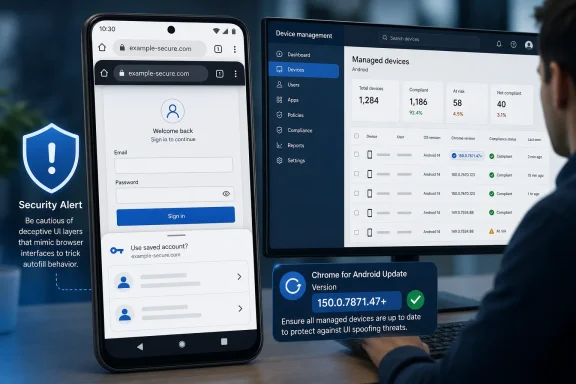 Autofill Is Part of the Browser’s Trust Boundary
Autofill is usually discussed as a convenience feature, but any browser-owned interface displayed alongside website-controlled content must maintain a clear trust boundary. A website controls its HTML and page presentation; Chrome controls browser interface elements that users may treat as more trustworthy than the page itself.CVE-2026-13995 sits at that boundary. According to the Chrome-authored vulnerability description published through the National Vulnerability Database, insufficient validation of untrusted input in the Android Autofill implementation could allow a crafted HTML page to produce UI spoofing.
The phrase UI spoofing matters. The documented outcome is not that an attacker automatically reads a stored password or silently extracts payment-card data. It is that a crafted page can create a misleading browser presentation that may cause the user to misunderstand what Chrome is showing or to take an unintended action.
That is an integrity problem. The user remains present and must interact with the page, but the presentation influencing that interaction may be deceptive.
The public record does not disclose the exact visual sequence, triggering conditions, or browser behavior used to produce the spoof. It therefore supports a limited technical conclusion: crafted HTML could exploit insufficient input validation in Android Autofill to produce UI spoofing. More specific claims about overlays, focus changes, buttons, prompts, credential dialogs, or payment workflows would be speculation unless supported by additional technical evidence.
The CVSS Score Describes a Constrained Attack
CISA-ADP assigned CVE-2026-13995 a CVSS 3.1 base score of 4.3 and a severity of MEDIUM. The vector isAV:N/AC:L/PR:N/UI:R/S:U/C:N/I:L/A:N: network-accessible, low attack complexity, no privileges required, user interaction required, unchanged scope, no direct confidentiality impact, low integrity impact, and no availability impact.The vector provides useful limits on what can responsibly be claimed. The supplied record does not characterize the vulnerability as directly exposing confidential information, crashing Chrome, compromising Android, or enabling attacker-controlled code execution. Its scored technical consequence is limited integrity impact.
The network attack vector means the attacker can present the malicious content remotely rather than first obtaining local access to the device. The user-interaction requirement means that reaching the crafted page is not, by itself, enough to complete the attack. The victim must participate in the deceptive interaction.
That requirement helps explain the moderate score, but it does not make the flaw irrelevant. UI-spoofing attacks are designed to influence human judgment. The appropriate response is therefore proportionate: patch promptly and verify compliance, but do not describe every device below the fixed version as compromised.
Organizations that use severity thresholds as patching gates should avoid allowing the MEDIUM label to conceal the unusually straightforward remediation. Chrome can be updated through the Play Store or an Android Enterprise management channel, and the CVE record provides a specific fixed-version threshold that can be checked after deployment.
The Android Version Boundary Is Clear
Chrome on Android versions earlier than 150.0.7871.47 are identified as affected. Version 150.0.7871.47 is the fixed or non-affected threshold in the supplied record.| Chrome deployment | Version state | What the record establishes | Practical response |
|---|---|---|---|
| Chrome on Android | Earlier than 150.0.7871.47 | Affected | Update and verify the resulting version |
| Chrome on Android | 150.0.7871.47 or later | At or beyond the fixed threshold | Record compliance and continue normal update monitoring |
| Chrome on desktop platforms | Any version | The supplied record does not identify desktop Chrome as affected | Do not use desktop Chrome status as proof that Android devices are patched |
The record includes a vendor-advisory reference whose title concerns the desktop stable channel, but the supplied material establishes only the reference and its classification, not the contents of that release post. It therefore cannot be used here to claim that the post lists this CVE, assigns its severity, identifies particular desktop builds, or places it in a specified Chrome security inventory.
Administrators should base remediation on the affected product and version data that are actually documented. In this case, the operational question is whether Chrome on each relevant Android device has reached 150.0.7871.47 or later.
A Windows browser dashboard does not answer that question. Even when the same employee uses Chrome on both Windows and Android, the installations have separate versions and update paths. Android compliance must be measured through the Android device or its management platform.
What UI Spoofing Does—and Does Not—Establish
UI spoofing is the creation of a misleading interface or presentation that causes the user to mistake one element, context, or action for another. In this CVE, Chrome identifies crafted HTML as the attack medium and Android Autofill as the affected component.The description does not establish that an attacker can automatically obtain saved credentials, read Autofill records, extract payment information, defeat Android authentication, bypass biometric protections, or execute code. Those outcomes should not be added to an incident report merely because they are plausible concerns around browser deception.
The description also does not establish the exact form the spoof takes. The flaw may involve a narrow presentation condition rather than every Autofill interaction. Without public reproduction details, defenders should avoid presenting hypothetical examples as demonstrated behavior.
A user could potentially disclose information or approve an action after being deceived, but that would be part of the surrounding social-engineering chain. It is different from saying that the vulnerability itself has a direct confidentiality impact. The CISA-ADP vector scores confidentiality impact as none and integrity impact as low.
That distinction is important during incident response. An affected browser version proves exposure. It does not prove that a crafted page was visited, that spoofed UI appeared, that the user was deceived, or that information was submitted.
CWE-20 Identifies the Underlying Weakness
Chrome classified CVE-2026-13995 as CWE-20, Improper Input Validation. This category covers software that does not adequately verify that untrusted input has the properties required for safe processing.That classification is consistent with the short vulnerability description: the Android Autofill component insufficiently validated untrusted input, allowing crafted HTML to produce a misleading interface outcome.
CWE-20 describes the implementation weakness, while UI spoofing describes the security consequence. Keeping those two ideas separate avoids overstating the record. The weakness is insufficient validation; the established result is UI spoofing.
The NVD history also records that CISA-ADP added CWE-451 and subsequently removed it. CWE-451 concerns user-interface misrepresentation, which resembles the documented outcome, but it is not the retained weakness classification in the supplied record. The listed Chrome-sourced classification is CWE-20.
Vulnerability-management systems that imported the record during its intermediate state may still show CWE-451 in an old ticket or cached data set. Administrators should check the current record rather than treating both weakness identifiers as equally authoritative.
Exploitation Was Not Identified in the Supplied Assessment
CISA’s Stakeholder-Specific Vulnerability Categorization assessment marked exploitation as “none,” automatable as “no,” and technical impact as “partial.” The assessment was recorded under SSVC version 2.0.3 in the CISA Coordinator role.Those values support a measured response. The supplied assessment did not identify exploitation, did not consider the attack automatable, and characterized the technical impact as partial.
This should not be converted into a broader claim that exploitation is impossible or that no exploitation has occurred anywhere since the assessment was made. It is a point-in-time entry in the supplied record.
Likewise, the restricted Chromium issue does not provide enough public detail to explain exactly why access is limited or when additional information may become available. It is sufficient to say that the issue is permission-restricted and that the public record does not expose the detailed trigger or reproduction procedure. Claims about the restriction’s specific rollout purpose would require separate sourcing.
The practical consequence is simple: defenders have enough information to identify affected installations and apply the fix, but not enough to reconstruct the attack reliably from the public issue entry.
Timeline
Chrome CVE submission: Chrome submitted the CVE record at the documented submission time.NVD publication: NVD published CVE-2026-13995.
CISA-ADP enrichment: CISA-ADP recorded the CVSS 3.1 assessment and SSVC information. The record’s change history also shows CWE-451 being added and later removed.
NIST initial analysis: NIST performed its documented initial analysis.
NVD modification: The NVD record was subsequently updated at its documented last-modified time.
This sequence should not be expanded into claims that a particular organization added each individual description field, CPE, reference type, or version boundary unless the corresponding change entries are quoted or separately supported. The timeline establishes the documented events, not an inferred division of authorship for every database field.
Enterprise Remediation Must End With a Version Check
The strongest enterprise control for this CVE is not a generic instruction to allow browser updates. It is a compliance query for a specific package and version.For Android Enterprise deployments, administrators should use the EMM’s managed-device application inventory or Managed Google Play reporting view to locate Chrome under package name
com.android.chrome. Devices should be separated into two groups:- Installations earlier than 150.0.7871.47.
- Installations at 150.0.7871.47 or later.
After the update action, refresh or resynchronize the managed application inventory and verify the installed version reported by each device. A device should not be marked remediated merely because Chrome is approved, assigned, or configured for automatic updating.
If a device remains below the threshold, treat it as an update-compliance exception. Confirm that the device is still enrolled and checking in, that Chrome is present under the expected package identity, and that the device can receive Managed Google Play application updates. Any additional cause—such as a local device condition, enrollment problem, product-specific policy conflict, or unsupported state—should be established from the management console rather than assumed in advance.
This procedure avoids unsupported generalizations about how every EMM stages applications, handles mobile application management, or reports app versions. The required evidence is the observed Chrome version on the managed Android device after the update action.
BYOD environments may provide less application visibility, depending on enrollment and policy design. Where the organization cannot inspect the installed version, users should be given the direct Chrome and Play Store procedure and asked to verify that About Chrome reports 150.0.7871.47 or later.
Password Managers Do Not Change the Patch Requirement
The supplied record does not document Chrome synchronization behavior, third-party Autofill support, form-field interpretation, or password-manager domain-matching rules. Those subjects are therefore not evidence for the scope or operation of CVE-2026-13995 and should not be used to infer whether a particular password manager prevents exploitation.The vulnerability is attributed to Chrome’s Android Autofill component. The record does not state that using a separate password manager removes the vulnerable Chrome behavior, nor does it identify particular password managers as affected.
Users should continue following their organization’s normal credential and password-manager policies, but those practices are not substitutes for updating Chrome. The remediation test remains the browser version.
Security-awareness messaging should be similarly restrained. Users can be told that a malicious page may have caused Chrome to display misleading interface elements and that they should verify the site and intended action before submitting sensitive information. Training should not claim that this CVE demonstrated a specific fake prompt, button, credential dialog, or payment flow unless further evidence becomes available.
Incident Response Begins With Exposure, Interaction, and Evidence
Finding Chrome for Android below 150.0.7871.47 establishes that the device was running an affected version. It does not establish exploitation.The first response is to update Chrome and record the installed version after remediation. The second is to determine whether there is evidence of relevant interaction while the affected version was present.
Useful questions include:
- Did the user visit a suspicious or unexpected web page?
- Did the user report unusual browser or Autofill presentation?
- Did the user submit information or approve an action because the page appeared trustworthy?
- Was suspicious account activity observed after the browsing event?
- Can the organization identify the destination domain and the account involved?
Where suspicious interaction is identified, responders should investigate the affected account, destination site, and resulting activity. Credential resets or session revocation may be appropriate when evidence indicates that credentials were entered into an untrusted page, but they should not be described as universally required merely because an old browser version was found.
The CVE describes a crafted HTML page producing UI spoofing, not persistent Android malware. Responders should therefore avoid declaring device-level compromise without separate evidence.
Incident reports should use language such as:
They should not state that saved passwords, payment data, or Autofill records were stolen unless the investigation independently establishes that outcome.The device was running an affected version of Chrome for Android and may have been exposed to crafted HTML capable of causing UI spoofing.
Action checklist for admins
- Use the Android Enterprise EMM application inventory to find
com.android.chrome. - Flag every managed Android installation earlier than 150.0.7871.47.
- Confirm that Chrome is approved and assigned through Managed Google Play.
- Apply the EMM’s high-priority, immediate, or equivalent managed-app update action.
- Refresh the inventory and verify that each remediated device reports 150.0.7871.47 or later.
- Track Android Chrome separately from Chrome installed on Windows, macOS, or Linux.
- Treat devices that remain below the threshold as compliance exceptions requiring follow-up.
- Give unmanaged users the Chrome Settings > About Chrome and Play Store update procedure.
- Preserve reports of unusual browser or Autofill presentation without assuming a particular spoofing mechanism.
- Investigate suspicious browsing and account activity based on evidence.
- Avoid claiming credential theft, stored-data exposure, code execution, or device compromise unless independently demonstrated.
A Narrow Disclosure Still Supports a Clear Decision
The public record provides a concise but actionable account. Chrome for Android before 150.0.7871.47 contains an improper-input-validation flaw in Autofill. A remote attacker can use crafted HTML to produce UI spoofing, but user interaction is required.The record does not establish direct confidentiality loss, availability impact, arbitrary code execution, Android compromise, or a particular credential-theft technique. It also does not provide enough public detail to describe the exact spoofing sequence responsibly.
That uncertainty does not prevent remediation because the affected platform and fixed threshold are explicit. Users can update through Chrome or the Play Store and verify the result through About Chrome. Managed fleets can query the Android Enterprise application inventory, take the available Managed Google Play update-compliance action, and confirm that
com.android.chrome has reached the required version.The NVD description and listed CPE configuration identify Android; the supplied record does not identify desktop Chrome as affected. Desktop browser status should therefore neither be presented as evidence of Android exposure nor accepted as proof of Android remediation.
CVE-2026-13995 belongs in the routine-but-prompt patch lane. It does not justify panic or unsupported claims that every vulnerable device leaked credentials. It does justify a concrete version check, an update where necessary, and evidence-based investigation when a user reports a suspicious interaction.
Finally, the numerical severity must be attributed accurately: 4.3 is the CISA-ADP CVSS 3.1 assessment. NVD had not provided its own CVSS assessment in the supplied record.
References
- Primary source: NVD / Chromium
Published: 2026-07-11T15:41:29-07:00
NVD - CVE-2026-13995
 nvd.nist.gov
- Security advisory: MSRC
Published: 2026-07-11T15:41:29-07:00
Original feed URL
Security Update Guide - Microsoft Security Response Center
 msrc.microsoft.com
- Related coverage: developers.googleblog.com
Chrome on Android to support third-party autofill services natively - Google Developers Blog
Chrome on Android will soon natively support third-party autofill services, providing a smoother user experience.developers.googleblog.com - Related coverage: cvefeed.io
CVE-2026-13995 - Google Chrome Android UI Spoofing Vulnerability
Insufficient validation of untrusted input in Autofill in Google Chrome on Android prior to 150.0.7871.47 allowed a remote attacker to perform UI spoofing via a crafted HTML page. (Chromium security severity: Medium)cvefeed.io - Related coverage: chromium.googlesource.com