

Google fixed CVE-2026-14000 in the Chrome 150 stable release on June 30, 2026, after disclosing that older Chrome builds could allow a remote attacker to inject arbitrary scripts or HTML through a crafted page abusing XML handling. The flaw is rated Medium by Chromium and scored 6.1 by CISA’s enrichment program, but its UXSS label is the part Windows admins should not skim past. In browser security, “medium” does not always mean “minor”; it often means “requires a user to land on the wrong page.” As detailed by Google’s Chrome Releases blog and the National Vulnerability Database, the practical fix is simple: move Chrome to 150.0.7871.47 or later where that build applies.
The temptation with CVE-2026-14000 is to file it under routine browser hygiene. Google shipped Chrome 150 to the stable channel for Windows, macOS, and Linux, and the release included hundreds of security fixes, many with more alarming labels than this one. Critical use-after-free bugs and high-severity memory problems will naturally pull the eye first.
But CVE-2026-14000 sits in a different part of the risk map. It is not described as remote code execution, sandbox escape, or a drive-by compromise of the operating system. It is described as inappropriate implementation in XML that allowed injection of arbitrary scripts or HTML, classified under CWE-79, the familiar cross-site scripting family.
The more interesting detail is that NVD’s description uses UXSS, or universal cross-site scripting. Ordinary XSS usually belongs to a vulnerable website. UXSS belongs to the browser or browser-adjacent code path, meaning the defect may let attacker-supplied content run in a context where it should not. That is why a Medium browser UXSS can matter more than a High bug in a forgotten web app.
CISA’s ADP vector tells the same story in compressed form. The attack is network reachable, low complexity, needs no privileges, requires user interaction, and has changed scope with low confidentiality and integrity impact. Translated out of CVSS dialect, the victim probably has to visit or interact with a malicious page, but the bug crosses a trust boundary once that happens.
That asymmetry is built into browser security. Google knows enough to patch. Researchers and attackers may know enough to reproduce. The public gets a terse component name, a CVE, a severity rating, and a fixed version.
For enterprises, that means the patch decision cannot wait for a polished exploit narrative. By the time a UXSS issue has a public proof-of-concept, the window for quiet fleet maintenance may already have closed. Chrome’s auto-update machinery helps consumers, but managed Windows environments are full of exceptions: frozen VDI images, kiosk modes, update rings, brittle extensions, and line-of-business apps that make browser updates feel more like change control than hygiene.
CVE-2026-14000 is therefore less about panic and more about cadence. If your estate is already on Chrome 150.0.7871.47 or newer, this specific issue should be closed. If your estate is “mostly updated,” the interesting systems are the ones outside the happy path.
A crafted HTML page exploiting XML handling is exactly the sort of phrase that makes security engineers lean forward. The browser is not merely rendering markup; it is deciding which parser owns which content, which origin or document context applies, and whether script should be inert, transformed, inherited, or executable. A mistake in that choreography can turn data into code.
That does not mean every XML bug is catastrophic. It does mean XML is not a dead corner of the browser. It is a negotiation layer between formats, encodings, namespaces, and script execution rules, and negotiation layers are where many browser security boundaries have historically become fuzzy.
The Chrome team has not publicly disclosed full bug details for CVE-2026-14000, and the linked Chromium issue remains permission-restricted. That is appropriate for a fresh browser vulnerability. It also leaves admins with the only operational fact that matters: versions before 150.0.7871.47 are in the affected range, and the fixed channel exists.
Universal cross-site scripting changes that moral geography. If the browser incorrectly permits script injection across contexts, the defect may not depend on the target site making the original mistake. The browser’s enforcement of origin isolation, content interpretation, or document handling becomes the weak link.
That is why CVE-2026-14000 deserves attention even without evidence of active exploitation. The public record says exploitation requires a crafted HTML page and user interaction, not that an attacker can silently compromise Windows from across the internet. But a crafted page is not a high bar in phishing, malvertising, compromised-site, or drive-by social engineering scenarios.
Browser vendors have spent years narrowing this class of risk through site isolation, process sandboxing, stricter content security behavior, and better parser consistency. Yet the web platform is too large to make “parser bug” a solved category. Every major browser release is both a feature release and a rolling repair of assumptions made by older code.
For Windows users, the distinction between “Chrome bug” and “website bug” is mostly academic. The browser is where authentication cookies, corporate SaaS sessions, password managers, device posture checks, and single sign-on flows meet. If script runs where it should not, the blast radius can be broader than the severity label suggests.
That is a reasonable technical score. It is not a complete risk statement for an enterprise. A browser flaw affecting a finance user’s authenticated session, an admin’s cloud console, or a developer’s internal tooling may carry more business consequence than the generic score captures.
CVSS is deliberately abstract. It does not know whether a vulnerable browser is used only for casual browsing, locked to a kiosk application, or carrying privileged Microsoft Entra ID sessions all day. It does not know whether users run with aggressive site isolation policies, whether sensitive apps enforce strong content security policies, or whether endpoint detection has useful browser telemetry.
The score also does not answer exploit availability. NVD’s page shows CISA’s SSVC entry with exploitation marked “none” at the time of enrichment, and the issue is not being presented as an exploited-in-the-wild emergency. That matters. It is the difference between “patch promptly” and “drop everything.”
Still, browser patching has a short half-life. Attackers routinely diff open-source projects after releases, inspect commits, and build working theories before vendors publish full details. A Medium label buys prioritization discipline, not complacency.
This is a familiar nuisance for security teams. CPE matching is brittle because installed software inventories are messy. Google Chrome may appear as a machine-wide install, user-level install, packaged enterprise app, bundled Chromium derivative, or absent from one inventory source while present in another.
There is also a semantic trap in the CVE record’s affected version language. The CNA data shown by NVD lists version “150.0.7871.47” with “lessThan 150.0.7871.47,” which can look odd if read casually. The intended meaning is not that 150.0.7871.47 is vulnerable; it is the version boundary. Anything lower than that fixed build is the concern.
For vulnerability managers, the right validation step is not staring at the CPE field. It is checking whether endpoint inventory reports Chrome at or above the fixed version, whether the scanner’s plugin has refreshed since July 1, and whether Chrome’s own update mechanism is allowed to complete without being blocked by policy, stale services, or reboot debt.
Microsoft Edge is the most important case for Windows shops. Edge has its own stable channel and its own release notes, but it tracks Chromium closely enough that browser security teams routinely watch Chrome stable releases as early warning. If a Chromium issue affects shared code, the relevant question becomes when Edge integrated the fix, not whether the Chrome blog named Edge.
This is where patch lag becomes an operational risk. Consumer Chrome often updates quickly. Enterprise Chrome may update on a controlled schedule. Edge may follow its own cadence. Chromium derivatives sometimes take longer, especially if they carry additional UI layers, privacy features, extension policies, or custom build pipelines.
For personal users, the practical advice is simple: update every Chromium-based browser you actually use, not just the default one. For admins, it is more subtle: inventory browser families, not just browser names. A stale secondary browser can become the forgotten door into the same class of web content risk.
That changes the way a UXSS bug should be viewed. The feared outcome is not necessarily code execution on Windows. It is script execution in a place where script should not run, with access to page content, session context, or user-driven actions that belong to another trust zone.
Modern mitigations help, but they do not erase the problem. SameSite cookies, content security policy, partitioned storage, site isolation, phishing-resistant MFA, and conditional access all reduce certain paths. But attackers chain small web flaws into user deception, session abuse, consent attacks, and data theft. A browser issue that crosses boundaries can become one link in that chain.
This is why browser patch SLAs should look more like identity control SLAs than desktop application SLAs. A delayed update to a PDF tool may be annoying; a delayed update to the browser affects nearly every privileged web action a user performs. For administrators, the blast radius is not the binary on disk. It is the authenticated web life of the user behind it.
But “no known exploitation” is not the same as “no exploitation possible,” and it is certainly not the same as “safe to defer indefinitely.” Browser vulnerabilities move from advisory to weaponized test case quickly once enough information leaks through commits, crash traces, or independent rediscovery.
Google’s decision to keep bug details restricted until a majority of users are updated exists for this reason. The security community often wants transparency, and rightly so. But immediate public reproduction details for a fresh browser bug can punish slower users before auto-update has time to do its job.
The smart response is neither fear nor boredom. It is a short, verifiable patch cycle: confirm version, force update where needed, watch for application breakage, and close the ticket. CVE-2026-14000 is the kind of issue that should disappear from your risk register because your browser update process works, not because someone argued Medium was beneath attention.
The harder cases are not ordinary users on laptops. They are shared workstations, regulated desktops, virtualized app delivery environments, browser-embedded workflows, and old intranet systems that still depend on yesterday’s web quirks. If those environments are pinned below Chrome 150.0.7871.47, CVE-2026-14000 becomes one more reason to revisit the pin.
Security teams should resist the false binary between “patch instantly” and “wait until the quarterly cycle.” Browser vendors ship rapid patches because the attack surface is exposed constantly. If a business-critical app breaks on Chrome 150, the answer is not to leave the entire browser estate exposed. It is to isolate the exception, document it, apply compensating controls, and push the vendor or internal owner toward compatibility.
This is also where Chrome’s enterprise controls matter. Update policies, rollback controls, version pinning, and reporting can help manage change, but they can also become the mechanism by which old vulnerabilities linger. A policy originally created to avoid breakage can quietly become a security debt machine.
The best-run Windows environments do not treat browser updates as background noise. They test the stable channel quickly, promote it through rings, monitor failures, and keep an explicit list of exceptions. CVE-2026-14000 is not the biggest Chrome bug of the year, but it is a useful audit of whether that machinery exists.
For managed environments, the boring work is more distributed. Confirm Google Update policies. Check whether update services are running. Look for machines stuck below the fixed version. Include non-persistent VDI images and golden images. Verify that software inventory is reading the actual installed browser version rather than stale package metadata.
Security teams should also check browsers users do not talk about. Developers may keep Chrome Canary, Chromium snapshots, portable builds, or alternate Chromium browsers for testing. Help desks may have legacy browsers installed for compatibility. Kiosk systems may run a browser shell that never appears in ordinary endpoint dashboards.
None of this requires exploit forensics. It requires asset truth. The more browsers have become the front end to corporate computing, the less acceptable it is for organizations not to know which browser versions are running.
That ordinariness is what makes it instructive. Modern browser security is not a sequence of rare catastrophes separated by calm. It is a continuous stream of boundary repairs inside a platform too large for any one user, admin, or vendor to fully reason about.
The details vary: XML this week, CSS or SVG another week, GPU or V8 the week after. The operational lesson does not. If the browser is the workplace, then browser patching is workplace security. If identity lives in the browser, then script injection bugs are identity-adjacent risks. If old parsers still shape modern content, then compatibility is part of the threat model.
CVE-2026-14000 is therefore a small story with a large shadow. It reminds us that the web’s oldest surfaces still matter, that Medium can still cross scope, and that the most effective mitigation is often the least glamorous one: stay current.
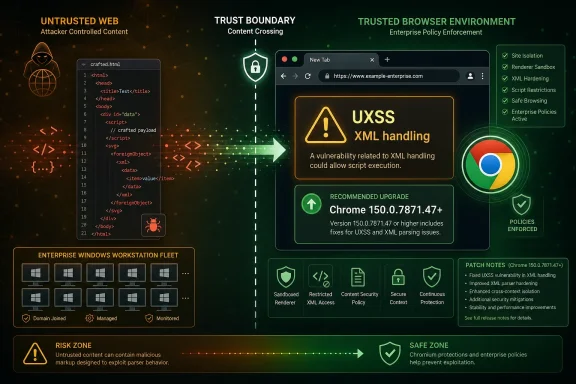 The Medium Bug That Still Crosses a Boundary
The temptation with CVE-2026-14000 is to file it under routine browser hygiene. Google shipped Chrome 150 to the stable channel for Windows, macOS, and Linux, and the release included hundreds of security fixes, many with more alarming labels than this one. Critical use-after-free bugs and high-severity memory problems will naturally pull the eye first.But CVE-2026-14000 sits in a different part of the risk map. It is not described as remote code execution, sandbox escape, or a drive-by compromise of the operating system. It is described as inappropriate implementation in XML that allowed injection of arbitrary scripts or HTML, classified under CWE-79, the familiar cross-site scripting family.
The more interesting detail is that NVD’s description uses UXSS, or universal cross-site scripting. Ordinary XSS usually belongs to a vulnerable website. UXSS belongs to the browser or browser-adjacent code path, meaning the defect may let attacker-supplied content run in a context where it should not. That is why a Medium browser UXSS can matter more than a High bug in a forgotten web app.
CISA’s ADP vector tells the same story in compressed form. The attack is network reachable, low complexity, needs no privileges, requires user interaction, and has changed scope with low confidentiality and integrity impact. Translated out of CVSS dialect, the victim probably has to visit or interact with a malicious page, but the bug crosses a trust boundary once that happens.
Chrome 150 Was Not a Small Security Release
Google’s June 30 Chrome Releases post announced the promotion of Chrome 150 to stable and listed Windows and Mac versions as 150.0.7871.46/.47, with Linux on 150.0.7871.46. The same post said the update included 433 security fixes and warned that bug details may remain restricted until most users have updated. That restriction is standard Chrome practice, but it is also a reminder that defenders often patch before they get the full anatomy lesson.That asymmetry is built into browser security. Google knows enough to patch. Researchers and attackers may know enough to reproduce. The public gets a terse component name, a CVE, a severity rating, and a fixed version.
For enterprises, that means the patch decision cannot wait for a polished exploit narrative. By the time a UXSS issue has a public proof-of-concept, the window for quiet fleet maintenance may already have closed. Chrome’s auto-update machinery helps consumers, but managed Windows environments are full of exceptions: frozen VDI images, kiosk modes, update rings, brittle extensions, and line-of-business apps that make browser updates feel more like change control than hygiene.
CVE-2026-14000 is therefore less about panic and more about cadence. If your estate is already on Chrome 150.0.7871.47 or newer, this specific issue should be closed. If your estate is “mostly updated,” the interesting systems are the ones outside the happy path.
XML Is Old Plumbing in a Modern Attack Surface
The component label “XML” may sound quaint in 2026, but browsers still carry decades of web platform machinery. XML parsing, XSLT, SVG-adjacent behaviors, MIME sniffing, document transformations, legacy APIs, and edge-case content handling remain part of the compatibility bargain that makes the web work. Attackers love that bargain because old plumbing often sits behind modern assumptions.A crafted HTML page exploiting XML handling is exactly the sort of phrase that makes security engineers lean forward. The browser is not merely rendering markup; it is deciding which parser owns which content, which origin or document context applies, and whether script should be inert, transformed, inherited, or executable. A mistake in that choreography can turn data into code.
That does not mean every XML bug is catastrophic. It does mean XML is not a dead corner of the browser. It is a negotiation layer between formats, encodings, namespaces, and script execution rules, and negotiation layers are where many browser security boundaries have historically become fuzzy.
The Chrome team has not publicly disclosed full bug details for CVE-2026-14000, and the linked Chromium issue remains permission-restricted. That is appropriate for a fresh browser vulnerability. It also leaves admins with the only operational fact that matters: versions before 150.0.7871.47 are in the affected range, and the fixed channel exists.
UXSS Turns a Website Problem Into a Browser Problem
Cross-site scripting is often treated as a website owner’s embarrassment. A forum fails to sanitize input, a comment box reflects a payload, a dashboard trusts user-controlled HTML, and an attacker steals tokens or manipulates the page. The boundary of blame is usually clear: fix the site.Universal cross-site scripting changes that moral geography. If the browser incorrectly permits script injection across contexts, the defect may not depend on the target site making the original mistake. The browser’s enforcement of origin isolation, content interpretation, or document handling becomes the weak link.
That is why CVE-2026-14000 deserves attention even without evidence of active exploitation. The public record says exploitation requires a crafted HTML page and user interaction, not that an attacker can silently compromise Windows from across the internet. But a crafted page is not a high bar in phishing, malvertising, compromised-site, or drive-by social engineering scenarios.
Browser vendors have spent years narrowing this class of risk through site isolation, process sandboxing, stricter content security behavior, and better parser consistency. Yet the web platform is too large to make “parser bug” a solved category. Every major browser release is both a feature release and a rolling repair of assumptions made by older code.
For Windows users, the distinction between “Chrome bug” and “website bug” is mostly academic. The browser is where authentication cookies, corporate SaaS sessions, password managers, device posture checks, and single sign-on flows meet. If script runs where it should not, the blast radius can be broader than the severity label suggests.
The CVSS Score Is a Floor, Not a Business Impact Statement
CISA’s ADP enrichment gives CVE-2026-14000 a CVSS 3.1 base score of 6.1, Medium. The vector says the attacker can reach the victim over the network, does not need credentials, and faces low attack complexity, but must get user interaction. It also marks scope as changed, with low confidentiality and integrity impact and no availability impact.That is a reasonable technical score. It is not a complete risk statement for an enterprise. A browser flaw affecting a finance user’s authenticated session, an admin’s cloud console, or a developer’s internal tooling may carry more business consequence than the generic score captures.
CVSS is deliberately abstract. It does not know whether a vulnerable browser is used only for casual browsing, locked to a kiosk application, or carrying privileged Microsoft Entra ID sessions all day. It does not know whether users run with aggressive site isolation policies, whether sensitive apps enforce strong content security policies, or whether endpoint detection has useful browser telemetry.
The score also does not answer exploit availability. NVD’s page shows CISA’s SSVC entry with exploitation marked “none” at the time of enrichment, and the issue is not being presented as an exploited-in-the-wild emergency. That matters. It is the difference between “patch promptly” and “drop everything.”
Still, browser patching has a short half-life. Attackers routinely diff open-source projects after releases, inspect commits, and build working theories before vendors publish full details. A Medium label buys prioritization discipline, not complacency.
The CPE Question Is Less Mysterious Than It Looks
The user-facing NVD page asks whether a CPE is missing, but the change history shows NIST added a CPE configuration for Google Chrome versions up to, but excluding, 150.0.7871.47. In plain language, the relevant affected product mapping is Chrome before the fixed build. If a vulnerability management platform is not flagging it, the issue is more likely feed timing, product normalization, or scanner logic than the absence of an obvious Chrome CPE.This is a familiar nuisance for security teams. CPE matching is brittle because installed software inventories are messy. Google Chrome may appear as a machine-wide install, user-level install, packaged enterprise app, bundled Chromium derivative, or absent from one inventory source while present in another.
There is also a semantic trap in the CVE record’s affected version language. The CNA data shown by NVD lists version “150.0.7871.47” with “lessThan 150.0.7871.47,” which can look odd if read casually. The intended meaning is not that 150.0.7871.47 is vulnerable; it is the version boundary. Anything lower than that fixed build is the concern.
For vulnerability managers, the right validation step is not staring at the CPE field. It is checking whether endpoint inventory reports Chrome at or above the fixed version, whether the scanner’s plugin has refreshed since July 1, and whether Chrome’s own update mechanism is allowed to complete without being blocked by policy, stale services, or reboot debt.
Edge, Chromium Derivatives, and the Patch Lag Problem
The CVE is assigned to Google Chrome, but Chrome is not the only browser built on Chromium. Microsoft Edge, Brave, Vivaldi, Opera, and other Chromium-based browsers inherit large parts of the same engine and may need their own vendor-specific updates when Chromium security fixes land. That does not mean every Chrome CVE automatically maps one-to-one to every derivative, but it does mean admins should not stop at Chrome if their fleet uses multiple Chromium browsers.Microsoft Edge is the most important case for Windows shops. Edge has its own stable channel and its own release notes, but it tracks Chromium closely enough that browser security teams routinely watch Chrome stable releases as early warning. If a Chromium issue affects shared code, the relevant question becomes when Edge integrated the fix, not whether the Chrome blog named Edge.
This is where patch lag becomes an operational risk. Consumer Chrome often updates quickly. Enterprise Chrome may update on a controlled schedule. Edge may follow its own cadence. Chromium derivatives sometimes take longer, especially if they carry additional UI layers, privacy features, extension policies, or custom build pipelines.
For personal users, the practical advice is simple: update every Chromium-based browser you actually use, not just the default one. For admins, it is more subtle: inventory browser families, not just browser names. A stale secondary browser can become the forgotten door into the same class of web content risk.
Windows Admins Should Treat Browser Updates Like Identity Controls
In many organizations, the browser has become the real operating environment. Users live in Microsoft 365, Google Workspace, Salesforce, ServiceNow, GitHub, Azure, AWS, and dozens of SaaS dashboards. The browser mediates identity, authorization, secrets, data export, and administrative reach.That changes the way a UXSS bug should be viewed. The feared outcome is not necessarily code execution on Windows. It is script execution in a place where script should not run, with access to page content, session context, or user-driven actions that belong to another trust zone.
Modern mitigations help, but they do not erase the problem. SameSite cookies, content security policy, partitioned storage, site isolation, phishing-resistant MFA, and conditional access all reduce certain paths. But attackers chain small web flaws into user deception, session abuse, consent attacks, and data theft. A browser issue that crosses boundaries can become one link in that chain.
This is why browser patch SLAs should look more like identity control SLAs than desktop application SLAs. A delayed update to a PDF tool may be annoying; a delayed update to the browser affects nearly every privileged web action a user performs. For administrators, the blast radius is not the binary on disk. It is the authenticated web life of the user behind it.
The Absence of a Public Exploit Is Good News, Not a Waiver
NVD and CISA’s enrichment do not indicate known exploitation for CVE-2026-14000 at the time reflected in the record. That is good news. It means defenders can patch in an orderly way rather than under the pressure of an active zero-day campaign.But “no known exploitation” is not the same as “no exploitation possible,” and it is certainly not the same as “safe to defer indefinitely.” Browser vulnerabilities move from advisory to weaponized test case quickly once enough information leaks through commits, crash traces, or independent rediscovery.
Google’s decision to keep bug details restricted until a majority of users are updated exists for this reason. The security community often wants transparency, and rightly so. But immediate public reproduction details for a fresh browser bug can punish slower users before auto-update has time to do its job.
The smart response is neither fear nor boredom. It is a short, verifiable patch cycle: confirm version, force update where needed, watch for application breakage, and close the ticket. CVE-2026-14000 is the kind of issue that should disappear from your risk register because your browser update process works, not because someone argued Medium was beneath attention.
The Enterprise Breakage Story Will Decide How Fast Some Fleets Move
Chrome 150 is not only a security delivery vehicle. Like every major browser release, it arrives with feature changes, platform adjustments, and behavioral shifts that can intersect with legacy enterprise workflows. That is where browser patching stops being a security checkbox and becomes a negotiation with the business.The harder cases are not ordinary users on laptops. They are shared workstations, regulated desktops, virtualized app delivery environments, browser-embedded workflows, and old intranet systems that still depend on yesterday’s web quirks. If those environments are pinned below Chrome 150.0.7871.47, CVE-2026-14000 becomes one more reason to revisit the pin.
Security teams should resist the false binary between “patch instantly” and “wait until the quarterly cycle.” Browser vendors ship rapid patches because the attack surface is exposed constantly. If a business-critical app breaks on Chrome 150, the answer is not to leave the entire browser estate exposed. It is to isolate the exception, document it, apply compensating controls, and push the vendor or internal owner toward compatibility.
This is also where Chrome’s enterprise controls matter. Update policies, rollback controls, version pinning, and reporting can help manage change, but they can also become the mechanism by which old vulnerabilities linger. A policy originally created to avoid breakage can quietly become a security debt machine.
The best-run Windows environments do not treat browser updates as background noise. They test the stable channel quickly, promote it through rings, monitor failures, and keep an explicit list of exceptions. CVE-2026-14000 is not the biggest Chrome bug of the year, but it is a useful audit of whether that machinery exists.
The Fix Is Boring, Which Is Exactly the Point
For unmanaged users, Chrome’s update path remains deliberately mundane. Open Chrome, let it update, relaunch the browser, and verify the version is at least 150.0.7871.47 on Windows and Mac where that fixed build is listed. If Chrome has already auto-updated, there is nothing dramatic to do.For managed environments, the boring work is more distributed. Confirm Google Update policies. Check whether update services are running. Look for machines stuck below the fixed version. Include non-persistent VDI images and golden images. Verify that software inventory is reading the actual installed browser version rather than stale package metadata.
Security teams should also check browsers users do not talk about. Developers may keep Chrome Canary, Chromium snapshots, portable builds, or alternate Chromium browsers for testing. Help desks may have legacy browsers installed for compatibility. Kiosk systems may run a browser shell that never appears in ordinary endpoint dashboards.
None of this requires exploit forensics. It requires asset truth. The more browsers have become the front end to corporate computing, the less acceptable it is for organizations not to know which browser versions are running.
What Chrome 150’s XML Bug Tells Us About the Next One
CVE-2026-14000 will probably not be remembered as a landmark vulnerability. It has no public drama, no catchy name, no emergency banner, and no known active exploitation in the NVD record. It is one entry in a huge Chrome 150 security release.That ordinariness is what makes it instructive. Modern browser security is not a sequence of rare catastrophes separated by calm. It is a continuous stream of boundary repairs inside a platform too large for any one user, admin, or vendor to fully reason about.
The details vary: XML this week, CSS or SVG another week, GPU or V8 the week after. The operational lesson does not. If the browser is the workplace, then browser patching is workplace security. If identity lives in the browser, then script injection bugs are identity-adjacent risks. If old parsers still shape modern content, then compatibility is part of the threat model.
CVE-2026-14000 is therefore a small story with a large shadow. It reminds us that the web’s oldest surfaces still matter, that Medium can still cross scope, and that the most effective mitigation is often the least glamorous one: stay current.
The Patch Window Is the Real Test
Chrome users and Windows administrators do not need a new doctrine for CVE-2026-14000, but they do need to execute the old one well. The evidence from Google’s release notes, NVD’s record, and CISA’s enrichment points to a contained browser flaw with a clear fixed version and no public signal of active exploitation at disclosure time.- Chrome installations below 150.0.7871.47 should be treated as affected for CVE-2026-14000.
- The vulnerability is a Medium-severity UXSS issue in Chrome’s XML handling, not a disclosed operating-system code execution bug.
- The attack requires user interaction with a crafted page, but it needs no prior privileges and crosses a security scope boundary.
- NVD’s change history shows a Google Chrome CPE configuration for versions up to, but excluding, 150.0.7871.47.
- Managed Windows fleets should verify actual browser versions across Chrome, images, kiosks, VDI, and secondary Chromium-based browsers.
- The absence of known exploitation lowers urgency compared with a zero-day, but it does not justify leaving browser update exceptions unreviewed.
References
- Primary source: NVD / Chromium
Published: 2026-07-03T07:00:36-07:00
NVD - CVE-2026-14000
 nvd.nist.gov
- Security advisory: MSRC
Published: 2026-07-03T07:00:36-07:00
Original feed URL
Security Update Guide - Microsoft Security Response Center
 msrc.microsoft.com
- Related coverage: cvefeed.io
CVE-2026-14000 - Google Chrome UXSS via Inappropriate XML Implementation
Inappropriate implementation in XML in Google Chrome prior to 150.0.7871.47 allowed a remote attacker to inject arbitrary scripts or HTML (UXSS) via a crafted HTML page. (Chromium security severity: Medium)cvefeed.io
