

Google fixed CVE-2026-13990 in Chrome 150.0.7871.47 for Windows on June 30, 2026, closing a medium-severity DataTransfer input-validation flaw that could let an attacker, after compromising Chrome’s renderer process, spoof browser UI through a crafted HTML page. The entry is now live in the National Vulnerability Database, with CISA’s ADP enrichment assigning a CVSS 3.1 score of 6.5 and Google classifying the bug as Medium severity. That makes this less a panic-button vulnerability than a reminder of a more uncomfortable truth: modern browser security increasingly fails in chains, not single spectacular crashes.
The practical answer for Windows users is simple enough: update Chrome to 150.0.7871.47 or later and restart the browser. The more interesting answer is why a “medium” flaw involving UI spoofing deserves attention at all. In an era where browsers are password managers, passkey prompts, enterprise SSO front doors, payment terminals, and software delivery platforms, the line between “just spoofing” and “user-approved compromise” has become dangerously thin.
CVE-2026-13990 sits in Chrome’s handling of DataTransfer, the web platform interface that helps move data through drag-and-drop and clipboard-style interactions. The NVD description, sourced from Chrome, says the issue was insufficient validation of untrusted input in DataTransfer on Windows before version 150.0.7871.47. The exploit scenario is constrained: the attacker first needs a compromised renderer process, then uses a crafted HTML page to perform UI spoofing.
That constraint matters. This is not described as a one-click remote code execution flaw, nor has Google publicly said it is being exploited in the wild. CISA’s SSVC enrichment lists exploitation as “none,” says the attack is not automatable, and describes the technical impact as partial. Those details are the difference between a red-alert patch-now emergency and the ordinary, relentless maintenance burden that defines browser security.
But “ordinary” should not be mistaken for harmless. Chrome’s renderer is the part of the browser that deals with web content, and Chrome’s security architecture assumes hostile pages will try to do hostile things inside it. The sandbox is there because web content is not trusted. A bug that becomes interesting only after renderer compromise is, by definition, a second-stage weakness — but second-stage weaknesses are exactly what exploit chains need.
Google’s June 30 Stable Channel update, as described on the Chrome Releases blog, moved the desktop stable channel to 150.0.7871.46/.47 for Windows and Mac and 150.0.7871.46 for Linux. Malwarebytes noted that the same update addressed a very large batch of security fixes, reportedly 382 in all. CVE-2026-13990 is one tile in that mosaic, not the whole mural.
That is also why this bug is useful as a case study. It is not the scariest item in Chrome’s June security pile. It is the kind of flaw security teams are tempted to compress into a dashboard row and forget. Yet its shape — renderer prerequisite, crafted page, UI deception, Windows-specific affected configuration — maps closely to how real-world browser compromise often progresses.
Security bugs in plumbing tend to be underestimated because they do not sound like memory corruption, sandbox escape, or cryptographic failure. “Insufficient validation of untrusted input” is a phrase that can numb even an experienced administrator. It reads like compliance boilerplate, the kind of CWE-20 entry that appears in too many scanners to command attention.
But DataTransfer is tied to user action and browser mediation. When a page can influence what the user appears to be dragging, dropping, selecting, confirming, or trusting, small mismatches can become social-engineering primitives. UI spoofing bugs live in that gap between what the browser intends to show and what the user believes they are seeing.
Chrome’s security language for CVE-2026-13990 is narrow: a remote attacker who had already compromised the renderer process could spoof UI through a crafted HTML page. That phrasing does not reveal the internal Chromium issue, which remains behind a permissions-required tracker. That is normal for newly fixed browser bugs; Google routinely restricts bug details until enough users have received the patch.
The lack of public exploit code or internal detail should not be read as a lack of seriousness. Browser vendors often have to balance defensive transparency against giving exploit developers a reproduction guide. For defenders, the actionable fact is not the exact malformed DataTransfer path. It is the corrected version number.
The browser is now the operating system for a large share of daily work. Identity providers, admin consoles, device enrollment flows, OAuth grants, passkey prompts, payment confirmations, file pickers, password managers, and enterprise SaaS sessions all depend on the user correctly interpreting browser chrome and web content. If an attacker can blur that boundary, the attacker may not need to steal a password directly. They may only need to persuade the user to bless the wrong action.
That is why a CVSS vector showing high integrity impact and no confidentiality or availability impact makes sense for this class of bug. CISA’s ADP vector for CVE-2026-13990 is AV:N/AC:L/PR:N/UI:R/S:U/C:N/I:H/A:N. In plain English, the attack is network-reachable, low-complexity, requires no privileges, does require user interaction, does not cross a scope boundary in the CVSS model, and primarily threatens integrity.
Integrity is often the least emotionally vivid of the security triad, but in UI spoofing it is the point. The attacker is not necessarily reading your secrets or crashing your browser. The attacker is altering the decision surface so that you perform the wrong trusted action. In enterprise environments, that can be enough.
Imagine a compromised renderer paired with a spoofed prompt that nudges a user toward a malicious file action, a misleading permission grant, or a fraudulent workflow inside a trusted-looking page. The public CVE does not say CVE-2026-13990 enables those exact outcomes, and we should not pretend it does. But the category exists because the browser’s visual contract with the user is itself a security boundary.
That lowers the probability of opportunistic exploitation. It also explains why the issue lands at Medium severity rather than High or Critical. In a vulnerability-management meeting, this is the line that keeps CVE-2026-13990 from dominating the agenda.
Yet exploit chains are not theoretical. Chrome’s security model is built on the assumption that one vulnerability may lead to another. Attackers often combine a renderer bug with a sandbox escape, a logic flaw, or a deception technique. If one flaw gets code running in a restricted renderer and another helps mislead the user or cross a trust boundary, the chain becomes more valuable than its individual parts.
This is also why patch prioritization based only on CVSS can mislead. A medium UI flaw may be uninteresting by itself but useful when paired with a high-severity renderer compromise. A sandbox escape may be devastating but need a first-stage bug to become reachable. A social-engineering primitive may not look technical enough for a red alert but can turn a partial foothold into an approved action.
The Chrome 150 update is a reminder that browser releases are bundles of risk reduction. Administrators rarely have the luxury of patching only the CVEs that look dramatic. The browser is a fast-moving dependency with a giant exposed attack surface, and the safest operational posture is to keep the whole thing current.
For consumers, the same principle is less formal but just as real. The right security habit is not to memorize CVE numbers. It is to let Chrome update, restart when prompted, and resist the common urge to leave the browser running for weeks because tabs feel like unfinished work.
The Windows-only framing may reflect platform-specific UI behavior, DataTransfer integration, or implementation details that differ across operating systems. Without the public Chromium issue, it would be irresponsible to overstate the cause. What we can say is that the affected CPE logic in NVD calls out Chrome on Windows, not Chromium generically across every desktop platform.
That has practical consequences for administrators. If your fleet is managed through Chrome Browser Cloud Management, Group Policy, Microsoft Intune, Configuration Manager, or a third-party patch platform, the relevant compliance question is whether Windows endpoints have crossed the 150.0.7871.47 threshold. Mac and Linux systems still received Chrome 150 updates for many other fixes, but this CVE’s published affected configuration is Windows-specific.
This is where vulnerability scanners can get awkward. The user-submitted NVD text asks, “Are we missing a CPE here?” because NVD’s affected software configuration was still visibly loading or incomplete in the page experience. Early CVE enrichment often evolves over hours or days as NIST, vendors, and CISA add metadata. That does not mean the vulnerability is imaginary; it means the machine-readable taxonomy may lag the human-readable advisory.
For Windows shops, the defensible move is not to wait for every scanner to agree. Treat Chrome before 150.0.7871.47 on Windows as vulnerable to CVE-2026-13990, because that is the version boundary provided in the CVE description and Google’s release channel context. Let the asset inventory catch up later.
That sequence is routine, but it creates a visibility problem. Security teams increasingly depend on automation to turn CVEs into tickets, dashboards, service-level objectives, and executive risk summaries. If NVD has not yet assigned its own CVSS score, if CPEs are delayed, or if a scanner has not mapped the version correctly, the vulnerability can be undercounted even after the vendor has shipped the fix.
CVE-2026-13990 illustrates the split between authoritative and operational truth. The authoritative truth is that Google fixed a Chrome for Windows issue before 150.0.7871.47. The operational truth is that many organizations will not act until their tooling converts that sentence into a vulnerable software match. The gap between those truths is where exposure lingers.
CISA’s ADP data helps by providing an independent enrichment path. Its CVSS 3.1 score of 6.5 gives vulnerability managers something to rank before NVD completes its own assessment. Its SSVC fields also give a more decision-oriented view: no known exploitation, not automatable, partial technical impact. That is often more useful than a naked severity label.
Still, defenders should be careful not to confuse “NVD assessment not yet provided” with “risk not yet real.” NVD is a catalog and enrichment service, not the vendor’s patch gate. By the time the CVE page looks tidy, the update may already be days old.
On one hand, bundling is efficient. Users get a single update, enterprises validate one browser build, and Google can push a wide set of mitigations through the stable channel. On the other hand, giant patch trains flatten the narrative. A medium DataTransfer UI spoofing bug sits next to memory-safety flaws, sandbox-relevant bugs, platform-specific issues, and lower-severity hardening work. The individual story disappears.
That disappearance is convenient for attackers. Not because CVE-2026-13990 is necessarily the crown jewel of the release, but because defenders are forced to triage at industrial scale. A browser with hundreds of fixes in a month is both a marvel of engineering and an admission that the attack surface is too large for humans to reason about CVE by CVE.
For Windows administrators, this argues for policy over heroics. Chrome should update on a short, enforceable cadence, with emergency override paths for zero-days and high-confidence exploitation reports. The goal is not to debate every medium CVE to perfection. The goal is to make vulnerable browser versions rare and short-lived.
Consumers have fewer knobs but the same underlying need. Chrome’s automatic updates are only as good as the restart that activates them. A machine can download the fix and still run the old browser until the user closes and reopens it. That final inch of patching remains stubbornly human.
CVE-2026-13990’s published text specifically names Google Chrome on Windows. That specificity should restrain overbroad claims. We should not declare Edge vulnerable to this CVE without a Microsoft advisory or a matching Chromium integration note. But Chromium’s shared codebase means browser vendors must evaluate the upstream fix and decide whether it applies to their product.
This is where users often misunderstand browser diversity. Choosing a Chromium-based browser can improve privacy, interface preference, enterprise integration, or feature policy, but it does not remove dependence on Chromium’s security pipeline. If the underlying engine needs a fix, downstream browsers need to ingest, test, and ship it.
Microsoft usually moves quickly on Chromium security updates for Edge, and enterprise Edge deployments can be managed through Windows Update, WSUS policies, Intune, and Edge-specific update controls. But “usually” is not an inventory. Administrators should check the actual deployed Edge version and Microsoft’s release notes rather than assuming Chrome’s version number maps cleanly to Edge’s.
For WindowsForum readers who run multiple browsers, the best posture is boring: update all Chromium-based browsers, not just Chrome. If a browser vendor has not yet published a fix for a relevant Chromium issue, treat that lag as part of the product’s risk profile.
This is especially true for UI spoofing. The whole point is to shape what the user thinks is happening. A bug that requires a user gesture may still be dangerous if the crafted page can make that gesture feel routine, urgent, or part of an expected workflow.
Modern phishing already relies on this idea. Attackers do not always need to defeat cryptography or exploit memory corruption if they can induce the user to approve an OAuth grant, enter a one-time code into a relay page, or install a malicious profile. UI spoofing belongs to the same family of attacks against perception and intent.
Again, CVE-2026-13990’s public description does not claim those outcomes. It says UI spoofing via a crafted HTML page after renderer compromise. But security teams should evaluate it in the context of what UI spoofing enables, not as an isolated visual glitch.
Training users to “look carefully” helps only at the margins. The stronger controls are technical: current browser versions, hardened extension policy, phishing-resistant MFA, reduced local admin rights, endpoint detection, and clear separation between privileged admin browsing and everyday web use. User vigilance is a last line of defense, not the control plane.
The key version is 150.0.7871.47 for Chrome on Windows. Anything before that version should be considered exposed to CVE-2026-13990 based on the current public record. Because the Chrome 150 release included many other fixes, upgrading is not merely a response to this one UI spoofing issue.
Enterprises should be more specific. They should identify Windows endpoints running Chrome below the fixed version, prioritize machines used for privileged administration or sensitive SaaS access, and confirm that update policies are not being blocked by stale maintenance windows or user-deferred restarts. Browser patching fails less often because updates are unavailable than because restarts are politically inconvenient.
There is also a lesson for exception handling. Some organizations freeze browser updates because an internal application breaks on a new release. That may be operationally understandable, but it converts the browser into a standing exposure. If the business depends on delaying Chrome, it should also fund compensating controls and rapid compatibility testing.
Home users should avoid the trap of thinking “medium” means “ignore.” Browser updates are cumulative security hygiene. If Chrome is offering a relaunch button, click it when you can save your work. The tabs will come back; the vulnerable process should not.
For CVE-2026-13990, NIST’s change history shows an affected configuration combining Google Chrome versions up to but excluding 150.0.7871.47 with Microsoft Windows. That is the right kind of signal for automated tools. But the fact that the page experience can show CPEs loading or ask for missing configuration feedback is a reminder that CVE publication is not a single magic moment.
Security operations teams should build processes that can handle this ambiguity. Vendor advisories, browser release notes, and deployed version inventory should be enough to trigger action for widely exposed software like Chrome. Waiting for scanner normalization is comfortable, but it is not always timely.
This is particularly important for software that updates outside the traditional OS patch cycle. Chrome is not just another application in Add or Remove Programs; it is a constantly updated runtime for untrusted code. Treating browser CVEs as monthly backlog items misses the tempo of the threat model.
The CPE issue also cuts the other way. Overbroad matching can create false positives, especially when a CVE is platform-specific. If a Linux machine is flagged for a Windows-only Chrome issue solely because of a generic Chrome CPE, teams waste time and trust in the tool erodes. Precision matters, but precision must not become paralysis.
That description is exactly why it deserves a sober look. Most real security work is not responding to cinematic zero-days. It is closing off the medium-strength links that make attack chains more reliable. UI spoofing, input validation, renderer assumptions, and version drift are all part of that unglamorous terrain.
The browser has become too important for users to think of UI as cosmetic. The interface is part of the security model. Address bars, prompts, file pickers, permission sheets, identity flows, and drag-and-drop surfaces are how the browser translates technical boundaries into human decisions. If that translation can be falsified, the system’s integrity is weakened.
Google’s fix in Chrome 150.0.7871.47 narrows one such weakness. The remaining question is whether users and organizations can narrow the much larger one: the delay between a fixed browser existing and a fixed browser actually running.
The practical answer for Windows users is simple enough: update Chrome to 150.0.7871.47 or later and restart the browser. The more interesting answer is why a “medium” flaw involving UI spoofing deserves attention at all. In an era where browsers are password managers, passkey prompts, enterprise SSO front doors, payment terminals, and software delivery platforms, the line between “just spoofing” and “user-approved compromise” has become dangerously thin.
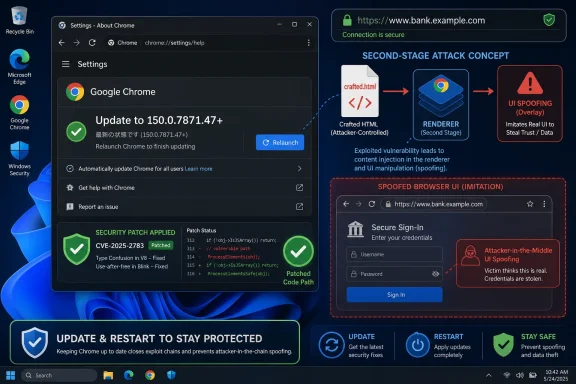 The Bug Is Medium; the Trust Boundary Is Not
CVE-2026-13990 sits in Chrome’s handling of DataTransfer, the web platform interface that helps move data through drag-and-drop and clipboard-style interactions. The NVD description, sourced from Chrome, says the issue was insufficient validation of untrusted input in DataTransfer on Windows before version 150.0.7871.47. The exploit scenario is constrained: the attacker first needs a compromised renderer process, then uses a crafted HTML page to perform UI spoofing.That constraint matters. This is not described as a one-click remote code execution flaw, nor has Google publicly said it is being exploited in the wild. CISA’s SSVC enrichment lists exploitation as “none,” says the attack is not automatable, and describes the technical impact as partial. Those details are the difference between a red-alert patch-now emergency and the ordinary, relentless maintenance burden that defines browser security.
But “ordinary” should not be mistaken for harmless. Chrome’s renderer is the part of the browser that deals with web content, and Chrome’s security architecture assumes hostile pages will try to do hostile things inside it. The sandbox is there because web content is not trusted. A bug that becomes interesting only after renderer compromise is, by definition, a second-stage weakness — but second-stage weaknesses are exactly what exploit chains need.
Google’s June 30 Stable Channel update, as described on the Chrome Releases blog, moved the desktop stable channel to 150.0.7871.46/.47 for Windows and Mac and 150.0.7871.46 for Linux. Malwarebytes noted that the same update addressed a very large batch of security fixes, reportedly 382 in all. CVE-2026-13990 is one tile in that mosaic, not the whole mural.
That is also why this bug is useful as a case study. It is not the scariest item in Chrome’s June security pile. It is the kind of flaw security teams are tempted to compress into a dashboard row and forget. Yet its shape — renderer prerequisite, crafted page, UI deception, Windows-specific affected configuration — maps closely to how real-world browser compromise often progresses.
DataTransfer Is Boring Plumbing Until It Touches User Intent
The web platform is full of APIs that look mundane until they intersect with trust. DataTransfer is one of them. Developers encounter it most often in drag-and-drop operations, clipboard-like movement of text or files, and browser-mediated data exchange between page elements. It is not glamorous browser machinery. It is plumbing.Security bugs in plumbing tend to be underestimated because they do not sound like memory corruption, sandbox escape, or cryptographic failure. “Insufficient validation of untrusted input” is a phrase that can numb even an experienced administrator. It reads like compliance boilerplate, the kind of CWE-20 entry that appears in too many scanners to command attention.
But DataTransfer is tied to user action and browser mediation. When a page can influence what the user appears to be dragging, dropping, selecting, confirming, or trusting, small mismatches can become social-engineering primitives. UI spoofing bugs live in that gap between what the browser intends to show and what the user believes they are seeing.
Chrome’s security language for CVE-2026-13990 is narrow: a remote attacker who had already compromised the renderer process could spoof UI through a crafted HTML page. That phrasing does not reveal the internal Chromium issue, which remains behind a permissions-required tracker. That is normal for newly fixed browser bugs; Google routinely restricts bug details until enough users have received the patch.
The lack of public exploit code or internal detail should not be read as a lack of seriousness. Browser vendors often have to balance defensive transparency against giving exploit developers a reproduction guide. For defenders, the actionable fact is not the exact malformed DataTransfer path. It is the corrected version number.
UI Spoofing Has Graduated From Nuisance to Security Primitive
For years, UI spoofing was often discussed as a phishing-adjacent annoyance. A page might fake a login box, imitate a browser warning, or make a prompt look like it came from somewhere else. Users were told to look at the address bar, check the lock icon, and avoid suspicious pop-ups. That advice was never great, but it belonged to a simpler browser era.The browser is now the operating system for a large share of daily work. Identity providers, admin consoles, device enrollment flows, OAuth grants, passkey prompts, payment confirmations, file pickers, password managers, and enterprise SaaS sessions all depend on the user correctly interpreting browser chrome and web content. If an attacker can blur that boundary, the attacker may not need to steal a password directly. They may only need to persuade the user to bless the wrong action.
That is why a CVSS vector showing high integrity impact and no confidentiality or availability impact makes sense for this class of bug. CISA’s ADP vector for CVE-2026-13990 is AV:N/AC:L/PR:N/UI:R/S:U/C:N/I:H/A:N. In plain English, the attack is network-reachable, low-complexity, requires no privileges, does require user interaction, does not cross a scope boundary in the CVSS model, and primarily threatens integrity.
Integrity is often the least emotionally vivid of the security triad, but in UI spoofing it is the point. The attacker is not necessarily reading your secrets or crashing your browser. The attacker is altering the decision surface so that you perform the wrong trusted action. In enterprise environments, that can be enough.
Imagine a compromised renderer paired with a spoofed prompt that nudges a user toward a malicious file action, a misleading permission grant, or a fraudulent workflow inside a trusted-looking page. The public CVE does not say CVE-2026-13990 enables those exact outcomes, and we should not pretend it does. But the category exists because the browser’s visual contract with the user is itself a security boundary.
The Renderer Prerequisite Is a Constraint, Not a Comfort Blanket
The phrase “attacker who had compromised the renderer process” is doing a lot of work in this CVE. It means the attacker does not get to start from a clean browser and immediately spoof UI merely by serving a page. They need another bug, a malicious extension path, a compromised site context, or some other foothold that gives them control inside the renderer.That lowers the probability of opportunistic exploitation. It also explains why the issue lands at Medium severity rather than High or Critical. In a vulnerability-management meeting, this is the line that keeps CVE-2026-13990 from dominating the agenda.
Yet exploit chains are not theoretical. Chrome’s security model is built on the assumption that one vulnerability may lead to another. Attackers often combine a renderer bug with a sandbox escape, a logic flaw, or a deception technique. If one flaw gets code running in a restricted renderer and another helps mislead the user or cross a trust boundary, the chain becomes more valuable than its individual parts.
This is also why patch prioritization based only on CVSS can mislead. A medium UI flaw may be uninteresting by itself but useful when paired with a high-severity renderer compromise. A sandbox escape may be devastating but need a first-stage bug to become reachable. A social-engineering primitive may not look technical enough for a red alert but can turn a partial foothold into an approved action.
The Chrome 150 update is a reminder that browser releases are bundles of risk reduction. Administrators rarely have the luxury of patching only the CVEs that look dramatic. The browser is a fast-moving dependency with a giant exposed attack surface, and the safest operational posture is to keep the whole thing current.
For consumers, the same principle is less formal but just as real. The right security habit is not to memorize CVE numbers. It is to let Chrome update, restart when prompted, and resist the common urge to leave the browser running for weeks because tabs feel like unfinished work.
Windows Specificity Changes the Enterprise Reading
CVE-2026-13990 is described as affecting Google Chrome on Windows prior to 150.0.7871.47. The NVD configuration added by NIST combines Google Chrome versions up to but excluding 150.0.7871.47 with Microsoft Windows. That platform specificity matters for WindowsForum readers because Windows is where Chrome often lives as both a consumer browser and a managed enterprise application.The Windows-only framing may reflect platform-specific UI behavior, DataTransfer integration, or implementation details that differ across operating systems. Without the public Chromium issue, it would be irresponsible to overstate the cause. What we can say is that the affected CPE logic in NVD calls out Chrome on Windows, not Chromium generically across every desktop platform.
That has practical consequences for administrators. If your fleet is managed through Chrome Browser Cloud Management, Group Policy, Microsoft Intune, Configuration Manager, or a third-party patch platform, the relevant compliance question is whether Windows endpoints have crossed the 150.0.7871.47 threshold. Mac and Linux systems still received Chrome 150 updates for many other fixes, but this CVE’s published affected configuration is Windows-specific.
This is where vulnerability scanners can get awkward. The user-submitted NVD text asks, “Are we missing a CPE here?” because NVD’s affected software configuration was still visibly loading or incomplete in the page experience. Early CVE enrichment often evolves over hours or days as NIST, vendors, and CISA add metadata. That does not mean the vulnerability is imaginary; it means the machine-readable taxonomy may lag the human-readable advisory.
For Windows shops, the defensible move is not to wait for every scanner to agree. Treat Chrome before 150.0.7871.47 on Windows as vulnerable to CVE-2026-13990, because that is the version boundary provided in the CVE description and Google’s release channel context. Let the asset inventory catch up later.
NVD’s Metadata Lag Is Now Part of the Security Story
The CVE record shows the choreography of modern vulnerability disclosure in miniature. Chrome submitted the new CVE on June 30, 2026, with the description, affected version information, references to the Chrome Releases blog and the Chromium issue tracker, and an initial CWE mapping to CWE-20. CISA’s ADP enrichment then added a CVSS 3.1 vector and SSVC information on July 1. NIST later added the CPE configuration and vendor advisory reference.That sequence is routine, but it creates a visibility problem. Security teams increasingly depend on automation to turn CVEs into tickets, dashboards, service-level objectives, and executive risk summaries. If NVD has not yet assigned its own CVSS score, if CPEs are delayed, or if a scanner has not mapped the version correctly, the vulnerability can be undercounted even after the vendor has shipped the fix.
CVE-2026-13990 illustrates the split between authoritative and operational truth. The authoritative truth is that Google fixed a Chrome for Windows issue before 150.0.7871.47. The operational truth is that many organizations will not act until their tooling converts that sentence into a vulnerable software match. The gap between those truths is where exposure lingers.
CISA’s ADP data helps by providing an independent enrichment path. Its CVSS 3.1 score of 6.5 gives vulnerability managers something to rank before NVD completes its own assessment. Its SSVC fields also give a more decision-oriented view: no known exploitation, not automatable, partial technical impact. That is often more useful than a naked severity label.
Still, defenders should be careful not to confuse “NVD assessment not yet provided” with “risk not yet real.” NVD is a catalog and enrichment service, not the vendor’s patch gate. By the time the CVE page looks tidy, the update may already be days old.
Chrome’s Giant Patch Trains Make Individual CVEs Harder to Read
The June 30 Chrome Stable Channel update was not a boutique fix. It arrived as part of a broad Chrome 150 desktop release that, according to Malwarebytes’ coverage of Google’s advisory, addressed hundreds of security fixes. That scale changes how users and administrators experience browser patching.On one hand, bundling is efficient. Users get a single update, enterprises validate one browser build, and Google can push a wide set of mitigations through the stable channel. On the other hand, giant patch trains flatten the narrative. A medium DataTransfer UI spoofing bug sits next to memory-safety flaws, sandbox-relevant bugs, platform-specific issues, and lower-severity hardening work. The individual story disappears.
That disappearance is convenient for attackers. Not because CVE-2026-13990 is necessarily the crown jewel of the release, but because defenders are forced to triage at industrial scale. A browser with hundreds of fixes in a month is both a marvel of engineering and an admission that the attack surface is too large for humans to reason about CVE by CVE.
For Windows administrators, this argues for policy over heroics. Chrome should update on a short, enforceable cadence, with emergency override paths for zero-days and high-confidence exploitation reports. The goal is not to debate every medium CVE to perfection. The goal is to make vulnerable browser versions rare and short-lived.
Consumers have fewer knobs but the same underlying need. Chrome’s automatic updates are only as good as the restart that activates them. A machine can download the fix and still run the old browser until the user closes and reopens it. That final inch of patching remains stubbornly human.
Edge, Chromium, and the Dependency Chain Nobody Gets to Ignore
Any Chrome security story now naturally raises the Chromium question. Microsoft Edge, Brave, Vivaldi, Opera, and many other browsers draw from Chromium, though they ship their own builds, branding, feature flags, and update schedules. A vulnerability in Google Chrome does not automatically mean every Chromium-based browser is vulnerable in the same way, but it does demand attention from the ecosystem.CVE-2026-13990’s published text specifically names Google Chrome on Windows. That specificity should restrain overbroad claims. We should not declare Edge vulnerable to this CVE without a Microsoft advisory or a matching Chromium integration note. But Chromium’s shared codebase means browser vendors must evaluate the upstream fix and decide whether it applies to their product.
This is where users often misunderstand browser diversity. Choosing a Chromium-based browser can improve privacy, interface preference, enterprise integration, or feature policy, but it does not remove dependence on Chromium’s security pipeline. If the underlying engine needs a fix, downstream browsers need to ingest, test, and ship it.
Microsoft usually moves quickly on Chromium security updates for Edge, and enterprise Edge deployments can be managed through Windows Update, WSUS policies, Intune, and Edge-specific update controls. But “usually” is not an inventory. Administrators should check the actual deployed Edge version and Microsoft’s release notes rather than assuming Chrome’s version number maps cleanly to Edge’s.
For WindowsForum readers who run multiple browsers, the best posture is boring: update all Chromium-based browsers, not just Chrome. If a browser vendor has not yet published a fix for a relevant Chromium issue, treat that lag as part of the product’s risk profile.
The User Interaction Requirement Is Where Social Engineering Enters
CISA’s CVSS vector marks user interaction as required. That tends to lower severity scores, but in browser exploitation it can be a deceptive comfort. The web is a machine for generating user interaction. Clicking, dragging, confirming, signing in, accepting prompts, and opening files are not unusual behaviors; they are the job.This is especially true for UI spoofing. The whole point is to shape what the user thinks is happening. A bug that requires a user gesture may still be dangerous if the crafted page can make that gesture feel routine, urgent, or part of an expected workflow.
Modern phishing already relies on this idea. Attackers do not always need to defeat cryptography or exploit memory corruption if they can induce the user to approve an OAuth grant, enter a one-time code into a relay page, or install a malicious profile. UI spoofing belongs to the same family of attacks against perception and intent.
Again, CVE-2026-13990’s public description does not claim those outcomes. It says UI spoofing via a crafted HTML page after renderer compromise. But security teams should evaluate it in the context of what UI spoofing enables, not as an isolated visual glitch.
Training users to “look carefully” helps only at the margins. The stronger controls are technical: current browser versions, hardened extension policy, phishing-resistant MFA, reduced local admin rights, endpoint detection, and clear separation between privileged admin browsing and everyday web use. User vigilance is a last line of defense, not the control plane.
Patch Management Is the Real Mitigation, Not CVE Memorization
For most Windows users, the fix is already built into Chrome’s normal update path. Opening Chrome’s About page forces an update check, and restarting completes installation. Managed environments can verify through their browser management console, endpoint inventory, or vulnerability scanner once plugin data catches up.The key version is 150.0.7871.47 for Chrome on Windows. Anything before that version should be considered exposed to CVE-2026-13990 based on the current public record. Because the Chrome 150 release included many other fixes, upgrading is not merely a response to this one UI spoofing issue.
Enterprises should be more specific. They should identify Windows endpoints running Chrome below the fixed version, prioritize machines used for privileged administration or sensitive SaaS access, and confirm that update policies are not being blocked by stale maintenance windows or user-deferred restarts. Browser patching fails less often because updates are unavailable than because restarts are politically inconvenient.
There is also a lesson for exception handling. Some organizations freeze browser updates because an internal application breaks on a new release. That may be operationally understandable, but it converts the browser into a standing exposure. If the business depends on delaying Chrome, it should also fund compensating controls and rapid compatibility testing.
Home users should avoid the trap of thinking “medium” means “ignore.” Browser updates are cumulative security hygiene. If Chrome is offering a relaunch button, click it when you can save your work. The tabs will come back; the vulnerable process should not.
The CPE Question Exposes a Scanner-Centric Blind Spot
The user’s source text highlights a familiar vulnerability-management annoyance: “Are we missing a CPE here?” In NVD terms, CPEs are how software products and versions get mapped into machine-readable affected configurations. If the CPE mapping is absent, delayed, or imprecise, scanners may fail to match a vulnerability to installed software.For CVE-2026-13990, NIST’s change history shows an affected configuration combining Google Chrome versions up to but excluding 150.0.7871.47 with Microsoft Windows. That is the right kind of signal for automated tools. But the fact that the page experience can show CPEs loading or ask for missing configuration feedback is a reminder that CVE publication is not a single magic moment.
Security operations teams should build processes that can handle this ambiguity. Vendor advisories, browser release notes, and deployed version inventory should be enough to trigger action for widely exposed software like Chrome. Waiting for scanner normalization is comfortable, but it is not always timely.
This is particularly important for software that updates outside the traditional OS patch cycle. Chrome is not just another application in Add or Remove Programs; it is a constantly updated runtime for untrusted code. Treating browser CVEs as monthly backlog items misses the tempo of the threat model.
The CPE issue also cuts the other way. Overbroad matching can create false positives, especially when a CVE is platform-specific. If a Linux machine is flagged for a Windows-only Chrome issue solely because of a generic Chrome CPE, teams waste time and trust in the tool erodes. Precision matters, but precision must not become paralysis.
The Patch Is Small; the Lesson Is Structural
CVE-2026-13990 is not the Chrome vulnerability that will make mainstream headlines. There is no public claim of active exploitation, no critical severity label, and no sensational remote takeover language. It is a medium flaw in a browser API, bound to Windows, requiring a compromised renderer and user interaction.That description is exactly why it deserves a sober look. Most real security work is not responding to cinematic zero-days. It is closing off the medium-strength links that make attack chains more reliable. UI spoofing, input validation, renderer assumptions, and version drift are all part of that unglamorous terrain.
The browser has become too important for users to think of UI as cosmetic. The interface is part of the security model. Address bars, prompts, file pickers, permission sheets, identity flows, and drag-and-drop surfaces are how the browser translates technical boundaries into human decisions. If that translation can be falsified, the system’s integrity is weakened.
Google’s fix in Chrome 150.0.7871.47 narrows one such weakness. The remaining question is whether users and organizations can narrow the much larger one: the delay between a fixed browser existing and a fixed browser actually running.
Chrome 150.0.7871.47 Is the Line Windows Fleets Need to Cross
The useful reading of CVE-2026-13990 is not that every Windows user is under immediate attack. It is that Chrome’s security boundary depends on many small validation decisions, and one of them was wrong enough to merit a CVE and a stable-channel patch. That should translate into fast verification, not fear.- Chrome on Windows should be updated to version 150.0.7871.47 or later to address CVE-2026-13990.
- The vulnerability requires a compromised renderer process, which lowers standalone risk but makes the bug relevant as part of a potential exploit chain.
- The public impact is UI spoofing through a crafted HTML page, with CISA’s enrichment rating integrity impact as high under CVSS 3.1.
- NVD had not provided its own CVSS score in the submitted record, but CISA’s ADP enrichment assigned a 6.5 Medium score and listed no known exploitation.
- Windows administrators should validate deployed Chrome versions directly rather than waiting for every scanner and CPE mapping to settle.
- Users of other Chromium-based browsers should watch their vendors’ update notes, because shared engine code can turn a Chrome fix into an ecosystem concern even when a CVE names Google Chrome specifically.
References
- Primary source: NVD / Chromium
Published: 2026-07-03T07:00:31-07:00
NVD - CVE-2026-13990
 nvd.nist.gov
- Security advisory: MSRC
Published: 2026-07-03T07:00:31-07:00
Original feed URL
Security Update Guide - Microsoft Security Response Center
 msrc.microsoft.com
- Related coverage: cvefeed.io
CVE-2026-13990 - Google Chrome UI Spoofing
Insufficient validation of untrusted input in DataTransfer in Google Chrome on Windows prior to 150.0.7871.47 allowed a remote attacker who had compromised the renderer process to perform UI spoofing via a crafted HTML page. (Chromium security severity: Medium)cvefeed.io
