

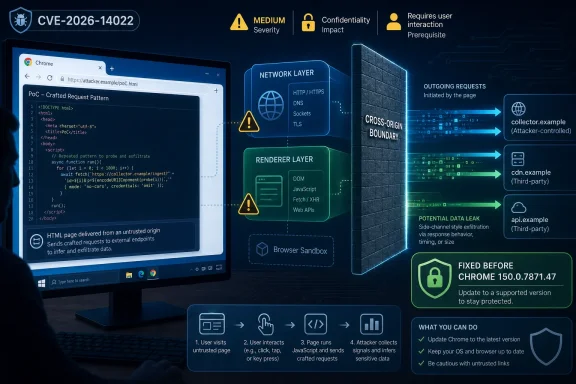
Google documented CVE-2026-14022 on June 30, 2026, as a medium-severity Chrome Network vulnerability fixed before version 150.0.7871.47 that could let an attacker with a compromised renderer process leak cross-origin data through a crafted HTML page. The National Vulnerability Database entry, updated July 1, adds the practical shape of the bug: network-reachable, low-complexity, no privileges required, but requiring user interaction. That combination should make Windows admins neither panic nor shrug. This is exactly the kind of browser flaw that looks modest in isolation and becomes more important when chained with the rest of Chrome’s sprawling attack surface.
CVE-2026-14022 is not a “click once, own the machine” vulnerability, and Google’s own Chromium severity label reflects that. The reported impact is confidentiality, not code execution or system compromise, and the attacker first needs a compromised renderer process before the Network component weakness becomes useful. In plain English, the browser’s sandboxed page-rendering world has to be in a bad state before this bug turns into a data-leak problem.
That prerequisite matters, but it does not make the issue academic. Modern browser exploitation often works as a sequence rather than a single knockout punch: one bug gets script into a dangerous place, another bug crosses a boundary, another leaks data, and another improves reliability or stealth. A medium-severity data leak in Chrome’s Network layer can therefore be more valuable than its label suggests, especially if paired with a renderer compromise from the same patch bundle or a future exploit.
The NVD record says the flaw involves insufficient validation of untrusted input in Chrome’s Network component. CISA’s enrichment assigns it a CVSS 3.1 score of 6.5, with high confidentiality impact and no integrity or availability impact. That is a useful score, but it is also a reminder of what CVSS can miss: the position of a bug inside the browser architecture can matter as much as the standalone severity number.
Google’s Chrome Releases blog, which announced the Stable Channel update for desktop, places the fix inside Chrome 150.0.7871.46 for Linux and 150.0.7871.46/.47 for Windows and macOS. The broader update is large enough that CVE-2026-14022 should be treated as one reason to update, not the only reason. As Malwarebytes and PCWorld both reported after Google’s release, Chrome 150’s security payload is unusually broad, with hundreds of fixes landing in the same stable update.
Chrome, like other browsers, spends enormous engineering effort enforcing those compartments. Same-origin policy, site isolation, CORB, CORS, process sandboxing, permission prompts, and network stack checks are all part of a layered attempt to keep hostile pages from learning what they should not. CVE-2026-14022 appears to live in that messy seam where browser networking, renderer trust assumptions, and origin boundaries intersect.
That is why this bug deserves more respect than a typical “medium” line item buried in a release note. If an attacker can leak cross-origin data, the prize may be session-adjacent information, internal resource responses, account-specific content, or details that make a follow-on attack easier. The NVD description does not say the bug exposes passwords or tokens directly, and we should not pretend it does. But confidentiality bugs in a browser are often dangerous precisely because they expose context that defenders assumed was unreachable.
For enterprise users, the phrase “cross-origin” also has a local-network shadow. Many corporate apps still live behind authentication portals, VPNs, reverse proxies, or intranet hostnames that assume the browser will behave. A crafted web page that can abuse a compromised renderer to draw secrets across origin boundaries is not just a consumer privacy concern. It is a reminder that the browser is now the universal enterprise client, and its security boundaries are business boundaries.
But Chrome renderer compromises are not theoretical in the way sysadmins would like them to be. Browser exploit chains have spent years treating the renderer as the first foothold: get code or powerful script execution in a renderer, then look for a way to escape the sandbox, read protected data, or bypass a browser security invariant. CVE-2026-14022 seems to sit in that second category, where the attacker is already partially inside the house and is now trying doors that should still be locked.
CISA’s SSVC enrichment says exploitation was “none” at the time of its July 1 update, automatable was “no,” and technical impact was “partial.” That is good news, especially because Google’s advisory language for actively exploited Chrome zero-days is usually explicit when it knows a bug is being used in the wild. There is no such public claim attached to CVE-2026-14022 in the material available so far.
Still, absence of known exploitation is not a safe reason to delay. Browser bugs become more legible after patches ship, even when issue tracker details remain restricted. Attackers diff Chromium changes, study regression tests, and look for neighboring mistakes. In Chrome’s world, the window between patch availability and practical exploit understanding is not infinite, and in high-value environments it may be uncomfortably short.
The exact count varies by outlet because Chrome release accounting can distinguish between internally found issues, externally credited CVEs, platform-specific fixes, and broader security changes. That variance is less important than the direction of travel. Chrome’s stable updates are increasingly giant patch trains, and each train includes a mix of memory-safety bugs, policy bypasses, UI flaws, network mistakes, and component-specific defects that only make full sense to the engineers who fixed them.
For Windows users, the version number to care about is straightforward: Chrome on Windows should be at 150.0.7871.47 or later for this particular fix, with Google’s release also listing 150.0.7871.46/.47 for Windows and macOS depending on build rollout. Linux users received 150.0.7871.46 in the same Stable Channel announcement. Android’s related channel moved separately, as Chrome for Android releases often do.
The point is not that every user should memorize the sub-build matrix. The point is that Chrome’s built-in updater is now part of endpoint security infrastructure. If an organization cannot answer which Chrome build is deployed across its fleet within a few hours, it has a visibility problem masquerading as a patching problem.
At first glance, users may notice fields that look incomplete. NVD’s own CVSS assessment is not yet provided in the record supplied by the user, while CISA-ADP has already provided a CVSS 3.1 vector. The weakness classification also shifts in the change history, with CWE-20 appearing, being removed, and being added again through enrichment. This is not evidence of chaos; it is evidence of multiple vulnerability-data pipelines catching up to a fast browser release.
The CPE question in the NVD interface — “Are we missing a CPE here?” — is similarly easy to misinterpret. The record shown includes a vulnerable software configuration for Google Chrome before 150.0.7871.47, which is the CPE administrators need for typical vulnerability management matching. But downstream scanners, software inventories, and compliance tools may still lag or normalize Chrome versions differently across Windows, macOS, Linux, and bundled Chromium derivatives.
That lag is where real operational confusion begins. A security team may see the CVE before its scanner maps it cleanly. A scanner may flag Chrome but not Edge, Brave, Vivaldi, Electron apps, or embedded Chromium runtimes. A desktop admin may see Chrome report itself updated while a vulnerability dashboard still shows stale data from yesterday’s inventory cycle. None of that changes the fix; it changes how much patience and verification an IT team needs.
For Edge specifically, administrators should watch Microsoft’s release notes and security update channels rather than assume Chrome’s version number maps directly to Edge’s. Microsoft usually rebases Edge on Chromium and ships fixes through its own versioning and enterprise controls. A Chrome CVE in the Network component is a strong signal to check Edge, but it is not a substitute for verifying Edge’s patched build.
The same logic applies to alternative browsers. Some Chromium derivatives move quickly; others trail Google’s stable channel. Some disable or modify features that affect exploitability, while others inherit the vulnerable component nearly unchanged. If the vulnerability sits in core network code, the burden of proof should be on the downstream vendor to show it is not affected, not on defenders to assume safety.
Electron is the sleeper issue for enterprises. Many desktop applications bundle Chromium under the hood but do not update at Chrome’s cadence. A user may have a fully patched Chrome browser and still run an enterprise chat client, note-taking app, admin console, or custom tool with an older Chromium runtime. CVE-2026-14022 is not automatically exploitable in every Electron app, but browser-component CVEs should keep pressure on vendors who treat embedded Chromium as frozen plumbing.
The web is the interaction surface. Users do not have to be reckless for a browser vulnerability to matter. They can be reading news, opening a vendor portal, reviewing a shared document, authenticating to SaaS, or researching an error message. If an attacker can place crafted HTML in front of a target, the practical barrier is lower than the words “requires user interaction” imply.
This is especially true for targeted attacks. A remote attacker does not need mass exploitation if the target is a help desk technician, a finance user, a developer with access to internal dashboards, or an administrator who browses from a privileged workstation. A confidentiality bug that leaks cross-origin information becomes more interesting when the browser session already contains high-value authenticated contexts.
That is why security guidance should not collapse into “don’t click suspicious links.” Users will click links because modern work requires it. The more useful response is to reduce exploitability and blast radius: patch fast, isolate privileged browsing, harden extensions, separate admin sessions, and make sure sensitive internal apps are not relying solely on browser-origin boundaries as their last line of defense.
For managed environments, the work is less about clicking the update button and more about proving the update happened everywhere. Chrome’s auto-update system is good, but enterprises often complicate it with maintenance windows, metered networks, golden images, nonpersistent VDI, application control, rollback policies, and delayed channels. The user who never relaunches the browser can remain exposed even after the update is downloaded.
Chrome’s own rollout language often says updates may arrive over days or weeks, which is sensible for consumer stability and dangerous if interpreted passively in enterprise security operations. High-risk organizations should not wait for global rollout when a fixed build is available. They should force update checks, enforce relaunch deadlines, and monitor version distribution through endpoint management.
There is also a cultural problem here. Browser updates have become so frequent that users and admins alike experience patch fatigue. But Chrome is not a peripheral app anymore; it is the runtime for identity, productivity, payments, administration, development, and remote access. Treating it as “just a browser” is one of the fastest ways to underestimate endpoint risk.
That vagueness is partly intentional. Chromium issue details are often restricted until enough users have updated, and the referenced issue for CVE-2026-14022 requires permissions. Google has long used that approach to reduce copycat exploitation while patches propagate. It frustrates defenders who want full technical detail immediately, but it is a rational tradeoff for a browser with billions of users.
The downside is that security teams must act without the satisfying clarity of a full exploit write-up. They may not know whether a proxy, extension, enterprise policy, site isolation setting, or authentication pattern changes exploitability. They may not know whether a proof-of-concept will appear in days, weeks, or never. They have to decide based on component, impact, prerequisite, availability of a fix, and the broader update context.
In this case, those signals point toward prompt patching rather than emergency incident response. No public exploitation is noted in the NVD and CISA data provided. The impact is confidentiality and partial technical impact, not full system compromise. But the affected component and cross-origin leak potential make it too close to the browser’s trust core to leave sitting in a monthly backlog.
Each layer serves a different audience. Google speaks to browser users and administrators. CISA speaks to defenders triaging risk across sectors. NVD speaks to vulnerability-management ecosystems that need normalized identifiers and configurations. Security teams need all three perspectives, but none of them replaces the basic question: is the fixed version deployed?
The Chrome CPE added by NIST is useful for scanners, but scanner truth can be stale. Inventory agents may not run immediately. Portable or user-installed Chrome copies may sit outside managed paths. Old profiles may point to abandoned binaries. Servers may have Chrome installed for automation or testing and be forgotten because nobody thinks of them as user workstations.
That last category deserves attention. Chrome often appears on build servers, test rigs, kiosk machines, jump boxes, and automation hosts. A vulnerability requiring user interaction may seem irrelevant there, but automation systems can load untrusted pages too. If Chrome exists on a machine, it should either be patched, removed, or deliberately justified.
But the maintenance lesson is bigger than the CVE. Chrome 150’s large patch bundle shows why browser updates should be treated as a continuous security stream rather than occasional software maintenance. Individual CVEs rise and fall in urgency, yet the aggregate risk of running old browser code climbs quickly.
This is where WindowsForum readers should resist two bad instincts. The first is the home-user instinct to assume Chrome will “take care of itself” without ever checking the relaunch state. The second is the enterprise instinct to wait for the vulnerability scanner to become perfectly confident before pushing an update that the vendor has already shipped. Both approaches leave a gap attackers can use.
A healthier model is version-driven: know the fixed build, measure who has it, force the relaunch where necessary, and then let vulnerability records catch up. That does not mean abandoning risk-based prioritization. It means recognizing that browsers are among the few applications where fast patching is almost always cheaper than prolonged analysis.
It should, however, trigger a quick browser-version audit. Windows endpoints running Chrome below 150.0.7871.47 need to move. Systems that have not relaunched Chrome after updating need user nudges or enforced restart policies. Devices outside central management need special attention because Chrome’s silent update machinery is only as good as the machine state and policy environment around it.
Admins should also look beyond Google Chrome without pretending every Chromium product is affected in precisely the same way. Microsoft Edge should be checked against Microsoft’s own current security release. Chromium-based third-party browsers should be verified through their vendors. Electron-heavy application estates should be inventoried at least well enough to know which vendors are habitually late with Chromium updates.
For security teams, CVE-2026-14022 is a useful tabletop prompt. If a medium Chrome confidentiality bug in the Network component appears today, can the organization identify affected browsers, force updates, monitor relaunch compliance, and explain residual risk to leadership within one business day? If the answer is no, the weak point is not Chrome. It is the organization’s browser governance.
 A Medium Bug With a Chain-Attack Accent
CVE-2026-14022 is not a “click once, own the machine” vulnerability, and Google’s own Chromium severity label reflects that. The reported impact is confidentiality, not code execution or system compromise, and the attacker first needs a compromised renderer process before the Network component weakness becomes useful. In plain English, the browser’s sandboxed page-rendering world has to be in a bad state before this bug turns into a data-leak problem.That prerequisite matters, but it does not make the issue academic. Modern browser exploitation often works as a sequence rather than a single knockout punch: one bug gets script into a dangerous place, another bug crosses a boundary, another leaks data, and another improves reliability or stealth. A medium-severity data leak in Chrome’s Network layer can therefore be more valuable than its label suggests, especially if paired with a renderer compromise from the same patch bundle or a future exploit.
The NVD record says the flaw involves insufficient validation of untrusted input in Chrome’s Network component. CISA’s enrichment assigns it a CVSS 3.1 score of 6.5, with high confidentiality impact and no integrity or availability impact. That is a useful score, but it is also a reminder of what CVSS can miss: the position of a bug inside the browser architecture can matter as much as the standalone severity number.
Google’s Chrome Releases blog, which announced the Stable Channel update for desktop, places the fix inside Chrome 150.0.7871.46 for Linux and 150.0.7871.46/.47 for Windows and macOS. The broader update is large enough that CVE-2026-14022 should be treated as one reason to update, not the only reason. As Malwarebytes and PCWorld both reported after Google’s release, Chrome 150’s security payload is unusually broad, with hundreds of fixes landing in the same stable update.
Cross-Origin Data Is the Browser’s Sacred Boundary
The phrase “leak cross-origin data” sounds dry until you remember that the web’s security model depends on origins behaving like walls. A site should not casually read data from another site just because both are open in the same browser. Your bank tab, your webmail, your internal dashboard, and a random page from a search result are supposed to live in separate compartments.Chrome, like other browsers, spends enormous engineering effort enforcing those compartments. Same-origin policy, site isolation, CORB, CORS, process sandboxing, permission prompts, and network stack checks are all part of a layered attempt to keep hostile pages from learning what they should not. CVE-2026-14022 appears to live in that messy seam where browser networking, renderer trust assumptions, and origin boundaries intersect.
That is why this bug deserves more respect than a typical “medium” line item buried in a release note. If an attacker can leak cross-origin data, the prize may be session-adjacent information, internal resource responses, account-specific content, or details that make a follow-on attack easier. The NVD description does not say the bug exposes passwords or tokens directly, and we should not pretend it does. But confidentiality bugs in a browser are often dangerous precisely because they expose context that defenders assumed was unreachable.
For enterprise users, the phrase “cross-origin” also has a local-network shadow. Many corporate apps still live behind authentication portals, VPNs, reverse proxies, or intranet hostnames that assume the browser will behave. A crafted web page that can abuse a compromised renderer to draw secrets across origin boundaries is not just a consumer privacy concern. It is a reminder that the browser is now the universal enterprise client, and its security boundaries are business boundaries.
The Renderer Prerequisite Is a Speed Bump, Not a Wall
The most comforting part of CVE-2026-14022 is also the easiest to overread. The attacker, according to the vulnerability description, needs to have compromised the renderer process. That means CVE-2026-14022 is not described as the initial entry point. A user must visit or interact with a crafted page, and some other condition must have already put the renderer under attacker control.But Chrome renderer compromises are not theoretical in the way sysadmins would like them to be. Browser exploit chains have spent years treating the renderer as the first foothold: get code or powerful script execution in a renderer, then look for a way to escape the sandbox, read protected data, or bypass a browser security invariant. CVE-2026-14022 seems to sit in that second category, where the attacker is already partially inside the house and is now trying doors that should still be locked.
CISA’s SSVC enrichment says exploitation was “none” at the time of its July 1 update, automatable was “no,” and technical impact was “partial.” That is good news, especially because Google’s advisory language for actively exploited Chrome zero-days is usually explicit when it knows a bug is being used in the wild. There is no such public claim attached to CVE-2026-14022 in the material available so far.
Still, absence of known exploitation is not a safe reason to delay. Browser bugs become more legible after patches ship, even when issue tracker details remain restricted. Attackers diff Chromium changes, study regression tests, and look for neighboring mistakes. In Chrome’s world, the window between patch availability and practical exploit understanding is not infinite, and in high-value environments it may be uncomfortably short.
Chrome 150 Is the Real Story, Not Just One CVE
It would be a mistake to treat CVE-2026-14022 as a standalone emergency detached from Chrome 150. Google’s Stable Channel update is the delivery vehicle, and that update carries a far wider security story. PCWorld reported that Chrome 150 fixes nearly 400 security flaws, including critical ones, while Malwarebytes characterized the release as another unusually large Chrome security update across desktop and mobile.The exact count varies by outlet because Chrome release accounting can distinguish between internally found issues, externally credited CVEs, platform-specific fixes, and broader security changes. That variance is less important than the direction of travel. Chrome’s stable updates are increasingly giant patch trains, and each train includes a mix of memory-safety bugs, policy bypasses, UI flaws, network mistakes, and component-specific defects that only make full sense to the engineers who fixed them.
For Windows users, the version number to care about is straightforward: Chrome on Windows should be at 150.0.7871.47 or later for this particular fix, with Google’s release also listing 150.0.7871.46/.47 for Windows and macOS depending on build rollout. Linux users received 150.0.7871.46 in the same Stable Channel announcement. Android’s related channel moved separately, as Chrome for Android releases often do.
The point is not that every user should memorize the sub-build matrix. The point is that Chrome’s built-in updater is now part of endpoint security infrastructure. If an organization cannot answer which Chrome build is deployed across its fleet within a few hours, it has a visibility problem masquerading as a patching problem.
The NVD Record Shows the Plumbing Behind the Panic
The NVD entry for CVE-2026-14022 is unusually revealing because it shows the vulnerability record still in motion. The CVE was received from Chrome on June 30, 2026, then modified by CISA-ADP on July 1 with CVSS, CWE, and SSVC metadata, and later received NIST initial analysis adding a CPE configuration for Google Chrome versions up to but excluding 150.0.7871.47. That sequence is normal, but it is worth watching.At first glance, users may notice fields that look incomplete. NVD’s own CVSS assessment is not yet provided in the record supplied by the user, while CISA-ADP has already provided a CVSS 3.1 vector. The weakness classification also shifts in the change history, with CWE-20 appearing, being removed, and being added again through enrichment. This is not evidence of chaos; it is evidence of multiple vulnerability-data pipelines catching up to a fast browser release.
The CPE question in the NVD interface — “Are we missing a CPE here?” — is similarly easy to misinterpret. The record shown includes a vulnerable software configuration for Google Chrome before 150.0.7871.47, which is the CPE administrators need for typical vulnerability management matching. But downstream scanners, software inventories, and compliance tools may still lag or normalize Chrome versions differently across Windows, macOS, Linux, and bundled Chromium derivatives.
That lag is where real operational confusion begins. A security team may see the CVE before its scanner maps it cleanly. A scanner may flag Chrome but not Edge, Brave, Vivaldi, Electron apps, or embedded Chromium runtimes. A desktop admin may see Chrome report itself updated while a vulnerability dashboard still shows stale data from yesterday’s inventory cycle. None of that changes the fix; it changes how much patience and verification an IT team needs.
Microsoft Edge and Chromium Derivatives Cannot Hide Behind the Chrome Name
The CVE name says Chrome, but the underlying codebase says Chromium. That distinction matters on Windows because Chrome is only one of the Chromium-based browsers and runtimes living on a typical endpoint. Microsoft Edge, Brave, Vivaldi, Opera, Electron applications, WebView2-based apps, and vendor-embedded browsers may all depend on Chromium code, though not every Chromium issue affects every downstream product in the same way or on the same schedule.For Edge specifically, administrators should watch Microsoft’s release notes and security update channels rather than assume Chrome’s version number maps directly to Edge’s. Microsoft usually rebases Edge on Chromium and ships fixes through its own versioning and enterprise controls. A Chrome CVE in the Network component is a strong signal to check Edge, but it is not a substitute for verifying Edge’s patched build.
The same logic applies to alternative browsers. Some Chromium derivatives move quickly; others trail Google’s stable channel. Some disable or modify features that affect exploitability, while others inherit the vulnerable component nearly unchanged. If the vulnerability sits in core network code, the burden of proof should be on the downstream vendor to show it is not affected, not on defenders to assume safety.
Electron is the sleeper issue for enterprises. Many desktop applications bundle Chromium under the hood but do not update at Chrome’s cadence. A user may have a fully patched Chrome browser and still run an enterprise chat client, note-taking app, admin console, or custom tool with an older Chromium runtime. CVE-2026-14022 is not automatically exploitable in every Electron app, but browser-component CVEs should keep pressure on vendors who treat embedded Chromium as frozen plumbing.
User Interaction Still Counts as Real Exposure
CISA’s vector marks user interaction as required, and that will tempt some organizations to downgrade urgency. That temptation is understandable but dated. In browser security, “user interaction” often means the user visited a page, opened a link, followed a redirect, loaded an ad, clicked a document preview, or interacted with content in a way that ordinary work already demands.The web is the interaction surface. Users do not have to be reckless for a browser vulnerability to matter. They can be reading news, opening a vendor portal, reviewing a shared document, authenticating to SaaS, or researching an error message. If an attacker can place crafted HTML in front of a target, the practical barrier is lower than the words “requires user interaction” imply.
This is especially true for targeted attacks. A remote attacker does not need mass exploitation if the target is a help desk technician, a finance user, a developer with access to internal dashboards, or an administrator who browses from a privileged workstation. A confidentiality bug that leaks cross-origin information becomes more interesting when the browser session already contains high-value authenticated contexts.
That is why security guidance should not collapse into “don’t click suspicious links.” Users will click links because modern work requires it. The more useful response is to reduce exploitability and blast radius: patch fast, isolate privileged browsing, harden extensions, separate admin sessions, and make sure sensitive internal apps are not relying solely on browser-origin boundaries as their last line of defense.
The Patch Path Is Simple, the Fleet Path Is Not
For an individual Windows user, the fix is almost boring. Open Chrome, go to the About Chrome page, let the browser check for updates, and relaunch when prompted. If the version reads 150.0.7871.47 or later on Windows, CVE-2026-14022 should be covered by Google’s published fix.For managed environments, the work is less about clicking the update button and more about proving the update happened everywhere. Chrome’s auto-update system is good, but enterprises often complicate it with maintenance windows, metered networks, golden images, nonpersistent VDI, application control, rollback policies, and delayed channels. The user who never relaunches the browser can remain exposed even after the update is downloaded.
Chrome’s own rollout language often says updates may arrive over days or weeks, which is sensible for consumer stability and dangerous if interpreted passively in enterprise security operations. High-risk organizations should not wait for global rollout when a fixed build is available. They should force update checks, enforce relaunch deadlines, and monitor version distribution through endpoint management.
There is also a cultural problem here. Browser updates have become so frequent that users and admins alike experience patch fatigue. But Chrome is not a peripheral app anymore; it is the runtime for identity, productivity, payments, administration, development, and remote access. Treating it as “just a browser” is one of the fastest ways to underestimate endpoint risk.
Network Bugs Are Hard to Explain Because the Browser Is No Longer One Thing
Chrome’s Network component is not a single visible feature users can reason about. It is a dense layer of request handling, caching, protocol negotiation, isolation checks, redirects, cookies, headers, permissions, and process-boundary decisions. When Google says insufficient validation of untrusted input occurred in Network, the most honest public reading is broad: some data crossing into or through that layer was not checked tightly enough before it affected security-sensitive behavior.That vagueness is partly intentional. Chromium issue details are often restricted until enough users have updated, and the referenced issue for CVE-2026-14022 requires permissions. Google has long used that approach to reduce copycat exploitation while patches propagate. It frustrates defenders who want full technical detail immediately, but it is a rational tradeoff for a browser with billions of users.
The downside is that security teams must act without the satisfying clarity of a full exploit write-up. They may not know whether a proxy, extension, enterprise policy, site isolation setting, or authentication pattern changes exploitability. They may not know whether a proof-of-concept will appear in days, weeks, or never. They have to decide based on component, impact, prerequisite, availability of a fix, and the broader update context.
In this case, those signals point toward prompt patching rather than emergency incident response. No public exploitation is noted in the NVD and CISA data provided. The impact is confidentiality and partial technical impact, not full system compromise. But the affected component and cross-origin leak potential make it too close to the browser’s trust core to leave sitting in a monthly backlog.
Vulnerability Databases Are Not Patch Managers
One of the more common mistakes in Windows shops is treating NVD as the operational source of truth. NVD is essential, but it is not a patch-management console, and its metadata often trails vendor releases. CVE-2026-14022 illustrates that gap cleanly: Google’s release tells users what build contains the fix, CISA adds scoring and decision-support metadata, and NIST enriches the record with CPE information after publication.Each layer serves a different audience. Google speaks to browser users and administrators. CISA speaks to defenders triaging risk across sectors. NVD speaks to vulnerability-management ecosystems that need normalized identifiers and configurations. Security teams need all three perspectives, but none of them replaces the basic question: is the fixed version deployed?
The Chrome CPE added by NIST is useful for scanners, but scanner truth can be stale. Inventory agents may not run immediately. Portable or user-installed Chrome copies may sit outside managed paths. Old profiles may point to abandoned binaries. Servers may have Chrome installed for automation or testing and be forgotten because nobody thinks of them as user workstations.
That last category deserves attention. Chrome often appears on build servers, test rigs, kiosk machines, jump boxes, and automation hosts. A vulnerability requiring user interaction may seem irrelevant there, but automation systems can load untrusted pages too. If Chrome exists on a machine, it should either be patched, removed, or deliberately justified.
The Security Severity Is Medium; the Maintenance Lesson Is High
Google’s “Medium” label is not wrong. CVE-2026-14022 requires a compromised renderer, needs user interaction, and is not described as enabling direct code execution or sandbox escape. Inflating every browser CVE into a five-alarm fire teaches users to ignore all alarms.But the maintenance lesson is bigger than the CVE. Chrome 150’s large patch bundle shows why browser updates should be treated as a continuous security stream rather than occasional software maintenance. Individual CVEs rise and fall in urgency, yet the aggregate risk of running old browser code climbs quickly.
This is where WindowsForum readers should resist two bad instincts. The first is the home-user instinct to assume Chrome will “take care of itself” without ever checking the relaunch state. The second is the enterprise instinct to wait for the vulnerability scanner to become perfectly confident before pushing an update that the vendor has already shipped. Both approaches leave a gap attackers can use.
A healthier model is version-driven: know the fixed build, measure who has it, force the relaunch where necessary, and then let vulnerability records catch up. That does not mean abandoning risk-based prioritization. It means recognizing that browsers are among the few applications where fast patching is almost always cheaper than prolonged analysis.
The Practical Reading for Windows Admins Is Narrow but Urgent
CVE-2026-14022 should not trigger password resets, network isolation, or breach notifications on its own based on the public record available now. There is no public indication in Google’s advisory, NVD’s entry, or CISA’s enrichment that this flaw is being exploited in the wild. Its described impact is a cross-origin data leak after renderer compromise, not arbitrary code execution.It should, however, trigger a quick browser-version audit. Windows endpoints running Chrome below 150.0.7871.47 need to move. Systems that have not relaunched Chrome after updating need user nudges or enforced restart policies. Devices outside central management need special attention because Chrome’s silent update machinery is only as good as the machine state and policy environment around it.
Admins should also look beyond Google Chrome without pretending every Chromium product is affected in precisely the same way. Microsoft Edge should be checked against Microsoft’s own current security release. Chromium-based third-party browsers should be verified through their vendors. Electron-heavy application estates should be inventoried at least well enough to know which vendors are habitually late with Chromium updates.
For security teams, CVE-2026-14022 is a useful tabletop prompt. If a medium Chrome confidentiality bug in the Network component appears today, can the organization identify affected browsers, force updates, monitor relaunch compliance, and explain residual risk to leadership within one business day? If the answer is no, the weak point is not Chrome. It is the organization’s browser governance.
Chrome’s Network Boundary Leaves Little Room for Complacency
The most concrete lesson from CVE-2026-14022 is that a medium-severity Chrome bug can still sit in a strategically sensitive place. Cross-origin data protections are one of the web’s foundational assumptions, and the Network component is close to the machinery that enforces them. The public record does not justify panic, but it does justify speed.- Google fixed CVE-2026-14022 in Chrome before version 150.0.7871.47, with the relevant desktop Stable Channel update announced on June 30, 2026.
- The vulnerability is a medium-severity insufficient input validation issue in Chrome’s Network component that could leak cross-origin data after a renderer compromise.
- CISA’s enrichment gives the bug a CVSS 3.1 score of 6.5 and notes no known exploitation in its SSVC data at the time of analysis.
- Windows users should verify Chrome is at 150.0.7871.47 or later and should relaunch the browser if an update is pending.
- Enterprise teams should check Chrome, Edge, other Chromium-based browsers, and embedded Chromium runtimes rather than assuming one vendor’s patch covers the whole estate.
- The right response is prompt patching and version verification, not panic-driven incident response based solely on the public details.
References
- Primary source: NVD / Chromium
Published: 2026-07-03T07:00:01-07:00
NVD - CVE-2026-14022
 nvd.nist.gov
- Security advisory: MSRC
Published: 2026-07-03T07:00:01-07:00
Original feed URL
Security Update Guide - Microsoft Security Response Center
 msrc.microsoft.com
