

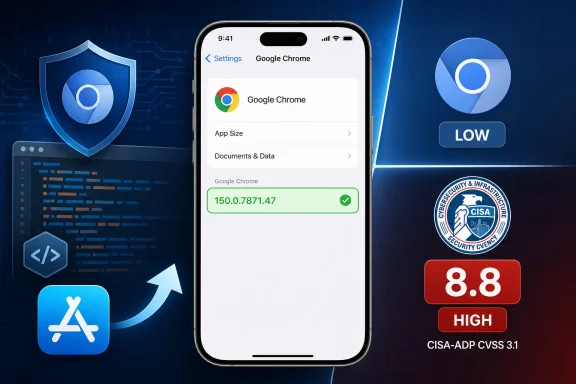
 Chrome for iOS Use-After-Free Pits Chromium’s Low Rating Against a CISA-ADP CVSS 3.1 Score of 8.8
Chrome for iOS versions below 150.0.7871.47 are affected by CVE-2026-14067. Update the application, then open Chrome and verify that the installed version shown under More > Settings > Google Chrome is 150.0.7871.47 or later. The prominent 8.8 HIGH rating is a CISA-ADP CVSS 3.1 contribution—not an NVD score.The immediate answer has two parts. First, identify every iPhone running Chrome earlier than 150.0.7871.47 and update the application through the organization’s approved process or by opening Chrome’s App Store listing. Second, verify the installed version inside Chrome instead of assuming that an update request, policy assignment, or App Store state proves completion.
The supplied record identifies CVE-2026-14067 as a use-after-free vulnerability in Chrome for iOS before 150.0.7871.47. It says a remote attacker could potentially achieve arbitrary code execution by persuading a user to process a crafted HTML page. Chromium classifies the issue as Low severity, while CISA-ADP contributes a CVSS 3.1 score of 8.8 HIGH. NVD had not supplied its own score in the material available for this report.
What to do now
Affected range: Chrome for iOS earlier than 150.0.7871.47.
Required boundary: Chrome for iOS 150.0.7871.47 or later.
Update: On the iPhone, open the App Store, search for Google Chrome, open the application listing, and select Update if that option is offered.
Verify inside Chrome: Open Chrome, tap More—the three-dot menu—select Settings, and then open Google Chrome. The complete installed version appears on that application-information screen. Confirm that it is 150.0.7871.47 or later.
Managed devices: Use the application-version information available from the organization’s approved mobile-management system where it can reliably report the installed Chrome version. Keep devices with missing, stale, or incomplete version information in an unresolved state.
Keep the ratings distinct in security records: Chromium severity is Low; the 8.8 HIGH score is a CISA-ADP CVSS 3.1 contribution, not an NVD score.
The Version Boundary Comes Before the Severity Debate
The most useful operational fact is the affected-version range. According to the Chrome-sourced CVE record presented through the National Vulnerability Database, CVE-2026-14067 affects Google Chrome on iOS before 150.0.7871.47. The record classifies the flaw as CWE-416, Use After Free, and describes a remote attack involving a crafted HTML page and user interaction.Administrators do not need to resolve the apparent disagreement between Chromium’s Low label and CISA-ADP’s 8.8 HIGH score before acting. The practical test is narrower:
- Is the device an iPhone within the platform scope identified by the record?
- Is Google Chrome installed?
- Is the complete installed Chrome version earlier than 150.0.7871.47?
That formulation avoids claiming more than the source material supports. The record establishes an affected range and a remediation threshold. It does not, by itself, establish App Store release mechanics, staged availability, update-enforcement behavior, or the state of a particular device.
Exact Chrome for iOS Version Verification
The central verification step takes place inside Chrome:- Open Google Chrome on the iPhone.
- Tap More, represented by the three-dot menu.
- Select Settings.
- Open Google Chrome.
- Read the complete version shown on the application-information screen.
- Compare the full dotted version with 150.0.7871.47.
Version comparison should proceed from left to right across the four numeric components. Version 149.x is below the threshold. Version 150.0.7871.46 is also below it. Version 150.0.7871.47 equals the boundary, and a later complete version is above it.
If the expected Google Chrome application-information entry cannot be opened or the complete version is not visible, do not mark the device compliant from memory or inference. Route it through the organization’s support process or verify it through a trusted mobile-application inventory source.
This in-app check also avoids treating App Store interface states as security evidence. The supplied CVE and NVD material does not establish what a particular App Store button means under every account, device, region, or update state. The installed version displayed by Chrome is the relevant evidence.
The Public Record Supports a Limited Technical Description
The public description identifies a use-after-free weakness and says that processing a crafted HTML page could potentially lead to arbitrary code execution. It does not identify the affected object, function, component, lifecycle transition, or precise trigger sequence.The linked Chromium issue requires permission, which limits public inspection of the underlying technical report. From the available material alone, defenders cannot responsibly reconstruct the exploit, describe its reliability, identify a distinctive crash pattern, or state which platform protections an attacker would need to overcome.
The record also does not establish a complete compromise of the iPhone, an escape from the affected application’s security context, persistence on the device, access to particular data, or movement into another application. Those outcomes should not be added to alerts, user notifications, or executive summaries without separate supporting evidence.
The supported technical statement is concise: the affected product is Chrome on iOS before 150.0.7871.47; the weakness is categorized as CWE-416; the documented path involves crafted HTML and user interaction; and the stated potential result is arbitrary code execution.
The user-interaction condition matters because the supplied CISA-ADP vector includes UI:R. The record supports saying that the user must process a crafted HTML page. It does not support a more detailed narrative involving particular redirects, advertisements, embedded content, gestures, prompts, or delivery campaigns.
Chromium’s Low Rating and CISA-ADP’s 8.8 Are Different Fields
The supplied record contains two assessments that should remain attached to their sources:| Assessment or state | Value | What it establishes | What it does not establish |
|---|---|---|---|
| Chromium severity | Low | Chromium’s vendor severity classification | That the vulnerability can be ignored |
| CISA-ADP CVSS 3.1 contribution | 8.8 HIGH | The score produced by CISA-ADP’s contributed vector | An NVD score or evidence of exploitation |
| CISA-ADP SSVC | Exploitation: none; automatable: no; technical impact: total | The decision values present in the supplied assessment | That future exploitation is impossible |
| Chrome for iOS below 150.0.7871.47 | Affected | The installation is within the published affected range | That the device has been attacked |
| Chrome for iOS 150.0.7871.47 or later | Outside the affected range | The installation has crossed the stated version boundary | That unrelated vulnerabilities are resolved |
| Missing or partial version | Unresolved | The available evidence is insufficient | That the device is compliant |
CVSS:3.1/AV:N/AC:L/PR:N/UI:R/S:U/C:H/I:H/A:H, producing a base score of 8.8 HIGH. That vector belongs to CISA-ADP. It should not be described in vulnerability tickets, dashboards, or articles as “NVD 8.8.”The public material does not explain why Chromium selected Low severity. It would therefore be speculative to attribute that label to a particular mitigation, platform architecture, exploit constraint, code path, or internal scoring convention.
The correct editorial treatment is not to decide that one label invalidates the other. Preserve the source of each assessment, prioritize the documented affected installations, and avoid collapsing multiple fields into an unattributed severity value.
The iOS Qualification Is Part of the Vulnerability Boundary
CVE-2026-14067 applies to Chrome on iOS. It is not presented as a generic vulnerability affecting every product named Chrome or every browser built from Chromium-derived code.A Windows workstation does not become affected by this CVE merely because Google Chrome is installed or because the desktop application has a numerically similar version. The platform condition must remain attached to the product and version condition.
The reliable matching rule is:
- The platform is the Apple iPhone environment identified by the record.
- The installed application is Google Chrome.
- The complete Chrome version is earlier than 150.0.7871.47.
This does not establish that any particular scanner, inventory service, or vulnerability feed will make a platform-matching error. It means administrators should validate the evidence produced by their own tools and retain the iOS qualification when creating internal rules.
The record does not establish that Safari, Chrome on Android, Chrome on Windows, Microsoft Edge, or another browser is affected or unaffected by related implementation issues. It establishes only the scope of this CVE. Other products require their own vendor information or vulnerability records.
Windows-Centric IT Still Has a Mobile Application Question
An iOS-specific Chrome vulnerability can fall outside traditional Windows patch reporting while still affecting devices used for organizational access. The key governance question is whether the organization permits or manages Chrome on iPhones used for work—and whether it can obtain the complete installed application version.For a managed fleet, administrators should use the mobile-application records available in their approved management environment. No universal MDM menu path or enforcement behavior should be inferred from this CVE record. Products, enrollment models, and organizational configurations differ.
A platform-neutral workflow is sufficient:
- Identify iPhones on which Google Chrome is installed.
- Obtain the complete installed Chrome version.
- Flag versions earlier than 150.0.7871.47.
- Place missing, partial, or stale version values in a separate unresolved group.
- Initiate the Chrome application update using the organization’s supported process.
- Collect a new version result after remediation.
- Close the finding only after Chrome reports 150.0.7871.47 or later, or after the application has been removed.
Do not direct users to Settings > General > Software Update as the primary remediation path. That screen concerns iOS operating-system updates, while the affected product identified by this CVE is the Chrome application.Open the App Store, search for Google Chrome, open its listing, and update it if an update is offered. Then open Chrome and go to More > Settings > Google Chrome. Confirm that the complete version is 150.0.7871.47 or later.
Requested Remediation Is Not Verified Remediation
A notification, update request, application assignment, policy status, or user statement can document an action taken. None substitutes for a current installed-version result.The closure requirement should be explicit:
Verified Chrome for iOS version: 150.0.7871.47 or later.
Where centralized application inventory is reliable, preserve the observed version and collection time in the remediation record. Where the device is not centrally inventoried, use the in-app procedure and define what evidence the help desk requires.
Several states should remain distinct:
- Affected: Chrome for iOS reports a version below 150.0.7871.47.
- Compliant: Chrome for iOS reports 150.0.7871.47 or later.
- Removed: Chrome is no longer installed.
- Unknown: The complete installed version cannot be obtained.
- Not applicable: The evaluated asset is not within the iOS Chrome product-and-platform scope.
- Remediation requested: An update action has begun, but the resulting version has not yet been verified.
SSVC Adds Context Without Changing the Version Target
The supplied CISA-ADP SSVC values are exploitation none, automatable no, and technical impact total.“Exploitation: none” records the assessment represented in the supplied material. It should not be rewritten as proof that exploitation has never happened, cannot happen, or will not be reported later.
“Automatable: no” should likewise be preserved without inventing a specific technical explanation. The public record does not provide enough detail to attribute that selection to a particular exploit obstacle.
“Technical impact: total” is the supplied decision value. It does not independently prove complete control of iOS, escape from Chrome’s security context, or compromise of every resource accessible from the device.
These values support a measured response: update affected installations, verify the complete version, and avoid presenting the vulnerability as an actively exploited emergency unless new evidence establishes that status.
The Record’s Provenance Should Be Preserved, Not Repeated Everywhere
The description and vendor severity originate with Chrome. CISA-ADP contributes the CVSS 3.1 vector, the 8.8 HIGH score, and the supplied SSVC values. NIST contributes affected-configuration and reference information represented through NVD.That distinction matters chiefly because the 8.8 score can be mislabeled when copied into an internal record. The recommended ticket wording is:
Once that attribution is recorded, the rest of the remediation ticket can focus on product, platform, installed version, remediation status, and verification evidence. There is no need to repeat the complete scoring explanation in every checklist item or status update.Chromium severity: Low. CISA-ADP CVSS 3.1 contribution: 8.8 HIGH. No independent NVD score was present in the supplied record.
Record sequence
The available material shows a Chrome-originated vulnerability description followed by contributed scoring, decision data, affected-configuration information, and reference classification. Because the supplied excerpts do not provide a complete, independently supportable set of exact timestamps for every change, no detailed timestamped chronology is asserted here.The operational point remains that different parts of the record have different institutional sources. Administrators should retain those sources when importing the data and should reassess the finding if the affected range, scoring, exploitation status, or product scope changes.
The Restricted Bug Record Limits Detection Claims
The permission-restricted Chromium issue prevents public review of the detailed report through the supplied reference. That means the available material does not establish a dependable CVE-specific network signature, browser event, crash pattern, forensic artifact, or content-detection rule.A crafted HTML page is too broad a description to function as a useful indicator on its own. The absence of public exploit details does not prove that exploitation is inherently undetectable; it means this record supports version-based remediation more clearly than exploit-specific hunting.
Finding an affected Chrome version is evidence of exposure to the documented vulnerability range. It is not evidence that the device was compromised. Incident-response measures should be based on separate evidence from the device, user reports, security telemetry, or relevant malicious activity.
Administrators also should not direct users to reset passwords, replace authenticators, wipe devices, or revoke all sessions solely because Chrome was below the version threshold. Those actions require an incident determination beyond the version finding itself.
Patch Priority Should Follow Verified Exposure
Priority starts with actual applicability. Devices without Chrome are not affected by this CVE. Windows Chrome installations are outside the supplied platform scope. Chrome for iOS installations below 150.0.7871.47 require remediation. Installations at or above the threshold have crossed the documented boundary.Organizations may then apply their existing business-risk criteria. Devices used for privileged administration or sensitive workflows may receive earlier attention than lower-impact devices. That is an organizational prioritization decision, not an additional technical characteristic established by the CVE.
The core questions are concrete:
- Which business-connected iPhones have Chrome installed?
- What complete Chrome version does each device report?
- Which installations are earlier than 150.0.7871.47?
- Which records contain only a partial, stale, or missing version?
- Which devices cannot be verified centrally?
- What evidence is required before the finding can be closed?
- Are any Windows assets incorrectly associated with the iOS-only configuration?
Action checklist for administrators
- Identify Google Chrome installations specifically on iPhones within organizational scope.
- Do not map this CVE to Windows Chrome solely by product name or version similarity.
- Obtain the complete installed Chrome version, not only the major release number.
- Flag every Chrome for iOS version earlier than 150.0.7871.47.
- Keep blank, stale, partial, or unreadable version values in an unresolved group.
- Initiate the application update through the organization’s supported process.
- For user-managed devices, direct users to the Chrome listing in the App Store.
- After updating, open Chrome and select More > Settings > Google Chrome.
- Verify that the complete installed version is 150.0.7871.47 or later.
- Recheck managed inventory after remediation rather than relying on an update request or assignment.
- Record Chrome for iOS 150.0.7871.47 as the stated threshold, not as proof about unrelated vulnerabilities.
- Keep Chromium severity Low separate from CISA-ADP CVSS 3.1 contribution 8.8 HIGH.
- Do not label 8.8 as an NVD score.
- Preserve the supplied CISA-ADP SSVC values without treating them as permanent predictions.
- Do not claim that an affected version proves exploitation or compromise.
- Do not claim that Safari, desktop Chrome, Edge, or other browsers share this vulnerability without separate evidence.
- Close the finding only when Chrome has been removed, the asset is confirmed outside the affected platform scope, or the installed iOS Chrome version is verified as 150.0.7871.47 or later.
Version Verification Is Stronger Than Speculative Detection
The public record does not provide an exploit-specific indicator that defenders can confidently use for hunting. It also does not provide enough detail to reconstruct the vulnerable code path or distinguish exploitation of this CVE from ordinary browser instability or unrelated malicious web activity.That limitation does not prevent an effective response. The affected product, platform, and version range provide a direct compliance test. Identify Chrome on iPhones, update installations below 150.0.7871.47, and verify the result on the Google Chrome information screen under More > Settings or through a trusted mobile-application inventory source.
Future changes could alter the assessment. Chrome could publish additional technical details, CISA-ADP could revise its scoring or SSVC contribution, NVD could add an independent assessment, or new evidence could change the exploitation picture. If that happens, administrators should revisit priority, detection guidance, and incident-response requirements.
Until then, the durable control is precise and measurable: preserve the iOS platform boundary, keep the CISA-ADP score correctly attributed, and require a complete installed Chrome version of 150.0.7871.47 or later before declaring remediation complete.
References
- Primary source: NVD / Chromium
Published: 2026-07-11T15:40:40-07:00
NVD - CVE-2026-14067
 nvd.nist.gov
- Security advisory: MSRC
Published: 2026-07-11T15:40:40-07:00
Original feed URL
Security Update Guide - Microsoft Security Response Center
 msrc.microsoft.com
- Related coverage: chromereleases.googleblog.com
Chrome Releases: Chrome Stable for iOS Update
Hi everyone! We've just released Chrome Stable 150 (150.0.7871.34) for iOS; it'll become available on App Store in the next few hours. This ...chromereleases.googleblog.com
- Official source: support.google.com

Install third-party apps from Chrome for iPhone and iPad - Google Chrome Help
On your iPhone or iPad, you can install third-party apps directly from websites in Chrome. Install apps from Chrome Important: To use this feature, your device must be iOS 17.4 or iPadOS 18, or
support.google.com
- Related coverage: chromium.googlesource.com