

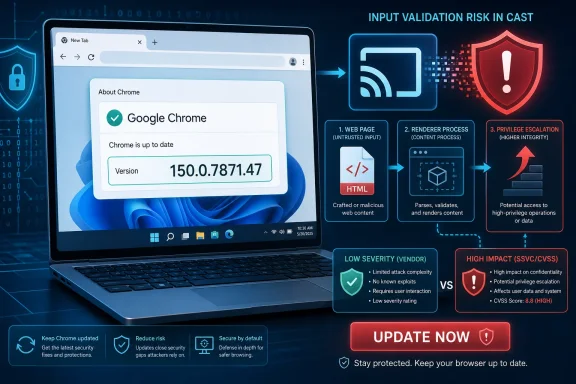
Google disclosed CVE-2026-14115 on June 30, 2026, as a Chrome Cast input-validation flaw fixed in Chrome 150.0.7871.47 for Windows and Mac, after NVD and CISA-ADP records described a renderer-compromise prerequisite and a crafted-HTML privilege-escalation path. The awkward part is not that this is a headline-grabbing zero-day; it is that the vulnerability sits in the messy middle where browser security actually lives. Chrome calls it low severity, CISA-ADP scores it high, and NVD has not yet supplied its own CVSS assessment. For Windows users and administrators, the practical conclusion is simpler than the scoring dispute: update Chrome, then check every Chromium-derived browser that may lag behind it.
CVE-2026-14115 is not described as a one-click remote code execution flaw. The published wording says an attacker would first need to compromise the Chrome renderer process, then use a crafted HTML page to escalate privileges through insufficient validation of untrusted input in Cast. That prerequisite matters because Chrome’s renderer is designed to be hostile territory: web content runs there precisely because the browser assumes pages may be malicious.
But “requires renderer compromise” is not the same as “irrelevant.” Modern browser exploitation is often a chain, not a single magic bug. A JavaScript engine flaw, type confusion issue, or memory corruption bug can provide the renderer foothold; a second weakness can then help escape a security boundary, reach a more privileged browser process, or interact with features that were never meant to trust web-originated data.
That is why the scoring looks contradictory. Google’s Chromium security severity is listed as low, while CISA-ADP’s CVSS 3.1 vector gives it a 7.5 high rating with high confidentiality, integrity, and availability impact. Those two judgments are not necessarily saying different things about the same risk; they are looking at different parts of the attack model.
Google is evaluating the bug in the context of Chromium’s internal severity process, where prerequisites and exploitability carry heavy weight. CISA-ADP is encoding what happens if the precondition is met. The former asks, “How reachable is this bug by itself?” The latter asks, “How bad is the result once an attacker gets there?”
A browser feature like Cast has to mediate between web content, the browser UI, operating-system networking, and devices on a local network. It is not supposed to let a hostile page smuggle assumptions across those boundaries. When a CVE says “insufficient validation of untrusted input,” the dry language usually means some component accepted data from a less trusted context and treated it as safer, better structured, or more authoritative than it really was.
For Windows administrators, that detail should ring louder than the “low” label. Enterprise fleets often disable, restrict, or monitor features that bridge web content and the local environment because they complicate containment. Cast may not be the first setting a security team thinks about, but the category is familiar: browser convenience features become risk multipliers when they cross from the web into the machine or the network.
This is also why a crafted HTML page is enough to matter. The browser is the operating system’s most exposed interpreter of untrusted input. A user does not need to download an executable or approve a macro for a malicious page to begin exercising an enormous attack surface.
That creates a familiar wrinkle for Windows users: the exact number matters more than the fact that Chrome says it is “up to date” at a glance. Chrome’s staged rollout model means some machines receive builds before others, and managed environments may hold back browser updates through policy, testing rings, or packaging workflows.
The safe check is direct. Open Chrome’s About page, confirm the version, and relaunch after the update is installed. For managed Windows fleets, inventory should confirm the executable version across endpoints rather than assuming the update has landed because Google published the advisory.
This is where consumer and enterprise realities diverge. A home user can update and move on. An administrator has to ask which packaged Chrome builds are deployed, which VDIs or golden images still carry older binaries, whether third-party Chromium browsers are separately patched, and whether security tools are actually reporting browser versions accurately.
Security teams increasingly depend on vulnerability scanners, SBOM pipelines, and ticketing systems that ingest CPE data as if it were a final legal boundary. When the human-readable description, vendor advisory, and machine-readable configuration disagree, scanners can under-report or over-report exposure. The result is either false comfort or unnecessary churn.
In this case, the prudent interpretation is to follow the vendor-fixed version and the CVE description rather than treating the early CPE enrichment as gospel. Chrome 150.0.7871.47 is the relevant fixed build named in the CVE description, while NVD’s own page notes that NVD assessment has not yet been provided. Until NIST finalizes its enrichment, automation should be checked against the advisory text.
This is not merely pedantry. If a scanner marks 150.0.7871.46 as safe because of a CPE cutoff while the CVE text says fixed in 150.0.7871.47, administrators have to decide whether the scanner or the advisory owns reality. In browser security, where patch cadence is measured in days and attackers reverse patches quickly, that decision should favor the stricter reading.
This is the right way to think about many browser bugs. Not every Chrome CVE is a fire drill, and this one is not being described as exploited in the wild. But lack of known exploitation is a snapshot, not a shield. Once a fix ships, attackers can inspect Chromium changes, correlate issue IDs where possible, and look for ways to reproduce the bug before lagging users patch.
Google also commonly restricts access to bug details until most users are updated. That practice is sometimes frustrating for defenders who want to understand exact exploit mechanics, but it reflects a practical reality: publishing a full exploit recipe before the patch reaches users would help attackers more than administrators.
For WindowsForum readers, the lesson is not to panic. It is to avoid the opposite mistake: treating “low severity” and “no known exploitation” as permission to let Chrome drift. Browser updates are cumulative risk reduction, not one-off reactions to whichever CVE gets the scariest score.
That volume can desensitize users. If every Chrome release fixes dozens or hundreds of issues, no single CVE feels special. The danger is that patch fatigue turns into version drift, especially on machines that are rarely rebooted, kiosk systems that are frozen in place, or corporate endpoints where users lack rights to relaunch applications.
Chrome’s architecture is built around compartmentalization, sandboxing, site isolation, and rapid patching. Those defenses assume the update mechanism is functioning. When updates stall, the browser becomes a catalog of known attack surfaces with public patch diffs pointing toward the fixes.
The Cast flaw is a small piece of that larger story. It may never appear in an exploit kit by itself. But as part of a chain, a low-severity flaw in a privileged or semi-privileged browser feature can become the second step that turns a contained renderer bug into something worse.
Microsoft Edge matters most for Windows environments because it is present by default, deeply integrated into Windows management assumptions, and often treated separately from Chrome in enterprise patch workflows. A shop that patches Chrome aggressively but leaves Edge to a slower Windows Update cadence may still carry Chromium exposure. Conversely, organizations that standardize on Edge but leave Chrome installed for compatibility testing may forget the browser they supposedly do not use.
Electron applications are a harder case. Many desktop apps embed Chromium but do not expose a conventional browser version in an obvious way. A CVE in a component like Cast may or may not be reachable in a given Electron app, depending on how the application is built and what features it exposes. But the operational lesson is the same: embedded browsers age, and aging embedded browsers become a supply-chain patch problem.
This is why vulnerability management based only on installed product names is increasingly inadequate. The question is not just “Do we run Chrome?” It is “Where does Chromium code run in our environment, and who owns updating each copy?”
Features like Cast sit in the policy gray zone. They are useful, consumer-friendly, and generally harmless in ordinary use. But they also connect browser-originated actions to nearby devices and local capabilities. In a locked-down enterprise, that deserves a conscious decision rather than a default inheritance from consumer Chrome.
Chrome enterprise policies allow administrators to control many browser behaviors, including extension installation, update cadence, network prediction, Safe Browsing, and feature availability. The right answer is not always to disable everything; overly restrictive browser policy can break workflows and push users toward shadow IT. The right answer is to know which features are enabled and why.
For environments with no business need for media casting, disabling or restricting Cast-related behavior may be reasonable. For schools, conference rooms, and media-heavy workplaces, the feature may be necessary. But necessity should come with patch discipline and monitoring, not blind trust.
For ordinary users, this vocabulary is almost useless. They need to know whether to update, whether the bug is being exploited, and whether any behavior change is required. For administrators, the labels are useful only when tied to asset criticality, exposure, exploit availability, and compensating controls.
The industry has tried to solve this with more scoring systems: CVSS, SSVC, EPSS, KEV, vendor severities, scanner priorities. Each adds signal, but each also adds another way for teams to argue about the number rather than the decision. CVE-2026-14115 is a neat example because the decision is obvious even while the scores are unsettled.
Patch the browser. Verify the version. Watch for downstream Chromium updates. Do not build a grand risk exception around a low vendor label when the fixed build is already available.
CVE-2026-14115 will probably not be remembered as the defining Chrome vulnerability of 2026. Its own description is too conditional, and Google’s severity rating is too modest for that. But it is a useful stress test for how we read browser advisories: not as isolated trivia, but as hints about where trust boundaries are thin.
The next Chrome bug will have a different component name and a different score. The durable lesson is that browser security is now a continuous verification loop, and Windows environments that treat it as ordinary desktop software maintenance will keep discovering that the web is the fastest-moving attack surface they own.
 A Low-Severity Chrome Bug Can Still Be Part of a High-Severity Attack
CVE-2026-14115 is not described as a one-click remote code execution flaw. The published wording says an attacker would first need to compromise the Chrome renderer process, then use a crafted HTML page to escalate privileges through insufficient validation of untrusted input in Cast. That prerequisite matters because Chrome’s renderer is designed to be hostile territory: web content runs there precisely because the browser assumes pages may be malicious.But “requires renderer compromise” is not the same as “irrelevant.” Modern browser exploitation is often a chain, not a single magic bug. A JavaScript engine flaw, type confusion issue, or memory corruption bug can provide the renderer foothold; a second weakness can then help escape a security boundary, reach a more privileged browser process, or interact with features that were never meant to trust web-originated data.
That is why the scoring looks contradictory. Google’s Chromium security severity is listed as low, while CISA-ADP’s CVSS 3.1 vector gives it a 7.5 high rating with high confidentiality, integrity, and availability impact. Those two judgments are not necessarily saying different things about the same risk; they are looking at different parts of the attack model.
Google is evaluating the bug in the context of Chromium’s internal severity process, where prerequisites and exploitability carry heavy weight. CISA-ADP is encoding what happens if the precondition is met. The former asks, “How reachable is this bug by itself?” The latter asks, “How bad is the result once an attacker gets there?”
Cast Is Not Just a Living-Room Feature Anymore
It is tempting to read “Cast” and imagine a home user flinging a YouTube video to a TV. In Chrome, however, Cast is part of a broader surface that intersects media routing, local-network discovery, device control, permissions, and cross-process browser plumbing. That is exactly the kind of feature area where input validation becomes more than a mundane coding hygiene issue.A browser feature like Cast has to mediate between web content, the browser UI, operating-system networking, and devices on a local network. It is not supposed to let a hostile page smuggle assumptions across those boundaries. When a CVE says “insufficient validation of untrusted input,” the dry language usually means some component accepted data from a less trusted context and treated it as safer, better structured, or more authoritative than it really was.
For Windows administrators, that detail should ring louder than the “low” label. Enterprise fleets often disable, restrict, or monitor features that bridge web content and the local environment because they complicate containment. Cast may not be the first setting a security team thinks about, but the category is familiar: browser convenience features become risk multipliers when they cross from the web into the machine or the network.
This is also why a crafted HTML page is enough to matter. The browser is the operating system’s most exposed interpreter of untrusted input. A user does not need to download an executable or approve a macro for a malicious page to begin exercising an enormous attack surface.
The Version Number Is the Cleanest Signal in a Noisy Advisory
The actionable boundary is Chrome 150.0.7871.47. According to Google’s Chrome Releases post for the June 30 Stable Channel update, the desktop channel moved to the 150.0.7871.46/.47 line for Windows and Mac, with Linux on 150.0.7871.46. NVD’s record for CVE-2026-14115 describes Chrome versions prior to 150.0.7871.47 as affected.That creates a familiar wrinkle for Windows users: the exact number matters more than the fact that Chrome says it is “up to date” at a glance. Chrome’s staged rollout model means some machines receive builds before others, and managed environments may hold back browser updates through policy, testing rings, or packaging workflows.
The safe check is direct. Open Chrome’s About page, confirm the version, and relaunch after the update is installed. For managed Windows fleets, inventory should confirm the executable version across endpoints rather than assuming the update has landed because Google published the advisory.
This is where consumer and enterprise realities diverge. A home user can update and move on. An administrator has to ask which packaged Chrome builds are deployed, which VDIs or golden images still carry older binaries, whether third-party Chromium browsers are separately patched, and whether security tools are actually reporting browser versions accurately.
NVD’s CPE Confusion Is a Warning About Automation
The user-submitted NVD details include a notable oddity: a CPE configuration was added for Google Chrome up to but excluding 150.0.7871.46, even though the CVE description says “prior to 150.0.7871.47.” The same record also asks whether a CPE is missing. This kind of mismatch is not unusual in the first days after a vulnerability is published, but it is consequential.Security teams increasingly depend on vulnerability scanners, SBOM pipelines, and ticketing systems that ingest CPE data as if it were a final legal boundary. When the human-readable description, vendor advisory, and machine-readable configuration disagree, scanners can under-report or over-report exposure. The result is either false comfort or unnecessary churn.
In this case, the prudent interpretation is to follow the vendor-fixed version and the CVE description rather than treating the early CPE enrichment as gospel. Chrome 150.0.7871.47 is the relevant fixed build named in the CVE description, while NVD’s own page notes that NVD assessment has not yet been provided. Until NIST finalizes its enrichment, automation should be checked against the advisory text.
This is not merely pedantry. If a scanner marks 150.0.7871.46 as safe because of a CPE cutoff while the CVE text says fixed in 150.0.7871.47, administrators have to decide whether the scanner or the advisory owns reality. In browser security, where patch cadence is measured in days and attackers reverse patches quickly, that decision should favor the stricter reading.
The “No Exploitation” Field Should Not Become a Sedative
CISA-ADP’s SSVC entry lists exploitation as “none,” automatable as “no,” and technical impact as “total.” That combination is revealing. It says there is no known exploitation at the time of assessment, but the potential consequence after successful use is severe.This is the right way to think about many browser bugs. Not every Chrome CVE is a fire drill, and this one is not being described as exploited in the wild. But lack of known exploitation is a snapshot, not a shield. Once a fix ships, attackers can inspect Chromium changes, correlate issue IDs where possible, and look for ways to reproduce the bug before lagging users patch.
Google also commonly restricts access to bug details until most users are updated. That practice is sometimes frustrating for defenders who want to understand exact exploit mechanics, but it reflects a practical reality: publishing a full exploit recipe before the patch reaches users would help attackers more than administrators.
For WindowsForum readers, the lesson is not to panic. It is to avoid the opposite mistake: treating “low severity” and “no known exploitation” as permission to let Chrome drift. Browser updates are cumulative risk reduction, not one-off reactions to whichever CVE gets the scariest score.
Chrome 150 Looks Like Another Reminder That Browser Patch Volume Is the New Normal
Malwarebytes reported that the June 30 Chrome update included hundreds of security fixes, with Chrome 150 arriving after an already heavy run of Chrome security releases. Whether every number in third-party summaries maps neatly to an externally exploitable issue is less important than the trend: browser maintenance has become a continuous security operation.That volume can desensitize users. If every Chrome release fixes dozens or hundreds of issues, no single CVE feels special. The danger is that patch fatigue turns into version drift, especially on machines that are rarely rebooted, kiosk systems that are frozen in place, or corporate endpoints where users lack rights to relaunch applications.
Chrome’s architecture is built around compartmentalization, sandboxing, site isolation, and rapid patching. Those defenses assume the update mechanism is functioning. When updates stall, the browser becomes a catalog of known attack surfaces with public patch diffs pointing toward the fixes.
The Cast flaw is a small piece of that larger story. It may never appear in an exploit kit by itself. But as part of a chain, a low-severity flaw in a privileged or semi-privileged browser feature can become the second step that turns a contained renderer bug into something worse.
Edge, Brave, Vivaldi, and Electron Apps Are Part of the Same Conversation
Because this is a Chromium issue, Chrome is only the first place to look. Microsoft Edge, Brave, Vivaldi, Opera, and other Chromium-based browsers need their own patched builds. The timing is not always identical, and version numbers do not always line up cleanly with Google Chrome’s public channel numbers.Microsoft Edge matters most for Windows environments because it is present by default, deeply integrated into Windows management assumptions, and often treated separately from Chrome in enterprise patch workflows. A shop that patches Chrome aggressively but leaves Edge to a slower Windows Update cadence may still carry Chromium exposure. Conversely, organizations that standardize on Edge but leave Chrome installed for compatibility testing may forget the browser they supposedly do not use.
Electron applications are a harder case. Many desktop apps embed Chromium but do not expose a conventional browser version in an obvious way. A CVE in a component like Cast may or may not be reachable in a given Electron app, depending on how the application is built and what features it exposes. But the operational lesson is the same: embedded browsers age, and aging embedded browsers become a supply-chain patch problem.
This is why vulnerability management based only on installed product names is increasingly inadequate. The question is not just “Do we run Chrome?” It is “Where does Chromium code run in our environment, and who owns updating each copy?”
Windows Admins Should Treat Browser Features as Policy Surface
The Windows security model increasingly assumes the browser is both an application and a boundary. That is awkward because users experience Chrome as a tool, while attackers experience it as an input parser attached to credentials, cookies, files, extensions, identity providers, and local network reachability.Features like Cast sit in the policy gray zone. They are useful, consumer-friendly, and generally harmless in ordinary use. But they also connect browser-originated actions to nearby devices and local capabilities. In a locked-down enterprise, that deserves a conscious decision rather than a default inheritance from consumer Chrome.
Chrome enterprise policies allow administrators to control many browser behaviors, including extension installation, update cadence, network prediction, Safe Browsing, and feature availability. The right answer is not always to disable everything; overly restrictive browser policy can break workflows and push users toward shadow IT. The right answer is to know which features are enabled and why.
For environments with no business need for media casting, disabling or restricting Cast-related behavior may be reasonable. For schools, conference rooms, and media-heavy workplaces, the feature may be necessary. But necessity should come with patch discipline and monitoring, not blind trust.
The Severity Debate Exposes a Broken Consumer Vocabulary
Security severity labels are supposed to help prioritize, but browser CVEs routinely expose their limits. A “low” Chromium severity can still appear with a “high” CVSS score. A bug with no known exploitation can still have total technical impact. A vulnerability that requires renderer compromise can still be meaningful because renderer compromise is exactly what many browser exploit chains try to achieve first.For ordinary users, this vocabulary is almost useless. They need to know whether to update, whether the bug is being exploited, and whether any behavior change is required. For administrators, the labels are useful only when tied to asset criticality, exposure, exploit availability, and compensating controls.
The industry has tried to solve this with more scoring systems: CVSS, SSVC, EPSS, KEV, vendor severities, scanner priorities. Each adds signal, but each also adds another way for teams to argue about the number rather than the decision. CVE-2026-14115 is a neat example because the decision is obvious even while the scores are unsettled.
Patch the browser. Verify the version. Watch for downstream Chromium updates. Do not build a grand risk exception around a low vendor label when the fixed build is already available.
The Practical Read Is Stricter Than the Label
The most useful response to CVE-2026-14115 is not dramatic, but it is specific. Treat it as a patched Chrome security issue with chain potential, not as a standalone catastrophe. The risk is lower than an actively exploited zero-day, but higher than a cosmetic bug that can be ignored until the next maintenance window.- Chrome installations on Windows and Mac should be updated to 150.0.7871.47 or later, with a relaunch completed after the update downloads.
- Vulnerability scanners should be checked against the vendor advisory text because early NVD CPE enrichment may lag or conflict with the fixed-version wording.
- Managed Windows environments should inventory Chrome and Chromium-based browsers separately instead of assuming one update workflow covers all of them.
- Administrators should review whether Cast is needed in their environment, especially on endpoints that do not require media routing or local device discovery.
- The lack of known exploitation reduces urgency compared with a confirmed zero-day, but it does not justify leaving exposed browser builds in production.
- Chromium-derived applications and embedded browser runtimes should remain on the patch radar even when the named CVE appears to target Google Chrome.
The Browser Patch Is the Easy Part; Proving It Landed Is the Job
The uncomfortable truth is that Chrome’s updater is better than many organizations’ ability to verify it. Google can ship a fix quickly, but the last mile runs through relaunch prompts, locked-down endpoints, stale images, disconnected systems, user behavior, and inventory accuracy. That is where browser security stops being a vendor advisory and becomes operations.CVE-2026-14115 will probably not be remembered as the defining Chrome vulnerability of 2026. Its own description is too conditional, and Google’s severity rating is too modest for that. But it is a useful stress test for how we read browser advisories: not as isolated trivia, but as hints about where trust boundaries are thin.
The next Chrome bug will have a different component name and a different score. The durable lesson is that browser security is now a continuous verification loop, and Windows environments that treat it as ordinary desktop software maintenance will keep discovering that the web is the fastest-moving attack surface they own.
References
- Primary source: NVD / Chromium
Published: 2026-07-03T07:00:43-07:00
NVD - CVE-2026-14115
 nvd.nist.gov
- Security advisory: MSRC
Published: 2026-07-03T07:00:43-07:00
Original feed URL
Security Update Guide - Microsoft Security Response Center
 msrc.microsoft.com
- Related coverage: cvefeed.io
CVE-2026-14115 - Google Chrome Cast Privilege Escalation
Insufficient validation of untrusted input in Cast in Google Chrome prior to 150.0.7871.47 allowed a remote attacker who had compromised the renderer process to perform privilege escalation via a crafted HTML page. (Chromium security severity: Low)cvefeed.io
