

Answer
Affected: Chrome for iOS versions earlier than 150.0.7871.47.
Remediation: Update Chrome on iPhone and iPad to 150.0.7871.47 or later, then verify the complete installed version.
Impact: A remote attacker can use crafted HTML to spoof Omnibox contents, weakening the reliability of the browser’s displayed location.
What the supplied record does not establish: There is no supplied evidence of active exploitation, automatic credential theft, code execution, browser takeover, or device compromise.
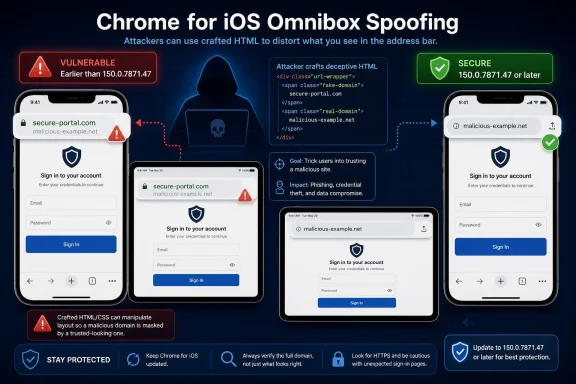 The URL Bar Is Part of the Browser’s Security Boundary
Modern browsers ask users to treat web content as untrusted while trusting the browser frame around it. A website can control its own text, images, forms, animation, and visual design, but it is not supposed to control the browser’s account of where that content came from.The Omnibox sits on that dividing line. It may look like a navigation convenience, but it is also one of the few pieces of security-relevant information that a browser exposes directly and continuously to ordinary users. If a page claims to belong to a bank while the Omnibox displays an unrelated domain, the mismatch is supposed to reveal the deception.
The published CVE description says that Chrome for iOS versions earlier than 150.0.7871.47 could allow a remote attacker to spoof Omnibox contents through crafted HTML. The public material does not say that the attacker could escape a sandbox, install software, execute arbitrary code, or take control of the iPhone or iPad.
Instead, the vulnerability affects a trusted security interface. The browser process may remain intact while the user makes a decision using location information that the browser has displayed incorrectly.
The weakness is categorized as user-interface misrepresentation of critical information. That description is more precise than casually labeling the issue as generic phishing or cross-site scripting. The established failure is that security-relevant information in the browser interface could be misleading.
The supplied material does not reveal the underlying implementation error. The linked Chromium issue requires permission, which establishes only that the public cannot read the issue through that reference. It does not establish why access is restricted, when the issue may become public, or whether Google is following a particular disclosure timetable.
The public record also does not establish whether the flaw involved navigation timing, history handling, presentation state, synchronization, or another internal mechanism. Claims about the precise root cause, exploit sequence, or patch mechanics would therefore be speculation.
What is established is narrow but important: crafted HTML could reportedly cause Chrome for iOS to present spoofed Omnibox contents, and an attacker could try to use that false signal to influence the user’s next decision.
One Version Line Separates Exposure From the Fix
The affected range is straightforward. Chrome for iOS installations earlier than 150.0.7871.47 are within the published vulnerable range. Version 150.0.7871.47 itself, and numerically later versions, cross the documented remediation boundary.| Chrome for iOS state | Version condition | CVE status | Required response |
|---|---|---|---|
| Older installation | Earlier than 150.0.7871.47 | Within the affected range | Update and verify |
| Fixed threshold | Exactly 150.0.7871.47 | Outside the published affected range | Retain version evidence |
| Newer installation | Later than 150.0.7871.47 | Outside the published affected range | Maintain normal update policy |
| Incomplete result | “Chrome 150” without the full version | Unverified | Collect the complete version |
| Missing or stale result | Current version cannot be established | Unresolved | Recheck or report as an exception |
Administrators and users should compare all four version components. A report that says only “Chrome 150,” “current,” or “updated” does not prove that the browser has crossed the boundary. Builds within the same major release can fall on opposite sides of the fixed version.
The operational test is simple:
- A version below 150.0.7871.47 remains affected.
- Version 150.0.7871.47 passes the documented boundary.
- A numerically later version also passes.
- An incomplete or unavailable version remains unresolved.
What iPhone and iPad Users Should Do
End users do not need to wait for an administrator to perform the basic update on an unmanaged device.- Open the App Store on the iPhone or iPad.
- Search for Chrome.
- Open the Google Chrome App Store entry.
- Tap Update if that option appears.
- Wait for the update to finish.
- Open Chrome.
- Tap the three-dot menu.
- Go to Settings > Google Chrome.
- Read the complete version number.
- Confirm that it is 150.0.7871.47 or later.
Users of organization-managed devices should follow their employer’s normal support process if application controls prevent the update, the expected version does not appear, or the version screen is unavailable. They should not bypass management restrictions.
Updating iOS or iPadOS alone does not establish that the Chrome application has been updated. Likewise, updating Chrome on a Windows computer does not remediate an outdated Chrome installation on an iPhone or iPad. The affected application must be checked on the mobile device itself.
The Attack Targets User Trust, Not Control of the Device
The most plausible downstream concern is that a person could accept an attacker-controlled page as a trusted destination because the browser appeared to confirm its identity.Attackers can already copy logos, colors, typography, support language, forms, and sign-in prompts. Those visual elements are weak identity signals because every website controls its own page content.
The URL bar is supposed to remain outside that control. If Omnibox contents can also be spoofed, an attacker gains a stronger deception primitive: the page and the browser’s location display can appear to tell the same false story.
That does not mean the vulnerability automatically steals passwords or bypasses every authentication control. The supplied record describes Omnibox spoofing, not automatic extraction of credentials, decryption of traffic, access to stored passwords, or takeover of the browser.
A consequential outcome would generally require additional action by the user, such as:
- Entering a password into an attacker-controlled form.
- Providing account-recovery information.
- Submitting payment or personal details.
- Approving a sign-in or transaction.
- Treating a malicious page as a trusted service.
The CISA-ADP CVSS vector assigns Low integrity impact. That metric should be reported as published without inventing a more precise technical rationale than the public record supplies. The record does not establish exactly how the assessor derived that selection from Chrome’s internal behavior.
For incident response, exposure and compromise remain separate questions. Version inventory establishes whether the browser was within the affected range. It cannot establish whether exploitation occurred.
If a user reports a suspicious page, analysts can preserve the available link, page information, time of the event, navigation history, screenshots, and the user’s description. Authentication and account activity may also warrant review where separate evidence indicates possible credential submission or suspicious access. An outdated version by itself should not trigger a declaration that the device was taken over.
Severity: Low Vendor Rating, 4.3 CISA-ADP Score
The severity information can be summarized without treating the labels as contradictory.Chromium rates the vulnerability Low. The CISA-ADP CVSS v3.1 contribution produces a 4.3 MEDIUM base score and models a network-accessible attack with low attack complexity, no required privileges, required user interaction, unchanged scope, no direct confidentiality impact, Low integrity impact, and no availability impact.
These are different assessment systems. Chromium’s label represents a vendor-side severity judgment, while CVSS calculates a standardized score from selected technical characteristics. The 4.3 value should remain attributed to CISA-ADP rather than being described as an independent NVD or NIST score.
Neither rating establishes code execution, a zero-click compromise, or device takeover. Neither rating should be used as a substitute for checking the installed version.
A proportionate response is prompt remediation without crisis language. This vulnerability can reasonably be scheduled behind actively exploited code-execution flaws while still receiving a short update window, particularly on devices used for financial approvals, account recovery, privileged administration, or access to other sensitive services.
The supplied CISA-ADP SSVC information records exploitation as none, automatable as no, and technical impact as partial. Those values support a measured response, but “exploitation: none” is a point-in-time assessment, not a guarantee that exploitation is impossible or will never be reported.
The Public Record Leaves Important Questions Unanswered
The supplied references require careful attribution. The vendor-advisory path is titled as a desktop stable-channel update, while the affected-product description and configuration identify Chrome on iOS.Without an applicable Google iOS release note that explicitly identifies this CVE, the article should not claim that a particular Google iOS advisory announced or fixed CVE-2026-14123. The defensible conclusion comes from the supplied vulnerability record: Chrome for iOS versions earlier than 150.0.7871.47 are identified as affected, and 150.0.7871.47 is the documented remediation boundary.
The desktop-titled advisory reference does not establish that desktop Chrome is affected. It creates a documentation discrepancy that should not be resolved through guesswork. Administrators should follow the explicit affected-product data unless Google, NVD, or another authoritative source later clarifies or broadens the scope.
The permission-required Chromium issue also limits technical conclusions. The supplied record does not disclose:
- The exact HTML construction.
- The complete triggering sequence.
- Whether particular gestures or navigation states are required.
- How long the spoof remains visible.
- Whether it survives page transitions.
- The vulnerable code path.
- The patch implementation.
- A public proof of concept.
- A CVE-specific network or device indicator.
Secondary summaries should not fill those gaps with assumptions. Claims that the vulnerability can display any arbitrary trusted domain, evade every warning, steal credentials automatically, or compromise the operating system exceed the verified description.
The lack of exploit detail does not block remediation. Defenders already have the information required for action: the affected platform, the version boundary, the crafted-HTML prerequisite, the Omnibox-spoofing consequence, and the absence of supplied evidence for active exploitation.
Mobile Browsers Remain Part of the Windows Security Estate
CVE-2026-14123 is identified as a Chrome for iOS issue, not a Chrome for Windows vulnerability. Windows administrators should not create desktop remediation tickets solely because a scanner matches the general Chrome product name or encounters a desktop-titled reference.The issue can still matter in a Microsoft-centered environment. Employees may open Microsoft 365 messages, identity-provider links, collaboration invitations, cloud-management portals, and account-recovery workflows on iPhones and iPads. A mobile browser can therefore provide access to identities and services also used from Windows endpoints.
The concrete organizational control is application-version inventory.
Administrators should query managed iOS and iPadOS devices for the installed Chrome application version, identify every result below 150.0.7871.47, require 150.0.7871.47 or later where the mobile-device-management platform supports application-version compliance, and report unresolved exceptions.
The query should preserve both platform and product scope. It should find Chrome on managed Apple mobile devices, not every application or endpoint containing the word “Chrome.”
Where supported, an MDM compliance workflow should:
- Inventory Chrome on managed iPhones and iPads.
- Collect the complete installed version.
- Compare that value with 150.0.7871.47.
- Mark lower versions noncompliant.
- Require or deploy an approved current Chrome release.
- Refresh inventory after the update.
- Report devices that remain below the threshold.
- Report devices with missing, stale, or incomplete version information.
- Record approved exceptions with an owner and review date.
- Close the finding only after current inventory shows 150.0.7871.47 or later, Chrome is confirmed absent, or an approved exception remains under active management.
Condensed Record Timeline
The supplied material supports a short record-level timeline, but the exact June and July calendar dates previously attached to publication, enrichment, and modification should not be repeated without direct verification against the applicable authoritative record.- Publication: NVD published the vulnerability record and presented the Chrome-originated description identifying Chrome for iOS versions earlier than 150.0.7871.47.
- Last modification: The record was subsequently enriched or modified with contributed scoring, weakness, SSVC, configuration, or reference information. The applicable NVD entry should be checked directly before publishing a specific last-modified date.
- SSVC conclusion: The supplied CISA-ADP entry records exploitation: none. That is the key operational conclusion from the timeline and does not establish a permanent absence of exploitation.
The operational finish line is the disappearance of versions earlier than 150.0.7871.47 from the in-scope device population.
Defense in Depth Beyond the Update
Updating Chrome is the primary remediation established by the supplied record. The following measures are defense-in-depth recommendations, not CVE-specific mitigations documented by Google, NVD, or CISA-ADP.Password managers: Origin-aware password filling may give users an additional warning when a familiar credential is not offered on an unexpected site. This does not remove the vulnerable Chrome code and should not replace the update.
Phishing-resistant authentication: Authentication methods designed to resist use on the wrong relying party can reduce dependence on a user visually reading the URL bar correctly. This is a broader identity-security recommendation, not a documented fix for the CVE.
Managed launchers and known bookmarks: Providing trusted routes to high-value services can reduce reliance on links delivered through email, text messages, QR codes, or unfamiliar pages. These routes do not prove that exploitation cannot occur.
Identity telemetry: Monitoring unusual sign-ins, account-recovery events, new authentication methods, unfamiliar sessions, and suspicious consent activity can help identify downstream account abuse. Such telemetry is not a CVE-specific exploitation detector.
User reporting: Users should be encouraged to report unexpected mobile sign-in pages, suspicious redirects, or browser location displays that conflict with the service they intended to visit. A report warrants investigation but does not by itself prove exploitation of this vulnerability.
These controls provide additional resilience when visual browser signals fail. They should be presented as layered protection, not as evidence that the vulnerable browser can safely remain below the fixed version.
Action Checklist for Admins
- Inventory Chrome installations on managed iPhones and iPads.
- Collect the complete installed application version rather than only the major release number.
- Identify every Chrome for iOS installation earlier than 150.0.7871.47.
- Deploy or require an approved current release that is 150.0.7871.47 or later.
- Where supported, configure application-version compliance to require 150.0.7871.47 or later.
- Refresh MDM inventory after the deployment or user update.
- Verify the resulting installed version rather than closing the finding on deployment status alone.
- Treat missing, stale, incomplete, or conflicting version data as unresolved.
- Report devices that remain below the threshold and assign each exception to an owner.
- Keep Chrome on Windows, Android, macOS, and unrelated products outside this CVE’s scope unless separate authoritative evidence applies.
- Tell users that the issue concerns spoofed Omnibox contents, not a documented zero-click takeover.
- Review identity activity only where user reports or other evidence create a separate reason for concern.
- Record the 4.3 MEDIUM score as a CISA-ADP contribution and retain Chromium’s Low vendor rating separately.
- Record the supplied SSVC exploitation status as none without converting it into a permanent guarantee.
- Continue deploying later supported Chrome updates rather than pinning devices indefinitely to the minimum fixed build.
What Defenders Should Retain After the Update
CVE-2026-14123 is narrow enough to address with an application update but important enough to test whether mobile application compliance can be measured accurately.- Chrome for iOS versions earlier than 150.0.7871.47 fall within the published affected range.
- The flaw can spoof Omnibox contents through crafted HTML.
- The supplied evidence does not establish active exploitation, code execution, automatic credential theft, or device takeover.
- Chromium’s Low rating and CISA-ADP’s 4.3 MEDIUM score describe the same interaction-dependent issue through different assessment systems.
- The published CISA-ADP vector assigns Low integrity impact, but the public record does not establish the assessor’s precise rationale.
- The Chromium issue requires permission; the supplied facts do not establish why access is restricted.
- The desktop-titled vendor-advisory reference should not be treated as an applicable Chrome for iOS release note without further confirmation.
- A vulnerable version proves exposure, not exploitation or compromise.
- Password managers, phishing-resistant authentication, managed launchers, and identity telemetry are defense-in-depth recommendations, not documented substitutes for the update.
- Users should update through the App Store and verify the full version in Chrome.
- Administrators should query managed iOS application inventory, require the fixed version where supported, and report every unresolved exception.