

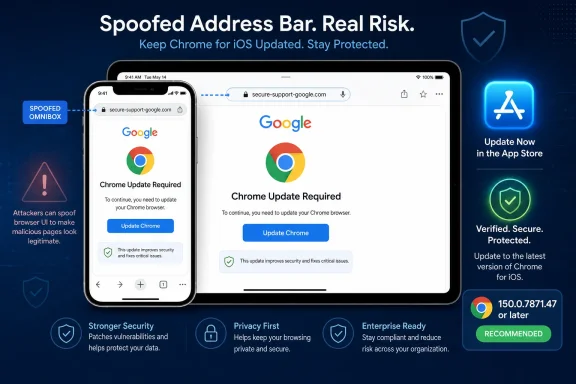
 CVE-2026-14128: Update Chrome on iPhone and iPad to 150.0.7871.47 or Later
Chrome for iOS versions before 150.0.7871.47 are affected by an Omnibox-spoofing flaw. Update the app through Apple’s App Store, confirm the installed version, and do not extend this CVE to desktop Chrome without separate evidence.Affected: Google Chrome on iPhone and iPad before version 150.0.7871.47.
Required action: Update Chrome through the App Store and confirm version 150.0.7871.47 or later.
Not established as affected: Chrome on Windows, macOS, Linux, Android, or ChromeOS.
Exploitation status: The supplied CISA-ADP assessment records no known exploitation.
Severity: Chromium rates the issue Low; CISA-ADP calculates a 4.3 Medium CVSS 3.1 score; the supplied record contains no independent NVD score.
CVE-2026-14128 is a Chrome for iOS vulnerability that allows a remote attacker to use a crafted HTML page to spoof the contents of the Omnibox. The public description does not identify code execution, data theft, sandbox escape, persistent access, or takeover of the iPhone or iPad as direct consequences.
The operational response is straightforward: update every affected Chrome installation to at least 150.0.7871.47 and verify the result. The documented scope is Chrome on iOS, so administrators should not open a desktop Chrome remediation campaign solely because the product name appears in a vulnerability feed.
What iPhone and iPad Users Should Do Now
Update Chrome manually through Apple’s normal application-update process:- Open the App Store on the iPhone or iPad.
- Search for Google Chrome.
- Open the Chrome application listing.
- Tap Update if that button appears.
- Wait for installation to finish, and then reopen Chrome.
- Open Chrome.
- Tap the three-dot menu.
- Tap Settings.
- Tap Google Chrome to open the application information screen.
- Confirm that the displayed version is 150.0.7871.47 or later.
If the App Store displays Open rather than Update, it is not currently offering another Chrome update to that device. That is useful information, but managed organizations should still use application inventory where available to establish the complete installed version.
The comparison must use the full dotted version number. “Chrome 150” is not precise enough because the documented boundary is 150.0.7871.47.
A Low-Rated Flaw With a Limited but Relevant Effect
The Chrome-supplied description says that an inappropriate implementation in Chrome for iOS allowed a remote attacker to spoof the contents of the Omnibox through a crafted HTML page. The affected range ends immediately before version 150.0.7871.47.The Omnibox is the part of Chrome that displays and accepts addresses and searches. Misrepresenting its contents can affect a user’s judgment about the page being viewed. The public record, however, does not establish exactly what an attacker can display, how long the false state persists, or which navigation and interface conditions are required.
CVE-2026-14128 is associated with CWE-451, User Interface Misrepresentation of Critical Information. That classification identifies the general security issue: information presented through an interface can be displayed in a misleading way.
This does not make the vulnerability equivalent to arbitrary code execution or a complete browser compromise. A spoofed interface could support social engineering, but any downstream result—such as credential entry, approval of a request, or disclosure of information—would require additional circumstances and user action. Those outcomes should not be described as automatic capabilities of the CVE.
The defensible interpretation is narrow:
- A remote attacker can provide crafted HTML.
- User interaction is required under the supplied CVSS assessment.
- The documented direct impact concerns the integrity of information displayed in the browser interface.
- The record assigns no direct confidentiality or availability impact.
- The public material does not document device takeover or execution of attacker-supplied code.
- No known exploitation is recorded in the supplied CISA-ADP assessment.
Why Chromium Low and CISA-ADP Medium Can Both Appear
The public record contains three different scoring signals:| Assessment source | Published result | Practical meaning |
|---|---|---|
| Chromium severity | Low | Product-context rating for the documented Chrome flaw |
| CISA-ADP CVSS 3.1 | 4.3 Medium | Standardized score reflecting remote reachability, required interaction, and limited integrity impact |
| Independent NVD score | Not supplied | Do not describe the CISA-ADP score as an NVD-generated assessment |
Those factors explain the 4.3 Medium result. Remote delivery, low complexity, and no privilege requirement increase the score, while required interaction and limited direct impact constrain it.
Chromium’s Low rating and CISA-ADP’s Medium score are not necessarily contradictory. They come from different assessment methods. Administrators should preserve the source of each label instead of flattening every value displayed on an NVD page into an “NVD score.”
The supplied CISA-ADP Stakeholder-Specific Vulnerability Categorization data records:
- Exploitation: None
- Automatable: No
- Technical impact: Partial
This combination supports a proportionate response: update promptly through the normal mobile-application process, verify the installed version, and avoid emergency claims unsupported by the record.
The Affected Product Boundary Is Chrome on iOS
The affected product is Google Chrome on iOS before version 150.0.7871.47. The record does not identify Chrome on Windows, macOS, Linux, Android, or ChromeOS as affected by CVE-2026-14128.That platform limitation must remain attached to every inventory query, scanner result, help-desk ticket, and remediation report.
| Installation state | Version or platform | CVE status | Required treatment |
|---|---|---|---|
| Chrome on iPhone or iPad | Earlier than 150.0.7871.47 | Affected | Update and recheck the installed version |
| Chrome on iPhone or iPad | 150.0.7871.47 | Meets the documented threshold | Record current version evidence |
| Chrome on iPhone or iPad | Later than 150.0.7871.47 | Outside the stated affected range | Continue normal update maintenance |
| Chrome on iPhone or iPad | Version unknown, incomplete, or stale | Unresolved | Obtain current inventory or update and verify |
| Chrome on Windows | Any version | Not established as affected by this CVE | Do not assign this CVE without separate evidence |
| Chrome on another platform | Any version | Not established as affected by this CVE | Follow platform-specific advisories |
Administrators should also avoid reducing the version rule to “version 150 or later.” An installation can share the same major version while still falling below the four-part fixed boundary.
Enterprise Procedure: Inventory, Update, and Recheck
For enterprise IT, CVE-2026-14128 is a mobile application inventory and update-control task. It does not require an invented product-specific MDM menu sequence.Use the organization’s existing mobile-device-management, mobile-application-management, or managed App Store workflow to complete these actions:
- Inventory Chrome for iOS.
Query managed iPhones and iPads for the installed Google Chrome application. Preserve the device platform, application identity, complete installed version, device or user association where appropriate, management state, and latest inventory time. - Identify affected installations.
Filter for Chrome versions earlier than 150.0.7871.47. Compare the complete version rather than only the major version. Keep devices with missing, incomplete, conflicting, or stale version data in an unresolved group. - Trigger or require the application update.
Use the organization’s existing MDM or App Store application workflow to deploy, request, or require the current Chrome release. The available enforcement options depend on the management platform, enrollment mode, ownership model, and App Store configuration. - Allow devices to check in.
An issued deployment command does not prove that installation succeeded. Devices may be offline, may not have checked in recently, or may require user participation under the organization’s existing deployment model. - Refresh application inventory.
Re-query the affected population after the update window. Collect a new installed-version result rather than relying on the original inventory record. - Verify remediation.
Confirm that each previously affected installation now reports Chrome 150.0.7871.47 or later. - Investigate unresolved devices.
Follow up on devices that remain below the threshold, have not checked in, report installation failure, or no longer return reliable application inventory. Apply the organization’s existing noncompliance procedures where appropriate. - Close only on version evidence.
A policy assignment, update command, user notification, synchronized vulnerability feed, or green deployment dashboard is not equivalent to evidence that the corrected version is installed.
Organizations that cannot inspect application versions on personally owned or lightly managed devices should send users the App Store and Chrome version-check procedure directly. The CVE record does not mandate a particular bring-your-own-device enforcement policy, so any restrictions should follow existing organizational rules rather than being presented as a vendor-prescribed workaround.
Action Checklist for Administrators
- Inventory Google Chrome on managed iPhones and iPads.
- Collect the complete installed application version.
- Identify versions below 150.0.7871.47.
- Treat missing or stale version data as unresolved, not compliant.
- Trigger or require the Chrome update through the existing MDM or App Store workflow.
- Re-query application inventory after devices have had time to check in.
- Confirm 150.0.7871.47 or later before closing each finding.
- Provide unmanaged-device users with the manual App Store update steps.
- Keep the platform condition attached to scanner and vulnerability-management rules.
- Do not assign CVE-2026-14128 to desktop Chrome from the product name alone.
- Monitor authoritative vulnerability records for later changes in scope or exploitation status.
Validate Scanner Results Before Opening Desktop Tickets
Vulnerability tools can ingest product names, version ranges, platform information, and reference metadata in different ways. The public record does not establish how any particular scanner will classify CVE-2026-14128, so organizations should inspect their own findings rather than assume that a tool will always match the correct platform.For each result, ask:
- Does the asset run iOS or iPadOS?
- Is Google Chrome actually installed on that mobile device?
- Did the inventory collect the complete installed version?
- Is the version earlier than 150.0.7871.47?
- Did the scanner evaluate the mobile platform and application together, or did it match only the generic Chrome product name?
- Is the inventory current enough to support the conclusion?
The reverse failure is also possible: an organization may have detailed Windows browser inventory but limited visibility into mobile applications. In that case, a desktop-centered dashboard could show no exposure while relevant iPhones remain unmeasured.
The appropriate matching rule is simple: the asset must be an applicable Apple mobile device, Chrome must be installed, and the complete installed Chrome version must be earlier than 150.0.7871.47.
The Public Record Does Not Reveal the Exploit Mechanics
The Chromium issue associated with CVE-2026-14128 requires permission to access. That fact establishes only that the issue details are not publicly available through the referenced tracker.The restricted reference does not establish why access is limited. It should not be attributed to deployment management, exploit prevention, coordinated disclosure strategy, or any other rationale unless Chromium provides that explanation separately.
As a result, the supplied public material does not establish:
- The exact HTML construction used to trigger the issue.
- The precise user action required.
- Which navigation state or browser transition is involved.
- How closely the Omnibox display can imitate an arbitrary destination.
- How long the misleading state remains visible.
- Whether behavior differs among affected iPhone and iPad configurations.
- A public proof of concept.
- A malicious domain, campaign, attacker, or victim population.
- A CVE-specific network, log, crash, or forensic indicator.
A crafted HTML page and user interaction are part of the documented attack model. Possible delivery through email, text messages, QR codes, collaboration platforms, or other channels may be useful general security context, but none of those routes should be presented as a confirmed feature of CVE-2026-14128.
Likewise, the issue can reasonably be discussed as a potential aid to deception because it concerns misleading browser interface information. Specific claims about credential theft, payment fraud, account compromise, or administrative-session abuse require evidence from an actual incident and are not direct consequences established by this CVE record.
Record Timeline and Source Provenance
The supplied material supports a staged record timeline without requiring unsupported calendar dates or exact event times.Timeline
Chrome-originated CVE information: Chrome supplied the core description identifying Chrome on iOS before 150.0.7871.47 and describing Omnibox spoofing through crafted HTML.NVD publication and product analysis: NVD published the vulnerability record and presented affected-product configuration information connecting the vulnerable Chrome range with Apple’s iPhone operating-system platform.
CISA-ADP enrichment: CISA-ADP supplied the 4.3 Medium CVSS 3.1 assessment, the CWE-451 classification, and SSVC values covering exploitation, automation, and technical impact.
Current remediation state: Chrome for iOS 150.0.7871.47 is the documented fixed-version boundary. Earlier releases remain within the affected range.
This provenance matters because information displayed on an NVD page can come from several contributors. The Chrome description, CISA-ADP score, SSVC fields, weakness classification, and NVD product analysis perform different functions and should not be attributed to one source indiscriminately.
In particular, the 4.3 Medium value should be described as the CISA-ADP CVSS assessment, not an NVD-generated score. The absence of an independent NVD score does not mean that the vulnerability has no severity information; it means the available score has a different contributor.
Security systems may choose one value for prioritization, but analysts should retain the source in reports and remediation records. For operational purposes, the most useful rule remains the fixed-version comparison rather than a debate over whether Low or Medium should control the workflow.
What the Record Does Not Establish
CVE-2026-14128 should not be described as:- A Windows vulnerability.
- A universal flaw in every Chrome platform.
- A vulnerability in every browser available on iOS.
- A zero-click compromise.
- Remote code execution.
- An iPhone or iPad takeover.
- A sandbox escape.
- Direct theft of saved passwords or private files.
- An actively exploited zero-day.
- A confirmed phishing campaign.
- An automatically scalable attack.
- Evidence that every device running an affected version was attacked.
An affected version proves exposure to the vulnerable condition. It does not prove exploitation or a security incident. Incident-response measures beyond updating should be driven by separate evidence, organizational policy, or suspicious activity associated with a particular device or account.
The Correct Response Is Narrow and Measurable
CVE-2026-14128 affects Google Chrome on iPhone and iPad before version 150.0.7871.47. It permits Omnibox spoofing through crafted HTML, requires user interaction under the CISA-ADP scoring model, and has no known exploitation recorded in the supplied assessment.Consumers should open the App Store, search for Google Chrome, tap Update, and then check Chrome’s application information under three-dot menu > Settings > Google Chrome to confirm version 150.0.7871.47 or later. If that label is unavailable in the installed release, they should use a reliable version screen or trusted application inventory rather than assuming the update completed.
Enterprises should inventory Chrome for iOS, identify installations below the threshold, trigger or require the update through their existing MDM or App Store workflow, and collect fresh version data afterward. Findings should close only when the installed version is verified.
Future record changes may add an independent NVD score, revise the exploitation assessment, clarify technical mechanics, or expand the product scope. Until authoritative information does so, the defensible response remains precise: update Chrome on affected iPhones and iPads, prove that version 150.0.7871.47 or later is installed, and do not turn an iOS-specific finding into an unsupported desktop Chrome alert.
References
- Primary source: NVD / Chromium
Published: 2026-07-11T15:40:45-07:00
NVD - CVE-2026-14128
 nvd.nist.gov
- Security advisory: MSRC
Published: 2026-07-11T15:40:45-07:00
Original feed URL
Security Update Guide - Microsoft Security Response Center
 msrc.microsoft.com
- Related coverage: cvefeed.io
CVE-2026-14128 - Google Chrome for iOS Omnibox Spoofing
Inappropriate implementation in Chrome for iOS in Google Chrome on iOS prior to 150.0.7871.47 allowed a remote attacker to spoof the contents of the Omnibox (URL bar) via a crafted HTML page. (Chromium security severity: Low)cvefeed.io - Related coverage: chromereleases.googleblog.com
Chrome Releases: Chrome Stable for iOS Update
Hi everyone! We've just released Chrome Stable 150 (150.0.7871.34) for iOS; it'll become available on App Store in the next few hours. This ...chromereleases.googleblog.com