

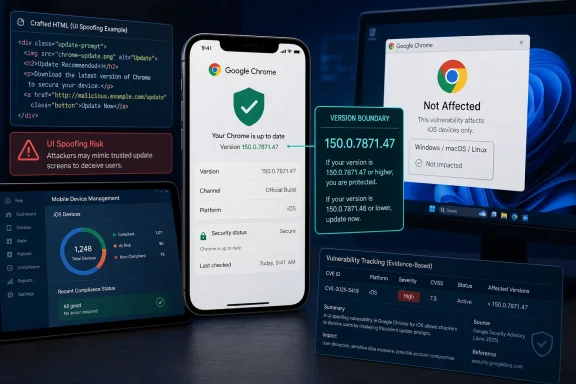
 Chrome for iOS Before 150.0.7871.47: Update and Verify; Chrome on Windows Is Not Listed as Affected
The published affected range for CVE-2026-14136 is Chrome for iOS versions earlier than 150.0.7871.47. Chromium rates the UI-spoofing issue Low, while CISA-ADP contributes a CVSS 3.1 score of 4.3 MEDIUM. Windows administrators should preserve that mobile-platform scope when routing findings.CVE-2026-14136 affects Google Chrome on iPhones at versions earlier than 150.0.7871.47. The issue can allow a remote attacker to perform user-interface spoofing through crafted HTML. Organizations should identify affected iPhone installations, move them beyond the published affected range through their normal application-update process, and verify the complete installed version.
Chrome on Windows is not identified as affected. A Windows computer should not be assigned remediation merely because it runs Chrome or has a version number that appears to fall below the iOS threshold.
The Low-versus-MEDIUM distinction is a matter of attribution and scoring method, not necessarily a contradiction. Chromium assigns a Low security severity. Separately, CISA-ADP contributes a CVSS 3.1 base score of 4.3 and a MEDIUM label. Those assessments should remain distinct in dashboards, tickets, and internal reporting.
What Admins Should Do
For Microsoft-centric organizations, the key operational task is preserving the iPhone condition as vulnerability data moves among inventory, endpoint-management, and remediation systems.Employees may use iPhones to access Microsoft 365 mail, Teams messages, identity prompts, SharePoint content, service-desk notices, and business applications. Chrome on those phones can therefore matter to the same users and identities protected by Windows and Microsoft security controls, even though this CVE is not listed as affecting Chrome on Windows.
Use one evidence-driven workflow:
- Identify the platform. Determine whether the asset is an iPhone, a Windows device, or an unresolved inventory record.
- Confirm the application. The relevant product is Google Chrome running on iOS.
- Collect the complete version. A major-version value such as “Chrome 150” is not enough to compare against 150.0.7871.47.
- Remediate affected iPhones. Use the organization’s established mobile-application update process or direct the device owner to obtain the current Chrome release through an approved source.
- Verify the result. Obtain reliable evidence of the complete installed version after the update attempt. Do not treat “update requested” as equivalent to “version verified.”
- Review unsupported Windows matches. If a finding is attached to Chrome on Windows without separate authoritative evidence, return it for applicability review.
- Record the disposition narrowly. Correct an unsupported desktop match without globally suppressing the CVE or hiding legitimate iPhone findings.
| Asset evidence | Recommended disposition |
|---|---|
| Chrome on iPhone earlier than 150.0.7871.47 | Affected; update and verify the resulting version |
| Chrome on iPhone at 150.0.7871.47 or later | Outside the published affected range |
| Chrome confirmed absent from the iPhone | Not applicable; retain the supporting inventory evidence |
| iPhone with Chrome version unknown or incomplete | Unresolved; obtain the complete version |
| Chrome on Windows with no separate evidence of applicability | Not established as affected; document platform-based disposition |
| Product reported only as “Chrome” | Unresolved; identify the operating system and full application version |
Administrators should base each decision on asset evidence: operating system, installed application, full version, collection time, and the source of the inventory data. Where central mobile inventory is unavailable, the finding should remain unresolved until trustworthy version evidence is obtained.
A Crafted Page Could Misrepresent Security-Relevant Information
The published description says insufficient validation of untrusted input in Chrome for iOS allowed a remote attacker to perform UI spoofing through a crafted HTML page. The published affected range is versions earlier than 150.0.7871.47.This is an interface-integrity problem. Browsers are expected to separate content controlled by a website from trusted information presented by the browser. If that boundary fails, attacker-controlled content may cause the browser to present inaccurate or misleading security-relevant information.
The associated weakness is CWE-451, User Interface (UI) Misrepresentation of Critical Information, as contributed by CISA-ADP. That classification captures the security category without requiring speculation about the exact visual element or interaction involved.
The public Chromium issue requires permission, so the available record does not identify the specific interface component, the complete trigger sequence, or the precise visual result. It would therefore be unsupported to name the address bar, a security indicator, a permission prompt, an account chooser, or any other particular interface element as the affected component.
One boundary is sufficient: the reviewed record documents crafted-HTML UI spoofing with required user interaction, but it does not establish a broader compromise such as code execution, sandbox escape, data extraction, credential theft, persistence, or control of the iPhone. A vulnerable version demonstrates exposure, not evidence that exploitation occurred.
The restricted technical details should not be filled with either worst-case assumptions or dismissive guesses. Defenders have enough information to make the primary remediation decision: identify Chrome for iOS installations within the published affected range, update them, and verify the resulting version.
Severity: Chromium Low, CISA-ADP 4.3 MEDIUM
Chromium rates CVE-2026-14136 as Low severity. CISA-ADP separately contributes a CVSS 3.1 base score of 4.3 MEDIUM with the vector:CVSS:3.1/AV:N/AC:L/PR:N/UI:R/S:U/C:N/I:L/A:NThat vector describes a network-deliverable attack with low attack complexity, no privileges required, required user interaction, unchanged scope, low integrity impact, and no scored confidentiality or availability impact.
| Assessment source | Published result | Operational interpretation |
|---|---|---|
| Chromium | Low security severity | Remediate through the normal browser-update process without treating the record as evidence of device compromise |
| CISA-ADP CVSS 3.1 | 4.3 MEDIUM | Network delivery and no required privileges increase reach, while required interaction and limited scored impact constrain severity |
| CISA-ADP SSVC | Exploitation: none; automatable: no; technical impact: partial | The contributed assessment did not identify exploitation, did not classify the attack as automatable, and assessed partial technical impact |
| Independent NVD-authored score | Not present in the reviewed record | Do not describe CISA-ADP’s 4.3 score as an NVD-authored assessment |
The CISA-ADP score is not a probability forecast. A 4.3 score does not indicate a 43 percent likelihood of attack, and it does not predict how often users will encounter crafted pages. Likewise, the CISA-ADP SSVC value “exploitation: none” is an assessment state in the reviewed record, not a guarantee about all past or future activity.
“Automatable: no” also should not be translated into “cannot be exploited.” It means CISA-ADP did not classify the modeled attack as automatable. Required user interaction remains part of the contributed CVSS assessment, but interacting with pages and links is ordinary browser behavior.
The practical priority is routine but verified remediation. Organizations should update affected Chrome for iOS installations, confirm the complete resulting version, and avoid escalating the record into a Windows-wide incident without evidence.
Platform Scope Matters More Than the Product Name
The reliable scope statement is narrow: CVE-2026-14136 affects Google Chrome on iOS at versions earlier than 150.0.7871.47. The available record does not list Chrome on Windows as affected.A numeric comparison alone is therefore insufficient. The same apparent version relationship on a Windows computer does not establish applicability because the operating-system condition is part of the affected-product definition.
This distinction matters in environments where multiple systems exchange vulnerability data. A record may pass through a vulnerability feed, asset inventory, endpoint console, ticketing system, dashboard, and reporting layer. If the platform condition is discarded along the way, a product-name match can be mistaken for proof that every Chrome installation is affected.
Administrators should not assume that any particular vulnerability product behaves this way. Instead, they should inspect the evidence behind an actual finding and consult the product’s documented matching logic when necessary. If the finding records only “Google Chrome” and a partial version, the correct disposition is unresolved until the operating system and complete version are known.
The reverse error is equally important. A Windows-focused program may have excellent desktop coverage while lacking reliable visibility into mobile browsers. Dismissing the CVE because Windows is not affected could leave relevant iPhone installations unreviewed.
A good internal record can state:
That wording preserves the platform boundary, the separate severity attributions, and the difference between exposure and compromise.CVE-2026-14136 applies to Google Chrome on iPhones at versions earlier than 150.0.7871.47. Chromium rates the issue Low. CISA-ADP contributes a CVSS 3.1 score of 4.3 MEDIUM, maps the issue to CWE-451, and records exploitation as none, automatable as no, and technical impact as partial. The documented effect is UI spoofing through crafted HTML with required user interaction. Affected iPhone installations should be updated and the complete resulting Chrome version verified. Chrome on Windows is not identified as affected.
Verification Is More Important Than an Update Request
The published affected range ends before 150.0.7871.47. That strongly implies a corrected build boundary, but the reviewed excerpt does not establish current App Store availability, staged-rollout status, device compatibility, the presence of a user-visible Update button, or a universal in-app path for checking the version.Administrators should therefore avoid documenting an exact iPhone procedure unless it has been validated independently against the devices and Chrome release in their environment. App Store presentation and application menus can change, and local management controls may affect how updates are delivered.
The defensible requirement is outcome-based:
- Identify the installed Chrome for iOS version.
- If it is earlier than 150.0.7871.47, use an approved process to obtain a newer release.
- Collect fresh evidence of the complete installed version.
- Keep the device unresolved if the version remains missing, partial, stale, or conflicting.
Where a centrally managed mobile platform can report application versions, administrators can re-query that inventory after remediation. Where the organization cannot centrally inspect the application, it should define an evidence method appropriate to its ownership, privacy, and support model rather than assuming a specific interface path.
The same discipline applies to non-applicability decisions. A Windows finding should include evidence that the asset is a Windows device and that no separate source identifies that product-platform combination as affected. A record that says only “Chrome” does not support closure.
Restricted Details Limit Detection and Incident Claims
Because the Chromium issue is permission-restricted, the public record does not expose a reproducer, screenshots, test cases, affected code path, patch discussion, or exact interface sequence. That limits exploit-specific detection and retrospective attribution.No dependable CVE-specific URL pattern, network signature, browser event, or forensic artifact is established by the reviewed information. Version-based prevention and verification are therefore the clearest controls supported by the public record.
If a user reports a suspicious mobile-browser event, analysts can preserve ordinary investigative evidence such as the relevant link, available page content, timing, browser history where lawful and available, message-delivery records, identity activity, and the user’s description of what appeared. Those are general investigative inputs, not indicators unique to CVE-2026-14136.
Investigators should avoid reasoning backward from a vulnerable version to a confirmed incident. An installation earlier than 150.0.7871.47 means the browser falls within the published affected range. It does not prove that the user visited a triggering page or that the flaw produced a security effect.
Similarly, an unusual browser display does not identify this CVE without additional evidence. Interface anomalies can have many causes, and the restricted issue prevents public comparison against the exact trigger and presentation.
The absence of public exploit mechanics does not reduce the need to update. It simply defines what can and cannot be claimed in incident reports, executive summaries, and remediation tickets.
The Trust Lesson Extends Beyond One Mobile Browser Build
CVE-2026-14136 illustrates why interface integrity is part of browser security rather than cosmetic correctness. Users make decisions based not only on page content but also on the security-relevant context the browser appears to provide.When hostile content can influence that presentation, the direct technical impact may remain limited while the user receives misleading context. That warrants remediation even when the available record does not support claims of broader device compromise.
The correct response is neither alarm nor dismissal. Organizations should move affected Chrome for iOS installations beyond the published range, verify the complete version, preserve the iPhone platform condition in vulnerability workflows, and investigate suspicious activity according to its own evidence.
For Windows administrators, the lasting lesson is that a Microsoft-centric security program still needs accurate mobile-application visibility. Users, identities, messages, approvals, and business workflows move between Windows PCs and iPhones. A platform-specific browser vulnerability can therefore matter to the organization without being a vulnerability in Windows or Chrome for Windows.
Reliable application inventory and managed updates can reduce the exposure window. Phishing-resistant authentication, independent confirmation of sensitive transactions, trusted application-distribution channels, and measured user guidance can reduce the consequences of deceptive content more broadly. Those controls do not replace updating Chrome, and they should not be presented as CVE-specific workarounds.
The immediate objective is straightforward: find Chrome on in-scope iPhones, identify installations earlier than 150.0.7871.47, update them through an approved process, and verify that the resulting full version is outside the affected range. The broader objective is to keep mobile browsers from disappearing into the operational gap between Windows endpoint security and mobile application management.
References
- Primary source: NVD / Chromium
Published: 2026-07-11T15:40:46-07:00
NVD - CVE-2026-14136
 nvd.nist.gov
- Security advisory: MSRC
Published: 2026-07-11T15:40:46-07:00
Original feed URL
Security Update Guide - Microsoft Security Response Center
 msrc.microsoft.com
- Related coverage: issues.chromium.org
Chromium
issues.chromium.org
- Related coverage: o3.security
CVE-2026-13813: CHROME Improper Input Validation (High 8.3) | O3 Security
CVE-2026-13813 is a high-severity vulnerability (CVSS 8.3). It affects CHROME. See affected versions, exploit status, EPSS, and fix guidance. o3.security
- Related coverage: techradar.com
Trend Micro warns of worrying security flaw allowing full Windows takeover, so patch now | TechRadar
Two critical-severity flaws were recently fixedwww.techradar.com