

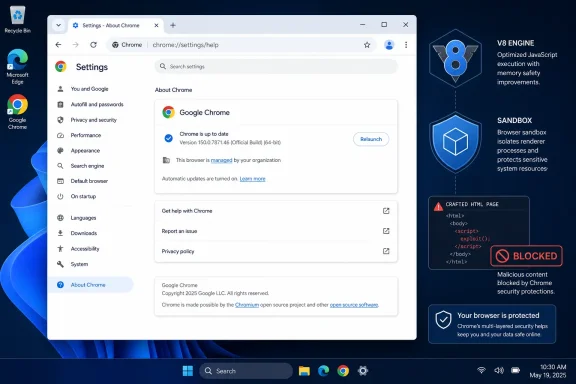
 CVE-2026-14403: Update Chrome to 150.0.7871.46 or Later and Relaunch
CVE-2026-14403 is a use-after-free vulnerability in Google Chrome’s V8 engine affecting versions earlier than 150.0.7871.46. The Chrome-originated description says a remote attacker could use a crafted HTML page to execute arbitrary code inside the browser sandbox. Chromium labels the issue Low severity, while the CISA Authorized Data Publisher assessment assigns a CVSS 3.1 score of 8.8 High and records no known exploitation in its SSVC data.Windows users should update Google Chrome to 150.0.7871.46 or later, relaunch the browser, and verify the version after it reopens. Administrators should deploy a fixed release through their established browser-management process and distinguish among devices where the version was installed, devices where Chrome was relaunched, and devices where the fixed version was verified after that relaunch.
This CVE applies to Google Chrome; it does not automatically apply to Microsoft Edge or every other Chromium-based browser or application.
Three boundaries are important at the outset:
- The supplied record does not confirm exploitation in the wild.
- It does not document a Chrome sandbox escape.
- It does not provide evidence of a broader Windows compromise.
chrome://settings/help, allow Chrome to check for an available update, and confirm that the displayed version is 150.0.7871.46 or later. If Chrome displays a Relaunch option, use it, and then return to the same page after Chrome reopens to verify the version again. These interface steps describe the normal Chrome update workflow; they are not procedural details established by the CVE or NVD record itself.Chrome’s Low-Severity Label Does Not Remove the Need to Update
CVE-2026-14403 is classified as CWE-416, Use After Free. This weakness occurs when software continues to reference a memory object after that object has been released. If the affected memory is reused while a stale reference remains, the program may behave unpredictably. Depending on the defect and surrounding conditions, the result can range from a crash to controlled execution.The Chrome-originated description states that a remote attacker could execute arbitrary code inside a sandbox by convincing a user to open a crafted HTML page. That description establishes a web-content attack path, required user interaction, and code execution within Chrome’s sandbox.
It does not describe CVE-2026-14403 as a Windows privilege-escalation vulnerability, a sandbox escape, or a complete operating-system takeover. The supplied material also does not establish that this vulnerability alone exposes local files, browser cookies, stored passwords, Windows credentials, or data belonging to other applications.
Those limits matter, but they do not make the issue irrelevant. Arbitrary code execution inside the browser sandbox is a concrete security outcome. The affected-version boundary is known, and a fixed-version threshold is available. Systems below that threshold should therefore be remediated without expanding the public description into unsupported claims about a full endpoint compromise.
The records present two different severity views. Chromium assigned the issue a Low severity, while CISA-ADP calculated a High CVSS score from its selected exploitability and impact metrics. The supplied public record does not explain the specific reasoning behind Chromium’s Low classification, so it would be speculative to attribute that label to a particular Chrome architecture feature, exploit prerequisite, or internal severity rule.
Administrators do not need to resolve that difference by creating a third severity rating. Both assessments can be recorded with their sources intact while remediation remains tied to the fixed version: Google Chrome 150.0.7871.46 or later.
Chromium and CISA-ADP Present Different Risk Views
The difference between Chromium’s Low classification and the CISA-ADP CVSS 3.1 score of 8.8 High is one of the most visible features of the public record. Security teams should preserve the attribution of each value rather than presenting them as if they came from the same scoring process.| Assessment | Published result | What the record establishes | Operational reading |
|---|---|---|---|
| Chromium security severity | Low | Chrome’s vendor-originated classification | Update affected Chrome installations despite the Low label |
| CISA-ADP CVSS 3.1 | 8.8 High | A contributed CVSS assessment using the published vector | Prioritize remediation of Chrome installations below the fixed threshold |
| CISA-ADP SSVC | Exploitation: none; automatable: no; technical impact: total | Decision-support values recorded by CISA-ADP | Remediate promptly without describing the issue as actively exploited |
CVSS:3.1/AV:N/AC:L/PR:N/UI:R/S:U/C:H/I:H/A:H. It records a network attack vector, low attack complexity, no privileges required, required user interaction, unchanged scope, and high potential effects on confidentiality, integrity, and availability.That vector explains how the contributed score reaches 8.8. It does not provide an exploit narrative or establish what information would necessarily be reachable from code executing inside Chrome’s sandbox. The individual CVSS impact values should not be converted into unsupported product-specific claims about access to passwords, cookies, files, or Windows resources.
The score displayed in the supplied NVD material is attributed to CISA-ADP. It should not be described as an independent NIST assessment. The accurate wording for an internal ticket, dashboard, or audit record is that CISA-ADP supplied the CVSS 3.1 score displayed in the NVD record.
The SSVC value “Exploitation: none” means that the contributed assessment did not identify evidence of exploitation at that time. It does not prove that exploitation is impossible or that the status cannot change. Likewise, “automatable: no” is a recorded decision-support value, not a detailed explanation of the technical conditions affecting exploit development.
The appropriate operational reading is concise: remediate the vulnerable Chrome version promptly, but do not represent the supplied record as evidence of an active attack campaign.
What the Public Description Says
V8 is the Chrome component identified in the vulnerability description. The public record says that a crafted HTML page can trigger the vulnerability and that successful exploitation can result in arbitrary code execution inside a sandbox.The user-interaction metric is consistent with that description. It establishes that successful exploitation requires an action by a user. The record does not quantify the complexity of that interaction, explain how a crafted page might reach a victim, or state how reliably the vulnerability can be triggered.
The supplied material does not include a public exploit recipe, proof-of-concept code, indicators of compromise, malicious domains, campaign details, or a documented vulnerability chain. It also does not establish that CVE-2026-14403 has been combined with another flaw.
Administrators do not need to fill those gaps with assumptions. The actionable facts are sufficient: the issue affects Google Chrome, the attack description involves crafted HTML content, versions earlier than 150.0.7871.46 are affected, and a fixed threshold has been identified.
Threat hunting should remain evidence-based. Generic browser crashes, ordinary JavaScript execution, or routine contact with unfamiliar websites cannot be presented as proof that CVE-2026-14403 was exploited. If Chrome, CISA, or another authoritative source later publishes indicators or confirms exploitation, organizations can adjust detection and response work at that time.
Version 150.0.7871.46 Is the Remediation Threshold
The supplied vulnerability material identifies Google Chrome versions earlier than 150.0.7871.46 as affected. That threshold is the reliable basis for compliance checks.It should not be expanded into an unsupported statement about the exact Stable Channel build for every operating system, release channel, or Chrome-derived product. For Windows systems covered by this article, the defensible instruction is to verify that Google Chrome reports 150.0.7871.46 or later.
For an individual Windows computer, the standard Chrome UI workflow is:
- Open Google Chrome.
- Enter
chrome://settings/helpin the address bar. - Allow Chrome to complete its update check.
- Confirm that the displayed version is 150.0.7871.46 or later.
- If Chrome presents a Relaunch option, select it.
- After Chrome reopens, return to
chrome://settings/help. - Confirm that Chrome still reports version 150.0.7871.46 or later.
If Chrome remains below the threshold, the computer should remain on the remediation list. In a managed environment, users should report the result through the normal support channel rather than assuming that opening the update page or attempting an update made the system compliant.
Administrators should record the following as separate compliance states:
- Version installed: Available inventory evidence reports Chrome 150.0.7871.46 or later.
- Browser relaunched: The browser has been closed and reopened after the update workflow.
- Post-restart version verified: Fresh evidence collected after the relaunch reports Chrome 150.0.7871.46 or later.
The strongest closure state is a fixed version verified after Chrome has been relaunched. Where management tooling cannot directly establish every state, the device should remain unverified until the organization obtains adequate version evidence through its normal operational process.
Chrome-Specific Fleet Checks
CVE-2026-14403 calls for a focused Chrome-remediation workflow. The main tasks are version inventory, compliance-state tracking, exception handling, and a defined remediation deadline.1. Build a product-specific version inventory
Inventory managed Windows devices with Google Chrome installed and group them by the latest reliable version evidence.At minimum, the report should distinguish among:
- Devices reporting Google Chrome 150.0.7871.46 or later.
- Devices reporting a Chrome version earlier than 150.0.7871.46.
- Devices with Chrome installed but no current version evidence.
- Devices that have not checked in recently enough to establish their status.
- Devices on which deployment or verification failed.
The inventory should also identify the product as Google Chrome rather than grouping all Chromium-derived software under one version rule. That prevents a Chrome-specific threshold from being applied to Edge, Electron applications, embedded components, or other products without vendor confirmation.
2. Track installation, relaunch, and verification separately
A useful fleet report should avoid reducing remediation to a single yes-or-no field. Record the strongest compliance state supported by available evidence.| Compliance state | Meaning | Required action |
|---|---|---|
| Below threshold | Chrome reports a version earlier than 150.0.7871.46 | Deploy or initiate a fixed release |
| Fixed version installed | Inventory reports 150.0.7871.46 or later, but the browser relaunch state has not been established | Complete or confirm the relaunch workflow |
| Browser relaunched | The browser was closed and reopened after the update workflow | Collect fresh version evidence |
| Post-restart version verified | Chrome reports 150.0.7871.46 or later after relaunch | Record as remediated |
| Status unknown | Available evidence is missing, stale, or inconclusive | Keep open pending verification |
| Verification failed | A current check still reports the vulnerable version or cannot confirm the fixed version | Investigate and remediate |
If an organization’s tooling records only the installed version, administrators can use that information while separately obtaining confirmation that Chrome was relaunched. If the tooling cannot reliably distinguish installation from an active browser session, the report should state that limitation rather than presenting an inferred restart as fact.
3. Track offline devices as exceptions
Laptops, virtual machines, shared systems, lab devices, and intermittently connected endpoints may not provide current evidence during the main deployment window. These systems should remain open exceptions until they reconnect and report sufficient evidence.An offline device is not automatically vulnerable because it may already have received the update. It is also not automatically compliant because its current Chrome version has not been verified. The accurate status is unknown pending evidence.
Each exception should include:
- Device identifier.
- Assigned owner or support group.
- Last-seen time.
- Last known Chrome version, if available.
- Current evidence state.
- Next follow-up action.
- Target date for verification.
4. Define a remediation deadline
Administrators should set a concrete deadline for reaching and verifying Chrome 150.0.7871.46 or later. The deadline should account for both update deployment and the evidence needed to close the device as remediated.The supplied record does not establish an active exploitation campaign, so this article does not characterize the issue as an ongoing mass attack. Even so, the known affected-version boundary and available fixed threshold support a prompt, finite remediation window rather than an open-ended recommendation.
After the deadline, every unresolved device should appear on an exception report with a documented reason and assigned next action. Aggregate compliance percentages can help management understand progress, but they should not replace a device-level list of systems that remain vulnerable or unverified.
Action checklist for administrators
- [ ] Inventory every managed Windows device with Google Chrome installed.
- [ ] Flag every reported Chrome version earlier than 150.0.7871.46.
- [ ] Deploy a fixed Chrome release through the organization’s established management process.
- [ ] Record “version installed,” “browser relaunched,” and “post-restart version verified” as distinct states where the available evidence supports them.
- [ ] Do not infer completion solely from an update assignment or successful deployment command.
- [ ] Obtain fresh version evidence after the Chrome relaunch workflow.
- [ ] Classify devices without current evidence as unverified rather than compliant.
- [ ] Assign owners and follow-up actions to offline or stale-device exceptions.
- [ ] Establish a clear remediation deadline.
- [ ] Escalate devices that remain below the threshold or unverified after that deadline.
- [ ] Consult the applicable vendor before applying Chrome’s threshold to another Chromium-based product.
Do Not Generalize Chrome’s Threshold to Every Chromium Product
The affected-product information supplied for CVE-2026-14403 identifies Google Chrome. Administrators should not automatically use Chrome’s fixed-version threshold to make compliance decisions for Microsoft Edge, other Chromium-based browsers, Electron applications, or products that embed Chromium components.Products that share upstream Chromium code may require review, but shared code ancestry does not establish an identical affected range, release schedule, product configuration, or fixed build. The relevant vendor’s security guidance should control the remediation decision for each separate product.
This distinction is particularly important in Windows environments where Chrome may be installed alongside Edge or another default browser. A device still requires Chrome review when Chrome is installed, even if users are expected to use a different browser. Conversely, the Chrome CVE record is not enough to mark every Chromium-derived application vulnerable.
| Product state | Required response |
|---|---|
| Google Chrome earlier than 150.0.7871.46 | Update, complete the relaunch workflow, and verify |
| Google Chrome 150.0.7871.46 or later, verified after relaunch | Record as remediated |
| Google Chrome installed but current version unverified | Keep open pending evidence |
| Other Chromium-based browser or application | Consult that product vendor’s guidance |
| Device offline or not recently inventoried | Track as an exception until verified |
Short Public-Record Timeline
The verified facts place the public-record activity on July 1, July 2, and July 3, 2026. Those dates are part of the supplied record and should not be dismissed as unsupported.This sequence matters because vulnerability dashboards can obscure attribution. A score displayed on an NVD page is not necessarily a score calculated by NIST. In this case, the 8.8 High assessment should remain attributed to CISA-ADP.Fact box: how the record developed
- July 1, 2026: CISA-ADP contributed the CVSS 3.1 vector and 8.8 High score, along with SSVC values recording exploitation as none, automatable as no, and technical impact as total.
- July 2, 2026: The NVD change record reflected additional affected-product configuration information for Google Chrome.
- July 3, 2026: The verified public record shows the vulnerability entry and its attributed enrichment in the published material, including the Chrome-originated description, affected-version information, and contributed CISA-ADP assessment.
- The supplied material did not show a separate NIST CVSS score.
The absence of a separate NIST score does not change the Chrome description, Chromium severity label, CISA-ADP assessment, or fixed-version threshold. It limits only how the displayed score should be described.
The timestamps and change history should be retained in source-level records when administrators need audit precision. For general operational reporting, the three dated stages above convey the important sequence without implying that all information came from a single publisher at one time.
Operational Interpretation of the Exploitation Status
The current recorded status supports vulnerability remediation rather than a claim of confirmed incident activity. Organizations should update Chrome, complete the relaunch workflow, verify the resulting version, and close or escalate exceptions by a defined deadline.The supplied material does not include CVE-specific indicators of compromise, exploit artifacts, malicious domains, process patterns, or campaign behavior. Security teams should therefore avoid creating detections based on unsupported assumptions about how attackers would deliver or operationalize the flaw.
If Chrome, CISA, NVD, or another authoritative source later publishes new exploitation information, indicators, or revised product guidance, administrators can adjust prioritization and detection work accordingly. Until then, removal of the affected Chrome version is the clearest available control.
The Bottom Line for Windows Users and Administrators
CVE-2026-14403 affects Google Chrome versions earlier than 150.0.7871.46 and can allow arbitrary code execution inside the browser sandbox through a crafted HTML page. Chromium classifies the vulnerability as Low, while CISA-ADP assigns an 8.8 High CVSS 3.1 score. The public record does not provide the internal rationale needed to reconcile those two labels, and organizations do not need to invent one.For users, standard Chrome UI guidance is to open
chrome://settings/help, allow the update check to complete, confirm version 150.0.7871.46 or later, use Relaunch if Chrome offers it, and verify the version again after Chrome reopens.For administrators, the required outcome is more precise than “deployment succeeded.” Track whether the fixed version was installed, whether the browser was relaunched, and whether a fresh post-restart check verified version 150.0.7871.46 or later. Treat missing or stale evidence as unverified, maintain a device-level exception list, and use the organization’s established management process without assuming that every platform provides identical browser-state or restart controls.
The severity labels may remain visually inconsistent, but the remediation line is clear. Any managed Windows installation still reporting Google Chrome earlier than 150.0.7871.46 should remain open for action. Any installation without adequate current evidence should remain open for verification. As additional vendor guidance or exploitation information emerges, organizations can refine their response, but the immediate objective remains unchanged: move affected Chrome installations to the fixed threshold and verify the result.
References
- Primary source: NVD / Chromium
Published: 2026-07-11T15:37:47-07:00
NVD - CVE-2026-14403
 nvd.nist.gov
- Security advisory: MSRC
Published: 2026-07-11T15:37:47-07:00
Original feed URL
Security Update Guide - Microsoft Security Response Center
 msrc.microsoft.com