

 CVE-2026-14415: Update Chrome Past 150.0.7871.46—and Verify the Full Version After Relaunch
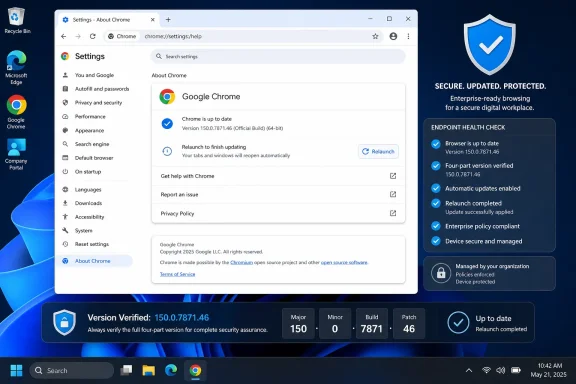
Google fixed CVE-2026-14415 in Google Chrome 150.0.7871.46. Chrome installations below that complete four-part version are within the affected range identified by the National Vulnerability Database record. Do not use “Chrome 150” as compliance evidence; verify that Chrome reports 150.0.7871.46 or later after it has relaunched.The vulnerability involves V8, crafted HTML, required user-interface gestures, and potential heap corruption. Chromium rates it Low, while CISA-ADP contributed a CVSS 3.1 score of 8.8, or High. The contributed Stakeholder-Specific Vulnerability Categorization assessment lists exploitation as none and automatable as no.
Action required
- Windows users: Open Chrome’s three-dot menu → Help → About Google Chrome. Allow Chrome to check for and apply its update, select Relaunch if offered, and then return to the page to confirm that the complete displayed version is 150.0.7871.46 or later.
- Administrators: Inventory Google Chrome by its complete version, update every installation below 150.0.7871.46, arrange the required relaunch, and collect fresh version evidence afterward.
- Compliance warning: Do not treat Chrome 150, an update assignment, or a downloaded update as proof of remediation. The required evidence is the full four-part version after relaunch.
A Low-Rated Chrome Flaw With a High-Impact Failure Mode
According to the National Vulnerability Database record for CVE-2026-14415, Google Chrome versions before 150.0.7871.46 contain an implementation flaw in V8 through which a remote attacker could convince a user to visit a crafted HTML page and perform specific user-interface gestures, potentially resulting in heap corruption.The interaction requirement is an important constraint. The public description does not say that the vulnerable condition is triggered merely by loading a page. The contributed CISA-ADP CVSS vector also records that user interaction is required, while the supplied SSVC assessment lists exploitation as none and automatable as no.
The possible result—heap corruption—still makes the vulnerability security-relevant. Heap corruption occurs when software improperly alters memory allocated during execution, potentially damaging nearby data or internal program structures. It is a meaningful software failure even when reaching the vulnerable condition requires user participation.
CISA-ADP associated CVE-2026-14415 with CWE-122, Heap-based Buffer Overflow. That weakness classification identifies the general memory-safety category. It does not, by itself, provide a complete exploit sequence or establish every possible consequence of successful exploitation.
The operational conclusion is straightforward: affected Chrome installations should be updated to the corrected version boundary and verified after relaunch. Administrators do not need to reconstruct the restricted technical details before acting.
Why Chromium’s Low Rating and CISA-ADP’s 8.8 Can Coexist
The National Vulnerability Database displays a CISA-ADP CVSS 3.1 assessment using the vectorAV:N/AC:L/PR:N/UI:R/S:U/C:H/I:H/A:H, producing a base score of 8.8 High. That attribution matters: CISA-ADP contributed the score, while the supplied NVD record did not contain a separate NVD-authored or NIST-authored CVSS assessment.The vector models a network attack vector, low attack complexity, no privileges required, required user interaction, unchanged scope, and high potential effects on confidentiality, integrity, and availability. It is a standardized severity model rather than a detailed description of a working exploit.
Chromium’s Low rating and the contributed 8.8 High score therefore should be preserved as separate assessments:
| Assessment source | Published rating or status | Key distinction |
|---|---|---|
| Chromium | Low | Vendor severity classification for the Chrome vulnerability |
| CISA-ADP CVSS 3.1 | 8.8 High | Contributed standardized score displayed by NVD |
| CISA-ADP SSVC | Exploitation: none; automatable: no | Contributed decision-support values |
| NVD/NIST CVSS | No separate assessment in the supplied record | NVD displays the CISA-ADP score but did not author it |
| Weakness classification | CWE-122 | Heap-based buffer-overflow category |
Likewise, the 8.8 score does not report attack prevalence. The supplied SSVC entry lists exploitation as none. That supports a measured update response rather than an announcement that active exploitation has been confirmed.
Administrators do not need to choose one severity label and discard the other. The corrected-version boundary supplies the clearer operational rule: Google Chrome below 150.0.7871.46 requires remediation.
NVD Displays a Contributed Score, Not an Independent NIST Assessment
The 8.8 High score shown in the NVD record was contributed by CISA-ADP. The record does not establish a separate NIST CVSS 4.0, CVSS 3.x, or CVSS 2.0 assessment for this vulnerability.Internal tickets, scanner annotations, dashboards, and executive reports should preserve that provenance. Accurate wording is:
- Chromium rates CVE-2026-14415 Low.
- CISA-ADP contributed the 8.8 High CVSS 3.1 score displayed by NVD.
- The supplied record does not include an independently authored NVD or NIST CVSS score.
- CISA-ADP’s SSVC assessment lists exploitation as none and automatable as no.
A useful remediation record should retain these fields separately:
- Chromium’s Low severity classification.
- The CISA-ADP CVSS 3.1 score, vector, and attribution.
- The CISA-ADP SSVC exploitation and automation values.
- Google Chrome as the named affected product.
- The full fixed-version boundary of 150.0.7871.46.
- The requirement for user interaction.
- The need for post-relaunch version verification.
The User-Gesture Requirement Is a Constraint, Not a Technical Explanation
The public description says an attacker must convince the user to perform specific user-interface gestures on a crafted HTML page. That establishes a requirement for user action, but it does not identify the gestures or explain why they are necessary.The requirement is reflected in the contributed CVSS vector’s
UI:R selection. CISA-ADP’s SSVC entry also categorizes the issue as not automatable and lists exploitation as none.Those facts provide useful prioritization context, but they do not remove the need to update. The corrected build is available as a clear and measurable remediation target. Organizations can deploy it without inventing a detailed social-engineering scenario or technical trigger sequence.
The most defensible security notice is therefore concise: user interaction is required, no exploitation is identified in the supplied SSVC assessment, and Chrome versions below the fixed boundary should still be updated promptly.
Version 150.0.7871.46 Is the Security Boundary
Google Chrome versions before 150.0.7871.46 are within the affected range for CVE-2026-14415. Version 150.0.7871.46 itself, and numerically later versions, meet the stated remediation threshold.The major release number is not sufficient. A device reporting only “Chrome 150” has not provided enough information to establish compliance. Users and administrators must compare the complete version:
| Reported Chrome version | Status |
|---|---|
| Below 150.0.7871.46 | Within the documented affected range |
| Exactly 150.0.7871.46 | Meets the fixed-version boundary |
| Later than 150.0.7871.46 | Outside the documented affected range |
| “Chrome 150” without the remaining components | Insufficient evidence |
| Missing, stale, or conflicting result | Unknown; keep the finding open |
The NVD record names Google Chrome only. Do not assign its 150.0.7871.46 threshold to Microsoft Edge or another Chromium-derived product without that vendor’s advisory.
Updating another browser also does not remediate an outdated Google Chrome installation on the same Windows computer. If Chrome is present, its own complete version must be checked independently of the Windows default-browser setting.
Exact Windows User Procedure: Update, Relaunch, Verify
Google Chrome Help’s standard desktop update guidance directs users to the browser’s About Google Chrome page, where Chrome checks for updates and presents a Relaunch option when a restart is required to apply an available update.Windows users should follow this process:
- Open Google Chrome.
- Select the three-dot menu in the upper-right corner.
- Select Help.
- Select About Google Chrome.
- Allow Chrome to complete its update check and apply any available update.
- If Chrome displays Relaunch, save necessary work and select it.
- After Chrome reopens, return to the three-dot menu → Help → About Google Chrome.
- Read the complete version displayed beneath the Google Chrome heading.
- Confirm that the version is 150.0.7871.46 or later.
chrome://settings/help in Chrome’s address bar to open the same settings page. The menu path is the procedure explicitly described by Google Chrome Help; the internal address is a convenient direct route to that page.The last verification step is essential. Seeing that an update is available does not prove remediation. Starting an update does not prove remediation. Even seeing a major-version label of Chrome 150 does not prove remediation.
The useful closure evidence is the full version shown after Chrome has reopened.
If Chrome continues to report a version below 150.0.7871.46, the installation remains within the affected range. On a managed computer, users should follow their organization’s support process if browser policies prevent them from completing the update.
Chrome must also be checked separately from Windows Update. A current Windows patch level does not, by itself, establish the installed version of Google Chrome.
Product Scope Must Remain Specific
The affected-product information in this CVE record identifies Google Chrome. That is the supported scope for this article.Administrators should avoid two unsupported conclusions:
- Do not automatically assign CVE-2026-14415 to Microsoft Edge or another product merely because it may use related technology.
- Do not copy Chrome’s fixed-version number into another vendor’s compliance rule.
Until then, this article’s compliance rule remains specific: identify Google Chrome installations and verify that each one reports version 150.0.7871.46 or later after the update and relaunch workflow.
This includes computers where Chrome is installed but is not the default browser. The CVE scope is determined by whether the affected product is present, not by which browser Windows opens by default.
Timeline of the NVD Record
The supplied NVD record supports a precise sequence of publication, submission, enrichment, and analysis events. These timestamps describe the public vulnerability record. They should not be converted into unsupported claims about when Google discovered the flaw, completed the patch, or first delivered the corrected browser to every platform.July 1, 2026 — NVD publication: The National Vulnerability Database published the CVE-2026-14415 record.
July 1, 2026, at 7:16:49 PM — Chrome submission: The record identifies the Chrome submission at this time.
July 2, 2026, at 1:16:59 PM — CISA-ADP modification: CISA-ADP modified the record, contributing assessment information that includes the CVSS 3.1 score and SSVC values.
July 2, 2026, at 2:40:42 PM — NIST analysis: NIST added its analysis and affected-product configuration information to the NVD record.
The sequence is important primarily because it preserves attribution. Chrome supplied the core CVE information. CISA-ADP supplied the displayed CVSS and SSVC assessments. NIST subsequently added analysis within NVD.
A value appearing on an NVD page is not necessarily authored by NVD or NIST. For CVE-2026-14415, the 8.8 score must remain attributed to CISA-ADP.
Managed Windows Fleets Need Current Version Evidence
The administrative objective is measurable: identify every managed Google Chrome installation below 150.0.7871.46, deploy an approved corrected version, arrange a relaunch, and obtain fresh version evidence.The CVE record does not prescribe a particular endpoint-management product, command, policy, registry query, update service, or inventory field. Organizations should use their established management processes while keeping the closure criterion independent of the tooling.
A practical fleet workflow is:
- Identify Chrome installations. Search the managed estate for computers on which Google Chrome is installed. Do not limit the search to computers where Chrome is the default browser.
- Collect complete versions. Obtain the full installed version together with the device identity and collection time. A report containing only “Chrome 150” is incomplete.
- Classify the evidence. Mark versions below 150.0.7871.46 as affected. Mark 150.0.7871.46 and later as meeting the supplied boundary. Keep missing, stale, contradictory, or truncated results in an unknown state.
- Deploy the update. Use the organization’s established browser-management, software-distribution, or endpoint-management process to move affected installations to an approved version at or above the boundary.
- Arrange the relaunch. Notify users that Chrome must be relaunched when the browser presents the option, or apply the organization’s approved restart workflow.
- Collect fresh evidence. Re-run the version inventory after the remediation window. The resulting record should show the complete Chrome version as 150.0.7871.46 or later.
- Verify exceptions directly. When management data is unclear, have the user or support technician open Help → About Google Chrome, complete the update and relaunch, and report the full displayed version.
- Track unresolved devices. Assign owners and follow-up dates for offline systems, failed updates, stale inventory, policy conflicts, and computers that remain below the threshold.
The CVE-specific closure question is not whether a deployment system displayed a green status. It is whether fresh evidence shows that the Google Chrome installation is now 150.0.7871.46 or later.
Action checklist for administrators
- Inventory managed endpoints on which Google Chrome is installed.
- Collect the complete four-part version, device identity, and evidence timestamp.
- Flag every Chrome version below 150.0.7871.46.
- Treat major-version-only, missing, stale, or conflicting results as unresolved.
- Deploy an approved Chrome release at or above 150.0.7871.46.
- Arrange the browser relaunch required to complete the update.
- Re-query Chrome versions after the remediation window.
- Directly verify unclear exceptions through Help → About Google Chrome.
- Keep devices below the boundary in the remediation queue.
- Assign owners to offline endpoints, failed updates, policy conflicts, and stale inventory.
- Preserve Chromium’s Low rating and CISA-ADP’s 8.8 High score as separate attributed assessments.
- Record that the supplied SSVC assessment lists exploitation as none and automatable as no.
- Do not describe the 8.8 score as NVD-authored or NIST-authored.
- Do not use Chrome 150 alone as compliance evidence.
- Do not apply Chrome’s version threshold to Edge or another product without that vendor’s advisory.
- Close the finding only when current evidence reports 150.0.7871.46 or later.
What Is Not Public
The public material does not disclose the exact user-interface gestures, the vulnerable V8 operation, the affected heap object, the reliability of triggering the memory corruption, a proof of concept, or CVE-specific indicators of compromise.It also does not establish a Chrome sandbox escape, complete Windows takeover, host-level persistence, or a broader exploit chain. Those outcomes should not be attached to CVE-2026-14415 without additional evidence.
The restricted Chromium issue does not change that reporting boundary. It confirms that public access to the underlying issue is limited, but it does not explain why access is restricted or supply the missing technical details.
These limitations should be stated once rather than repeated throughout every section. They constrain exploit reporting, but they do not obstruct remediation: the affected product and corrected-version boundary are already known.
Version-Based Remediation Is the Available Control
The supplied record does not identify a CVE-specific configuration change, detection signature, malicious domain, file hash, or network indicator that can substitute for installing a corrected Chrome version.Generic browser crashes, unfamiliar websites, or routine script activity should not be labeled as exploitation of CVE-2026-14415 without supporting evidence. Conversely, the absence of an alert does not establish that an older Chrome installation is safe.
The defensible control is therefore version-based:
- Find Google Chrome.
- Determine its complete version.
- Update it if it is below 150.0.7871.46.
- Relaunch the browser.
- Collect fresh evidence showing 150.0.7871.46 or later.
- Keep unknown or failed devices open until they can be resolved.
The Practical Answer Is Full-Version Proof
CVE-2026-14415 is not presented in the supplied record as an actively exploited emergency. It also should not be left unpatched merely because Chromium assigned a Low severity rating.The NVD record establishes a Google Chrome vulnerability involving V8, crafted HTML, required user-interface gestures, and potential heap corruption. Chromium rates it Low. CISA-ADP contributed an 8.8 High CVSS 3.1 score and an SSVC assessment listing exploitation as none and automatable as no. NVD displays those contributed values, but the supplied record does not contain a separate NVD-authored or NIST-authored CVSS assessment.
For Windows users, the response is direct: open Help → About Google Chrome, allow the update to complete, select Relaunch if offered, and verify that the complete version shown after Chrome reopens is 150.0.7871.46 or later.
For administrators, the goal is equally concrete: inventory Google Chrome as a specific product, remediate every installation below the threshold, arrange the relaunch, collect fresh version evidence, and keep unknown or failed endpoints open until their status is established.
The strongest WindowsForum operational lesson is not the disagreement between Low and High. It is the difference between an assumed update and a verified result. Chrome 150 is not proof. An update assignment is not proof. The compliance evidence is the complete four-part Chrome version—150.0.7871.46 or later—verified after relaunch.
References
- Primary source: NVD / Chromium
Published: 2026-07-11T15:38:03-07:00
NVD - CVE-2026-14415
 nvd.nist.gov
- Security advisory: MSRC
Published: 2026-07-11T15:38:03-07:00
Original feed URL
Security Update Guide - Microsoft Security Response Center
 msrc.microsoft.com
- Related coverage: security.snyk.io
CVE-2026-14415 in chromium | CVE-2026-14415 | Snyk
CVE-2026-14415 in chromium | CVE-2026-14415security.snyk.io