

CVE-2026-14428 affects Google Chrome on Android versions earlier than 150.0.7871.46. The remediation is direct: update Chrome on Android to version 150.0.7871.46 or later and verify the installed version afterward.
The vulnerability is a potential sandbox escape that requires the attacker to have already compromised Chrome’s renderer process. It is therefore not confirmed as a stand-alone compromise triggered solely by visiting a malicious page. CISA-ADP assigned it a CVSS 3.1 base score of 8.3, rated High, and recorded exploitation as “none,” automation as “no,” and technical impact as “total.”
For Windows administrators, the scope boundary is equally important: the supplied record confirms Chrome on Android only. Chrome for Windows, Microsoft Edge, and other Chromium-based browsers should not be marked affected unless their vendors publish their own applicability statements.
The confirmed affected product is Google Chrome on Android below version 150.0.7871.46.
The attack conditions explain why the score is High without establishing an instant takeover. The recorded CVSS 3.1 vector is AV:N/AC:H/PR:N/UI:R/S:C/C:H/I:H/A:H. In practical terms:
The network attack vector is consistent with delivery through crafted web content. User interaction is required because the target must interact with or render the attacker-controlled content. No prior privileges are required from the attacker, but the high-complexity rating reflects the additional condition that the Chrome renderer process must already be compromised.
The changed-scope metric is central to the score. A renderer compromise begins inside a constrained security context. A successful sandbox escape crosses beyond that context, which is why the potential impact is broader than the impact of code execution that remains contained inside the renderer.
CISA-ADP’s Stakeholder-Specific Vulnerability Categorization data expresses the same risk in a different format:
“Automatable: no” is consistent with an attack that requires user interaction and conditions beyond simply sending a request to a vulnerable device. It does not mean that no part of a future exploit chain could be automated.
“Technical impact: total” describes the potential consequences of successful exploitation. It does not erase the high-complexity requirement or the renderer prerequisite. The complete assessment is therefore more useful than either of the oversimplified conclusions that commonly follow a severity score: “High means immediate remote takeover” or “High complexity means it can be ignored.”
The appropriate operational reading is narrower: update the affected Android browser promptly, but report the attack conditions accurately.
That makes this a potential second-stage vulnerability. The public record does not identify the first-stage flaw, technique, or exploit that would provide renderer control. It also does not establish that CVE-2026-14428 alone can compromise the renderer.
A complete attack could therefore require at least two distinct capabilities:
Reporting should preserve that distinction. Describing the CVE as a confirmed stand-alone remote takeover would omit the prerequisite. Describing it as harmless because another stage is needed would ignore the purpose of defense in depth.
The supplied record supports the following formulation:
The record classifies the issue as CWE-20, Improper Input Validation. That classification establishes a validation weakness at a broad level, but it does not identify the exact input, object, operation, or internal failure involved. Without accessible technical details, administrators should avoid filling that gap with assumptions about graphics commands, memory corruption, native backends, serialization, or any other implementation mechanism not established by the record.
The restricted issue reference likewise means the public material is sufficient for version-based remediation but not necessarily for a complete root-cause analysis. The absence of public implementation detail is a reason to limit technical claims, not a reason to delay deployment of the fixed version.
After the update finishes, verify the version instead of assuming that the attempted update completed:
If Chrome remains below the threshold, reopen the Play Store and check whether the update is still pending. Also confirm that the device has a working network connection and sufficient storage for application updates. Do not close the remediation ticket merely because an update command was initiated; close it after the installed version has been verified.
This is an application-version remediation. The affected-product record associates Chrome with Android because Android is the operating platform, but the stated fixed boundary is a Chrome version. An Android operating-system update should not be substituted for confirmation that the Chrome application itself reached the fixed release.
Administrators should also keep application and operating-system findings separate. For this CVE, a current Android security patch level does not by itself prove that Chrome has been updated. In the other direction, Chrome 150.0.7871.46 or later resolves the recorded version exposure for this CVE but does not prove that the Android operating system, firmware, or other applications are fully patched.
Where an organization cannot obtain reliable Chrome version data, it should document that as an inventory limitation. The safe response is not to assume every Android device is vulnerable indefinitely or to assume every update succeeded. The response is to improve collection until product, platform, and version can be matched.
A product-name match alone is not enough. A scanner that detects “Google Chrome” must still determine whether the software is the Android application covered by the vulnerable range. A platform match alone is also not enough; an Android device is not affected merely because it runs Android if the relevant Chrome version is not installed.
The bounded applicability rule is:
The same restriction applies to version comparisons. Another browser displaying a version number equal to or higher than 150.0.7871.46 is not automatically fixed for this CVE. Product versions cannot be treated as interchangeable unless the relevant vendor ties its release to the vulnerability.
This distinction is particularly important in vulnerability-management systems that normalize products into broad families. “Chromium-based browser” may be a useful inventory category, but it is too broad to serve as the final applicability determination for a CVE whose supplied record names a specific product and operating platform.
A Windows device should not be marked affected merely because it has Chrome installed. The supplied record confirms Chrome on Android below the fixed version. It does not confirm Chrome on Windows.
Microsoft Edge should likewise not be marked affected merely because Edge is Chromium-based. The existence of a related upstream implementation does not answer whether a specific code path exists in Edge, whether it is reachable on Windows, whether Microsoft already applied a fix, or whether the affected implementation was included in the relevant release.
The same rule applies to every other downstream browser: wait for that browser’s vendor to publish an applicability determination, security advisory, release note, or fixed-version statement.
A practical scanner-validation workflow is:
The article’s WindowsForum angle is therefore asset precision. Windows administrators often manage identity, endpoint, cloud-access, and incident-response systems that extend beyond Windows PCs. They may need to remediate Chrome on corporate Android devices while simultaneously suppressing unsupported Chrome-for-Windows and Edge findings.
A valid Windows exception should state why the CVE is not applicable rather than merely labeling it a false positive. For example:
A release page, CVE description, CPE configuration, and version range serve related but different purposes. A page title may describe a release channel or publication context, while the affected-product data defines the platform and versions associated with the vulnerability.
For remediation, the strongest supplied applicability statement remains:
When database metadata appears inconsistent, check the conjunction of the product description, platform configuration, and affected-version range. If uncertainty remains for a product outside the confirmed Android scope, seek a statement from that product’s vendor.
Calling the flaw simply “remote code execution” can obscure that distinction. A complete chain may involve code execution, but that does not prove this individual CVE supplies every stage of the chain.
For ticket titles, dashboards, and executive summaries, use language that preserves the prerequisite. Suitable descriptions include:
The exploitation status also needs careful wording. CISA-ADP recorded exploitation as “none.” The article should therefore say that no exploitation was recorded in that assessment, not that Google or CISA proved no exploitation had occurred anywhere.
Likewise, the record does not support calling the issue a zero-day exploited in the wild. If a later vendor advisory, CISA catalog entry, or threat-intelligence report changes that status, administrators can update their assessment. Until then, the article should retain the recorded status.
CISA-ADP enrichment — CISA-ADP added the CVSS 3.1 vector and the 8.3 High base score. It also supplied the SSVC values recording exploitation as none, automation as no, and technical impact as total.
NIST analysis — NIST added affected-product configuration data associating the vulnerable Chrome application with Android and classified the supplied references.
Later metadata adjustment — A later change adjusted SSVC-related metadata without changing the substantive exploitation, automation, or technical-impact values.
The sequence matters because vulnerability records can look different depending on when they are viewed. One organization may first ingest only the product description and affected version. Another may ingest the record after a score and platform configuration have been added.
A database modification is not automatically a new disclosure, a new exploit, or a change in severity. Administrators should examine which fields changed before escalating a ticket based on an updated timestamp.
The same discipline applies to attribution. The numerical 8.3 score should be attributed to CISA-ADP. It should not be presented as a separate NIST severity conclusion if the supplied record does not contain an NVD-authored score.
For a confirmed affected device, record:
This documentation prevents a later database update from creating confusion. If a vendor expands the affected scope, the organization can identify which exceptions need review. If the scope remains Android-only, the organization retains a defensible explanation for why desktop findings were not treated as confirmed exposure.
At the same time, priority should not be justified with unsupported claims. The supplied record does not establish a self-contained exploit, active exploitation, broad automation, or applicability to every Chromium-derived product.
Local priority can still vary within the confirmed Android population. An Android device used to access organizational resources may carry greater business exposure than a device with no organizational access. That is a local risk distinction, not a change to the CVE’s technical severity or fixed-version requirement.
The minimum defensible response is the same in either case:
The best outcome is not the largest possible list of allegedly affected browsers. It is a verified list of affected Android installations, a verified deployment of Chrome 150.0.7871.46 or later, and a documented rule that prevents shared Chromium ancestry from turning into unsupported Windows findings.
The vulnerability is a potential sandbox escape that requires the attacker to have already compromised Chrome’s renderer process. It is therefore not confirmed as a stand-alone compromise triggered solely by visiting a malicious page. CISA-ADP assigned it a CVSS 3.1 base score of 8.3, rated High, and recorded exploitation as “none,” automation as “no,” and technical impact as “total.”
For Windows administrators, the scope boundary is equally important: the supplied record confirms Chrome on Android only. Chrome for Windows, Microsoft Edge, and other Chromium-based browsers should not be marked affected unless their vendors publish their own applicability statements.
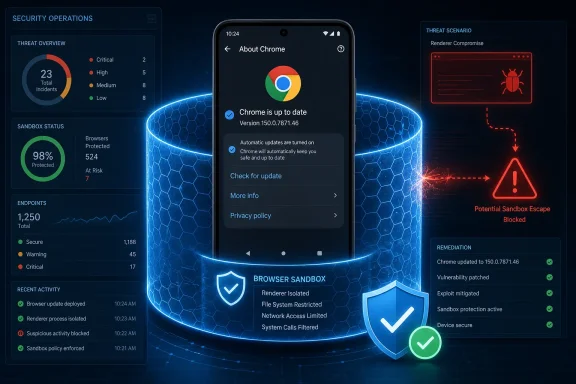 Direct Answer: Who Is Affected and What Should They Do?
The confirmed affected product is Google Chrome on Android below version 150.0.7871.46.| Deployment state | Chrome on Android version | CVE-2026-14428 status | Required action |
|---|---|---|---|
| Below the fixed threshold | Earlier than 150.0.7871.46 | Affected | Update Chrome and verify the installed version |
| At the fixed threshold | 150.0.7871.46 | Fixed for this CVE | Record successful remediation |
| Above the fixed threshold | Later than 150.0.7871.46 | Not affected by the recorded vulnerable range | Continue normal update verification |
| Chrome on Windows, Edge, or another Chromium browser | Any version | Not established by the supplied record | Await a product-specific vendor applicability statement |
- The attack can be delivered over a network.
- It does not require the attacker to begin with authenticated privileges.
- User interaction is required.
- Attack complexity is High.
- The renderer must already have been compromised.
- Successful exploitation can cross a security boundary.
- The potential effects on confidentiality, integrity, and availability are each rated High.
What the 8.3 High Rating Actually Means
The CISA-ADP assessment gives CVE-2026-14428 a CVSS 3.1 base score of 8.3, or High. That number reflects both the barriers to exploitation and the potential consequences of success.The network attack vector is consistent with delivery through crafted web content. User interaction is required because the target must interact with or render the attacker-controlled content. No prior privileges are required from the attacker, but the high-complexity rating reflects the additional condition that the Chrome renderer process must already be compromised.
The changed-scope metric is central to the score. A renderer compromise begins inside a constrained security context. A successful sandbox escape crosses beyond that context, which is why the potential impact is broader than the impact of code execution that remains contained inside the renderer.
CISA-ADP’s Stakeholder-Specific Vulnerability Categorization data expresses the same risk in a different format:
- Exploitation: none
- Automatable: no
- Technical impact: total
“Automatable: no” is consistent with an attack that requires user interaction and conditions beyond simply sending a request to a vulnerable device. It does not mean that no part of a future exploit chain could be automated.
“Technical impact: total” describes the potential consequences of successful exploitation. It does not erase the high-complexity requirement or the renderer prerequisite. The complete assessment is therefore more useful than either of the oversimplified conclusions that commonly follow a severity score: “High means immediate remote takeover” or “High complexity means it can be ignored.”
The appropriate operational reading is narrower: update the affected Android browser promptly, but report the attack conditions accurately.
The Renderer Prerequisite Limits What the Record Establishes
The supplied description states that the attacker must already have compromised the renderer process before potentially using CVE-2026-14428 to escape the sandbox.That makes this a potential second-stage vulnerability. The public record does not identify the first-stage flaw, technique, or exploit that would provide renderer control. It also does not establish that CVE-2026-14428 alone can compromise the renderer.
A complete attack could therefore require at least two distinct capabilities:
- A way to compromise or control the renderer process.
- A way to use CVE-2026-14428 to cross the sandbox boundary.
Reporting should preserve that distinction. Describing the CVE as a confirmed stand-alone remote takeover would omit the prerequisite. Describing it as harmless because another stage is needed would ignore the purpose of defense in depth.
The supplied record supports the following formulation:
That statement captures the delivery method, prerequisite, boundary-crossing consequence, and affected platform without asserting an unsupported exploit mechanism.CVE-2026-14428 is a High-severity vulnerability in Chrome on Android that may permit a sandbox escape through crafted HTML after the attacker has already compromised the renderer process.
The record classifies the issue as CWE-20, Improper Input Validation. That classification establishes a validation weakness at a broad level, but it does not identify the exact input, object, operation, or internal failure involved. Without accessible technical details, administrators should avoid filling that gap with assumptions about graphics commands, memory corruption, native backends, serialization, or any other implementation mechanism not established by the record.
The restricted issue reference likewise means the public material is sufficient for version-based remediation but not necessarily for a complete root-cause analysis. The absence of public implementation detail is a reason to limit technical claims, not a reason to delay deployment of the fixed version.
Remediation for Individual Android Users
Google’s official Play Help instructions provide a concrete path for manually updating an Android application:- Open the Google Play Store.
- Tap the profile icon in the upper-right corner.
- Tap Manage apps & device.
- Under Updates available, tap See details.
- Find Google Chrome.
- Tap Update next to Chrome.
After the update finishes, verify the version instead of assuming that the attempted update completed:
- Open Chrome.
- Tap the three-dot More menu.
- Tap Settings.
- Tap About Chrome.
- Confirm that the displayed application version is 150.0.7871.46 or later.
If Chrome remains below the threshold, reopen the Play Store and check whether the update is still pending. Also confirm that the device has a working network connection and sufficient storage for application updates. Do not close the remediation ticket merely because an update command was initiated; close it after the installed version has been verified.
This is an application-version remediation. The affected-product record associates Chrome with Android because Android is the operating platform, but the stated fixed boundary is a Chrome version. An Android operating-system update should not be substituted for confirmation that the Chrome application itself reached the fixed release.
Enterprise Remediation Should Be Based on Installed State
Enterprise administrators should start with the same fixed boundary and apply it to verified device inventory.Action checklist for admins
- Identify Android devices on which Google Chrome is installed.
- Collect the installed Chrome application version from each device.
- Flag every installation earlier than 150.0.7871.46.
- Approve or deploy the current Chrome release through the organization’s authorized application-management process.
- Re-query installed versions after deployment.
- Investigate devices that remain below 150.0.7871.46.
- Record the verified version and verification time in the remediation ticket.
- Validate scanner findings against the Android platform requirement.
- Do not assign this CVE to Windows browsers based only on the words “Chrome,” “Chromium,” or a shared component name.
- Monitor the relevant vendor and NVD records for later changes to affected-product scope or exploitation status.
Administrators should also keep application and operating-system findings separate. For this CVE, a current Android security patch level does not by itself prove that Chrome has been updated. In the other direction, Chrome 150.0.7871.46 or later resolves the recorded version exposure for this CVE but does not prove that the Android operating system, firmware, or other applications are fully patched.
Where an organization cannot obtain reliable Chrome version data, it should document that as an inventory limitation. The safe response is not to assume every Android device is vulnerable indefinitely or to assume every update succeeded. The response is to improve collection until product, platform, and version can be matched.
Applicability Is Chrome on Android Unless a Vendor Says Otherwise
The affected configuration in the supplied record identifies Google Chrome running on Android. That conjunction matters.A product-name match alone is not enough. A scanner that detects “Google Chrome” must still determine whether the software is the Android application covered by the vulnerable range. A platform match alone is also not enough; an Android device is not affected merely because it runs Android if the relevant Chrome version is not installed.
The bounded applicability rule is:
The supplied record does not establish that the following products are affected:Mark CVE-2026-14428 as confirmed only when the asset is running Google Chrome on Android at a version earlier than 150.0.7871.46, unless a vendor later publishes an expanded or revised applicability statement.
- Google Chrome for Windows
- Google Chrome for macOS
- Google Chrome for Linux
- Microsoft Edge
- Other Chromium-derived desktop browsers
- Other Chromium-derived Android browsers
- Embedded browser components
- Android WebView
- Products that contain similarly named libraries or files
The same restriction applies to version comparisons. Another browser displaying a version number equal to or higher than 150.0.7871.46 is not automatically fixed for this CVE. Product versions cannot be treated as interchangeable unless the relevant vendor ties its release to the vulnerability.
This distinction is particularly important in vulnerability-management systems that normalize products into broad families. “Chromium-based browser” may be a useful inventory category, but it is too broad to serve as the final applicability determination for a CVE whose supplied record names a specific product and operating platform.
Preventing False Positives in Windows Environments
WindowsForum readers may encounter CVE-2026-14428 in dashboards that also inventory Windows endpoints. The correct response is validation, not automatic fleet-wide assignment.A Windows device should not be marked affected merely because it has Chrome installed. The supplied record confirms Chrome on Android below the fixed version. It does not confirm Chrome on Windows.
Microsoft Edge should likewise not be marked affected merely because Edge is Chromium-based. The existence of a related upstream implementation does not answer whether a specific code path exists in Edge, whether it is reachable on Windows, whether Microsoft already applied a fix, or whether the affected implementation was included in the relevant release.
The same rule applies to every other downstream browser: wait for that browser’s vendor to publish an applicability determination, security advisory, release note, or fixed-version statement.
A practical scanner-validation workflow is:
- Check the product. Is the finding attached to Google Chrome itself or to a generic Chromium family?
- Check the platform. Is the asset an Android device?
- Check the version. Is Chrome earlier than 150.0.7871.46?
- Check the evidence. Did the scanner observe the installed application version, or did it infer exposure from a broad product signature?
- Check vendor applicability. If the product is not Chrome on Android, has that product’s vendor independently confirmed exposure?
- Classify the result. Record it as confirmed, remediated, not applicable, or pending vendor determination.
The article’s WindowsForum angle is therefore asset precision. Windows administrators often manage identity, endpoint, cloud-access, and incident-response systems that extend beyond Windows PCs. They may need to remediate Chrome on corporate Android devices while simultaneously suppressing unsupported Chrome-for-Windows and Edge findings.
A valid Windows exception should state why the CVE is not applicable rather than merely labeling it a false positive. For example:
That wording is auditable and can be revisited if the vendor later changes the affected-product scope.The supplied CVE configuration identifies Google Chrome on Android earlier than 150.0.7871.46. This asset runs Chrome on Windows, and no product-specific statement supplied with the finding confirms Windows applicability.
Keep the Advisory Reference Separate From Product Scope
The record may include a Google release page whose title appears desktop-oriented even though the affected configuration identifies Chrome on Android. That reference-title mismatch should not be used either to expand or dismiss the CVE.A release page, CVE description, CPE configuration, and version range serve related but different purposes. A page title may describe a release channel or publication context, while the affected-product data defines the platform and versions associated with the vulnerability.
For remediation, the strongest supplied applicability statement remains:
- Product: Google Chrome
- Platform: Android
- Vulnerable versions: earlier than 150.0.7871.46
- Fixed threshold: 150.0.7871.46 or later
When database metadata appears inconsistent, check the conjunction of the product description, platform configuration, and affected-version range. If uncertainty remains for a product outside the confirmed Android scope, seek a statement from that product’s vendor.
Do Not Relabel the CVE as Stand-Alone Remote Code Execution
The supplied record supports a potential sandbox escape after renderer compromise. It does not establish that CVE-2026-14428 independently provides the initial renderer compromise.Calling the flaw simply “remote code execution” can obscure that distinction. A complete chain may involve code execution, but that does not prove this individual CVE supplies every stage of the chain.
For ticket titles, dashboards, and executive summaries, use language that preserves the prerequisite. Suitable descriptions include:
- Chrome on Android renderer-prerequisite sandbox escape
- Potential Chrome for Android sandbox escape after renderer compromise
- High-severity Chrome on Android input-validation flaw requiring prior renderer compromise
- Unauthenticated one-click Android takeover
- Confirmed Chrome zero-day under active exploitation
- Universal Chromium remote-code-execution flaw
- Windows and Android Chrome sandbox escape
The exploitation status also needs careful wording. CISA-ADP recorded exploitation as “none.” The article should therefore say that no exploitation was recorded in that assessment, not that Google or CISA proved no exploitation had occurred anywhere.
Likewise, the record does not support calling the issue a zero-day exploited in the wild. If a later vendor advisory, CISA catalog entry, or threat-intelligence report changes that status, administrators can update their assessment. Until then, the article should retain the recorded status.
Timeline: Record Enrichment Without Unsupported Dates
The supplied material shows a sequence of record enrichment, but unsupported calendar dates should not be used to imply independently verified disclosure events.Timeline
Initial Chrome-sourced record — Chrome was recorded as the CVE source and supplied the core vulnerability description, the affected-version boundary, references, and the CWE-20 classification. This should not be rewritten as a separate public-disclosure event unless a source explicitly establishes one.CISA-ADP enrichment — CISA-ADP added the CVSS 3.1 vector and the 8.3 High base score. It also supplied the SSVC values recording exploitation as none, automation as no, and technical impact as total.
NIST analysis — NIST added affected-product configuration data associating the vulnerable Chrome application with Android and classified the supplied references.
Later metadata adjustment — A later change adjusted SSVC-related metadata without changing the substantive exploitation, automation, or technical-impact values.
The sequence matters because vulnerability records can look different depending on when they are viewed. One organization may first ingest only the product description and affected version. Another may ingest the record after a score and platform configuration have been added.
A database modification is not automatically a new disclosure, a new exploit, or a change in severity. Administrators should examine which fields changed before escalating a ticket based on an updated timestamp.
The same discipline applies to attribution. The numerical 8.3 score should be attributed to CISA-ADP. It should not be presented as a separate NIST severity conclusion if the supplied record does not contain an NVD-authored score.
Administrative Decision Table
| Question | Decision rule |
|---|---|
| Is the device running Android? | If no, the supplied record does not confirm applicability |
| Is Google Chrome installed? | If no, this product-specific finding is not confirmed |
| Is Chrome earlier than 150.0.7871.46? | If yes, update and verify |
| Is Chrome 150.0.7871.46 or later? | Record remediation for this CVE |
| Is the finding for Chrome on Windows? | Do not mark affected without a Windows-specific vendor statement |
| Is the finding for Microsoft Edge? | Do not mark affected without a Microsoft applicability statement |
| Is the finding for another Chromium browser? | Request or locate that vendor’s own determination |
| Did management report that an update was pushed? | Recheck the installed version before closing |
| Does the scanner omit the operating platform? | Treat the match as incomplete until platform evidence is obtained |
| Does a reference title mention desktop Chrome? | Do not use the title alone to expand the affected scope |
What Security Teams Should Record
A well-formed remediation ticket should contain enough information for another analyst to reproduce the conclusion.For a confirmed affected device, record:
- Device identifier
- Operating platform
- Product name
- Chrome version before remediation
- Chrome version after remediation
- Update method
- Verification time
- Any reason the update initially failed
- The detected product and platform
- The scanner’s evidence
- The supplied CVE scope
- The absence of a vendor statement extending applicability to that product
- The condition under which the exception should be reviewed again
This documentation prevents a later database update from creating confusion. If a vendor expands the affected scope, the organization can identify which exceptions need review. If the scope remains Android-only, the organization retains a defensible explanation for why desktop findings were not treated as confirmed exposure.
Priority Without Exaggeration
An 8.3 High score warrants prompt remediation of confirmed affected installations. The fixed version is available, the affected range is explicit, and the potential outcome involves crossing a browser security boundary.At the same time, priority should not be justified with unsupported claims. The supplied record does not establish a self-contained exploit, active exploitation, broad automation, or applicability to every Chromium-derived product.
Local priority can still vary within the confirmed Android population. An Android device used to access organizational resources may carry greater business exposure than a device with no organizational access. That is a local risk distinction, not a change to the CVE’s technical severity or fixed-version requirement.
The minimum defensible response is the same in either case:
- Find Chrome on Android installations below 150.0.7871.46.
- Update them to 150.0.7871.46 or later.
- Verify the installed version.
- Keep Windows, Edge, and downstream-browser findings out of the confirmed affected set unless their vendors publish their own applicability statements.
- Reassess if the vendor or vulnerability record later changes the affected scope or exploitation status.
The best outcome is not the largest possible list of allegedly affected browsers. It is a verified list of affected Android installations, a verified deployment of Chrome 150.0.7871.46 or later, and a documented rule that prevents shared Chromium ancestry from turning into unsupported Windows findings.
References
- Primary source: NVD / Chromium
Published: 2026-07-11T15:41:38-07:00
NVD - CVE-2026-14428
 nvd.nist.gov
- Security advisory: MSRC
Published: 2026-07-11T15:41:38-07:00
Original feed URL
Security Update Guide - Microsoft Security Response Center
 msrc.microsoft.com
- Related coverage: cvefeed.io
CVE-2026-14428 - Google Chrome Dawn Sandbox Escape
Insufficient validation of untrusted input in Dawn in Google Chrome on Android prior to 150.0.7871.46 allowed a remote attacker who had compromised the renderer process to potentially perform a sandbox escape via a crafted HTML page. (Chromium security severity: High)cvefeed.io - Related coverage: dawn.googlesource.com
- Related coverage: chromium.org