

No confirmed Chrome patch or affected-version range is available from the supplied record. Track the CVE, keep normal browser updates running, and do not create a CVE-specific compliance threshold until Google publishes a fixed build.
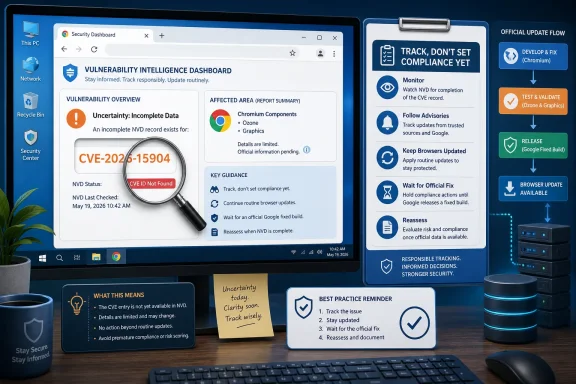
The available material identifies CVE-2026-15904 as a reported use-after-free issue associated with Chromium’s Ozone component. It also shows that an NVD lookup returns “CVE ID Not Found.” NVD says that RESERVED status can cause this result; the status of this CVE is not verified.
This is therefore not a Chrome patch bulletin. It is an NVD-gap operational playbook: a guide to separating CVE tracking from patch compliance when an identifier exists in reporting but the information needed to define a remediation threshold has not been established.
The record supports a narrow set of conclusions.
First, CVE-2026-15904 is described as a use-after-free issue associated with Chromium’s Ozone component. That description identifies a vulnerability class and a component name, but it does not establish the affected Chrome products, operating systems, release channels, or configurations.
Second, the supplied NVD lookup does not return an available CVE record. Instead, it returns “CVE ID Not Found.” The accompanying NVD explanation says that a CVE assigned in the broader CVE system may not yet be available through NVD and that RESERVED status is one possible reason for that outcome. The status of CVE-2026-15904 itself is not verified.
Those facts do not establish that Chrome for Windows is affected, that Chrome for Windows is unaffected, or that Google has released a fix. They also do not establish a specific impact, attack path, severity classification, CVSS score, or exploitation status.
That boundary matters because a CVE identifier alone is not enough to support a patch-compliance rule. A reliable compliance rule needs a vendor-confirmed product scope and a vendor-confirmed fixed build or other documented remediation condition. Neither is present in the supplied record.
The appropriate operational response is to recognize the data gap for what it is: NVD does not currently provide a usable record for this lookup, while the supplied material identifies the CVE as a reported issue. That is enough to justify tracking the identifier and monitoring for authoritative product guidance. It is not enough to declare a device vulnerable, declare a device remediated, or assign a patch deadline tied to a particular Chrome version.
This distinction is the practical value of the WindowsForum approach. CVE tracking answers the question, “Is this identifier being watched?” Patch compliance answers a different question: “Has the organization installed the vendor-documented remediation on the products the vendor says are affected?” The first question can be answered now. The second cannot yet be answered from the supplied record.
Security teams should preserve those separate states in their internal tracking:
This avoids two common errors. The first is dismissing a reported identifier because an NVD lookup is incomplete. The second is inventing precision by assigning affected versions, severity, or remediation versions that have not been documented by the vendor.
A component name does not establish which shipping products contain the relevant code, which platforms are affected, or whether a particular browser release includes a remediation. It should not be used to infer Windows exposure, Linux exposure, desktop exposure, or any other product scope.
Similarly, “use-after-free” is a vulnerability category, not a complete impact statement. The supplied material does not provide a technical narrative, affected code path, attack scenario, or vendor impact assessment for CVE-2026-15904. Readers should therefore avoid attaching specific consequences to the identifier based solely on the issue class.
For editorial purposes, the accurate short description remains:
For individual Windows users, that means continuing to accept normal browser updates through the update method they already use. This article does not provide a detailed Chrome menu path because the supplied material does not include an official Google Chrome support source confirming the current interface and behavior. Any end-user instructions used in a formal support article or enterprise communication should be checked against current official Google documentation before publication.
For administrators, the point is equally simple: continue the organization’s normal browser-maintenance practice, but do not label a deployment as remediation for CVE-2026-15904 unless and until an authoritative source ties that deployment to a documented fixed version.
That wording protects both users and reporting teams. It encourages normal maintenance without claiming that an unspecified update resolves this particular CVE.
Organizations should use their own documented endpoint-management procedures for ordinary browser maintenance. When a vendor advisory becomes available, that advisory should determine the product scope and remediation condition, while the organization’s established procedures determine how to deploy and validate the update in its own environment.
The key fields to capture are:
Only after those fields are available should a team decide whether to create a dedicated compliance rule, an emergency deployment, a change request, or an executive risk update tied specifically to CVE-2026-15904.
If Google or Chromium publishes a fixed build before NVD populates its record, the vendor documentation should be the primary basis for patch action. NVD can still be useful later for enrichment and correlation, but the absence of an NVD record should not delay action once the software vendor has published clear remediation guidance.
Reported issue label: CVE-2026-15904 is identified as a reported use-after-free issue associated with Chromium’s Ozone component.
NVD lookup state: The supplied lookup returns “CVE ID Not Found.”
NVD explanatory note: NVD says a CVE may be unavailable through its service for reasons including RESERVED status. That statement does not verify the status of CVE-2026-15904.
Patch state from the supplied record: No confirmed Chrome patch, affected-version range, severity rating, exploitability assessment, or vendor remediation build is available.
Next evidence needed: An official Google or Chromium disclosure identifying affected products and a fixed build or other remediation instruction.
That is the central operational distinction. A CVE can be important enough to monitor even when the public record is incomplete. At the same time, a missing NVD entry and a short component description do not justify claims about affected Windows versions, Chrome release channels, severity, exploitation, or remediation status.
For now, the defensible course is to keep normal browser updates running, preserve the identifier in vulnerability tracking, and wait for a primary Google or Chromium source before defining a fixed-version threshold. When that source appears, use it to move from monitoring to documented patch compliance.
The forward-looking lesson is that vulnerability operations depend on separate signals that do not always arrive together: an identifier, a public database record, a vendor advisory, an affected-product statement, a remediation build, and local deployment evidence. A mature Windows browser-maintenance program keeps those signals separate until the evidence supports joining them.
The available material identifies CVE-2026-15904 as a reported use-after-free issue associated with Chromium’s Ozone component. It also shows that an NVD lookup returns “CVE ID Not Found.” NVD says that RESERVED status can cause this result; the status of this CVE is not verified.
| Item | What the supplied material supports |
|---|---|
| CVE identifier | CVE-2026-15904 |
| Issue label | Reported use-after-free issue associated with Chromium’s Ozone component |
| NVD lookup result | “CVE ID Not Found” |
| NVD explanation | A CVE may be unavailable in NVD for reasons including RESERVED status |
| Chrome fixed version | Not available from the supplied record |
| Affected Chrome version range | Not available from the supplied record |
| Severity, CVSS, exploitability, or exploitation status | Not available from the supplied record |
| Google or Chromium advisory | Not verified by the supplied material |
 What Is Verified Today
The record supports a narrow set of conclusions.First, CVE-2026-15904 is described as a use-after-free issue associated with Chromium’s Ozone component. That description identifies a vulnerability class and a component name, but it does not establish the affected Chrome products, operating systems, release channels, or configurations.
Second, the supplied NVD lookup does not return an available CVE record. Instead, it returns “CVE ID Not Found.” The accompanying NVD explanation says that a CVE assigned in the broader CVE system may not yet be available through NVD and that RESERVED status is one possible reason for that outcome. The status of CVE-2026-15904 itself is not verified.
Those facts do not establish that Chrome for Windows is affected, that Chrome for Windows is unaffected, or that Google has released a fix. They also do not establish a specific impact, attack path, severity classification, CVSS score, or exploitation status.
That boundary matters because a CVE identifier alone is not enough to support a patch-compliance rule. A reliable compliance rule needs a vendor-confirmed product scope and a vendor-confirmed fixed build or other documented remediation condition. Neither is present in the supplied record.
The NVD Gap Is Not a Remediation Signal
A missing NVD record should not be treated as a clean bill of health. It should also not be treated as proof that an emergency Chrome update is required.The appropriate operational response is to recognize the data gap for what it is: NVD does not currently provide a usable record for this lookup, while the supplied material identifies the CVE as a reported issue. That is enough to justify tracking the identifier and monitoring for authoritative product guidance. It is not enough to declare a device vulnerable, declare a device remediated, or assign a patch deadline tied to a particular Chrome version.
This distinction is the practical value of the WindowsForum approach. CVE tracking answers the question, “Is this identifier being watched?” Patch compliance answers a different question: “Has the organization installed the vendor-documented remediation on the products the vendor says are affected?” The first question can be answered now. The second cannot yet be answered from the supplied record.
Security teams should preserve those separate states in their internal tracking:
| Tracking state | Appropriate interpretation |
|---|---|
| CVE is known to the security team | The identifier has been recorded for monitoring and review. |
| NVD has no available record for the lookup | NVD enrichment is incomplete or unavailable for this identifier. |
| No vendor fixed build is documented in the supplied material | No CVE-specific compliance floor should be created. |
| Routine browser updating continues | Normal maintenance should continue independently of this CVE’s incomplete public record. |
| Vendor advisory later identifies a fixed build | The advisory can become the basis for remediation planning and validation. |
What Should Not Be Claimed Yet
Until a primary Google or Chromium disclosure provides more detail, the following statements should not be presented as established facts:- That Google released a Chrome update for CVE-2026-15904.
- That any specific Chrome, Chromium, Windows, macOS, Linux, or ChromeOS build is affected.
- That a particular Stable, Extended Stable, Beta, Dev, Canary, or other release channel is affected.
- That a specific version is fixed.
- That the issue has a High, Medium, Critical, or other severity rating.
- That the issue has a CVSS score.
- That the issue is remotely exploitable, web-content reachable, locally reachable, or limited to a particular configuration.
- That the issue permits code execution, denial of service, information disclosure, sandbox escape, or another specific outcome.
- That exploitation has been observed in the wild.
- That a Google security bulletin, Chromium release note, CERT notice, or third-party advisory has been published for this CVE.
- That the CVE is currently RESERVED.
Component and Vulnerability Labels Are Not Product Scope
The supplied description associates the issue with Chromium’s Ozone component and labels it as a use-after-free issue. Those are useful tracking details, but they are not a substitute for a vendor advisory.A component name does not establish which shipping products contain the relevant code, which platforms are affected, or whether a particular browser release includes a remediation. It should not be used to infer Windows exposure, Linux exposure, desktop exposure, or any other product scope.
Similarly, “use-after-free” is a vulnerability category, not a complete impact statement. The supplied material does not provide a technical narrative, affected code path, attack scenario, or vendor impact assessment for CVE-2026-15904. Readers should therefore avoid attaching specific consequences to the identifier based solely on the issue class.
For editorial purposes, the accurate short description remains:
That sentence conveys the known facts without turning an incomplete record into an unsupported technical conclusion.CVE-2026-15904 is a reported use-after-free issue associated with Chromium’s Ozone component, while the supplied NVD lookup currently returns “CVE ID Not Found.”
Browser Maintenance Continues, but This Is Not a CVE-Specific Patch Directive
The absence of a confirmed fixed build for CVE-2026-15904 does not change the ordinary recommendation to keep supported browsers updated through an organization’s established process.For individual Windows users, that means continuing to accept normal browser updates through the update method they already use. This article does not provide a detailed Chrome menu path because the supplied material does not include an official Google Chrome support source confirming the current interface and behavior. Any end-user instructions used in a formal support article or enterprise communication should be checked against current official Google documentation before publication.
For administrators, the point is equally simple: continue the organization’s normal browser-maintenance practice, but do not label a deployment as remediation for CVE-2026-15904 unless and until an authoritative source ties that deployment to a documented fixed version.
That wording protects both users and reporting teams. It encourages normal maintenance without claiming that an unspecified update resolves this particular CVE.
Enterprise Preparation Checklist
This is not yet a situation for a CVE-specific remediation procedure. There is no confirmed affected-version range or fixed-version floor in the supplied material. The useful enterprise work is preparation: ensure that the organization can act quickly once Google or Chromium publishes authoritative product guidance.Preparation checklist for Windows administrators
- [ ] Create or update an internal tracking item for CVE-2026-15904.
- [ ] Record the supplied description: reported use-after-free issue associated with Chromium’s Ozone component.
- [ ] Record the NVD lookup result: “CVE ID Not Found.”
- [ ] Record the NVD caveat accurately: RESERVED status can cause this result, but the status of this CVE is not verified.
- [ ] Assign an owner responsible for monitoring official Google or Chromium security communications.
- [ ] Identify the organization’s documented source of truth for installed browser version reporting.
- [ ] Identify the browser update process already used for managed Windows endpoints.
- [ ] Identify device groups that follow a different browser-maintenance schedule, such as test rings, shared systems, virtual desktops, kiosks, or disconnected devices.
- [ ] Confirm where internal teams record exceptions, delayed updates, and devices that cannot follow the standard maintenance process.
- [ ] Prepare a change record template that can capture a future vendor advisory, the documented fixed build, affected product scope, deployment decision, and validation evidence.
- [ ] Do not create a CVE-2026-15904 “compliant” or “noncompliant” version threshold before a vendor source provides the required version information.
- [ ] Do not assign a severity-based remediation SLA based on the supplied record alone.
Organizations should use their own documented endpoint-management procedures for ordinary browser maintenance. When a vendor advisory becomes available, that advisory should determine the product scope and remediation condition, while the organization’s established procedures determine how to deploy and validate the update in its own environment.
What to Add When a Primary Advisory Appears
A future Google or Chromium disclosure may provide the information needed to move from tracking to compliance. When that happens, the internal record should be updated with the vendor-provided facts rather than assumptions carried forward from the incomplete NVD lookup.The key fields to capture are:
| Needed field | Why it matters |
|---|---|
| Official advisory or release-note identifier | Establishes the authoritative source for the remediation decision. |
| Publication date from the source | Supports an accurate chronology and change record. |
| Affected product names | Determines whether the organization’s deployed browsers are in scope. |
| Affected operating systems or release channels, if stated | Prevents an advisory from being applied too broadly or too narrowly. |
| Fixed version or other remediation instruction | Provides the basis for a compliance threshold. |
| Severity or impact statement, if provided | Supports risk triage using vendor information rather than assumptions. |
| Any vendor notes about exceptions or special deployment conditions | Helps administrators plan implementation and validation. |
If Google or Chromium publishes a fixed build before NVD populates its record, the vendor documentation should be the primary basis for patch action. NVD can still be useful later for enrichment and correlation, but the absence of an NVD record should not delay action once the software vendor has published clear remediation guidance.
Current Lookup State
This is a current lookup-state summary, not a publication chronology. The supplied material does not provide a verified publication timestamp for an advisory, release note, or NVD record.Reported issue label: CVE-2026-15904 is identified as a reported use-after-free issue associated with Chromium’s Ozone component.
NVD lookup state: The supplied lookup returns “CVE ID Not Found.”
NVD explanatory note: NVD says a CVE may be unavailable through its service for reasons including RESERVED status. That statement does not verify the status of CVE-2026-15904.
Patch state from the supplied record: No confirmed Chrome patch, affected-version range, severity rating, exploitability assessment, or vendor remediation build is available.
Next evidence needed: An official Google or Chromium disclosure identifying affected products and a fixed build or other remediation instruction.
The WindowsForum Takeaway
CVE-2026-15904 should be tracked, but it should not yet be turned into a Chrome patch-compliance metric.That is the central operational distinction. A CVE can be important enough to monitor even when the public record is incomplete. At the same time, a missing NVD entry and a short component description do not justify claims about affected Windows versions, Chrome release channels, severity, exploitation, or remediation status.
For now, the defensible course is to keep normal browser updates running, preserve the identifier in vulnerability tracking, and wait for a primary Google or Chromium source before defining a fixed-version threshold. When that source appears, use it to move from monitoring to documented patch compliance.
The forward-looking lesson is that vulnerability operations depend on separate signals that do not always arrive together: an identifier, a public database record, a vendor advisory, an affected-product statement, a remediation build, and local deployment evidence. A mature Windows browser-maintenance program keeps those signals separate until the evidence supports joining them.
References
- Primary source: NVD / Chromium
Published: 2026-07-17T17:42:43-07:00
NVD - CVE-2026-15904
 nvd.nist.gov
- Security advisory: MSRC
Published: 2026-07-17T17:42:43-07:00
Original feed URL
Security Update Guide - Microsoft Security Response Center
 msrc.microsoft.com