

Microsoft’s January Patch Tuesday included CVE-2026-20944, a Microsoft Word vulnerability described in vendor advisories as a Remote Code Execution (RCE) but scored in CVSS with an Attack Vector of Local (AV:L) — a seeming contradiction that has confused admins and security teams. The short, operational answer is this: “Remote” in the CVE title describes the attacker's position or delivery channel (they can be off‑host), while CVSS’s AV:L describes where and how the vulnerable code is invoked (it executes inside a local process when a user opens or previews a file). This article explains that distinction, verifies the technical meaning of the metrics, analyzes the practical implications for enterprise defenders, and lays out prioritized detection and mitigation steps to reduce risk from document‑parsing RCEs like CVE‑2026‑20944.
Microsoft’s advisory language and CVE titles are designed to communicate the impact and attacker reach — “Remote Code Execution” quickly signals that a remote actor can cause arbitrary code to run on a target system if the exploit chain completes. CVSS, by contrast, is a standardized scoring system that separates impact from exploit mechanics, and its Attack Vector (AV) metric specifically describes the context at the moment the vulnerable code executes (Network, Adjacent, Local, or Physical). When a document‑parsing bug is triggered by a local application (for example, Word parsing a .docx or an embedded OLE object), the vulnerable logic runs in the local process — CVSS correctly records this as AV:L even though the file was delivered remotely via email, cloud share, or download. Why does this matter? Because many automated triage and prioritization systems rely on CVSS vectors to rank risk. Misreading AV:L as “low severity” is a dangerous mistake: document‑based RCEs remain a high operational risk because remote delivery is trivial and user interaction (phishing, social engineering, or automatic previews) is often enough to trigger exploitation. CVE‑2026‑20944 is an immediate example of this pattern.
Remember the operating rule: Remote delivery + local execution = high operational risk. Read CVE headlines as a call to action, parse CVSS metrics for triage detail, and align your remediation and detection work to close delivery, trigger, and post‑exploit pathways before attackers have a window to weaponize the vulnerability.
Source: MSRC Security Update Guide - Microsoft Security Response Center
 Background / Overview
Microsoft’s advisory language and CVE titles are designed to communicate the impact and attacker reach — “Remote Code Execution” quickly signals that a remote actor can cause arbitrary code to run on a target system if the exploit chain completes. CVSS, by contrast, is a standardized scoring system that separates impact from exploit mechanics, and its Attack Vector (AV) metric specifically describes the context at the moment the vulnerable code executes (Network, Adjacent, Local, or Physical). When a document‑parsing bug is triggered by a local application (for example, Word parsing a .docx or an embedded OLE object), the vulnerable logic runs in the local process — CVSS correctly records this as AV:L even though the file was delivered remotely via email, cloud share, or download. Why does this matter? Because many automated triage and prioritization systems rely on CVSS vectors to rank risk. Misreading AV:L as “low severity” is a dangerous mistake: document‑based RCEs remain a high operational risk because remote delivery is trivial and user interaction (phishing, social engineering, or automatic previews) is often enough to trigger exploitation. CVE‑2026‑20944 is an immediate example of this pattern. How a “remote delivery / local execution” RCE actually works
The canonical attack chain
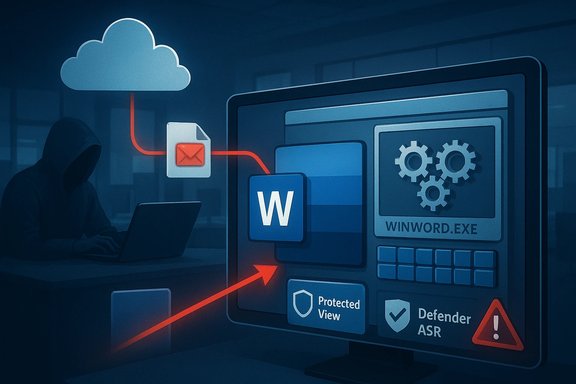
A typical exploit chain for a document‑parsing RCE like CVE‑2026‑20944 follows these steps:- Attacker crafts a specially formed Word document that corrupts Word’s parser (for example, via out‑of‑bounds reads/writes, use‑after‑free, integer overflows).
- The attacker distributes the file remotely (phishing email attachment, cloud share link, file transfer or public download).
- The victim opens the file in Microsoft Word (or an in‑process preview/handler runs) and the local Word process parses the content.
- The parsing operation triggers memory corruption, and the attacker’s payload executes inside the local process with the privileges of the Word user. From there, post‑exploitation steps (dropper, lateral movement, persistence) can follow.
Typical root causes (why Word parsers are frequently targeted)
- Memory safety errors in native parsers — use‑after‑free (CWE‑416), buffer/heap overflows (CWE‑119/CWE‑122), out‑of‑bounds reads/writes (CWE‑125).
- Complex legacy formats and numerous embedded components (OLE, ActiveX, images, fonts) widen the attack surface.
- In‑process preview and rendering handlers mean parsing happens inside Explorer, Outlook, or server processes, which creates important exceptions (see below).
What CVSS is actually telling you — and what it isn’t
Attack Vector (AV) in plain English
The CVSS Attack Vector ranks how remote an attacker can be when they exploit a vulnerability. The four AV values are:- Network (AV:N) — exploitable across the network (no local action required).
- Adjacent (AV:A) — attacker must be on the same local network or otherwise adjacent.
- Local (AV:L) — exploit requires local execution or user action to trigger vulnerable code (e.g., opening a file or using SSH/terminal).
- Physical (AV
 ) — physical access required.
Other CVSS metrics to watch on document RCEs
- User Interaction (UI:R) — many Office RCEs require a user to open a file or click a link; CVSS reflects this explicitly.
- Privileges Required (PR:N or PR:L) — often exploitation runs at user privilege (PR:N or PR:L), making administrator compromise possible if the targeted user is elevated.
- Scope (S:U or S:C) — most document parsing bugs keep scope unchanged, but follow‑on exploitation can lead to larger compromises.
The important exception: when AV becomes Network (AV:N)
There’s a decisive operational caveat. If a network‑facing server or cloud service parses Office documents on behalf of remote users — for example:- Email gateways or Secure Web Gateways that generate attachment previews,
- Office Online Server or web‑based document conversion/preview services,
- Cloud collaboration platforms that render documents server‑side for thumbnails/previews —
CVE‑2026‑20944: what’s known and what we verified
- Microsoft’s public advisory and CSAF entries clarify that “the word Remote in the title refers to the location of the attacker” and that the attack is executed locally when the user opens the malicious file — the same FAQ text appears across multiple Microsoft CSAF advisories. This confirms Microsoft’s intent to use RCE as an impact label rather than a literal network exploit vector. Note: the MSRC interactive page is rendered with JavaScript, but the CSAF feed and vendor‑mirrors carry the official FAQ wording.
- Independent security trackers (Cisco Talos’ Patch Tuesday analysis and vendor vulnerability databases) show CVE‑2026‑20944 as a Microsoft Word out‑of‑bounds read leading to arbitrary code execution, and list a CVSS v3.1 base score of 7.8 with AV:L and UI:R — consistent with the remote delivery / local execution pattern. Multiple independent sources reflect the same score and impact description, confirming both the technical scoring and Microsoft’s advisory framing.
- Where Microsoft’s MSRC page isn’t directly parseable by every automated tool (interactive UI), CSAF/JSON feeds and prominent security vendors reproduce the advisory text and metrics. Where any specific textual detail cannot be retrieved directly from MSRC in plain HTML form, that absence is not evidence the claim is false — the CSAF mirrors and vendor writeups provide verifiable copies of the advisory content. Treat any single‑page rendering limitation as an accessibility caveat, not a contradiction in the underlying advisory.
Operational risk analysis: why AV:L document RCEs get weaponized fast
Several practical realities make document RCEs highly attractive to adversaries despite the AV:L score:- Ubiquity of Office — Microsoft Word runs everywhere, widening the blast radius.
- Ease of remote distribution — phishing, drive‑by downloads, shared links, and compromised websites scale distribution cheaply.
- Human factor — social engineering remains the most reliable fail: convincing users to open a file is simpler than bypassing hardened network services.
- Preview and automated parsing — preview handlers or server‑side previews can reduce the required user interaction or shift the vulnerable execution into a network‑facing process.
- Post‑exploit maneuverability — code executing in the user context can fetch payloads, perform credential theft, and escalate privileges.
Prioritized mitigation playbook (what to do now)
The single most effective control is to install the vendor security update immediately. Beyond patching, apply the following layered mitigations in order of urgency and impact:- 1. Apply Microsoft’s security updates for all affected Word/Office SKUs and ensure Click‑to‑Run and managed deployments have picked up the latest patches. (Patch now.
- 2. Enforce Protected View and Office attachment protections — keep Office’s default behavior for files from the Internet zone enabled (Mark of the Web). Educate users to treat the “Internet” warning as a blocking step.
- 3. Deploy Microsoft Defender/EDR Attack Surface Reduction (ASR) rules that harden Office behavior:
- Block Office applications from creating child processes.
- Block Office applications from creating executable content.
- Block Office applications from injecting code into other processes.
These are high‑value rules that stop common post‑exploit behaviors and should be tested and rolled out quickly. - 4. Harden email and gateway controls:
- Turn on attachment scanning and sandboxing for suspicious Office documents.
- Disable automatic previewing or ensure preview generation happens in an isolated, patched service.
- Strip active content (macros, ActiveX) from inbound attachments where feasible.
If your mail gateway generates previews server‑side, treat that exposure as a separate high‑risk vector and patch or isolate the previewing component. - 5. Use least privilege and application control:
- Ensure users do not run with unnecessary local admin rights.
- Apply application allowlisting (SmartScreen, WDAC, AppLocker) for high assurance.
- 6. Isolate high‑risk workloads and document handling:
- Use dedicated document viewer sandboxes or VDI for untrusted files.
- Route incoming untrusted documents to isolated scanners rather than allowing direct desktop opening.
- 7. Monitor and hunt:
- Create detection rules for Word spawning cmd.exe, powershell.exe, wmic, or rundll32 shortly after document open.
- Alert on abnormal network connections initiated by WINWORD.EXE.
- Audit Office ASR events and block hits to automatically stop suspicious behavior in real time.
Detection playbook: what to look for in the event of exploitation
- Parent/child process anomalies: Word launching command shell, PowerShell, or signed‑to‑unsigned process transitions are classic signs.
- Unusual network connections: outbound callbacks or SMB/UNC connections originating from WINWORD.EXE.
- Suspicious file writes: Word‑spawned processes creating DLLs, EXEs, or scheduled tasks under user profiles.
- ASR/EDR telemetry: events showing ASR rules triggered (Office child process creation, injection attempts).
- Mail gateway/preview logs: failed or anomalous parsing requests; spikes in sandbox detonation rates for Office files.
Communication guidance for security teams and end users
- Use clear, non‑technical language when informing staff: explain that a Word file could be weaponized and describe safe handling (don’t open attachments from unknown senders; use the web viewer or request the sender to re‑share via approved channels).
- For admins, issue targeted operational guidance: deploy the patches, enable ASR rules (with audit before block where risk to business apps is unknown), and harden mail gateway settings.
- Prioritize protective controls for high‑risk groups: finance, HR, executive assistants, and anyone who regularly receives external documents.
Strengths and limitations of the current approach to scoring and communication
Notable strengths
- Vendor advisories’ use of “Remote Code Execution” is an effective triage signal: it elevates attention quickly across operations teams.
- CVSS’s AV metric is precise and consistent: by separating delivery from trigger locality, CVSS avoids inflating exploitability scores and enables reproducible automated prioritization.
Potential risks and pitfalls
- Misinterpretation risk: security teams that treat AV:L as “low priority” can under‑patch or fail to implement mitigations, creating substantial operational risk.
- Server‑side parsing blind spots: organizations may mistakenly assume AV:L means only endpoints are affected and overlook email gateways, document preview services, or cloud platforms that perform server‑side parsing and could be remotely triggered (AV:N scenarios).
- Automation traps: automated patch/prioritization systems that rely strictly on AV without factoring UI, delivery vectors, and prevalence will underserve real risk in many environments.
Conclusion — how defenders should interpret CVE titles and CVSS vectors
CVE‑2026‑20944 demonstrates a recurring pattern: advisory language emphasizes impact and attacker reach while CVSS metrics describe exploit mechanics at trigger time. Both perspectives are correct and complementary. Treat vendor RCE advisories as high priority: verify the CVSS vector and the presence of server‑side parsing in your environment, apply patches immediately, deploy layered mitigations (Protected View, ASR rules, email sandboxing), and hunt for indicators of exploitation.Remember the operating rule: Remote delivery + local execution = high operational risk. Read CVE headlines as a call to action, parse CVSS metrics for triage detail, and align your remediation and detection work to close delivery, trigger, and post‑exploit pathways before attackers have a window to weaponize the vulnerability.
Source: MSRC Security Update Guide - Microsoft Security Response Center
