

Title: CVE-2026-21223 — What Windows admins and power users need to know about the Microsoft Edge Elevation Service VBS bypass
Summary
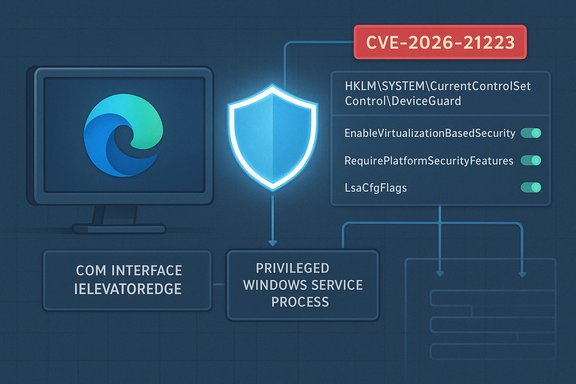
A privilege-validation bug in the Microsoft Edge Elevation Service (Chromium-based Edge) has been assigned CVE-2026-21223. The service exposes a privileged COM interface (IElevatorEdge) whose method LaunchUpdateCmdElevatedAndWait can be invoked by a standard (non‑administrator) local user and causes the service to run update commands as LocalSystem. An attacker or local user exploiting this weakness can modify protected registry keys under HKLM\SYSTEM\CurrentControlSet\Control\DeviceGuard and thereby enable or disable Windows Virtualization‑Based Security (VBS). Disabling VBS undermines Credential Guard, Hypervisor‑protected Code Integrity (HVCI), Secure Kernel protections and other critical platform defenses — effectively a security feature bypass.
This article explains what happened, why it matters, how to detect it, and immediate and medium‑term mitigations and recovery steps for home and enterprise environments.
Background — how the issue works (plain language)
- Edge ships a small privileged helper component (the "Edge Elevation Service") that must, in legitimate cases, perform update or maintenance tasks with system (LocalSystem) privileges.
- That helper exposes a COM interface named IElevatorEdge with a method LaunchUpdateCmdElevatedAndWait which, in the vulnerable implementation, does not adequately validate the privileges or identity of the calling process.
- Because COM entry points are callable from local processes, a non‑administrator process can call that method and cause the Elevation Service to execute commands at LocalSystem privilege.
- With LocalSystem execution, an attacker can write to protected system areas including the DeviceGuard registry keys used to enable/disable VBS (for example, values under HKLM\SYSTEM\CurrentControlSet\Control\DeviceGuard). Changing those keys can turn off VBS or associated features; the system will later boot without those hardening features active.
- In short: insufficient caller validation on a privileged service -> local non‑admin can flip system security settings -> platform protections become weakened or disabled.
- VBS is foundational to several modern Windows defenses: it isolates credential material (Credential Guard), protects kernel code integrity (HVCI), and enables the secure kernel. If VBS or its subcomponents are disabled, many exploitation vectors that were blocked by those controls reopen.
- The attack is local (no remote code execution required), and because the malicious action is performed by a system service, local logging and process ownership can be confusing — making detection and post‑incident investigation harder.
- In enterprise environments, an attacker who gains a standard user shell (or leverages a malicious insider or compromised managed account) could use this bug to reduce platform protections across affected hosts, then escalate further or move laterally.
- The vulnerable component: Microsoft Edge (Chromium‑based) Elevation Service exposing IElevatorEdge::LaunchUpdateCmdElevatedAndWait.
- Registry keys commonly used to control VBS / Device Guard include HKLM\SYSTEM\CurrentControlSet\Control\DeviceGuard (values such as EnableVirtualizationBasedSecurity and RequirePlatformSecurityFeatures) and HKLM\SYSTEM\CurrentControlSet\Control\Lsa (value LsaCfgFlags used for Credential Guard settings). These are the same keys used by Device Guard / Credential Guard configuration.
- Turning off or changing these values can stop VBS from running on boot; conversely enabling them without completing other prerequisites is not always sufficient to start VBS without a reboot and correct BCD settings.
1) Patch urgently
- Apply the Microsoft update/patch that addresses CVE‑2026‑21223 as soon as your change control permits. This is the primary fix.
- Update both Microsoft Edge (the Chromium build) and any Windows updates released by Microsoft that reference the advisory. If you manage Edge centrally (via Intune / SCCM / WSUS / AD), prioritize deployment to critical systems.
- On every potentially affected endpoint, check current VBS/DeviceGuard status and the DeviceGuard/Lsa registry values.
- Query DeviceGuard status:
Get-CimInstance -ClassName Win32_DeviceGuard -Namespace root\Microsoft\Windows\DeviceGuard - Read the registry control values:
Get-ItemProperty -Path 'HKLM:\SYSTEM\CurrentControlSet\Control\DeviceGuard' -Name EnableVirtualizationBasedSecurity,RequirePlatformSecurityFeatures
Get-ItemProperty -Path 'HKLM:\SYSTEM\CurrentControlSet\Control\Lsa' -Name LsaCfgFlags - Inspect last‑write time for the DeviceGuard key (helps find recent modification):
(Get-Item 'HKLM:\SYSTEM\CurrentControlSet\Control\DeviceGuard').LastWriteTime
- Treat as a possible compromise. Re‑enable (or set appropriately) only after you determine the scope and prior to reactivation ensure you have investigated which accounts/machines performed the modification.
- If you must restore VBS quickly and are certain systems are otherwise uncompromised, you can set the DeviceGuard and LSA registry values back to desired values and reboot; however, reboots and BCD/hypervisor settings may also be needed.
- Check current values:
Get-ItemProperty -Path 'HKLM:\SYSTEM\CurrentControlSet\Control\DeviceGuard' -Name EnableVirtualizationBasedSecurity,RequirePlatformSecurityFeatures
Get-ItemProperty -Path 'HKLM:\SYSTEM\CurrentControlSet\Control\Lsa' -Name LsaCfgFlags - If those values were set to 0 or absent and you want to turn VBS back on:
Set-ItemProperty -Path 'HKLM:\SYSTEM\CurrentControlSet\Control\DeviceGuard' -Name EnableVirtualizationBasedSecurity -Value 1 -Type DWord
Set-ItemProperty -Path 'HKLM:\SYSTEM\CurrentControlSet\Control\DeviceGuard' -Name RequirePlatformSecurityFeatures -Value 1 -Type DWord
Set-ItemProperty -Path 'HKLM:\SYSTEM\CurrentControlSet\Control\Lsa' -Name LsaCfgFlags -Value 1 -Type DWord
Then restart the machine.
Hunting and detection guidance (recommended SIEM/EDR queries)
- Look for registry‑write events targeting the DeviceGuard and Lsa keys. If you have registry auditing enabled or a recorder that logs registry writes, look for writes to:
HKLM\SYSTEM\CurrentControlSet\Control\DeviceGuard
HKLM\SYSTEM\CurrentControlSet\Control\Lsa - If you do not have registry auditing on, enable Object Access → Audit Registry and add SACLs on the DeviceGuard key to log modifications (important for future detection).
- Search process creation logs for instances where a non‑system process triggers Edge update or elevation commands, or where a process interacts with the Edge elevation service (your EDR may capture RPC/COM activity). If you can see calls to the Edge update helper process invoking command lines under LocalSystem, investigate.
- Query for machines where VBS state changed recently. Use the Win32_DeviceGuard WMI class to pull current status across hosts; compare to baselines.
- Enforce VBS configuration through centrally managed Group Policy or MDM. Do not rely on local registry values alone: deploy the "Turn on Virtualization‑based security" GPO setting with UEFI lock where possible. This makes local registry flips less effective.
- Lock DeviceGuard and Lsa registry keys via Group Policy preferences or registry enforcement so local users cannot change them. In Active Directory environments, distribute desired values via Computer Configuration policies (not user policies).
- Enable logging/auditing on these registry keys so any future modification is recorded and forwarded to your SIEM.
- Consider temporary restriction of local ability to call the Edge update/elevation helper:
- If you have application control (AppLocker / WDAC), evaluate whether you can prevent local non‑admin users from launching the specific Edge update binary or from registering/using the vulnerable COM interface. This must be tested carefully to avoid breaking legitimate management/update workflows.
- Tighten least privilege: where possible keep user accounts and managed software update tools in separated privilege contexts and monitor for lateral privilege escalations.
- After you patch, verify that the patch is applied and the Elevation Service no longer allows unvalidated calls. Use your management tool to confirm package/version levels across the estate.
- Re‑verify DeviceGuard/Lsa registry values and VBS status on each host. Reboot where required to bring protections back online.
- Conduct focused investigations for hosts where registry values were changed: collect event logs, EDR history, process command lines and user logons preceding the change. If you find evidence of malicious activity beyond the registry change, follow your incident response playbook (isolate, collect forensic images, preserve evidence, escalate).
- If you restored VBS settings after a suspected unauthorized change, consider an extended monitoring period and look for suspicious related artifacts (credential theft, lateral movement, new local administrator creation, persistence mechanisms).
- For most home users the simplest, correct action is to install the Edge update and any Windows updates recommended by Microsoft and reboot.
- To check whether VBS is running on a single computer use msinfo32.exe (System Summary → “Virtualization‑based security”) or the PowerShell Win32_DeviceGuard query listed earlier.
- Don’t run registry edits or remedies you don’t fully understand. If you are not comfortable, apply official updates and ask a trusted technician to help.
- Check VBS state:
Get-CimInstance -ClassName Win32_DeviceGuard -Namespace root\Microsoft\Windows\DeviceGuard - Check DeviceGuard keys and timestamps:
(Get-Item 'HKLM:\SYSTEM\CurrentControlSet\Control\DeviceGuard').LastWriteTime
Get-ItemProperty -Path 'HKLM:\SYSTEM\CurrentControlSet\Control\DeviceGuard' -Name EnableVirtualizationBasedSecurity,RequirePlatformSecurityFeatures - Check LSA flags for Credential Guard:
Get-ItemProperty -Path 'HKLM:\SYSTEM\CurrentControlSet\Control\Lsa' -Name LsaCfgFlags - Restore values (only if you know what you are doing and after investigation):
Set-ItemProperty -Path 'HKLM:\SYSTEM\CurrentControlSet\Control\DeviceGuard' -Name EnableVirtualizationBasedSecurity -Value 1 -Type DWord
Set-ItemProperty -Path 'HKLM:\SYSTEM\CurrentControlSet\Control\DeviceGuard' -Name RequirePlatformSecurityFeatures -Value 1 -Type DWord
Set-ItemProperty -Path 'HKLM:\SYSTEM\CurrentControlSet\Control\Lsa' -Name LsaCfgFlags -Value 1 -Type DWord
Restart-Computer
- Make this CVE part of your immediate patch management priority list. Treat it as high‑priority because an attacker with local access can remove system hardening features.
- Ensure your update distribution method rapidly stages the patched Edge client and any OS updates.
- Audit and enforce the configuration state of DeviceGuard via GPO/MDM so local non‑admin users cannot roll it back.
- If you rely on VBS for regulatory or compliance reasons (e.g., protecting credentials or meeting federal guidelines), perform a compliance sweep to ensure all affected hosts are patched and VBS is functioning.
- Desktop users: install updates when prompted and reboot. If asked by support staff, confirm the device was updated and restarted.
- IT teams: prioritize patching and immediate detection steps described here. Treat any unexpected change to DeviceGuard / Lsa registry values as a potential security incident and investigate.
CVE‑2026‑21223 is an example of a common class of problems: privileged helpers or services that expose rich functionality via COM or RPC must validate callers carefully. When they don’t, even a low‑privilege local account can cause high‑privilege state changes. The security community has long advocated minimizing privileged surface area, validating callers, and enforcing central configuration to reduce the blast radius of local exploits. For administrators, the practical takeaway is clear: patch quickly, actively hunt for unauthorized registry changes to DeviceGuard/Lsa, and enforce VBS configuration centrally so single‑machine changes cannot silently disable platform hardening.
If you’d like, I can:
- produce a one‑page checklist you can share with your IT operations team that contains the exact PowerShell and bcdedit commands to check, remediate and audit; or
- give a short SIEM/EDR search template (Splunk/Elastic/QRadar/Defender) you can drop into your threat hunting pipeline to find suspicious modifications to the DeviceGuard keys across your fleet.
Source: MSRC Security Update Guide - Microsoft Security Response Center
