

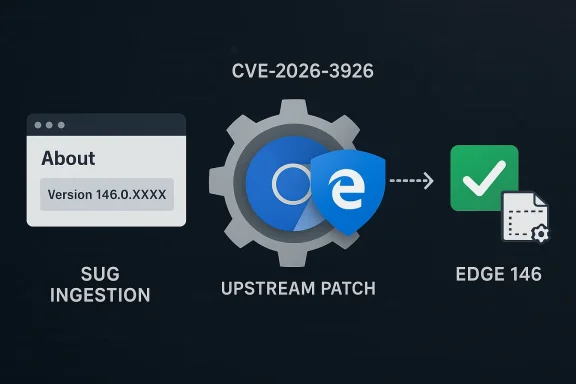
Chromium’s CVE‑2026‑3926 — an out‑of‑bounds read in the V8 JavaScript engine — was cataloged in Microsoft’s Security Update Guide (SUG) because Microsoft Edge (the Chromium‑based browser) consumes upstream Chromium open‑source code; the SUG entry exists to tell Edge users whether Microsoft’s Edge builds have ingested the upstream Chromium fix and are therefore no longer vulnerable. leblog.com](Stable Channel Update for Desktop))
Chromium is the open‑source engine that supplies major components used by Google Chrome and many other browsers — notably Blink (rendering) and V8 (JavaScript and WebAssembly runtime). When a security flaw is found in Chromium or V8, Google assigns a CVE and ships a patch in a Chrome promotion (Stable/Beta/Dev). Downstream consumers such as Microsoft Edge then ingest those upstream changes on their own release cadence; Microsoft documents those upstream CVEs in its Security Updateether Edge is still affected or has already received the fix. (learn.microsoft.com)
On March 10, 2026, the Chrome team promoted Chrome 146 to Stable and listed CVE‑2026‑3926 — “Out of bounds read in V8” — among the security fixes included in Chrome 146. The Chrome release announcement shows CVE‑2026‑3926 as a Medium severity V8 issue reported on January 26, 2026. (chromereleases.googleblog.com) Independent vulnerability trackers that index Google’s release notes also show that Chrome builds prior to 146.0.7680.71 are affected.
The practical takeaway is straightforward: confirm your browser version, update if you are on an older build, and use enterprise update tools to accelerate deployment. Because V8 memory bugs carry disproportionate attacker interest, prioritizing this class of updates should be part of a standard browser patching cadence. Chrome 146 includes the fix (Chrome 146.0.7680.71); verify that your Microsoft Edge build has ingested Chromium 146 or later via the Edge About dialog or Microsoft’s Edge security release notes before assuming immunity. (chromereleases.googleblog.com)
End of article.
Source: MSRC Security Update Guide - Microsoft Security Response Center
 Background / Overview
Chromium is the open‑source engine that supplies major components used by Google Chrome and many other browsers — notably Blink (rendering) and V8 (JavaScript and WebAssembly runtime). When a security flaw is found in Chromium or V8, Google assigns a CVE and ships a patch in a Chrome promotion (Stable/Beta/Dev). Downstream consumers such as Microsoft Edge then ingest those upstream changes on their own release cadence; Microsoft documents those upstream CVEs in its Security Updateether Edge is still affected or has already received the fix. (learn.microsoft.com)On March 10, 2026, the Chrome team promoted Chrome 146 to Stable and listed CVE‑2026‑3926 — “Out of bounds read in V8” — among the security fixes included in Chrome 146. The Chrome release announcement shows CVE‑2026‑3926 as a Medium severity V8 issue reported on January 26, 2026. (chromereleases.googleblog.com) Independent vulnerability trackers that index Google’s release notes also show that Chrome builds prior to 146.0.7680.71 are affected.
What exactly is CVE‑2026‑3926 (technical summary)
The bug class: out‑of‑bounds read
An out‑of‑bounds read occurs when code reads memory outside the intended buffer boundaries. In a JavaScript engine like V8, this can happen during JIT compilation, typed array operations, or internal object layout handling. The immediate risk depends on which memory is exposed and how it is used:- It may cause a crash (denial of service).
- It can leak memory contents (information disclosure).
- In constrained circumstances, memory corruption chains can lead to remote code execution — but an out‑of‑bounds read typically needs additional vulnerabilities to elevate to RCE.
Whyatter
V8 executes untrusted JavaScript from arbitrary websites. That makes any memory‑safety issue in V8 high‑value to attackers, because a crafted webpage or injected script can trigger the engine bug without user privilege. V8 bugs have historically been weaponized, so browser vendors treat V8 fixes as high priority — but the practical exploitability and required exploit chain vary by bug.Why Microsoft lists a Chrome/Chromium CVE in its Security Update Guide
Microsoft’s Security Update Guide is a central catalog of vulnerabilities affecting Microsoft products. For Chromium CVEs the SUG entry serves two purposes:- It records the upstream CVE so administrators can track the issue across ecosystems.
- It indicates whether Microsoft Edge builds have integrated the upstream fixthe ingestion status and the Edge build(s) that include the fix so customers know when Edge is no longer vulnerable.
How to see the version of your browser (and why that matters)
Knowing your browser’s exact version is how you confirm whether you’ve received a specific security fix. The critical steps are:- Check the browser’s About or Version page to get the exact build number.
- Compare that build number with the fixed version listed in the vendor advisory (Chrome release notes) or the Microsoft SUG / Edge release notes.
- If your build predates the fixed build, update immediately.
Microsoft Edge (desktop)
- Open Microsoft Edge.
- Click the menu (three dots) → Help and feedback → About Microsoft Edge. The page will show the full version string and automatically check for updates. Microsoft’s documentation explains this and how to interpret the version.
- Alternatively, type edge://version in the address bar to see the detailed version string (and the corresponding Chromium version reported inside Edge). Community and admin guides also recommend edge://version or edge://settings/help for quick checks.
Google Chrome (desktop)
- Open Chrome and choose Help → About Google Chrome, or type chrome://version into the address bar.
- Chrome will display the version and will check for updates automatically when you view the page.
Command‑line / enterprise checks
- On Windows, Edge writes its version to the registry (for automation): HKEY_CURRENT_USER\SOFTWARE\Microsoft\Edge\BLBeacon with the key name "version". This makes scripting and inventory via Group Policy / Configuration Manager possible.
- For large fleets, use Microsoft Endpoint Manager / WSUS / SCCM and the Edge enterprise MSI channels to control rollout and verify updated versions centrally. Microsoft’s Edge release note pages list stable channel version numbers and security update details for administrators. (learn.microsoft.com)
Practical step‑by‑step: Verify whether CVE‑2026‑3926 is patched on your machine
- Open Microsoft Edge.
- Go to About (edge://settings/help) or enter edge://version in the address bar.
- Note the full version string (for example, “Microsoft Edge 146.0.xxxxx.xx”).
- Compare it to the fixed Chromium build: Google’s Chrome 146 Stable includes the CVE fix in Chrome 146.0.7680.71 (Windows/Mac). If your Edge build maps to Chromium 146 and your build’s Chromium sub‑component number is equal to or newer than the fixed Chromium build, Edge has likely ingested the patch. (chromereleases.googleblog.com)
- If the Edge build is older, update Edge using the built‑in updater or deploy the enterprise installers; after update, re‑check About to confirm the new version. Microsoft’s Edge support pages explain the update paths and what the About dialog shows.
Timeline, severity and current risk assessment
- Chrome 146 Stable was published March 10, 2026, and CVE‑2026‑3926 was listed among the Chrome 146 security fixes. The Chromium entry classed this V8 bug as Medium severity. (chromereleases.googleblog.com)
- As of the Chrome 146 announcement there was no explicit public advisory that CVE‑2026‑3926 was being exploited in the wild. When a vendor knows about active exploitation they typically mark the CVE or the release notes accordingly; absence of such a flag suggests no immediate public reports of active exploitation, though that can change rapidly. Always treat a memory‑safety bug in V8 with caution because of the potential exploit value. (chromereleases.googleblog.com)
- Microsoft’s SUG entry documents the issue so Edge administrators can see when Microsoft has ingested the fix and which Edge builds are no longer vulnerable. Checking the SUG and Edge security release notes is the right way to confirm Edge status.
What to do if you are vulnerable
- Update now. For consumers, updating the browser via About page is usually sufficient. For enterprises, deploy the official Edge Stable MSI/EXE via your normal software distribution channels, or apply the Edge Updater policy where appropriate. Microsoft’s enterprise guidance and release notes provide the explicit Edge builds that contain fixes. (learn.microsoft.com)
- Use defense‑in‑depth settings:
- Ensure OS updates are current (sandbox/OS hardening complements browser protections).
- Keep extensions to a minimum and review trusted sources only.
- Enable Site Isolation (where supported) and ensure built‑in mitigation settings are on.
- If you must delay an update (e.g., compatibility testing), apply network‑level protections: block or monitor risky content, use web filtering, and increase monitoring for unusual client behavior.
Enterprise considerations: rollout, verification, and auditing
Enterprises must manage browser updates at scale. Here are tested practices:- Inventory first: query the registry key HKEY_CURRENT_USER\SOFTWARE\Microsoft\Edge\BLBeacon/version or use management tools to collect installed Edge version strings across endpoints. This helps map which devices are still on pre‑patched builds.
- Controlled rollout: use Microsoft Endpoint Manager / WSUS / SCCM to stage updates and validate application compatibility before broad deployment. Microsoft’s Edge release notes include per‑build security entries so you can match a CVE to an Edge package. (learn.microsoft.com)
- Reconciliation: after deployment, re‑audit versions and compare to the fixed Chromium/Edge build. For compliance, record when the version change occurred and which update package delivered the fix.
- Communication: notify end users and helpdesk staff about the reason for the update (security patch for a V8 memory bug) and encourage prompt restarts when updates require it.
Why the ingestion delay exists (Chrome → Edge)
The gap between an upstream Chromium patch and the downstream Edge release reflects several operational realities:- Microsoft tests upstream Chromium changes against Edge’s product integrations, enterprise features, and additional Microsoft‑specific code.
- Some fixes require backporting across branches or additional integration work.
- Edge release cadence and channel promotion timelines differ from Chrome’s, so Microsoft documents the upstream CVE in its SUG to explain the status and timeline to admins.
Assessing exploitability and attacker interest
- Memory bugs in V8 are attractive to attackers because they can be triggered remotely via web content.
- An out‑of‑bounds read is less likely than an OOB write or use‑after‑free to directly lead to RCE, but a determined attacker can sometimes combine multiple flaws into an exploit chain.
- At the time of Chrome 146’s release, CVE‑2026‑3926 was not marked as exploited in the wild; however, this status can change. Administrators should not conflate “no public proof of exploitation” with “no risk.” Patching remains the lowest‑cost risk mitigation. (chromereleases.googleblog.com)
Strengths and limitations of the vendor response
Notable strengths
- Google published the fix promptly in the Chrome 146 promotion and itemized the CVE in the release notes, including credit and bounty amounts where applicable. This transparency helps defenders prioritize. (chromereleases.googleblog.com)
- Microsoft documents upstream Chromium CVEs in its Security Update Guide so Edge customers can track ingestion status and have a single place to confirm whether their Edge build is patched. This reduces ambiguity for enterprise admins who must reconcile Chrome and Edge timelines.
Potential risks and limitations
- The time window between Google’s fix and Microsoft’s ingestion may leave environments exposed if automatic Edge updates are delayed or blocked by policy.
- Documentation sometimes lags behind releases in public channels (e.g., release notes may omit granular mapping to Chromium sub‑build numbers), so administrators must rely on SUG entries, Edge relnotes, and direct version checks to be sure.
- Not all third‑party Chromium consumers (Brave, Vivaldi, Opera) update on the same cadence; the CVE remains relevant across the ecosystem until each vendor ships a patched build. Community trackers and vendor release notes should be checked for each browser.
How to keep monitoring for changes (watchlist)
- Bookmark the Chrome Stable Channel release announcements and the Chrome Security Page. Chrome release posts list the CVE numbers and the fixed build. (chromereleases.googleblog.com)
- Monitor Microsoft’s Security Update Guide entry for CVE‑2026‑3926 to see Microsoft’s ingestion status for Edge and any additional Microsoft advisories. The SUG entry is the authoritative Microsoft record for the CVE’s impact on Edge. (msrc.microsoft.com)
- Use reputable vulnerability databases and feeds (OpenCVE, NVD, Rapid7, vendor advisories) to get cross‑references and timeline context. Cross‑reference at least two independent sources before making high‑impact operational decisions.
Quick checklist for readers (summary actions)
- Consumers:
- Open Edge → About → allow the browser to update → confirm version is Edge 146.x or newer that maps to Chromium 146.0.7680.71 or newer.
- Restart the browser after update.
- IT administrators:
- Inventory Edge versions via registry or management tools (HKEY_CURRENT_USER\SOFTWARE\Microsoft\Edge\BLBeacon\version).
- Confirm the Edge stable channel relnotes and Microsoft SUG mapping show the ingestion of the Chromium 146 security fixes. (learn.microsoft.com)
- Stage and deploy Edge updates via Endpoint Manager/WSUS/SCCM; re‑audit post‑deployment.
- For all:
- Keep OS and other endpoint protections current; minimize risky extensions and use browser hardening features.
Final analysis: what this means for Windows and Edge users
CVE‑2026‑3926 is one more in a recurring pattern: security issues discovered and fixed upstream in Chromium affect multiple downstream browsers, and vendors like Microsoft must map, test, and ship those fixes to their customers. Microsoft’s approach — documenting Chromium CVEs in the Security Update Guide and indicating ingestion status — is a mature, transparent way to bridge the upstream‑to‑downstream gap and give administrators a single place to confirm whether Edge is safe from a particular CVE.The practical takeaway is straightforward: confirm your browser version, update if you are on an older build, and use enterprise update tools to accelerate deployment. Because V8 memory bugs carry disproportionate attacker interest, prioritizing this class of updates should be part of a standard browser patching cadence. Chrome 146 includes the fix (Chrome 146.0.7680.71); verify that your Microsoft Edge build has ingested Chromium 146 or later via the Edge About dialog or Microsoft’s Edge security release notes before assuming immunity. (chromereleases.googleblog.com)
End of article.
Source: MSRC Security Update Guide - Microsoft Security Response Center
